r/PowerShell • u/AsyncProper • Apr 23 '22
What new acquired PowerShell concept/understanding significantly improved the quality/performance of your scripts that inspired you to go back and integrate it into some of your old scripts?
70
u/scrumbud Apr 23 '22
How to break a long script down into discrete, easily testable, and reusable functions. And advanced functions, especially with parameter validation.
52
7
u/Bren0man Apr 24 '22
I always wonder where I should draw the line in terms of "should I functionise this?".
For example, does anyone go to the extreme point of making absolutely everything a function? If so, is that considered a good practice?
7
u/MemorySkein Apr 24 '22
I like to use functions a lot! They're for just about everything: getting information, setting properties or performing actions based on retrieved information, and generating output.
I leave my main script for initializing, setting script-level variables, controlling workflow, and passing/retrieving information between functions.
When to make a function?
When you have a certain input and expecting a particular output. The bread and butter of functions are receiving information and generating a certain result.
When there are 10-30 lines of code to produce a particular result. This helps code be easier to digest, and well-thought out function names helps code be self-documenting.
4
u/zanshin808 Apr 24 '22
I do. It makes it easier to refactor things later, and having everything in a function is the ONLY way you can unit test it with Pester. To be fair, this is true in any scripting language, Python, Ruby, etc. This is because you need to have the functionality scoped to a function so that the testing framework has something to hook into.
4
u/OPconfused Apr 24 '22 edited Apr 25 '22
If you're just connecting the dots between tasks, like setting some variables or opening up a control flow block, then for me personally a function is up to your discretion. It can be done, but it may not always be necessary or an improvement. However, for the main steps in your script, the actual tasks, these are always better as functions (or methods), unless your script itself is only a single task (or very short).
The functional style has more overhead and feels unnatural at first, but it was definitely something I was glad to have after getting used to it, in my experience with it so far -- I'm not an expert functional programmer by any means.
You can do everything in a single file if you only have 2-3 functions, but one thing that makes a significant difference for me in larger scripts/modules is moving the functions into separate files. A single script file containing 10-15+ function definitions loses a good part of its organizational value since you can't make heads or tails of which functions are connected to each other. It ends up looking like a wall of code interrupted by function declarations and calls.
For example in one of my modules, I split up my functions over separate script files. One file is Get-FilesFromShareDrive.ps1, for a task that loads files from a share drive. There are 2 subfunctions in that file, one for the logic of selecting the correct folder path based on input parameters, and the other for processing the files in that folder path.
Then I have another file with functions for processing the files after they are copied to my local server.
Between these two supporting files, my main module script ends up looking extremely clean:
<intro section (some initializations)>
Get-FilesFromShareDrive

Replace-FilesInZip
<end section>
Well there are more functions than that, but that's the gist of it. It should readily obvious to a reader what the module is doing there.
And then if you try to examine these functions, you would see a similar level of organization thanks to the use of subfunctions, for example in the Get-FilesFromShareDrive function:
$shareDriveDir = Find-ShareDriveDir
$fileList      = Select-FilesToImport -Path $shareDriveDir
Copy $fileList
where the variables are calling the subfunctions respectively. So if the reader wants to dig deeper, the logic flow remains transparent and organized. Overall, I feel my module is significantly more readable as well as accessible and maintainable as a result of this organization.
One maybe overlooked advantage of the functional paradigm is that calling functions with proper names communicates to the reader most of what they need to know atuomatically. As a result, the extra code lines to write out a function pay a good part of it back when you end up deleting a lot of your commented descriptions for redundancy, and with a transcript and good error handling I use fewer write-host progress updates.
Finally, on the topic of proper error handling, my catch will report which subfunction had the error, so it becomes much simpler to debug. Rather than having one big function to scroll through, I can target my debugging to the precise subfunction which only consists of 10-20 lines, and I can safely modify that subfunction without worrying about how it interacts with the rest of the task, since I designed Get-FilesFromShareDrive to consist of independent subfunctions. If it were one giant function, in a procedural design it's easy for the logic to become entangled with one another. If using class methods, then the variable scope is also limited, so you have even better isolation.
Spending the time upfront to rewire your thought process and design the logic as isolated functions pays off later.
3
u/Merkilo Apr 24 '22
I would also like to know this
2
2
u/zanshin808 Apr 24 '22
I put everything in a function. It makes it easier to refactor and easier to unit test.
2
u/MonkeyNin Apr 26 '22
You can definitely over-abstract things, where it may feel better, but doesn't gain much, or adds unnecessary complexity. It depends on what the purpose is. Is this section of code going to benefit, or, you could spend that time in a more impactful section.
Because editors are so nice these days, I've found myself loosen up a bit on when it's okay to repeat yourself.
In VS Code
try these
https://code.visualstudio.com/docs/getstarted/tips-and-tricks#_copy-line-up-down
https://code.visualstudio.com/docs/getstarted/tips-and-tricks#_move-line-up-and-down
select multiple lines
hit
alt+shift+upselect multiple lines
hit
alt+upAnother nice one is highlight a word, hit
ctrl+dseveral times, then paste. It just pasted 4 places in one go.2
1
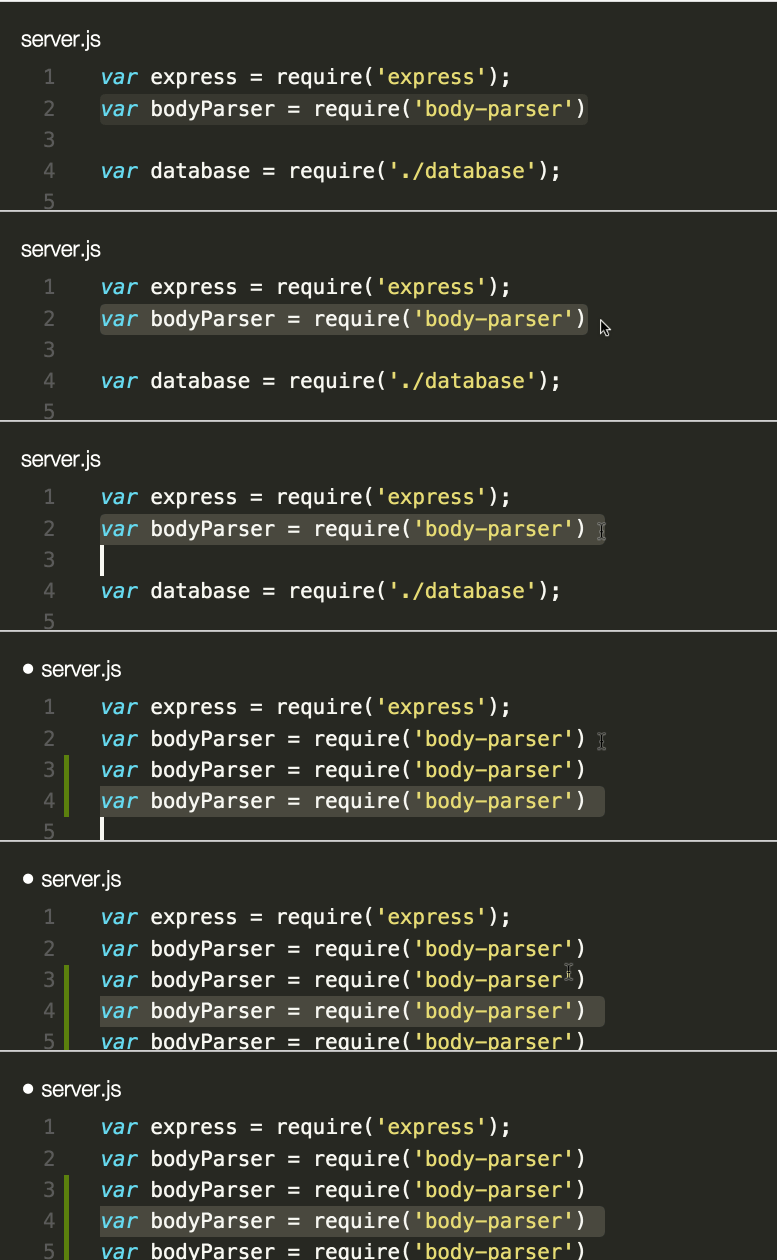
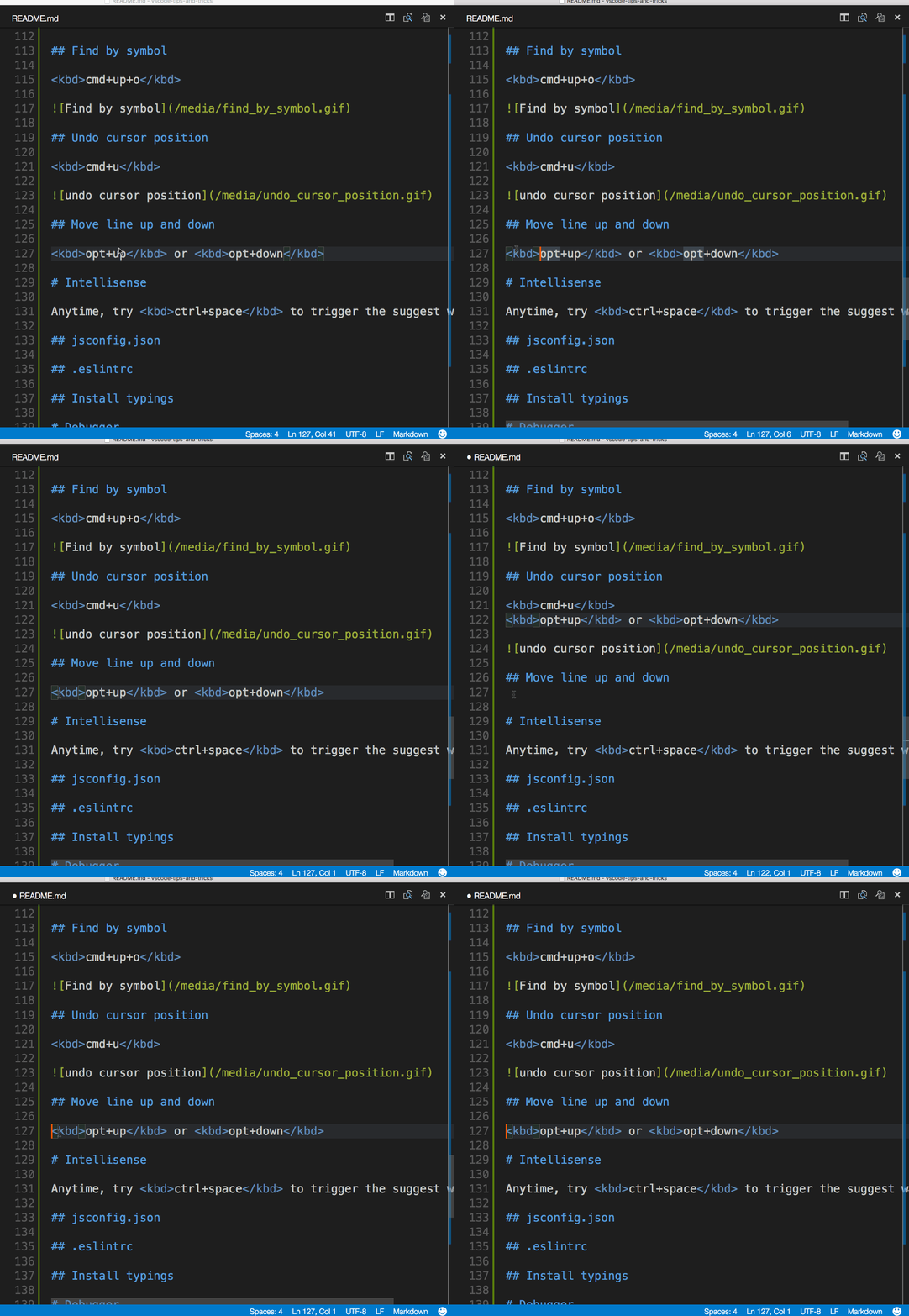
35
u/Frothy_Semenbeard Apr 23 '22
Classes. Anytime I'm dealing with custom objects, I'll 99.9% make a custom class instead. It gives me a greater degree of control when working with them.
I also make custom Exception classes inheriting the base System.Exception class. This allows me to add custom properties to the classes which assist me greatly when trying to troubleshoot the problem.
I even put the error in a $global:LastError variable in a Catch block which lets me easily look at when I Ctrl + C or when the script ends.
8
u/Marketfreshe Apr 23 '22
Classes, this was basically my answer also, wholly agree. I'm not a software dev but the software architect on my team took a few days to really teach me the power of classes, it's been so valuable.
13
Apr 23 '22
I have never run into a situation where I've needed a class in PowerShell, do you have any examples? Usually a pscustomobject is enough.
In Python I use classes all the time though.
9
u/Thotaz Apr 23 '22
I made an example here last week where I show how you can create your own validation attribute with a PowerShell class: https://www.reddit.com/r/PowerShell/comments/u4aa4m/powershell_parameter_validate_set_and_removing/i4ujvjf/
I would consider that a bit of a niche scenario though. Honestly, you don't really need classes in PowerShell. Methods don't do anything that can't be handled by a PowerShell function.
PowerShell classes don't have custom getters/setters for properties so you may as well use a pscustomobject to dump all your data.
With that said, if you are working on a module then classes are a bit nicer for output objects because it tells the end user (and the tab completion) what kind of properties to expect it also makes it clearer which functions work together since you can use a proper type for the parameters. It's also easier to create custom views of the objects.1
1
u/Vortex100 Apr 24 '22
One of the main reasons I use classes these days is to control how an object output. Consider a complex object with that's a few layers deep. You know when you see
System.Object()in a table? If you were to make that particular object class, you can add a ToString() method, and voila, suddenly it's returning something more useful. It also makes ps1xmls a bit easier since you can specifically target your class.In general though from a functional (pardon the pun) standpoint, classes and functions are somewhat interchangable. It is nice to be able to do
$MySpecialArray.DoThing()though :)1
u/MonkeyNin Apr 23 '22
Plus class without code still gives you JSON validation
6
4
Apr 23 '22
I second the "what do you mean"
2
u/MonkeyNin Apr 26 '22
you can add validation using types and attributes. You don't need a constructor.
class Dino {
    [String]$Name = 'Bob'

    [ValidateRange(10, 30)]
    [int]$Age = 12
}

[Dino]@{
Age = 17
}

[Dino]@{
Age = 99
}
3
u/chris-a5 Apr 24 '22
As far as I've tested, you classes convert to and from Json fine, the only issue that can arise is if you do not have a constructor that matches the input. For simple data structures I prefer to have no constructor:
Class Foo{
    [String]$name = "anon"
    [Int]$age = 99

    [String]ToString(){
        return "The age of {0} is {1}" -f $this.name, $this.age
    }
}

[Foo]$e = @{}

[Foo]$f = @{
    name = "fred"
    age = 30
}


$e, $f | ConvertTo-Json
$e, $f | Write-Host

$g = [Foo](ConvertFrom-Json -InputObject ($f | ConvertTo-Json))

$g.ToString()
The output is:
[
    {
        "name":  "anon",
        "age":  99
    },
    {
        "name":  "fred",
        "age":  30
    }
]
The age of anon is 99
The age of fred is 30
The age of fred is 30
1
u/skot123 Apr 23 '22
Stupid question, when building and troubleshooting PowerShell classes, how do you force it to re-instantiate? It seems like I either have to restart the ISE or do all of the testing from a command prompt (that I relaunch after every change)
3
u/chris-a5 Apr 24 '22
Are you using Powershell 5.1?
This is a bug that will never be fixed. I solved this by having a "test" script that would run a single instance, then wait for me to press enter at the end. On pressing enter it simply opens a new powershell instance re-running itself.
Basically to give each run its own powershell session, otherwise imported classes are not reloaded.
1
0
22
Apr 23 '22 edited Apr 23 '22
[PSCUSTOMOBJECT]2.
Function {


Begin  {}

Process {}

 End  {}


}
3.
Try {}

Catch {}

Finally  {}
4. Get-Ciminstance vs Get-WMIObject
5. Pipeline handling difference between ForEach and ForEach-Object and impact on performance
6. Understanding to avoid Where-Object when possible to improve script performance
11
u/spyingwind Apr 23 '22
[PSCUSTOMOBJECT]
This is by far the best object. Being able to add Note Properties at will makes building them so nice.
19
u/Ironic_Jedi Apr 23 '22
I think the biggest code level up I had was when I went whole hog into making use of functions. It's a huge boon for code reuse.
Having the functions use parameters, returning results. Using functions within functions sometimes as well.
14
14
u/gangculture Apr 23 '22
splatting was fun for me when i first found it, now most of the time i use it even if i don’t need to
8
u/spyingwind Apr 23 '22
I use splatting when the line length goes off the side of my monitor, if I know something will need to be changed down the road, or I just want to make it more readable.
4
u/NeitherSound_ Apr 23 '22
I’ve been scripting 5 years now and just last year I make it habit to splat most my scripts. I’ve even rewritten old scripts to be more optimized and add splat.
2
u/adamdavid85 Apr 24 '22
I use splatting in any case where I want parameters to vary based on different conditions. It's easy to add if or switch statements to the hashtable declarations or after the initial declaration depending on the situation.
10
u/overlydelicioustea Apr 23 '22
instead of getting a bunch of infos into variables and then cumbersomely combine them you can just do
$alltheinfos = @{
infoa = get-stuff -computername $bunchofcomputers
infob = get-otherstuff -computername $bunchofcomputers
infoc = get-evenmorestuff -computername $bunchofcomputers
}
7
u/ryecurious Apr 23 '22
You can also stick a
[PSCustomObject]in there before the@, that way you also get the nice table-formatting Powershell does automatically!@{ a = 1 b = 2 } Name Value ---- ----- a 1 b 2vs
[pscustomobject]@{
  a = 1
  b = 2
}

 a  b
 -  -
 1  2
I tried posting a screenshot of what I mean, but apparently this sub auto-removes all images even in comments...
1
26
u/Lee_Dailey [grin] Apr 23 '22
howdy AsyncProper,
for me, the goes faster was assigning the output of a loop to a $Var instead of using $Var += inside the loop. the speedup is serious when the collection gets "large". it's even a [microscopic] bit faster than using .Add() for collection types that support that.
for the easier to understand part, it was splatting. that makes things so much easier to read/modify/comment that it is truly glorious. [grin]
for easier to maintain ... i have to admit that it is getting rid of backticks. the "natural line wrap" article by markekraus was an eye opener.
take care,
lee
5
14
u/Ironic_Jedi Apr 23 '22
You didn't grin. Disappointed.
21
u/Lee_Dailey [grin] Apr 23 '22
howdy Ironic_Jedi,
take a look at the end of the 2nd paragraph. [grin]
take care,
lee8
7
u/ProfessorChaos112 Apr 23 '22
Runspaces
3
u/Deutscher_koenig Apr 23 '22
Don't runspaces get super complicated when you need to pass in an object? Strings, it's, etc seem to work ok, but objects get serialized and end up losing functionality right
6
u/CognizantAutomaton Apr 23 '22
Depending on what you’re trying to do, a synchronized hashtable will allow you to pass data back and forth across threads without encountering the issue you’re talking about.
3
u/SeeminglyScience Apr 24 '22
Serialization is only a thing for standard out-of-process "jobs" like those created via
Start-Job. Manual local runspace management,Start-ThreadJobandForEach-Object -Paralleldo not involve serialization.1
u/jantari Apr 24 '22
Only with out-of-process runspaces. With regular runspaces the I objects are not serialized
7
7
Apr 23 '22
Pester
3
u/zanshin808 Apr 24 '22 edited Apr 24 '22
Pester++. Having the test framework, mocking, and assertions library be part of the same project, and having them well thought out is amazing! I've written prod code with test coverage in many languages, and right now Pester is my favorite testing framework.
6
u/fatalicus Apr 23 '22
using jobs to run things in parallel.
Had quite a few scripts that would run through lots of AD users or such and do lots of things, and it would sometimes take alot of time.
Then i was making a script that was pulling logs from all our clients and the damn thing took 11 hours or so to run. Looked for a solution and found jobs, which i used to get the script down to just 40 minutes or so.
So changed many of my script to use that to speed them up.
Now i'm looking forward to the day when all the modules i need work in PS 7, so i can switch to using -parallel on foreach-object instead.
2
u/dogmir Apr 23 '22
Or you can use invoke-parallel by rambling cookie monster. I use it a lot. Simple as $var | invoke-parallel -scriptblock { your loop here } https://github.com/RamblingCookieMonster/Invoke-Parallel
0
Apr 23 '22
[deleted]
3
u/Black_Magic100 Apr 23 '22
Have you tried using poshRSjob. I believe it is just a wrapper for runspaces, but that's what I've used and haven't experienced what you have.
1
u/alinroc Apr 26 '22
PoshRSJob hasn't been maintained in 4 years.
ThreadJobis the replacement and it's actually built intopwsh1
u/Black_Magic100 Apr 26 '22
Oh rly? I knew it wasn't maintained, but also if it's not broken then don't fix it. Is it officially not maintained or have there just been no updates needing a change? Isn't it just a wrapper around the c# runspaces class/library (whatever that is)
I will look into threadjobs
1
u/alinroc Apr 26 '22 edited Apr 26 '22
Is it officially not maintained or have there just been no updates needing a change?
There's 49 open issues and 5 unmerged PRs, and the owner/maintainer has been idle on GitHub for at least a year. So whatever the details are, it appears to be at a dead end.
ThreadJob is built into
pwshand is in the PSGallery for legacy systems. I used to use PoshRSJob but switched a couple years ago.1
6
u/Pure_Syllabub6081 Apr 23 '22
Splatting. Makes your scripts way more readable by deduplicating lines
Try-catch. Especially useful in debugging later on, because you can chose your own error messages and be more specific.
The order of parameters. Also mainly for the readability: Switches first, then parameters that have values. Note: -confirm:$false is also a switch. :)
PSCustomObject. Create your own damn objects to work with it later on. I use it a lot!
5
5
u/ryecurious Apr 23 '22 edited Apr 23 '22
Definitely pipelines.
Say you want to find the largest .txt files on your C: drive. You could do a typical script like this:
$files = gci C:\ -include *.txt -recurse
$largeFiles = $files | where length -gt 1kb
$sorted = $largeFiles | sort length -descending
$topTen = $sorted[0..9]
Or, you could do it all with pipelines, skipping the intermediate variables!
$topTen = gci C:\ -include *.txt -recurse
          | where length -gt 1kb
          | sort length -descending
          | select -first 10
The real benefit here is memory usage, since the 2nd pipeline stage discards any results less than 1kb in size. If the first gci command returned a billion results, the "traditional" version of the script might run out of memory and crash trying to store them all in $files. But the pipeline version will just pass each result as it's found, allowing it to be processed/freed as necessary.
Extra bonus, the 2nd/3rd/etc. stages start working as soon as the preceding stage sends any results down the pipeline. So it can also be faster, if some of your stages (like gci) end up idling while waiting for IO results a lot.
4
4
4
u/TheGooOnTheFloor Apr 24 '22
trap
Nice to have a global catch-all to gracefully handle unplanned situations. You're not going to be able to anticipate all situations (that comes later in the process), so being able gracefully deal with those issues helps a lot with preventing them.
3
u/Marketfreshe Apr 23 '22
Building classes for large data driven scripts, slowly updating all of my old repositories. Everything is so much more readable and easy to follow when you don't have all this expanded data in main script bodies spanning pages.
3
u/jfq722 Apr 23 '22
Assigning a value to a hash table entry regardless of whether the key exists yet or not. Maybe not significant performance improvement but removing unnecessary code is always good.
3
u/savornicesei Apr 23 '22
Powershell for builing and deploying projects and database scripts using Invoke-Build and dbatools.
3
u/Th3Sh4d0wKn0ws Apr 23 '22
I definitely keep learning and keep changing stuff, or incorporating it going forward, but i will say that developing functions for everything has been a big change.
Make a function, with a good parameter block with good validation, and use Begin, Process and End blocks. Set it up right to accept pipeline input (if appropriate) and you can pipe a bunch of objects to it and get nice clean output.
If you're making functions, then you can make modules.
3
u/PinchesTheCrab Apr 23 '22
Custom parameter transforms and validators. They let me reuse a lot of code with a single keyword, I love them.
3
u/scrthq Apr 23 '22
Understanding what data structures make sense for the task at hand.
Sample: Reorganizing an array of objects into a dictionary for much faster lookups against the result set further along in processing. Rebuilding an array of tens of thousands of complex objects into a dictionary takes milliseconds and lookups against it will be exponentially faster than using Where-Object over and over (as long as you know what key you will have access to to perform the lookup).
I think it's somewhat common for folks with PowerShell experience to not have a CS background (including myself), highly recommend to never stop learning and filling in gaps that you might not have filled previously 🙂
1
u/Gerane Apr 24 '22
When I've tried to do this with hashtables, the creation of the hashtable was actually very slow. The overall result was faster than lookups using where-object or where{}, but slower than using an array list and foreach-object and an if statement for lookups. Do you have a gist with an example of your implementation?
2
u/scrthq Apr 24 '22
It's a matter of needing to do a search to find the corresponding object vs knowing the key it's indexed at, you'll always have better speeds when you know the key to lookup with.
Sample situation would be having a list of 10K email addresses but needing the AD User object for each email to work on that AD object (whether getting additional info or updating info or whatever you're doing in your processing). You could...
Perform a lookup per user to resolve it:
$user = Get-ADUser -Filter “mail -eq ‘$address’”Enumerate the entire user list (or subtree under a specific OU), then search against the returned list in your loop:
$user = $list | Where-Object {$_.mail -eq $address}Reconstruct your list into a hashtable with the
$addressas the key when doing a lookup in the loop instead of searching against the entire list:$user = $listHash[$address]The additional second or so to build the hashtable from data already in memory will be greatly surpassed by the amount of time saved doing the lookups.
This is situational and makes more sense for data sets where you would typically need to do a lot of lookups and depends on having a common property or key to index with.
1
1
u/Gerane Apr 24 '22
I get that. For me, when I look at the entire runtime, a lot of the speed gained from a lookup vs a search was eaten away by the initial creation time of the dictionary itself. The lookups were faster, but the initial prep time was way longer. It is faster than doing searches using where-object, but searches using foreach-object with a nested if statement are so much faster than using where-object, that it was still faster as a whole than using the dictionaries. The speed increase from foreach-object outperformed the speed increase from hashtable lookups due to how much time the creation of the hashtable added.
I think it depends on how much lookups you might need to do. If you are doing a very large number of lookups, you could see the dictionary start to be faster. It's been many years, but I think at best 1 lookup per size of dictionary still had foreach-object as faster, but if you were closer to 2 lookups per it would likely tip more towards the dictionary.
2
u/scrthq Apr 24 '22
I'm a bit thrown off on how ForEach-Object came into comparison here tbh, unless you meant Where-Object. Where-Object is going to be implicitly slower though compared to knowing the exact key in the dictionary you need to look up. Even in the most optimal scenario, searching an array is only going to ever take one cycle if it happens to land on the right item at the start of the search. Dictionary lookups are always going to take exactly one cycle. Your initial load of the dictionary will take one cycle per item in the list, but given that you already have that list in memory converting the data structure isn't that expensive.
The big takeaway here is that a lookup against a dictionary where you have the key in index and know that value will only ever take one step. That scales linearly no matter how many lookups you have to do in your loop.
Back at comp, here's a dictionary being built from the list in .2 seconds from 25322 Google users, which resulted in a hashtable containing 78786 unique key-value pairs. That hashtable was built in 1/4 of a second, which is at most the additional pre-processing time needed to enable that dictionary lookup instead.
[#5 PS 7.3.0-p3] [0:00:00.1191 @ 23:09:32.7221]
λ $start = Get-Date
[#6 PS 7.3.0-p3] [0:00:00.0010 @ 23:09:51.7998]
λ Import-Module PSGSuite
[#7 PS 7.3.0-p3] [0:00:00.5906 @ 23:09:52.5371]
λ $googUsers = Get-GSUser -Filter * -Verbose
VERBOSE: Building ServiceAccountCredential from P12Key as user '******************'
VERBOSE: Getting all Users for customer '***********'
VERBOSE: Retrieved 500 users...
VERBOSE: Retrieved 1000 users...
VERBOSE: Retrieved 1500 users...
VERBOSE: Retrieved 2000 users...
***** cut for brevity *****
VERBOSE: Retrieved 24500 users...
VERBOSE: Retrieved 25000 users...
VERBOSE: Retrieved 25322 users...
[#8 PS 7.3.0-p3] [0:00:51.7085 @ 23:10:44.3315]
λ $googUserHash = @{}
[#9 PS 7.3.0-p3] [0:00:00.0005 @ 23:10:44.4397]
λ $googUsers | ForEach-Object {
    foreach ($email in $_.emails) {
        $googUserHash[$email.address] = $_.primaryEmail
    }
}
[#10 PS 7.3.0-p3] [0:00:00.2988 @ 23:10:44.8104]
λ $end = Get-Date
[#11 PS 7.3.0-p3] [0:00:00.0005 @ 23:10:44.9418]
λ [PSCustomObject]@{
    Start = $start
    End = $end
    Total = ($end - $start).TotalSeconds
    Items = $googUserHash.Keys.Count
} | Format-List

Start : 4/23/2022 11:09:51 PM
End   : 4/23/2022 11:10:44 PM
Total : 53.096258
Items : 78786


[#13 PS 7.3.0-p3] [0:00:00.0132 @ 23:11:10.3706]
λ
1
u/Lee_Dailey [grin] Apr 25 '22
howdy scrthq,
the triple-backtick/code-fence thing fails miserably on Old.Reddit ... so, if you want your code to be readable on both Old.Reddit & New.Reddit you likely otta stick with using the
code blockbutton.it would be rather nice if the reddit devs would take the time to backport the code fence stuff to Old.Reddit ... [sigh ...]
take care,
lee
3
3
u/very_bad_programmer Apr 23 '22 edited Apr 24 '22
Storing data in SQL instead of zillions of .csv, .txt and .json files
3
u/EnusTAnyBOLuBeST Apr 24 '22
Can you please provide some examples of this? I’m super intrigued.
1
u/very_bad_programmer Apr 24 '22
Sure, I work at an MSP, so multi-tenant scripts are my bread and butter.
Here's an example:
I built a system to monitor forwarding rules for every single Office 365 user across all of my tenants. Reason being, any time a user's account is compromised, one of the first things the bad actor does is set up a mailbox rule to delete certain emails with keywords "hacked" "did you meant to send this", stuff like that. They also will typically set up a rule to forward to an email address that they control. Prior to SQL, I was storing a mapping of all forwarding rules in .txt files ('[email protected]>[email protected]'). I would then alert on any forwarding rule that sends emails outside any of the client's known domains. Our helpdesk would reach out and confirm with the user that this is a known forward (sometimes they'd have rules to forward emails to their own personal account, which is a huge no no in my opinion, but that's beside the point) and every now and then we'd catch a compromise the first day it even happened.
Every client had their own text file, and I wanted historical data, so every client had their own text file for EVERY DAY. This got out of hand fast.
I now store these items in SQL in a table with the following columns:
-Client GUID-FromAddress
-ToAddress
-DateFirstSeen
It's much cleaner and much easier to pull historical reports on
1
3
Apr 24 '22 edited Apr 24 '22
Proper
Param()blocks[CmdletBinding(SupportsShouldProcess = $true)]Proper comment blocks at the top, good comments that make
Get-HelpusefulSecretManagement module
[edit] dbatools module (someone else mentioned it, and I can't believe it slipped my mind)
3
3
u/Bubbagump777 Apr 24 '22
The key ability that took my powershell scripting to the next level was building WPF User Interfaces (yes with Powershell!) with custom graphics and multithreading. Now I deliver custom desktop applications to business users to automate their work! It is incredible.
2
u/hamsdre Apr 24 '22
How do you do multithread ?
3
u/Bubbagump777 Apr 24 '22
Look up runspaces. There are different ways to thread, but runspaces are my preference. Each time you open powershell that is its own "runspace". You can open multiple runspaces in one script and run those concurrently.
1
u/hamsdre Apr 24 '22
Are you splitting the worckload between the runspaces before the actions or does the run space do it automagically ?
Like you have 10 objects that needs to be processed, do you split them in 2 lists of 5 and feed each list to a runspace ?
3
u/Bubbagump777 Apr 24 '22
It wouldn't be automatically. What you would do is you would have a runspace pool that you create. Maybe it has 8 runspaces. Then you would have a master loop for data processing. As you are looking through data you first check how many runspaces are available (not busy). Grab an available runspace inside your loop to process the object. Then continue. Loop again and search for another available runspace to process your next object. If one isn't available you wait until one is. Once all objects are in processing wait for all runspaces to complete.
2
u/sebastien_aus Apr 23 '22
Converting my arrays into lists
2
u/chris-a5 Apr 24 '22
For even better performance, if the list does not contain duplicates, you could use a HashSet or the sightly slower SortedSet (faster than List).
List benefits you when you want random access to the list, Sets are superior when you will be processing the data sequentially.
2
u/Pisnaz Apr 23 '22
I added arrays, variables, and functions into my profile. Now when I have to work using distinguished names i just type the array breakdowns for say $accounts.securitygroups or $workstations.ou etc. My environment is a bit abnormal and it helps mostly in searchbase limits etc but saves more hassle/ time. But some.might be as simple as my default path for saving log files or exporting csv.
That mixed with functions to perform my typical calls fed back in allows me to streamline scripts and make things common across different usage etc. Once something becomes a simple script but above average usage it now gets added as a function to my profile vs a script to do remote wmi resets or look up a package name from a id andn so on.
My only issue is they are tailored to my profile so if they are for use by the service desk or such i have to add some things, the plan moving forward is to work on a module or such for future but i am also having to engage to lock down the chaos of folks with no rwal knowledge just running code adhoc with admin rights and no knowledge so part of the revamp is centralizing creation of scripts etc to one team so we, in theory, know what is going on and prevent some issues from happening again.
2
u/Gerane Apr 24 '22
Instead of using where-object or .where{} on really large amount of data, use foreach-object{ } with an if statement inside. Huge performance improvements. I've shaved many hours off of runtimes. Some I've taken runtimes down from hours to minutes.
1
2
2
u/Szeraax Apr 24 '22
Quality?
##
No, really. Comment Based Help (CBH, accessed easily in VSCode via ##) is amazing. Absolutely dead simple to get runtime parameter helper hints.
really awesome work on that one, PowerShell team!
2
u/fxbyy Apr 25 '22
[PSCustomObject]@{
    Name = Value
}
2.
Write-Verbose "Getting ..."3.
$var = foreach () {

}
2
u/JordanBlackburnWork Apr 28 '22
For me the biggest game changer so far was learning how to call REST APIs with Invoke-WebRequest
2
u/zyeus-guy Apr 28 '22
Do you use IWR or IRM as in invoke-restmethod ?
If you haven’t seen IRM you are in for a treat :-)
2
u/uslackr Apr 29 '22
So many things...
First - import-csv - but that was 2006;
Then importexcel and all that it does forced me to re-write all the admin tasks I have running.
Recently added getsql and ReallySimplyDatabase to the list. Querying data just imported from a spreadsheet or joining to datasets together is so much easier than how I'd been doing it. And I just learned SQL in the past 6 months. If you actually know SQL, these will be good tools
1
1
u/Affectionate_Walk214 May 06 '22
Using [RunspaceFactory] to multithread scripts.
Greatly speed up scripts where I loop through many objects or time consuming tasks.
11
91
u/rynoski Apr 23 '22
instead of