r/PCsupport • u/Weak1x • 16d ago
In progress Pc caught on fire
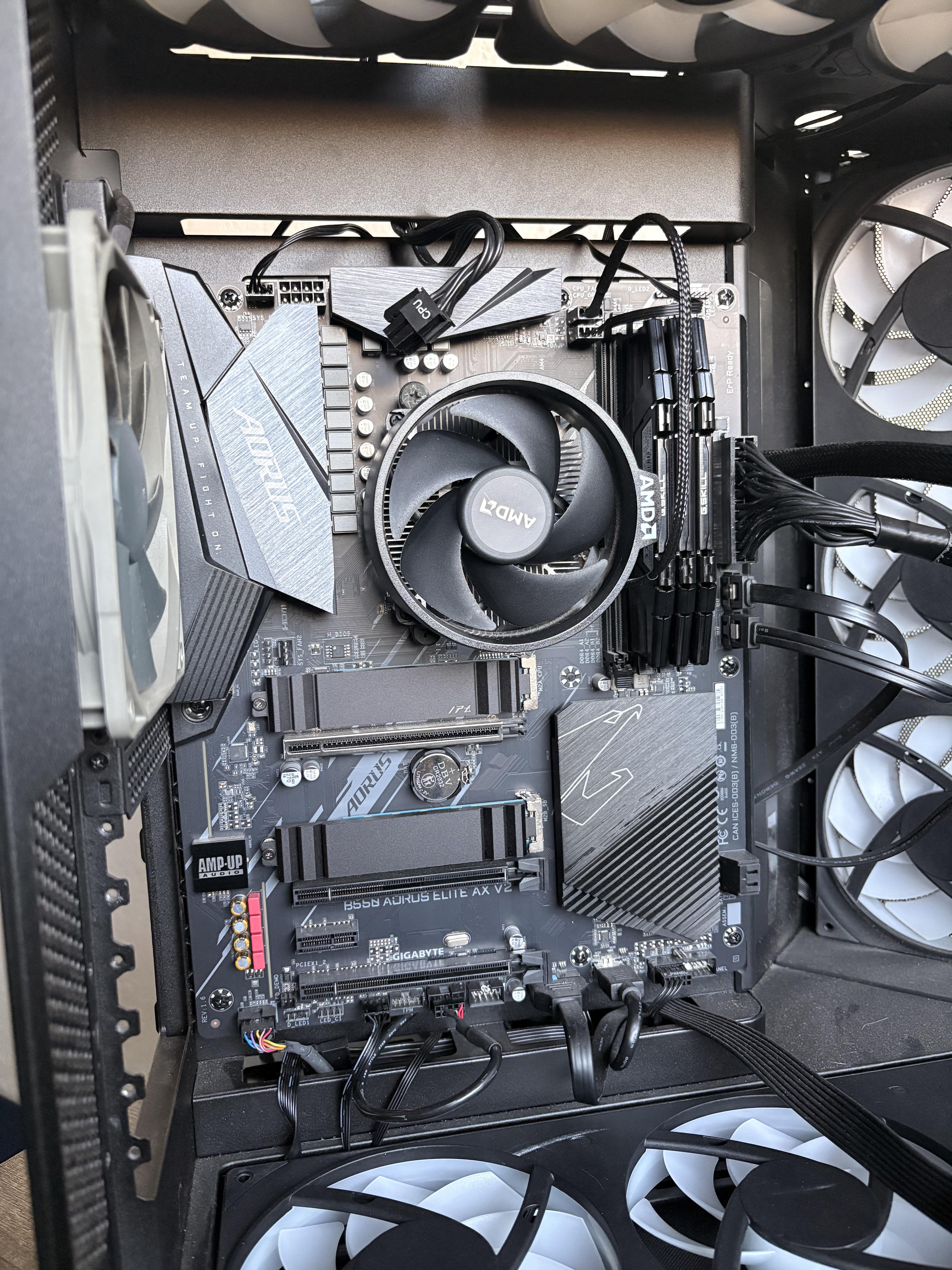
I swear it’s this motherboard before I had a issue because it somehow got short circuited and then I bought a new one and then that one also didn’t work so I had to buy a new one which is this one but now this one just caught fire while I was trying to replace the fans. I’m cooked. What should I do?
1
u/Slow-Discipline-8028 16d ago edited 16d ago
this one just caught fire while I was trying to replace the fans.
Man, that was a long sentence that was hard to read.
So it was switched on and running whilst you were replacing the fans? Or was it a spontaneous combustion?
What actually set on fire (the source)?
1
u/Weak1x 16d ago
Everything was off, and then I go to start it up and then the fans turn on and then the top part of the motherboard which I think was the heat sink that smarter smoking and caught fire
2
u/Slow-Discipline-8028 16d ago
Given that this is your 2nd/3rd motherboard, I think it's a peripheral that you've got plugged in (and not the motherboard itself) that's causing the issue.
I'm only going on by what you're saying, but if "catching fire" is not an exaggeration, it's getting incredibly hot, incredibly fast.
Have a look at what's around/connected near that area; that's probably your culprit. It could also be your PSU.
If it hasn't already died, start the pc with bare bones (nothing connected except monitor and keyboard/mouse; pull everything else out). Monitor it, then add each peripheral one by one, monitoring it each time for a while.
1
u/Anamorphic82 16d ago
Three motherboards failing, with the latest one actually catching fire, suggests something else in the system is causing the damage.
Do not turn that PC on again. Unplug it completely.
If the fire started around the heatsink at the top of the motherboard, that could be the VRM area, which regulates power to the CPU. A short circuit, faulty PSU, damaged cable or incorrectly connected fan could potentially cause this.
Before spending another dollar on a motherboard, I'd want to know:
What's the exact PSU brand and model?
Were you using fan splitters, hubs or adapters?
Did you change or reconnect any modular PSU cables?
Can you post a close-up photo of the burnt area?
Also check for misplaced motherboard standoffs or loose screws.
My biggest concern is the PSU or something connected to it. Repeatedly replacing motherboards without finding the underlying fault could just destroy another one. And don't reuse that PSU until it's been properly tested or replaced.

1
u/ciocolata69 16d ago edited 16d ago
2 or 3 boards? I really wish to take a look on that USB 3.0 header, also at the motherboard pins for this, and also your motherboard standoffs. No one goes through 2-3 boards and not get a result, other than sparks and fire.
Edit: Did this computer ever worked?
Edit2: Board is rev 1.6, I have the exact board, bought 2 months ago. Running a 5700x and a 5070 TI, your problem lies elsewhere. Check standoffs to not have one mounted where there is no through hole on the motherboard, and your case cable for damaged connectors, and your board for any bent pins, specially in the 3.0 USB port.
1
1
u/Siliconpower74 15d ago
You either have a bad psu or you left a motherboard standoff in the wrong place behind the motherboard, creating a short.
1
u/mrmouseOC 15d ago
dont mess around while powered on. did you check the backside of mainboard place for some missplaced standoffs?
1
1
u/niekdejong 15d ago
It seems one of your VRM stages of your CPU has decided no longer wants to live. You can see scorchmarks. I wonder what the voltage does of your PSU.
1
u/7one5tar 15d ago
Sometimes a PSU turns into serial killer PSU, you have to find out wich part or parts are involved.
1
1
u/JNSapakoh 15d ago
Do you have extra standoffs installed in the case? they could be scratching the backs of your motherboards
That or your just feeding good components to a bad PSU
1
u/HankThrill69420 15d ago
Looks like it was the SYS_FAN_1 header. You likely only partially plugged it.
1
u/Zealousideal_Match28 15d ago
Najebane wentylatorów w obudowie a na Procku stockowy radiator. Śmiało możesz całe to gówno wyrzucić (te wentylatory dookoła) a dać lepsze chłodzenie na Procka, chociaż jakiegoś Thermalright 120- który na Amazonie można kupić za 80zl
1
u/BOBbeD1G1TA1 15d ago
Is that the b550 Aorsonist elite ax v2?
Thank you, I'll show myself out the door.
1
u/Sasukeh27 15d ago
Is it just me, or are the wires on the CPU connector possibly exposed?
Maybe the metal sheet from the case cut the plastic.
1
u/Lagoon_M8 15d ago
I have the same motherboard from around 2 years. No issues at all... What did you do?
1
u/Illustrious_Pay_5219 15d ago
Happened to me,brand new build first start capacitor for main cpu fan caught fire+plus the beeping no fan alarm.luckily it was just that.moved to the secondary cpu fan and that board worked flawlessly 5-6 years until next upgrade
1
u/Typical_Magician_606 15d ago
You should install the fourth ram stick in order to proceed, you cant have just 3.
1
0
16d ago
[deleted]
1
u/Weak1x 16d ago
Pc didn’t catch on fire when I was installing the fans it caught fire when I put everything together and I tried starting it back up that’s when fans and stuff started spinning. That’s when I saw the heat sink at the top started sparking and smoke came out
1
1
u/PhotoFenix 15d ago
This is why run on sentences and phrasing works against you. A clearer question would have prevented all the misinterpretation throughout this post.
0
6
u/ALaggingPotato 16d ago
Caught fire while you were replacing fans? Dude, you need to unplug the thing to do any maintenance...
And change your PSU.