r/PCHelpHub • u/MereGonCrazy • Jan 04 '26
Does this mess up my gpu?

78
Upvotes
r/PCHelpHub • u/No_Condition_7970 • Feb 07 '26

been trying to Flash the latest bios to my b850 tomahawk max motherboard via the Flash back button however the red LED (marked with the red circle) on the motherboard board flashes for a few seconds then disappears and it seems to be doing nothing
r/PCHelpHub • u/yash_yap • Jan 08 '26

I have a Gigabyte B450m gaming motherboard. A few months ago my GPU ( gtx 1070) started acting up, my pc randomly started shutting down and just after that my gpu fans would ramp up to 100% speed. I somehow managed to fix that issue and my pc was running fine for a few weeks. After a few weeks, i found out my Nvme m.2 ssd was not being detected and was dead. I noticed something strange when I removed the Nvme, there were dark burn marks on the gold pins. I'll attach a picture for reference. Good thing it was under warranty so i was able to replace it. Fast forward 1 week, i got my new Nvme and tried booting my pc and it worked. I was installing windows and that's when my pc crashed again, and boom it was the same old gpu fans going 100% issue.
After finally installing windows i tried every single thing to fix this gpu crashing issue. Now I started thinking my PSU isn't keeping up with my gpu so i even replaced the PSU and got a new one. Since my ram was under warranty as well (plus the ram prices going skyrocket) i also replaced the ram. And when i removed the ram sticks from my motherboard, i noticed there were same black spots on the pins too, also both of these pins were looking more dark yellow-ish than gold. I used an eraser to clean the pins of both rams and managed to clear those dark stains and also got rid of the dark yellow-ish colour. Anyways after replacing both ram, Nvme ssd, and PSU I finally thought I'd be able to use my pc again but I was wrong. Now my gpu wouldnt power ON at all. No fans spinning, nothing. My pc was booting but i wasnt getting display. I tried the hdmi cable on my motherboard and it started displaying. Turns out my GPU wasn't being detected. Read some guides to fix this issue, did the DDU, performed CMOS, tried everything but nothing worked. Also, my gpu fans started spinning after i performed the CMOS but still, no display at all. I finally used my friend's GPU on my PC and his gpu worked. Tried my GPU on his PC: didn't work. GPU is officially dead now.
I also want to mention that the socket point where i connect my pc was exposed with water once and i didn't know about it until i got it checked by an electrician. He showed me marks of water, inside the socket... Maybe that could also cause it but i also use a spyguard so im not sure.
Anyways, now I've bought a second hand RTX 3080 ti since buying a new one is not worth it right now. Now, I am just worried about one last thing: Is my motherboard causing all this? Is it killing all my components? First, my gpu started acting up, which eventually died, then my SSD died, plus stains on SSD and RAM, there weren't any stains on the Pcie pins of the GPU btw. Also im broke right now so i cant afford a new motherboard for now as well.
What do you guys think? Any help or guidance would be really appreciated. Thank you :)
r/PCHelpHub • u/GonpachiroKamaboko23 • Jul 16 '26
It was fine a while ago before I cleaned it.
Did I somehow break my GPU Riser or something? This is the first time this has happened to me and I have been personally cleaning my PC every 2 months...
r/PCHelpHub • u/Longjumping_Bass3087 • Jan 25 '26
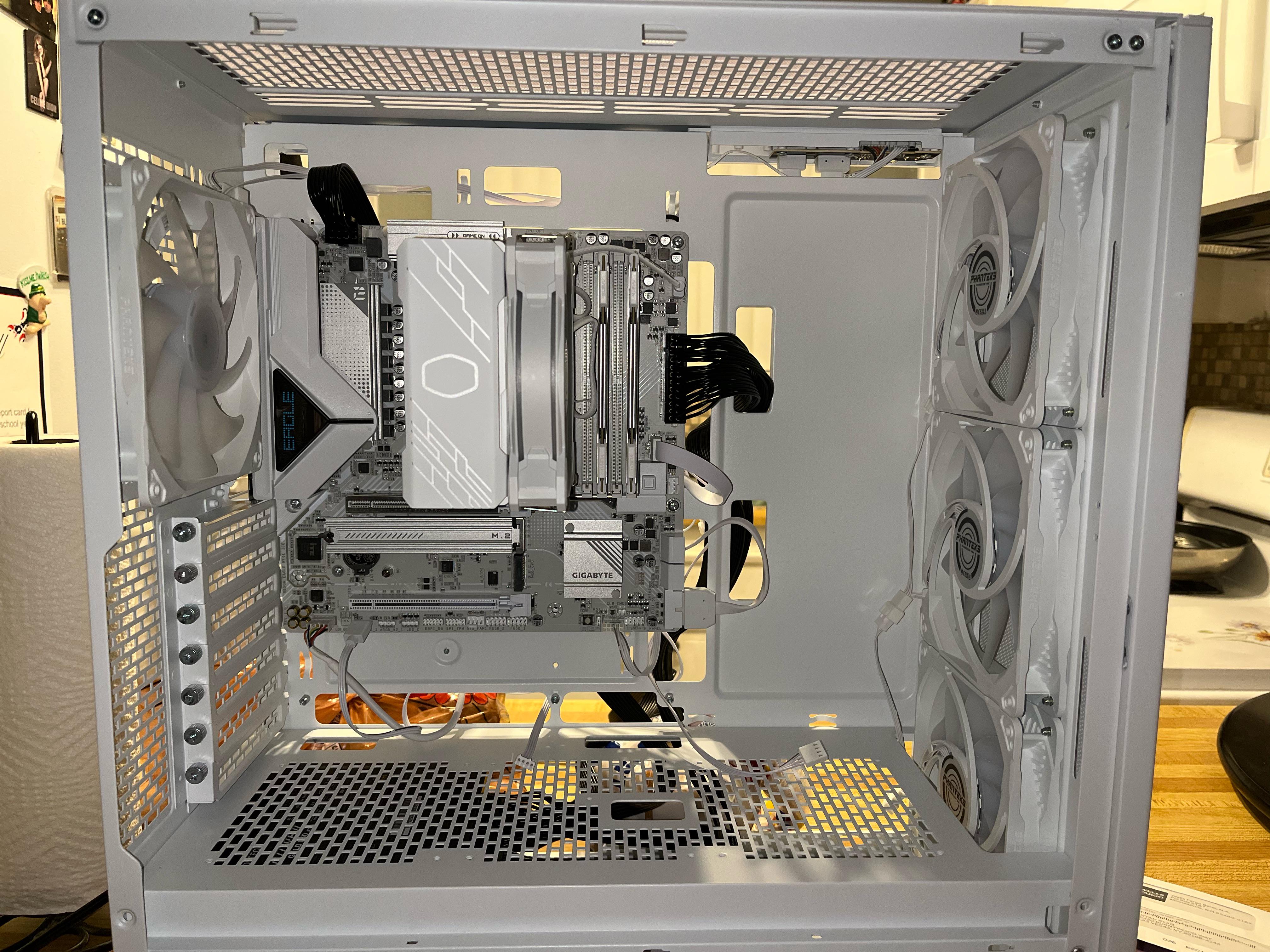
the connectors to my motherboard only had a couple of things labeled of where to go, everything else im clueless and lost. i dont have my gpu it ships later today but i wanted to test if it worked first :/
r/PCHelpHub • u/Alkinsb • Nov 10 '25

r/PCHelpHub • u/Illustrious-Pen7509 • Aug 31 '26

So my PC was working fine with my original ram sticks in slots 2,4 I then added the red ones into slots 1-3 and the PC wouldn’t boot. I instantly took the ram sticks out and tried to boot but it wouldn’t work. So I took the CMOS out and put the original two back in their slots and it still won’t work. Here’s a list of what I’ve tried:
- taken all ram sticks out to see what motherboard lights say (only DRAM lights up)
- reset CMOS and put original ram sticks back in (still doesn’t work)
- put the red ram sticks in slots 1,3 (didn’t work) neither did the white ram sticks (I reset CMOS before doing both)
This is so tiring and I don’t know why it’s happening all I did was put in more ram and I even backed off and put back the original ram in the same slots after resetting CMOS and it still won’t boot this is such a headache and I’ve spent hours in the discord server however nobody is available
The lights on my motherboard is constantly displaying CPU then DRAM over and over
r/PCHelpHub • u/Practical-Arrival-33 • Oct 22 '25

This regards my recent post https://www.reddit.com/r/PCHelpHub/s/9Ev0BpWzWd as I am looking to RMA my faulty 7700x after only 2 years of normal use.
Long story short, I solved the issue by swapping CPU's. I tried everything else beforehand, and only the CPU swap worked.
Naturally, I'm looking to send AMD my 7700x as it should not be failing after 2 years of use.
In order to do that, I need the part number (OPN) which is found on the box (which I threw out in 2023), and on the cpu itself.
The above picture shows my part number is 100-000000591, yet on AMDs site, that's not a number in the dropdown it can accept.
The temporary cpu I have in my build has a number found in the dropdown. Which makes me wonder is this 7700x proper?
I bought it in a bundle from Canada computers with mobo and ram, everything about it seemed normal when i built my PC, but I'm not curious as to why I can't proceed on AMD's site.
I am looking forward to hearing your thoughts and thank you in advance for the help!
r/PCHelpHub • u/Emergency-Frame-8826 • Oct 26 '25

Fun Fact for Ryzen processor owners - AM4 and older sockets !:
Note: this issue mostly happens with older AMD sockets (like AM3, AM4, FM2) that use the PGA design less likely on Intel LGA sockets
Regarding the issue of the thermal paste sticking to the heatsink but in short, the paste hardens over time and creates a strong bond between the heatsink and the processor. This can cause the processor to be pulled out of the socket when you remove the heatsink, and it might even damage part of the socket. To avoid this, run a stress test using any program for a few minutes to heat up the processor and soften the thermal paste. Then, gently twist the heatsink left and right before lifting it.
This is much better than using a thin thread, which could cause you to accidentally drop and damage the processor !
r/PCHelpHub • u/Its_uncle_carl_ttv • Nov 08 '25

Pc was heating up, checked the inside of the pc and found this.
Also the fan on front of thr pc isnt spinning is it a bearing issue?
r/PCHelpHub • u/Gloomy_Promotion5767 • Aug 19 '26

I was building my computer and everything was going good but when I put in the gpu it did not display anything the fans were spinning and everything does anyone know what might be the problem
r/PCHelpHub • u/Inevitable-Clerk-133 • Jan 21 '26
r/PCHelpHub • u/DerFuzzy • Aug 13 '25

I've built a new PC myself it doesn't boot though, the red CPU light shows up everytime and now after switching somethings it doesn't boot at all.
Ryzen 7 9800X3D 4.7 GHz 8-Core Processo ARCTIC L
iquid Freezer III Pro 360 Liquid CPU Cooler
ASRock B850 Steel Legend AM5 Motherboard
Corsair Vengeance RGB 32 GB (2 x 16 GB) DDR5-6000 CL40 Memory
Western Digital WD_Black SN850X 2 TB M.2-2280 PCIe 4.0 X4 NVME Solid State Drive
ASRock Steel Legend Radeon
RX 9070 XT 16 GB Video Card
Lian Li O11 VISION COMPACT ATX Mid Tower Case Asus Prime
AP-850G 850 W 80+ Gold Certified Fully Modular ATX Power Supply
r/PCHelpHub • u/Practical-Arrival-33 • Oct 18 '25
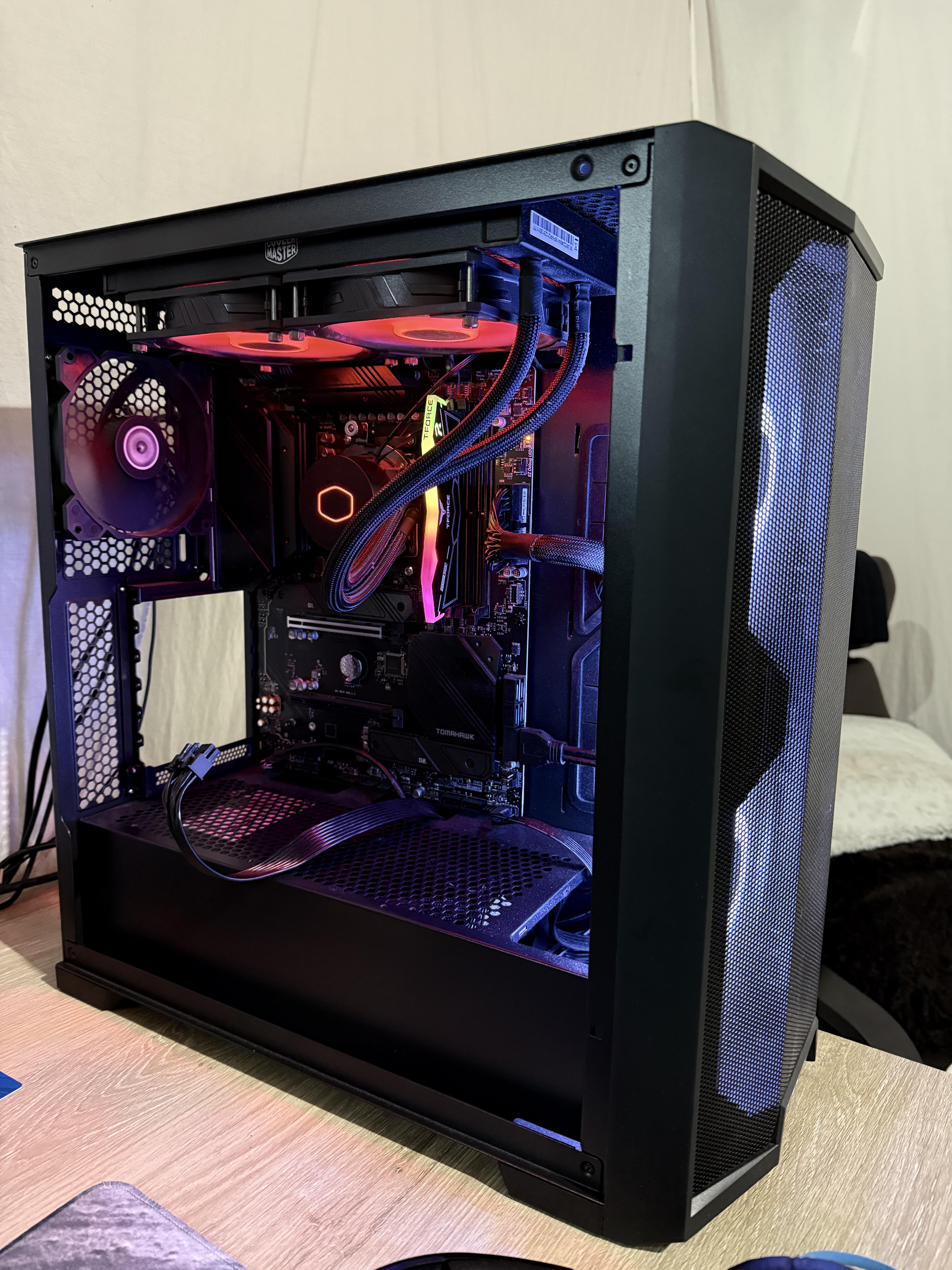
Hey guys,
I have been in a rut the past few days trying to diagnose my PC (cannot post). I built this in late 2023, and the past few months sometimes my pc wouldn't post, so I'd restart it, and it would. No big deal right? As time went on (6 months) it became more frequent, now to the point I can't post at all.
Here are the specs, I will go into detail below:
CPU: 7700x MOBO: MSI B650 Tomahawk Ram: Teamgroup T force 32gb 6000 CL30 Cooler: Coolermaster ML240L V2 Gpu: Gigabyte 4070 wind force OC PSU: Corsair rm850e SSD: 2tb Kingston KC3000 & 2tb UD90
Problem:
Red and yellow debug lights. (CPU and ram as far as I'm aware) prevent me from posting. I removed CMOS a bunch of times during this process, I tried removing second stick of ram, nothing. I removed GPU, I'd get a post to windows, I'd plug gpu back in, nothing. I then tried gpu in 2nd slot with 1 ram stick in A2 and it posted. That was the end of the night and I played battlefield like that with a friend.
The next day, it wouldn't post. I was back to square 1. I took the gpu out, nothing. Tried each ram stick in each slot, nothing. I also checked PSU and moved my gpu cable one slot over just to see, but no success. My cpu cables are plugged in properly too.
Now today, I ordered thermal paste and isopropyl alcohol, cleaned CPU and cooler, checked the pins (which seemed perfect), and reapplied and installed.
Btw every power down I did I flicked off the PSU and held power button for 10s.
This is very frustrating, I don't know what to do. I am still new to all of this but I am happy to learn.
I really hope it's not a motherboard problem, although I should still have 3 year warranty with MSI right? My ram seemed fine, but now I'm not so sure.
If anyone has any suggestions or knows a solution I would appreciate the help.
Thank you!
r/PCHelpHub • u/INoxPhobos • Jan 29 '26
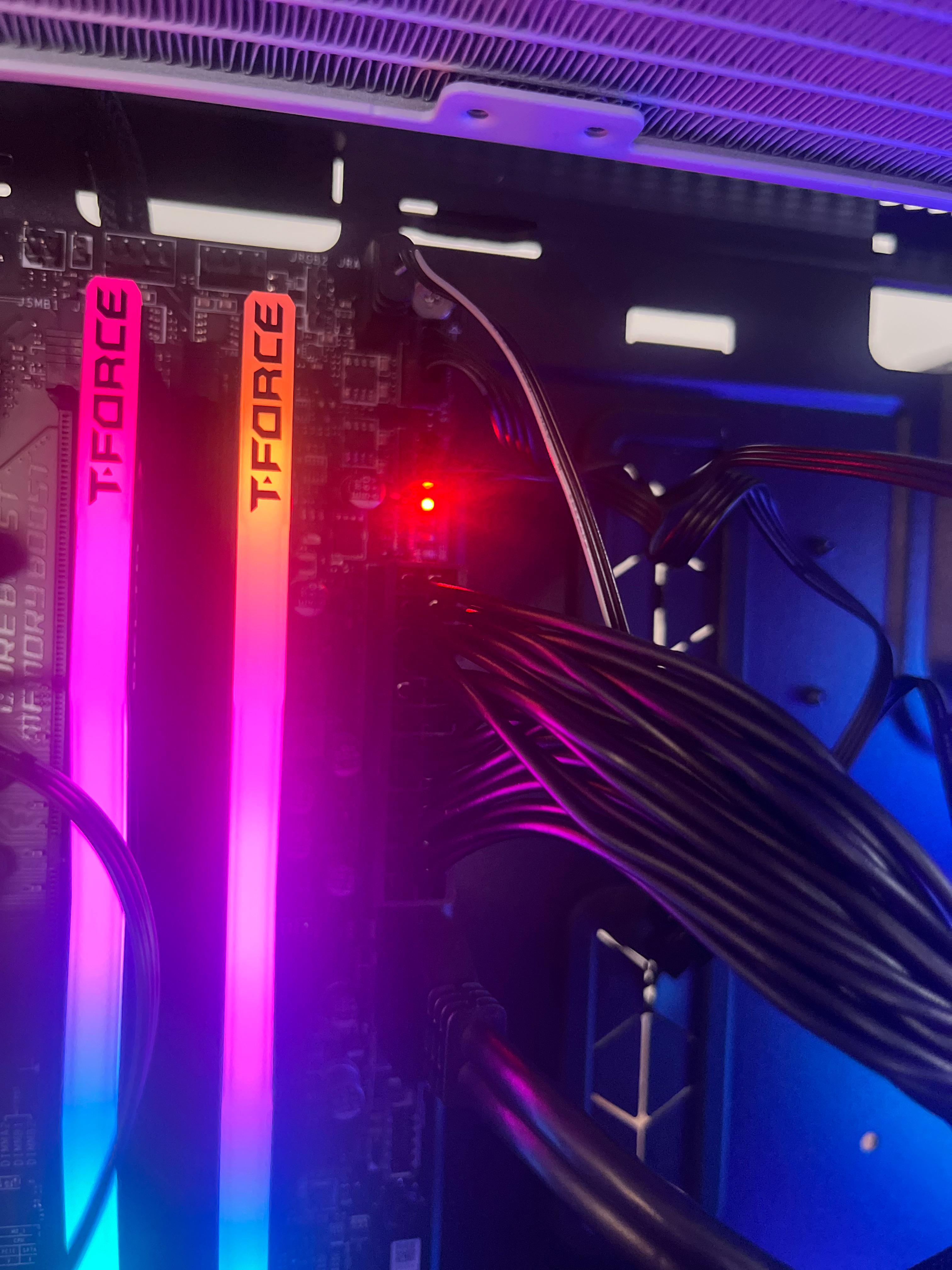
i just built my first pc and noticed there is a red light over CPU on my motherboard. i had tried a multitude of things several different time and yet nothing seems to make it go away. also when i plug it into my monitor via hdmi on the graphics card it says “no signal”
r/PCHelpHub • u/Srp45 • Jul 25 '25

I have a PC from Alienware that’s about six or seven years old as a 1080 TIGPU which I think should give me some good gameplay but it seems that I’m getting bottlenecks by my CPU to research I’ve done give me a conflicting information some stuff I see says that I will get a big jump from my CPU change And other stuff says that the jump is minimal. I’m ok with playing 1080. Just want that 60fps.
r/PCHelpHub • u/Inevitable-Remote-99 • Dec 19 '25
I have been using my PC for a couple of years now. A new problem has arisen, where my PC is now unable to turn on. It used to have power, but shut off instantly (the RGB used to show up for about 5 seconds, but then the power would go off). Now, it's not even turning on. Any reasons why this is happening?
Motherboard: B550M A Prime WiFi
RAM: Corsair Veng 16GB 3200Mhz
SMPS: Coolermaster MWE V2 650W Bronze
My RAM and SSDs have been removed just to check why the motherboard isn't working; it wasn't working even when I had them on. There is some form of LED lights at the back of the motherboard; they are all switched on (Orange Light on)
r/PCHelpHub • u/Realistic_Nothing492 • Jul 22 '25
My brother was playing roblox until the cat hit the power strip keep in mind that I don't have a job yet so money is hard to get
r/PCHelpHub • u/M7kail90is_here_bois • Oct 23 '25

Got this monitor 20 days ago from Amazon and just noticed this
Also tell me if you need more photos /s(a lot I know)
r/PCHelpHub • u/Dependent_Ad9044 • Dec 01 '25

Help my son was playing with my computer, he said he try to make more space and he deleted some files but he’s not sure what it was
r/PCHelpHub • u/Fickle-Tangelo8564 • Jul 25 '25
So my 2070 is dying, so i went on eBay to find a gpu, i found a few 3090s/3090ti's that werent heavily used, working and are not OEM, they are like sub 500, the seller has a good reputation, like idk
r/PCHelpHub • u/WizardWasp • Sep 14 '26

Of course it needs a touchup on thermal paste but I doubt just old used thermal paste remnants could get it all the way up to 200 degrees
EDIT: Pump was dead, replaced it and now getting normal temps. Thank you all
r/PCHelpHub • u/SubjectClassic6530 • Jan 10 '26

I finished my PC but because of the hard disk and slow blocking what little potential so I decided to take the SSD that I found in my laptop a Samsung NVMe SSD model: Samsung MZVLB1T0HBLR-000L2 and I wanted to know if I can put it in that slot or not I'm looking for someone to help me
r/PCHelpHub • u/Serious_Type_9328 • Jan 05 '26

So went to start up computer today and this message came up for whatever reason it tries to self diagnosis the problem and there is no success, any idea what's wrong?