r/OrangePI • • 16d ago

Receiving IR from remote controls is easier than you think

Post image
24 Upvotes

This is an old topic, but I didn't find it addressed well with existing code or products. LIRC is the biggest project to work with IR remote controls, but it requires a kernel driver and/or external USB devices to do the job. I wanted to receive IR codes with the cheapest possible hardware and the simplest possible code. I simplified the receiving code (tested on microcontrollers) for a different version of this project:

https://bitbanksoftware.blogspot.com/2026/11/how-to-read-codes-from-many-ir-remote.html

For Linux SBCs, I created this project:

https://github.com/bitbank2/bb_ir

It allows you to receive IR codes in user land with a minimum of C code by simply hooking up a 25 cent IR demodulator to an available GPIO pin. Pictured is an OrangePi Zero 2W with the IR receiver connected to pin 11 on the 40-pin header. The only dependency is the GPIOD library which is available on every Linux distro. No Python libs, no device tree drivers and no complicated apps needed. The code simply receives the codes - it's up to you to do something with that info...


r/OrangePI • • 17d ago

Orange Pi Zero 2W for pi-hole

7 Upvotes

I would like to ask whether it makes sense to search for an Orange Pi Zero 2W. I have a Raspberry Pi Zero 2W and I have set it up for running pi-hole on my home network, and I want something equivalent. Is the specific Orange Pi relevant for such a task? Thank you.


r/OrangePI • • 19d ago

HELP!The microphone recording has too much noise—you can’t even hear the human voice!

Post image
2 Upvotes

I’m having trouble with audio recording on the Orange Pi 6 Plus!

amixer -c 0 cset name='Capture Switch' on,on

amixer -c 0 cset name='Capture Volume' 39,39

amixer -c 0 cset name='Mic Boost Volume' 0,0

amixer -c 0 cset name='Internal Mic Boost Volume' 3,3

I followed the official user documentation for audio recording settings and tested both a dedicated microphone module (connected to the MIC interface) and a microphone plugged into the 3.5mm jack. In all cases, the recordings contain significant background noise—a persistent hum or hiss, which I suspect is electrical noise. Is there any other way to record audio? The same microphones work perfectly when tested on a PC, and all the equipment I’m using is brand new. Has anyone else encountered this issue? If so, how can it be resolved?
使用官方用户文档录制音频的设置,分别、购买并测试了MIC接口的咪头、3.5mm耳机孔的麦克风,测试录音功能,所有录制的音频都有很大的底噪,推测这种嗡嗡声或者丝丝声是电流声引起的,求助是否有其他录音的方式?在PC上测试录音功能玩好,测试设备都是新买的,请问有人遇到过这种情况吗?如何解决


r/OrangePI • • 21d ago

Ubuntu port for Orange Pi 4 Pro

47 Upvotes

Hi, the orange pi official OS was very limited when it came to compatibility. So, decided to make a port for ubuntu.

Is already working, we are using Vulkan for the gpu part. Performance is great when a fresh install, but it gets worse as we add new apps (something am working on). But compatibility wise is a beauty, you can install everything you want (if it works on ubuntu), chromium, node, vscode, docker, photocraft, gimp, etc. Wifi and network already working, audio is working, memory swap is working too.

My next step is to try to boot from a SSD NVME in order to test gains in performance. So far I have been working on a SD card, and htop does not indicate a memory saturation of some sort.

Also, I would like to post this on github in order to get help from some of you guys, but I need to clean the entire codebase, is a mess at the moment.


r/OrangePI • • 21d ago

香橙派6plus电池供电,购买不到用户手册中的电池

0 Upvotes

找到电池厂家后,人家说电芯是他们做的,但是电池后期组装是香橙派自己组装的,需要提供端子型号,定义、方向等,然后去问香橙派的淘宝客服问了能不能提供,以及问问技术人员,电池是怎么做的。香橙派官方客服就是不说,不做,不问,没有提供一点有用信息。这是我见过最不负责的客服了。大家有给香橙派6 plus供电的电池链接吗?


r/OrangePI • • 26d ago

RKMPP and transcoding on Orange pi 5 plus with mainline Ubuntu

8 Upvotes

I am running Joshua Riek’s Ubuntu image on my orange pi 5 plus. I mainly use this for Jellyfin and have RKMPP for transcoding. Everything works phenomenally, it can handle multiple streams like a champ.

Now that we can use mainline Linux with EDK2 on the orange pi 5 plus, though, I’d like to migrate to mainline Ubuntu 26. However as far as I can tell, RKMPP cannot be set up for transcoding. I hope that I’m wrong.

Is it possible to get RKMPP working on mainline Ubuntu arm 26? Are there any instructions out there people can point out, or any tips others can suggest?

I used this guide to get it working on Riek’s image (https://akashrajpurohit.com/blog/setup-jellyfin-with-hardware-acceleration-on-orange-pi-5-rockchip-rk3558/) along with the Jellyfin docs. Following the same instructions do not work on mainline Ubuntu 26.

Thank you!


r/OrangePI • • 29d ago

NetherSX2 on ROCKNIX – Loader for ARM64

Thumbnail
youtube.com
2 Upvotes

I developed a loader for the latest NetherSX2 Android APK on ROCKNIX with the help of an AI coding agent.

The results have been great. NetherSX2 delivers significantly better PS2 emulation performance compared to the other emulators currently available on ROCKNIX, especially (and tested only) on the Orange Pi 5.

The loader is open-source and doesn't include or distribute the NetherSX2 APK. You'll need to provide it yourself, but the repository contains explanations and a redirect to the official NetherSX2 repository.

If you'd like to try it out, check out the GitHub Repository. I also made a Youtube video comparing NetherSX2, AetherSX2, and ARMSX2, including gameplay tests and installation instructions.

Feedback and testing are welcome!


r/OrangePI • • 29d ago

No HDMI output on OrangePi 5

3 Upvotes

I've got an OPi5 (not plus) and had Armbian installed. It worked fine up until a couple of days ago, when it simply stopped giving any HDMI output signal. I've tried:

* different hdmi cables - the TV detects the cable, but gets no signal. The cables work with my Nintendo Switch and my laptop;

* different TVs - I've tested on 3 different TVs with 2 different cables;

* Flashing a new image - I've flashed Batocera, but still get no signal;

Given the above, I'm suspecting something might be up on the hardware side. What can I do to check if that's the case and any hopeful solutions?

In case it might matter, the power plug I've been using is 5V/6A.


r/OrangePI • • Oct 17 '26

Android 17 for Orange Pi Zero 2W (v1)

Post image
87 Upvotes

r/OrangePI • • Oct 13 '26

Custom fan control for Orange Pi 6 Plus to make it quiet enough for HTPC & daily use

9 Upvotes

I’ve been working with the Orange Pi 6 Plus. While the hardware is great, one thing that bothered me was the stock fan behavior, out of the box it tends to be quite loud and aggressive, which makes it less than ideal if you want to use the board as a desktop or especially as a quiet living room media player / HTPC.

To solve this for my own setup, I (let) put together a custom fan driver/controller: https://github.com/royka1/cixfan

What it does:
- Provides a dynamic fan curve control based on thermal readings.
- Eliminates unnecessary high-RPM noise during light/moderate tasks.
- Helps keep temperatures in check while making the board quiet enough to sit under your TV or on your desk without being distracting.

If you're running an Orange Pi 6 Plus and noise has been annoying you, feel free to check it out and try it on your setup.


r/OrangePI • • Oct 12 '26

Really fast GPIO on Linux (includes support for the Pimoroni Display HAT mini on OPI 2W/3W)

Post image
22 Upvotes

I've been experimenting with direct GPIO register manipulation on various Linux boards. I wrote a blog post about it and shared all of the code. In it, I demonstrate how I got my bb_spi_lcd library running on both the OPI Zero 2W and 3W without the use of custom device tree overlays.

https://bitbanksoftware.blogspot.com/2026/10/really-really-fast-gpio-on-linux.html


r/OrangePI • • Sep 23 '26

Orange Pi zero3w PSA

25 Upvotes

Hello so i have not heard anyone mention yet this anywhere but Imagination released some open source drivers for their GPU's and funnily enough a couple of days later i saw a new image on OPi Zero3w, flashed it on mine and good news, the debian trixie image now has Imagination PowerVR BXM-4-64 drivers, full on hw acceleration.
This is probably going to affect other boards with A733 chips if it hasnt already, it runs 1080 video no problem now on youtube and the whole board desktop experience feels smooth instead of choppy, i do believe it will improve as drivers get worked on even if slow, since the chip is present on a couple of sbc's, hope this helps someone other than me, im pretty stoked!


r/OrangePI • • Sep 22 '26

Custom Android TV firmware for Orange Pi 3B (RK3566), developed through reverse engineering.

48 Upvotes

OrangeTV OS is an Android TV firmware created specifically for the Orange Pi 3B (RK3566).

Unlike traditional ROM ports, this project is not based on an existing Android TV ROM.

Instead, the firmware is built by studying Google's Android TV implementation and recreating the required components through reverse engineering while adapting them to the Rockchip platform.

The goal is to provide a modern Android TV experience while keeping compatibility with Orange Pi hardware.

✨ Features

  • Android 11

  • Google TV / Android TV interface

  • Dynamic Partitions support

  • RK3566 optimized

  • Google Play Services

  • Google Play Store

  • Leanback Launcher

  • Google Assistant (Katniss)

  • Recommendations support

  • TV Provider

  • OTA-ready structure

  • Root-friendly

🏗 Development Philosophy

OrangeTV OS does not simply unpack an Android TV ROM and redistribute it.

Development includes:

  • Reverse engineering Android TV firmware

  • Framework adaptation

  • Manual partition rebuilding

  • Dynamic super image creation

  • System image reconstruction

  • Google application integration

  • Compatibility fixes for Orange Pi hardware

🛠 Tools Used

During development the following tools are used:

  • Android SDK Platform Tools

  • adb

  • fastboot

  • afptool

  • MagiskBoot

  • simg2img

  • img2simg

  • lpmake

  • lpdump

  • lpadd

  • avbtool

  • MIO-KITCHEN

  • SDDiskTool v1.72

  • ext4 utilities

  • Linux

Download


r/OrangePI • • Sep 13 '26

Orange Pi RV - voltage sd issue

3 Upvotes

Hello everyone, i have a orange pi RV (not the RV2), if i attach a serial uart in order to read logs, i keep getting:

Card did not respond to voltage select! : -110

I even have an isolator (ADUM1201) between my serial and the one on the board, but still same result.

Without it, it boots just fine.

What can it be?

Thanks!


r/OrangePI • • Sep 12 '26

OrangePi 4A NPU mainline Kernel (AurealNix)

12 Upvotes

OS used: https://github.com/ut-slayer/orangepi-4a-mainline/releases/tag/v0.4.1

NPU driver / module: https://github.com/defencedog/orangepi4A/tree/main/NPU_modules_opi4a_6.18.44

NPU x3 completed projects: https://github.com/defencedog/orangepi4A/tree/main/NPU_proj_opi4a_6.18.44

  1. Object detection

  2. Face clustering

  3. Steam IAPWS Thermodynamic library

All models use TFLite trained models


r/OrangePI • • Sep 07 '26

Orange Pi 4 Pro 12Gb, detecting a Waveshare UPS 3s

Post image
102 Upvotes

It's Alive!!

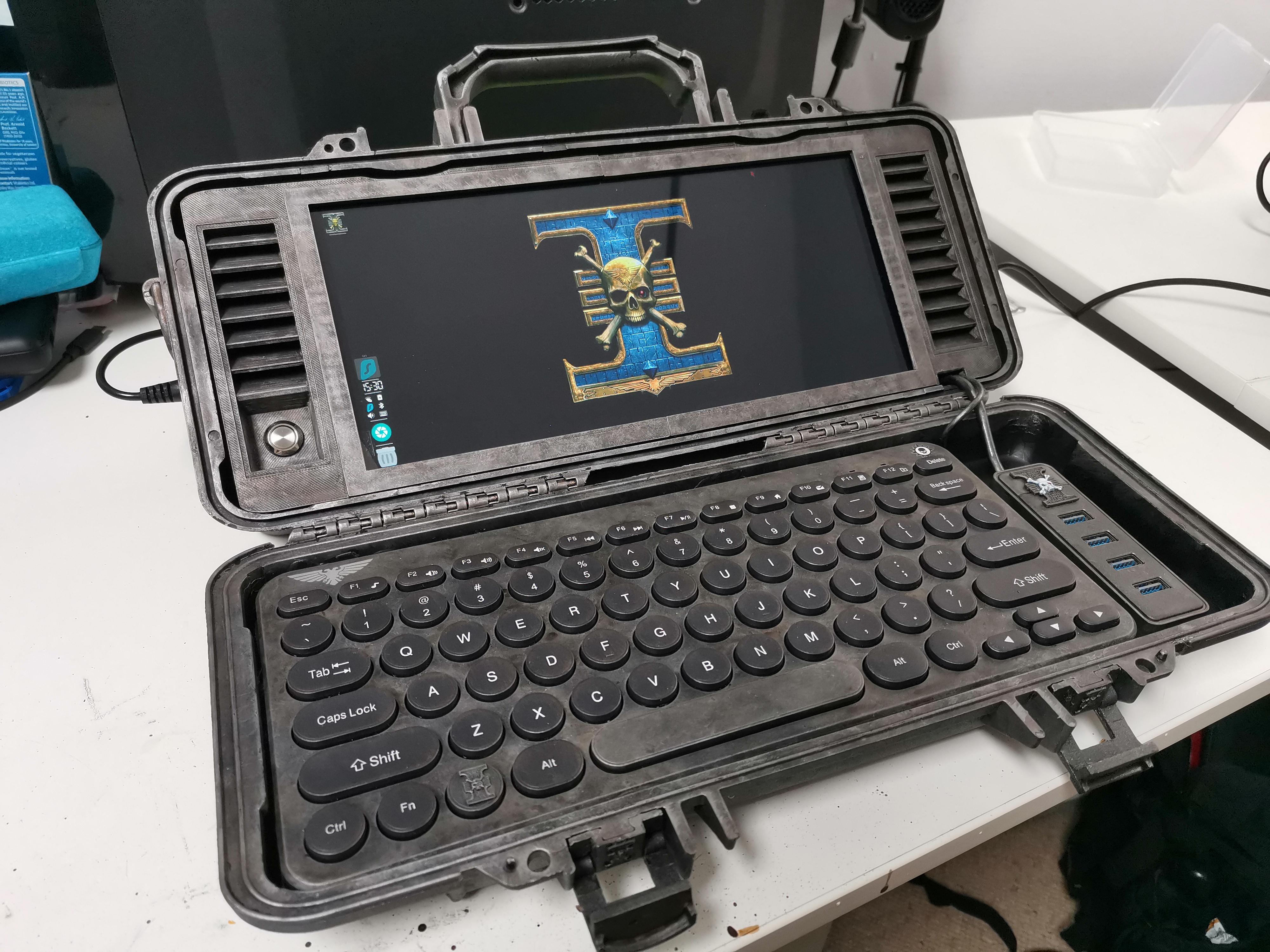
The GrimDark Cyberdeck is complete.

Based on an Orange Pi 4 Pro 12Gb, a Waveshare 10.4" screen and a Waveshare UPS 3s.

Very pleased with the result. Got a few tweaks to make including the battery telemetry which is why I am posting...

Can anyone help with getting the Orange Pi 4 Pro Running the Orange Pi version of Debian to see the Waveshare UPS Module 3s? I have connected the SCL and SDA terminals from the Pi to UPS and enables the i2C on the correct input (0) but can't find a script to show the battery level and charging status on the desktop?

Any help would be appreciated.


r/OrangePI • • Aug 22 '26

New Debian for Orange Pi Pro 4

15 Upvotes

Was having problems with getting a VPN (Surfshark) on my Orange Pi 4 Pro.

This Trixie edition was released a day ago, so fingers crossed it fixes the issues.

https://drive.google.com/drive/folders/1AzF-uTwA328qDFPaVBaKpiP4VjZjkmbS


r/OrangePI • • Aug 21 '26

Finding a Compatable MIPI LCD for the OPi Zero 3w

Thumbnail reddit.com
2 Upvotes

r/OrangePI • • Aug 16 '26

Working on a Jukebox with OPi for gatherings, would like to hear your input

5 Upvotes

Hello everyone! I finally decided to take the plunge and got myself some oranges to tinker with, and found myself deciding what my first proyect will be, i would like a Jukebox that works with local files as well as streaming services like youtube music/spotify/deezer and i am in a bit of an impass with some of my options given my lack of experience with linux/sbc's

FIrst of all let me tell you my use case, i go almost every friday with some friends to play some games, mtg, video games, do stuff; and we almost always have youtube music streaming on a sound bar, the player we have is an old laptop that a friend has from his work, given that its not supposed to be used for anything other than, we cannot login to my acc with premium to avoid ads, and no one is really willing to have their phone be the one playing the service (Me neither) because it ends up being taken hostage when we start adding songs to the queue, so i am currently in the look for the following features in the Jukebox

1- Youtube music streaming (Only audio if possible)
2- Client accesible through web
3- Jukebox Mode where anyone can join through the client and add songs to the queue
4- An option to download the current song to the library

Less important features that i would like to have but honestly wouldnt mind losing if it needs more resources from the SBC

1- MetaData library (Like musicbrainz)
2- Library Organizer
3- Download song to the phone as well as the server

I have a Fiio KA15 dac so it can go from the OPi to the dac to the soundbar and since im not really using it for anything else atm i am willing to just leave it there since while searching looks like OPi sound output is subpar, im not looking for the greatest sound output but a DAC filtering the noise is always appreciated IMO

Currently i have found some options but i am unaware which ones are doable with OPi's current software support

  • LetzPlay seems like a fine option and it having debian/ubuntu packet gives me hope with it

  • Mopidy Is also another choice i found but i am unsure if it can even run given the debian image available on the orange pi's

  • MPD Good ol MPD nothing beats it, my concern with this would be that i am unsure if a web client that controls it is available on the pi, i have only used MPD's most basic features so i am not as familiar with it

  • LMS LMS is another option that i found, when i started learning about dockers i tried to get a server running but was unable at the time and never tried it again, that said having a docker image would make it IMO easier to implement

I am not looking for this to be the most scalable project serving hundreds of users, or a high end hifi server, i just want to make listening music with my friends a bit easier, right now the most users it could possibly serve would be around 10

Right now i dont have the SBC's yet but ive been doing (and will continue to) research about this, sadly i find it difficult actually finding resources about this compared to a RPI as i am sure its the standard with a smaller community.

I will receive multiple sbc's so i have choices, but of course ideally id prefer to use the pi with less resources so i have more leeway with my other projects, the boards i got were

  • OPi Zero 3 (1GB)

  • OPi 4 Pro (4GB)

  • OPi Zero 3W (6GB)

Also my linux experience is not that high but i dont mind getting my hands dirty if this will need it, given that i dont have the boards with me i am unable to start just yet but i should get them this week

What would you guys do? how would you approach it? and which SBC would you pick for the task, would you pick another different model at all?

Any input would be appreciated and i am also planning to update the process of the project since even if its a simple proyect i dont see much documentation for this SBC's so im sure someone would find it useful


r/OrangePI • • Aug 11 '26

Does anyone with an RK3588 board want to help me find out if a distributed LLM inference board is worth building? (one script, ~15 min, no root)

Thumbnail
reddit.com
0 Upvotes

r/OrangePI • • Aug 05 '26

OrangePi 5 Max - can't get into MASKROM

2 Upvotes

I'm having an impossible time getting into MASKROM mode. No matter what I do now, rkDevtool on Windows nor rkdeveloptool on Ubuntu recognize the maskrom device. It's bricked now.

I've had my 5 Max for a while now. In the beginning I was booting from eMMC and SD card and never had trouble getting into MASKROM mode on Windows PC with RkDevTool. But the board had stability problems so I kind of stopped using it. Then I bought the Orange Pi 5V USB-C power adapter after which it seemed to be more stable. So I ventured to get Ubuntu installed on a NVMe SSD where it never managed to boot. But then neither would it boot from SD nor eMMC any more. I figured the SPI needed clearing and I'd start over. But nope, I no longer can get into maskrom mode to do anything with the SPI. I think it's bricked now.

USB UART Debugging shows the DDR banner when powering it on without maskrom button pressed and when pressed the USB UART shows just a couple strange characters, so it seems the maskrom button works. I went thru ChatGPT, Gemini and Claude to no avail. Tried different USB cables too and tried it with Windows PC and Ubuntu on my Jetson. I even re-installed the USB driver on Windows. I think it's pooched.

Anyone have ideas how to get back into maskrom mode to bring this board back to life?


r/OrangePI • • Aug 05 '26

Correct type to new Antenna to Orange Pi RV2

1 Upvotes

Hello friends, good morning!

I recently purchased an Orange Pi RV2 to set up a simple network gateway with a Wi-Fi hotspot. However, the included antenna is extremely limited and performs very poorly, so I want to replace it; the problem is that the documentation doesn't specify which type of IPEX connector the device uses, and—honestly—I don't have a caliper to measure it myself. It would be very helpful if this information were in the manual, but I’ve combed through all the official documentation and found nothing about it. If anyone could help me out—perhaps even by recommending a good antenna—I would be immensely grateful.

Thanks in advance to everyone for the help.


r/OrangePI • • Aug 04 '26

Catching up on Orange Pi 5 Plus Development

12 Upvotes

Hi everyone,

I am a big fan of this community, and I thank you all for the development work you’ve done. I’ve lurked for a long time and haven’t posted.

I have an orange pi 5 plus 32 gb and several orange pi zero 2w projects up and running for months, all because of the great work by this community.

Anyways, I got my hands on another orange pi 5 plus and wanted to know what the latest opinions are on the best Linux OS options since I last checked.

Right now my OP5+ is running Joshua Riek’s amazing image. I know that more options have materialized since I set this server up months (years??) ago. My zero2ws are all running armbian.

For the zeros, I’m more than happy with armbian. But for the OP5+, I prefer a more complete desktop environment, and I usually prefer Ubuntu over other Linux distros.

I’ve done some searching and have seen there’s been a lot of development since I set up my OP5+, including some people setting up a bios, getting “vanilla” Ubuntu arm running, and many custom images.

Is there any consensus about the best full desktop OS (ideally Ubuntu, but I’m flexible) at the moment? When I last checked, Riek’s image was king, and I know development has halted there.

What do people suggest for a “complete” desktop Ubuntu environment (or at least as close as we can get on these ARM boards)?

Thanks in advance.


r/OrangePI • • Aug 04 '26

Android 17 for RK3588(s) devices

Post image
32 Upvotes

Hey guys,

NOTE- This is just a repost of my previous post as I recently got permission to post in this channel.

previous post - https://www.reddit.com/r/SBCs/comments/1uypcw8/android_17_for_rk3588s/

Just want to let everyone know that I am releasing Android 17 for rk3588(s) devices.

Download link - https://github.com/dvab-sarma/android_local_manifest/releases/tag/Android-17.0_r1

Source code - https://github.com/dvab-sarma/android_local_manifest

issues page - https://github.com/dvab-sarma/android_local_manifest/issues/8

This update brings a lot of stability, performance fixes, boot time optimizations, along with new features.

This image was thoroughly tested on Orange Pi 5 pro.

FEATURES -

  1. Boot time is less than 13 seconds ! (tested via nvme booting, nvme used - EDILOCA 128gb nvme), for sd card is less than 22 seconds (tested via mmc booting, mmc used Sandisk extreme plus 128gb)

  2. twrp working end to end out of the box, no hacks , no workarounds, just use settings> rockchip settings> reboot to recovery and just reboot the board and to reboot from twrp to normal mode, in twrp recovery, just press reboot > system.

  3. Widevine L3 is provided as a twrp module in the google drive, tested it with netflix app.

  4. Gapps is working fine, suggested to use only the gapps package without pixel launcher.

  5. Hardware decoding of 8-bit and 10 bit AV1, VP9, HEVC, H264 until 4k@30 fps is supported. The 10 bit is supported via rga3 !!, it converts the 10-bit to 8 bit as nv15 is not supported via mesa.

  6. Certain resolutions would cause glitches like 1080p and 360p, suggested to either use 1440p, 4k or 720p or others etc.

  7. Wifi and bluetooth stable (tested via binge watching Netflix).

  8. DP and HDMI are working (tested via dual monitor setup)

  9. USB 3.0, nvme, usb 2.0 are working and tested thoroughly.

  10. max refresh rate supported by the 2nd HDMI port (HDMI 2.0) on orange pi 5 pro is 60hz, anything above might cause a kernel panic.

Not working -

  1. camera

  2. Ethernet (enabled a kernel config, but don't know if its going to work on other devices, testers are required for various board).

  3. 3.5mm jack

  4. lvds display

Boards currently added in the image -

  1. Orange pi 5 pro

  2. Orange pi 5

  3. Orange pi 5 plus

  4. Orange pi 5 Ultra

  5. Orange pi 5 Max

  6. Radxa rock 5a

  7. Radxa rock 5b

  8. Radxa rock 5c

  9. Orange pi 5 b

NOTE - Only orange pi 5 pro is tested! I need testers to test the image on other devices.

How to burn the image -

  1. download and extract the image.

  2. use balena etcher (recommended on linux, but others can also be used) to flash it onto the desired nvme/ sd card/ usb.

  3. after flashing, MAKE SURE TO change the boot device in the /boot/config.txt file.

  4. for nvme , set boot_device=nvme. for sd card, set the boot_device=mmc, for emmc, set the boot_device=mmc. for usb , set the boot_device=usb.

  5. make sure to play around with the number in boot_devnum= . because different boards use different boot_devnum, it can either be 1 or 0.

for example, on orange pi 5 pro -

for sd card boot,
boot_device=mmc
boot_devnum=1
boot_partnum=1

for nvme booting -
boot_device=nvme
boot_devnum=0
boot_partnum=1

5. change the "fdtfile=" variable to select your respective board. just copy and paste the device tree file name from /boot/ (including .dtb extension) your board uses. (default is set to rk3588s-orangepi-5-pro-1.dtb)

if you want to boot into recovery, you can change the recovery=false to true as well.

6. MAKE SURE TO SAVE THE FILE AND SAFELY EJECT THE BOOTABLE DEVICE. or else its not going to boot.

FOR devices without spi flash, nvme and usb booting is not working due to absence of uboot. for those devices -

  1. use an sd-card and burn the included u-boot-rockchip.img file, using balena etcher (recommended - linux). insert both the sd card and nvme device.

If anything doesn't work, please try to share the uart log in my dm.

Please try to share the image to others as well.

Hope you guys like it!

Happy engineering!!!