r/OpenWebUI • • Jul 27 '26

ANNOUNCEMENT Open WebUI 0.11.0 is here: our BIGGEST RELEASE EVER. A full UI redesign, the largest performance pass we've ever done, and a genuinely huge pile of features & fixes.

Post image
524 Upvotes

This is the largest release we have ever shipped, and it's not close.

🎨 The interface has been rebuilt from the ground up. Every surface got redone: chat view, admin panel, menus, dropdowns, text boxes, spacing, typography. And the thing we're most quietly proud of: the UI is finally, actually uniform. If you've been here a while, you know it was never perfectly consistent. Now it is. Narrower conversation column, lighter type, tidier spacing, consistent menus everywhere, clearly outlined inputs. It just feels right.

⚑ The most significant performance work we've ever done. A top-to-bottom sweep, not a single optimization. Faster saves across the whole app, lighter model lists, quicker folder loading, leaner streaming, fewer DB round trips per request, faster chat search on PostgreSQL, cheaper filter handling while streaming, an optional faster JSON encoder (ENABLE_ORJSON), hiredis by default, Redis Sentinel churn fixed, DNS lookups off the shared thread pool, and a lot more. Long responses no longer slow down as they grow. Big instances stay quick. You will feel this.

πŸ€– And the new features. These are cool new features:

  • Sub-agents: models can hand parts of a task to background helper agents that run their own tool-driven work and report back into the chat.

  • Chat timers: the assistant can park a prompt and bring it back later, after a delay or at a set time.

  • Fork a chat: branch any conversation into a new chat from any point.

  • Folder pages: folders get their own page, with paging, sorting, unread counts and per-folder new chats.

  • Notification targets: route events to multiple webhooks, and the assistant can now notify you when something's worth your attention.

  • Chat and user variables: declare fields in a system prompt, or store your own account context, and drop them in wherever needed.

  • Personal usage dashboard: token heatmap, streaks, most-used models and tools.

  • Compact on demand, customizable keyboard shortcuts, chat previews on hover, note-chat with full model/tools/files, and honestly loads more.

πŸ”’ Plus a mountain of fixes and hardening. Security and access-control fixes (update your production deployments), Safari blank-message fix, context-compaction fixes, web-fetch reliability, OAuth/OIDC sign-in fixes, and dozens upon dozens more across the app.

⚠️ Heads up before you upgrade: this release includes database schema migrations. Back up first, and if you run multi-worker, multi-server, or load-balanced, all instances must be updated at the same time (rolling updates aren't supported).

The full changelog is genuinely enormous, so go read it. There's something in there for everyone.

Thank you to everyone who contributed, reported, translated, and tested. This one's special. πŸš€

What are you most excited to try?

https://github.com/open-webui/open-webui/releases/tag/v0.11.0


r/OpenWebUI • • Nov 05 '24

AMA / Q&A I’m the Sole Maintainer of Open WebUI β€” AMA!

361 Upvotes

Update: This session is now closed, but I’ll be hosting another AMA soon. In the meantime, feel free to continue sharing your thoughts in the community forum or contributing through the official repository. Thank you all for your ongoing support and for being a part of this journey with me.

---

Hey everyone,

I’m the sole project maintainer behind Open WebUI, and I wanted to take a moment to open up a discussion and hear directly from you. There's sometimes a misconception that there's a large team behind the project, but in reality, it's just me, with some amazing contributors who help out. I’ve been managing the project while juggling my personal life and other responsibilities, and because of that, our documentation has admittedly been lacking. I’m aware it’s an area that needs major improvement!

While I try my best to get to as many tickets and requests as I can, it’s become nearly impossible for just one person to handle the volume of support and feedback that comes in. That’s where I’d love to ask for your help:

If you’ve found Open WebUI useful, please consider pitching in by helping new members, sharing your knowledge, and contributing to the projectβ€”whether through documentation, code, or user support. We’ve built a great community so far, and with everyone’s help, we can make it even better.

I’m also planning a revamp of our documentation and would love your feedback. What’s your biggest pain point? How can we make things clearer and ensure the best possible user experience?

I know the current version of Open WebUI isn’t perfect, but with your help and feedback, I’m confident we can continue evolving Open WebUI into the best AI interface out there. So, I’m here now for a bit of an AMAβ€”ask me anything about the project, roadmap, or anything else!

And lastly, a huge thank you for being a part of this journey with me.

β€” Tim


r/OpenWebUI • • Sep 18 '26

Models Qwen 3.8 27b full precision quality at just 5.9GB VRAM usage

349 Upvotes

Just wanted to share this: https://x.com/PrismML/status/2100692248480596348

Prism dropped Bonsai 2

It's based on the full Qwen 3.8 27b, but it is 9x smaller.

It can run in memory with just 5-6GiB VRAM usage and retains 98.2% of quality.

Across all benchmarks, Bonsai 2 is just ~2 percentage points worse than the full precision Qwen 3.8 27b.

For comparison, The Q2_XXS Version of Qwen 3.8 27b is ~14 percentage points worse than Qwen 3.8 27b and Bonsai 2 is just ~2 percentage points worse while being 9 times smaller

It requires their forked llama.cpp to run it, not a big deal.

I got it running on a 7900XTX and I get almost 900 tok/s prefill and 60tok/s output (no MTP)

Extremely fast

I already did some testing, it is a very capable and smart model.

So all 8GB GPU owners: cheer up! This model will run on your card just fine and you will still have 2GB remaining for KV Cache (which will easily give you a ton of KV cache if you quantize your cache).

It's very smart and capable and very fast.

Run it on xhigh reasoning for the best quality (which is what comes close to the Full Precision Qwen 3.8 27b) or if you drop it to medium you will lose some of that quality but it will reason way less.

https://huggingface.co/collections/prism-ml/bonsai-2

NIVIDA card owners should run the PTQ1_0 file since it is optimized for CUDA and all AMD owners should run the Q2_0 file which will run well via Vulkan.

(The PTQ1_0 version doesn't have the dot kernel so on AMD cards it will crawl at 13tok/s - the Q2_0 version of the model will run very fast on AMD cards)


r/OpenWebUI • • Jun 30 '26

ANNOUNCEMENT Open WebUI 0.10.0 is out and it quietly turns the thing into a real agent platform - The LARGEST RELEASE EVER (205 entries)

Post image
332 Upvotes

For a while now Open WebUI has been one of the go-to self-hosted chat UIs. 0.10.0 is the release where that framing expands to being your entire AI infrastructure.

This is the version where it stops being just a chat surface and starts being something you can wire into your own infrastructure and let it do things.

Event functions (the headline)

A brand-new plugin primitive. Pipe/filter/action functions all run inside a chat. An Event function runs your own Python in response to system-wide events instead: sign-ups, config changes, startup, chat/knowledge/file actions. It's the first plugin type that hooks into the platform itself rather than a single conversation. If you've ever wanted Open WebUI to provision something, sync to an external system, or notify a service the moment X happens, this is the hook that was missing.

Backing it: a new event system with outbound webhooks. Open WebUI now emits events across the whole app, and admins can route them to webhooks, users, or groups. Audit trails, automation, integrations: glue you can build without forking.

Reworked memory

Memory is now split into distinct types: long-lived personal memories vs per-conversation context, with a proper structured add/update/delete flow instead of one fuzzy bucket.

Automatic context compaction

Long chats past a token threshold can auto-summarize to stay inside the model's window. Configurable, and off by default, so nothing changes unless you opt in. No more manually pruning a 90-message thread to keep a small-context model coherent.

Open WebUI Computer agent support

Connect to Open WebUI Computer over an OpenAI-compatible gateway and run full agent sessions on your own machine with file, terminal, git and web access.

Native tool calling is now the default

For every chat and model. The old behavior is still there, renamed Legacy, so if you relied on the old path flip it back per-model after upgrading.

A few more worth calling out:

This is the single largest version release ever, with 205 entries!

  • Share folders with your team: a folder + its chats, to users/groups/everyone, read or write, gated by a new admin permission.

  • Much faster hybrid search on large KBs: runs natively in the DB on pgvector instead of loading whole collections into memory. Plus external knowledge bases backed by an external retrieval source.

  • MCP matured: per-connector OAuth resource/scope control, least-privilege scopes, auto-authorizing OAuth 2.1 tools, broader server compatibility, and resource (blob/image) results now come through.

  • Large performance pass: streaming, math rendering, markdown setup, password hashing, model downloads, uploads and URL safety checks moved off the main loop or batched. Server stays responsive under load.

  • Security & access hardening: live token/session revocation on WebSocket connections, DNS-rebinding protection, path-traversal rejection, optional valve encryption at rest, Argon2 password hashing, AWS RDS IAM database auth.

  • Out of beta and now stable: Memories, Notes, Channels and High Contrast Mode.

  • New web search providers (SERPHouse, Microsoft Web IQ) + optional web-search confirmation.

  • QoL: drag folders/notes/models from the sidebar into chat, searchable pickers in the model editor, recurring calendar events, richer analytics with a date picker.

Links


r/OpenWebUI • • Oct 10 '26

ANNOUNCEMENT Open WebUI 0.12.0: REALTIME VOICE calls are here. TWO-FACTOR sign-in, shared chats you can reply in, Tool Search, Model Controls, VERSION CONTROLS, Redesigned Knowledge Base and Model Editor and a more visible CURSOR. 339 changes, our LARGEST RELEASE EVER.

Thumbnail
gallery
309 Upvotes

On October 3, 2024, someone opened issue #5894: "feat: openai real-time api". Over two years it collected 35 comments and 74 reactions.

Today it ships.

0.12.0 is the LARGEST release in Open WebUI's history.

19 days after 0.11.4: 583 commits, 107,637 lines added, 339 changelog entries. 52 new features. 281 fixes.

You can call it now.

Switch Voice mode to Realtime and just talk. The voice model handles the small talk on its own. Ask something real and it hands the question to the model you picked for the chat, with your whole conversation and every tool it has, then speaks the answer back while the full reply writes itself into the chat. Give a model a 3D avatar and it waves, claps and moves its mouth as it speaks.

Two factors, every user.

Admins can require two-factor sign-in for everyone: an authenticator app, ten recovery codes and a reset command for the day someone loses their phone. Admins can sign a user out of every device. Change a password and every device is signed out, Redis or not. On top of that, 40 security and access-control fixes.

Chats are not one-person anymore.

Share a chat or a folder with Allow replies and everyone writes in the same conversation, live. Every message carries a name and a face. You see who is typing. Nobody else can touch your chat settings, title or tags.

Your models, your knobs.

Put a Thinking control with Low, Medium and High right next to the model selector, or build any control you like, each option with its own parameters. Every save of a model, tool, function or skill is now a version you can go back to. Skills hold whole folders of scripts, references and templates, and admins can import them straight from GitHub. The model editor has a completely new layout.

Built for the big setups.

Tool Search keeps long tool definitions out of the request until the model actually needs one, so your prompt stays small and your prompt cache survives your MCP collection. Groups nest inside groups and pass their access down. Hybrid search on Milvus now runs inside Milvus instead of pulling every chunk into Open WebUI. Knowledge bases open like a file browser.

The bugs you learned to live with.

  • Pasting a large block of text froze the browser. Reported March 2025. Fixed. (as far as possible, waiting on upstream dependency for further improvements)

  • Older interrupted replies kept spinning forever when you reopened a chat. Reported June 2025. Fixed.

  • One empty reply could break a chat for good with some providers. Fixed, and chats already stuck that way work again.

  • Large pastes into Notes vanished on reload. Fixed.

  • iPhone photos failed with vision models in Firefox. Fixed.

236 of the 281 fixes trace back to an issue one of you wrote.

And yes, the cursor.

WE HEARD YOU. The cursor at the end of a streaming reply now pulses faster and fades further. It got its own line in the changelog. It earned it.

7,439 tests ran against this release. 330 unit, 4,906 integration, 2,188 driving a real browser and 15 frontend. The integration suite ran twice, once on SQLite and once on Postgres with Redis: 12,345 test runs across 46 parallel jobs in about 30 minutes. Every one of those tests is public: https://github.com/open-webui/tests

Before you upgrade:

  • The database schema changes. Back up first. Multi-worker, multi-server and load-balanced setups must update every instance at once; rolling updates will fail.

  • Milvus users: back up your Milvus data. The first start copies every collection, which can take hours on large data and needs free disk space for a second copy. Hybrid search needs Milvus 2.5 or newer.

  • Instances that share websocket traffic through Redis should all be updated together.

  • ENABLE_PLUGINS=false now switches off every kind of plugin, external tool servers included.

Thank you. To everyone who wrote an issue and then came back to answer our questions. To everyone who updated a translation, 47 languages in this release alone. To everyone who sent a pull request or pushed back until we got it right. None of this would be as good without you.

Full changelog: https://github.com/open-webui/open-webui/blob/f8ae8a6c328946dc62cd0712961a0632574581bf/CHANGELOG.md

(yes a link to the file today, because we literally could not fit the entire changelog into github releases)


r/OpenWebUI • • Feb 13 '26

ANNOUNCEMENT πŸš€ Open WebUI v0.8.0 IS HERE! The LARGEST Release EVER (+30k LOC!) 🀯 OpenResponses, Analytics Dashboard, Skills, A BOAT LOAD of Performance Improvements, Rich Action UI, Async Search & MORE!

301 Upvotes

πŸ›‘ STOP SCROLLING. IT IS TIME.

(Check out the post on Open WebUI Community)

We just pushed the big red button. Open WebUI v0.8.0 is officially live and it is an absolute UNIT of a release. We are talking a major version bump. We are talking a complete overhaul.

We didn't just cook; we catered the entire wedding. πŸ‘¨β€πŸ³πŸ”₯

πŸ† THE STATS DO NOT LIE

This is statistically the LARGEST update in Open WebUI history.

  • +30,000 lines of code added πŸ“ˆ

  • 300+ Commits

  • 300+ Files edited

  • 139 Changelog entries (previous record was 107)

We literally broke the chart:

πŸ† TOP RELEASES (by entries)
----------------------------------------
   1. v0.8.0    (TODAY)      - 139 entries 🀯
   2. v0.7.0    (2026-01-09) - 107 entries
   3. v0.6.19   (2025-08-09) - 103 entries

πŸ”₯ THE GOOD STUFF (TL;DR)

The changelog is massive, but here is why you need to update RIGHT NOW:

πŸ“Š 1. FULL ANALYTICS DASHBOARD

Admins, rejoice! You can finally see where your tokens are going.

  • Usage statistics per model/user

  • Token consumption charts

  • User activity rankings

  • Why? Because data is beautiful

Analytics Docs

🧠 2. SKILLS (Experimental)

We are bringing agentic capabilities to the next level. Create reusable AI skills with detailed instructions. Reference them in chat with $ or attach them to models. This is a game-changer for complex workflows.

Skills Docs

πŸ§ͺ 3. OPEN RESPONSES (Experimental)

Native support for the Open Responses API! It finally reached enough adoption so might as well throw it in there in addition to the good ol' reliable Completions API.

Open Responses Docs

πŸ“¨ 4. MESSAGE QUEUING

No more waiting. While the AI is still generating, you can already send your next message! Queue your messages while the AI is still generating the response to your last one or send it immediatly and interrupt the AI's response. Keep your train of thought moving. πŸš‚

Message Queue Docs

πŸ“ 5. PROMPT VERSION CONTROL

Devs, we heard you. Full history tracking for prompts. Commit changes, view diffs, rollback versions. It’s Git for your prompts.

Prompt Version Docs

⚑ 6. SPEED. I AM SPEED.

We went on an optimization spree. This version has the most performance and scalability improvements we ever shipped! If it was slow, we fixed it.

  • πŸš€ 34% Faster Authentication: Login is now instant.

  • 🏎️ Sub-second TTFT: Chat completions are snappier thanks to smarter model caching.

  • 🀯 13x Faster SCIM Lookups: Enterprise users, you're welcome.

  • 🧹 4-5x Faster Bulk Operations: Deleting feedback or managing group members is now blazing fast.

  • 🧠 39% Faster Memory Updates: Your AI remembers things quicker.

  • 🎨 Concurrent Image Editing: Multi-image edits now load all at once.

  • ✨ Silky Smooth UI: The model selector no longer lags, even with hundreds of models.

  • Search Debouncing Everywhere: Searching for Users, Groups, Functions, Tools, Prompts, Knowledge, and Notes is now incredibly efficient. No more UI stutter while typing - and a chill backend for a less-stressed database.

  • πŸ’¨ Database Optimizations EVERYWHERE: We eliminated redundant queries for:

    • Profile updates & role changes

    • Model visibility toggling

    • Model access control checks

    • Model list imports

    • Filter function loading

    • Group member counts

🀝 7. DIRECT USER SHARING

Finally. You asked for it, we delivered. You no longer need to create a "Group" just to share a specific prompt or model with one other person.

  • Share Knowledge Bases, Prompts, Models, Tools, and Channels directly to specific individuals.

  • Includes a redesigned Access Control UI that makes managing permissions significantly less painful.

🎨 8. RICH UI FOR ACTIONS

Actions just got a massive facelift.

  • HTML/Iframe Rendering: Action functions can now render rich HTML content directly in the chat stream.

  • No more hacks: Authors don't need to inject code blocks anymore. We now support embedded iframes natively.

Rich UI Docs

🐍 9. NATIVE PYTHON CODE EXECUTION

Models can now autonomously run Python code for calculations, data analysis, and visualizations without needing the "Default" mode hacks. It's cleaner, faster, and more integrated.

🚀 10. A BOATLOAD OF FIXES

We squashed the bugs that were annoying you the most. Here are the heavy hitters:

  • πŸ”₯ Stability: Fixed database connection pool exhaustion (no more random server timeouts).

  • ❄️ No More Freezing: Fixed LDAP authentication hangs when logging in with non-existent accounts.

  • πŸ›‘οΈ Security: Added SSRF protection for image loading.

  • 🧹 Resource Leaks: Fixed "Unclosed client session" errors by properly cleaning up streaming connections.

  • πŸ”Œ MCP Tools: Fixed a regression where MCP tools were failing with pickling errors.

  • πŸ”‹ Battery Saver: Fixed the "User Online" status indicator eating 40% of your GPU (oops).

  • πŸ€– Model Compatibility: Fixed Ollama providers failing if models didn't end in :latest.

  • πŸ’» Code Fixes: Markdown fences (backticks) are now automatically stripped before execution, fixing syntax errors.

  • πŸ“š RAG Reliability: Fixed silent failures when uploading files to Knowledge Bases.

  • πŸ‘οΈ Dark Mode: Fixed icons randomly inverting colors in dark mode.

  • And a lot more ;)

We recommend reading the full novel:

Read the full changelog here - let it sink in - enjoy the depth

Are you as hyped as we are?

Join the Discord

As always, find our helpful AI Bot on the Discord in the #questions channel - fed with all issues, all discussions and the entire docs if you need any immediate troubleshooting help.

Let us know what you think in the comments! If you find a bug, please report it on GitHub Issues so we can squash it immediately. πŸ›πŸ”¨


r/OpenWebUI • • Apr 21 '26 Bravo

ANNOUNCEMENT Open WebUI v0.9.0 IS HERE β€” I don't even know where to start! NATIVE DESKTOP, SCHEDULED AUTOMATIONS, TASK MANAGEMENT, CALENDAR AND THE LARGEST PERFORMANCE OVERHAUL EVER

288 Upvotes

Open WebUI v0.9.0 β€” your chats were silently re-sending tens of MBs per turn. We mass-closed 200+ issues. There's a desktop app now. I don't even know where to start.

Okay. Deep breath. Let's go.

I genuinely don't know how to write this post because this release is so absurdly large that no matter where I start, I'm burying something important.

200+ changes. That's not a version bump. That's a different piece of software wearing the same name.

Let me just hit you with the thing that's going to make the biggest difference in your daily life first:

Your chats were sending TENS OF MEGABYTES per turn. Every turn. You didn't know. We fixed it.

Here's what was happening: every time you sent a message, Open WebUI was packaging up your entire conversation history β€” every message, every image, every attached file β€” and shipping it back to the server. Long chat with screenshots? 10, 20, 30+ MB round-tripping on every single prompt.

v0.9.0 uses server-side history loading. The client sends a lightweight request. The server already has your history. Your bandwidth just got a massive, silent upgrade.

But that's honestly just the appetizer. Here's the main course:

🧨 WE REWROTE THE ENTIRE BACKEND

Not "we made some things async." Not "we optimized a few queries." We went through the entire core backend β€” every database call, every file operation, every request path β€” and made it asynchronous.

What does this mean for you?

THE ENTIRE BACKEND IS NOW ASYNC. No matter how long operations take, there's nothing blocking your server anymore now.

  • πŸ’¬ Long chats no longer kill your browser. Off-screen messages unload from memory and reload on scroll. 500-message conversations stay smooth.

  • πŸ“ File uploads don't block the server. Uploads, reads, transcriptions, deletions β€” all background threads now.

  • ⚑ Streaming is faster. Single-pass line processing instead of double yields.

  • πŸ“‚ Sidebar loads faster. Chat lists now query only the fields needed for the view.

  • 🏷️ Tags load faster. Only metadata, not full chat payloads.

  • 🧠 Image viewer uses less memory.

  • 🏎️ Title updates are a single DB op instead of multiple round trips.

  • πŸ”Ž Mention parsing, code blocks, deep equality checks, knowledge access β€” all optimized.

  • AND LITERALLY 20 OTHER PERFORMANCE IMPROVEMENTS (!!!!!!!)

I literally cannot list all the performance PRs. There are too many. Just go look at the changelog. It's a wall of entries.

If v0.8.x ever felt slow, v0.9.0 will feel like we rebuilt it from scratch. Because we kind of did.

Oh wait. I haven't even mentioned the headline features yet. Yeah. All of that performance stuff? That was the background work.

πŸ–₯️ DESKTOP APP

Native. Mac. Windows. Linux. No Docker. No terminal. Download it. Run it. That's it.

It connects to your existing remote instances. Switch between servers from the sidebar. But here's the wild part: there's a system-wide floating chat bar. Shift+Cmd+I on Mac, Shift+Ctrl+I on Windows/Linux. You're in any app β€” browser, IDE, Photoshop, whatever β€” and boom, AI chat overlay. System-wide push-to-talk. Offline mode. Auto-updates. Zero telemetry.

It's like Spotlight but it's your AI. And it's free. And it's local.

πŸ€– SCHEDULED AUTOMATIONS

"Every morning at 8am, summarize X." "Every Friday, generate a status report." "Every hour, check Y and alert me if Z."

Set it. Forget it. The AI runs on a cron schedule while you do literally anything else. Create automations from a dedicated page or just ask the AI to set one up in chat β€” it has built-in tools to create, list, update, pause, and delete automations conversationally.

πŸ—“οΈ FULL CALENDAR

Events. Recurring schedules. Reminders β€” toast, browser notification, or webhook. Automations show up here too. Configurable alerts up to an hour before.

πŸ“‹ TASK MANAGEMENT IN CHAT

Tell the AI to plan a project. It creates tasks. Tracks them. Updates them in real-time. In the conversation.

πŸ›‘οΈ Security (The Serious Section)

40+ security fixes. This is not a drill:

  • πŸ›‘οΈ XSS in model descriptions β†’ fixed

  • 🌐 SSRF bypass via IPv6 resolution β†’ fixed

  • 🚫 LDAP empty-password bypass β†’ fixed

  • πŸ‘₯ First-user admin race condition β†’ fixed

  • πŸ”‘ API key bypass via alternate headers β†’ fixed

  • πŸ”’ SCIM timing-attack token comparison β†’ fixed

  • 🧭 Azure path traversal β†’ fixed

  • πŸ›‘ Socket role persistence after user demotion/deletion β†’ fixed

  • πŸ” Channel, knowledge, and model permission enforcement across the board β†’ fixed

✨ Also (Because 200+ Changes Is Insane)

  • πŸ“Ž Re-attach previously uploaded files β€” browse and attach without re-uploading saving you processing and upload time

  • 🎨 Emoji shortcodes β€” type : for emoji suggestions with recents pinned to top

  • πŸ‘† Swipe to reply on mobile β€” swipe right on any message

  • πŸ”” Unread chat indicators in the sidebar

  • πŸ“Œ Pinned notes in sidebar for quick access

  • πŸŽ™οΈ Mistral TTS β€” new text-to-speech provider

  • ☁️ Azure Responses API β€” /openai/v1 format support

  • πŸ€– Ollama Responses API β€” /v1/responses with Ollama models

  • πŸ—‘οΈ Admin model deletion directly from the model selector

  • πŸ”— Shared chat access controls β€” grant access to specific users/groups, BIG W

  • πŸ”Œ WebSocket reconnect feedback β€” clear warnings on disconnect/reconnect and automatic reconnect

  • 🎚️ Active filter valve shortcuts from chat input

  • 🧩 Richer Anthropic tool results β€” images and structured outputs preserved

  • 🌐 Translation updates β€” Irish, Catalan, German, Chinese, Hindi, Portuguese (BR)

⚠️ BEFORE YOU docker pull β€” READ THIS

  1. BACK UP YOUR DATABASE. Schema migrations included. Multi-worker/load-balanced? All instances update at once or everything breaks.

  2. Custom plugins may need async migration. Check the 0.9.0 Plugin Migration Guide.

  3. OpenAI passthrough is now opt-in β€” set ENABLE_OPENAI_API_PASSTHROUGH if you need it.

  4. SQLite WAL enabled by default for better concurrent performance.

⭐ 133k stars and counting. This is the biggest release we've ever shipped. Go try it and tell us what breaks 😈

https://github.com/open-webui/open-webui/releases/tag/v0.9.0


r/OpenWebUI • • Sep 09 '25

New web search visuals looks awesome!

Post image
272 Upvotes

I love the new expandable source menu with all the icons, makes it easier to go straight to sources.

I just wish the search would be a tad bit faster.

What are your thoughts?


r/OpenWebUI • • Jul 22 '26

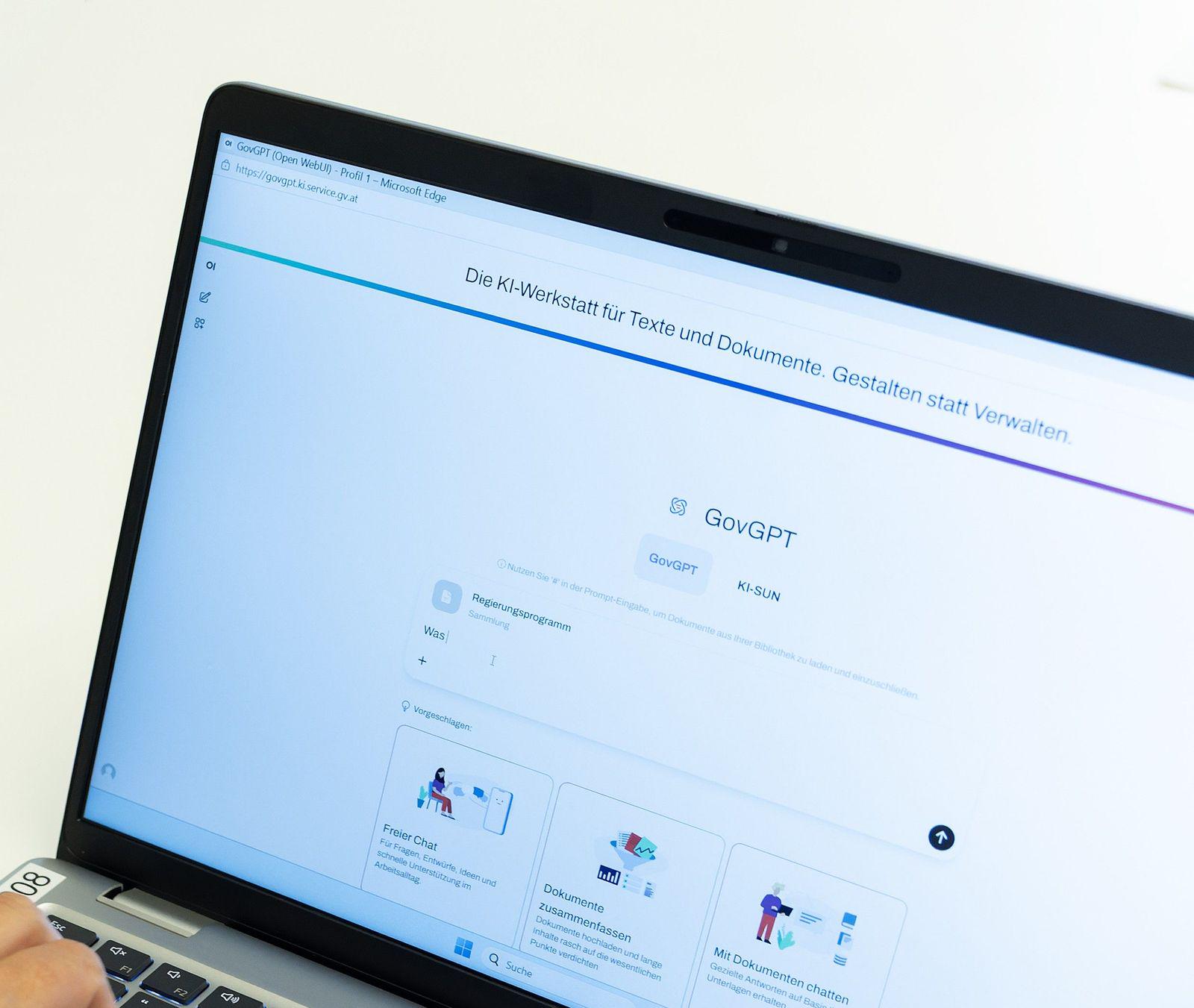
Show and tell πŸ‡¦πŸ‡Ή Austria is rolling out a government AI-platform using Open WebUI

Post image
244 Upvotes

πŸ‡¦πŸ‡Ή Austria is rolling out a government AI-Platform using Open WebUI πŸ‡¦πŸ‡Ή

This is a surprisingly large real-world deployment: "GovGPT" is part of Austria’s Public AI initiative, running on sovereign infrastructure (in their BRZ - federal datacenter) with Mistral open-weight models.

Trending Topics reports that Open WebUI is used as the interface for GovGPT, and the screenshot of the platform is labeled "GovGPT (Open WebUI)" on the top left corner!

The rollout is already happening and targeting 250,000 public-sector employees!

The federal rollout targets around 180,000 federal employees. The broader public-sector context refers to approximately 250,000 public sector employees.

Planned use cases include document chat, internal knowledge bases, electronic-file analysis, parliamentary requests, and eventually agentic workflows.

This might be one of the largest government deployments of Open WebUI yet. πŸš€

Sources:


r/OpenWebUI • • Sep 21 '26

ANNOUNCEMENT Open WebUI 0.11.4 is out: slim image at ~175 MB, skills from terminals, per-language model names

Post image
220 Upvotes

Open WebUI 0.11.4 is out.

The headline is the images. The slim build now comes down at around 175 MB, about 89% smaller than the last release: the bundled local models, the packages around them and the tools that installed them are gone from it. The standard image lost about 170 MB as well (a second copy of Python, fonts nothing loaded, packages nothing imports). The slim image still starts and holds a conversation on its defaults, but anything that leaned on the bundled models (PDF and Word reading, local speech, embeddings) now needs an external service. That is all written out in the changelog under Changed, worth reading before you switch.

Elsewhere:

  • Skills from a terminal: skills a connected terminal server offers sit beside workspace skills in every picker, and a model working with a terminal now reads the AGENTS.md in its home directory every turn

  • Automatic skill discovery: every skill you can reach is listed to the model by name and description, full text loads only when it decides to use one

  • Terminal tabs per command, folder uploads to terminals, and side-by-side file comparison in the file browser

  • Per-language names and descriptions for models, tools, skills and functions, plus suggested starter prompts in the interface language

  • The sign-in form can now be removed from the authentication settings, where before it needed an env var set before startup

  • Search over chats and knowledge no longer blocks the server, streaming into long conversations got much cheaper, and stopping a chat now stops every running task

35 added, 182 fixed, 18 changed. The release includes security and access-control fixes, so production deployments should update sooner rather than later. No database migration this time.

Release notes and full changelog: https://github.com/open-webui/open-webui/releases/tag/v0.11.4

Docs: https://docs.openwebui.com


r/OpenWebUI • • Mar 13 '26 Helpful Bravo

Plugin Claude just got dynamic, interactive inline visuals β€” Here's how to get THE SAME THING in Open WebUI with ANY model!

Thumbnail
v.redd.it
216 Upvotes

Your AI can now build apps inside the chat. Quizzes that grade you. Forms that personalize recommendations. Diagrams you click to explore. All in Open WebUI.

You might have seen Anthropic just dropped this new feature β€” interactive charts, diagrams, and visualizations rendered directly inside the chat. Pretty cool, right?

I wanted the same thing in Open WebUI, but better. So I built it. And unlike Claude's version, it works with any model β€” Claude, GPT, Gemini, Llama, Mistral, whatever you're running.

It's called Inline Visualizer and it's a Tool + Skill combo that gives your model a full design system for rendering interactive HTML/SVG content directly in chat.

What can it do?

  • Architecture diagrams where you click a node and the model explains that component

  • Interactive quizzes where answer buttons submit your response for the model to grade

  • Preference forms where you pick options and the model gives personalized recommendations based on your choices

  • Chart.js dashboards with proper dark mode theming

  • Explainer diagrams with expandable sections, hover effects, and smooth transitions

  • and literally so much more

The KILLER FEATURE: sendPrompt

This is what makes it more than just "render HTML in chat". The tool injects a JS bridge called sendPrompt that lets elements inside the visualization send messages back to the chat.

Click a node in a diagram? The model gets asked about it. Fill out a quiz? The model gets your answers and drafts you a customized response. Pick preferences in a form? The model gets a structured summary and responds with tailored advice.

The visualization literally talks to your AI. It turns static diagrams into exploration interfaces.

Minor extra quirk

The AI can also create links and buttons using openLink(url) which will open as a new Tab in your Browser. If you are brainstorming how to solve a programming problem, it can also point you to specific docs and websites using clickable buttons!

How it works

Two files:

  1. A Tool (tool.py) β€” handles the rendering, injects the design system (theme-aware CSS, SVG classes, 9-color ramp, JS bridges)

  2. A Skill (skill.md) β€” teaches the model the design system so it generates clean, interactive, production-quality visuals

Paste both into Open WebUI, attach to your model, done. No dependencies, no API keys, no external services. (Read full tutorial and setup guide to ensure it works as smoothly as shown in the video)

Tested with Claude Haiku 4.5 β€” strong but very fast models produce stunning results and are recommended.

πŸ“¦ Quick setup + Download Code

Takes 1 minute to set up and use!

Setup Guide / README is in the subfolder of the plugin!

Anthropic built it for Claude. I built it for all of us. Give it a try and let me know what you think! Star the repository if you want to follow for more plugins in the future ⭐


r/OpenWebUI • • Jun 12 '25 This

AMA / Q&A I’m the Maintainer (and Team) behind Open WebUI – AMA 2025 Q2

204 Upvotes

Hi everyone,

It’s been a while since our last AMA (β€œI’m the Sole Maintainer of Open WebUI β€” AMA!”), and, wow, so much has happened! We’ve grown, we’ve learned, and the landscape of open source (especially at any meaningful scale) is as challenging and rewarding as ever. As always, we want to remain transparent, engage directly, and make sure our community feels heard.

Below is a reflection on open source realities, sustainability, and why we’ve made the choices we have regarding maintenance, licensing, and ongoing work. (It’s a bit long, but I hope you’ll find it insightfulβ€”even if you don’t agree with everything!)

---

It's fascinating to observe how often discussions about open source and sustainable projects get derailed by narratives that seem to ignore even the most basic economic realities. Before getting into the details, I want to emphasize that what follows isn’t a definitive guide or universally β€œright” answer, it’s a reflection of my own experiences, observations, and the lessons my team and I have picked up along the way. The world of open source, especially at any meaningful scale, doesn’t come with a manual, and we’re continually learning, adapting, and trying to do what’s best for the project and its community. Others may have faced different challenges, or found approaches that work better for them, and that diversity of perspective is part of what makes this ecosystem so interesting. My hope is simply that by sharing our own thought process and the realities we’ve encountered, it might help add a bit of context or clarity for anyone thinking about similar issues.

For those not deeply familiar with OSS project maintenance: open source is neither magic nor self-perpetuating. Code doesn’t write itself, servers don’t pay their own bills, and improvements don’t happen merely through the power of communal critique. There is a certain romance in the idea of everything being open, free, and effortless, but reality is rarely so generous. A recurring misconception deserving urgent correction concerns how a serious project is actually operated and maintained at scale, especially in the world of β€œfree” software. Transparency doesn’t consist of a swelling graveyard of Issues that no single developer or even a small team will take years or decades to resolve. If anything, true transparency and responsibility mean managing these tasks and conversations in a scalable, productive way. Converting Issues into Discussions, particularly using built-in platform features designed for this purpose, is a normal part of scaling open source process as communities grow. The role of Issues in a repository is to track actionable, prioritized items that the team can reasonably address in the near term. Overwhelming that system with hundreds or thousands of duplicate bug reports, wish-list items, requests from people who have made no attempt to follow guidelines, or details on non-reproducible incidents ultimately paralyzes any forward movement. It takes very little experience in actual large-scale collaboration to grasp that a streamlined, focused Issues board is vital, not villainous. The rest flows into discussions, exactly as platforms like GitHub intended. Suggesting that triaging and categorizing for efficiency, moving unreproducible bugs or priorities to the correct channels, shelving duplicates or off-topic requests, reflects some sinister lack of transparency is deeply out of touch with both the scale of contribution and the human bandwidth available.

Let’s talk the myth that open source can run entirely on the noble intentions of volunteers or the inertia of the internet. For an uncomfortably long stretch of this project’s life, there was exactly one engineer, Tim, working unpaid, endlessly and often at personal financial loss, tirelessly keeping the lights on and code improving, pouring in not only nights and weekends but literal cash to keep servers online. Those server bills don’t magically zero out at midnight because a project is β€œopen” or β€œbeloved.” Reality is often starker: you are left sacrificing sleep, health, and financial security for the sake of a community that, in its loudest quarters, sometimes acts as if your obligation is infinite, unquestioned, and invisible. It's worth emphasizing: there were months upon months with literally a negative income stream, no outside sponsorships, and not a cent of personal profit. Even in a world where this is somehow acceptable for the owner, but what kind of dystopian logic dictates that future team members, hypothetically with families, sick children to care for, rent and healthcare and grocery bills, are expected to step into unpaid, possibly financially draining roles simply because a certain vocal segment expects everything built for them, with no thanks given except more demands? If the expectation is that contribution equals servitude, years of volunteering plus the privilege of community scorn, perhaps a rethink of fundamental fairness is in order.

The essential point missed in these critiques is that scaling a project to properly fix bugs, add features, and maintain a high standard of quality requires human talent. Human talent, at least in the world we live in, expects fair and humane compensation. You cannot tempt world-class engineers and maintainers with shares of imagined community gratitude. Salaries are not paid in GitHub upvotes, nor will critique, however artful, ever underwrite a family’s food, healthcare, or education. This is the very core of why license changes are necessary and why only a very small subsection of open source maintainers are able to keep working, year after year, without burning out, moving on, or simply going broke. The license changes now in effect are precisely so that, instead of bugs sitting for months unfixed, we might finally be able to pay, and thus, retain, the people needed to address exactly the problems that now serve as touchpoint for complaint. It’s a strategy motivated not by greed or covert commercialism, but by our desire to keep contributing, keep the project alive for everyone, not just for a short time but for years to come, and not leave a graveyard of abandoned issues for the next person to clean up.

Any suggestion that these license changes are somehow a betrayal of open source values falls apart upon the lightest reading of their actual terms. If you take a moment to examine those changes, rather than react to rumors, you’ll see they are meant to be as modest as possible. Literally: keep the branding or attribution and you remain free to use the project, at any scale you desire, whether for personal use or as the backbone of a startup with billions of users. The only ask is minimal, visible, non-intrusive attribution as a nod to the people and sacrifice behind your free foundation. If, for specific reasons, your use requires stripping that logo, the license simply expects that you either be a genuinely small actor (for whom impact is limited and support need is presumably lower), a meaningful contributor who gives back code or resources, or an organization willing to contribute to the sustainability which benefits everyone. It’s not a limitation; it’s common sense. The alternative, it seems, is the expectation that creators should simply give up and hand everything away, then be buried under user demands when nothing improves. Or worse, be forced to sell to a megacorp, or take on outside investment that would truly compromise independence, freedom, and the user-first direction of the project. This was a carefully considered, judiciously scoped change, designed not to extract unfair value, but to guarantee there is still value for anyone to extract a year from now.

Equally, the kneejerk suspicion of commercialization fails to acknowledge the practical choices at hand. If we genuinely wished to sell out or lock down every feature, there were and are countless easier paths: flood the core interface with ads, disappear behind a subscription wall, or take venture capital and prioritize shareholder return over community need. Not only have we not taken those routes, there have been months where the very real choice was to dig into personal pockets (again, without income), all to ensure the platform would survive another week. VC money is never free, and the obligations it entails often run counter to open source values and user interests. We chose the harder, leaner, and far less lucrative road so that independence and principle remain intact. Yet instead of seeing this as the solid middle ground it is, one designed to keep the project genuinely open and moving forward, it gets cast as some betrayal by those unwilling or unable to see the math behind payroll, server upkeep, and the realities of life for working engineers. Our intention is to create a sustainable, independent project. We hope this can be recognized as an honest effort at a workable balance, even if it won’t be everyone’s ideal.

Not everyone has experience running the practical side of open projects, and that’s understandable, it’s a perspective that’s easy to miss until you’ve lived it. There is a cost to everything. The relentless effort, the discipline required to keep a project alive while supporting a global user base, and the repeated sacrifice of time, money, and peace of mind, these are all invisible in the abstract but measured acutely in real life. Our new license terms simply reflect a request for shared responsibility, a basic, almost ceremonial gesture honoring the chain of effort that lets anyone, anywhere, build on this work at zero cost, so long as they acknowledge those enabling it. If even this compromise is unacceptable, then perhaps it is worth considering what kind of world such entitlement wishes to create: one in which contributors are little more than expendable, invisible labor to be discarded at will.

Despite these frustrations, I want to make eminently clear how deeply grateful we are to the overwhelming majority of our community: users who read, who listen, who contribute back, donate, and, most importantly, understand that no project can grow in a vacuum of support. Your constant encouragement, your sharp eyes, and your belief in the potential of this codebase are what motivate us to continue working, year after year, even when the numbers make no sense. It is for you that this project still runs, still improves, and still pushes forward, not just today, but into tomorrow and beyond.

β€” Tim

---

AMA TIME!
I’d love to answer any questions you might have about:

  • Project maintenance

  • Open source sustainability

  • Our license/model changes

  • Burnout, compensation, and project scaling

  • The future of Open WebUI

  • Or anything else related (technical or not!)

Seriously, ask me anything – whether you’re a developer, user, lurker, critic, or just open source curious. I’ll be sticking around to answer as many questions as I can.

Thank you so much to everyone who’s part of this journey – your engagement and feedback are what make this project possible!

Fire away, and let’s have an honest, constructive, and (hopefully) enlightening conversation.


r/OpenWebUI • • Apr 01 '25

OWUI v0.6.0. is out

192 Upvotes

Tons of very exciting new features: https://github.com/open-webui/open-webui/releases


r/OpenWebUI • • Dec 21 '25

ANNOUNCEMENT πŸš€ Open WebUI v0.6.42: The Largest Release Since 0.6.19! (93 Entries, Resizable Sidebar, & Massive Speed Boosts)

183 Upvotes

v0.6.42 has been released. This is the second-largest update in the project's history by entry count. It addresses the community's most frequent request (sidebar customization) and introduces a new server-side architecture for handling large files. The update focuses heavily on scaling performance for large datasets and delivering highly requested interface improvements.

Here are the 10 most notable changes:

1. Resizable Sidebar The sidebar width is now fully adjustable on desktop (220px to 480px). Preferences are saved locally, so the layout persists between sessions.

2. Major Knowledge Base Performance Overhaul File management has moved to server-side pagination, loading 30 files at a time rather than the entire collection. This results in massive speed increases for large knowledge bases.

3. Native File Viewers Excel and CSV files now render as interactive, scrollable tables within the UI. Markdown files display with full typography, and source code files include syntax highlighting without needing to be downloaded.

4. Bulk Website & YouTube Import Users can now add multiple URLs at once (newline-separated). The system processes them sequentially and automatically retrieves transcripts for YouTube videos. ALSO FOR KNOWLEDGE BASES!!!!

5. Optimized Image Storage User-uploaded images are now converted from Base64 to actual file storage on the server. This eliminates large inline strings in the history and significantly reduces database bloat.

6. Full-Screen Chat Input When messages exceed two lines, an expand button now appears, allowing for a focused, full-screen editor experience for long-form prompting.

7. Notes Feature Redesign The Notes system now supports server-side search, filtering by author, and "Read Only" permissions for safer sharing.

8. Unlimited Web Search Concurrency The WEB_SEARCH_CONCURRENT_REQUESTS default has been changed to 0 (unlimited), applying to all search engines for faster parallel query execution. With the option to setting it to '1' to make it sequential for rate limited providers!

9. Read-Only Knowledge Access Users can now view and explore shared Knowledge Base collections without having write/delete permissions, improving collaboration security.

10. Critical Database Schema Changes This release modifies the database schema. Administrators running multi-worker or load-balanced deployments must update all instances simultaneously. Rolling updates will result in application failure.

https://github.com/open-webui/open-webui/releases/tag/v0.6.42


r/OpenWebUI • • Apr 20 '26

THIS SHOULD NOT BE POSSIBLE IN OPEN WEBUI: LIVE VISUALIZATION RENDERING - Inline Visualizer v2 is HERE!

178 Upvotes

You Are Not Going To Believe What Open WebUI Is Capable Of

Open WebUI chats are static. You ask a question, the AI writes a response, maybe a tool call runs, a result pops in at the end. That's how it works. That's how it's always worked. Not anymore. Your AI now PAINTS visualizations directly into the chat, LIVE, token-by-token, as it types.

Not "the diagram appears when the response finishes". Not "a static image renders at the end". I mean the SVG literally assembles itself in front of you. Cards appear one at a time. Chart.js bars populate column by column. D3 force graphs settle into place as the model generates them. First elements appear within ~50ms of the model opening the block.

You are watching your AI draw. This is v2 of Inline Visualizer β€” the plugin I shipped last month that let Open WebUI do what Claude.ai does. v1 gave you the visuals. v2 makes them stream.

What's actually new

  • 🎬 Live streaming renderer β€” custom safe-cut HTML parser + incremental DOM reconciler. Existing elements never re-mount, animations don't retrigger, zero flicker. Nodes literally just appear.

  • πŸŒ‰ Six bridges (up from two) β€” sendPrompt, openLink, + new: copyText (auto-toast), toast, saveState, loadState. The last two persist per-message in localStorage, so sliders/toggles/tabs survive reloads.

  • πŸŽ‰ Done toast + soft C-major chime sound effect when a stream finalizes. Off-switchable via valve β€” and when off, the code literally isn't shipped (not a silent no-op).

  • 🌍 230 translated strings across 46 languages β€” every user-facing label, localized.

  • πŸ”’ Three CSP levels β€” strict (default), balanced (lets external images through), none (for live API fetches from inside the iframe).

Setup (same as v1, still takes a minute)

  1. Paste tool.py into Workspace β†’ Tools

  2. Paste SKILL.md into Workspace β†’ Knowledge as a skill named visualize

  3. Attach both to your model, native function calling on

  4. Settings β†’ Interface β†’ enable "Allow iframe same origin" (required β€” the observer needs it to read the chat DOM)

Works with anything

Verified on Claude Sonnet 4.5, Opus 4.7, Haiku 4.5, GPT-4.1, Gemini 2.5 Pro, Qwen 3.5 27B. Smaller local models work too if they follow protocol well β€” the skill file teaches the format so the model doesn't have to invent it.

GitHub + full README + setup guide + demo video HERE

Star the repo ⭐ if you want to see what I ship next.

Show me what you build with it (screenshots down into the comments) and let me know what you think of it!

Never underestimate Open WebUI's extensibility.


r/OpenWebUI • • 20d ago

ANNOUNCEMENT Open WebUI 0.13.0: a TABBED WORKSPACE with terminals, files, GIT, a BROWSER and a DESKTOP you share with the model, plus SIDE CHATS, COMMENTS, MCP APPS and sub-agents on OTHER MODELS.

Post image
177 Upvotes

0.13.0 brings 48 changelog entries from 193 commits: 26 features, 15 fixes and 7 changes. It contains security fixes and a database migration, so back up and update soon.

Your chat gets a workspace. The Tabs button at the top of a chat opens tabs for files, terminals, artifacts, previews, voice calls and comments. Add them from the + menu, drag to reorder and save new files straight into the terminal. On large screens the tabs can go full width, with the chat as its own tab.

  • Git panel: diffs, stage, discard, commit, branches, worktrees, push, pull, history and GitHub pull requests when the terminal's folder is a repository.

  • Git, open ports and running processes update live on terminals that support it.

  • File sizes in previews, sort by date added and a 3D viewer for GLB, glTF, STL, OBJ and PLY.

A desktop and a browser, shared with the model.

  • Desktop tab: your Open Terminal's desktop with mouse, keyboard, clipboard and audio where available. The model takes screenshots, clicks, types and scrolls while you watch, and you step in when needed, for example to type a password.

  • Browser tab: websites and local dev servers beside the chat, with several tabs and a mobile viewport. In Chrome mode you and the model share one session to navigate, fill in forms and test the apps it builds.

  • Update Open Terminal to 0.16.0. Its Docker image ships a Linux desktop with LibreOffice and Chromium. Run directly on a Mac or Windows PC, it shows that screen (on a Mac, grant Screen Recording and Accessibility).

Also new:

  • Side chats: /side, /btw or Side chat opens a temporary conversation with the chat as context. It disappears when you close the tab. For admins and users with the new Allow Side Chat permission (off by default).

  • Comments (ENABLE_COMMENTS, off by default): replies, reactions and mentions on chats, notes, models, knowledge bases, prompts, skills and tools, also on a selected passage. /comments opens them in a tab.

  • Inbox (ENABLE_NOTIFICATIONS, on by default): comments, replies, mentions, failed automations and upcoming events, with an unread count.

  • MCP Apps show in the chat in a sandboxed frame. Every tool call they make waits for your confirmation.

  • Sub-agents can run on other models, picked in the model editor.

  • Models with native function calling can create private Python tools on request (Tool Creation, per model).

  • On and off switch for tools. A switched-off tool cannot run in any chat.

  • "Waiting for approval" marker on sidebar chats.

  • Compaction can reuse the prompt cache when the same model writes the summary, which can lower its cost.

  • Knowledge base limits for file count, file size and files per upload (KNOWLEDGE_MAX_FILE_COUNT, KNOWLEDGE_MAX_FILE_SIZE, KNOWLEDGE_MAX_UPLOAD_COUNT), plus per knowledge base limits set by the owner.

  • {{USER_ROLE}} prompt variable.

  • Generate a title from the top bar, side panels on tablets, movable blocks and code Copy buttons in notes, more PowerPoint chart types.

  • Accessibility: names for every window, field, setting and icon button, and keyboard access to tool approvals, notifications, table sorting, sidebar resizing and the calendar.

Open WebUI Desktop 0.1.4 (separate app) now focuses on running Open WebUI locally, with optional llama.cpp models, a slimmer interface, searchable settings, startup logs and start to tray. It no longer switches between remote servers, bundles Open Terminal or has the Spotlight and voice overlays. https://github.com/open-webui/desktop/releases/tag/v0.1.4

Fixes:

  • New chats from the home page sync with the server again, so removed files stay removed and shared chat owners get Regenerate back.

  • Temporary Chat on a folder page keeps you in the folder.

  • Interrupting the model in a realtime voice call no longer ends the call.

  • Temporary chat replies keep arriving after a reconnect.

  • The home page and folders pick the model and apply link settings again, and drafts come back.

  • The Chat Completions API streams correctly from models on the Responses API.

  • Context usage is more accurate during long agent runs.

  • Photos dragged from macOS Photos are recognized as images.

  • Preview opens nested code blocks, channel reactions show who reacted, and thread replies get focus.

  • OAuth providers load their saved settings at startup.

Security: this release contains security fixes. The advisories follow once their CVEs are assigned.

Before you upgrade:

  • Database migration: back up first. Multi-worker and multi-server setups must update all instances at once.

  • Chat files, valves, system prompt and parameters moved from Controls at the top to the model controls menu next to the input. The top button now opens the tabs. Overview moved to the chat menu.

  • The tool-call limit is now 1024 rounds. Set CHAT_RESPONSE_MAX_TOOL_CALL_ITERATIONS to 256 to keep the old one.

  • Sub-agent limits (SUBAGENTS_MAX_*) now default to no limit.

  • The "Retrieval Content process failed" notification is gone.

Full changelog: https://github.com/open-webui/open-webui/releases/tag/v0.13.0


r/OpenWebUI • • Aug 25 '26

ANNOUNCEMENT Open WebUI 0.11.1: Streaming rebuilt, HITL Tool approval, 303 Changes!

Post image
170 Upvotes

0.11.1 is out. 303 changes across added, fixed and changed.

⚑ This is a performance focused release ⚑

Streaming was rebuilt. A reply now streams as small pieces of new text instead of resending the whole message so far on every update. The data sent per update stops growing with the length of the reply, which cuts up to 1000x off a single update late in a long answer. That means far less server time spent encoding and passing those updates, far less load on the shared cache that carries them between instances, and far less work in your browser, which no longer takes in the whole reply again and redraws parts that have not changed. On Redis-backed deployments a reply still in progress is now held on the server, so reloading the page picks it up where it is instead of showing you a blank message.

Tool approval with a human in the loop. Where an administrator turns it on, you can switch a conversation from letting tools run freely to being asked first. A model that wants to use a tool stops and waits for you to allow or deny it, one call at a time, and your choice is remembered for that conversation and for future ones.

Performance work throughout. 37 entries in this release are performance. An idle instance no longer works through every chat you have once a second, which on a large history kept about a quarter of a core busy doing nothing. Opening the sidebar no longer reads your whole chat history to build a short list, which took 2 to 4 seconds on an instance with 15000 chats. Long replies no longer get slower as they grow. A chat is written to the database in one go rather than one message at a time. Permission and group lookups are direct index lookups rather than full scans.

⚑ This is the most performance improvements and the most groundbreaking ones, we ever shipped.

If you want even more performance, set ENABLE_ORJSON to true!

Security and access control. 24 fixes in this release are security or access control. Among them: knowledge search that could reach past what you are allowed to read, sessions that stayed signed in on an old password until they expired on their own, and several paths that could be used to exhaust a server's memory. Advisories are published on GitHub.

Terminals. The file browser is now a real tree with search by name and by file contents, a right-click menu, hidden files and drag to move. A file a model creates in a terminal shows up in the reply with a preview and a download button, and it can open a PDF, Word document or slide deck at a specific page.

Also in. Model download and management on llama.cpp and LM Studio connections. A built-in tool that lets a model put a multiple-choice question to you and wait for the answer. Word and PowerPoint previews that render properly instead of being flattened into plain text. Chat search that matches all your words in any order rather than only the exact phrase.

Before you upgrade: this release changes the database schema. Back up your database and its data first. If you run multiple workers, multiple servers or a load balancer, every instance has to be updated at the same time. Rolling updates are not supported and will fail on schema incompatibility.

Full changelog: https://github.com/open-webui/open-webui/releases/tag/v0.11.1

Go read the full changelog, its epic and worth the time to read through it!


r/OpenWebUI • • Feb 22 '25

Finally figured it out - OpenWeb UI with your own, custom RAG back-end

153 Upvotes

I posted about this in both the n8n and OpenWebUI forums a day or two ago and I'm posting an update - NOT because I'm selling anything or trying to build subscribers or whatever. So this "repost" is because I genuine think there was enough discussion to indicate an interest.

It's a bit of a read because it's pretty much a diary entry. Read the last section for the answer on how to use OpenWebUI's RAG system - whenever you want - and switch over to full documents - whenever you want - and hand off any uploaded documents to Google for OCR (of PDFs) or to N8N (or any other system) for your own RAG logic - whenever you want:

https://demodomain.dev/2025/02/20/the-open-webui-rag-conundrum-chunks-vs-full-documents/


r/OpenWebUI • • 15d ago

ANNOUNCEMENT Open WebUI 0.13.1: CODING AGENTS like Claude Code, Codex and Pi as models, TETHER for your own computer, AUTO tool permissions, SPLIT tab panes and MUCH CHEAPER tool chats. And a lot of QoL improvements

Thumbnail
gallery
152 Upvotes

0.13.1 brings 125 changelog entries from 289 commits. It also contains security fixes, so update soon.

Coding agents in the model picker.

On an Open Terminal that offers agents, coding agents such as Claude Code, Codex and Pi now show up in the model picker next to your other models. Chat with them or call them by voice, pick their reasoning effort and service tier, and approve their tool requests right in the chat. The agent works in the terminal's folders with its own tools, so you can hand it a repository and watch the files change in the tabs next to the chat. Each conversation uses one agent, and agent chats cannot be regenerated, continued or edited and resent.

Split the workspace.

On large screens, drag a tab or a chat to the edge of the workspace, or press the new Split screen button, and it splits into resizable panes. The chat, a file and a terminal stay visible side by side. The open tabs, the split layout and the selected terminal are saved for each chat on the server and come back when you reopen it, even on another device. New shortcuts open the Files, Desktop and new chat, file, terminal and browser tabs, and Cmd+P (Ctrl+P elsewhere) finds a file in the terminal by name.

Tether: your own computer in Open WebUI.

Tether is the new desktop companion app for macOS, Windows and Linux. Sign in once and your computer shows up under Your devices in the terminal menu. Models, coding agents and automations can then work in your real files, repositories and tools, and you can reach them from any browser, your phone included. Tether connects out to Open WebUI, so there are no ports to open. Terminal output resumes after a dropped connection, and notifications reach your desktop even when no Open WebUI page is open. The sign-in expires after 90 days without use by default (SESSION_EXPIRES_IN).

Download: https://github.com/open-webui/tether

Tools that only ask when it matters.

Admins can now turn on Auto, a third tool permission mode next to Full access and Ask for approval. Each tool call is checked against an approval policy and runs right away only when no confirmation is needed. Risky calls, like deleting a folder, stop for your Allow or Deny, and any call that cannot be reviewed always asks.

Tool calls can also get readable labels. Turn on Tool Call Labels in Admin Settings > Interface or with ENABLE_TOOL_CALL_LABELS, and the model describes each call in your language, like "Read weather station data", instead of showing the raw tool name.

Much cheaper tool chats.

Citation instructions, memory recall, the skills list and attached knowledge are no longer rewritten into the system prompt or your message on every tool round. The start of the conversation stays the same between requests, so providers can serve it from their prompt cache.

Tool Search finds tools by meaning.

Besides keyword search, Tool Search can now match tools with embeddings from your Documents embedding model, or send the query and tool definitions to a relevance-scoring API. The model can also run several independent tools it found in a single call, which saves turns in tool-heavy chats.

MCP Apps can talk to the chat.

An MCP App shown in a reply can now send a message to the chat. You confirm it first in a Confirm Prompt from Embed dialog, then it goes out like a message you typed.

Files and Git in the workspace.

  • Edit Excel files right in the file view, with a formula bar, pasting from other spreadsheets and resizable columns. Formula cells and protected sheets stay read-only.

  • Markdown files open in a rich text editor that saves back to Markdown, and the code editor suggests words already in the file.

  • Clone a Git repository from an HTTP(S) or SSH URL into any folder of the selected terminal.

  • The code editor marks lines added or changed since the last commit, and the file browser marks files and folders with their Git status.

  • The Git panel shows what it is doing, can be resized and can discard any change, including staged and new files.

  • Drag files from the file browser into the message input to attach them, open several Files tabs for one terminal, drag a box to select files, and hold a dragged file over a Files tab to switch to it.

  • Record a voice note with Cmd+Alt+M (Ctrl+Alt+M elsewhere). It is transcribed and saved with a Markdown note in the current folder.

  • The terminal menu has a System info view with CPU, memory, disk, network, uptime and top processes, and the terminal renders heavy output faster.

Faster.

Large chats open about twice as fast, and marking a chat read or unread or removing a tag is 4 to 6 times faster. Typing after pasting 16,000 lines of text is about 117 times faster, down from 8.6 seconds to 74 milliseconds per keystroke. The channel list, channel messages and replies load much faster, the sidebar chat list no longer waits for the channels, and long reasoning replies from providers such as OpenRouter send far less data while they stream.

For admins:

  • Files whose text is shorter than 50,000 characters (RAG_FULL_TEXT_CHAR_THRESHOLD, or Admin Settings > Documents) are now included in full instead of through retrieval.

  • Model Defaults in the admin Models settings has a Tools picker for models without their own tool list.

  • Limit how much of an earlier chat the Chat History tools return with VIEW_CHAT_MAX_CHARS or the new Chat Read Limit field in Admin Settings > General.

  • Custom connection headers can use {{USER_IP}} and {{X_FORWARDED_FOR}} to pass the client address on to the provider.

  • Tool calls with fenced, double-encoded or text-typed arguments now run, a call that fails twice with the same arguments ends the tool loop, and the tool call limit now ends in a final answer instead of an error.

  • Open WebUI publishes model.available and model.unavailable events.

  • The sign-up page and the user dialogs accept non-ASCII email addresses.

Everyday things.

  • Replies show the time they finished instead of the time you sent the prompt.

  • Each channel has a Search button for its messages.

  • Clicking a desktop notification opens the related chat, channel or calendar.

  • Drag a chat from the sidebar onto the chat area to open it as a side chat.

  • A working directory menu in the message input has folder search and a Recently Used list, and folders can have their own default terminal and working directory.

  • Notification sounds come in Chime, Soft, Bell and Tap.

The bugs you told us about.

Chats with Ollama models got stuck after a tool call with cut-off, rejected or empty arguments. Fixed.

Context compaction summaries were cut off at 1000 tokens, which could leave reasoning models with an empty summary. Fixed.

Sending a chat message on a Redis Cluster deployment failed while the personal terminal relay started. Fixed.

With automatic SSO redirect on, an expired session ended in a state mismatch error. It now signs you back in.

Image generation with the OpenAI engine defaulted to the shut-down DALLΒ·E 2. It now defaults to GPT-IMAGE 2.

Terminal connections set to Session authentication broke Verify Connection and the terminal tools. Fixed.

Uploading a large, sparsely filled spreadsheet took minutes and stalled the server. Fixed.

Tool approvals and ask_user questions did not work in side chats. Both work now, including after reopening the chat.

Security.

This release contains security fixes. They are not listed in the changelog; the advisories follow once their CVEs are assigned. Update as soon as you can.

Before you upgrade:

  • This release changes the database schema. Back up your database first. Multi-worker, multi-server and load-balanced deployments must update all instances at once; rolling updates are not supported.

  • With native function calling, attached files are no longer added to the conversation automatically. Models read them with their file tools instead. Models without tool support or without the Files tool need Preload files turned on in their Capabilities to see attachments.

  • Unless you saved your own values, RAG_TOP_K and RAG_TOP_K_RERANKER now default to 10 instead of 3, and CHUNK_SIZE to 1024 instead of 1000. Prompts with knowledge get longer.

  • Memory recall, the skills list and the attached knowledge list now arrive as hidden tool results after your message. Custom pipes can see a tool message as the last message.

  • Side chats are now saved as regular chats unless Temporary Chat is on.

  • On large screens the tabbed workspace always fills the chat area, and the full-width toggle from 0.13.0 is gone. The Integrations button moved into the + menu.

Full changelog: https://github.com/open-webui/open-webui/releases/tag/v0.13.1


r/OpenWebUI • • Sep 25 '25

ANNOUNCEMENT v0.6.31 HAS RELEASED: MCP support, Perplexity/Ollama Web Search, Reworked External Tools UI, Visual tool responses and a BOATLOAD of other features, fixes and design enhancements

145 Upvotes

Among the most notable:

  • MCP support (streamable http)

  • OAuth 2.1 for tools

  • Redesigned external tool UI

  • External & Built-In Tools can now support rich UI element embedding, allowing tools to return HTML content and interactive iframes that display directly within chat conversations with configurable security settings (think of generating flashcards, canvas, and so forth)

  • Perplexity websearch and Ollama Websearch now supported

  • Attach Webpage button was added to the message input menu, providing a user-friendly modal interface for attaching web content and YouTube videos

  • Many performance enhancements

  • A boatload of redesigns, and EVEN more features and improvements

  • Another boatload of fixes

You should definitely check out the full list of changes, it's very comprehensive and impressive: https://github.com/open-webui/open-webui/releases/tag/v0.6.31

Docs were also merged just now; docs live now on docs.openwebui.com


r/OpenWebUI • • Oct 16 '26

ANNOUNCEMENT Open WebUI 0.12.3 is out, and with it 291 performance changes since 0.7.0

141 Upvotes

Open WebUI 0.12.3 ships today. It is a good moment to look back: from 0.7.0 in January to 0.12.3 today, 35 releases carried 291 changes whose main effect is speed, memory, server load or size. Each one was counted from the changelog, entry by entry, with borderline cases left out, so 291 is the floor. The images in this post show the full picture.

The short version: the backend went async, streaming was rebuilt, the database stopped asking the same question over and over, the browser stopped redrawing what did not change, and the slim Docker image lost most of its weight.

The biggest measured wins

  • Streaming sends only the new text: up to 1000x less data and server work on a very long reply (0.11.1)

  • Long replies are no longer re-read from the start on every piece: around 190x less time spent on them (0.11.1)

  • JSON is read and written with orjson by default: about 17x faster encoding, 3x faster decoding, on every request, stream and live update (0.12.0)

  • The notes list went from about 167 MB to about 10 KB for 60 notes (0.8.4)

  • Time to first token went from several seconds to under a second for most requests (0.8.0)

  • The slim image is around 175 MB, near enough 89% smaller, and the standard image lost about 170 MB (0.11.4)

  • An idle server with a large chat history no longer burns about a quarter of a processor core looking for timers (0.11.1)

  • Media-heavy web pages load in under three seconds instead of ten, pulling 4 MB instead of 55 (0.11.4)

Every release, 0.7.0 to 0.12.3

0.7.0 (9): the admin user list went from one query per user to two queries in total, notes and channel messages batch their user lookups, file search got much faster, profile images moved to WebP and are cached in the browser.

0.7.1 (1): database session sharing is off by default, which fixed page timeouts on low-spec and SQLite installs.

0.7.2 (2): database connections are no longer held during model calls and streaming, so busy servers stop running out of them.

0.8.0 (23): time to first token from several seconds to under a second, sign-in 34% faster, SCIM group lookups up to 13x faster, bulk deletes 4 to 5x faster, memory updates up to 39% faster, the model selector stopped freezing with hundreds of models, and the online status dot stopped using 35 to 40% of the GPU.

0.8.1 (5): models, prompts and knowledge load with batch access checks, and reasoning traces stopped slowing the browser while streaming.

0.8.2 (3): batched tag queries, one query for group member counts, previews capped so huge documents stay smooth.

0.8.3 (1): one redundant database query gone from the model list for regular users.

0.8.4 (10): the notes list went from about 167 MB to about 10 KB, loading 30 items of anything went from about 31 queries to 3, and sending a message stopped loading the whole conversation.

0.8.6 (23): the big frontend streaming pass. Fewer redraws, one message list rebuild per frame, cheaper message copies, and six memory leaks closed.

0.8.7 (2): no more leaks when switching chats, artifact updates batched per frame.

0.8.9 (14): message list rendering went from quadratic to linear, the first page load lost several megabytes of JavaScript, and chats with artifacts stopped re-rendering forever.

0.8.10 (1): title and tag generation can send shortened messages.

0.8.11 (9): pages and Markdown render about 25% faster with much less memory, and the functions list payload shrank by over 99%.

0.9.0 (30): the backend database and request paths moved to async, which made it far more responsive with many people on it at once. Storage work moved off the main thread, long chats got lighter in memory, and many queries were merged.

0.9.2 (5): smaller model lists, cached default icons, and the browser itself now skips off-screen messages.

0.9.3 (5): faster prompt pages, chat history from normalized message records, an index for memories.

0.9.6 (9): tools fetched in one query, web search no longer blocks the server, shared connections to Ollama, and no more full Redis scans on disconnect.

0.10.0 (13): hybrid search runs inside pgvector instead of loading the whole collection into memory, file lists stopped returning full document text, and math renders are cached.

0.11.0 (48): the largest single release for speed. Frequent automations schedule near instantly instead of taking twenty seconds or more, large uploads stream in chunks, web search filtering no longer turns three seconds into half a minute, non-English text files are read in well under a second, Redis lookups per chat request were halved, and the compiled hiredis parser now reads Redis replies with noticeably less processor time.

0.11.1 (38): hundreds of places stopped building log text that is switched off and thrown away unread, which speeds up nearly everything, streaming rebuilt to send only new text (up to 1000x less), long replies no longer rescanned (around 190x less time), one middleware layer instead of five on every request, the sidebar no longer reads all your chats (2 to 4 seconds on 15000 chats), being online writes at most once a minute, and idle servers with a large history stopped burning a quarter of a core.

0.11.2 (5): less session upkeep on busy Redis websocket servers, and unchanged model lists are no longer rewritten by every worker.

0.11.4 (14): slim image around 175 MB, standard image about 170 MB smaller, media-heavy pages in under three seconds instead of ten, and shared note editing sends half the traffic with two editors and less still as more join.

0.12.0 (17): orjson by default (about 17x faster encoding), Tool Search keeps long tool definitions out of the prompt, Milvus hybrid search runs inside Milvus, prompt caching holds across back-to-back tool calls, and installs are about 115 MB smaller on x86_64.

0.12.1 (3): one-word chat search about 40% faster, no more reconnect loop after sign-in, and long skills reach the model as a short preview.

0.12.3 (1): with Redis, a streaming reply now has its own key and new text is appended to it, where every update used to rewrite the whole reply so far into a shared hash. With room channels on, each instance only subscribes to the rooms of the people connected to it. If you run several instances on Redis, this is the one to look at. Note the Redis user now needs the PUBLISH, SUBSCRIBE, UNSUBSCRIBE and PING permissions.

0.8.5, 0.8.8, 0.8.12, 0.9.1, 0.9.4, 0.9.5, 0.10.1, 0.10.2, 0.11.3 and 0.12.2 were fix releases without a speed change.

Also new in 0.12.3

  • End-to-end encrypted chats in direct messages and private group channels: messages are encrypted in your browser with MLS and only passed through the server, never saved. Off by default, admins turn it on.

  • Workspace search across your chats, shared chats, channels, direct messages and notes, with filters and previews

  • Live collaborators in shared chats, plus editing and regenerating in shared chats with replies

  • Compare view options and undo, richer Markdown file previews, comments in Office and PDF previews, and "Ask or edit" on a selection in the file browser

  • Google Drive now only asks for access to the files you pick

Full changelog: https://github.com/open-webui/open-webui/releases/tag/v0.12.3

Still slow somewhere? Tell us.

Open WebUI should feel fast in every corner, on every setup. If any part of it does not, open an issue: https://github.com/open-webui/open-webui/issues

What helps most: your version, your setup (Docker or pip, database, Redis, how many instances), what exactly is slow and how long it takes, roughly how many users, chats and files you have, and any server log lines or browser network timings. About one in five of the changes above links back to a reported issue or discussion.


r/OpenWebUI • • Dec 25 '24

Open WebUI v0.5.0 (Asynchronous Chats, Channels, Structured Output, Screen Capture and more)

140 Upvotes

πŸŽ„πŸŽ…Β Merry Christmas and Happy Holidays!Β This festive season, we're bringing you our most exciting updates yet, unlocking powerful new possibilities for your workflows. Here's to a smarter, more collaborative future with Open WebUI! πŸš€

Added

  • πŸ’¬ True Asynchronous Chat Support: Create chats, navigate away, and return anytime with responses ready. Ideal for reasoning models and multi-agent workflows, enhancing multitasking like never before.

  • πŸ”” Chat Completion Notifications: Never miss a completed response. Receive instant in-UI notifications when a chat finishes in a non-active tab, keeping you updated while you work elsewhere.

  • 🌐 Notification Webhook Integration: Get alerts via webhooks even when your tab is closed! Configure your webhook URL in Settings > Account and receive timely updates for long-running chats or external integration needs.

  • πŸ“š Channels (Beta): Explore Discord/Slack-style chat rooms designed for real-time collaboration between users and AIs. Build bots for channels and unlock asynchronous communication for proactive multi-agent workflows. Opt-in via Admin Settings > General. A Comprehensive Bot SDK tutorial (https://github.com/open-webui/bot) is incoming, so stay tuned!

  • πŸ–ΌοΈ Client-Side Image Compression: Now compress images before upload (Settings > Interface), saving bandwidth and improving performance seamlessly.

  • πŸ› οΈ OAuth Management for User Groups: Enable group-level management via OAuth integration for enhanced control and scalability in collaborative environments.

  • βœ… Structured Output for Ollama: Pass structured data output directly to Ollama, unlocking new possibilities for streamlined automation and precise data handling.

  • πŸ“œ Offline Swagger Documentation: Developer-friendly Swagger API docs are now available offline, ensuring full accessibility wherever you are.

  • πŸ“Έ Quick Screen Capture Button: Effortlessly capture your screen with a single click from the message input menu.

  • 🌍 i18n Updates: Improved and refined translations across several languages, including Ukrainian, German, Brazilian Portuguese, Catalan, and more, ensuring a seamless global user experience.

Fixed

  • πŸ“‹ Table Export to CSV: Resolved issues with CSV export where headers were missing or errors occurred due to values with commas, ensuring smooth and reliable data handling.

  • πŸ”“ BYPASS_MODEL_ACCESS_CONTROL: Fixed an issue where users could see models but couldn’t use them with 'BYPASS_MODEL_ACCESS_CONTROL=True', restoring proper functionality for environments leveraging this setting.

Changed

  • πŸ’‘ API Key Authentication Restriction: Narrowed API key auth permissions to '/api/models' and '/api/chat/completions' for enhanced security and better API governance.

  • βš™οΈ Backend Overhaul for Performance: Major backend restructuring; a heads-up that some "Functions" using internal variables may face compatibility issues. Moving forward, websocket support is mandatory to ensure Open WebUI operates seamlessly.

Removed

  • ⚠️ Legacy Functionality Clean-Up: Deprecated outdated backend systems that were non-essential or overlapped with newer implementations, allowing for a leaner, more efficient platform.

-- https://github.com/open-webui/open-webui/releases/tag/v0.5.0


r/OpenWebUI • • Mar 11 '25

webui + mcps = magic

139 Upvotes

r/OpenWebUI • • 20d ago

Open WebUI v0.13.0: your model gets a computer

Thumbnail
openwebui.com
138 Upvotes

r/OpenWebUI • • Oct 25 '26

ANNOUNCEMENT Open WebUI 0.12.4: HIDE ANY CONTROL from your users, skills that load ON DEMAND, compaction you can see, multi-select chats, bulk file downloads, a big ACCESSIBILITY pass and group saves in under a second with thousands online.

Post image
133 Upvotes

0.12.3 shipped nine days ago. 0.12.4 brings 119 changelog entries from 385 commits: 42 new features, 68 fixes and 9 changes. It also contains security fixes, so update soon.

You decide what your users see.

Admins can now hide single controls from users, under Visible controls in Admin Settings > Interface or with UI_VISIBILITY. That covers the + menu (Capture, Compare text, Attach Webpage, Attach Files, Attach Notes, Attach Knowledge and Reference Chats), the /status, /model and /settings commands, Fork, Merge Responses, Preview, Artifacts, Archive and Tags in chats, the usage info, the capabilities, default features and built-in tools in the model editor, Set as default and Keep in Sidebar for models, and settings such as the Usage tab and the speech engines. Hidden controls keep their values and the features behind them keep working. Admins still see everything.

Open WebUI also hides options that cannot take effect: Capture without a Vision model, Attach Notes without the Notes permission, the search engine settings while web search is off, the Call button without speech-to-text, and many more like them. Saved values stay for when they apply again. The Access button only shows for people allowed to share, and the + menu and the # and @ lists only offer what can actually be attached.

Smaller prompts, and compaction you can see.

Turn on Load selected skills on demand in Admin Settings > General, or set ENABLE_SKILL_LAZY_LOADING, and skills selected in the chat or attached to a model are only listed. The model loads one when it needs it, so their full instructions no longer ride along with every message. Skills you mention in the message still load right away. It is off by default and needs the built-in Skills tool.

A "Context compacted" line now marks the spot where older messages were summarized. Open it to read the summary. It also shows inside a reply when compaction ran between tool calls, and progress and errors now show in the chat, where they used to be pop-ups. Compaction also runs in temporary chats and in short chats that are already over the threshold, such as one question with a reply full of tool output, so the follow-up no longer fails with a context length error.

Tools from tool servers, Open Terminal included, now reach the model in the same form after a restart, so your provider's prompt cache keeps working and long chats are not processed again from scratch.

Built for big instances.

With thousands of users online, saving a group or changing its members or permissions now finishes in well under a second. It took several seconds and reloaded the open chat of everyone online. Renaming, sharing, moving or deleting a folder, and deleting all chats, got the same fix. Posting in a channel with many members online returns in a fraction of a second. The Admin Analytics dashboard uses fewer and lighter database queries and opens faster on instances with many messages.

Analytics now ranks models and users by tokens by default, with a switch back to messages. The usage chart adds volume and activity views, a single model view, a comparison with the previous period, a choice of time steps and the Year to date and Last 12 months ranges.

For admins with bigger setups:

  • LDAP users without a mail attribute can sign in through a default email domain (LDAP_DEFAULT_EMAIL_DOMAIN). Pick a domain you control: those users get username@domain and sign in to any existing account with that address.

  • The Hidden Models permission lets a group build workspace models on hidden base models, which stay out of their model picker.

  • With audit logging on and /chat removed from AUDIT_EXCLUDED_PATHS, every reply and tool call round writes an audit entry with the model and the input, output and total tokens.

  • Connections set to OAuth now also send the user's OAuth token when the user calls the API with an API key.

  • MCP connections work with servers on the stateless 2026-07-28 protocol, and older servers still connect.

Accessibility.

Screen readers now announce buttons, menus, switches, headings, lists and status changes by name across the app, down to when a reply starts and finishes. Keyboard users move through the input, user, chat and Terminal menus with the arrow keys, and focus stays or returns where you expect in the model picker, the sidebar and Archived Chats. Notifications in the light theme and the dates in Archived Chats meet the 4.5:1 contrast minimum, and the Archived Chats and Keyboard lists work at 400% zoom. With Accessibility Mode on, pinch zoom works on phones and small buttons such as More and Eject in the model picker are at least 24 pixels.

Everyday things.

  • Shift-click a chat in the sidebar to start a selection, then archive or delete the selected chats together. Escape clears it.

  • Manage Files in Settings > Data Controls downloads single files, or selects several, or every file matching a search, to delete them or download them as one zip.

  • On phones, swipe left across a chat to pull in Chat Controls.

  • The terminal file browser has a grid view, item counts on folders and hover previews on larger screens.

  • Folders get a New Chat item in their menu and a description.

  • The sidebar hover preview of a chat shows how many turns it has.

  • Click a setting's label to flip its switch or focus its field.

  • If the page reloads or drops its connection while Ask User, a tool approval or an MCP input request waits for you, the question comes back when you reopen the chat within a minute.

  • Chat Controls save one setting at a time, so a copy of the chat open on another device no longer wipes your system prompt with older settings.

  • Files dropped into a knowledge base show up right away, switch to Processing on the server and only show as done once they are indexed.

  • Hovering an owner's name across the workspace opens their profile card.

  • The model can edit a note by finding and replacing text.

The bugs you told us about.

Since 0.12.3, chats opened through a share link, or by an admin viewing another user's chat, reloaded over and over and jumped back to the bottom, so you could not scroll up. Fixed.

Since 0.12.3, messages showed an extra space at the start of each paragraph and before bold, italic or linked text. Fixed.

Archiving all chats and then deleting a folder deleted those archived chats for good. Fixed: Archive All Chats now takes the chats out of their folders.

More Concise and Add Details now rewrite the reply. The model used to get only the instruction and answer things like "OK, I'll keep answers shorter". Fixed.

Deleting the chat you were looking at left its messages on screen, and the next message failed. Fixed.

On SQLite, closing a page while it was still loading could lose database connections until requests hung or failed with a 503. Fixed.

Since 0.12.3, with the Redis websocket manager and retry_on_timeout set, new connections could hang after a Redis drop until the instance was restarted. Fixed.

Attached web pages came back empty on fresh installs after a broken update of a library underneath. Fixed.

Images the model made after a tool approval never showed up, and the model kept making more. Fixed.

A stop sequence containing % stopped every message from sending. Fixed.

Security.

This release contains security fixes. They are not listed in the changelog; the advisories follow once their CVEs are assigned. Update as soon as you can.

Before you upgrade:

  • Direct Integrations is off by default. While it is off, tool servers and Open Terminal connections that users and admins saved in their Integrations settings are no longer used in chats. If you rely on them, turn on Direct Integrations in Admin Settings > Connections or set ENABLE_DIRECT_INTEGRATIONS.

  • The Docker image now runs Python 3.12 on Debian 13. Custom functions, tools and packages installed with pip inside the container need versions that support Python 3.12.

  • MCP_INITIALIZE_TIMEOUT (10 seconds by default) now also limits listing tools and reading resources, so slow MCP servers may need a higher value. MCP connections only follow redirects that stay on the same address.

  • Saving a model, prompt, tool, skill, knowledge base, note, channel or calendar no longer changes who it is shared with. Sharing changes only in the item's Access settings. Sharing permissions now also apply through the API, and a change you are not allowed to make is refused with an error.

  • Manage Files lists only your own files, for admins too.

  • Holding Shift over a sidebar chat no longer shows the quick Archive and Delete buttons, since Shift-click now selects.

Full changelog: https://github.com/open-webui/open-webui/releases/tag/v0.12.4