r/Onyx_Boox • • Oct 26 '26 Heartwarming

News & Update Meet BOOX Palma 3: Quiet Tech. Inside and Out

Post image
79 Upvotes

Palma 3 is now available. Learn more and order yours here: https://shop.boox.com/products/palma3


r/Onyx_Boox • • Sep 28 '26

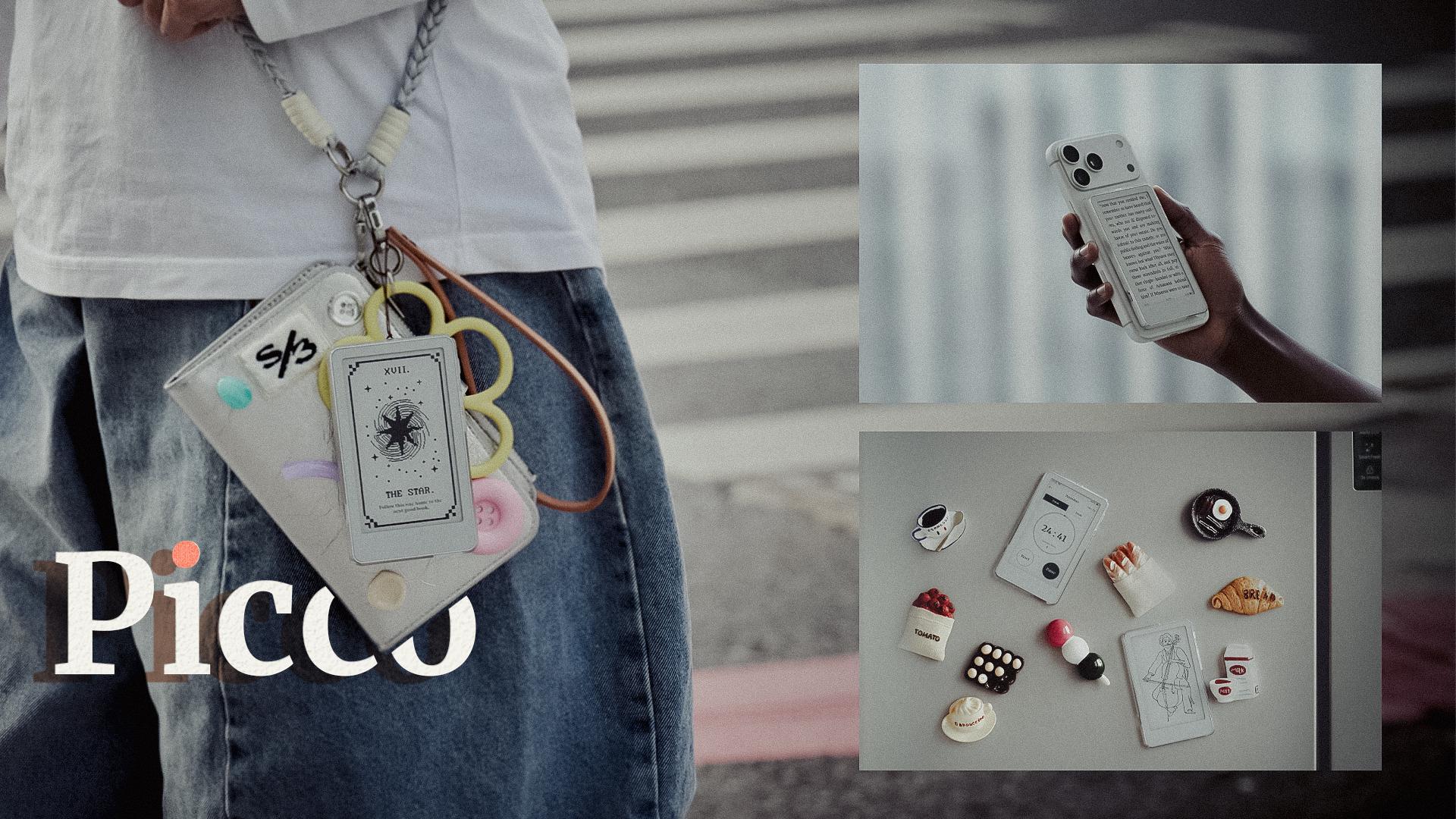
News & Update Meet BOOX Picco: The 3.97″ Card-Sized BOOX Tile for Pages and Fun

Post image
215 Upvotes

Pre-order your Picco now: https://shop.boox.com/products/picco


r/Onyx_Boox • • 3h ago

DIY I made a minimal home screen for my Go 10.3 that works behind the Home button on firmware 4.2 (no root, open source)

Thumbnail
gallery
19 Upvotes

I got a Go 10.3 (Gen II) Lumi a few days ago, mostly for reading and for planning my work. The stock home screen kept bugging me, it feels like a phone launcher stretched onto paper. And on firmware 4 you can't set another launcher as default anymore.

So I wrote my own and found a way to put it behind the Home button without root. It's called Ink Home.

What it is:

- one page, black on white, no animations, so no full screen flash when you go home

- date and time at the top

- three big tiles: Notes, Library, Quick note

- Quick note opens an actually blank page. The stock one reopens whatever template you used last, which annoyed me every single time

- Files, Settings, and a "Boox home" tile so the stock screen is always one tap away

- all your apps in a plain alphabetical list

- a little year progress bar

- a status line at the bottom with your name, title and an icon (hold it to change them, there are 12 icons to pick from)

It's about 700 KB, has no internet permission, no account, nothing running in the background.

How the Home button part works, short version: Boox refuses to give the Home role to other apps, but its own launcher opens its main screen with an implicit intent. Ink Home answers that intent, Android asks you which app to use, you pick it and tap Always. That's it. Uninstall it and everything goes back to stock. I wrote the details up in the repo for anyone who wants to build something similar.

Install is: download the APK, unfreeze it in App Freeze (Boox freezes every sideloaded app by default), go home, pick Ink Home > Always. There's a step by step guide with a screenshot.

Repo and download: https://github.com/YadaCoder/ink-home

- I only own this one device, so it's only tested on the Go 10.3 Gen II Lumi with firmware 4.2. It should work on other firmware 4.x models but I can't promise

- the Notes tile sometimes lands on the wrong tab of the stock screen (about 1 in 4 for me)

- a firmware update could break the Home button trick

If you try it on another model (Note Air, Tab, Palma, Page, whatever), please tell me if it worked, here or as a GitHub issue. I'd like to keep a list of what it runs on.

It's MIT licensed, so fork it, change the tiles, do whatever. Feedback welcome, be gentle, it's v1.0.0 :)


r/Onyx_Boox • • 4h ago

My BOOX Review Not happy with the Palma 3 software

10 Upvotes

Got my Palma 3 yesterday to replace my Palma 1, mainly because of the pen and the fingerprint sensor. I played around with it for a day now and it's the worst first impression of a Boox device I had on launch (if you don't count the Picco where I immediately installed Crosspoint).

The hardware is great but not really a noticeable upgrade from the Palma 1 for me. It feels a bit faster but not that much. If I hadn't bought it for the pen, I would regret buying it as an upgrade. The new metal casing is nice but did they really have to make it around 2mm longer so sleeves for older models don't fit perfectly anymore?

But the biggest disappointment is the software. I upgraded to 4.3.1-rel immediately and that is the worst release I have seen on a Boox device (it is my 6th) so far:

  • in apps from the Playstore, the top bar (clock, wifi etc) disappears, I made a separate posting about that

  • I chose English as language and I can't install additional keyboards, the install button just doesn't work

  • so I switched to my native language German because I need äöüß on my keyboard (longpress doesn't offer those characters) and now I have the bad localisation like always with Boox where words are too long and just shortened with "…" so sometimes you have to guess what a button does

  • I have a 3rd party pen that I bought for my Boox Go 7, it works great for writing but after a minute or so it loses its connection, that never happens on the Go 7

  • Finally a light sensor and a setting for automatic frontlight, but it is far too dark and there seems to be no way to change the configuration, unusable too me because in situations where I activate the frontlight, I still stays off, I have to set it manually. I still miss my Kindle in that regard, the automatic frontlight was perfect out of the box there, I never had to set it manually and it was always set to a level where it just improved the contrast but didn't look like a light.

  • battery went from 60% to 45% over night in airplane mode (thanks to all here who already posted solutions for that problem, I'll check them out later)

I hope that was just a rushed release for Thanksgiving/Black Friday and they release a better OS version soon.

At least the hardware is nice. The pen support is precise and not as bad as on the Go 7 with the same tech. If you want a tiny digital notepad, the Palma 3 works nice, you can write tiny text which was impossible on the Go 7. The fingerprint sensor is also really reliable and works on first try most of the time.
I also like the back of the device. Still a rough texture like on the Palma 1 but looks more elegant now.


r/Onyx_Boox • • 5h ago

Question CrossNext on Boox Picco?

3 Upvotes

Just wanting to post, because I'm hoping that someone in the community will create an port of CrossNext for the Boox Picco. Or is there already a way of flashing CrossNext onto the Picco?

Currently using CrossNext on my Sticky and I love it but the Boox has a way better build quality and frontlights, so it would be a dream to use CrossNext on my Picco.


r/Onyx_Boox • • 20h ago

Templates Templates

Thumbnail
gallery
27 Upvotes

Hi everyone,

For those who are interested, I wanted to let you know that my 2027 digital planners and journals are now available here:

Boox - 10.3" Templates

Boox - 7.8" Templates

Also I'd like to share one of my journals with you. You can download it from my Google Drive HERE.

Thank you so much for your support!


r/Onyx_Boox • • 8h ago

Question How sensitive to water damage are the Boox devices? No IPX8 is the main reason I'm hesitating

Thumbnail reddit.com
3 Upvotes

r/Onyx_Boox • • 2h ago

Question Kobo Clara bw or onyx books go 6 gen 2?

Thumbnail reddit.com
1 Upvotes

r/Onyx_Boox • • 14h ago

DIY Boox Picco Case

Thumbnail gallery
9 Upvotes

r/Onyx_Boox • • 1d ago Heartwarming

News & Update Android 15 Upgrade is Dropping to Your Tab X C, Note Max, and Tab Ultra C Pro!

38 Upvotes

The update releases in batches; if you can't detect it now, maybe check it later or tomorrow.

Have a nice weekend:)


r/Onyx_Boox • • 4h ago

BuildMyApp Old scanned PDFs on a Boox: the usual converter gave me 377 page pictures, so I built one that reads the page again

Thumbnail
gallery
1 Upvotes

Old scans (Internet Archive, Google Books) are the worst files to read on an e-reader. I ran Tales of Terror (1899, the Internet Archive copy) through Calibre with default settings: the EPUB was a picture of every page and 32 words of actual text, so no font size, no reflow, tiny type on a small screen.

Picture 1 is that EPUB, picture 2 is the same page from the converter I make, epub.ftak.net. It reads each page picture again with an AI vision model that is told to copy the print exactly, no corrections, then rebuilds paragraphs, dialogue lines and chapters. A reader spent the last two weeks sending me his worst scans and every one turned into a fix. 700+ books converted so far.

It's free up to 150 pages with no signup (for scans, the first 20 pages). If you have a scan that comes out badly, send it, I'm collecting the hard ones.

epub.ftak.net/?s=post-boox-ba


r/Onyx_Boox • • 14h ago

My BOOX Review Future buyers of Picco, buy from Amazon. Don't buy straight from Boox’s website.

Thumbnail reddit.com
5 Upvotes

r/Onyx_Boox • • 20h ago

News & Update My Go 10.3 Gen II just had an update to a new 4.2 version

6 Upvotes

Seems a bit odd with 4.3 rolling out to so many devices but here we are.

Update dates 25th November.


r/Onyx_Boox • • 21h ago

Discussion No perfect Boox!

6 Upvotes

So the Tab X C does not have a micro SD slot. I guess the stylus could be considered a negative since it needs charging. The screen size is awesome.

The Note Max does not have a micro SD slot and a backlight.

The Air6C does have a micro SD slot, but it is smaller (10.3 versus 13.3)....

Can Boox please make a 13.3 inch tablet with a micro SD slot, a backlight, and a stylus that does not need charging? It is frustrating that you almost have to buy 3 different ereaders to try and get an experience that one device could provide.

Thank you.


r/Onyx_Boox • • 1d ago

DIY Boox Picco Flip Case

19 Upvotes

after countless revisions, i finally have my ideal flip case for the BOOX Picco, designed with the help of chatgpt! 🥹🤍

it’s slim, lightweight, easy to hold, and protects the screen while keeping all the buttons and charging port easily accessible. It fits snugly without adding unnecessary bulk or requiring any magnets or magsafe rings!

#booxpicco


r/Onyx_Boox • • 15h ago

Question Has anyone tested wired HDMI on BOOX Note Air6 C or Note Mini C using DisplayLink or Silicon Motion?

2 Upvotes

Hi everyone!

I'm planning to use a BOOX Note Air6 C or Note Mini C as a laptop replacement during professional trips. Wired HDMI projection is essential for my work because I often travel to rural areas without reliable internet.

I'm considering two USB graphics adapters:

  • WAVLINK UG7602HC — Silicon Motion SM768, using SMI InstantView.

  • WAVLINK WL-UG3501H — DisplayLink DL-3500, using DisplayLink Presenter.

Has anyone successfully tested either of these adapters with any BOOX device, especially the new Note Air6 C or Note Mini C running Android 16?

I would particularly like to know:

  • Exact adapter brand, model and chipset.

  • Whether full-color presentations and videos work.

  • Whether audio is transmitted through HDMI.

  • Whether projection works completely offline.

  • Whether USB 2.0 is sufficient.

  • Whether the connection remains stable during long presentations.

  • Whether both HDMI outputs work simultaneously on the Silicon Motion adapter.

If you own one of these BOOX devices and a compatible USB graphics adapter, I would really appreciate it if you could test this configuration.

Failed experiences are also very useful. Photos or video demonstrations would be greatly appreciated.

Thank you!


r/Onyx_Boox • • 22h ago

Question Bug: Palma 3, invisible top bar (v. 4.3.1-rel)

4 Upvotes

Got my Palma 3 today and updated it to the newest firmware (4.3.1-rel).

It seems to have a weird bug. If I start an app that is not preinstalled (e.g. Wikipedia, Kindle, Instapaper), the top bar (the one with the clock, wifi status, battery) gets invisible. It's still there, if I scroll the app it is beneath an empty white box.

A workaround seems to be to go into EinkWise and set the background color to any value other than the default value 0. Doesn't matter whether it's 1 or 255. The top bar gets visible again then.

Tried rebooting but the bug is always present from the start. Only the preinstalled apps don't have that problem, they always show the top bar.

Does anyone here know a workaround that works globally? I don't want to configure that nonsense for every single app I have. And when I start EinkWise without any app, the background color setting is not present, so I can't set a default.


r/Onyx_Boox • • 20h ago

Question Discount program for Onyx developers

2 Upvotes

Does anyone know if there are any discount programs for purchasing Onyx Boox devices for developers interested in developing/porting apps for Onyx?

I'm working on a bytecode compiler for embedded systems, and I think it would be interesting to port my virtual machine to Onyx, or at least emulate the quirks and glitches of bw & color e-ink in a Linux/win32 build so I can see how graphical apps would run on Onyx devices (to optimize GUI & drawing for one second screen updates).


r/Onyx_Boox • • 1d ago

Use Case Cute case for boox go color 7 gen 1

Thumbnail
gallery
26 Upvotes

I've had this device for two years and it has been such a hazle to find a cute case for it, I finally found a cute one on Etsy.


r/Onyx_Boox • • 18h ago

Tech Support Broken screen

1 Upvotes

Hey guys. I had just accidentally broken my screen, and finals are in 2 weeks. I was wondering if it would be better (faster + cheaper) to repair at a repair shop or use my warranty (i had just bought it this year). Additionally, would a different screen be harder if I replaced it?

I don't care too much for the latter, as customer service is a little slow for $500 product. (The product was faulty when it first arrived)

I did also try resetting the device, and it was still broken.

Sorry if none of the makes sense, I am freaking out rn, I don't even know how to upload a picture.


r/Onyx_Boox • • 1d ago

Discussion Palma Pro 2 vs Palma 3

3 Upvotes

My Palma Pro 2 shattered after only having it a couple of months, it was in my pocket with no case. I ordered a case that morning for the replacement, however insurance could not repair it and gave me the $400 Amazon coupon instead. I now have a personalized case coming, and am having second thoughts.

The Palma 3 is $70 less, but no color. I liked to play games that required color on the Pro 2 while I listened to audiobooks. I believe there is also a 2GB Ram difference (lower on the 3) and I am unsure if that will make any difference (I'm not a tech person).

Any advice or input is appreciated, I don't really use Reddit but figured someone may have some experience with both of these devices.


r/Onyx_Boox • • 1d ago

Accessories Boox Picco case I’m working on. Honest opinions

Thumbnail
gallery
36 Upvotes

I’ve been working on this Picco case for a few days now and as it’s getting close to complete I’m second guessing the design. Lmk what yall think.


r/Onyx_Boox • • 23h ago

Buying Advice Boox Note Air5C or 6C

2 Upvotes

Hello again,

Yesterday I posted a question about my first ereader purchase. For now I've landed on the Note Air.

I found someone who offers a secondhand Note Air 5C in a very good state, still 18 months warranty and accessoires like a keyboard and case for €485. The Note Air 6C here is only available from €699,99 (new) without any accessories.

Now I was wondering if the upgrade to the 6c is really worth the extra money. Especially since it's my first purchase, I'm leaning more towards buying the 5c. But I wanted to ask for your thoughts on the differences between them and if the extra money would be worth it in this case.

Thank you again for reading my question!

Edit: I'm really excited to let you all know that I just picked up my new Boox Note Air6C! Thanks for everyone's advice! I'll be spending the next couple of days exploring my new purchase ☺️


r/Onyx_Boox • • 1d ago

Question stylus for Palma 3

4 Upvotes

Hello everyone,

My Nth Onyx device arrived just now:) Palma 3. I thought it came with a stylus but not. I understand as much as 'my old styluses won't work' and want to get one, obviously. I like the idea of a small one.

Am I right that I'm looking for an EMR one? Is that the specific keyword to check for, for compatibility?

Any stories about your favourites very welcome. (And I want the other end to be the eraser, that's a dealbreaker for me). Thanks.

PSA to anyone else interested: if you ask Alexa on Amazon it will give you completely wrong info: 'The BOOX Palma 3 uses EMR (Electro-Magnetic Resonance) technology, so you need a compatible EMR stylus – not the USI pen you're currently viewing, which won't work with it.'