r/MicrosoftFlow • • Dec 27 '23

Cloud New UI is terrible

162 Upvotes

I’m just gonna go out and say it, maybe I’m alone, maybe I’m not. The new UI is god awful, what a terrible waste of resources and time. It is no where near intuitive, missing half the features of the previous UI, and half the time doesn’t work. Great job Microsoft, instead of developing the features you users are actually requesting on the community page, you dump money and time into this dumpster fire.


r/MicrosoftFlow • • Mar 26 '25

Discussion Microsoft Please Go To Tell NSFW

149 Upvotes

For however long this post is up, Microsoft if you're in this community, understand that this New Designer is fucking ass. More importantly, understand that you will never see heaven for the way yall have decided to make that the default every time I go into a flow, regardless of the setting last chosen. And, not only will you never see heaven, but you actually are seeing the hottest parts of hell for the way yall are so useless that you can't even design a toggle button that works when I want to turn it off. Trying to force a perspective is about to force my foot up yalls asses.


r/MicrosoftFlow • • Mar 01 '21

Official News Power Automate Learning Cheat Sheet

Thumbnail
flow.microsoft.com
134 Upvotes

r/MicrosoftFlow • • Apr 25 '25

Cloud Neat trick I figured out with Office scripts last week

96 Upvotes

So middle of last year or thereabout MS released the Office Script integration. For a long time I didn’t find a usecase, but now I had a task which stumped me. There is an excel file, which meeds to be read in, transformed and then saved to an SQL database. Problem was, it might have tens of thousands of rows(I know this is not the usual usecase for PA, but client says so…).

So, after few tries I figure out that transforming and saving can be done via stored procedures, so that part is a couple minutes. But the reading in part is looong (20-30mins). So remembering vaguely something about Office Scripts, I start to dig and behold, I can write a script which neatly packages the whole excel table into a Json amd hands it back to PA. Takes 2-3 mins for the longer tables. All in all, I can get the whole work done in like 10-15 mins and then I handled multiple long tables.

Moreover, I can give ranges to this script, so I can read in not-table data from Excel as well :)

Since a couple people seems interested here is the script (this asks for a worksheet name and a startcell, but can be modified however you wish)

function main(workbook: ExcelScript.Workbook, sheetName: string, startCell: string): string { const sheet = workbook.getWorksheet(sheetName);

const range = sheet.getRange(startCell).getSurroundingRegion();

const values = range.getValues();

const headers = values[0].map(h => String(h));

const dataRows = values.slice(1);

const jsonArray = dataRows.map(row => {
    const obj: { [key: string]: unknown } = {};
    headers.forEach((header, i) => {
        obj[header] = row[i];
    });
    return obj;
});

console.log(jsonArray);

return JSON.stringify(jsonArray);

}


r/MicrosoftFlow • • May 01 '25

Discussion Just passed PL-200 and built a Power Automate flow that transformed internal support at a major pharmacy company!

84 Upvotes

I’m a pharmacist who just passed the PL-200, and I put my skills to work immediately by building something awesome for our team.

Our company was struggling with scattered help requests flying around in multiple Teams chats—tech issues, billing questions, RPh needs—you name it. So I built a Power Automate flow that does all this:

Triggers on keywords like “help” or “RPh” in a Teams channel

Routes the message to the correct group (Lead Techs or Pharmacists)

Posts an Adaptive Card with:

Who asked the question

The actual request

A button to open the patient profile

Lets the responder answer directly in the card, and the requester gets pinged with the reply

Logs the entire thing to SharePoint so we can track questions and analyze trends for training

It’s reduced noise, sped up our response times, and given us insights we didn’t have before. Honestly—this one flow made a huge impact. I'm so excited to make use of my skills and provide some order to the chaos that is pharmacy.


r/MicrosoftFlow • • Apr 02 '25

Discussion Copilot is worthless

76 Upvotes

Tried asking Copilot to do something simple: Add an Initialize variable action. I was starting with this just to see how I could build out from there. Like adding "Add and initialize variable action and set the Type to String". Then I was going to have it create 10, then 50, and see if it had the capability to create 150.

NOPE, couldn't even do that simple task. It failed on the first SIMPLE question of adding a Built in Power Automate action. Here is what it told me:

"The "Initialize Variable" action is not available in the connectors provided by the search results.

To initialize variables in Power Automate, you typically use the "Initialize Variable" action from the built-in actions. This action is not part of the connectors listed in the search results.

You can manually add the "Initialize Variable" actions in the Power Automate designer by selecting the "Initialize Variable" action from the built-in actions menu.

If you need further assistance with adding these actions manually, please let me know!"

My search results it is literally the first one that shows up. I asked it to show me the search results and this is what it gave (first 5, I won't list all 20, doesn't matter though, the BUILT IN one isn't there):

shared_motawordtranslations

  • Operation Name: InitializeTranslationProject

  • Description: Initialize a new translation project at MotaWord. You can later add document(s) to it, and then launch it.

  1. shared_documentdrafter

    • Operation Name: GetVariablesForTemplate

    • Description: Fetch variables for a single template.

  2. shared_morta

    • Operation Name: GetProjectVariables

    • Description: Retrieve all variables associated with a specified project.

  3. shared_iaconnectdynamiccode

    • Operation Name: CreateJSONFromInputVariables

    • Description: Takes an array of input variables and returns in JSON format and optionally as a JSON table.

  4. shared_checklyip

    • Operation Name: GetV1Variables

    • Description: Lists all current environment variables in your account.

  5. shared_jedoxodatahub

    • Operation Name: RunLoadWithVariables

    • Description: Run the load with the given name in the given integrator project. The execution will be added to the queue.


r/MicrosoftFlow • • May 07 '21

Worked on a flow all day long in the office on my pc. Back home starting up my notebook and resumed working on the flow. It’s almost finished. Next morning on the office I had my browser still opened on my pc and without thinking hit the save button In the flow… WHERE IS VERSIONING!?

Post image
71 Upvotes

r/MicrosoftFlow • • Dec 05 '19

Fire whoever renamed Flow to "Microsoft Power Automate"

70 Upvotes

Why can't Microsoft ever be happy with catchy names that last? This trend of constant rebranding with worse and worse names has to end.


r/MicrosoftFlow • • Oct 01 '26

Cloud A simpler way to edit Power Automate flow JSON without export/import

Thumbnail
gallery
67 Upvotes

I kept finding myself wanting to inspect the actual JSON behind a flow, especially when debugging larger flows or using an AI to help with them.

I ended up building a browser extension that adds a JSON editor directly to the Power Automate designer.

It uses Monaco Editor and lets you edit, validate, save and publish the current flow without going through the usual export → unzip → edit → import process.

I’ve just made it publicly available and I’d be interested to hear what other Power Automate users think.

Chrome Web Store link

Happy to take feature suggestions too!


r/MicrosoftFlow • • Oct 12 '25

Discussion Has anyone found CoPilot even a little useful? Every time I try to use it, it's just dog crap!

Thumbnail
gallery
67 Upvotes

I thought,

"eh, I'll try Copilot again, it's been a few months."

For this flow I'm messing with I've been trying it out off and on.

I have an HTTP request where the XML in the body is malformed. (I already know the problem and solution.)

It didn't even look at the code of the flow, it just decided to take a nod from the helpdesk who is in charge of Microsoft Answers:

  • Read the documentation!

  • Check for issues!

  • (Have you rebooted!!!?)

So, after that horribly useless suggestion. I decided to chat with it and asked if it had even looked at the code before making any suggestions.....

AND BAM!

Error with the webpage.

Throughout this whole flow, I've been asking copilot for suggestions and each time its painfully obvious that it doesn't even look at the flow before making any kind of suggestion.

They have shoved this thing into everything and it is worthless in Power Automate. Given how it preforms here, I don't even want to use it for other stuff.


r/MicrosoftFlow • • Aug 31 '21

I’ve been programming for 5 years and this is the least intuitive software I’ve ever worked with

64 Upvotes

Horribly vague error messages that make me break apart my entire flow to realize I missed some quotation marks or some shit, unintuitive syntax and worst of all you can’t Google anything because of it’s awkward fucking name.

This shit is seriously making me reconsider my job.


r/MicrosoftFlow • • Sep 24 '26

Cloud 𝐏𝐨𝐰𝐞𝐫 𝐀𝐮𝐭𝐨𝐦𝐚𝐭𝐞 𝐇𝐓𝐌𝐋 𝐓𝐚𝐛𝐥𝐞 𝐒𝐭𝐲𝐥𝐞𝐫 Tool: 𝐂𝐫𝐞𝐚𝐭𝐞 𝐂𝐥𝐞𝐚𝐧, 𝐄𝐦𝐚𝐢𝐥-𝐑𝐞𝐚𝐝𝐲 𝐓𝐚𝐛𝐥𝐞𝐬 𝐢𝐧 𝐒𝐞𝐜𝐨𝐧𝐝𝐬

63 Upvotes

r/MicrosoftFlow • • Jan 23 '26

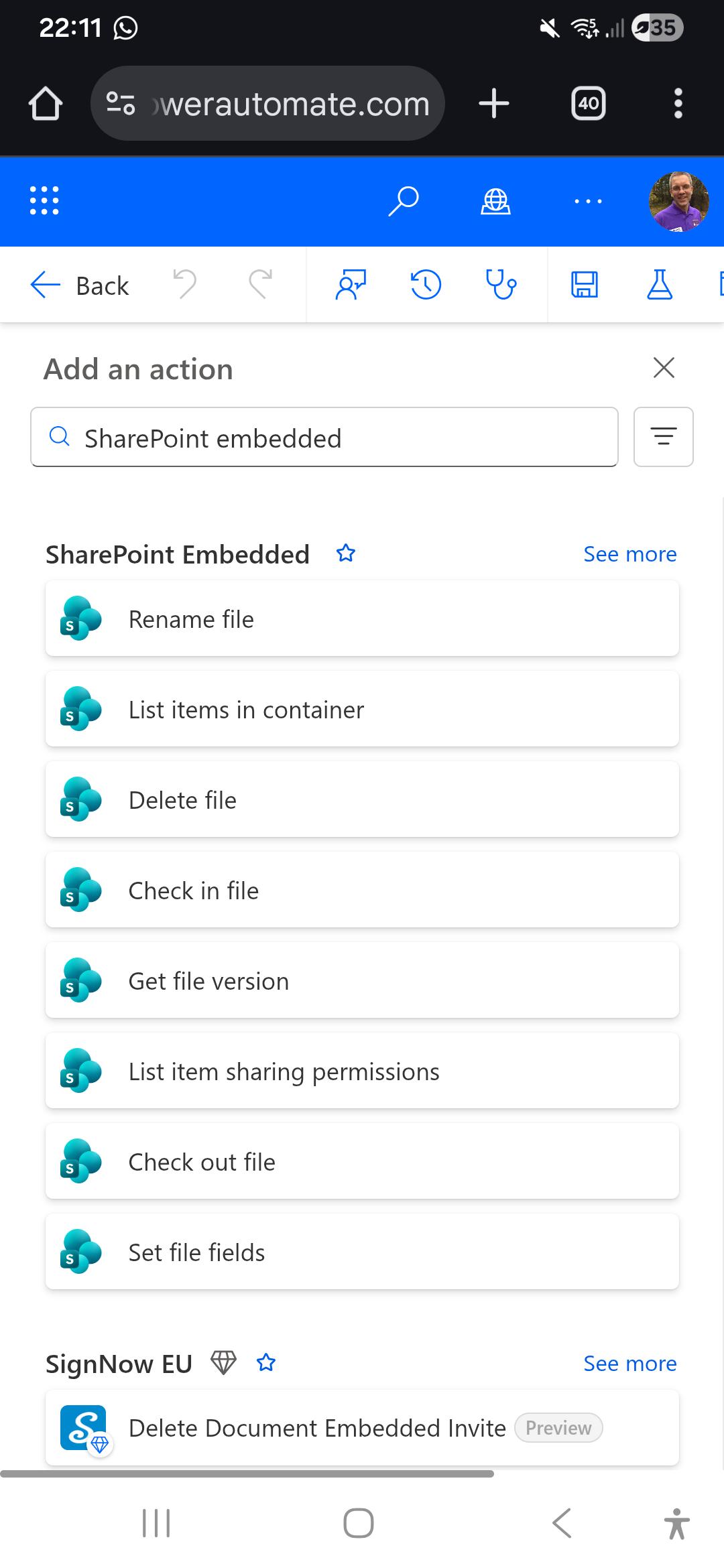
Cloud SharePoint Embedded connector has arrived

Post image
63 Upvotes

Something new has arrived to the Power Platform. There is now a second SharePoint connector available, SharePoint Embedded.

Do you want to know more about SharePoint embedded then read this link.

https://learn.microsoft.com/en-us/sharepoint/dev/embedded/overview


r/MicrosoftFlow • • 18d ago

Discussion FlowForger - write your Power Automate flows in TypeScript!

60 Upvotes

Hello everyone,

I've been working on a project called FlowForger for a while. It consists of a TypeScript-based domain specific language (DSL) in which you can write Power Automate flows, and a supporting CLI and tooling for compilation, validation, local execution, pulling/pushing from/to Dataverse and more.
You can pull an existing flow and get TypeScript back, and what you push is normal Power Automate JSON, so the flow stays editable in the designer.

There is a VS Code extension for running and debugging flows locally, and an MCP server so an AI agent can debug flows locally too.
All of this can help you to really move your flows to git, with all the nice things that come with it.

A simple flow looks like this:

@Flow('hello-flow')
class HelloFlow {

@ManualTrigger()
trigger() {} 

@Action()
  async run(ctx: FlowContext) {
    await ctx.compose('Greeting', { message: 'Hello from FlowForger' });
    await ctx.http('CallHttpBin', {
      method: 'POST',
      url: 'https://httpbin.org/post',
      body: ctx.outputs('Greeting'),
    });
  }
}

I decided to publish it as open source (Apache 2.0): https://github.com/tomdam/flowforger
NPM package: https://www.npmjs.com/package/flowforger
CLI: npm install -g flowforger
VS Code extension: https://marketplace.visualstudio.com/items?itemName=FlowForger.flowforger-vscode

My team and I are using FlowForger for all the flows in all our projects, and it really helps us keep track of changes and with debugging. The AI part is what speeds us up the most because the agent can run a flow locally, stop at breakpoints, look at variables, mock connector calls and replay a failed cloud run.

The video is a short overview that should help you understand the logic behind it quickly.

Happy forging, and feel free to comment if you think this could help your team and you want to know more!


r/MicrosoftFlow • • Nov 10 '24

Question What are some of the best flows you have created for a company without the premium version?

57 Upvotes

I am trying to pitch Power Automate to the company I'm working under, since they are thinking of cost-effective ways of automating tasks. I made flows in the past, but all of them were for Excel files. I am trying to think of other ways that the company may benefit from using Power Automate. What are some of the flows you have created outside Excel? Share you experiences. I would be grateful for any answers 🙏 Thanks!


r/MicrosoftFlow • • Jan 20 '24

Desktop what kind of position/job are you in that you use Power automate?

57 Upvotes

just curious.. bonus points if you don’t mind revealing years of experience and very vague ball park range for salary

i’m in a non tech role trying to learn this right now, and also wondering what other technical skills you find to be valuable /transferable

thanks a lot


r/MicrosoftFlow • • Sep 24 '26

Question What’s the best AI model for creating Power Automate flows?

56 Upvotes

I work in workflow automation and want to start using AI to create Power Automate flows.
I’m wondering which AI model people here have had the best experience with for Power Automate so far. I’m particularly interested in models that can actually generate a valid ZIP package that can be imported directly into Power Automate, rather than just providing instructions or snippets that I have to build manually.
Has anyone compared models like ChatGPT 6 Astra, Opus 5.5, or others specifically for Power Automate?
Which one has worked best for you, especially for creating more complex flows?


r/MicrosoftFlow • • Dec 09 '24

Discussion The search function is DRIVING ME CRAZY. How is it possible that we have access to an AI Copilot demi-god 100B-parameter or whatever connector and we can't even have a decent search function for actions and triggers ????

Post image
56 Upvotes

r/MicrosoftFlow • • Mar 02 '21

Power Automate Desktop is now available for all Windows 10 users at no cost

Thumbnail
cloudblogs.microsoft.com
53 Upvotes

r/MicrosoftFlow • • Aug 26 '22

Official News Suggestion: should this community be renamed Power Automate?

51 Upvotes

Microsoft has changed the name to Power Automate. should MOD change the name of this community? Might be good idea to attract more people especially newer people to using it. Just a suggestion :)


r/MicrosoftFlow • • Aug 07 '24

Question If Power Automate is "low-code," what is the next step I could take that would be more "high-code"?

48 Upvotes

Power Automate is an amazing tool, but I'm starting to feel like I'm reaching the limits of what it can easily do. For example, in order to avoid painfully slow loops when operating on 100,000+ items, I am having to write increasingly complicated and hard-to-read Power Fx formulas, to the point where it feels like it'd be easier if I could just use another programming language like typescript or python. Does anyone have any suggestions for next steps I could take that would still provide the benefits of Power Automate (cloud-based, can automatically run based on a schedule, able to connect to SharePoint and Outlook, easy to share with other users in my company)?


r/MicrosoftFlow • • Oct 07 '22

Cloud Just wanted to share a victory

48 Upvotes

It may be small, but I am proud of the flow I built today, and it's the beginning of a large project that I'm working on. I made a flow that creates a folder in SharePoint when I file is added, creates sub folders, changes the top level folder to a document set, then files the original file in the correct subfolder based on certain criteria, then adjusts the metadata to match that of the folder. It may be elementary, but I'm super proud of it and excited to discover more of what Flow can do.


r/MicrosoftFlow • • 21d ago

Question Are We Using AI Where Traditional Automation Would Work Better?

47 Upvotes

Not every business process needs AI.

If a task follows predictable rules, traditional automation is often faster, cheaper, and more reliable.

But when processes involve unstructured data, changing inputs, or decision-making, AI can add real value.

The smartest architecture isn't AI everywhere. It's knowing where to use deterministic workflows and where intelligence is actually needed.

How do you decide between traditional automation and AI in your projects?


r/MicrosoftFlow • • Feb 04 '26

Discussion I updated my Power Platform Tools site (challigan.com)

Thumbnail tools.challigan.com
47 Upvotes

A few years ago I created a few tools for personal use and ultimately ended up publishing them to netlify and shared them on here

https://trigger.challigan.com - Trigger Condition Generator

https://odata.challigan.com - OData Query Generator

Plus a few more things. Well according to my Cloudflare statistics there's still thousands of people that use these daily! I never expected that. So I figured it was time to update them, and I would like you to test the new site before I replace the old ones.

https://tools.challigan.com - New Site

Everything has been redesigned and a handful of new tools added for various SharePoint/Power Platform things. All free to use.

Any feedback/error reporting would be greatly appreciated.

My favourite feature is the SharePoint list generator. It lets you easily generate a CSV with column schema to quickly create lists.

DISCLAIMER: This is pretty much completely vibe coded, if that wasn't obvious already. The old site was too. I can code, just not very well, but AI makes me feel superhuman. But the site does nothing trival, no logins, no data capture or anything, just useful web tools.