r/MetaGlassesforDevs • • Oct 25 '26

❓Question Is there an iOS app for Meta Ray-Ban Display that lets you use AI with the camera and Neural Band completely silently?

0 Upvotes

Hey everyone!

I have the Meta Ray-Ban Display glasses and Neural Band, and I’m looking for an iOS app that lets me interact with AI completely silently, without using voice commands or audio.

Ideally, I’d like something that:

Connects directly to my Meta Ray-Ban Display glasses through my iPhone.

Lets me use the glasses’ camera to capture text, documents, or questions.

Uses AI like ChatGPT, Gemini, or Claude to analyze what the camera sees.

Displays the AI’s responses as text directly inside the glasses’ display. Supports typing commands or using Neural Band gestures instead of speaking.

Works for studying, reading documents, and analyzing practice questions. I’ve seen apps like Sightline, but I’m wondering if anyone has found something similar that works reliably on iOS.

I’m specifically looking for a camera/camera + typing with neural band gestures feature → AI → text-in-lens workflow with absolutely no voice interaction.
Has anyone successfully gotten this working? If so, which app are you using, and does it support the Neural Band?

I’d really appreciate any recommendations or setup instructions. Thanks!


r/MetaGlassesforDevs • • Jul 20 '26

❓Question Ray-Ban Meta Developer Mode stuck on “Installation failed” — anyone else? (Meta AI 281)

Thumbnail
gallery
2 Upvotes

Hey everyone — looking for anyone who’s gotten Developer Mode DAT working on Ray-Ban Meta recently.

What’s happening

I’m building a third-party Android app with Meta’s Device Access Toolkit (DAT). In Meta AI → App info → Developer mode:

• Glasses first showed Unavailable
• Now it shows Installation failed (red) with an Install button
• Tapping Install never finishes — base DAT Wearables App never installs on the glasses

Without that on-glasses DAT app, my phone app can’t start a camera session.

Setup

• Phone: Xiaomi (Android 13)
• Meta AI: 281.0.0.30.168
• Glasses: Ray-Ban Meta (RB Meta 08K0)
• Developer Mode: ON
• DAT SDK: 0.8.0 (APPLICATION_ID=0 / local dev flow)

Already tried

• Toggle Developer Mode off/on
• Update Meta AI
• Force-stop Meta AI
• Wear glasses + Wi‑Fi on during Install
• Nearby devices / Bluetooth permissions for the app

Looks like the same Meta server entitlement issue others are hitting on GitHub: facebook/meta-wearables-dat-android issue 147 — entitlement grant returns null / “App not found in entitlements” before download.

Questions

-> Did anything fix Installation failed for you (firmware, account type, re-pair, VPN, etc.)?

Any tips appreciated — happy to share more logs if useful.


r/MetaGlassesforDevs • • Jul 09 '26

📝 Feedback This is what have I learnt after building 7 apps in one day.

Post image
2 Upvotes

Hey everyone,

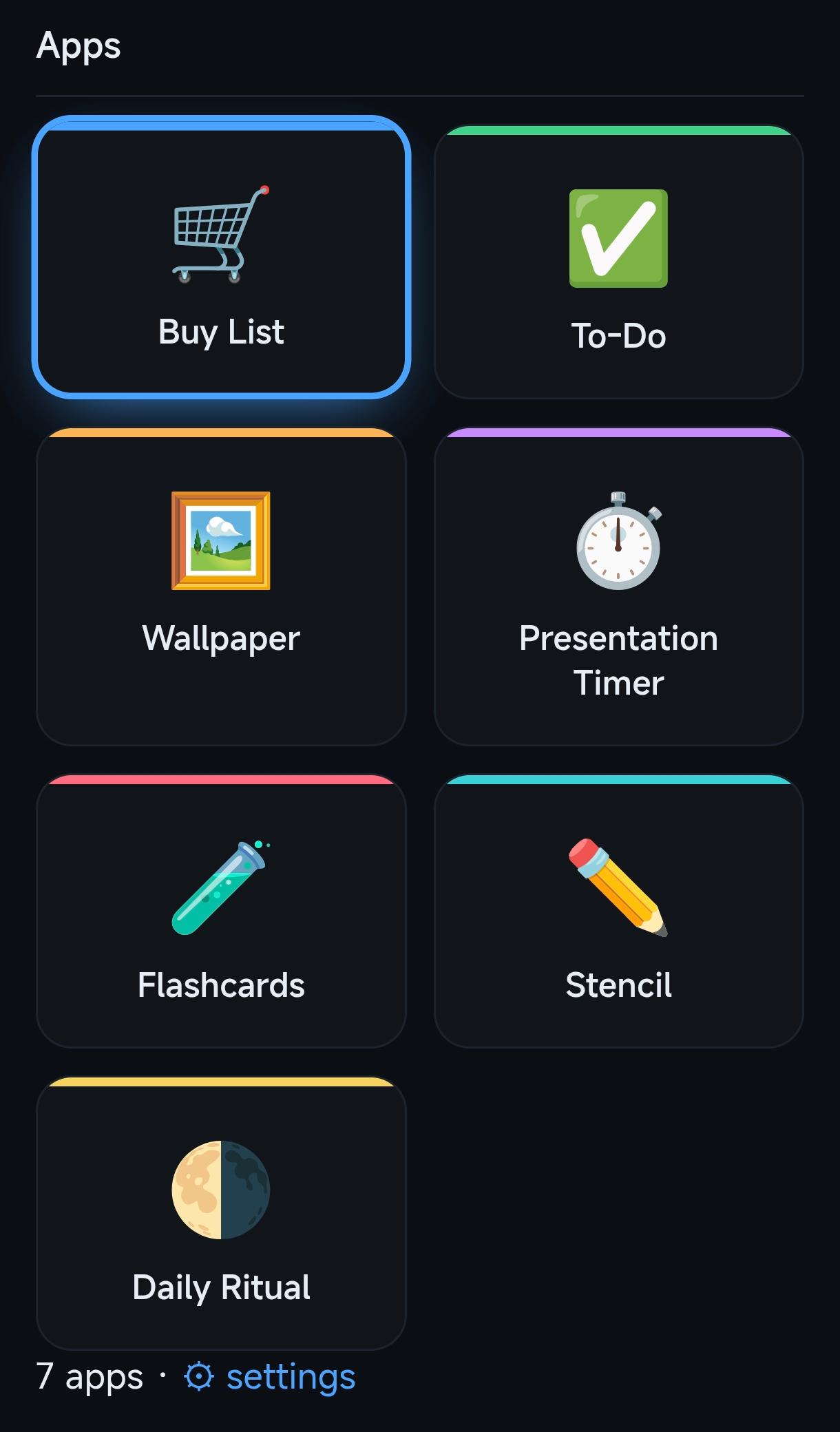
Yesterday, I spent the day building out a webkit harness system for smart glasses. To test the workflow, I rapidly spun up a few micro-apps: a buy list, a to-do list, a shape projection tool, flashcards, a presentation timer, and a daily affirmations app.

Developing for this form factor is incredibly fun, but the hardware constraints force you to completely rethink your architecture. Here are my main takeaways from the build, the massive bottlenecks I ran into, and where I’m taking the project next.

💡 3 Key Learnings on Glass Development

  1. The "Last Mile" Paradox: The hardware comes with brutal limitations—limited processing power and short battery life. However, it absolutely shines at providing the "last mile" experience (incredible spatial audio and true hands-free execution). You have to design for the constraints, not against them.

  2. Build Webapps, Configure on Desktop: Native is too slow for rapid iteration. Webapps are much quicker to build and instantly deployable to desktop, mobile, and glass. The ideal UX loop is doing all your heavy setup and configuration on a desktop/phone, and leaving the glass interface strictly optimized for simple D-pad navigation.

  3. Moving to Full-Loop AI Engineering: I started with a basic harness to build and bundle the webapps. But to scale this, the harness needs to become a full-loop agentic ecosystem. The goal: gather user requirements upfront, let an LLM agent run at full speed to build, test, and deploy the app, and leave me with just the final step—testing on the glasses and feeding bugs back into the agent loop.

🛑 The Bad: Video is a Battery Killer

Initially, I wanted to leverage live video streaming, but the experience was rough. It introduces too much latency and drains the tiny glasses battery almost instantly. Video streaming just isn't viable for lightweight, continuous feature yet.

🚀 The Next Shift: Claude as a "Computer Backend"

Because video failed and UX inputs (D-pad/voice) are so limited on-device, my next focus is a total pivot: Using Claude as a full AI backend and backend-builder.

Giving the glasses a lightweight interface that connects directly to a headless Claude instance (with full access to the internet and a local file system) is an absolute game-changer. It offloads all the computing power and context gathering from the glasses to the cloud/local machine, leaving the glasses to do what they do best: show the right data at the right time.

If you want to check out the codebase, test the harness, or follow along with the journey, the repo is fully open source:

👉 GitHub: https://github.com/Tienduyvo/meta-glass-display-webkit-harness.git


r/MetaGlassesforDevs • • Jul 07 '26

📣 Project Webkit AI Harness

0 Upvotes

Hi guys,

Ever wanted a shopping list, to-do list, gymtracker, or dealtracker that runs right on your glasses? Here is a harness system that let AI agent (Claude Code, Cursor, etc.) do the heavy lifting for you.

How it works: clone the repo, open it in your AI tool, and start developing. The harness handles everything via the happy path, served from a free Cloudflare Worker, and they work on both glasses and phone.

Repo: https://github.com/Tienduyvo/meta-glass-display-webkit-harness

If you find it useful, a star helps others discover it. Feedback and app requests more than welcome.


r/MetaGlassesforDevs • • Aug 20 '26

📣 Project Herald Platform/App Updates

Post image
4 Upvotes

Hey everyone! Been a bit since I have posted but also because there have been some updates in the pipeline. Firstly, hope everyone in the community is doing well. Since Meta released the latest updates to Meta Ray Ban Displays, I have been working to implement a lof of these new features into the platform. Today, I am here to share some of those updates!

Back Button

The back button has been removed from pretty much all of the apps in exchange for the middle pinch that is native to the MRBD. This allows some free up on the UI and better navigation experience. So, if you think about going back, just use that middle pinch!

Oflline Mode

Many of the apps now support an offline mode to allow you to play games, access content and so on without an internet connection. Of course, some apps simply wont work (like those that rely on data), but this makes other use cases more exciting! .

Handwriting

The text entry fields have been replaced with Handwriting options as the default for text input. In case you prefer to use a Keyboard DOM, its still present, but...use the handwriting. Its been tested a bit but need additional feedback on this.

Drag and Pinch

Drag and pinch is slowly making its way into Herald apps, simply to ensure it works properly across all platforms. Right now, some apps using it include:

  • YouTube for video scrubbing

  • Hue/Govee/Lights for brightness controls

As more testing occurs, it will roll out to other media apps as well

Subscriptions

I have rolled out two subscriptions for the platform, the first being "Supporter" and "Builder". For those unaware, EVERY app on Herald is free access. While this has been and continues to be the northstar, the costs are starting to stack up a bit. In order to keep the servers online, APIs working, and things operational, I am bringing forth Supporter.

  • Supporter ($5): Think of it like a Patreon, it will give early access to certain apps and features as well, special profile badges and so on. Also an optional donation button if you feel like spreading more love.

  • Builder ($20): Everything with supporter but also the ability to get AI credits to create your own apps on Herald. Again, an optional donation as well.

Hope you all enjoy, please share any feedback as well!

Website Link: https://herald.ascents.gg
Navigate to apps to see and search for anything!


r/MetaGlassesforDevs • • Jul 28 '26

📣 Project Building the layer I wanted when I started with DAT Development Looking for feedback

1 Upvotes

I've spent the last months building Extentos, so you can build and test a smart-glasses app

without owning the glasses.

The app in that video is real. It runs the same SDK code that runs on hardware, with only the

transport swapped, so the browser acts as the glasses. Photos taken in the simulator land in the

phone app, and the glasses display renders from the same code path.

It works today for Meta glasses, including Ray-Ban Display. Android XR is in preview, you can

develop against it in the simulator, but there's no shipping hardware yet.

The point is to integrate smart glasses once, instead of rebuilding for every new device.

Multi-vendor is one piece of this, not the whole thing. Extentos also handles the surrounding

infrastructure, including prebuilt connection flows and local real-time models as a cost-optimized

option alongside cloud models. There's a Kotlin SDK and a Swift SDK, and an MCP server your

coding agent installs to scaffold the integration for you.

I'm looking for people who'll try it and tell me what works, what's missing, and where it breaks.

If you have an idea, I'll personally help you get it running. It's at extentos

Short video of me using the browser simulator: ⬇️


r/MetaGlassesforDevs • • Jul 08 '26

📣 Project I Built A Bible App For Meta Ray-Ban Display Glasses & I Would Love Your Feedback!

8 Upvotes

Hey everyone! JDun from Onyx Leaf Media again! I wanted to share something personal I just launched called Lamp & Path.

It’s a Bible, prayer, and reflection app I built with around 60+ hours of focused build time.

For me, this project is where a lot of things came together: my faith, my love for technology, and my belief that new devices like display glasses can be used for more than entertainment or productivity.

This is not meant to push anything on anybody.

It’s just a quiet space for people who want to read Scripture, pray, reflect, or take a peaceful moment during the day.

The app was purpose-built for Meta Ray-Ban Display glasses, so a lot of the work went into making sure it was actually readable and comfortable on a small wearable display. Text size, contrast, spacing, navigation, themes, loading, all of that mattered a lot.

We also made sure it works on mobile and web for people who want to experience it that way too.

Some things inside:

⭐Daily Scripture
⭐Full Bible reading
⭐Prayer atmosphere mode
⭐Peaceful music
⭐Continue Reading
⭐Readable themes
⭐Glasses-friendly navigation
⭐Mobile and web UI

Meta Ray-Ban Display Glasses Link: https://lampandpath.app/glasses

Mobile/WEB Link- https://lampandpath.app/


r/MetaGlassesforDevs • • May 14 '26

Does Meta do dev kits?

2 Upvotes

I don’t have enough money to drop on meta ray ban displays, but would love to develop for them. Is there a dev program?


r/MetaGlassesforDevs • • Aug 24 '26

📣 Project DUN STRIKE: Neon Lanes is officially live for Meta Ray-Ban Display glasses!(🤏 Pinch and Drag Gesture)

3 Upvotes

Another One From Onyx Leaf Media🎳⚡️

DUN STRIKE: Neon Lanes is officially live for Meta Ray-Ban Display glasses!

One thing we love about building for emerging platforms is watching the SDK and developer tools continue to evolve. Whenever new capabilities arrive, our first thought is always...

“What can we build with this?”

So we challenged ourselves to create a full neon arcade bowling experience around some of the latest web app features...especially the new pinch-and-drag gesture support.

Pinch, pull, aim, add a little hook, and release the ball down the lane. We also added multiple game modes, changing camera perspectives, DUN OVERDRIVE, full bowling scoring, music, sound effects, and an offline mode so the game can continue working after it has been cached to your glasses.

This is another DUN ARCADE experiment from our studio, built to explore what games can feel like on a lightweight display when the interaction is designed specifically for the device.

We already have more updates and improvements planned over time, but you can play the first official release now:

🎳 www.dunstrike.app

Let us know your high score and please do not blame us when you start practicing your pinch-and-drag bowling motion in public🤣 We would love some feedback!


r/MetaGlassesforDevs • • Aug 06 '26

📣 Project The problem wasn’t testing my Display app. It was showing it to my PM

3 Upvotes

Not everyone on our team has a pair, which turned design reviews into whoever had them describing what they saw.

And it’s not just seeing the UI. Half the design decisions on these things come from context, what the user is doing, what’s behind the screen, whether they’re walking or standing in a garage with their hands full. If the team can’t see that, they can’t really weigh in on anything.

The existing sims are good and we use them. Meta’s extension, the various dev ones. But they all live on your machine and they’re built for the person writing the code.

Ours is the same idea except the output is a link. Paste a URL, set the brightness and placement, pick a background scene, send it to your PM, client, or whoever.

It’s pointed at your live URL so it updates on its own, which we didn’t plan for and now use constantly.
Browser only (desktop & mobile), no account, free.

https://displayglasses.dev/


r/MetaGlassesforDevs • • Oct 20 '26

📣 Announcement 👋 Web Apps for Meta Ray-Ban Display just got a major input upgrade: wrist orientation!

Post image
4 Upvotes

You can now tap into wrist roll, pointing, and tilt data from the Meta Neural Band in your web apps. We provide this data as a quaternion, unlocking new kind of experiences.

Learn more in our new documentation


r/MetaGlassesforDevs • • Oct 08 '26

📣 Announcement 🌎 All Meta Connect developer sessions on AI glasses are now live on YouTube!

Post image
4 Upvotes

r/MetaGlassesforDevs • • May 13 '26

MultiSet VPS on Meta Glasses for 6DoF tracking

4 Upvotes

r/MetaGlassesforDevs • • 27d ago

📣 Explore is now available on Meta Ray-Ban Display

15 Upvotes

It lets you discover and use a curated collection of apps and experiences!


r/MetaGlassesforDevs • • Jun 16 '26

📣 Project Pool cleaning App 😅

5 Upvotes

Okay… this is another one of those “because I can” prototypes 😅

I built a web app for Meta Ray-Ban Display glasses that lets me monitor and control my pool cleaning robot directly from the glasses.

🤖 Track the robot’s path in real time
⏸ Pause and resume the cleaning cycle
💧 Instantly check water quality indicators and alerts

Of course, it’s just a concept. But I think experiences like this hint at something much bigger.

The moment wearables become the interface to the physical world, interacting with connected devices won’t require pulling out a phone anymore. You’ll simply glance at the object you want to control and the relevant information and actions will appear exactly when you need them.

Smart homes → ambient interfaces.
Apps → contextual experiences.
Screens → the world itself.

Maybe the future of IoT isn’t another dashboard. Maybe it’s invisible.

What everyday objects would you want to control through smart glasses? 👀


r/MetaGlassesforDevs • • Jun 18 '26

📣 Project Meta AI Glasses Developers experiment with everything from education and tourism to wellness, gaming, and events. Here’s what’s new:

6 Upvotes

- Navigation and travel tools like Travel HUD, AWE Guide, Muni Sniper, and Near Train
- Learning and real-world awareness experiences like Vocab Trainer and Bird Call ID
- Local discovery tools like Restaurant Spot
- Habit-building and wellness experiences like Brush Coach
- Hands-free gaming experiences like Python

Which category do you think is currently the best fit for AI glasses?


r/MetaGlassesforDevs • • May 15 '26

First look at watching YouTube videos on Meta Ray-Ban Display

6 Upvotes

r/MetaGlassesforDevs • • Jul 03 '26

📣 Project Emulator for Meta Ray Ban Displays - preview any web app on the glasses

6 Upvotes

Hey all! Excited to share the first emulator for the Meta Ray Ban Displays.

Like many of you, I've been building web apps since the dev kit dropped ~1 month ago, and kept running into the same problem that there's no easy way to preview them without loading onto the actual glasses. So I built one!

https://hud.xyz/emulator

Drop in any web app URL

Paste in your web app URL and it renders straight onto the glasses. Test your app's layout and colors without the physical glasses, then share clean screenshots for your demo once you're ready.

Accurate lens transparency

Accurately preview how your app looks on the MRBD lenses in different environments and lighting conditions (around 30-40% transparency I feel is pretty close to IRL).

Glasses mode or 1:1

Toggle between frames and the 600x600 pixel view if you want to see your app in the correct resolution.

Day and night environments

Flip between light and dark modes to check contrast and legibility in different conditions. The MRBDs use projectors to render their screens, so it's good to make sure your app is readable both indoors and outside :)

hud.xyz is still in v1, so stay tuned for more updates! If there's something you want to see simulated or tweaked, let me know.

Very welcome to feedback - bugs, feature requests, the sorts.


r/MetaGlassesforDevs • • Jun 04 '26

Introducing Herald App Generator (Alpha)

6 Upvotes

Hello everyone!

Hope you are all well, I've been quiet but thats because I have been cooking! Today, I am not here to introduce an App, instead, I am here to introduce an all new platform. Say hello to the Herald Developer Docs and App Generator!

After developing over 100 Web Apps, I found myself wanting to take a new challenge, make it easier for ANYONE to build on the Meta Ray Ban Displays. Have an idea but don't know how to code? No problem. Not sure how to host/install it? Don't worry, we take care of it. For those users who do have expertise in coding or wanting to get their hands dirty, the docs created a guideline and learns from my experience. For those wanting to just get generating, well, thats the fun!

Disclaimer: I want to be upfront, this is not a replacement to hand building an app, or for that matter, even using direct AI agents. Why? Well, its simple, you have more control on things like that. These apps are much more sandboxed and limited, simply due to their development nature. If you are ever interested in building apps, I Highly suggest giving it a try too, its tons of fun and you'll learn a lot along the way. However, if you just want to get your idea flowing and out there, this system is for you.

App Generator (https://herald.ascents.gg/create)

What makes this different from just Claude Code or Codex? Well, not much really. If anything, the platform is designed to be a simple execution rather than re-inventing the wheel. To ensure costs are low/free as well, it uses a BYOK method, aka, your own API credits/tokens. If I integrated an API myself, I would need to charge hundreds of dollars haha, but doing this, I can keep the cost either free or low.

The App generator has all of the pre-filled controls and requirements wired into it. This way when you ask to create an app, you don't need to say its for the MRBD, tell it to size down, or how to understand the neural band input, thats all handled for you.

Now, this is early, and while I have been testing it, there are tons of edge cases I cannot see unless people try it. SO, I would love for you all to test it, provide feedback, and explore it!

Heres some of the things to also keep in mind, along with how it works:

What makes it different

  • You describe it in plain words and get a finished, running glasses app, not code you have to read, host, or wire up.

  • It's built for the Meta Ray-Ban Display, the output already speaks the glasses' model (the six hardware inputs, pinch/back, additive black-is-transparent rendering, glance-first layout). A general chat model doesn't know any of that.

  • It runs the whole pipeline, not just the writing step: generate, live preview, version history with restore, host on your hub, connect live data, optionally submit to the public Hub.

  • It hardens the raw model into a working result: layout/quality rules, a repair pass when output is off, truncation detection, and auto-continue past token caps so big apps finish instead of cutting off.

  • It can give an app real live data safely (below). Claude alone can't hand your app a working, secret-protected API or login.

  • Hosted or Download: You can either download the files and host yourself, or, publish it and let us handle it.

How it's secure

  • Every app runs in a locked sandbox (isolated origin, no access to your Herald account, cookies, or other apps).

  • Your keys never live in the app. They're stored encrypted on the server; the app calls a helper and the server injects the key through an allowlisted, read-only, rate-limited proxy locked to one address. The key never reaches the browser.

  • The proxy is hardened against SSRF: it refuses internal/private addresses and pins each request to the address it validated, so a swapped DNS record can't redirect it inward.

  • OAuth is per person, done by the book (state + PKCE). Tokens are encrypted and used only on the server; the maker never sees them. OAuth apps are further locked so they can't leak data out through image or media links.

  • Private by default. A new app is visible only to you. It reaches the open web only if you submit it and we approve it, and even then we serve a frozen, reviewed snapshot.

  • Guardrails: human review of published apps with full code captured, per-account build limits, a global concurrency cap, an emergency stop, and a live cost readout while it builds.

Limitations (being honest)

  • Bring your own AI key. Generation cost is on your provider bill (usually a few cents, more for a large app).

  • Web apps can't use the microphone, camera, or push notifications (native-only on the glasses). The lane is service/data/hardware dashboards plus media and glance apps.

  • Live data is read-only through one connected address per app (no writes).

  • Not instant-public: "Add to my hub" is private to you; a public listing needs review and approval. If you try and share the link, it wont work with someone else.

  • OAuth apps don't show remote images (album art, avatars) by design, to keep your data from leaking out.

  • It's an AI builder: ambitious prompts may need a regenerate or edit, and very large apps can still bump the token ceiling (softened by auto-continue, not unlimited).

  • Not fully tested: While I have generated web apps, connected APIs and systems work, I cannot account for edge cases. Please share feedback!

Pricing (Currently Free)

Now I want to be transparent, this likely will turn into a paid service. Why you may ask? Well, it comes down to hosting and stability. If hundreds of people utilize the generator, that means hosting hundreds of apps, along with ensuring those apps all stay live, thats a costly endeavour. While the apps I create always aim to be free, I cannpt subsize the cost of everyones apps. So, my thought for the future is a $10 subscription monthly that helps offset these costs. Now that said, I have had the pleasure of some incredible people who have donated to keep the lights on. If this continues, and the donations outweight upkeep, I will gladly keep it free.

r/MetaGlassesforDevs • • Oct 01 '26

📣 Project I built a live flight HUD for my Meta Display mid-flight

6 Upvotes

On my flight back from the US to Europe, I vibe coded a small heads-up display that shows the plane's live altitude, heading, and speed. I checked it against the in-flight display, and the numbers matched exactly.

"But you can already see that on the seatback screen, so why build it?"

Fair question. Usually only international flights have those screens, and even then, not always.

I've got a domestic flight coming up, so I'll fire it up again there and see how it holds up.

The live data comes from the Flightradar24 API.


r/MetaGlassesforDevs • • May 18 '26

10+ New Features on Meta Ray-Ban Display!

6 Upvotes

With the v125 firmware update currently rolling out since last week, a lot of features have been added, here is a recap:

✍️ Neural handwriting (US Only)

Write with your finger on any surface - your palm, your leg, the desk in front of you - and your Meta Neural Band turns your handwriting into a message.

🕶️ Display recording

Record your display and POV video at the same time.

📍 Maps and navigation upgrades

Walking directions are now available throughout the entire US and in international cities like London, Paris, Rome, and more. Finding places is faster with richer search results and detailed place cards. You can now save your home and work addresses for quick access and use voice commands to navigate.

📞 WhatsApp group video calls

Group video calling on WhatsApp is now available on your glasses.

🤖 AI History and AI Home

Pick up where you left off with Meta AI. A new home view on your Meta Ray-Ban Display glasses surfaces your recent AI conversations and quick shortcuts so you can jump back into context with a glance.

📞 Phone call captions

Real-time captions displayed on your in-lens display during phone calls, making it easier to follow conversations in noisy environments or when clarity matters most. All processing happens on-device for privacy.

⏳ Timers

Set hands-free timers right from your glasses. Say "Hey Meta, set a timer for 10 minutes" and watch the countdown on your display.

⚙️ Instagram navigation update

New top navigation bar, making it effortless to swipe between Reels and DMs.

🥳 Facebook Birthdays widget

Widget to view Facebook friends' birthdays and send one-tap celebratory messages via Facebook Messenger.

🛠️ Developer Preview: Web Apps

Build and run your own web apps optimized for Meta Ray-Ban Display using neural gestures, GPS, motion and orientation data. Learn more at https://wearables.developer.meta.com.

🛠️ Developer Preview: Display for Device Access Toolkit

Extend iOS and Android apps with content displayed directly on your Meta Ray-Ban Display using the Device Access Toolkit SDK. Learn more at https://wearables.developer.meta.com.


r/MetaGlassesforDevs • • Aug 06 '26

📣 Project I built an app to test a theory: one codebase could serve both the Ray-Ban Display and audio-only Meta glasses. Turns out, it can.

8 Upvotes

I've been building location-based experiences for smart glasses, and I had a theory: a single web app should be able to adapt into completely different experiences depending on the device you're wearing. So I built one to find out. One codebase, three experiences.

Here's how it breaks down:

Ray-Ban Display: The app becomes glanceable and visual. Audio first, minimal UI, information you can read in details or absorb in a second or two without stopping what you're doing.

Audio-only Meta glasses: This was the interesting design challenge. With geolocation on, the app detects where you are and autoplays the relevant audio. Think about how you normally experience public art: you lean down to read the plaque, or pull out your phone to scan a QR code. All of that goes away. No scanning, no leaning, no phone in your hand. You just walk up, look up, and the story of the piece starts playing in your glasses while your eyes stay on the art.

Phone: The same content works as a regular mobile web experience for anyone without glasses.

This was my first attempt at designing audio-first, and it genuinely changed how I think about app architecture. When you can't rely on a screen, you have to structure content around location, timing, and voice instead of layout. The visual experiences then become a layer on top of that foundation rather than the starting point.

A few other notes:

  • It's all web tech, no native app required

  • The app is multilingual, so the same experience works in English, French, and German

  • I've been field testing it around San Francisco, and walking up to an artwork with your eyes up instead of down at a phone really does feel different

If anyone else is experimenting with these devices, I'd love to hear how you're handling the display versus audio split. Happy to share details on my setup too.


r/MetaGlassesforDevs • • Jun 18 '26

📣 Project Herald V2 (New UI, Google Maps, Parcel, Create, Forum, etc)

8 Upvotes

Hey all! Have an exciting update for the Herlad Platform, and that is our new V2 design! For those who already have visited the site, you may have already seen it, however, wanted to showcase it today. The new V2 design has been created to really feel more like a home and product rather than just an addition to the apps that are made. There are a ton of new features and apps added as well for you to check out. This post however will lean towards those who use Herald while also introducing it again for the new crowds.

Redesigned UI

Herald V2 has an entirely re-designed UI for mostly every aspect. Some pages still have a similar feel as to ensure a total re-write doesn't break them, but the website now feels lively and polished.

herald.ascents.gg

100+ apps made for the heads-up display

The new hub has been reorganized and new features added. The hub is catalog you can load onto the glasses: maps, Steam stats, parcel tracking, smart lights, and a lot more. All built to be glanceable in a second instead of something you sit and stare at.

Website Hub: herald.ascents.gg/hub

AR walking directions (powered by Google Maps)

Instead of a tiny map in the corner, the route floats out in front of you. 3D arrows sit on the ground, flow toward you as you walk, and bank gently through each turn, with a clean instruction bar up top. There's a normal top-down map mode too if you'd rather.

herald.ascents.gg/a/maps/

You can also send your directions from the companion app to the glasses as well!

Describe an app and it builds it

Type what you want and it generates a working app and hosts it for you. You bring your own AI key so it's genuinely yours, and you can bring your own code to host too (free for up to 5 hosted apps).

herald.ascents.gg/create

Along with this, there is now the ability to self host your own apps, GitHub, or file uploads. Each app is isolated and sandboxed for security reasons as well. This will be free for up to 5 apps, after that $5 for 20 apps and $10 for 50 apps monthly (also a special premium badge). This just helps to cover server costs for hosting space after a certain amount.

A forum for the community

There's a space now for questions, showcases, and app requests, so it isn't just me deciding what gets built. If there's something you'd want on your glasses, ask for it there. If you want to discuss a development more in-depth, you can do so as well.

herald.ascents.gg/forum

As always, check it out and give thoughts, and if you want to support, here is the tip jar: https://buymeacoffee.com/ascentsgg


r/MetaGlassesforDevs • • May 30 '26

I tested dozens of apps for Meta Ray-Ban Display Glasses, here's my top 25

Thumbnail
youtu.be
9 Upvotes

r/MetaGlassesforDevs • • Jun 18 '26

📣 Project Camera Field Coach

9 Upvotes

I started building a few personal projects using the Meta Display Glasses Mobile Kit.

As part of Immersive Exposure, I built a field coach designed for photographers. It can provide posing suggestions, review photos as you shoot, offer feedback on composition and lighting, and even control the cameras directly from the glasses or wristband.

The vision is simple: bring a photography mentor with you on every shoot.

Excited to keep building and adding new layers to this. https://immersiveexposure.com/

Side note the display recording doesn't like another camera being connected it delays the connection for some reason when trying to showcase.

#smartglasses

#canon

#MetaRayBanDisplay

#metadisplay

#MRBD