r/MVaveFM1 • • 2d ago

Dont use a website to flash your FM-1

21 Upvotes

Howdi folks,

Keen lover of the FM-1 here. Picked one up last week and I haven't been able to put it down. Took ages to finally get my hands on one and goddamn, those Shrub basslines are sick as fuck.

I'm starting to see a huge pattern here however. A lot of new users, a lot of people new to tech like this and a hell of a lot of bricked FM-1's.

Can you use a website like TheFirmwareHub to flash the latest firmware? Yes, of course! Should you? God no.

I've been working in tech for years, modding and updating anything I can get my hands on. The love for it started with unlocking Nokia phones back in the day and still continues. One of the reasons I love the FM-1 is the hive of creativity this little $60 synth is creating.

Nearly every third post now is 'I bricked my FM-1 - Help!' and it can be avoided. Ai has enabled online sites to allow us to have all these firmwares at our fingertips but there is an easy way to avoid destroying your FM-1.

When you flash your device, you wipe everything. All its memory, all its programming, everything! Doing this from a website means all parts need to be stable (cable, site, internet connection, Chrome etc) which is not ideal. One small slip up on any of these elements and your FM-1 is brown bread.

I highly recommend only using M-Flasher for adding any new firmware for your device. While Im not knocking other sites that are out there, M-Flasher reduces the odds of you bricking your device and means you can enjoy the synth like the rest of us. There are a lot of other options out there and they will work for the majority but its better to play it safe and reduce the risk of busting your machine.

Protect your device and trust me on this one :)


r/MVaveFM1 • • 19d ago

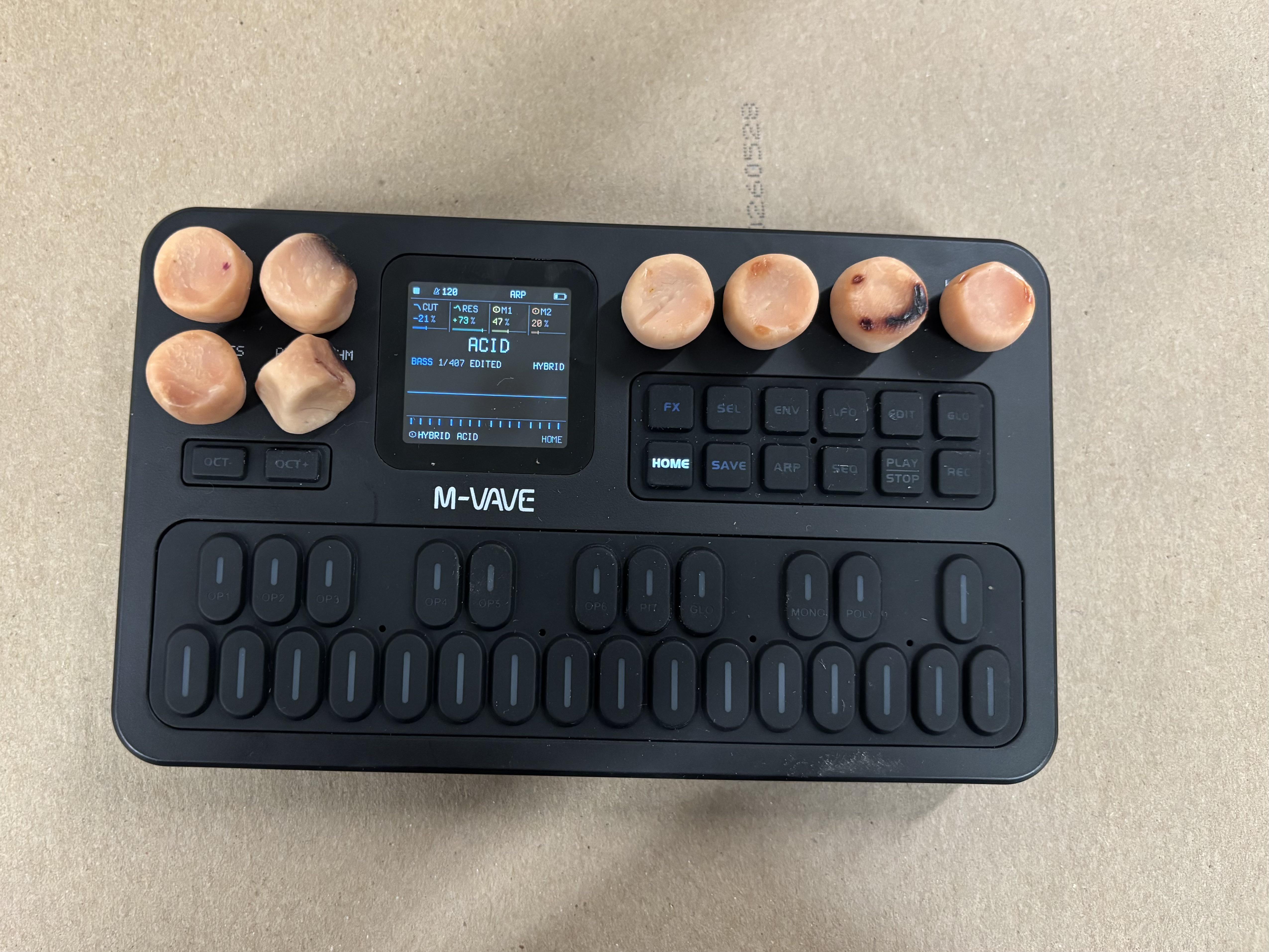
Custom knobs with sculpy

Post image
8 Upvotes

Took like ten mins just a heads up for those thrifty crafty people


r/MVaveFM1 • • 5d ago

worth it for $85?

0 Upvotes

I missed the boat on the $50 price and was kind of on the fence if I really needed this. But the shrub firmware tipped the scales for me and I want to pick one up as a mobile set up with my MPC sample.

But I saw a few people on here say that they think as the price approaches $100 that it’s not really a good value, as you can spend a bit more for something better. After looking around at other options I still feel like it’s a steal at $85 for some of the firmwares I’ve seen around. Also I don’t really want a big piece of gear or keyboard, as I am mostly using my MPC one and sample, and liven evoke.


r/MVaveFM1 • • 13d ago

Question I press the keys and they don't sound good

0 Upvotes

talentless hack here. are there video games or firmwares that give users a crash course in basic music theory?


r/MVaveFM1 • • 10d ago

Flashers are the new Firmware

10 Upvotes

Did we really run out of ideas for making music and now we just make flashers for other peoples firmware? A "cozy" flasher? A "tactical" flasher? Get back to your desks and make beats goddamnit!


r/MVaveFM1 • • 12d ago

Question Any firmware explicitly not vibecoded?

15 Upvotes

It has become implicit that almost every custom firmware posted here is at least Claude-assisted. I'm not here to argue about if it is good or bad, but I'm just curious: has anyone tried to design and code a firmware for that synth without using any LLM in the process? Like, as a challenge per se?


r/MVaveFM1 • • 24d ago

Bad Gear - BIG BRANDS have a PROBLEM!!!

Thumbnail
youtu.be
4 Upvotes

Didn't know that even Audio -Pilz is a fan ;)


r/MVaveFM1 • • Oct 15 '26

FM-1 how is mini-DAW. Demo with 8 tracks, 128 steps& Automation #fm1 #mvave #dawless #synth

Thumbnail
youtube.com
0 Upvotes

Is it a DAW?


r/MVaveFM1 • • 22d ago

FM-1 FM1 Life Expectancy?

0 Upvotes

What is a realistic expectation for how long the internal guts will last? I don’t even use the rubber keys on it , I control it using another keyboard…

Anyone on here who knows about hardware have a look inside and have any insight as to how long this amazing little gadget will last?

I’ve bought several and have one stored away just in case one dies…


r/MVaveFM1 • • 8d ago

Question Just got my fm1 in the mail🥳

0 Upvotes

What are my next steps if i want to install shrub using mac?


r/MVaveFM1 • • 3d ago

Me acabo de comprar un MVAVEFM1 en temu y no tengo ni idea de nada

0 Upvotes

Hola jovenes,

Me he comprado un dispositivo M Vave FM 1 y nunca he tenido ningun tipo de sintetizador, tengo un teclado yamaha E353 y muy poco conocimiento de música. He estado probando un simulador web y me ha gustado y he estado siendo guiado por chat gpt pero es muy lento el proceso. Alguien me dice cual es la mejor manera de pillar el gustillo a este dispositivo?

Por cierto me ha costado 64 euros en temu en color purpura, a mi no me desagrada el color.

Gracias chicos.


r/MVaveFM1 • • Oct 10 '26

is there any cfw NOT made with ai

7 Upvotes

>_>


r/MVaveFM1 • • 18d ago

Cardputer Zero, priced the same as FM1, but with MIC and MicroSD slot - in a size of a credit card!

0 Upvotes

New Cardputer Zero, being released this month is a beast!

https://shop.m5stack.com/pages/m5-cardputerzero?srsltid=AYCX9vITC5H45lY4LrypoIOvgSGEtHDGiSupGe-q2ryPvShjkdd9aeqc

Having a MIC and MicroSD card,... easily could be a sampler,... ?

Could it become what FM1 would never be?

What do you think?

I am waiting for mine to arrive soon...


r/MVaveFM1 • • Oct 09 '26

Tip: Learning using new MVAVE FM1 firmware fast way! (any firmware) with Sloop 2.5 example

3 Upvotes

If you found yourself that with each new firmware update you have to learn how to use its new features practically from the scratch, here is a personal tip how to do it much faster. For me the fastest way of learning is hands-on using the unit and making concrete beat/song on it. Prerequisite is that firmware of your choice comes with some manual (so far all of them that I checked have it).
Using AI chat of your choice, like ChatGPT for example, give it a prompt (this is example for the latest Sloop 2.5):
"Learn and understand features and functionality of my MVAVE FM1. Link to manual is here: https://raw.githubusercontent.com/isod89/sloop-fm1/refs/heads/main/GUIDE.md

Based on your learning give me step-by-step instruction how to make a nice R&B song."

It works unbelievably well!

Below you can find step-by-step instruction how to make a Soft House beat, using the latest features of Sloop 2.5 with accent on using web editor part (which is really great and becoming more and more and integral part of beat creation process in Sloop). You can accomplish it from start to finish in 10-15 minutes.

(Remark: see it as appendix to the manual to figure out faster how things work and what is possible. Not for cutting the corners on creativity and your creation process.)

Here it is ----->

I’ve read the updated SLOOP 2.5 manual. Let’s make a warm soft-house beat at 116 BPM, with Rhodes chords, a soft bass, and a subtle melody.

We’ll use the FM-1 and the web editor, because some new features are edited through the browser.

New feature in 2.5How we’ll use it
PHYS engineA gentle melody using MUTED GTR
Drum synth, SYN1–SYN4A custom, softer drum kit
Drum delay sendA subtle echo
Piano rollPrecise chord entry and note lengths
MIDI export/importExporting individual patterns for your DAW
Song page in the editorArranging sections into a song

Other additions include the NOISE engine, 153 factory sounds, MIDI CC control, bulk DX7 patch import, and 48 kHz USB audio.

Correction to my earlier instructions: the current manual calls the scale button SEL, located between FX and ENV. SELECT is a separate knob.

1. Connect the device and prepare a project

  1. Connect the FM-1 to your Mac with a USB data cable.

  2. Open the SLOOP editor in Chrome or Edge.

  3. Click Connect and allow MIDI access.

  4. If you have work you want to keep, open Projects → Backup → Save a backup.

  5. Stop playback.

Create a new project on the FM-1:

  1. Tap GLO, then SAVE.

  2. Turn SELECT to find TOOLS.

  3. Turn KNOB 4 — NEW one click, then another within approximately 1.5 seconds.

Under Settings in the editor, set:

SettingValue
BPM116
Global SWING0
CLICKOFF
SYNCINT

We’ll add swing only to the drums. Leave REC off: we’ll enter notes directly.

2. Create a softer custom kit — new in 2.5

Open Drum synth in the editor.

  1. Choose an available SYN slot, such as SYN1.

  2. Under Start from, select D.HOUSE, then click Copy.

  3. Name the kit SOFTHOUS — eight characters.

  4. Enable Play on change to hear your adjustments.

Start with small changes to the existing kit:

SoundAdjustment
KICKReduce CLICK slightly for a softer attack
KICKShorten Tone DECAY if the kick rings out too long
CLAPShorten Noise DECAY slightly
HATLower Out LEVEL slightly
OPEN HATShorten Noise DECAY so it doesn’t wash over the next beat

These are suggestions to adjust by ear, rather than factory settings from the manual. Leave the other parameters unchanged for now.

Click Store on the FM-1, then Use on the drum track.

Saving your project and storing your SYN kit edits are separate actions.

3. Program the drums

In the editor, select track 4 → Sequencer → Grid.

Set:

  • LEN: 16

  • DIV: 1/16

  • SWG: 12

  • Roll: x1

Click the following cells in the grid. Select the appropriate Level before entering each instrument:

InstrumentStepsLevel
KICK1, 5, 9, 13NORM
CLAP5, 13SOFT
HAT3, 7, 11SOFT
OPEN HAT15SOFT
SHAKER2, 4, 6, 8, 10, 12, 14, 16GHOST
RIM12GHOST

Press PLAY.

You should hear a steady kick, a clap on beats two and four, and a gently swinging shaker. In SLOOP, SWG 0 means straight timing; 12 gives a small amount of swing.

4. Enter Rhodes chords using the new piano roll

Stop playback. Select track 2 → Sound → Presets → RHODES.

Check these settings:

  • VOICE / VCE: POLY

  • CHORD: OFF

  • ARP MODE: OFF

  • Transpose / TRN: 0

We’ll enter the individual notes of each chord.

Open Sequencer and set:

  • LEN: 64

  • DIV: 1/16

  • SWG: 0

  • View: Piano roll

  • Note length: 1/8 — two sixteenth-note steps

At each starting step below, enter all four notes from that row:

BarChordNotesStarting steps
1Am7A3, C4, E4, G43 and 11
2Fmaj7A3, C4, E4, F419 and 27
3Cmaj7G3, B3, C4, E435 and 43
4G7G3, B3, D4, F451 and 59

For example, enter the first chord like this:

  1. At step 3, click the A3 row.

  2. At the same step, add C4, E4, and G4.

  3. Repeat at step 11.

Clicking at the starting step of a chord adds another note to that chord, up to four. Drag a note’s right edge to adjust its duration.

The result: two short, syncopated chords per bar. These chord voicings keep the notes close together for smooth changes.

5. Soften the Rhodes

On track 2 → Sound:

  1. Leave FX → DST at zero.

  2. Add a little CHO and REV.

  3. Move FILTER slightly toward the low-pass side, left of its neutral position.

  4. If the chords overlap too much, reduce ENV → REL.

Aim for a clear attack with rounded high frequencies. Keep the reverb in the background.

6. Add the bass

Select track 1 → Sound → SUB BASS.

Check CHORD OFF, ARP OFF, and TRN 0. In Sequencer, set LEN 64, DIV 1/16, and SWG 0, then open Piano roll.

Set note length to 1/8 and enter:

BarNote to enterSteps
1A33, 7, 11, 15
2F319, 23, 27, 31
3C435, 39, 43, 47
4G351, 55, 59, 63

According to the manual, SUB BASS already sounds two octaves below the notes you enter. Don’t transpose these notes down another two octaves.

The bass plays between the kicks. Leave its reverb and delay at zero for now.

7. Add a gentle PHYS melody — new in 2.5

Select track 3 → Sound → MUTED GTR. This preset uses the new PHYS engine.

Set CHORD OFF, ARP OFF, and TRN 0, then configure Sequencer:

  • LEN: 64

  • DIV: 1/16

  • SWG: 0

  • Note length: 1/8

Enter this sparse melody:

StepNote
7E5
15G5
23A5
31G5
39E5
47D5
55B4
63D5

If it sounds too bright, reduce BRIT slightly on the PHYS BODY page. Add a little reverb and lower the track level so the melody sits subtly above the Rhodes.

8. Add delay, including the new drum send

Open Sound → FX → DLY, or tap FX on the device until you reach the DLY page.

Set:

  • TIME: 1/8D

  • FDBK: low, for a few quiet repeats

  • COLR: toward a darker sound

  • MIX: high enough to hear the echo when you raise a send

On track 3, raise FX → DLY send slightly.

Next, open Settings → DRUMS → DLY in the editor and raise it just above zero. On the device, this is GLO → DRUMS → KNOB 4.

This sends the entire drum track into the delay, including the kick. Keep it very quiet, adding just a little space around the rhythm.

9. Add house pumping and balance the mix

Under Settings → MASTER, start with:

ParameterStarting value
DUCK25%
DUST6%
FILTNeutral / OFF

DUCK lowers the synth tracks when the kick hits, then brings them back up, creating gentle house pumping.

Open Tracks in the editor:

  1. Use the drums as your foundation.

  2. Bring up the bass until it supports the kick clearly.

  3. Add the Rhodes until the chords fill the space.

  4. Keep the melody quieter than the other musical elements.

Use headphones or external speakers to judge the bass.

10. Save the beat and export MIDI — new in 2.5

Stop playback.

  1. On the FM-1, hold SAVE and press white key 5 to save to section A. If A is occupied, choose another slot or deliberately confirm the overwrite.

  2. Open Projects → Backup → Save a backup for a complete backup.

  3. In Sequencer, select each track separately and click Export MIDI.

You’ll get separate MIDI files for the bass, chords, melody, and drums. MIDI stores the notes, not the FM-1’s sound; record its USB audio output as well if you want to preserve the exact sound.I’ve read the updated SLOOP 2.5 manual. Let’s make a warm soft-house beat at 116 BPM, with Rhodes chords, a soft bass, and a subtle melody.We’ll use the FM-1 and the web editor, because some new features are edited through the browser.New feature in 2.5 How we’ll use it
PHYS engine A gentle melody using MUTED GTR
Drum synth, SYN1–SYN4 A custom, softer drum kit
Drum delay send A subtle echo
Piano roll Precise chord entry and note lengths
MIDI export/import Exporting individual patterns for your DAW
Song page in the editor Arranging sections into a songOther additions include the NOISE engine, 153 factory sounds, MIDI CC control, bulk DX7 patch import, and 48 kHz USB audio.Correction to my earlier instructions: the current manual calls the scale button SEL, located between FX and ENV. SELECT is a separate knob.1. Connect the device and prepare a projectConnect the FM-1 to your Mac with a USB data cable.
Open the SLOOP editor in Chrome or Edge.
Click Connect and allow MIDI access.
If you have work you want to keep, open Projects → Backup → Save a backup.
Stop playback.Create a new project on the FM-1:Tap GLO, then SAVE.
Turn SELECT to find TOOLS.
Turn KNOB 4 — NEW one click, then another within approximately 1.5 seconds.Under Settings in the editor, set:Setting Value
BPM 116
Global SWING 0
CLICK OFF
SYNC INTWe’ll add swing only to the drums. Leave REC off: we’ll enter notes directly.2. Create a softer custom kit — new in 2.5Open Drum synth in the editor.Choose an available SYN slot, such as SYN1.
Under Start from, select D.HOUSE, then click Copy.
Name the kit SOFTHOUS — eight characters.
Enable Play on change to hear your adjustments.Start with small changes to the existing kit:Sound Adjustment
KICK Reduce CLICK slightly for a softer attack
KICK Shorten Tone DECAY if the kick rings out too long
CLAP Shorten Noise DECAY slightly
HAT Lower Out LEVEL slightly
OPEN HAT Shorten Noise DECAY so it doesn’t wash over the next beatThese are suggestions to adjust by ear, rather than factory settings from the manual. Leave the other parameters unchanged for now.Click Store on the FM-1, then Use on the drum track.Saving your project and storing your SYN kit edits are separate actions.3. Program the drumsIn the editor, select track 4 → Sequencer → Grid.Set:LEN: 16
DIV: 1/16
SWG: 12
Roll: x1Click the following cells in the grid. Select the appropriate Level before entering each instrument:Instrument Steps Level
KICK 1, 5, 9, 13 NORM
CLAP 5, 13 SOFT
HAT 3, 7, 11 SOFT
OPEN HAT 15 SOFT
SHAKER 2, 4, 6, 8, 10, 12, 14, 16 GHOST
RIM 12 GHOSTPress PLAY.You should hear a steady kick, a clap on beats two and four, and a gently swinging shaker. In SLOOP, SWG 0 means straight timing; 12 gives a small amount of swing.4. Enter Rhodes chords using the new piano rollStop playback. Select track 2 → Sound → Presets → RHODES.Check these settings:VOICE / VCE: POLY
CHORD: OFF
ARP MODE: OFF
Transpose / TRN: 0We’ll enter the individual notes of each chord.Open Sequencer and set:LEN: 64
DIV: 1/16
SWG: 0
View: Piano roll
Note length: 1/8 — two sixteenth-note stepsAt each starting step below, enter all four notes from that row:Bar Chord Notes Starting steps
1 Am7 A3, C4, E4, G4 3 and 11
2 Fmaj7 A3, C4, E4, F4 19 and 27
3 Cmaj7 G3, B3, C4, E4 35 and 43
4 G7 G3, B3, D4, F4 51 and 59For example, enter the first chord like this:At step 3, click the A3 row.
At the same step, add C4, E4, and G4.
Repeat at step 11.Clicking at the starting step of a chord adds another note to that chord, up to four. Drag a note’s right edge to adjust its duration.The result: two short, syncopated chords per bar. These chord voicings keep the notes close together for smooth changes.5. Soften the RhodesOn track 2 → Sound:Leave FX → DST at zero.
Add a little CHO and REV.
Move FILTER slightly toward the low-pass side, left of its neutral position.
If the chords overlap too much, reduce ENV → REL.Aim for a clear attack with rounded high frequencies. Keep the reverb in the background.6. Add the bassSelect track 1 → Sound → SUB BASS.Check CHORD OFF, ARP OFF, and TRN 0. In Sequencer, set LEN 64, DIV 1/16, and SWG 0, then open Piano roll.Set note length to 1/8 and enter:Bar Note to enter Steps
1 A3 3, 7, 11, 15
2 F3 19, 23, 27, 31
3 C4 35, 39, 43, 47
4 G3 51, 55, 59, 63According to the manual, SUB BASS already sounds two octaves below the notes you enter. Don’t transpose these notes down another two octaves.The bass plays between the kicks. Leave its reverb and delay at zero for now.7. Add a gentle PHYS melody — new in 2.5Select track 3 → Sound → MUTED GTR. This preset uses the new PHYS engine.Set CHORD OFF, ARP OFF, and TRN 0, then configure Sequencer:LEN: 64
DIV: 1/16
SWG: 0
Note length: 1/8Enter this sparse melody:Step Note
7 E5
15 G5
23 A5
31 G5
39 E5
47 D5
55 B4
63 D5If it sounds too bright, reduce BRIT slightly on the PHYS BODY page. Add a little reverb and lower the track level so the melody sits subtly above the Rhodes.8. Add delay, including the new drum sendOpen Sound → FX → DLY, or tap FX on the device until you reach the DLY page.Set:TIME: 1/8D
FDBK: low, for a few quiet repeats
COLR: toward a darker sound
MIX: high enough to hear the echo when you raise a sendOn track 3, raise FX → DLY send slightly.Next, open Settings → DRUMS → DLY in the editor and raise it just above zero. On the device, this is GLO → DRUMS → KNOB 4.This sends the entire drum track into the delay, including the kick. Keep it very quiet, adding just a little space around the rhythm.9. Add house pumping and balance the mixUnder Settings → MASTER, start with:Parameter Starting value
DUCK 25%
DUST 6%
FILT Neutral / OFFDUCK lowers the synth tracks when the kick hits, then brings them back up, creating gentle house pumping.Open Tracks in the editor:Use the drums as your foundation.
Bring up the bass until it supports the kick clearly.
Add the Rhodes until the chords fill the space.
Keep the melody quieter than the other musical elements.Use headphones or external speakers to judge the bass.10. Save the beat and export MIDI — new in 2.5Stop playback.On the FM-1, hold SAVE and press white key 5 to save to section A. If A is occupied, choose another slot or deliberately confirm the overwrite.
Open Projects → Backup → Save a backup for a complete backup.
In Sequencer, select each track separately and click Export MIDI.You’ll get separate MIDI files for the bass, chords, melody, and drums. MIDI stores the notes, not the FM-1’s sound; record its USB audio output as well if you want to preserve the exact sound.

r/MVaveFM1 • • Oct 21 '26

How can I create my on fw?

0 Upvotes

Hey guys, I don't have any knowledge in programing but I love what the community is doing here to FM-1, I also follow other 2 communities, the Zoom Ms that has first "hacked" by hardcode I believe but today I saw alot people coming with vibe code for new FXs and Hotone Ampero where right now I only saw 2 "breaks" that actually uses the current firmware and tweak it, not bring new firmwares. But I'm really exciting to start to tweak things, there is some documentation on how to do it? I need access to claude code to do it? It's possible to this only have knowledge of synths, music and design with zero experice in code? What would you suggest? Ty!


r/MVaveFM1 • • 24d ago

Question Some blabbering before i buy

0 Upvotes

TL:DR

  1. Is it good enough as first entry level learning device for someone with no experience and very little music theory ?

  2. Is it capable enough past the beginner stage, into the semi-professional, freelancer use ? Maybe as a base to add a midi controller keyboard ?

  3. Can fm1 be effectively used for making full blown songs as a sole device ? Think of ambient like øneheart, maybe shoegaze.

  4. If not, are the hardware limitations the reason. Which ? Cpu, not enough tracks, too small sequencer ? Lack of sampler ?

  5. If so, then can it be used with DAW/sampler on pc/phone to make something advanced with a good custom firmware and post production. Would it still make sense or would midi keyboard be best.

Hello there. I'm curious about buying the fm1 bc of the price, i can get it on ali for roughly 50€/55$, that's affordable for a hobby start, but i am a total beginner.

I have no prior music education, I never owned a synth, not even keyboard for that matter, but i did use DAW's just a few times in the past. Tho using daw without a keyboard was troublesome. I checked (mini) midi keyboards, but they were just an addon and pretty expensive at 99-200€ for akai or arturia. Thus i dropped it as a teen, but i saw the potential.

Now, as an adult i wanna try to learn how to make my own music again.

I LOVE listening to music, i have AuDHD which makes my brain hyperfixate on music. I often add some parts, complexity and solos in my brain. You could call it ArpeggioDHD.

I wonder just how exactly capable is mvave Fm1 with all of the recent firmwares like sloop, jiant, AMB-1, melodee etc.

It can be basically everything apart from whole daw and sampler, but only one at once.

Here come the questions from TL:DR up top.

Can i buy it and get enough use out of it to learn and eventually make my own songs that seem complete, professional enough beyond a simple loop. I know the sequencer is normally just 16 steps, up to 32 in some fw. It won't work on half-notes, thus can't fully recreate best songs without sounding uncanny.

i made some research on youtube and apart from few good songs most were just simple loops to be paired with another device, be it one or two FM1's or professional samplers, guitar effects etc.

I wonder if just one fm1 is enough as a sole hardware to pair with software daw & sampler to create something amazing. From ambient through shoegaze to trance, even if for best results i have to put it through pc first and combine it, add effects.

I don't care about live performance. I am not gonna use it on the go. I wonder how capable it really is on it's own.


r/MVaveFM1 • • 28d ago

Showcase Fm2 with better keys and bigger screen

Thumbnail
gallery
0 Upvotes

This is my only request. I think the fm1 is almost perfect, however the screen is so hard to read with the new firmwares adding more text and the keys are hard to play because the all smush together. So a bigger screen and bigger and more separate keys is all I want. Maybe add like 2 inches to the device and it would be great


r/MVaveFM1 • • 23d ago

Any firmware for non-repetitive music?

6 Upvotes

All firmwares I've come across are oriented towards genres like house, techno, EDM, basically all repetitive music genres. They're usually limited to 8 patterns, some firmwares 16 pattern. But this is not enough for "linear" music, for example film score or other long melodies. Any firmware with either much more patterns OR a linear, tape-like workflow like an OP1 with at least 5 minutes of tape length?


r/MVaveFM1 • • Oct 18 '26

Funny I built a custom firmware for the m-vave fm1 that makes it write custom firmwares for the m-vave fm1 and then post about them a couple times a day on every subreddit

Thumbnail reddit.com
0 Upvotes

You know you’re getting popular when you’re being mocked by r/synthesizercirclejerk 😂


r/MVaveFM1 • • Oct 20 '26

Firmware MPC FOR FM-1 ? SAMPLE DIRECTLY IN VIA USB-C 32 SAMPLE SLOTS 8 BIT OR 12 BIT... COSTS 5

Thumbnail
youtube.com
0 Upvotes

I DOWNLOADED IT BUT WONT BE ABLE TO TRY IT OUT UNTIL TOMORROW, INSTALL WAS SMOOTH THO.


r/MVaveFM1 • • 25d ago

Can the M-VAVE FM-1 Be Used as an External MIDI Sound Module for Live Church Worship?

0 Upvotes

Hi! I would like to know if the M-VAVE FM-1 is suitable for my specific use case.

I play keyboards at my church. We have an older keyboard that has MIDI connectivity, but its built-in sounds are not very good.

My idea is to connect the keyboard's MIDI OUT to the FM-1's MIDI IN and use the FM-1 as an external sound module.

For example, would I be able to:

Play high-quality piano sounds using the church's old keyboard?

Layer different sounds, such as piano + atmospheric pads or strings?

Create splits and layers with different instruments?

Connect the FM-1's audio output directly to the church's mixing console?

Basically, I want to use the old keyboard only as a MIDI controller and let the FM-1 generate all the sounds.

Is the FM-1 designed for this kind of application, or is it mainly intended to be used as a standalone synthesizer?

I would really appreciate your clarification before purchasing it. Thank you!


r/MVaveFM1 • • 29d ago

Firmware Where is the genesis of this crazy FM1 custom firmware revolution announcement

0 Upvotes

Hi guy,

while waiting for 1,2,3,4 units arrival, I want to dig deep into the ground zero of our incredible FM1 historical revolution. Can someone fill me in to quench my thirst please. any links to the source or explanation please.


r/MVaveFM1 • • 9d ago

MegaList of Devices that support USB Audio Host mode. Get better audio from your FM-1

0 Upvotes

I just read a question that i have not seen much talk about. This post: How do you get decent sound to output : r/MVaveFM1 so i prompted it and got this. get ready yall!!!

If you have a device that supports USB Audio Host Mode list it below. Pictures and setup description pls. =p

--------------------------------------------------------------------------------------------------------------

When choosing a DAC / audio interface for the M-Vave FM-1, the crucial hardware detail to understand is USB hierarchy:

[!important] The FM-1 is primarily a USB Client (Device), not an audio host source: cuvave.com. You cannot directly plug a standard USB dongle DAC (like an Apple dongle, DragonFly, or Fiio) into the FM-1's USB-C port, because both devices would be waiting for a host computer to route the audio.

To get clean, high-quality audio conversion, you have two main pathways:

Option 1: Standalone Hardware Samplers / Grooveboxes (USB Audio Hosts)

If you want to plug the FM-1’s USB-C cable directly into another hardware machine for digital recording/monitoring without a PC, that machine must support USB Audio Host mode.

Top class-compliant devices that act as USB audio hosts and pair seamlessly with the FM-1:

  1. Roland SP-404MKII

    • Why it fits: It has full class-compliant bidirectional USB-C audio/MIDI host capability. Plug the FM-1 straight in via USB-C to record, resample, apply Roland's 37+ MFX engines, and power both cleanly.

  2. Akai MPC One+ / Live II / Key 37

    • Why it fits: Akai MPC 2.10+ firmware natively supports class-compliant USB audio interfaces. Plug the FM-1 into the MPC’s USB-A port to record digital audio directly onto a stereo track.

  3. 1010music Blackbox / Tangerine

    • Why it fits: Ultra-portable, accepts class-compliant USB audio/MIDI devices, making for a pocket-sized DAWless setup.

Option 2: USB Audio Interfaces with Line-In (Analog Out → Quality DAC/ADC)

If you want to play the FM-1 into a computer/tablet or monitor through high-grade headphones/monitors, take the FM-1's 3.5mm analog output into a dedicated audio interface with quality converters:

  1. MOTU M2 / M4

    • DAC/ADC: ESS Sabre32 Ultra DAC.

    • Why it fits: Exceptionally clean, dynamic headphone and monitor outs with very low self-noise. It accepts the FM-1 into inputs 1 & 2 via 1/4" line jacks with zero-latency hardware monitoring.

  2. Focusrite Scarlett 2i2 (4th Gen)

    • DAC/ADC: Uses RedNet-grade converters delivering 120 dB of dynamic range.

    • Why it fits: Auto-Gain and Clip Safe make tracking the FM-1's punchy FM transients easy.

  3. Behringer U-Phoria UMC202HD

    • Why it fits: The best budget choice (~60–75 USD). High-resolution 24-bit/192kHz Midas-designed preamps with transparent line-level tracking.

  4. TC Helicon GO XLR / GO Solo or IK Multimedia iRig Pro Duo I/O

    • Why it fits: Ultra-portable, battery/bus-powered class-compliant interfaces ideal if you are tracking into an iPad or iPhone on the go.

Required Cable: A standard 3.5mm TRS stereo to dual 1/4" TS mono splitter cable (Y-cable) to feed the FM-1's output into Left/Right line inputs.

Option 3: Ground Loop Isolator (Direct Monitoring Clean-Up)

If you are currently monitoring directly from the FM-1's headphone jack while it is plugged into USB power/MIDI and hearing buzz, high-pitched whines, or digital noise, you don't necessarily need a new DAC—you're likely hearing USB ground loop noise.

Plugging an inexpensive 3.5mm Ground Loop Noise Isolator (like Mpow or BESIGN, ~10 USD) inline with your headphones or speaker cable clears out that digital interference immediately.


r/MVaveFM1 • • Oct 13 '26

I am joining the M-Vave phenomenon

Post image
0 Upvotes

I bought 4. I'll buy more as I find more firmware keepers. I am going with Sloop, Baud Girl, Felucca, and XOX. I'll buy more if needed. Am I doing too much? :-)


r/MVaveFM1 • • Oct 21 '26

rings into clouds

0 Upvotes

can't believe nobody already did a firmware of rings into clouds