r/MSAccess • • Oct 10 '25

[DISCUSSION - REPLY NOT NEEDED] Retiring MS Access Developer

173 Upvotes

After 41 years of working with database tech, it is time for me to go into partial retirement. I started with COBOL on a mainframe. When desktops hit the market in force, I transitioned to Ashton-Tate dBase III. Access entered the picture in 1992, and I never looked back. For the past 33 years, I've worked solely in MS Access. I have worked in finance, banking, health care, insurance, government, manufacturing, HR, transportation, aerospace, and equipment/lab interfaces. I want to give back, and over the next few weeks, I'll post a few things that have helped me tremendously with my development efforts over the year.

If anyone from the MS Access team is on this sub...Thank you for MS Access. I used this tool to build two homes, provide for my family's daily needs, and offer a private education for my sons, who have greatly benefited from said education. While I have endured ridicule for the use of the product, the satisfaction of building low-maintenance systems that have endured for years has more than covered the short-sightedness of industry "experts". The ride isn't over, but it will be slowing down, and I am thankful that this product has given me the luxury of slowing down. Thank you.


r/MSAccess • • Feb 23 '25

[DISCUSSION] One of the greatest Access website resources I ever found

90 Upvotes

This site has been around for probably over 20 years. I did a search in the forum and I saw it referenced a few times in older posts, but never highlighted. This guy is brilliant and I learned SO much from him so here it is:

http://allenbrowne.com/tips.html


r/MSAccess • • Oct 11 '25

[DISCUSSION - REPLY NOT NEEDED] Parting Thoughts - Why IT departments dismiss Access

87 Upvotes

I have 30+ years as a Microsoft Access developer. I'm entering partial retirement and want to give back to my community. I've decided to post my experience in the form of a Reddit message in the access forum.

Why IT departments dismiss Access?

Here are my observations:

 Access lets you build full-stack apps—UI, logic, data—in one file. That scares IT teams who prefer rigid silos: front-end devs, DBAs, and project managers. Access breaks that mold.  They “lose control” of the process.

 Access empowers business users to solve problems without waiting for IT. That’s a feature, not a flaw—but IT often sees it as rogue deployment. Ironically, many of those “rogue” apps outlive the official ones.  I still have applications in product after 15 years.

 IT versed in web stacks often dismiss Access as “insufficient” or “non-scalable.” But they miss its strengths: rapid prototyping, tight Office integration, and automation via VBA.

 Access is a legitimate development tool and it’s underleveraged. It’s still the fastest way to build context-driven tools in environments where agility beats bureaucracy.

These are MY observations.  Your experiences may be different, and I encourage you to respond to these posts if you feel so lead.  The objective is to make life easier on those who travel the same path.


r/MSAccess • • Jul 23 '14

New to Access? Check out the FAQ page.

71 Upvotes

FAQ page

Special thanks to /u/humansvsrobots for creating the FAQ page. If you have additional ideas feel free to post them here or PM the mods.


r/MSAccess • • Jul 26 '19

[DISCUSSION] I hid an easter egg in the Access application I've been developing

61 Upvotes

r/MSAccess • • Oct 31 '25

[DISCUSSION - REPLY NOT NEEDED] Retiree Notes - How to sell Access solutions

59 Upvotes

This content is based on my experience and opinions. Nothing more.

Since the inception of my business (in 2010), I have averaged $197,000 a year in income. I have never run an ad or marketing campaign. This is my strategy for selling into businesses:

Step 1 - Know your prospects. Focus on businesses you can actually help. Primarily, I look for small- to midsize, independently owned businesses. Working for large companies wasn't easy for me. The only time I had any success with a large business was when I targeted an independent unit that needed particular help.

Step 2 - Understand the customer's particular pains and values. Literally all my success came from units that could not get off-the-shelf software AND valued flexibility and independence. They were accustomed to getting no help, so they improvised (Excel and user-built Access solutions). Giving them a professional, Office 365-based, low-maintenance database solution sold itself. Believe it or not, money was rarely the issue.

Step 3 - Deliver. Even if the project sank, it would still be finished. You never quit, and you don't let the client quit on you. References and referrals. This is how good word of mouth travels.

I once had a client with whom I could not get along with very well. I finished our project and asked if I could use him as a reference (I always do that). He said ok. I was skeptical. I had a bid come in for a project I didn't really want, but I was obliged to bid on it so I could keep an open door for other business (some businesses require no-bid submissions, and I hate that). I put him down as a reference and priced the job out of the market, or so I thought. When I was awarded the contract, I was shocked. I asked the project manager how I got the job. He laughed and said, "We called your reference." The reference said, "I can't stand that SOB, but he's the only guy that can do what he does." Go figure.

Typically, I do several projects (300 manhours) a year, and the rest is modifications or consulting.


r/MSAccess • • Feb 22 '25

[DISCUSSION] Life as a MS Access freelancer

59 Upvotes

Hi guys.

Since the mods are encouraging more discussion on here, I figured I'd give it a go. I know my account has low karma - hope it's not a problem.

Well over the past 4ish years, I have been working almost exclusively with MS Access development. It was kind of a coincidence and not planned at all.

About 4 years ago, I moved back to my home country after having lived in a different country for almost 8 years. I was looking for a job, and ended up finding some very basic office data entry work in a furniture wholesale company. Basically, they wanted me to find potential furniture suppliers in countries like China and India, etc.

They wanted me to put all the suppliers I found into their "database". I quickly learned that their "database" was a Excel sheet on a shared network file drive. I almost coked. I immediately recalled a class I took in college some years earlier. It was called something along the lines of "Introduction to Microcomputer Applications". Basically, it was a course teaching the Microsoft Office fundamental. The course touched on Access, and I remember thinking it was cool at the time, but never touched it again after that class.

Well fast forward to my data entry job. There I was, staring at this horrible Excel "database", about to vomit. On my own time, I started looking into MS Access. Watched a lot of YouTube videos and read about it online. I was immediately sold. It was like my mind was blown when I finally realized what it was capable of. I started creating a database for the suppliers, and designed neat little forms to make the user experience a whole lot better. So far, this was all just for myself to learn Access, as I was now entering the supplier information into both the Excel list AND my personal little Access database.

I had some decent programming experience before getting into Access, so learning VBA was a breeze for me with a few YouTube videos and the Microsoft Learn website. I started pushing myself to implement a bunch of cool functionality. I created a full user login system, with admin users having the ability to control what each user has access to, and so on.

After my personal Access supplier database had become somewhat sophisticated, I presented it to the manager at the office, and I offered to implement it so that all employees could use it. He was kinda "meh" about it, because he was an older guy and didn't quite understand IT stuff. He did, however, realize this himself, so he told me to show it to upper-management, which I did. They found the application pretty cool, and gave me the go-ahead to implement it.

Well, this is where things took off. After all the other employees started using it, there were a lot of suggestions and demand for new features. At this point, I was spending most of my day developing the application. They wanted all kinds of stuff, such as having all products and customers in there, as well as the suppliers.

This all happened over the span of a few years. Now, I am still working for the same company, but my title is now Database Administrator. I spend almost all my time developing and supporting the Access application, which has now become a full-blown ERP system. It literally handles every aspect of the company's operations - from sourcing suppliers, product development, warehouse management, and sales.

There are so many cool and sophisticated functions in this system now, so I don't even know where to start. If you guys have questions, I'd be more than happy to answer.

Now, why did I use the word "freelancer" in the title? Well I found a side hustle developing a MS Access application for a law firm, creating a case management system from scratch. This is still in an early stage, so not much I can tell you guys about it at the moment. My current job, and the freelance job have gotten me so excited about Access, that I am now considering finding some more clients and go 100% freelance.

In conclusion, Access is some of the most amazing software I have worked with, and I keep learning new things about it every day. It just never ends. It is mind blowing to me that most people have no clue what Access even is, and those that do, have no idea how versatile and useful it is. The enterprise software industry is pushing their subscription and cloud-based garbage, but I keep pushing back against that. What most small and midsize companies need is a well-developed Access application.


r/MSAccess • • Feb 19 '26

[SHARING HELPFUL TIP] Access Explained: Let’s Talk About Access

51 Upvotes

Hi folks. I've been a member of the Reddit community for years now... mostly lurking in the shadows like a database ninja. Between running my business, making tutorials, and recording videos, I don't always have a ton of time to jump into threads and answer questions as much as I'd like. But I still read a lot of what goes on in here, and I wanted to find a way to give something back to the Access community that doesn't involve me trying to type a novel into a comment box at 1:30 in the morning.

So I figured... why not do what I already do every day, just in written form, and share it here?

For those who don't know me, I've been working with Microsoft Access since the early 1990s. Version 2.0. Floppy disks. Big hair. The whole thing. I spent a big chunk of my early career doing consulting work, building full database systems for small and mid-sized companies, and even a few larger environments where Access was used as a front end to SQL Server. That's one of the reasons I get a little fired up when people dismiss Access as a "toy." It's not. Like any tool, it depends on how you build with it.

Over time, something interesting happened. I'd deliver a finished system to a client, and instead of just using it, they'd ask, "How do we modify this?" "How do we add a field?" "How do we build another form like this?" Eventually I realized I was spending more time teaching people how their databases worked than I was building them. And honestly... I enjoyed the teaching part more.

So I shifted.

I moved away from consulting and focused on training. Helping people understand not just what buttons to click, but why things should be built a certain way. Design philosophy. Best practices. The stuff that prevents database pain six months down the road.

That's really what this series is about.

Access Explained is going to focus on concepts. The "why" behind how Access works and how databases should be designed. Not step-by-step tutorials. Not "click this, type that." There are plenty of resources for that already. What I want to do here is dig into the thinking side of Access:

  • Why certain design choices matter

  • Why some common practices cause problems

  • Why Access gets misunderstood so often

  • And how to use it more effectively whether you're a beginner or experienced developer

I've got a pretty deep archive of material from years of teaching, so I'll be pulling from that treasure trove and reshaping topics into bite-sized, discussion-friendly articles for the sub. Just sharing knowledge the knowledge I've spent decades gathering.

My goal is simple: the more people who understand Access and get excited about using it properly, the stronger the community becomes. And frankly, the more we can push back on the idea that Access is some kind of second-class database, the better.

So that's the mission.

If there are specific topics you'd like to see covered, feel free to chime in. Chances are I've either taught it, built it, debugged it, or fixed it after someone else built it sideways.

LLAP
RR


r/MSAccess • • Dec 22 '23

[EXAMPLE CODE] I made Flappy Bird in MS Access

49 Upvotes

I wanted to learn some VBA, so i thought: “what other way to learn a new language, than remaking flappy bird”

The flickering occurs because it redraws the screen everytime the pipes move, or the bird wings flap.

Sorry in advance if im not allowed to post this. I just thought it would be cool to show off some alternative things you can use Access for, and how many possibilities you have with VBA.


r/MSAccess • • Oct 07 '24

[DISCUSSION] Access 2024 Has Been Released

45 Upvotes

Microsoft released Access 2024 a few days ago. That's the perpetual license (retail) version, where you buy it once, rather than paying a subscription fee.

This article lists the new features in Access 2024. Those using the Microsoft 365 subscription service already have all of these features. But for those using the perpetual version, these will be new.

https://support.microsoft.com/en-au/office/what-s-new-in-access-2024-a4643663-59a9-48e8-87ae-43cfdd9ba267


r/MSAccess • • Mar 05 '26

[SHARING HELPFUL TIP] Access Explained: How To (and How Not To) Share a Microsoft Access Database Online

44 Upvotes

I saw someone in this subreddit yesterday asking how to share a Microsoft Access database online so multiple people can use it. This question comes up all the time. People build a really useful Access database and then eventually someone asks, "Can we just share this like an Excel file?" That's usually the moment the database developer looks at them the way Scotty looks at someone who just asked him to rewrite the laws of physics. So I figured today would be a good day to write about it. I've talked about this topic in a lot of videos and articles over the years, but here are the nuts and bolts so the next time this comes up you can just point people here.

The first thing to understand is that Access is designed as a file-based database system, and it works best when it is running on a stable local area network. Traditionally that means a wired network connection between the users and the computer or server hosting the data file. Wireless connections can work, but they introduce the possibility of brief drops or interruptions in connectivity, and that is something an Access database does not tolerate well. Even a short network hiccup while a record is being written can cause problems. For that reason, the standard approach is to split the database so that each user has their own copy of the front end on their machine while the shared tables live in a back end database on the network. Each front end connects to that shared data file. This setup dramatically improves reliability and performance. There are plenty of tutorials, videos, and articles online explaining how to split a database properly, so I won't go into the step by step details here.

Another thing to understand is that Access is not like Excel or Word. You can't just drop the file into a cloud folder and have multiple people open it. Access is a file-based database. It expects a stable connection to the data file and it performs a lot of locking operations behind the scenes. Because of that, trying to run an Access database directly from file syncing services like OneDrive, Google Drive, or Dropbox is one of the most common mistakes people make. Usually a fatal one. Those services constantly sync and lock files in the background.

Access also locks files while records are being edited. The two systems do not play nicely together. At best you will see strange errors and data conflicts. At worst you will corrupt the database. It might appear to work for a while, which is why people keep trying it, but eventually it will cause problems. You can absolutely store backups of your database in those services, but do not run the live working database from them. This is how perfectly good Access databases end up wearing a red shirt before they beam down with the away team.

So if you need multiple people using the database remotely, what are your options?

One option is SharePoint. If your organization is already using SharePoint and is comfortable with it, you can move your tables into SharePoint lists and keep the Access front end on each user's machine. This allows multiple users to work with the data remotely. However, this approach involves migrating your tables and sometimes making adjustments to your forms and queries. I generally only recommend this route if your company is already invested in SharePoint. I would not start a brand new project around it.

Another common approach is to split the database and move the data into SQL Server. In this model the tables live on a SQL Server (often hosted online) and each user runs their own copy of the Access front end connected to it. Access becomes the user interface while SQL Server handles the data storage. This is a very scalable and reliable solution and it works well for teams ranging from just a few users to very large organizations. This is what I do for both my in-house database and my website database. Access front-ends. SQL Server back-ends. Reliable. Secure. This is where the big kids play.

Another advantage of moving your data to SQL Server is that it opens the door to building a web-based interface for your database. Your users in the office can continue using Microsoft Access as their front end application while the same data is also available to a web site. Once the tables live in SQL Server, you can connect to them from almost any web programming language and build browser based pages that interact with the same data. That means employees using Access on their Windows PCs can keep working exactly as they always have, while customers, vendors, or remote users can interact with the system through a web interface.

That is essentially what I do with my own web site. My site is database driven and uses SQL Server hosted online. The web site itself was written in classic ASP many years ago when I first started building it and I still maintain it that way today. ASP is definitely more hands on than many modern frameworks, but I enjoy coding things manually and writing my own HTML, CSS, and JavaScript. It is the way I learned and it still works very well for what I need. Of course there are plenty of newer technologies today that offer visual designers and drag and drop tools if that is the style of development you prefer. Classic ASP is an oldie, but a goodie. Like me.

Now if you don't want to redesign the database or migrate your tables to SQL Server and you simply want remote access to the same machine where the database lives, a remote desktop solution works well. Something like Chrome Remote Desktop or Windows Remote Desktop lets you log into your office computer from anywhere and run Access as if you were sitting in front of that computer. This is perfect for a single user or very small scenarios, but it is not really meant for large groups unless you move to a full remote desktop server environment. I use this when I travel. I remote in to my office PC and it's just like I'm sitting at my desk.

There are also hosted environments designed specifically for running Access databases in the cloud. In those systems the database runs on a remote server and your users log into that server to run Access. This approach is popular with small businesses because it requires very little technical setup. The tradeoff is usually a per user monthly cost.

The important takeaway from all of this is that Access can absolutely be used in multi user and remote environments, but it has to be set up correctly. The mistake people make is trying to treat the database like a shared document. Once you understand the basic architecture options, whether that is SharePoint, SQL Server, remote desktop, or a hosted environment, it becomes much easier to choose the right solution.

And since this question pops up constantly, hopefully this explanation helps the next person who runs into it. Save a link to it. Paste the next time it comes up. And it will. :)

LLAP
RR

P.S. I'm always curious how other developers handle this. What solutions have you used to share Access databases with remote users?


r/MSAccess • • Sep 08 '26

[SHARING HELPFUL TIP] Access Explained: Modernizing Microsoft Access Doesn't Mean Replacing It

41 Upvotes

Here's the thing people keep getting wrong about Access modernization: remote access is a requirement, not an architecture. Hiring two remote employees, adding a customer-facing screen, or needing a barcode workflow on a phone does not automatically mean a mature Access application needs to be rebuilt from scratch as a web app.

People often say "replace Access" as though Access is one indivisible thing. It usually is not. An Access solution may include the data tables, queries, forms, reports, VBA, imports, exports, validation rules, scheduled processes, and years of small business-specific adjustments. The ACCDB file holding tables and the Access front end used by employees are related, but they are not the same decision.

A more useful question is: what exactly needs to change? Where should the shared data live? What should office staff use every day? Which users need access outside the office, and what do they actually need to do? Those questions may produce three different answers, and that is perfectly normal.

For many established systems, the practical evolution is to move shared tables to a server backend such as SQL Server while retaining Access for the desktop users who benefit from it. Access can continue handling forms, reports, and VBA while SQL Server handles centralized storage, larger volumes, backup, security, and server-side administration. That is an upgrade in architecture without declaring war on every working screen in the application.

The old "Access has a 2 GB limit" argument is also frequently oversimplified. An ACCDB backend has a practical 2 GB file limit. That does not mean the Access application itself cannot work with larger databases. Access can link through ODBC to SQL Server and other database platforms, so the real question is whether the file-based backend is still appropriate, not whether every Access form must be replaced.

Likewise, Access is not inherently a single-user tool. A properly split application gives each user a local front end while shared tables live in a backend. An ACCDB backend on a LAN may be fine for a small office. As concurrency, security requirements, or data volume increase, moving the data to a server database is often the sensible next step. What is not sensible is opening an ACCDB backend directly across the public internet or trying to make Dropbox behave like a database server. There lies the corruption swamp. Don't follow the lights!

Remote employees do not necessarily need a browser interface either. If they need the entire existing desktop application, Remote Desktop or a virtual desktop setup can be a reasonable answer. If they only need to look up customers, update contacts, and review orders, a smaller Access front end connected to a central server database might be enough. A web portal may also make sense, but it can be built around their specific workflow instead of recreating 140 forms nobody outside the office will ever use.

Mobile needs should be treated the same way. A warehouse user with a phone may need to scan a barcode, update a quantity, and save the change. That is a focused mobile workflow, not a demand to squeeze a decade-old desktop application onto a six-inch screen. A small web or mobile interface can coexist with Access as long as both are working against the same properly designed central data source.

Now, to be fair, there may come a time when Access longer fits your needs. A full web replacement can be justified when there are hundreds or thousands of distributed users, external customers need self-service accounts, browser access is the primary use case, or mobile devices are the main platform. Organizational standards around a particular development stack can also be a legitimate reason. But "Access is old" is not a requirement. Windows is old too, and somehow it keeps reporting for duty.

The expensive part of a rewrite is rarely rebuilding tables or making forms look similar. The real cost is rediscovering the business knowledge embedded in old code, reports, validation rules, odd workflows, and all the exceptions accumulated over time. The 20 percent a conversion tool cannot handle may contain 80 percent of the actual complexity. Before replacing anything, make sure you know whether you are solving a real business problem or just buying a newer-looking hammer.

Have you kept Access as a front end while moving data to SQL Server or adding web features? Where have you found the line between sensible evolution and a full rewrite?

LLAP
RR


r/MSAccess • • May 18 '26

[SHARING HELPFUL TIP] Access Explained: Is Microsoft Access Still Worth Learning in 2026?

41 Upvotes

Let's talk about the long-debated question that pops up in developer circles every few years: is Microsoft Access still worth learning in 2026 and beyond? Or are you just sinking hours into learning "old tech" that's desperate to hide its grey beard under red ribbon UI? It's an understandable concern, especially when the internet's full of hot takes about the end of Windows and stories about every business switching to web apps overnight.

Here's the thing: rumors of Access's demise have been greatly exaggerated, and not just by Microsoft marketing. Windows remains the desktop OS of choice in business, and while Linux and web stacks get all the magazine covers, the reality is many companies (small and large alike) quietly run huge swathes of daily operations on Access. In fact, the biggest risk isn't Access vanishing - it's running out of people who actually understand these systems. If you want a future-proof job, maintenance of "legacy systems" can keep you paid longer than the One Ring kept Gollum going.

Why does Access remain so sticky? First off, it's incredibly fast for turning requirements into a business-ready database app. If you're a consultant or run IT for a small company, there's still almost nothing faster or easier for rapidly building a usable, multi-user database with forms, queries, reporting, and security tricks. Python web apps are cool, but when a client wants a working solution next week, Access is often the warp drive they secretly crave.

Now, let's get real about the so-called decline of Windows. Yes, Linux adoption has grown, mainly among folks who like penguins (haha) and enjoy building things from source. But Windows is still essentially the backbone of most non-tech company desktops. As for privacy and tracking - turn off what you don't like, and welcome to the modern world, where every platform collects something. Microsoft has actually been listening, walking back some of its wilder experiments (remember the Start Menu mutiny?), and is unlikely to chase away its user base anytime soon.

If you poke around, you'll find old Access databases everywhere, quietly running enterprises large and small - even in Fortune 500 settings. These piles of VBA and macros aren't going to disappear overnight. Even young devs focused on the next hot JavaScript framework would be wise not to ignore Access completely, since there's a solid career niche in maintaining, upgrading, and integrating these systems with new tech (think of it as the "COBOL effect," but far less dusty and with better form design).

Of course, if you're after a pure web or mobile app career, Access isn't the silver bullet. But for small businesses, internal tools, prototyping, or as a SQL Server front end, it's surprisingly future-proof. Hybrid architecture is common - Access front end, SQL Server back end, maybe even some web hooks or Power Platform extensions. Those who claim "Access is dead" usually don't talk to the actual companies still using it every day to run their core business. The truth is: Access isn't going anywhere for at least another decade.

So, learning Access is far from wasted effort. For business owners, consultants, or IT folks maintaining existing systems, it remains a lucrative and smart skill. For younger devs, even a working knowledge can open doors - integrating with old systems, troubleshooting, or even just understanding how millions of businesses got organized in the first place.

What's your current Access/survival strategy? Have you been burned by a sudden "migration" initiative that fizzled out when nobody could build what Access did overnight? Or have you created fresh Access apps to solve new problems? Share your experience - are you betting on Access until 2036? Or are you already loading up your Photon torpedoes for a full-stack future?

LLAP
RR


r/MSAccess • • Sep 24 '24

[DISCUSSION] How successful are those organizations that still use Microsoft Access Database?

41 Upvotes

I am aware of Microsoft's achievements in the software world. But is it really helpful to stick to solutions even after decades that Microsoft introduced? How are organizations still managing their operations with this age-old solution? I am curious about some really helpful solutions against the Microsoft Access Database. It would be great to learn about some alternatives.


r/MSAccess • • Nov 02 '24

[UNSOLVED] I think MS Access is a great versatile development tool - why do many coders poo-poo it?

40 Upvotes

I've seen and created nice looking user friendly tools in MS Access.

The main statement I hear is that amateur coders are making terrible tools using MS Access.

But this argument doesnt make any sense... any fool can try to create some business system or tool in excel or any other coding language from scratch and still make a terrible system.

Blaming MS Access for the end-quality of a badly made application is down to the creating User dev expertise more so than the development tool used.

Anyway, I wish code-snobs would admit users create these issues and its not always the fault of the tool used.


r/MSAccess • • Apr 27 '23

[DISCUSSION] New Templates for Microsoft Access: Northwind 2.0

39 Upvotes

A group of Access MVP volunteers spent the past 15 months overhauling the Northwind database and creating both a Starter Edition as well as a Developer Edition, along with a video tutorial and documentation for each.

So this could be a great tool for beginners, as well as advanced users.

I've updated the FAQ to point to these in one of its first sections. So, feel free to point people to it if they ask about how to get started with Access, along with other resources noted in our FAQ.

From the article:

About 15 months ago, a group of us in the Access community decided to “be the change we wanted to see” in Access. Led by Access MVP Tom van Stiphout, we made a proposal to Microsoft and formed the Northwind 2.0 Working Group with the goal of fixing this situation [of problems with the Northwind database] and totally redesigning these templates.

Today, together with the Microsoft Access team, we are pleased to announce two brand new versions of the Microsoft Access Northwind templates, built from the ground up by the community to meet the needs of both new users, and developers who are looking for advanced ways to build new solutions with Access.  

Our group designed and tested this with new users to give them a better way to get started learning about the potential of Microsoft Access.

• It showcases Access features at a basic level, with a simpler yet correct relational design.

• Our goal with this template is to show them what’s possible without feeling overwhelmed by the rich possibilities of a fully developed relational database application.

• Built-in step by step video tutorial

Each template includes a new first run experience that takes you to a video tutorial so you can learn how to get the most out of these tools. To learn more, see the documentation and first run video tutorial, at Northwind Starter Edition on Microsoft Support.

As Access developers ourselves, everyone in the working group knew we needed to have a template that went beyond first-time users and met the needs of people like us who are learning as developers how to build solutions with Microsoft Access.

The Northwind Developer Edition template meets these developer needs by

• Showcasing advanced Access features in a solid, working application using sound design principles and professional practices.

• Implementing a more fully developed relational database application.

• Re-designed to incorporate normalized tables, proper naming conventions, and professionally written code to enforce complex business rules.

• Built-in step by step video tutorial for developers

For more information, see the new developer video tutorial and documentation here Northwind Developer Edition on Microsoft Support.

https://techcommunity.microsoft.com/t5/access-blog/announcing-new-templates-for-microsoft-access-northwind-2-0-is/ba-p/3806082


r/MSAccess • • Oct 12 '20

[DISCUSSION] We use MSAccess for EVERYTHING

37 Upvotes

I work for a large multi-milion dollar, 25+ years old manufacturing company. 250+ employees and a large roster of clients we cater to. Every single process is handled through different Access databases that are duct taped together, with certain queries and functions that are never even used or touched. They just threw in all kinds of functions and buttons they thought they might use, or would be a good idea, but lost any use over time.

From a single manufactured component to order entry, quotations, shipping information. Every. Single. Thing. Through jury rigged Access instances.

Just thought I would share, I feel like this cannot possibly be normal.


r/MSAccess • • Aug 19 '22

[UNSOLVED] Is Access Dead?

36 Upvotes

I've been working with MS Access for about a year now, and the more I learn about other platforms especially SaaS cloud offerings from Microsoft, AWS, Salesforce, etc. the older MS Access is feeling. I know Microsoft still ships it with MS Office, but they have done very little to update and improve it over the last 10-15 years in comparison to other MS Office applications. I'm not saying I want to see it die, but I would love to see Microsoft do more with it to optimize it and perhaps shift some of the heavy querying loads to the cloud and stop trying to do so much locally. I predict in the next 5 years we'll see Microsoft do one of 3 things with Access: start adding features to it again and bring it into the 21st century, replace it with something new that provides many of the same capabilities but is more of a web-based application and integrate it more directly with Microsoft 365, or abandon it altogether. If the past is any indication of the future, I don't think it will be #1.

What do you guys think? Am I the only one pulling my hair out and asking myself "why does my organization still use this antique?!" on a daily basis, or am I being dramatic here?


r/MSAccess • • Jun 09 '26

[UNSOLVED] Made FunctioningCalculator In MS Access, Cause Why Not?

Post image
34 Upvotes

r/MSAccess • • Feb 24 '26

[DISCUSSION - REPLY NOT NEEDED] "Access Explained" Series

34 Upvotes

As many of you have noticed we have a new member-created series of articles called "Access Explained." This series is by Richard Rost, who is a long-time user and instructor of Microsoft Access. We're honored to have him sharing his wealth of knowledge with us, so that we can all improve our understanding of Access.

Before creating the series, Richard approached the moderators and discussed it with us. We discussed certain guidelines for the series, so as not to violate the "no self-promotion" rule. Richard readily agreed to those, and has adhered to them.

So, we appreciate Richard taking the time to share his knowledge with us.

You can find his series, along with other user-generated series, by clicking the link to the sub's wiki in the sidebar. Or you can use this link:

https://www.reddit.com/r/MSAccess/wiki/access-explained/


r/MSAccess • • Nov 17 '25

[WAITING ON OP] Is there any job market for Access/VBA developers? Reality check needed

34 Upvotes

I'm currently working where about 70% of my time is dedicated to Access development and VBA programming. I've built several business systems that handle complex data processing and reporting.

My current experience:

Complex VBA programming (forms, automation, API integrations)

SQL query optimization within Access

Database normalization and performance tuning

MS SQL Server integration

Building front-ends in Access for SQL Server back-ends

My questions:

Are companies still hiring developers with Access/VBA + MS SQL skills?

What's the realistic job market for this combined skillset?

I really enjoy working with MS Access development, but I'm concerned that these specific skills might not be in demand.

Thanks in advance for your honest opinions!


r/MSAccess • • Oct 12 '25

[DISCUSSION - REPLY NOT NEEDED] Parting Thoughts - How did I get paid using Access?

34 Upvotes

Here is a rundown of jobs I had and how Access contributed to my gainful employment:


1984-1994, USAF – Inventory control, Access became my go-to report writer and query engine around 1992.  It was MUCH easier than Realia COBOL (used to extract data from the mainframe) and Borland dBase III (used to compile data into reports).  I ran it under Windows 3.0.  My salary was approximately $15,000 per year.


94-95, Investment Firm – I used Access to allocate insurance bills from four major carriers to the operating departments.  Files came in, they were allocated to the department by the SSN of the employee, and intra-company transfers were output.  My Salary was $36,000 per year.


96, Insurance Company – I was hired to do a conversion from a mainframe to client-server.  I had to take 100,000 insurance policies and their associated data and convert if from flat files to Btrieve.  This was my first encounter with ODBC (and a game changer).  My Salary was $75,000 per year.


97-2004, Engineering Firm/Systems Integrator – I worked with engineers to develop information systems that turned process/telemetry data into information.  We did everything from processing chicken to reading brain electrical data from attached electrodes.  Ending salary was $85,000 per year.


04-09, Big Data Company, I worked in a unit that generated data products for credit card companies (visa/mastercard/discover).  I built tools to test logic and model offer sequences.  My ending salary was $110,000 per year.


10-11, Transitional CIO for a Drug Store Chain.  I directed the transition of assets and personnel to an acquiring chain.  I conducted information intelligence for due diligence between companies.  My fee was $175,000.


11 – Present, Consultant and contract developer.  I build department and division-level applications for various organizations (government, trucking, health care, finance, and industry).  Access is my sole development platform.  I cap my work at 20 hours per week.  My current salary is $125,000 per year.


When I took up consulting as my sole source of income, I had a couple of issues to address:


1.      Health Insurance – My wife is a medical professional, so we selected family coverage from her work.

2.      Private education expense for my kids – I picked up jobs scanning documents and made my kids work them.  I wrote an app, in Access, that used the client's databases and Epson scanning software to tag the records once digitized.  I would deliver the documents and a database that had the images related to a record back to the client.  My kids' schooling (grade school and college) costs approximately $760,000.  THEY paid for all of it through these scanning jobs. 

3.      Business Insurance – I paid a lawyer to build me a contract that absolved me of E&O liability through the use of client-provided test data.  Conversions were billed as separate projects and NEVER associated with the app project.

4.      Outsourcing – I used several different sweatshops in India and Poland when I needed something outside my expertise (web work).  I provided the specs, a model (game changer), and the test data (from the client).  They turned the work over to me for approval. I am their client.  They never made contact with my client, and the client's data was never released to them.


In partial retirement, I plan to continue supporting existing clients and not take on any new jobs.  I plan to teach college, hunt, and fish.


r/MSAccess • • Aug 09 '25

[DISCUSSION - REPLY NOT NEEDED] We hit 14,000 members!

34 Upvotes

Now if anyone has any ideas about how to increase daily engagement, I'm all ears.


r/MSAccess • • Mar 07 '26

[UNSOLVED] First Access DB Project

Post image
32 Upvotes

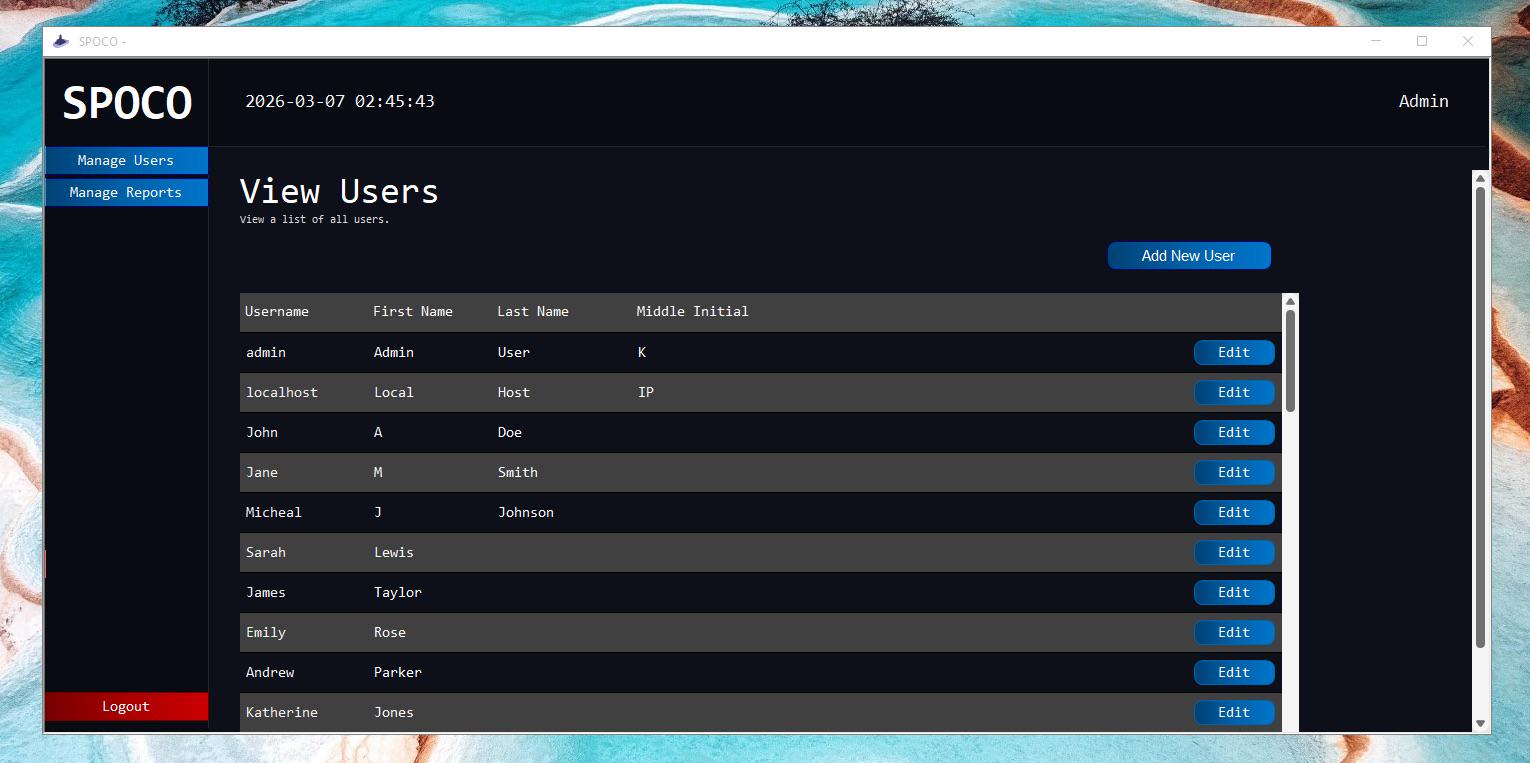
Just started diving into Access and VBA. I’ve decided to make an admin dashboard CRUD app.

So far I’ve made it so all remnants of the Access UI is removed, making my form seem like a native desktop app.

The “View Users” portion is my view container, where all the pages get switched into.

At this stage I just finished all the basic CRUD operations, but it’s all dynamic. I just have to make the text boxes and name them the same thing as fields in the database and VBA takes care of the rest.

I’ve designed a login system as well, I’ll be making a sessions system later.

This is pretty basic, but I’m having fun learning what this app can do. Long term I have goals to have this GUI interact with other Microsoft apps like outlook. Just feeing proud and wanting to share, took me hours of troubleshooting to get to this point.