r/GetComputerHelp • u/Fungus54321 • 2h ago
Is the graphics card having an issue? Flickering screen problem.
1
Upvotes
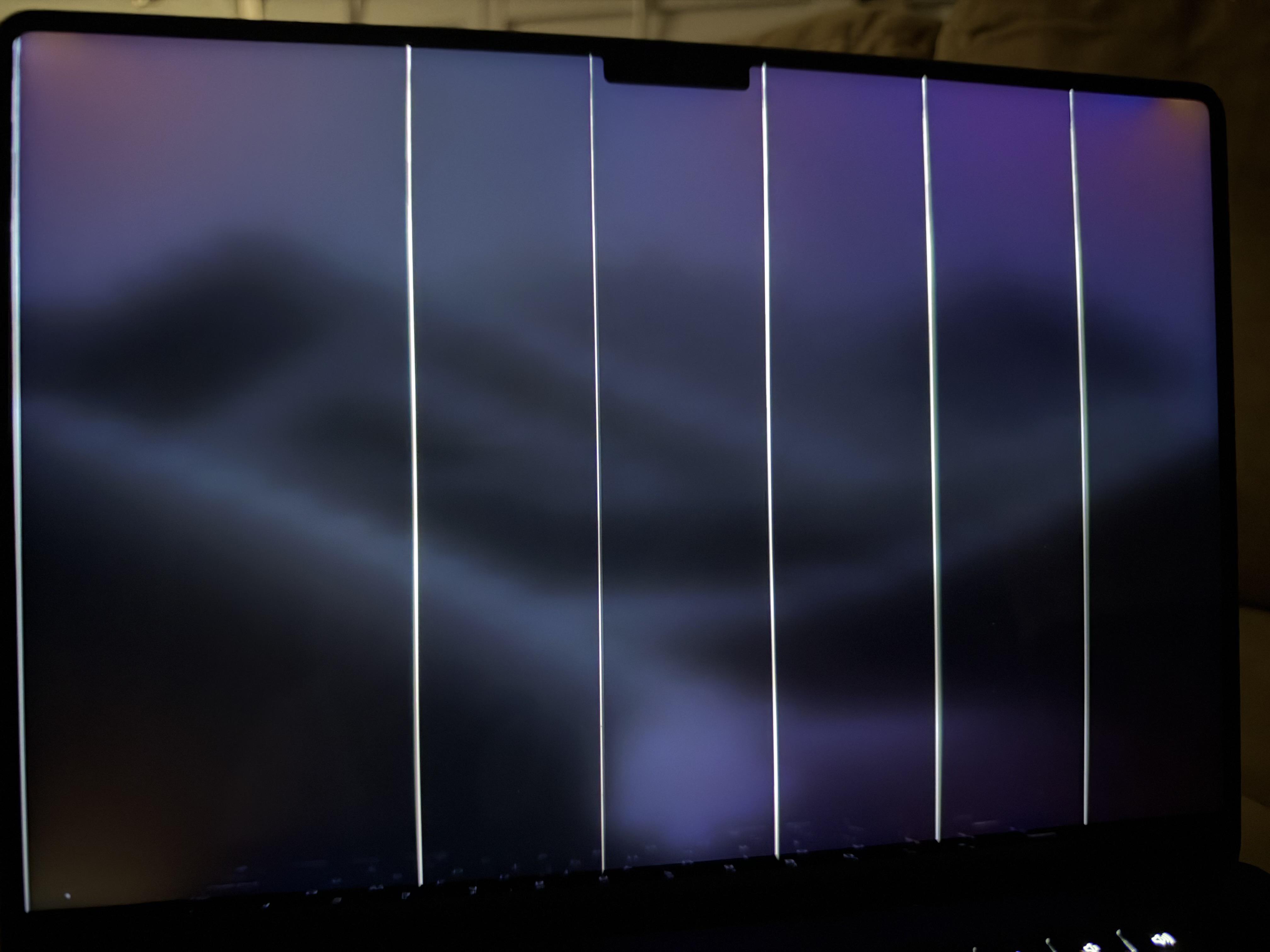
Started with mild flickering, and now it's this. I also see a line of dead pixels which were absent before.
r/GetComputerHelp • u/hellishchimera • 10h ago
So this has been going on for about 2 years. I saved up A LOT for over a year to get this monitor. I have gotten it about 3 to 4 years ago. It does this no matter what its plugged into. My computer, my switch, nothing at all. I tried to contact customer service and they couldn't help and made it very complicated to send it back via warranty. Why is it doing this. Does anyone know why. I cant afford repairs at the moment since i am paying for therapy for my oldest son and alignment therapy for my youngest to correct his vision. This monitor is so expensive (LG 49" wide screen 4k" not the newest but one gen before). It causes me headaches when this happens. If I wait about 15-20 minutes it stops but once the screen is off for the night and I turn it back on it does this. I think its getting worse because it used to stop after only 5 minutes.
r/GetComputerHelp • u/Conscious_Cod3188 • 12h ago
I was watching a show and as I adjusted the screen I pressed on the side and it did that glitchy computer thing, right where I pressed there was suddenly a thick white line and next to it multiple little white pink and green lines. This happed for a split second before the whole screen turned black as if I had turned off the laptop. I tried to press the power button to restart it and it seems like the keys work just fine, but the screen is still black, I can even hear the computer reacting to certain keys. What can I do? Must I take it to the store or is there a way to salvage my laptop? Any advice is appreciated.
Update: I examined the screen and I saw a crack outline near the area that I pressed. I think I might have broken the screen?
r/GetComputerHelp • u/otbelcher • 14h ago
Acasis EC1003 4 Bay SAS/Sata
I just obtained this on ebay from an Acasis seller. I have tried using it on 2 different computers with 2 different USB cables. I keep getting USB device not recognized. Device manager shows Unknown USB Device (Device Descriptor Request Failed). Anyone run into this problem?
r/GetComputerHelp • u/Millisec • 16h ago
r/GetComputerHelp • u/RushinLoda • 17h ago
r/GetComputerHelp • u/TarekBoy44 • 18h ago

I've had this laptop for about 2 years; a Katana 15 B13v with i7 13th 13620H CPU, a 32 Go DDR 5 5200HZ of RAM, a Nvidia Rtx 4070 8Go ddr6 GPU and a 15.6 inch 2k 165hz QHD k screen.
I had a gaming session lasting for a bit longer than an hour and the lines started popping up just as I exited the game; I tried rebooting the pc and restartin the graphics card but nothing changed so it's a hardware issue, plus it's been getting worse ( the attached picture is the worst its gotten before I turnedit off and callled it a day) . I do move the laptop with me a lot in my backpack but it's pretty secure in there and I haven't moved it from its spot in two days before this happened? Any idea how this might have happened, should I not turn it on again to not risk it getting worse? and how fixable it is?
It's the weekend here so I won't be able to take it to any repair shop until Saturday.
r/GetComputerHelp • u/DannyCallyfornia • 1d ago
1st photo: Main monitor has these lines (Acer XF273)
2nd photo: Second monitor is fine (some 60 dollar LG monitor, 60hz
Both monitors are plugged into the same DP, I’ve tried using different cables and different HDMI to DP adapters, but it only seems like the second DP (3rd image) has any output.
I currently use a Radeon RX 6700 and have had it since 2023, is it time to get a new one to retain my sanity?
r/GetComputerHelp • u/pixel_plants • 1d ago
Hi all! My laptop screen recently stopped working, so I took it to a repair shop. They quoted me 170 to replace the part, on top of the 60 euro diagnostic fee. My laptop is a 6 year old HP Pavilion, which I believe cost around 600 euro at the time.
Should I cut my losses and replace it altogether or get it repaired? I am a masters student that uses my laptop for college work, online shopping and streaming, the most demanding software I use is IBM SPSS Statistics. I understand that RAM is expensive now, which is driving up laptop prices, would it make more sense to repair the screen and see if I can get a few more years out of it, or is it past its lifespan?
Any advice on what to do/what laptops to get would be greatly appreciated.
r/GetComputerHelp • u/AntiqueMidnights • 1d ago

r/GetComputerHelp • u/-the_void- • 1d ago
r/GetComputerHelp • u/occtmasta • 2d ago

The current TPM firmware version I have is 3.92.0.5 which isn't compatible according to Activision as it specifically lists it as requiring an update, and 3.92.5.5 as an example of a compatible version. I searched for BIOS update for my MACHINIST B450M AM4-K V1.0 motherboard but couldn't find anything. My current BIOS is American Megatrends 5.17, dated July 7, 2025. Where can I find the updated BIOS? I'm not even sure which is the official machinist website or their email address. I enabled secure boot and UEFI but it's still requiring a BIOS update
r/GetComputerHelp • u/Bitter-Bad-9784 • 2d ago

r/GetComputerHelp • u/Prror31 • 2d ago

Hey guys! Today I bought windows 11. I was installing it till the system said to me that I needed to activate TPM 2.0.
So I watched a video in YouTube that I needed to enter in recovery mode, after that I just selected the option “Turn of your PC” since then, my monitor is not showing any image.
It works with my computer and my switch, so the problem is my pc. I already tried all the YouTube methods, disconnect my computer, disconnect and connect the ram, check the cables. But nothing is working.
r/GetComputerHelp • u/Primary_March4865 • 2d ago
MacBook Pro 2020 M1. Timeline: 5Pm, I spilt water onto my Mac and I immediately tipped it upside down for like 30 minutes shut down and then turned it on to discover my touchpad not working. It was responsive and working browns but i couldn’t click it and press down on it. So I let it dry for another 90 minutes then I decided to just try to use it. It would occasionally click on its own. However, 4 hours later with use, I start hearing this noise of crackling and my touchpad was going psychotic and repeatedly clicking down and for a brief moment I could click down but it was clicking on its own along with the noise. I shut it off and it stopped but it is currently doing it occasionally even shut off. I’m just wondering whether it’s a serious sound that I should keep off or if it’s just resolving on its own or if I should let it dry over a day. The rest of the Mac works fine.
The sound just spooked me a bit
r/GetComputerHelp • u/Hariueli69 • 2d ago
I have an HP Omen 30L that’s getting a bit old, and it’s been giving me trouble for quite some time. I’d really appreciate some advice from someone with expertise.
Under load, my computer keeps crashing and getting stuck in a loop where it tries to restart, then shuts off again. If I unplug all the cables and leave it alone for a few hours or days, it starts working again. It seems like the longer I leave it unplugged, the longer it works afterward.
However, if I leave it stuck in that restart loop for too long, additional issues crop up, such as BIOS problems and drives no longer being detected. I’ve already tried various things to address the BIOS issues, but nothing has helped in the long term.
r/GetComputerHelp • u/Stargazor_Kumo • 2d ago
I stream art a lot and have used windows wireless display many times before this issue occured. My windows is currently completely up to date with all its drivers and what not, ive checked many times since that seems to be one of the main issues. Ive also checked fire wall to make sure that it was not blocking it in any way as well as makeing sure I have the proper things checked inside of the wireless display settings. Ive tried deleting and reinstalling it and resseting both my pc and the device I was trying to project from. I have not blocked my device in the wireless display settings, and honestly I have no idea what other issue it can be. It started to occur a few updates ago and have tried all the common fixes ive seen online.
r/GetComputerHelp • u/circee06 • 2d ago

HELP HOW CAN I BRING THIS BACK TO NORMAL. I'VE DONE EVERYTHING WHAT THE GOOGLE AND I CANT FIND THE EXACT SAME THING ON YOUTUBE