r/GetComputerHelp • • Jun 28 '26

Schermata blu "Il dispositivo ha riscontrato un problema ed è necessario riavviarlo (win32kfull.sys)"

2 Upvotes

Hello everyone,

My working PC After a restart, show this particular problem and really dont know how to solve ..

Its a dell PC pretty new.

Already tried all of possible option that PC suggest me but none of them worked.

Already tried even on terminal some thing like sfc /scannow and the things that starts with DISM

Windows 11 PC 32gb RAM and so on anyway its new


r/GetComputerHelp • • Jul 27 '25

Fan RGB Not Working Consistently. Help Needed!

1 Upvotes

So, here are my specs...

  • Motherboard: ASUS ROG STRIX Z590-F GAMING WIFI

  • CPU: Intel Core i9-11900K

  • CPU Cooler: ARCTIC Liquid Freezer II 360 A-RGB

  • GPU: NVIDIA GeForce RTX 4060 Ti

  • RAM: 32GB DDR4 3200MHz (2x16GB Corsair kit)

  • SSD: Patriot P400 M.2 NVMe 2TB

  • PSU: Cooler Master MWE 850 Gold V2 Fully Modular

  • Case: Montech AIR 903 MAX RGB

This computer that I built myself works great and since I built it, the RGB lighting has been absolutely fine, a bit rocky to begin with because I was trying to use both armoury crate and iCUE for lighting seeing as neither one program picked up all of the RGB, but in the end it worked great.

A few weeks/months ago, I started running into some interesting issues. Not only was the RGB on all the fans not lighting up every time, but I was getting some weird freezes and eventually blue screening. Eventually I had some time to dive in to the problem and I ended up just reinstalling windows 11 and it seems to have fixed the freezing/blue screening. I also noticed that after I did the Intel ME update, the fan RGB starting working after the computer restarted.

I thought that everything was fixed! PC was healthy, RGB was staying on all day...but then I started the computer the next day and no RGB on any fans again. I ran the Intel ME update again and the RGB came back to life again once it restarted...and then went again the next time I turned the computer on.

Just to clarify, my front intake fans and the fans on my water cooler are the ones that are not lighting up, they are spinning as normal tho.

Any help or guidance would be appreciated!


r/GetComputerHelp • • Dec 21 '25

Is this normal?

Post image
2 Upvotes

r/GetComputerHelp • • Oct 23 '26

Motherboard problem

6 Upvotes

Hi, can you help me fix this motherboard? It turns on but doesn't display a picture. I don't know what to do. I've already flashed the BIOS, but to no avail.


r/GetComputerHelp • • Jun 15 '26

Monitor keep flashing on desktops and I can't interact with my PC

2 Upvotes

r/GetComputerHelp • • Oct 29 '26

Problem receiving signal to the monitor

2 Upvotes

I keep getting 99 code and some 4d and issue with not receiving signal to the monitor even though i have cables connected to the gpu slot


r/GetComputerHelp • • Aug 19 '26

My pc no longer detects my monitor

2 Upvotes

I believe it a software, maybe drivers related problem but for a very long while now, my pc has stopped recognizing my main monitor. In case context for that might be needed, it happened after I tried switching to Linux, noticed my graphics was not compatible with it, and switched to windows... By the time I did tho, it stopped recognizing and detecting my monitor.

Some may say my monitor or pc have a problem, but no, my pc can use other monitors without problem, and my main monitor can detect other pcs and laptops I plug into it.

I've checked and swapped cables from HDMI to DisplayPort, have cleaned my graphics card, ram, and did a lot of troubleshooting with no success. If more info is needed I'll do my best to answer but hopefully someone can help me get my main monitor back up and running.


r/GetComputerHelp • • Sep 23 '26

laptop not using the gpu on my laptop

Post image
3 Upvotes

hey there hope ur all well, i have a dell inspiron 5593 with a i7 10 Gen paired with a mx230 and i recently downloaded batman arkham city and started playing but the game stutters a lot dropping down to 10-15 fps and when i checked using the task manager the gpu was showing no signs of being used, i'm using steam to launch the game(i got the game from epic games) and i have tried selecting the game from the windows graphic settings and selected it to use high performance mode and also tried adding the program using nvidia manage programs tab where i added the game but still 0% usage on the gpu its only using the integrated graphics. i would really appreciate if someone could help me out thank you!!


r/GetComputerHelp • • Feb 20 '26

My pc sounds like a Geiger counter

2 Upvotes

I was just playing a game that really hardware intense when I took of my headphones I heard the normal maxed out fan sound but I also heard like something inside the computer sounding like a Geiger counter. Is this something I should be worried about?


r/GetComputerHelp • • 4d ago

Help needed... so when i get in full scrren mode in any app on my pc.. there are black lines on top and bottom,... idk why they are coming but they annoying af.. pls help me fix them

2 Upvotes

My pc is Lenovo Yoga 7.. with quallcomm ardeno gpu ... I have tried all display settings but hv kept all on recommended so no luck there ... idk wht to do at this point hv tried all things told by chatgpt but nothing worked,,, so pls hekp


r/GetComputerHelp • • Oct 03 '26

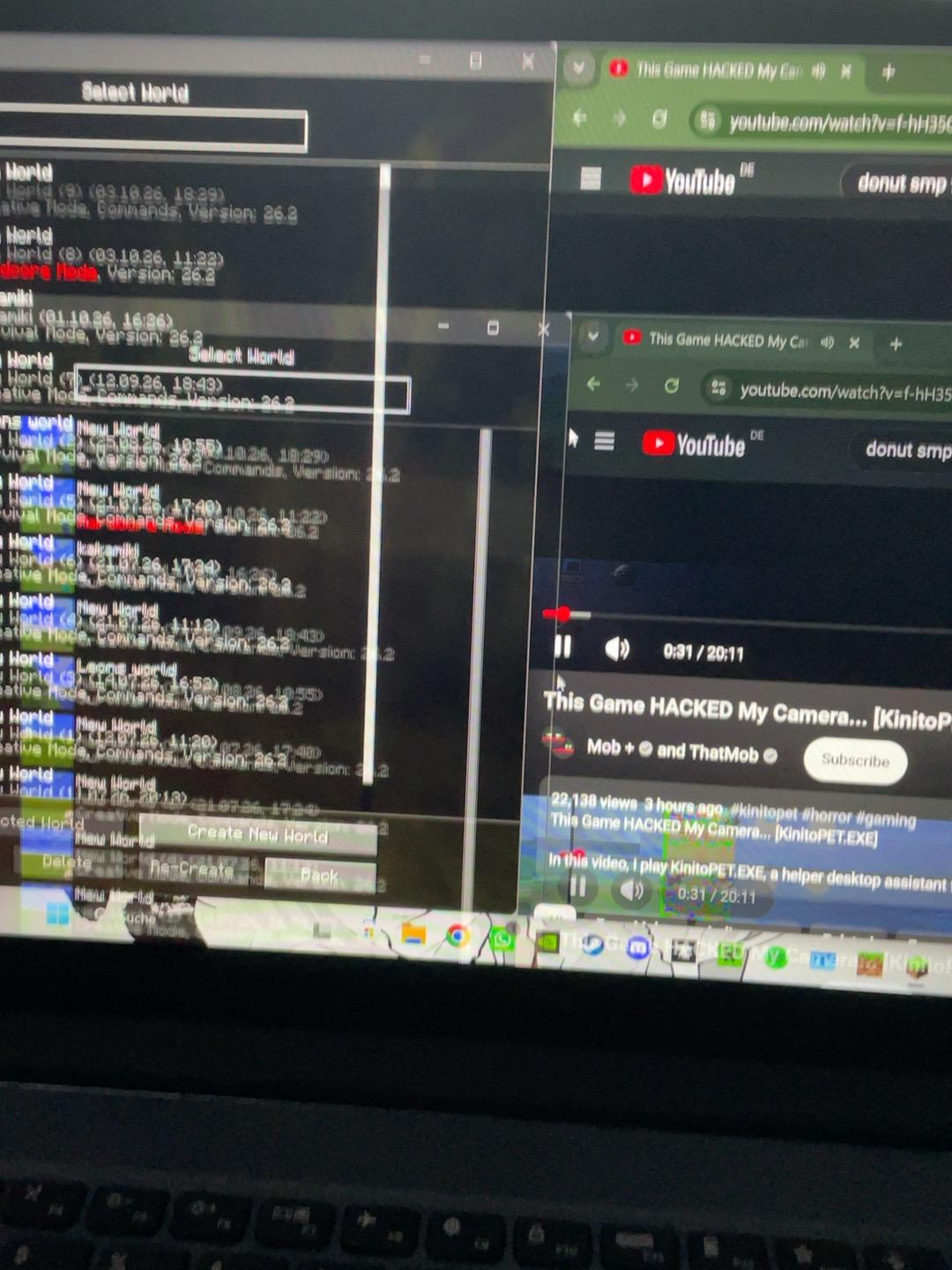
Laptop keep glitching while playing Minecraft Java

Post image
0 Upvotes

r/GetComputerHelp • • Sep 25 '26

Is it possible to connect a monitor, keyboard, and mouse to my phone?

4 Upvotes

I really like the games (specifically Minecraft and roblox) on my phone and my computer is too old to fully operate the pc versions. But I think the screen is getting too small for me and I'm not as used to mobile's controls as I am with my computer's. Is it possible to connect the three to my mobile phone and successfully play? What do I need to get/set up?

I read that you can use an HDMI to type c cable adapter for the monitor but I'm not so sure. Is there any tutorial/instructions online with complete steps? Thank you in advance


r/GetComputerHelp • • Sep 20 '26

Monitor problems post switch

2 Upvotes

(Linux mint) About a month or so ago this began happening when my monitor is above 60 hz ive tested multiple cords and happens with all id been using linux for about a month or so before it began happening so not sure what's going on


r/GetComputerHelp • • Jun 28 '26

Reg. urgent fix needed

2 Upvotes

Can anyone please tell the fix nothing seems to be working


r/GetComputerHelp • • Oct 07 '26

Help !

3 Upvotes

I was playing Minecraft before when my entire PC crashed, my monitors went black, a continuous error sound happened for a few seconds and then my PC turned off. When I turned it back on it was like I had no gpu drivers as only my main monitor was showing anything and the light on my gpu was red.

To try and fix that, I used a DDU to wipe any gpu drivers and then installed fresh ones from NVIDIA (I have a 3080), I technically did this twice because the Nvidia app wouldn't install the drivers (it kept saying it did but then just didn't) so I got the file from the website and did it manually.

Since that, when my monitor is on, it looks normal like it's supposed to, so the drivers seem to be working, but every few seconds, my monitor goes black for about 30 seconds and it's about a 50/50 chance that it comes back on again or the entire PC restarts.

Oh I also tried completely unplugging and removing my gpu from the motherboard while the PC was off, as well as changing my monitor cable AND even the power cord my PC and monitors are plugged into.

I'm really at a loss here, I have no idea what caused it to crash in the first place, why that messed up my drivers and why it's still not working even tho fresh drivers have been installed.

Any suggestions I will try, and thank you if you read all that


r/GetComputerHelp • • 19d ago

I think I’m screwed

Post image
6 Upvotes

So this was working fine in the am but my 3090 appears to have died if I plug directly into the motherboard I’m fine but the card itself doesn’t appear to be outputting any video and this red light is solid no matter what cord is plugged in anywhere. Any help or am I just up a creek


r/GetComputerHelp • • 12d ago

Problem monitor

0 Upvotes

Cześć, po wymianie karty na monitorze na czerni pojawiają się kolory - zielony itp. Co to może być?


r/GetComputerHelp • • Sep 29 '26

Where can I source legit and working BGA chips?

3 Upvotes

Do you guys have other suggestions / shops that I can buy a working BGA chip from?

My Laptop’s CPU | PCH got shorted and is in need of a replacement. (It’s a legion 7 with i7-11800H
and an rtx 3070 so it’s hard to let go since it still performs decent with recent games).

Local tech suggested AliExpress but reading reviews from there makes me skeptical because most are selling fakes.

If you’ve tried ordering from there, how was your experience?


r/GetComputerHelp • • Feb 20 '26

Need help

2 Upvotes

Hello, I recently assembled a new PC. It worked for about 15 minutes, but after a crash and restart, it will no longer POST. Here’s what happens: Fans and RGB (if any) spin normally. Keyboard does not light up. Monitor shows no signal on any input. All non-essential peripherals (SSD, HDD, USB devices, extra fans) have been removed. Bench test minimal setup performed: only motherboard, CPU with cooler, 1 RAM stick, and graphics card (or CPU video output) connected. I have also cleared the CMOS / BIOS. The issue persists. It seems to be a hardware failure—either motherboard, CPU, or graphics card


r/GetComputerHelp • • Aug 25 '26

Monitor turning off when laptop is touched

2 Upvotes

This is my friend and he is having troubles with his monitor shutting off whenever he touches his computer, I’ve personally never seen anything like this so I can’t really help him, but usually Reddit has a answer


r/GetComputerHelp • • 28d ago

is my gpu fucked? or can i fix it?

Post image
8 Upvotes

r/GetComputerHelp • • 14d ago

weird border screen glitch please help

1 Upvotes

r/GetComputerHelp • • Jan 08 '26

Why does my computer screen automatically scrolls through items when pressing windows logo button through keyboard or even clicking through mouse? See video

3 Upvotes

r/GetComputerHelp • • Oct 13 '26

Websites like Spotify Web, G2A, Genius and Airbnb causing screen to turn black.

3 Upvotes

Recently, around a few months ago, I started experiencing an issue where my monitor goes completely black when opening Spotify Web, Airbnb or any other site like that.

When this happens, I try pressing Win + Ctrl + Shift + B to reset my GPU driver. I hear the usual beep, but the display doesn't come back. The only ways to restore it are to unplug and reconnect my DisplayPort cable or restart my PC.

  • GPU: MSI GeForce RTX 4080 SUPER

  • CPU: Intel Core i9-14900KF

  • RAM: 64 GB DDR5 6800 MHz

  • OS: Windows 11 Pro 26H2

  • Monitor: Acer XZ271

  • Connection: DisplayPort

Unfortunately, none of the following have resolved the issue:

  • Tried a different DisplayPort cable.

  • Tried different DisplayPort ports on my GPU.

  • Disabled NVIDIA High Definition Audio in Device Manager.

  • Tested multiple browsers, with the same result.

  • Disabled browser hardware acceleration.

  • Checked my monitor's settings for potential issues.

  • Used DDU to completely uninstall my NVIDIA drivers and manually installed fresh drivers.

Despite all this, the problem persists.

Has anyone experienced something similar or managed to find a permanent solution?