r/GalaxyTab • • 1d ago

Software updates One UI 9 official Galaxy Tab megathread

23 Upvotes

Sorry for the delay folks! But One UI 9 has officially started rolling out for Samsung's Galaxy Tabs. Devices that have it so far are the Tab S12 series (released with One UI 9), Tab S11 series, Tab S10 series, and Tab S9 series at the time of this post (including the FE) (check your country for more info)

This megathread is for those to voice their releases. If you're sharing receiving One UI 9, please be sure to include the model (including if it's an Ultra, FE, regular, etc), country, and Wi-Fi or cellular configuration.


r/GalaxyTab • • Sep 26 '26 Bravo

Community Improvement Feedback Post: what would you like to see to improve your experience here?

6 Upvotes

Hey everybody. Latrell (u/yayoshorti, the mod) here...

I made a post a little bit ago saying that we were going to be switching all support questions over to r/SamsungSupport, and it received a lot of pushback.

So I figured, instead of pushing and focusing on that, I thought I'd ask if you have any annoyances or things you'd like to see improved here. If you have any suggestions, please sound off! Big or small. As long as it's under my control.


r/GalaxyTab • • 2h ago

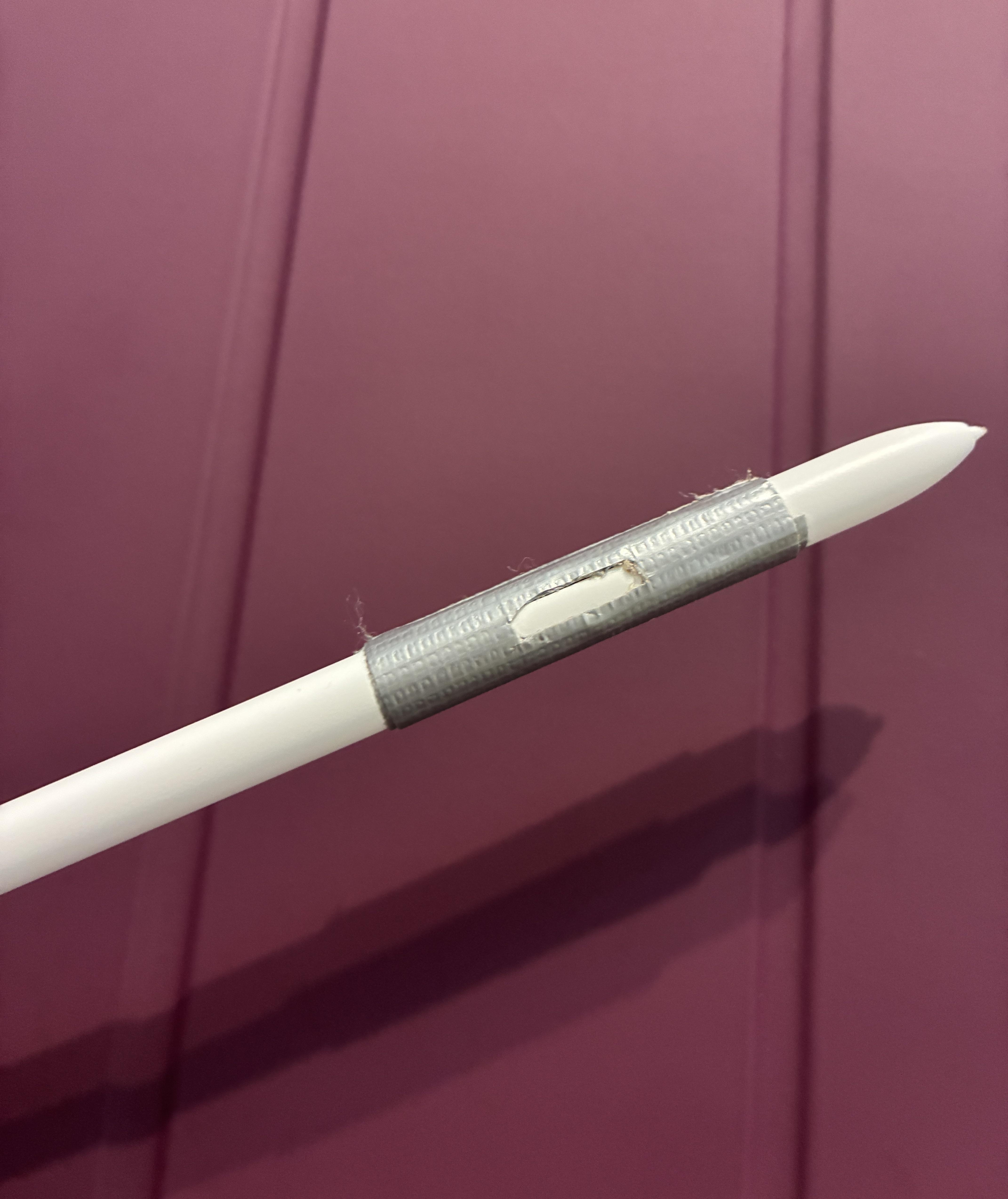
S Pen s pen broke but i taped it up and it still works!

Post image
15 Upvotes

s pen broke yesterday after falling off my bed so i tried taping it up and cut a hole for the button and it still works just fine! i also bought a silicone sleeve for it (which should arrive tmr) to give it a bit more protection. hoping to use it for a few more months but we’ll see lol i’m just glad i don’t have to buy a new one after a week of getting it


r/GalaxyTab • • 8h ago

Question Need magnet location

Post image
11 Upvotes

So I just bought a Tab S11 and designed a case for it, but now I want to make a magnetic version like the original. To make one, I need to know where the magnets are in the original case. I could hold magnets against the back of my tablet and mark where they stick, but I’m worried that some magnets might stick in places where they could damage the tablet over time. I live in Türkiye, and for some reason the original case costs $217 here, so I can’t get one. If anyone who owns it could roughly mark where the magnets are and share a picture, I’d really appreciate it.


r/GalaxyTab • • 6h ago

What's the best Tab?

5 Upvotes

Hey,

Which is best Samsung Galaxy Tab to get this year for note taking, watching shows and anime, reading mangas and drawing?

The S9 Ultra? S10FE+? S10 Ultra? Or the S11 Ultra?


r/GalaxyTab • • 2h ago

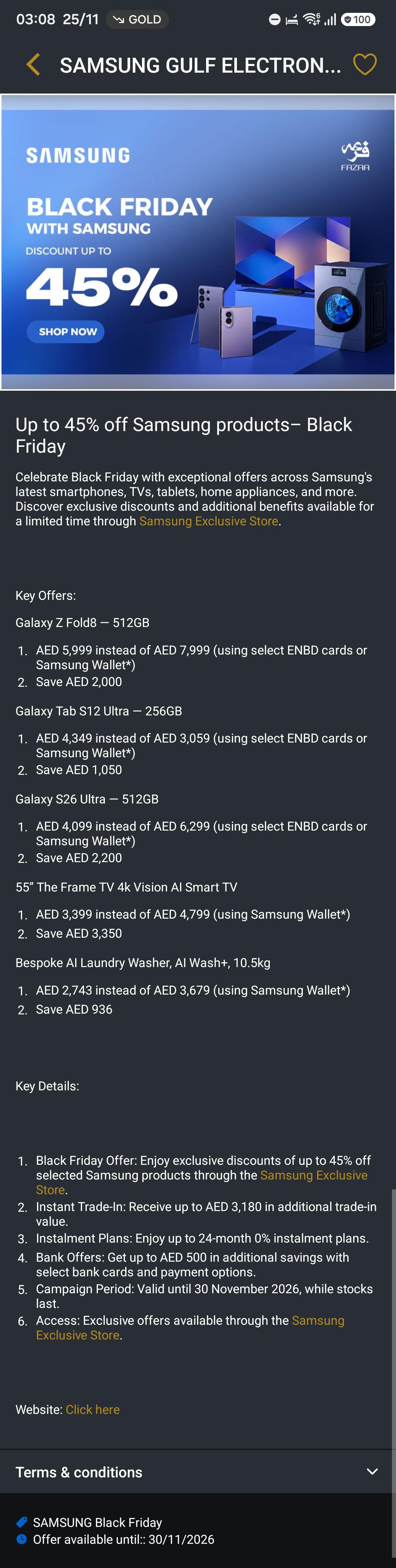
Samsung UAE offering a reverse Black Friday discount on Fazaa

Post image
2 Upvotes

r/GalaxyTab • • 35m ago

Question Flaky Tab A9+ Screen

1 Upvotes

My Tab A9+ Screen has become a bit flakey. If I press gently on the screen in the area under which the motherboard screen connector is located (based on some photos of an Tab A9+ with the screen removed), the screen will stay on otherwise it's intermittant. Anyone else experience this?

I'm planning on removing the screen to get access to the connector which I assume is loose or dirty, but my electronics heating pad (used to heat up the screen glue) has died and I'm debating whether to replace it. Anyone have tips on screen removal?


r/GalaxyTab • • 6h ago

Concern Galaxy tab s10 fe+ S Pen and gel screen protector

2 Upvotes

Hey guys, so I got a gel screen protector for my tablet and I noticed its really hard to write with the pen now.

Its my very first time owning a tablet, so I'm scared this might ruin the pen's tip or something. Do you guys recommend I change it to a glass screen protector?


r/GalaxyTab • • 3h ago

Discussion Floating windows don't save their sizing after One UI 9 update

1 Upvotes

Before floating windows would keep their set sizing, now they reset to default, phone like aspect ratio when opened and must be resized basically every time. Anyone else has this issue? Im using tab s10+.


r/GalaxyTab • • 3h ago

Accessories galaxy tab screen protector issue

1 Upvotes

i recently got a screen protector for my galaxy tab but it turned out to be a kinda low quality and the plastic of the screen protector is a bit foggy (i got it thinking it was tempered glass but it turned out to be plastic 🫠) it also picks up an insane amount of fingerprints, and while using my s pen, i noticed a lot of resistance and a bit of delay tbh. i’m honestly think of taking it off but im wondering how safe it is to use it without any screen protector? and should i even take it off in the first place?


r/GalaxyTab • • 21h ago

One UI 9 is on the A11+!

Post image
22 Upvotes

Sorry if anyone has already mentioned it but one UI9 hit my A11+ tonight! Finally


r/GalaxyTab • • 15h ago

Question Do beta UI updates not come to tablets?

Post image
8 Upvotes

I was wondering about these beta features cause I was trying to check for one ui 9.5


r/GalaxyTab • • 6h ago

Concern Samsung Notes PDF issue

1 Upvotes

I don't know if this is related to tablets or not but I only really use my S11 for this one purpose.

Recently I had to help fill out a medical form for my mum to send off to the hospital. So since i need to have an excuse to use my tab S11 I said i can just annotate it using samsung notes. We filled all the required credentials up then when it came time to save it I saved it as a normal PDF file, i shortly sent it back to my mum and when i checked it to see if everything worked I noticed that:

  1. All the text that I wrote on, suddenly dissapeared

  2. Some text was a sort of white colour till I zoomed in and it appeared

Basically in the end it looked like none of the form got filled up which was frustating. The only way i could make it stay was if I exported it as .sdocx file which kept all the writing yet when we sent it off via email I realised that it was impossible to access for them since computers didn't support the extension unless you had samsung notes installed on the pc.

How do i fix this so all my writing can stay as I export it as a normal .pdf file rather than relying on .sdocx plus especially fix that issue of the zooming in text appearing problem.

Thanks


r/GalaxyTab • • 22h ago

Apps For Galaxy tab users that want desktop-level video editor,there is a free,opensource editor that runs on android.

Thumbnail
gallery
21 Upvotes

It has all you need to edit videos,3d workspace,Node-based effects,Capcut UI,keyframes,color correction,tons of effects,transitions and community marketplace.

https://play.google.com/store/apps/details?id=org.cutwire.drift

(Note : the screenshots I showed are from version 0.9.3,but playstore version is updated yet(0.9.1),so I recommend you to sideload from github instead.

https://github.com/CutWire-Studios/Drift


r/GalaxyTab • • 10h ago

Question Any additional discounts available on BF? (CA)

2 Upvotes

They are still decent prices, but any promo codes available that can be put towards purchases (S11 possibly)?


r/GalaxyTab • • 1d ago

Apps New drawing app for android (free)

Thumbnail
gallery
92 Upvotes

Hey guys! I'm currently trying to make a new little drawing app (free) for android as I just got my first touch tablet too!

I was wonderign if anyone here would be interested in helping out by just checking and maybe giving some feedback? My goal is to create something pretty simple and tablet friendly but with all the tools most people would need. It's not fully done yet but it's available to try already!

https://play.google.com/store/apps/details?id=com.daybreakstudios.inko

I'm so excited about this little project!


r/GalaxyTab • • 7h ago

Como sacar punta

Post image
0 Upvotes

Hola tengo un problema lo que pasa es que a mi lapiz se le habia metido la punta pero al momento de sacarla se le rompió y ahora esta metido saben como lo puedo sacar o ya me compro otro 😭


r/GalaxyTab • • 15h ago

Concern S10 FE suddenly lowering brightness and randomly turning off

2 Upvotes

Hello! I've recently had this issue on my tablet where it would randomly turn off when I angle it in a specific way. Along with that it also sometimes lowers the brightness without me adjusting it at all and when I try to increase or lower it, it doesn't change staying dim consistently. The only way I can adjust the brightness again is by turning the tablet off and on. I thought this was a me only issue, however my friend also had a similar experience with her Samsung tablet. Anyone know what to do?

Other notes:

  1. I've turned off auto-brightness already

  2. Extra dim is disabled


r/GalaxyTab • • 12h ago

Question Tab S10 Fe+ 5g e a saga do SIM

1 Upvotes

Seguinte, comprei o esse tablet na versão 5g, pagando mais por ela justamente para poder ter o cartão pois não tenho wi-fi na minha casa. Essa semana meu chip chegou e fui colocar nele, pois não tinha como porque o slot veio apenas para micro SD.

Tentei ligar pra Samsung e não rolou, entrei em contato via live chat e a moça que me atendeu falou que não tinham como me enviar porque não era compatível

SENDO QUE EU PAGUEI MAIS E A MINHA VERSÃO É A 5G E TEM TUDO PRA RECEBER SIM FÍSICO

Alguém que comprou esse também e teve o mesmo problema ou sabe de alguém que teve, como vocês resolveram?

Ps. Eu até botaria as fotos mas elas tão com meus dados e não tô afim de editar, mas eu juro que tudo dentro dele tá falando que é 5g


r/GalaxyTab • • 1d ago

One UI 9 available now for Tab A11+ (USA)

Post image
16 Upvotes

r/GalaxyTab • • 1d ago Bravo

A11+ UI 9 The Geekbench 6 & 7 Scores

Thumbnail
gallery
11 Upvotes

I updated my A11+ to UI 9 and I had to run the Geekbench 6 & 7 tests....

I know performance might increase a bit in the next few days yet performance is almost identical. In Geekbench 6 it's like 8 points slower in single core and 7 points faster in multi-core.

Visually UI 9 is almost identical to UI 8.5 but definitely feels smoother than UI 8.5...

I run Smart Launcher so there are no obvious changes as far as I can tell.

-------------------------------------

On a side note the A11+ must be more premium than the S10 Lite as my S10 Lite is still on UI 8.5


r/GalaxyTab • • 1d ago

Software updates One UI 9 Is Here For The s10fe United States

Post image
14 Upvotes

r/GalaxyTab • • 19h ago

Best keyboards for the s9 ultra?

1 Upvotes

Looking for the best "laptop experience" keyboards


r/GalaxyTab • • 1d ago

GalaxyTab S9+ pen replacement options

3 Upvotes

Hello! I am turning here for advice since I have no idea what to do anymore. I've had my S9+ tab for about 1.5 years now. I am a full-time vet student and I write and draw a lot! I probably use my tablet for more than 10 hours daily for school. The issue is I keep messing up with the pens since the tips keep getting broken. So far I've had 5 different pens, 2 of them original ones, and they always end up with a broken tip, the kind of breakage that keeps half of the tip inside the pen and you are unable to take out. I urgently need a pen that doesn't break, a huge advantage would be if I didn't have to change the tip that often (I usually go over one new tip a month). Does that dream pen exist? Thank you in advance!


r/GalaxyTab • • 1d ago

Concern (Solution) Battery not charging Samsung Tab S9

3 Upvotes

I wanted to share this issue I had in case this solution helps someone else.

SOLUTION SUMMERY: Try charging the tablet with a USB A to USB C cable (NOT C TO C), and be sure that charger is connected to the wall, not a power bank. I don't know if It could work conected to a PC, notebook etc, or something like that I'd recommend a wall brick, it doesn't have to be fast, its just to get that initial 1% (If I were you I'd let it charge 'till 5% at least)

The problem I experienced:

I was using my tablet at 3% battery when it suddenly turned off. I left it charging with a Ugreen 45W charger for over half an hour and it appeared as charging (showed the white circle) but still no percentage and it wouldn't turn on.

I tried connecting it to a slower power bank (Ugreen as well) and it showed a yellow triangle with a lightning (although it was being drained).

After a while I decided to connect it with a slow charger to the wall, a samsung 15W USB A to USB C. It instantly displayed a percentage and I could turn it on.

Cause:
My best guess is that it's an issue with the USB-PD negotiation, high speed chargers do to determine what voltage to send through.

USB C uses diverse voltages to increase wattage without burning the cable and choosing this value uses some power, meanwhile USB A defaults to (I think) to 5V or 12V and therefore doesn't need power to get power. That being said, samsung fix this, it shouldn't happen

Luckily I had heard of a similar issue with some brand of Ebooks, so I was able to troubleshoot this relatively easily.

PS: It's worth noting that my battery is about 16 months old, and always used with battery protection at maximum, so the battery should be fine.