r/ExcelPowerQuery • u/DragonStern • Apr 13 '25
Is it possible to add a refresh button?
2
Upvotes
Is it possible to add in the excel sheet a button to refresh the power query?
r/ExcelPowerQuery • u/Moist-Height2935 • Apr 08 '25
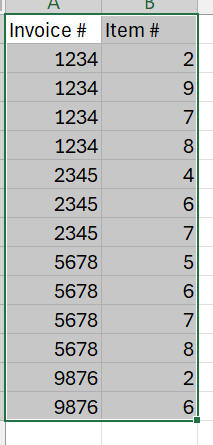
Basically if any row has a certain value (in Column B) then I want to keep all rows in Column A that have the whatever value is in Column A in that matching row. I have been trying to use Table.SelectRows with a condition but keep getting error so I am obviously missing something. The picture below visualizes what I am trying to do. I am looking to keep all Invoice# rows if that invoice included Item # 2. So I would end up with all rows for invoices 1234 and 9876 below.
r/ExcelPowerQuery • u/gumpert7 • Mar 27 '25
Hi All
I am trying to replicate this table, but in PowerQuery where Column D is a Custom column:

Basically Columns A to C is the dataset, cells in column D I am able to create within Excel with the use of formula =XLOOKUP([@Vehicle]&"retire",[Vehicle]&[Destination],[Travel Date]). Given columns A to C, is there a way i can replicate the creation of Column D within PowerQuery?
r/ExcelPowerQuery • u/RabidPocketMonster • Mar 19 '25
Hi! Just joined. Like many I suffer from imposter syndrome. Some people think what I do is magic, but I feel like a fish flopping around on a deck 9 times out of 10.
So question for the community: Do you feel "proficient", and what does that mean to YOU personally?
Bonus, how do you evaluate your skill level, or is that an antiquated way of thinking when it comes to PQ?
r/ExcelPowerQuery • u/Electric-Ice-cream • Mar 08 '25
Hello, I work with a report document that I duplicate and reuse weekly with fresh data and it includes pq. It was created by someone else and I am trying to understand and learn how it works so I can make changes without breaking the thing. So far it feels very precarious so I try not to change anything about the format of the document as it causes issues. Hoping to get a reference book that looks useful, watching YouTube vids too.
This week when I refreshed the data it said it couldn’t find one of the tables. When I looked at the tables that were connected, the name of the table that was not found has changed from what it was last week. A couple q’s
How can this happen without deliberately changing the name of the table? The range is the same so it’s just the name of the table that changed.
How can I fix it?
Any suggestions on best resources for learning PQ?
Thanks!
r/ExcelPowerQuery • u/Aizen1403 • Mar 07 '25
Hi All, I'm a relative newbie here
I have a process that I am currently doing by hand each month (taking about 2-3 hours each time). I've been automating much of my data sourcing and prep recently using Power Query/ M code, but I am struggling with this one.
I have an Excel file from a system that generates around 2,500 phone call records per month with a data structure as follows (I've changed all the real numbers to protect the innocent!):
Type Call Date Time Duration Calling Number Destination Number Outcome
Incoming 01/09/2024 12:29 00:00:00 6734021111 0045611447 Engaged
Incoming 01/09/2024 13:19 00:00:00 6734021111 1004561447 Engaged
Incoming 01/09/2024 14:20 00:00:00 1004561044 1865045647 Engaged
Incoming 02/09/2024 09:35 00:02:48 1004561044 1865004565 Answered
Outgoing 02/09/2024 09:35 00:02:48 1004565595 1860045648 Answered
Incoming 02/09/2024 09:35 00:02:48 1004565595 1800456048 Answered
Incoming 02/09/2024 09:47 00:00:17 1004561044 1004561040 Answered
Incoming 02/09/2024 09:47 00:00:17 1004563255 1800456595 Answered
Outgoing 02/09/2024 09:47 00:00:17 1004565595 1004561040 Answered
Incoming 02/09/2024 10:13 00:06:03 1267341938 1004561043 Answered
Outgoing 02/09/2024 10:13 00:06:03 1004565595 1800456108 Answered
Incoming 02/09/2024 10:13 00:06:03 1004561044 0045611948 Answered
Outgoing 02/09/2024 10:26 00:01:33 1865004565 1004561043 Answered
Incoming 02/09/2024 10:26 00:01:33 7786734851 1800456555 Answered
Outgoing 02/09/2024 10:26 00:01:33 1865004560 Answered
Outgoing 02/09/2024 10:29 00:00:59 1860045640 Answered
Incoming 02/09/2024 10:29 00:00:59 7926734940 1004565595 Answered
Outgoing 02/09/2024 10:29 00:00:59 1004561044 1865800456 Answered
Outgoing 02/09/2024 10:35 00:00:24 1004561040 7960045640 Answered
Outgoing 02/09/2024 10:35 00:36:17 1004561044 1496700456 Answered
There are many rows within the data will refer to the same call (a function of how the phone system operates). This can normally be identified as they are duplicates in the [Call Date Time] column. But there could be an additional row to be included in the same call group that is about one second earlier than the rest of the group (but the duration will always be the same as the rest of the group).
I need to be able to:
Identify each group of rows that refer to the same call, taking into account the possible 'extra' record as described above.
within each group, identify if the number '1004561044' is present in the [calling number] column
If so, do the following:
Find the row within the group where the [calling number] does not start with '1004561'
In this row, assign the value '1004561043'; to the [destination number] column
Delete all other rows relating to that same call
Move onto the next group.
As output, I need to get both the single rows that are output by the process above AND all the rows that have not gone through the process. This output is then appended to the main file that holds all the data from previous months, following which analysis is done.
As I say, I'm struggling and don't know where to start; maybe I have decided to automate something that's far ahead on my Power Query journey, and I should continue with simpler solutions until I am more experienced.
What do you think? Any help with this would be much appreciated. Cheers!
r/ExcelPowerQuery • u/Glendronach_neat • Mar 04 '25
This is driving me nuts! - I have a column [Rate Tier Annual Rate] which is of type Decimal Number. I want to combine it with a second column [Rate Tier Description] which is of type text. (See image 1)

However, just doing a simple Text.Combine adds unwanted zeroes (see Image 2)

Okay, I'll use Number.ToText to pre-convert the value to a text string with a single decimal place. Works great!

And now, my combined column looks exactly right:

So now the only thing I need to do is go back and get rid of the initial merge...but wait...now the other two columns aren';t working!!

Does anyone have any idea why the presence or absence of the first #"Inserted Merged Column" (Text.Combine) step would change the behavior of the #"Added Custom" (Number.ToText) step??
Code block at step 4
let
    Source = REDACTED
    DBTABLE = Source{[Schema="dbo",Item="REDACTED"]}[Data],
    #"Filtered Rows2" = Table.SelectRows(DBTABLE, each ([Default Tier] = "Yes")),
    #"Removed Other Columns" = Table.SelectColumns(#"Filtered Rows2",{"Billing Definition", "Rate Tier Annual Rate", "Rate Tier Description", "Rate Tier Level"}),
    #"Sample filter" = Table.SelectRows(#"Removed Other Columns", each ([Billing Definition] = "2016 Investment Advisory Monthly" or [Billing Definition] = "2016 Investment Advisory With a 10% Discount Monthly" or [Billing Definition] = "2021 Core Monthly 01")),
    #"Rounded Off" = Table.TransformColumns(#"Sample filter",{{"Rate Tier Annual Rate", each Number.Round(_, 3), type number}}),
    #"Sorted Rows" = Table.Sort(#"Rounded Off",{{"Billing Definition", Order.Ascending}, {"Rate Tier Level", Order.Ascending}}),
    #"Multiplied Column" = Table.TransformColumns(#"Sorted Rows", {{"Rate Tier Annual Rate", each _ * 100, type number}}),
    #"Inserted Merged Column" = Table.AddColumn(#"Multiplied Column", "Merged", each Text.Combine({Text.From([Rate Tier Annual Rate], "en-US"), [Rate Tier Description]}, " | "), type text),
    #"Added Custom" = Table.AddColumn(#"Inserted Merged Column", "OneDecimal", each Number.ToText([Rate Tier Annual Rate],"F1")),
    #"Inserted Merged Column1" = Table.AddColumn(#"Added Custom", "Merged.1", each Text.Combine({[OneDecimal], [Rate Tier Description]}, " | "), type text)
in
    #"Inserted Merged Column1"
Code block at step 5
let
    Source = REDACTED
    DBTABLE = Source{[Schema="dbo",Item="REDACTED"]}[Data],
    #"Filtered Rows2" = Table.SelectRows(DBTABLE, each ([Default Tier] = "Yes")),
    #"Removed Other Columns" = Table.SelectColumns(#"Filtered Rows2",{"Billing Definition", "Rate Tier Annual Rate", "Rate Tier Description", "Rate Tier Level"}),
    #"Sample filter" = Table.SelectRows(#"Removed Other Columns", each ([Billing Definition] = "2016 Investment Advisory Monthly" or [Billing Definition] = "2016 Investment Advisory With a 10% Discount Monthly" or [Billing Definition] = "2021 Core Monthly 01")),
    #"Rounded Off" = Table.TransformColumns(#"Sample filter",{{"Rate Tier Annual Rate", each Number.Round(_, 3), type number}}),
    #"Sorted Rows" = Table.Sort(#"Rounded Off",{{"Billing Definition", Order.Ascending}, {"Rate Tier Level", Order.Ascending}}),
    #"Multiplied Column" = Table.TransformColumns(#"Sorted Rows", {{"Rate Tier Annual Rate", each _ * 100, type number}}),
    #"Added Custom" = Table.AddColumn(#"Multiplied Column", "OneDecimal", each Number.ToText([Rate Tier Annual Rate],"F1")),
    #"Inserted Merged Column1" = Table.AddColumn(#"Added Custom", "Merged.1", each Text.Combine({[OneDecimal], [Rate Tier Description]}, " | "), type text)
in
#"Inserted Merged Column1"r/ExcelPowerQuery • u/ImissMefh • Feb 24 '25
I found the following M code on the internet to create a calendar table for my data model. I want a column that calculates the week in a running count. For example after the first 52 weeks are done in 2024 then the running week count would show on the following Monday as 53 for the first week in 2025 and continue with 54 the next week and so on. I just do not know much about the M language to do this myself. Any help would be appreciated! Here is my current calendar query:
let
Today = Date.From( DateTime.LocalNow() ),
StartDate = #date(2024, 1, 1),
EndDate =#date(2027, 1, 1),
#"List of Dates" = List.Dates( StartDate, Duration.Days( EndDate - StartDate ) +1, #duration( 1, 0, 0, 0 ) ),
#"Converted to Table" = Table.FromList( #"List of Dates", Splitter.SplitByNothing(), type table[Date = Date.Type] ),
#"Insert Date Integer" = Table.AddColumn(#"Converted to Table", "Date Integer", each Number.From( Date.ToText( [Date], "yyyyMMdd" ) ), Int64.Type ),
#"Insert Year" = Table.AddColumn(#"Insert Date Integer", "Year", each Date.Year([Date]), Int64.Type),
// Creates a dynamic year value called 'Current' that moves with the current date. Put this value in a slicer and it automatically switches to the Current period.
#"Add Year Default" = Table.AddColumn(#"Insert Year", "Year Default", each if Date.Year( Today ) = [Year] then "Current" else Text.From( [Year] ), type text),
#"Insert YYYY-MM" = Table.AddColumn(#"Add Year Default", "YYYY-MM", each Date.ToText( [Date], "yyyy-MM"), type text),
#"Insert Month-Year" = Table.AddColumn(#"Insert YYYY-MM", "Month-Year", each Date.ToText( [Date], "MMM yyyy"), type text),
#"Insert Month Number" = Table.AddColumn(#"Insert Month-Year", "Month Of Year", each Date.Month([Date]), Int64.Type),
#"Insert Month Name" = Table.AddColumn(#"Insert Month Number", "Month Name", each Date.MonthName([Date], "EN-us"), type text),
#"Insert Month Name Short" = Table.AddColumn(#"Insert Month Name", "Month Name Short", each Date.ToText( [Date] , "MMM", "EN-us" ), type text),
// Creates a dynamic year value called 'Current' that moves with the current date. Put this value in a slicer and it automatically switches to the current period.
#"Add Month Name Default" = Table.AddColumn(#"Insert Month Name Short", "Month Name Default", each if Date.Month( Today ) = [Month Of Year] then "Current" else [Month Name], type text ),
#"Insert Start of Month" = Table.AddColumn(#"Add Month Name Default", "Start of Month", each Date.StartOfMonth([Date]), type date),
#"Inserted End of Month" = Table.AddColumn(#"Insert Start of Month", "End of Month", each Date.EndOfMonth( [Date] ), type date),
#"Inserted Days in Month" = Table.AddColumn(#"Inserted End of Month", "Days in Month", each Date.DaysInMonth([Date]), Int64.Type),
#"Add ISO Week" = Table.AddColumn(#"Inserted Days in Month", "Week of Year", each let
CurrentThursday = Date.AddDays([Date], 3 - Date.DayOfWeek([Date], Day.Monday ) ),
YearCurrThursday = Date.Year( CurrentThursday ),
FirstThursdayOfYear = Date.AddDays(#date( YearCurrThursday,1,7),- Date.DayOfWeek(#date(YearCurrThursday,1,1), Day.Friday) ),
ISO_Week = Duration.Days( CurrentThursday - FirstThursdayOfYear) / 7 + 1
in ISO_Week, Int64.Type ),
#"Add ISO Year" = Table.AddColumn(#"Add ISO Week", "ISO Year", each Date.Year( Date.AddDays( [Date], 26 - [Week of Year] ) )),
#"Insert Start of Week" = Table.AddColumn(#"Add ISO Year", "Start of Week", each Date.StartOfWeek([Date], Day.Monday ), type date),
#"Insert Quarter Number" = Table.AddColumn(#"Insert Start of Week", "Quarter Number", each Date.QuarterOfYear([Date]), Int64.Type),
#"Added Quarter" = Table.AddColumn(#"Insert Quarter Number", "Quarter", each "Q" & Text.From( Date.QuarterOfYear([Date]) ), type text ),
#"Add Year-Quarter" = Table.AddColumn(#"Added Quarter", "Year-Quarter", each Text.From( Date.Year([Date]) ) & "-Q" & Text.From( Date.QuarterOfYear([Date]) ), type text ),
#"Insert Day Name" = Table.AddColumn(#"Add Year-Quarter", "Day Name", each Date.DayOfWeekName([Date], "EN-us" ), type text),
#"Insert Day Name Short" = Table.AddColumn( #"Insert Day Name", "Day Name Short", each Date.ToText( [Date], "ddd", "EN-us" ), type text),
#"Insert Day of Month Number" = Table.AddColumn(#"Insert Day Name Short", "Day of Month Number", each Date.Day([Date]), Int64.Type),
// Day.Monday indicates the week starts on Monday. Change this in case you want the week to start on a different date.
#"Insert Day of Week" = Table.AddColumn(#"Insert Day of Month Number", "Day of Week Number", each Date.DayOfWeek( [Date], Day.Monday ), Int64.Type),
#"Insert Day of Year" = Table.AddColumn(#"Insert Day of Week", "Day of Year Number", each Date.DayOfYear( [Date] ), Int64.Type),
#"Add Day Offset" = Table.AddColumn(#"Insert Day of Year", "Day Offset", each Number.From( [Date] - Date.From( Today ) ) , Int64.Type ),
#"Add Week Offset" = Table.AddColumn(#"Add Day Offset", "Week Offset", each Duration.Days( Date.StartOfWeek( [Date], Day.Monday ) - Date.StartOfWeek( Today, Day.Monday ) ) / 7 , Int64.Type ),
#"Add Month Offset" = Table.AddColumn(#"Add Week Offset", "Month Offset", each ( [Year] - Date.Year( Today ) ) * 12 + ( [Month Of Year] - Date.Month( Today ) ), Int64.Type ),
#"Add Quarter Offset" = Table.AddColumn(#"Add Month Offset", "Quarter Offset", each ( [Year] - Date.Year(Today) ) * 4 + Date.QuarterOfYear( [Date] ) - Date.QuarterOfYear( Today ), Int64.Type ),
#"Add Year Offset" = Table.AddColumn(#"Add Quarter Offset", "Year Offset", each [Year] - Date.Year(Today), Int64.Type ),
#"Insert Is Weekend" = Table.AddColumn(#"Add Year Offset", "Is Weekend", each if Date.DayOfWeek( [Date] ) >= 5 then 1 else 0, Int64.Type ),
#"Insert Is Weekday" = Table.AddColumn(#"Insert Is Weekend", "Is Weekday", each if Date.DayOfWeek( [Date] ) < 5 then 1 else 0, Int64.Type ),
#"Removed Columns" = Table.RemoveColumns(#"Insert Is Weekday",{"Day Offset", "Week Offset", "Month Offset", "Quarter Offset", "Year Offset"})
in
#"Removed Columns"
r/ExcelPowerQuery • u/Retro_infusion • Feb 06 '25
I have this table in excel which has been loaded into PQ
min-- max -- diff range
0----- 20 ----- 0
20----- 40 ----- 1
40----- 60 ----- 2
60----- 80----- 3
80---- 100 ----- 4
I have a column in a query called Probability that has decimals from 0 to 100.
I would like to create a new column to assign the values in Probability with the diff range values when they fall between the min and max from the table above. I would end up with the Probability column with the original values and a new column with diff range values. for example a value of 43.2 would get a diff range value of 2.
It is important that I can change these values in the table above when needed from the excel sheet and refresh the query to show the updated values.
r/ExcelPowerQuery • u/MutedZombie1545 • Feb 03 '25
I have the following Power Query table wherein the "Comments" column is a manually added one. This is a self-referencing table that whenever it refreshes as new data come in from a separate master source table, comments will still be aligned to their original rows.
| Fruit | Country | Comments |
|---|---|---|
| Apple | USA | Yum |
| Mango | USA | |
| Cherry | Canada |
Problem: Everyday, values change as users make modifications to the master source table like changing the spelling of a word. Whenever the PQ table refreshes, the manual "comments" always gets removed. See example:
| Fruit | Country | Comments |
|---|---|---|
| Apples | USA | |
| Mango | USA | |
| Cherry | Canada |
Goal: Allow users to still make changes in the master source table but initial comments written in the PQ table should be retained. Is there a way to do this?
r/ExcelPowerQuery • u/Left_Ad2672 • Jan 22 '25
Hi all,
Apologies for two reasons: 1) this is a very long post; and 2) as I'm not able to share the exact code as it's on my work device, however facing a situation that has me really confused and would be grateful for any direction / troubleshooting you could provide.
In Dec 24, I created a PQ that does this:
Connects to a SharePoint site (I'm 99% certain I used the connector "Get Web" to process the SharePoint site - naturally logged in via organizational account and assigned those permissions - more on this later).
The SharePoint contains 1000s of files, so I filter on those that I am interested in. Specifically .xlsm files with a unique word in the file name. Output will typically be more than 350 and is expected to grow larger.
Upon establishing this shortlist of files, opens every file to retrieve the content (multiple worksheets within each file).
Filters for a specific sheet of interest.
Opens each sheet, consolidates them into one and applies multiple transformations.
Now during creation of the PowerQuery, I faced an issue with the query not being able to successfully open some of the ..xlsm files but was able to open others. Based on some high level troubleshooting, I understood the problem to be the file paths and names containing spaces and/or #s which would mess up the URL. I therefore added a couple of steps to create a custom column which would replace the spaces and #s with %20 and %23 respectively. My query would then look at this column to get the file data. What happened next is that my PQ successfully executed, and all the files which previously it couldn't open, opened and I was able to apply the transformations to it that I wish. End result = ~500 rows of data (what I was expecting).
Returning to office this side of the year, I went to refresh the query and all of a sudden, the volume of rows generated was approx. 60. Here's where it becomes very murky for me. When I look at my PQ, the steps of course haven't changed at all and the column with the replaced characters exists, but now all of a sudden the PQ no longer opens the files.
Here are general observations and things I've tried:
I have tried creating the PQ again from scratch in a new file. I mentioned at the start I am using the Get Web connector. I am pretty certain this is what I used in December as that's my default, however this time around whenever I use this connector to connect to the SharePoint site, my credential authentication fails. I suspect whatever changes have happened this is where the issue may lie.
As a result of the above, I've tried using the Get SharePoint folder connector, and this time authentication is successful, however the same issue with opening the files is present, it will not open the files.
I've ensured the connection is API: 15, I've tried encoding the URL, I've tried breaking the URL into two pieces and concatenating at point of getting the files. I've tried replicating in PowerBI. I've tried asking colleagues to refresh my file. (I've also used Claude, Copilot, and ChatGPT to review my code and support solutioning.) All of the results are the same: it opens a really small fraction of the files and the ones it fails in appear to because of the URL.
4, I confirm that the files have not been deleted/renamed in the SharePoint folder. In fact the custom columns show me the files are present and the file path.
I am at the point of pretty much calling it a total fluke that it worked as a one off, but it just doesn't make any sense how/why it would work and then stop working all of a sudden. I'm also fairly certain I haven't changed my code between the point I was iterating through the query in December, I went back throughout the version history. I would be grateful if anyone has any viable solutions?
I'll see if I can get the code here with an update later.
Thanks!
r/ExcelPowerQuery • u/ResponsibleArcher769 • Jan 13 '25
Hello, queries I created using in PQ have stopped refreshing even after selecting Data - Refresh. We were brought by a new business and have just moved to their Network. That’s when things appear to have stopped working. Any suggestions on what happened could have happened would be appreciated.
r/ExcelPowerQuery • u/Paul-Swims • Jan 13 '25
Hi, I’m new to power query and I’m stuck with something. I’m trying to remove square brackets and quote marks from a row by using the ‘Replace Value’ option but no changes have been made after.
Does anyone know how to fix this?
r/ExcelPowerQuery • u/Creative_Ad_4809 • Dec 04 '24

I’ve been using power query to convert a list of orders into a trucking schedule for almost a year now and this is the 2nd time my source pathways have broken. This first time I was able to find a work around but it’s no longer working. I get this error on all of my queries now:
[DataSource.Error] The downloaded data is HTML, which is not the expected type. The URL may be wrong or you might not have provided the right credentials to the server.
They were all working before lunch, then when I came back every query was broken. It makes 0 sense to me. The first time this happened I was able to fix it by re linking (followed instructions in the pic), of course the link was shortened so I had to find out how to get the full length link which was a new process at the time.
My credentials are correct, and I’ve signed out and signed back in to double check I was using the right pw. It’s all bricked now and I’m rather frustrated.
r/ExcelPowerQuery • u/EezSleez • Nov 17 '24
Good afternoon. I'm trying to construct a query that can pull in recent iterations of a weekly report (let's say up to 5). Just putting a cap to keep file size down. I still want to preserve older files for the sake of maintaining history. Is there a way to filter to the 5 most recent iterations? Note, early on there will be less than 5, so I don't want to break something looking for a file that doesn't exist. I know how to pull the single most recent, but I'd like to be able to go back easily to compare changes.
r/ExcelPowerQuery • u/ClifMcIrvin • Nov 14 '24
I would like to retrieve free-form orders from a remote source and present the data as an ordered array (or table).
This picture is supposed to show the critical pieces of my problem.
I have limited experience with power query, and am looking for suggestions how to approach the transform

My background would lean towards a VBA solution, simply because I am familiar with that tool.
I'm working in Excel 365.
r/ExcelPowerQuery • u/Imbatman7700 • Nov 13 '24
My data source right now only allows so much data pulled from it per query and to avoid it denying the data query I have to set up a bunch of queries to pick up where each one leaves off. But right now the only way I know how to do this is to manually click each query after it finishes, and there can be a lot of them. Is there a way to automate Power Query to start the next query automatically when the preceeding one finishes?
r/ExcelPowerQuery • u/heyyogurlie • Oct 17 '24
Hi everyone! I’m very new to PQ so I have few questions whether below concern is possible or not to use PQ.
I have a raw data source which has 10 columns. I am required to add few more columns and these new columns are based on one of the new columns (let’s call it column F). Column F is added by merging two queries and I have no issue with it.
Subsequent new columns will be added based on this column F. If the value in F is x, the values in some of the new columns will be null. Why null? Because the values then will be entered manually. If the value in F is other than x, it’ll copy values in A (one of the original columns). Additionally, these new columns are scattered within the original table.
My question is, is it possible to add new columns which then the values will be entered manually? I want the manually entered data retained after the data refresh.
However from my understanding, if the data is not embedded in the query, then it’ll be lost upon refresh.
If it’s not possible, I guess I have to try another way. I’ve tried with VBA but it’s too heavy for my dataset.
I’d appreciate any of the inputs! Thanks.
r/ExcelPowerQuery • u/yoda_78330 • Oct 01 '24
Hi ! Until today, I was able to retrieve the historical exchange rates for a rolling year from the Yahoo Finance website, but my code no longer works, and it returns an HTTP status code '404'. Has the URL possibly changed? I need to keep the parameters for period 1, period 2, base currency, and currency. My M code is as follows :
= let
GetExchangeRates = (BaseCurrency as text, Currency as text) =>
let
Period1 = Number.From((DateTime.Date(DateTime.LocalNow())) - (#date(1970,1,1))) * 86400 - 31560000,
Period2 = Number.From((DateTime.Date(DateTime.LocalNow())) - (#date(1970,1,1))) * 86400,
Source = Web.Page(Web.Contents("https://fr.finance.yahoo.com/quote/" & BaseCurrency & "" & Currency & "%3DX/history?period1=" & Number.ToText(Period1) & "&period2=" & Number.ToText(Period2) & "&interval=1wk&filter=history&frequency=1wk&includeAdjustedClose=true")),
Data0 = Source{0}[Data],
"Type modifié" = Table.TransformColumnTypes(Data0, {{"Date", type date}, {"Ouverture", type number}, {"Élevé", type number}, {"Faible", type number}, {"Fermer Cours de clôture ajusté en fonction des fractionnements.", type number}, {"Clôture ajustée Cours de clôture ajusté pour les fractionnements et les distributions de dividendes et/ou de plus-values.", type number}, {"Volume", type text}}),
"Ajouté colonne base currency" = Table.AddColumn(#"Type modifié", "Base Currency", each BaseCurrency),
"Ajouté colonne currency" = Table.AddColumn(#"Ajouté colonne base currency", "Currency", each Currency)
in
"Ajouté colonne currency",
CurrencyPairs = {{"EUR", "AED"}, {"EUR", "AUD"}, {"EUR", "BHD"}, {"EUR", "BRL"}, {"EUR", "CAD"}, {"EUR", "CHF"}, {"EUR", "CNY"}, {"EUR", "CZK"}, {"EUR", "DKK"}, {"EUR", "GBP"}, {"EUR", "HKD"}, {"EUR", "INR"}, {"EUR", "JPY"}, {"EUR", "KWD"}, {"EUR", "MAD"}, {"EUR", "MOP"}, {"EUR", "MXN"}, {"EUR", "MYR"}, {"EUR", "NOK"}, {"EUR", "NZD"}, {"EUR", "PAB"}, {"EUR", "PLN"}, {"EUR", "QAR"}, {"EUR", "SAR"}, {"EUR", "SEK"}, {"EUR", "SGD"}, {"EUR", "THB"}, {"EUR", "TRY"}, {"EUR", "TWD"}, {"EUR", "USD"}, {"EUR", "DOP"}},
AllTables = List.Transform(CurrencyPairs, each GetExchangeRates(_{0}, _{1})),
CombinedTable = Table.Combine(AllTables)
in
CombinedTable
Thank you in advance for your help,
Yoda78330
r/ExcelPowerQuery • u/Original_Air_6106 • Sep 26 '24
Hi! I am in a data analytics class and must use PowerBI and PowerQuery for some group and individual assignments. I have to download a remote desktop because I have a Mac. I only need it for one semester so I was looking for a free one, but if I have to buy one like Parallels that's fine. What are some good free ones or should I buy Parallels?
r/ExcelPowerQuery • u/LionsAndViolets1851 • Sep 10 '24
I have a file for each month that has accounts in column A and the balance at the end of the month in column B. I would like to merge these files using power query to create a table with the accounts in column A and then say the balance of January from file 1 in column B and the balance for February from file 2 in column C and so. Is this possible? Could someone point me to a resource that would show me how to do this?
Thanks!
r/ExcelPowerQuery • u/Evening-Marzipan-378 • Aug 21 '24
Does anyone know of a way to pull your current username in using a query similar to Environ("USERNAME")from vba?
r/ExcelPowerQuery • u/PizzaTacoCat312 • Aug 03 '24
I've spent all week working on a query and the second to last step is reordering the columns before renaming them. But when I try to add the reorder step it keeps telling me it runs into a clipboard error, something about not being able to copy the contents of the clipboard because it's in use by another application. Everything within the query is in the same file as the query. There's no workbook links in the file either. Without that step it takes about 45 seconds to run which is pretty good considering how many queries I'm combining and doing calculations on. I tried taking the final step of reordering the columns out of the file completely. Putting the export into a fresh workbook and just adding that step. While it loaded much faster I keep running into the same error and it often closes the workbook. There's only about 15,000 rows in the export right now. I've spent all day trying to get this to work. Any suggestions on how to fix this would be appreciated 🙏
r/ExcelPowerQuery • u/130510 • Jun 21 '24
Sorry if this is poor formatting but I’m doing this on mobile.
I have a table that looks like this: ID Name State Value 123456 Sara VT 50 123456 Sara NY 60 123459 Steve KY 300 123459 Steve OH 50 123457 John HI 100 123458 Bob IA 250
I need it to come out like this: ID Name State 1 Value 1 State 2 Value 2 123456 Sara VT 50 NY 60 123459 Steve KY 300 OH 50 123457 John HI 100 123458 Bob IA 250
Is there a way to do this in PQ, or should I use a different method?