r/ExcelPowerQuery • u/Capable-Post-5674 • Nov 13 '24
Learn Power Query how to automate Vlookup
0
Upvotes
Please check https://youtu.be/BOmi2JW6gI8
r/ExcelPowerQuery • u/Capable-Post-5674 • Jan 10 '25

r/ExcelPowerQuery • u/Capable-Post-5674 • Jan 08 '25

In this video, we'll dive into one of the most powerful features of Power Query: bulk replacing values. Whether you're cleaning data, standardizing entries, or just making your datasets more manageable, bulk replace is a game-changer
r/ExcelPowerQuery • u/Jig_nesh • Nov 28 '25
Hey everyone,
So I'm in my 4th year of college, and something happened two days ago that got me thinking.
I was chatting with my senior who's working now, and man, I had no idea how much people use Excel at work. Like, he uses it for literally everything—even designing websites! I was pretty surprised.
On my way back to my room, I kept thinking about this. So many people use Excel every day—corporate folks, small businesses, everyone. I started googling around and found these tools like Formula Bot where you describe what you need and it gives you the formula. Pretty cool, but you still have to manually apply it to your sheet.
Then I thought—what if there was something where you just upload your Excel file, type what you want done, and get the updated file back? Like, no copying formulas or doing manual work.
r/ExcelPowerQuery • u/direstraits05 • Oct 22 '25
Hi champions Copilot has helped me get into the weeds of trying to get my data sorted. I've come to a screaming halt editing. Should I do some sort of course or just ask for tips here? Thanks for any help.
r/ExcelPowerQuery • u/fromheretoyue • Sep 10 '24
Sorry, here is the english version:
Hello, I am new to Powerquery and I need help. I would like to merge 2 tables: Table A which is a tracking table Table B which is a parallel version that has been updated on some lines.
I want my table A to show the updated data from my table B, in order to delete B.
Please note, both tables are in the same format, same frame. My two tables have identical data but B is the updated version.
How to properly merge and have a table without duplicates please
Thank you for your help 😅 and read
Hello everyone, I'm new to using Powerquery and need help. I would like to merge 2 tables: Table A which is a tracking table Table B which is a parallel version which has been updated on certain lines.
I want my table A to present the updated data from my table B, in order to delete B.
Precision, the two tables are in the same format, same frame. My two tables have identical data but B is the updated version.
How to merge properly and have a table without duplicates please
Thank you for your help 😅
r/ExcelPowerQuery • u/Capable-Post-5674 • Nov 22 '24

r/ExcelPowerQuery • u/Confident-Garlic5372 • Feb 26 '26
r/ExcelPowerQuery • u/SmoothPin9604 • Apr 08 '26
i am noob please help me
video
.
r/ExcelPowerQuery • u/afresh6177 • Aug 27 '25
Hoping someone can help me with a date issue I’m having. I have a table in Powertools that is being populated with some PowerAutomate flows. I’ve confirmed the dates feeding into the table are correct.
The issue I’m having is when creating a query and getting this table from source dataverse, it’s pushing all of my dates out one day.
The “created on” columns of the data feeding in is current day with timestamp 12:00am if that might cause any issues but I can’t see why it would.
I’ve also changed a column to “test” in my table to double check that it is updating correctly and pulling from the right source. Populated with “test” in PQ right away.
Any ideas or help is appreciated!
r/ExcelPowerQuery • u/Capable-Post-5674 • Nov 22 '24

r/ExcelPowerQuery • u/Capable-Post-5674 • Nov 27 '24

In this video, I'll guide you through the process of combining multiple files where the column names and sheet names are not unique, using Power Query in Excel.
r/ExcelPowerQuery • u/A_Firestrawn • Jan 09 '25
Hi friends, I am so sorry for the headache I'm about to list out but I cannot find the answer I need anywhere so I'm here on Reddit.
Here's what's happening : my company has developed a tool to track development issues (bugs, security issues, patching problems, etc) company wide. The Exec teams are using this as their source of truth. The issue though is that it doesn't give records of what's been completed, just total #'s change and items fall off when an issue has been resolved. My immediate leadership team is looking for a way to track items in a meaningful way, and be able to show that our developers have been fixing things, and add notes so that we can say 'Team A is working on bug 27' or what have you.
I can export from this tool a csv file which is updated daily with the items on it, but if an item has been closed out, it's just not on the spreadsheet any more. Which leads to a ton of extra work to generate a master list showing what's been done, what's in progress, what is still in the queue and which team it's related too, when I get new issues daily, and others fall off and I have to manually go through and mark issues as 'Closed'.
I've been given various tools to try to use and now I'm here on Power QUery as the hopeful answer to my quest. Here is what I need to accomplish, preferrably in minutes rather than hours :
Need to append data into the master list daily from an exported csv sheet for new records
need to have old data updated (Some fields update like SLA countdown for example) from the new csv sheet - there is a Unique Identifier to each row that can be used.
and then I need a way for records that are not in the new csv sheet to be marked as closed. I'd rather it be automatically when I upload the sheet, but if I have to do it twice or something similar, that'll work.
I am praying that I may have finally found my answer with Power Query, but I am definitely not holding my breath. If there is a different, preferrably free, tool I can use to do this with, please guide me. lol.
r/ExcelPowerQuery • u/Single-Leadership260 • Oct 15 '25
Would love a review!
r/ExcelPowerQuery • u/thepoetcoder • Aug 31 '25

I made an Excel add-in called 'On It, Boss!' where you can transform your data with ChatGPT writing M code based on your description of the transformation you want. It's like you're having a conversation with your data; you type in “Group by Department and sum Salary,” and it generates the M code, applies it to your data, saves your steps in a replayable history.
r/ExcelPowerQuery • u/CranberryIll7114 • May 27 '25
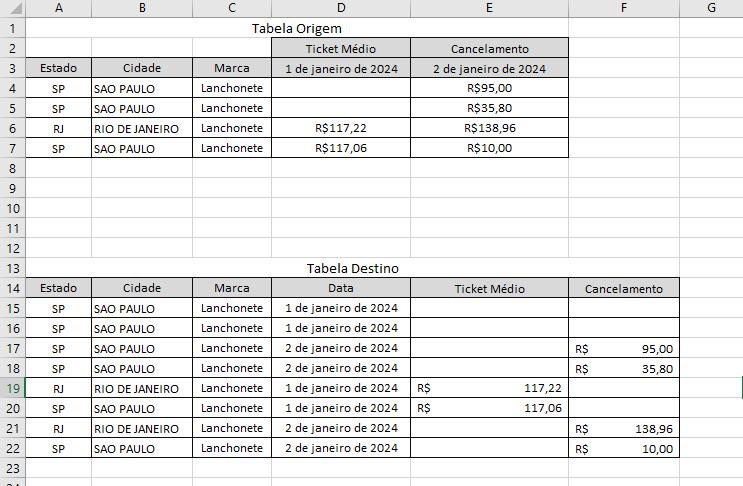
And I hope everyone is doing well. I've been trying to do this transformation in Power Query Excel for a few days now, and I can't. The idea is to take the data from the source table and leave it in the same way as the destination table. If anyone can give me some help, I'm about to give up lol
r/ExcelPowerQuery • u/Queasy_Sherbert_1899 • Oct 30 '25
let Origin = SharePoint.Files("https://fesa1.sharepoint.com/sites/BasesDataVoice", [ApiVersion = 15]), FilteredRows = Table.SelectRows(Source, each ([Folder Path] = "https://fesa1.sharepoint.com/sites/BasesDataVoice/Documentos shared/Call Detail Report (ALL)/") and ([Name] = "10- Call Detail Report (ALL) Oct.xlsx")), FiledHiddenFiles = Table.SelectRows(FilteredRows, each [Attributes]?[Hidden]? <> true), InvokeFunction = Table.AddColumn(FilteredFiles, "Transform file (2)", each #"Transform file (2)"([Content])), RenamedColumns = Table.RenameColumns(InvokeFunction, {"Name", "Source.Name"}), RemovedColumns = Table.SelectColumns(RenamedColumns, {"Source.Name", "Transform file (2)"}), ExpandedColumn = Table.ExpandTableColumn(RemovedColumns, "Transform file (2)", Table.ColumnNames(#"Transform file (2)"(#"Example file (2)"))), ChangedType = Table.TransformColumnTypes(ExpandedColumn, {{"Source.Name", type text}, {"TransactionId", Int64.Type}, {"Call Entry", type datetime}, {"Macroprocess", type text}, {"Campaign", type text}, {"Call Type", Int64.Type}, {"Phone", type text}, {"IVR Time", Int64.Type}, {"Queue Time", Int64.Type}, {"Call Time (sec)", Int64.Type}, {"Call Time", type text}, {"notes", Int64.Type}, {"User Password", type text}, {"Login", type text}, {"Typing", type text}, {"Subtyping", type text}, {"Class", type any}, {"Comment", type text}, {"DVID", type number}, {"Phone Type", type text}, {"HANG UP", type text}}, "es-MX"), NullACero = Table.TransformColumns(ChangedType, {{"IVR Time", each if _=null then 0 else _, Int64.Type}, {"Queue Time", each if _=null then 0 else _, Int64.Type}, {"Call Time (sec)", each if _=null then 0 else , Int64.Type}}), IniTalk = Table.AddColumn(NullsACero, "IniTalk", each [Call Entry] + #duration(0,0,0, [IVR Time] + [Time Row]), type datetime), FinTalk = Table.AddColumn(IniTalk, "FinTalk", each [IniTalk] + #duration(0,0,0, [#"Call Time (sec)"]), type datetime), DurTalkSeg = Table.AddColumn(FinTalk, "DurTalkSeg", each let ini = [IniTalk], finRaw = [FinTalk], fin = if finRaw < ini then finRaw + #duration(1,0,0,0) else finRaw in Number.From(Duration.TotalSeconds(fin - ini)), type number), PositiveFilter = Table.SelectRows(DurTalkSeg, each [DurTalkSeg] > 0), WorkDate = Table.AddColumn(FilterPositives, "WorkDate", each Date.From([IniTalk]), type date), StartInterval = Table.AddColumn(WorkDate, "StartInterval", each let dt = [IniTalk], h = Time.Hour(Time.From(dt)), m = Time.Minute(Time.From(dt)), mBucket = Number.RoundDown(m / 30) * 30, t = #time(h, mBucket, 0), d = Date.From(dt) in #datetime(Date.Year(d), Date.Month(d), Date.Day(d), Time.Hour(t), Time.Minute(t), 0), type datetime), IntervalEnd = Table.AddColumn(IntervaloStart, "IntervaloEnd", each [IntervaloStart] + #duration(0,0,30,0), type datetime), IntervalTxt = Table.AddColumn(IntervaloEnd, "IntervaloTxt", each Time.ToText(Time.From([IntervaloStart]), "HH:mm"), type text) in IntervaloTxt let Origen = SharePoint.Files("https://fesa1.sharepoint.com/sites/BasesDataVoice", [ApiVersion = 15]), FilasRows = Table.SelectRows(Origin, each ([Folder Path] = "https://fesa1.sharepoint.com/sites/BasesDataVoice/Documentos shared/Programming/") and ([Name] = "10- Programming Oct.xlsm")), FiledHiddenFilters = Table.SelectRows(FilteredRows, each [Attributes]?[Hidden]? <> true), InvokeFuncion = Table.AddColumn(FilteredFiles, "Transform file", each #"Transform file"([Content])), RenamedColumns = Table.RenameColumns(InvokeFunction, {"Name", "Source.Name"}), RemovedColumns = Table.SelectColumns(RenamedColumns, {"Source.Name", "Transform file"}), ExpandedColumn = Table.ExpandTableColumn(RemovedColumns, "Transform file", Table.ColumnNames(#"Transform File"(#"Example File"))), ChangedType = Table.TransformColumnTypes(ExpandedColumn,{{"Source.Name", type text}, {"Date", type date}, {"EmployeeNum", Int64.Type}, {"Name", type text}, {"Campaign", type text}, {"Login", type text}, {"Supervisor", type text}, {"Entry Date", type date}, {"Exit Date", type text}, {"In Schedule", type time}, {"Out Schedule", type time}, {"Operation Center", type text}, {"Group 2", type text}, {"Scheduled Day", Int64.Type}}), FilteredRows1 = Table.SelectRows(ChangedType, each ([Campaign] = "INBOUND")), GroupedRows = Table.Group(FilteredRows1, {"Date", "Operation Center", "Login"}, {{"In Schedule", each List.Min([In Schedule]), type nullable time}, {"Out Schedule", each List.Max([Out Schedule]), type nullable time}, {"JP", each List.Sum([Scheduled Day]), type nullable number}}), IniDT = Table.AddColumn(GroupRows, "IniDT", each #datetime(Date.Year([Date]), Date.Month([Date]), Date.Day([Date]), Time.Hour([In Schedule]), Time.Minute([In Schedule]), Time.Second([In Schedule])), type datetime), FinDT_raw = Table.AddColumn(IniDT, "FinDT_raw", each #datetime(Date.Year([Date]), Date.Month([Date]), Date.Day([Date]), Time.Hour([Out Time]), Time.Minute([Out Time]), Time.Second([Out Time])), type datetime), FinDT = Table.AddColumn(FinDT_raw, "FinDT", each if [FinDT_raw] < [IniDT] then [FinDT_raw] + #duration(1,0,0,0) else [FinDT_raw], type datetime), Remove_FinDT_raw = Table.RemoveColumns(FinDT, {"FinDT_raw"}), SecondDuration = Table.AddColumn(Remove_FinDT_raw, "SegDuration", each Number.From(Duration.TotalSeconds([FinDT]-[IniDT])), type number), DailyWindow = Table.Group(SegDuration, {"Login","Fecha"}, {{"StartDay", each List.Min([IniDT]), type datetime}, {"EndDay", each List.Max([FinDT]), type datetime}}) in DailyWindow let Tip = #"Typification", Vent = #"Scheduling", Tip_Types = Table.TransformColumnTypes(Tip, {{"Login", type text}, {"WorkDate", type date}, {"StartInterval", type datetime}}, "es-MX"), Merged = Table.NestedJoin(Tip_Types, {"Login","WorkDate"}, Vent, {"Login","Date"}, "v", JoinKind.Inner), Expanded = Table.ExpandTableColumn(Merged, "v", {"StartDay","EndDay"}, {"StartDay","EndDay"}), Filtering = Table.SelectRows(Expanded, each [StartInterval] >= [StartDay] and [StartInterval] < [EndDay]), ModifiedType = Table.TransformColumns(Filtered, { {"Typification", each if _ <> "UNTYPEFIED CONTACT" then "TYPEFIED CONTACT" else "UNTYPEFIED CONTACT", type text } }), #"Changed type" = Table.TransformColumnTypes(ModifiedTypification,{{"TxtInterval", type time}}), #"Grouped rows" = Table.Group(#"Type changed", {"WorkDate", "TxtInterval", "Login", "Typing"}, {{"Count", each Table.RowCount(), Int64.Type}, {"Call Time (sec)", each List.Sum([#"Call Time (sec)"]), type number}}) in #"Grouped Rows"
r/ExcelPowerQuery • u/Capable-Post-5674 • Jan 09 '25

r/ExcelPowerQuery • u/missanxiety98 • May 19 '26
Hi friends. I am doing a project for work that I need a power query master for. I am attempting to create a template tool that can be used by different users every month (they would make a copy of the tool for their use) but I need to be able to load a list of search terms (either in the source file or in the actual pq tool) and a date range so that the tool only spits out the relevant data to the list of terms and the date range. I think I am confusing Copilot and ChatGPT because I want to use TWO separate files (one as the source of data and one as the tool itself) and connect them through the data source settings. Can anyone help me? I can commission this task as well if you don’t want to teach a newbie like me.
r/ExcelPowerQuery • u/Prashant_sah • Sep 07 '24
Hey folks,
I’ve been using Power Query a lot and have collected a bunch of handy M code snippets along the way. Just wondering how everyone else manages theirs for future projects?
Do you have a go-to tool or method to keep everything organized and easy to find when you need it? Would love to hear what works best for you!
Thanks!
r/ExcelPowerQuery • u/Sometimes_Accurat3 • Aug 14 '26
Fml. I was merely trying to be a problem solver as I despise manual, time-consuming, soul-sucking tasks. Not to mention overall stagnation/lack of resourcefulness. But now I can’t help but feeling like I’ve fucked myself.
I’ve essentially brute forced my way through a few automation projects out of shear stubbornness and hyper fixation. They were really well received and have saved my colleagues hours with the solutions, as the story goes.
I only started dabbling with PQ a few months ago, and now they are asking me to host a full-on lunch and learn to teach my team. Not to mention, some of the projects I worked on were in VBA, not even PQ. WTF?
I don’t think they appreciate that 1. I used the information that is available to ALL of us to create these tools without anyone teaching me (besides ChatGPT lol), and 2. I am still learning myself and it’s not a simple skill that I can train the team on in an hour.
While I’m always open to commiseration, my question is:
r/ExcelPowerQuery • u/DragonStern • Apr 13 '25
Is it possible to add in the excel sheet a button to refresh the power query?
r/ExcelPowerQuery • u/13ass13ass • Aug 27 '25
I’ve been writing m code for a year now. Almost always using llms to generate the code.
I feel like gpt5 has been a huge step up in m code writing! It’s using functions and is more clear about what it’s trying to do. Honestly it’s helping me appreciate what m code can do even more.
Are you guys seeing the same thing?