r/ExcelPowerQuery • u/Anonymity4TreeFiddy • May 10 '24
Transform table into shown format (Please see pic)
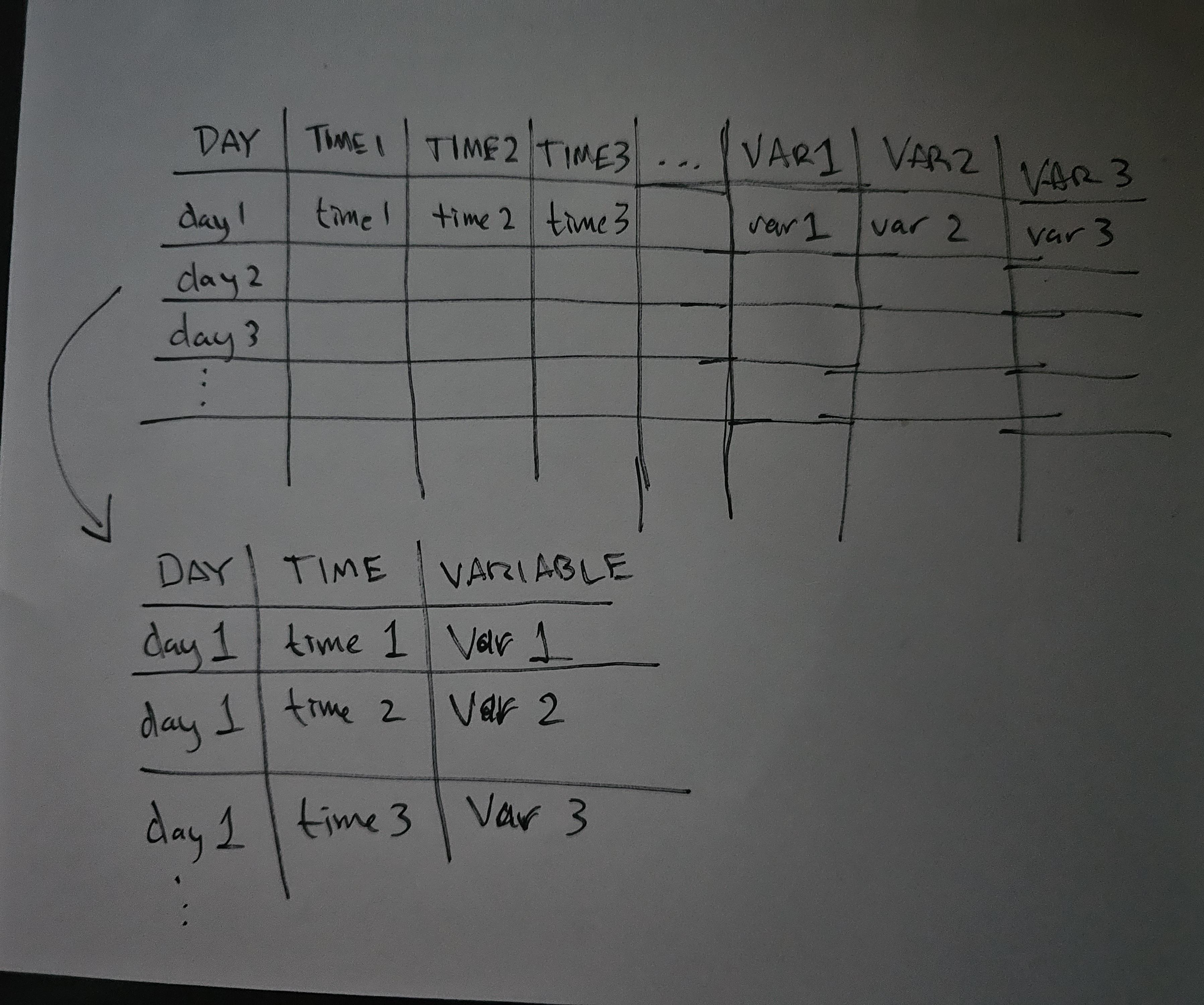
Sorry if this is basic, I can't seem to figure out how to do this with the unpivot method. Thank you in advance for helping a beginner.
0
May 11 '24
[deleted]
1
u/Anonymity4TreeFiddy May 11 '24
It would stack the time and var variables in the same column. I think I need to deconstruct the table and piece it together, no simple solution because of original format chosen. Will update when I've created a solution.
4
u/Ecstatic-Scheme9968 May 12 '24
Unpivot is da way.
First, unpivot all Time columns. Then Unpivot all Var columns.
You get two separated columns, one for Time and another for Var.
I tried on my side and it seemed to work... Though I wonder if some duplicates appear with my solution... Only one way to find out :)
2
u/Anonymity4TreeFiddy May 12 '24
Haha thank you for the feedback. I did find out lol That strategy does end up duplicating. Ended up using Python and pandas to break it into 3 separate data frames. Melted (unpivoted) each individually, sorted each by index, then concatenated it back together. Prolem solved fortunately. Thanks again for your time and consideration!
1
u/Dwa_Niedzwiedzie May 26 '24
letSource = Binary.Decompress(Binary.FromText("Ncw7CgJBEIThXPAw2111AAMDAxMR02FhDQxMRISFObxMV01SP/vob1v3fr9cz0tt1GYtatkfp9syJsbkGIzh8bCt+9K/r/dzabPhpguX/bd+xm+VUFKBIlBAGIw2n9OFW2AIDIEhMASGQR2mwTSYbb6HW2AKTIEpMAWmQR3AIAzCINr8XiAEQiAEQiAMsg5okAZpkAYpkAIpkAIpkAP8Aw=="), Compression.Deflate),#"Imported CSV" = Csv.Document(Source,[Delimiter="|", Columns=11, Encoding=1250, QuoteStyle=QuoteStyle.None]),#"Promoted Headers" = Table.PromoteHeaders(#"Imported CSV", [PromoteAllScalars=true]),#"Unpivoted Other Columns" = Table.UnpivotOtherColumns(#"Promoted Headers", {"day"}, "Attribute", "Value"),#"Split Column by Character Transition" = Table.SplitColumn(#"Unpivoted Other Columns", "Attribute", Splitter.SplitTextByCharacterTransition((c) => not List.Contains({"0".."9"}, c), {"0".."9"}), {"Attribute.1", "Attribute.2"}),#"Pivoted Column" = Table.Pivot(#"Split Column by Character Transition", List.Distinct(#"Split Column by Character Transition"[Attribute.1]), "Attribute.1", "Value"),#"Removed Columns" = Table.RemoveColumns(#"Pivoted Column",{"Attribute.2"})in#"Removed Columns"