r/DroidDeck • u/elysiumexe • 22d ago
DroidDeck on Android Auto

161
Upvotes
Bro, no one mentioned this anywhere.. I looked around and it literally went under the radar.. wtf..
r/DroidDeck • u/elysiumexe • 22d ago
Bro, no one mentioned this anywhere.. I looked around and it literally went under the radar.. wtf..
r/DroidDeck • u/G3ioh • 24d ago

Running on a ayn Odin 3 on the preview build, it's still a bit choppy and crashes a lot, so I'm still fine tuning the settings/drivers but the fact it even boots up, I'm genuinely amazed.
If anyone has any tips on getting this to run better do let me know :)
r/DroidDeck • u/pigpentcg • 9d ago

Got my Duo and was pleasantly surprised with the second screen utilization. There’s also emulated SteamDeck trackpads you can use!
r/DroidDeck • u/FreeAd7483 • 23d ago
Good day to you my fellow android geeks, in this post I will tell you about my experience with droid deck on snapdragon 8 gen 2 and share some tips about running games.
Just go with stable versions please, I know you may want to try latest features but they aren't... well... stable so just stick with normal version
Because of how unorganised android tech handles cpu core affinity there's a good chance you are losing performance because both steam and game is using all of your cores! It might sound counter intuitive but when all cores are enabled including weak ones, there's high probability of games just not going their full speed because your android decided that droid deck shouldn't waste energy on using the most powerful cores you have. What I suggest doing is enabling just one super core for your steam, and enabling your performance cores for games while turning efficency cores off. This tip doesn't apply just to 8 gen 2 processor, this way of thinking works for most snapdragon processors.
Fex Presets. What's that? Well this basically dictates how aggressive should droid deck dictate your translation layer to optimise a game. General rule is that Perfomance + TSO preset is the best overall, however if game is running slower than expected you might wanna check different Presets and see how they affect performance, you never know, maybe you set it to EXTREME preset and you will gain extra stability! It's always good to test every option and see if game works for the better or for the worse, it might just fix your issue with performance.
Trust me, you really do not need 2k resolution on your phone, just set resolution of both steam and game to 720p and stretch screen, on small screens 720p resolution looks decent just like on steam deck, you won't lose much in terms of visual, but you will gain noticeable fps boost!
If you decide to run DX12 game I suggest you don't, linux is very picky and most dx12 games run like absolute cheeks, if game lags heavily or just crashes there's a good chance your Resident evil 2 remake is running in DX12 mode, switch to DX11 and your fps will probably double if not triple most of the time.
I know you wanna rock those ultra settings in games but trust me, a good battery life and phone not turning into toaster is much better option than to have ultra settings in Skyrim only to realise your device lost all battery after like 40 minutes of playing.
It's better to have stable 30 than choppy 60. I know playing in 30 fps in modern era of gaming is horrible experience but trust me, after playing for a while your eyes will adjust to 30 fps, also it saves your battery and temperature!
Stop sitting in reddit and visit droid decks discord server, it has chat where you can ask creators questions directly, see compatible settings for your specific game, and maybe find some friends along the way!
While I didn't explain everything regarding droid deck I did my best to explain basics to you as a fellow android enthusiast, hope my guide was helpful and remember, emulators reward tinkering
r/DroidDeck • u/nimbusconflict • Oct 24 '26

Was not fun getting this to work, but there it is. Should be pretty plug-and-play soon, but if you can't wait, you can try my Proton until then.
https://github.com/arusiasotto/wow-forever-droiddeck
Edit: The proton patches have been pushed up stream. Most recent versions of DroidDeck now have Battle.net as a store that installs and runs wow like normal!
r/DroidDeck • u/PeerPressure • Oct 17 '26

Droid Deck running on Retroid Pocket Classic. Set this up between changing diapers after getting DD set up on my AYN Thor and Retroid Pocket 6. Tried about 5 games, only Stardew works so far.
r/DroidDeck • u/morose_banana • 22d ago
Decided to share how I got New Vegas + Skyrim running on a Snapdragon 870 (Adreno 650) device since I noticed there's little info out there
Device: Lenovo Legion Y700 (1st gen)
Chipset: Snapdragon 870 (Adreno 650)
Memory: 8/128gb
Droid Deck Settings
New Vegas
GPU Driver: Turnip 24.1.0 r18
Proton 11.0 (ARM64)
FEX PRESET: Performance + TSO
FEX: Default
DXVK: 2.7.1-linux
VKD3D-Proton: Default
Skyrim
GPU Driver: Turnip 24.1.0 r18
Proton 11.0 (ARM64)
FEX PRESET: Performance + TSO
FEX: 2604-linux
DXVK: 2.4.1-linux
VKD3D-Proton: Default
... And for Terraria, in case someone needs it
GPU Driver: Turnip 24.1.0 r18
Proton 11.0 (ARM64)
FEX PRESET: Performance + TSO
FEX: 2604-linux
DXVK: 2.4.1-linux
VKD3D-Proton: 2.14.1-linux
Good luck and have a nice day.
r/DroidDeck • u/Confident_Ice_4507 • Oct 23 '26

Hey there, I am a huge fan of android handhelds and I really love DroidDeck so far. I own an Ayn Odin 3 Ultra and have been quite hands on with development cycle of this android handheld gaming space. I want to give some feedback on how the DroidDeck has been feeling, and what can be done to improve the experience. On top of that, I want to list some games here that I want to play but cannot.
Pros:
-Everything feels smooth after the 1000hz polling rate controller update. A big change.
-Its awesome that we can hook up controllers into one device and play coop games.
-A big fan of every online feature just working.
-In my experience, the auto driver feature has been quite successful, but not enough yet.
-There are some games that see a big input latency improvement, and performance improvement compared to GameHub and GameNative. Thats awesome.
-DroidDeck feels like a well polished product, something that feels like its the native app for these android handhelds.
Cons:
-About 20% of my games wont boot at all. Some of these include:
Dead By Daylight (Most likely the Easy Anti Cheat) (Did not work in GameNative either.)
Call of Duty: Black Ops 3 (Does work in GameNative, quite well)
Resident Evil 3 (I get an error message, the game wont boot) (Does work in GameNative, quite well)
Project Zomboid (Did not work in GameNative either.)
A plague tale innocence (big performance boost over GameNative, but a lot of graphical glitches.)
-My SD card games DO NOT work, at all.
My recommendations for the dev team:
Perhaps creating a database of "known configs" for games, helping people to just boot into a game without any issues.
Creating a way to play EAC games.
Making the whole app seem much polished, for it to be recognized as the "default way" to play steam games on android.
Love the app, and the dev team behind it. I hope this has been useful so far.
r/DroidDeck • u/alvinatorr • 27d ago

Paranormasight: Mermaid’s Curse on Ayn Thor Pro
Started playing on Droid Deck 0.2 and finished the game in 0.6. Booted up on the first try with no fuss. Paired with Clustertune on a Large underclock setting, I was able to play for hours without charging.
r/DroidDeck • u/Emergency-Oil-8559 • Oct 21 '26
My list of successful games that run and the very few tweaks.
fallout 3, 4, &76. Windows componen direct audio.
ff7 integrade and sequel, re1 remake, re2 remake, daldurs gate 3, Skyrim, morrowind, stardew valley, no man’s sky, no issues other than performance improvements from changing video drivers around to turnips and adreno test.
lossless scaling works well too.
Also, I run a peltier cooler otherwise my phone would literally melt.
r/DroidDeck • u/jukrapopk • 14d ago

Hey! I just finished testing PC games on DroidDeck. Just wanted to share.
A few details:
Device: Odin 2 Mini (12GB)
Chip: Snapdragon 8 Gen 2
Device Settings: Standard Performance + Smart Fan
App: DroidDeck 0.6.9
DroidDeck Settings: Default DD-Turnip, DroidDeck Proton
Resolution: 1280×720
Game Settings: VSync Off, Most of the settings are around Medium
I'm also working on a similar test on SteamOS (ARM64). It should be interesting to compare the two. DroidDeck 0.7.0 just dropped as well. I might check it out and test a few games to see if the visual glitches and performance have improved.
Note: my method = configures DroidDeck/MangoHud to log to file and use adb to pull them out
r/DroidDeck • u/Apprehensive-Tone421 • 7d ago
The game runs pretty well actually. I got 15-25 FPS and up to 50 with lossless frame gen. But I wonder if anyone with similar specs has a better performance with different settings.
I'm using a Poco F7 phone with Snapdragon 8s Gen 4 and 12GB RAM
r/DroidDeck • u/Johns_Kiss • 10d ago

Gog Games on my Tablet with Droiddeck, What a time to be alive xD
r/DroidDeck • u/The_Mrk • 14d ago
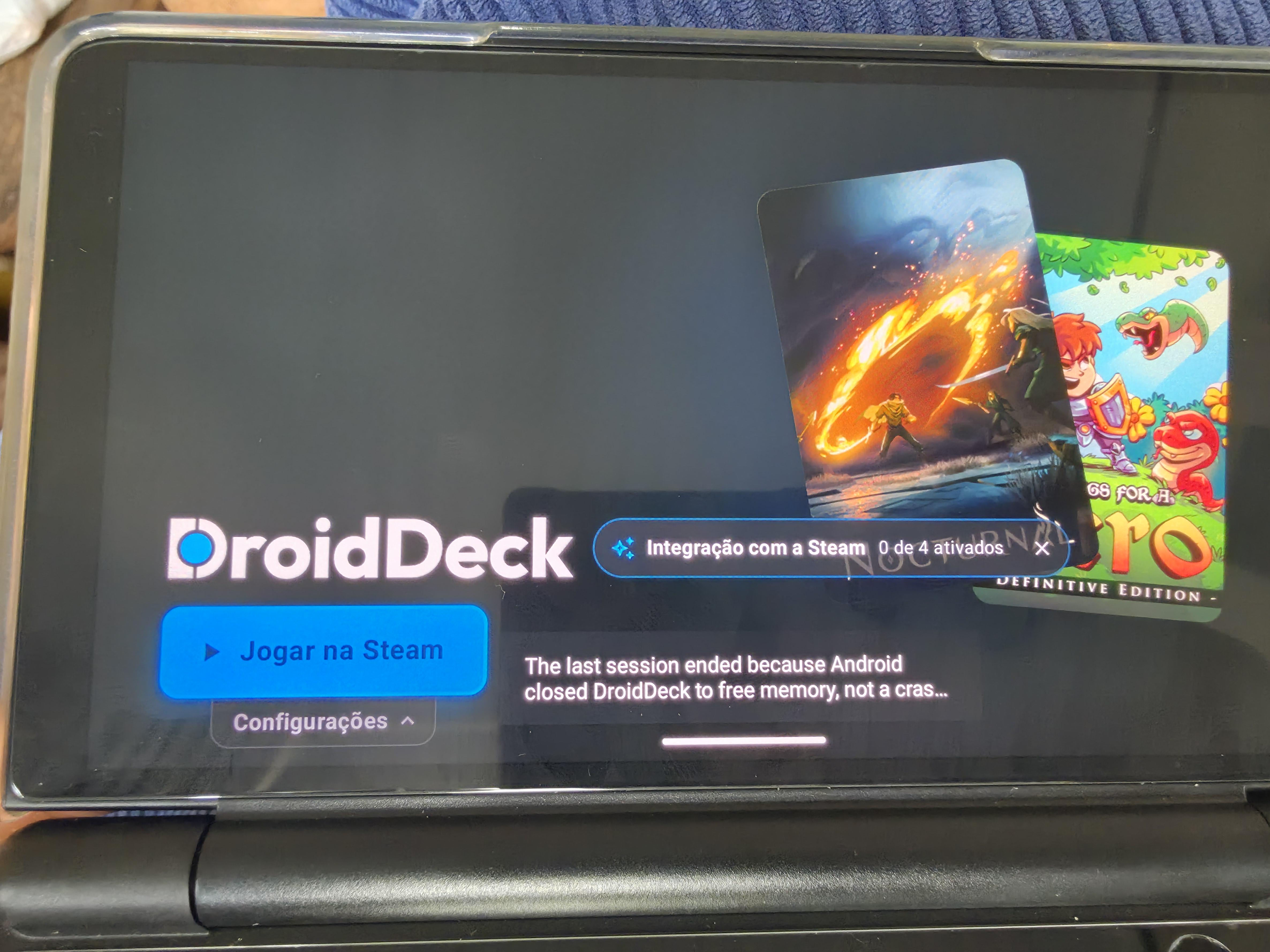
Hi everyone.
Want start with "i know 8gb of RAM it's not the better choice to run steam games, and 12, 16 and above are the go to". Puttin take aside, i'm able to play that exactly game (nocturnal) in game native, no problem, as should i since it's a light weight game. But unfortunately in droiddeck i have this issue, it also happened in other game. Which made me wonder, it couldn't be some config that i'm missing?
I really appreciate your feedback and thanks beforehand
UPDATE
Some days later, they responded this:
"The memory fix (#2382) was merged on Nov 12 and is in the latest Preview (Updates > Preview). Another tester confirmed it there. Please try Nocturnal on the Thor with it, and if Android still closes DroidDeck, send a log from that session."
Don't have time to test right now, but should me fixed
r/DroidDeck • u/nerdcorpltd • Oct 14 '26
Just wanted to share a quick proof-of-concept test of Monster Hunter: World (Steam PC version) running on my POCO F8 Ultra using DroidDeck v0.4.0.
This isn't meant to be my main way of playing the game. I just wanted to see how far PC gaming on Android has come.
POCO F8 Ultra (Snapdragon 8 Elite Gen 5 / Adreno 840)
16 GB RAM
GameSir FX5 external cooler
GameSir X5s controller
Resolution: 1280×720
Scaling Filter: Snapdragon GSR (Quality)
Filter Sharpness: 40%
Frame Limit: 30 FPS
Frame Generation: Lossless LSFG 2×
Graphics: Medium
DirectX 12: Off (DX11)
Resolution: 1280×720
Aspect Ratio: 16:9
FidelityFX CAS + Upscaling: Off
Frame Rate Limit: 30 FPS
VSync: Off
CPU0: Unassigned
CPU1–6: Game
CPU7: Steam Client
During a roughly 25-minute open-world hunt:
Native FPS: ~25 on average
LSFG 2× output: ~47–48 FPS
Occasional FPS drops when rotating the camera or entering new areas
Lowest observed FPS: 11, during an area transition
DroidDeck RAM usage: approximately 11–12 GiB
Measured using DevCheck with the GameSir FX5 cooler attached.
Typical readings during the hunt:
GPU: ~72°C
CPU: ~42°C
Battery: ~38°C
Highest observed readings across testing/recording:
GPU: 82°C
CPU: 44°C
Battery: 43°C
These are reported sensor readings, not necessarily GPU/CPU junction temperatures.
I also tested 540p Low and 720p Low in the Arena.
At 540p Low, native FPS was around 28, with DroidDeck RAM usage below 9 GiB.
At 720p Low with Snapdragon GSR Quality, native FPS was also around 28 in the tested Arena scene, with RAM usage below 10 GiB. The image looked noticeably sharper.
Moving to 720p Medium improved visual quality significantly, especially shadows, but increased memory usage and GPU load.
For actual extended gameplay, I would probably choose 720p Low + GSR Quality. However, Medium looks surprisingly good for a proof of concept.
Monster Hunter: World is definitely playable to a degree on this setup, but it isn't consistently smooth. Area transitions can cause severe frame-time spikes, and the GPU gets quite warm.
The attached gameplay recording was captured while playing, so recording overhead may also affect performance.
Overall, I'm impressed that the PC version can run and complete a real hunt on an Android phone through multiple translation layers.
This is a proof of concept, not a recommendation to replace a gaming PC or handheld.
Would be interested to hear if anyone has found better DroidDeck, FEX, Proton, or Turnip settings to reduce the stuttering.
r/DroidDeck • u/GWBHandhelds • 11d ago

Games Tested
Minecraft Legends
Megabonk
Helldivers
The Forest
Drift Legends 2
r/DroidDeck • u/voyager2005 • Oct 22 '26

r/DroidDeck • u/CultishGoose • 28d ago

As of version 0.6.0 Tmod Loader launches and plays using Droid Deck. I have a AYN Thor Max using Banners Turnip Adreno Gpu driver and Proton-Cachyos as the proton version.
With the little time I have played before making this post I was only able to load around 50 mods before my game started to slow down and become unplayable. Some of these mods included visual changes and content mods such as Calamity Fables and Spirit Reforged.
I would suggest Vanilla+ mods. Putting mods together on the Thor was a horrible experience and would suggest build your mod pack on pc using the collections feature.
r/DroidDeck • u/supershredderdan • Oct 12 '26

r/DroidDeck • u/One-Dependent-328 • 25d ago

Only have access to the steam library. Can't remove the performance overlay. Can't swipe left to stop a game anymore. Almost feel like Uninstalling to download the previous version.
r/DroidDeck • u/voyager2005 • Oct 18 '26

r/DroidDeck • u/KernelCorns • 16d ago

Currently trying to run the game "Probably Stolen" and "Hull Rupture" on this ancient relic, any suggestions on stable 30fps?
r/DroidDeck • u/Fluffely_Toasted • Oct 17 '26
Under here is my guide on how to make Persona 3 reloaded work on your phone
Install the game, either via steam or locally
After downloading it install this mod as specified by the mod (https://www.nexusmods.com/persona3reload/mods/51). You will need the P3RFix (steam) version, this mod fixes the issue with ultrawide and custom resolutions, without this you will most likely run into display issues. After downloading it modify the P3RFix.ini file to the wanted custom resolution (Easier on Pc, but you can do it on droid deck desktop mode too. Use either your phone file manager or the desktop mode to put the files in the correct location, if you only use touch options open dolphin (file manager) and use the 3 lines in the top right corner, click it and use the actions called: "Actions for Current View" or the other options under "More" and "File" .
Launch the game, it will crash but it is needed to generate steam compatdata, after it crashes download this mod (https://www.nexusmods.com/persona3reload/mods/54) and put Engine.ini into /root/.local/share/Steam/steamapps/compatdata/2161700/pfx/drive_c/users/steamusers/AppData/Local/P3R/Saved/Config/WindowsNoEditor/ (You will be forced to use desktop mode unless you can figure out how to reach it from your phones file manager).
If you are installing it locally instead with steam then you will need to manually download these windows components for the game (you can download them in the components menu after changing profile to Persona 3 Reloaded, the required windows components: "visual C++ 2015-2019", "Visual C++ 2015-2022", also I recommend you use Droid Deck Proton.
Lastly in the Components menu for the game, change FEX to Denuvo. Download DXVK 2.7.1 or 2.4 and use those as your DXVK option, and go into environment variables and change VKD3D_FEATURE_LEVEL to 12_1.
Now you can launch the game, set your own settings up, although for phones with Snapdragon 8 Gen 1 or Gen 2 i wouldn't go above low or medium at 30 fps as it can overheat easily If anyone needs help ask me anything, I'll try to help
My phone was Nothing phone 2 with Snapdragon 8+ Gen 1, so everything should work even with Snapdragon 8 Gen 1 and above should work even better. Also while mods are technically might not be needed, without them you will either have severe issues or it wont even start because mods disable raytracing. Good luck
r/DroidDeck • u/Emergency-Oil-8559 • Oct 22 '26
just Settings, from the droiddeck game listing add fsrx2 frame gen, in game lock the frames to 30 for a smooth 60fps and in graphics/video settings just select the “steam deck“ profile.
