r/AnkiAi • • Oct 08 '26

[Seeking Help] How can I enable an agent to continuously generate efficient cards in an unsupervised environment?

0 Upvotes

Current status:

I have an LLM wiki that records everything about me.

I vibe-coded a flashcard plugin with a pi agent. Before, I manually reviewed and edited the cards. Now I do nothing and just let it generate.

My journey:

Before I got into Anki, I wrote a huge amount of notes. In the end, I realized I never looked at them. I put in a lot of effort, but found I hadn't remembered anything, and I couldn't recall things in time when talking with others.

Then I found Anki. The first loop I validated was using Anki to learn how to use Anki. Up to now, I've basically stopped writing notes (except for some public articles).

Problems I'm running into:

  1. Making cards is too much hassle -> AI agent

  2. The AI agent's card-making quality is too poor -> skills, LLM wiki

  3. Right now I'm still reading books, and after I understand something, I supervise the agent to make cards. That's also too much hassle -> I want to generate cards continuously and unsupervised. My main fear right now is how to guarantee quality. How can I quickly build trust and feedback with the agent in this area?

Where I want to go:

For speed and efficiency—and maybe because I'm lazy—I think that in the future I might not even read books. I'll just keep memorizing the cards the agent gives me and become pure *wetware*. I hope future Anki can act like the Great Sage (Daikenja) in *That Time I Got Reincarnated as a Slime*. Let the agent decide what I should know and avoid complexity. (It's a bit delusional, but I still want to live a life of certainty. Too much uncertainty makes me anxious.)

What I'm hoping to hear:

  1. Practical experience with using an LLM wiki to drive an agent that makes Anki cards

  2. Trust issues around agent-generated cards

  3. Thoughts on Anki's role in the future

  4. Related practices, advice, ideas, and approaches


r/AnkiAi • • Apr 18 '26

I think I finally fixed my reading-to-Anki workflow

1 Upvotes

Whenever I read PDFs/books I highlight a ton, but turning those highlights into Anki cards has always been the annoying part.

I either:

  • stop reading to make cards (breaks the flow), or

  • just… don’t make them

I tried a couple tools, but they didn’t really work for me. They were either too generic or based on sections I didn’t find important in the first place.

So I ended up making a tool for myself that focuses on my highlights and the surrounding context to generate Anki cards.

Biggest win was being able to go back to old PDFs and actually make use of my highlights.

If anyone wants to try what I built, I can share it, I’d love some honest feedback.


r/AnkiAi • • Aug 13 '26

Generate Anki Package from any source

Post image
0 Upvotes

If you want to create Anki package from pdf, YouTube, link a solution we built would sort you out (https://app.edithly.com) (free tool)

Do try and let us know your suggestions


r/AnkiAi • • Jun 20 '26

Legitimate Multiple Choice in Anki with Source Linked Feedback

3 Upvotes

Hey Anki users,

I recently added multiple choice question generation to Recall Genie.

The idea is pretty simple: upload your notes/slides, generate MCQs, answer them, get immediate right/wrong feedback, and see explanations for why each answer choice is right or wrong.

The part I care about most is the source-linked feedback. The questions point back to the relevant section of your notes/slides, so you can quickly see where the answer came from without scrolling through a long PDF.

You can also adjust:

  • number of questions

  • difficulty

  • question/card style

I’m pretty pro-AI for MCQs specifically because if you write the question yourself, you already know the answer. With AI-generated MCQs, you can test yourself first, then use the feedback to see what you actually need to review again.

Right now it works best for text-based notes/slides and memorization/understanding-style questions. Full diagram/image-heavy PDF support is not added yet because I want to keep quality reliable.

Try it free here: https://www.recall-genie.com/multiple-choice/

Demo video: https://www.youtube.com/watch?v=dqbHMyg2kMw

Would love feedback, especially on question quality, source-linked feedback, and explanations for wrong answers.


r/AnkiAi • • Oct 18 '26

I created Cardly: turn your PDFs and lecture slides into Anki-ready flashcards (with the source on every card)

Post image
2 Upvotes

Hey everyone, I'm the developer of Cardly. I shared it here when it was still in a very early stage, and a lot of what's in it now came from your comments.

What it does:

You add your notes or PDFs (lecture slides, textbook chapters, even scanned or handwritten pages) and it makes flashcards or a quiz from them. Each card shows where in your material it came from, down to the page or slide, and can come with a short explanation of why the answer is right. That way you can actually trust the cards instead of second guessing them.

The parts I think you'll care about:

- Export to Anki in one click (a tab-separated file you import straight into a deck)

- Up to 10 PDFs in one go, and decks up to 80 cards

- Cards in 15+ languages, or it matches the language of your notes

- An option that rewords the questions every time you study, so you learn the idea and not the wording

- You can edit, reorder or write cards yourself before exporting

It also has its own daily review if you want to study inside it, but it works fine as a card factory for Anki.

The free plan gives you 10 generations a month (up to 20 cards each), and export is free. Pro is $5/month or $40/year and adds bigger decks, languages and rewording.

Would love your honest take:

  1. If you tried it on your own notes, would you keep the cards as they are or end up rewriting them?

  2. Does seeing the source on every card make you trust AI-made cards more?

  3. What's the first subject or exam you'd use it for?

studywithcardly.com


r/AnkiAi • • Sep 09 '25

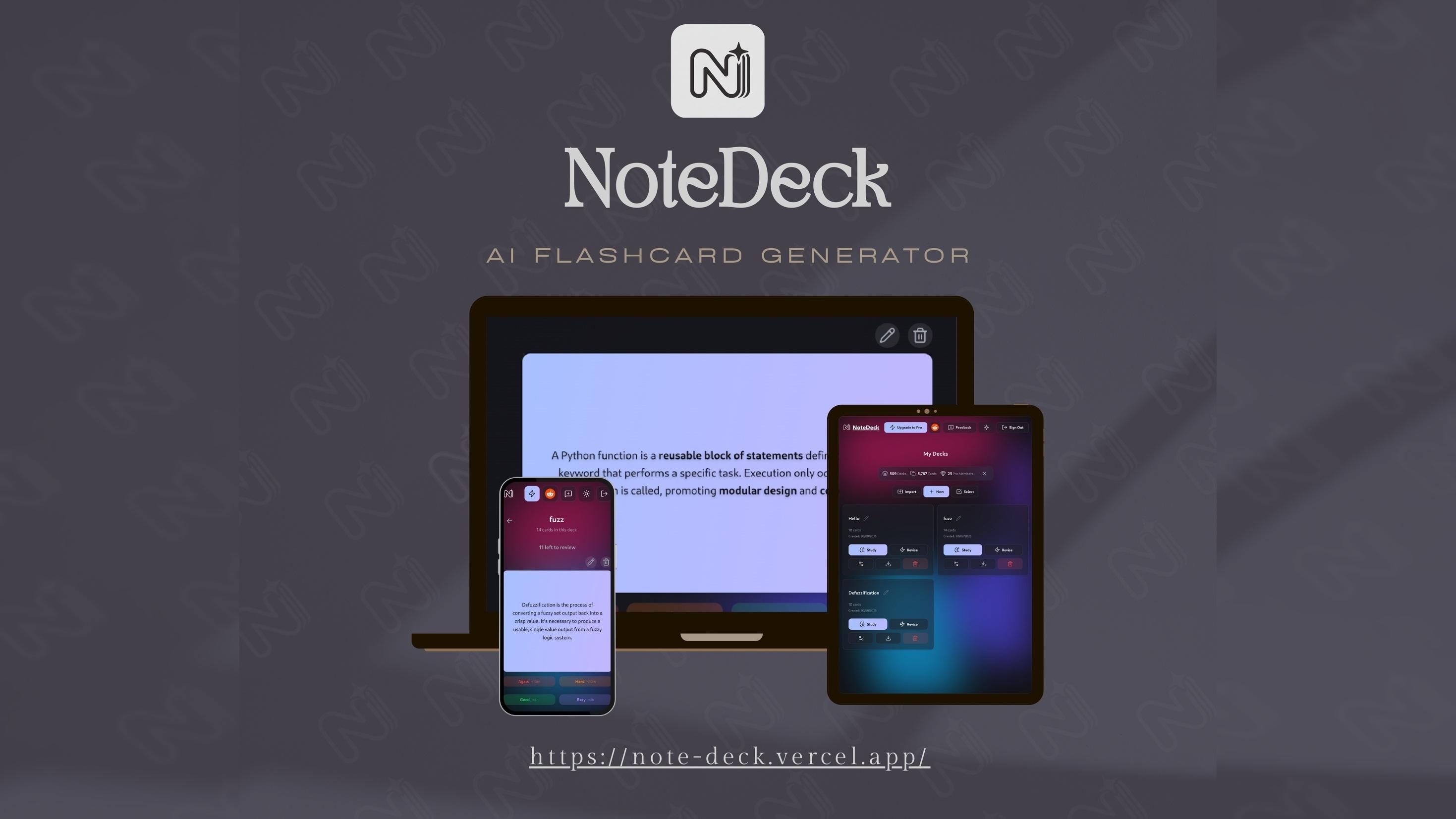
I built NoteDeck, an AI tool that generates Anki cards from PDFs, text, and URLs. Looking for feedback from the Anki AI community.

Post image
0 Upvotes

Hey everyone,

As a solo developer and a huge believer in the power of Anki, I've been fascinated by the potential of AI to streamline the most time-consuming part of the process: card creation.

I built a web app to tackle this called NoteDeck.

The core function is to use AI to analyze your study materials—be it pasted text, a dense PDF, or a web article—and automatically generate a deck of question-and-answer flashcards. The goal is to let you focus on the learning part within Anki, not the manual data entry.

In compliance with Rule #3, I want to be fully transparent. I am the developer of this tool. While many AI tools are paid, I've tried to create a generous free tier that allows for significant use. The Pro version helps cover the costs of the more advanced AI models needed for higher accuracy on complex subjects.

It's been exciting to see the community's response so far:

  • 530+ Decks Created

  • 6,500+ Flashcards Generated

  • 32 Pro Members

Today, September 10th, is the final day of our launch sale for the Pro version, and I wanted to share it with this highly relevant community before it ends. I am particularly interested in your feedback on the quality of the AI generation and any features you think would make it a more powerful companion for Anki.

You can try it out here: NoteDeck

I understand and respect that many Anki users prefer free and open-source tools, and I appreciate you taking the time to check out what I've built. All feedback is welcome!


r/AnkiAi • • Apr 29 '26

Hey everyone, I used Claude AI to code a "StudyOS" add-on bundle to help with focus. Sharing it for free!

Thumbnail gallery
2 Upvotes

r/AnkiAi • • Jul 26 '26

I built a browser-based editor for Anki that live-syncs via AnkiConnect — replaces the old desktop card screen (AI audio/images included) — early days, feedback wanted

0 Upvotes

Anki's card creation and editing screen hasn't really changed in years — no real overview of your cards while editing, clunky for anything beyond plain text. So I built a separate web app that connects live to your real decks through AnkiConnect:

- See every card in a deck in one browser view — edit, delete, or flip front/back instantly, no digging through the desktop browser window

- Everything syncs straight back to your actual deck — no CSV export/import round-trip

- It can also generate AI voice audio + custom images per card if you want that, but the core of it is just a faster, modern way to manage cards you already have

Does the native card browser actually bother you day to day, or is this solving a problem people don't really have? Honestly want the "this is pointless, here's why" answers too, not just the positive ones.

Link: transmomy.web.app (needs Anki desktop running with AnkiConnect enabled)


r/AnkiAi • • 12d ago

Tarjetas Anki en Inglés generadas por IA

0 Upvotes

Soy un apasionado del aprendizaje de idiomas. Actualmente estoy reforzando muchísimo mi inglés y llevo alrededor de un año aprendiendo alemán. Además, soy desarrollador de software, así que ¿por qué no mezclar ambas cosas?

Durante los últimos meses he estado desarrollando un proyecto que ayude a generar tarjetas de Anki listas para importar y comenzar a estudiar. Por el momento solo se pueden generar tarjetas en inglés enfocadas para hablantes de español. Conforme el proyecto vaya creciendo, se agregarán más idiomas.

Pueden visitar el enlace para probarlo ustedes mismos y, si es posible, escribir su experiencia aquí mismo.

https://ankigenai.com/


r/AnkiAi • • Mar 30 '26

Looking for feedback on Anki deck to AI podcast tool

0 Upvotes

Hi everyone,

I’ve been building a tool that turns Anki decks into AI-generated podcasts so you can review on commutes / walks without staring at the screen.

Not looking for confirmation that the idea is awesome, but rather am looking for honest feedback from people who actually use Anki.

  • Does this solve a real problem for you, or is it a nice-to-have?

  • What factors would determine the likelihood of you integrating AI-generated podcasts into your Anki review workflow?

If you’re open to trying it, I can share a link in the comments and will be looking forward to hearing your feedback there.

Thanks in advance.


r/AnkiAi • • Apr 28 '26

Built an Anki add-on for one-click AI explanations during reviews — would love feedback

1 Upvotes

I made Anki-GPT, an add-on that gives quick AI explanations inside Anki so you do not have to leave your reviews and paste cards into another app.

It opens a small panel during review, works on text and image cards, and has Simple, Exam, and Deep modes depending on how much detail you want.

I am a med student building it first for my own workflow, but I want it to be useful for anyone using Anki across medicine, MCAT, language learning, law, and other study-heavy decks.

I would really love honest feedback from people here on the UX, explanation quality, and what would make it more useful in your actual study flow.

AnkiWeb page + demo: https://ankiweb.net/shared/info/853364085


r/AnkiAi • • Sep 08 '26

The Anki Generation Files - AI card generation, built for Anki

Thumbnail reddit.com
1 Upvotes

r/AnkiAi • • Jul 09 '26

I got tired of spending 2+ hours turning my notes into Anki cards, so I built a tool that does it in seconds.

6 Upvotes

You paste your lecture notes (or upload a PDF), and it generates a full set of Q&A flashcards using AI. You can study them right in the browser with a flip-card UI, or export to CSV and import into Anki.

It's free to use, no account needed. I'd genuinely love brutal feedback from people who actually use Anki — especially on card quality, because that's the hardest part to get right.

https://ai-flashcard-generator-rosy.vercel.app

What would make this actually useful for your workflow?


r/AnkiAi • • May 08 '26

Other AI card generators are quietly skipping half your lecture. Here's what I built instead.

2 Upvotes

Tested a few AI Anki tools before building my own. The pattern I kept seeing: upload a dense pharmacology or pathology lecture, get back cards that feel complete — but when you go back to the source, huge chunks were never touched.

That's actually worse than not using AI at all, because you don't know what you're missing.

Ankit is built around full-file coverage. The backend processes every part of your upload — not just the "important" sections the AI decides to focus on. It's a custom pipeline, not a wrapper around a chat prompt.

Would love to see it stress-tested on your actual lecture material. Link in comments.


r/AnkiAi • • Mar 15 '26

I built an AI tool to solve the PDF-to-Anki bottleneck. It uses "coordinate-based extraction" to prevent AI hallucinations. (100% Free)

9 Upvotes

Hey r/AnkiAi,

I rely heavily on Anki, but the manual copy-paste grind of turning heavy PDF materials into flashcards was literally soul-crushing.

I tried existing AI flashcard generators, but they were super frustrating. Because they just extract raw text and dump it into an LLM, they lose the visual layout context. The result is usually shallow, random, or hallucinated questions that don't reflect the actual material.

So, as a developer, I spent the last few months building a solution tailored for our workflow called Cubrain (https://cubrain.app).

To fix the AI hallucination issue, I used a "coordinate-based extraction" method.
Here is how it works:

  1. You upload a PDF file where you've highlighted the exact sections you want.

  2. It maps the visual bounding boxes of your highlights, forcing the AI to strictly anchor to that specific context (Zero hallucination).

  3. It generates precise cards, and you export them seamlessly as an Anki-ready CSV file.

100% Free & Looking for Feedback:
To comply with rule #4 (and because I hate freemium traps), the MVP is completely 100% free to use. (You can try it out via Guest Mode—no sign-up required! If you like it, you can create an account later).

I’m not trying to replace Anki, just trying to build the ultimate AI prep-tool for it. I'd love for this community to test the AI extraction quality.

Is the coordinate-based approach actually better for your workflow?

Please roast my app and let me know how I can improve it!

Thanks guys. I'll be in the comments!


r/AnkiAi • • May 19 '26

how i turned my lecture slides into anki cards (without typing)

10 Upvotes

made a little demo of my anki workflow. pdf in, cards out, import done

built this for myself as a med student because i got tired of typing cards for 2 hours after every lecture. shows the full process in the video.

not saying it replaces making cards yourself. but if you're curious: quickdecks.ai

cheers from switzerland🧀🍫❤️


r/AnkiAi • • 22d ago

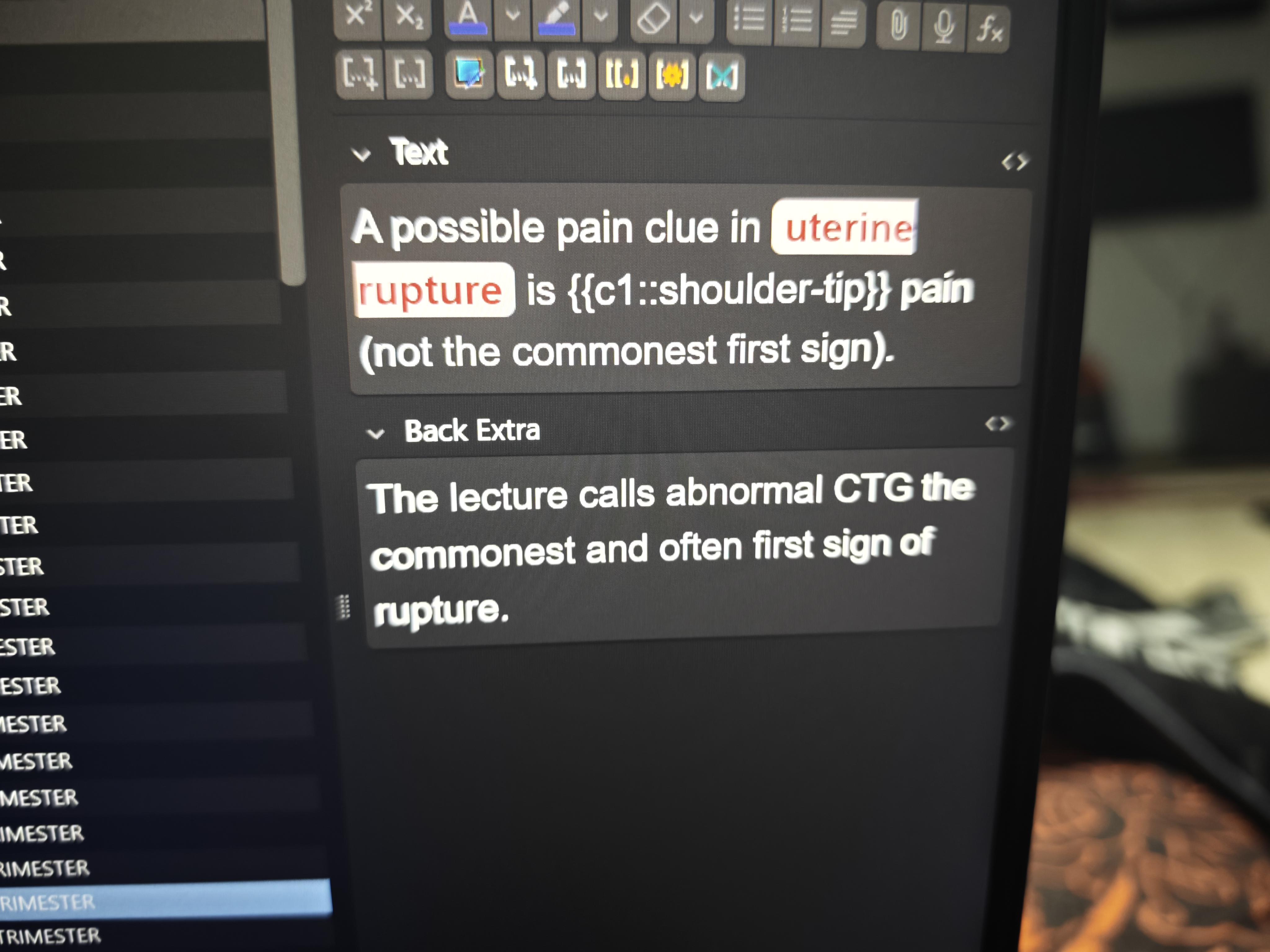
chatgpt is trash at making cards

Post image
24 Upvotes

I dunno if I just bite the bullet and go Claude, or if chatgpt is one prompt away from making great cards

but he does this thing a lot, even when I "scold" him about it: the answer of a cloze is interchangeable with many other answers that are just as correct

it happens throughout the whole deck


r/AnkiAi • • May 06 '26

built my own version of pdf to anki. works so far :))

3 Upvotes

Hiii 😄:)

A few semesters into med school (switzerland) I realized one of the most exhausting parts of studying wasn't actually learning the content. It was making Anki cards. I kept running into the same problem: either I spent hours making cards myself or I used premade decks that never fully matched the way I think. And I don't mean those decks are bad, some of them are genuinely amazing. I also learn much better from cards that test understanding and concepts instead of isolated facts. A lot of premade decks felt too fragmented for how our lectures are actually structured.

So I started building a small tool for myself. The idea was simple: could I generate cards that feel similar to ones I'd write on my own? I kept tweaking prompts and workflows after lectures until the output actually felt usable for real studying. At some point some med student friends saw it and asked for access. Then their friends. Eventually I just made it public.

The workflow is intentionally minimal:

  • Upload a PDF

  • (Choose pages)

  • Choose difficulty/style (usually hard 😉)

  • Generate deck

  • Download .apkg

  • Import into Anki

Takes about a minute end-to-end.

The thing I care about most is that the cards feel useful for actual lecture studying. testing concepts, not just spitting out fragmented facts.

I know AI-generated cards aren't for everyone (and there is a ton of stuff around) and some people will always prefer writing manually (totally fair). But for me this removed one of the biggest bottlenecks in med school, so figured some of you might find it useful too.

There's a free tier so you can try it without committing to anything. Genuinely curious what you think especially if you've tried other AI card generators and have opinions on what works/doesn't.  Quickdecks.ai


r/AnkiAi • • Jan 15 '26

Green Deck, an open-source AI-powered flashcard generator.

7 Upvotes

It’s time to share: Green Deck — an open-source, AI-powered flashcard generator built to be “Anki-first”.

It helps turn text and documents into better (less generic) cards, with a workflow designed for real spaced-repetition review.

It supports both local models (via Ollama) and APIs, so you can choose between privacy/cost and convenience.

Repo: github.com/Erick-Bryan-Cubas/green-deck

Senior folks: this is a junior data engineer’s project. If you notice missing SOLID practices or improvements to implement, please contribute.

If you like it, leave a star and send feedback, issues, or pull requests.

Contributions are more than welcome.


Chegou o dia de compartilhar: Green Deck, um gerador open-source de flashcards com IA, pensado para ser “Anki-first”.

Ele ajuda a transformar texto e documentos em cartões melhores (menos genéricos) e com um fluxo de uso voltado para revisão de verdade.

Suporta uso com modelos locais via Ollama ou APIs, para você escolher entre privacidade/custo e conveniência.

Repo: github.com/Erick-Bryan-Cubas/green-deck

Aos seniores: este é um trabalho de um engenheiro de dados júnior. Se notarem a ausência de práticas SOLID ou melhorias a serem implementadas, por gentileza, contribuam.

Se curtir, deixa uma estrela e manda feedback, issues ou pull requests.

Contribuições são mais que bem-vindas


r/AnkiAi • • Oct 17 '26

I've made a beatiful ANKI THEME with AI

Thumbnail
reddit.com
0 Upvotes

r/AnkiAi • • Feb 07 '25

AI add-ons (AI tool, addon) NovaCards: Card Finder, Card maker, add-on

Thumbnail
novacards.ai
0 Upvotes

r/AnkiAi • • Jul 29 '25

Free AI Anki flashcard generator giveaway

Thumbnail reddit.com
0 Upvotes

r/AnkiAi • • Dec 09 '25

My Anki only has Pass/Fail on the option buttons for my cards. What's the code or add on I need to get: Easy, Good, Hard etc?

Thumbnail reddit.com
0 Upvotes

r/AnkiAi • • Oct 04 '26

Add-on that turns a photo of a school lesson into Anki cards, built for my kids' middle school

5 Upvotes

My kids are in middle school, and typing their lessons into Anki was the part nobody wanted to do (me included).

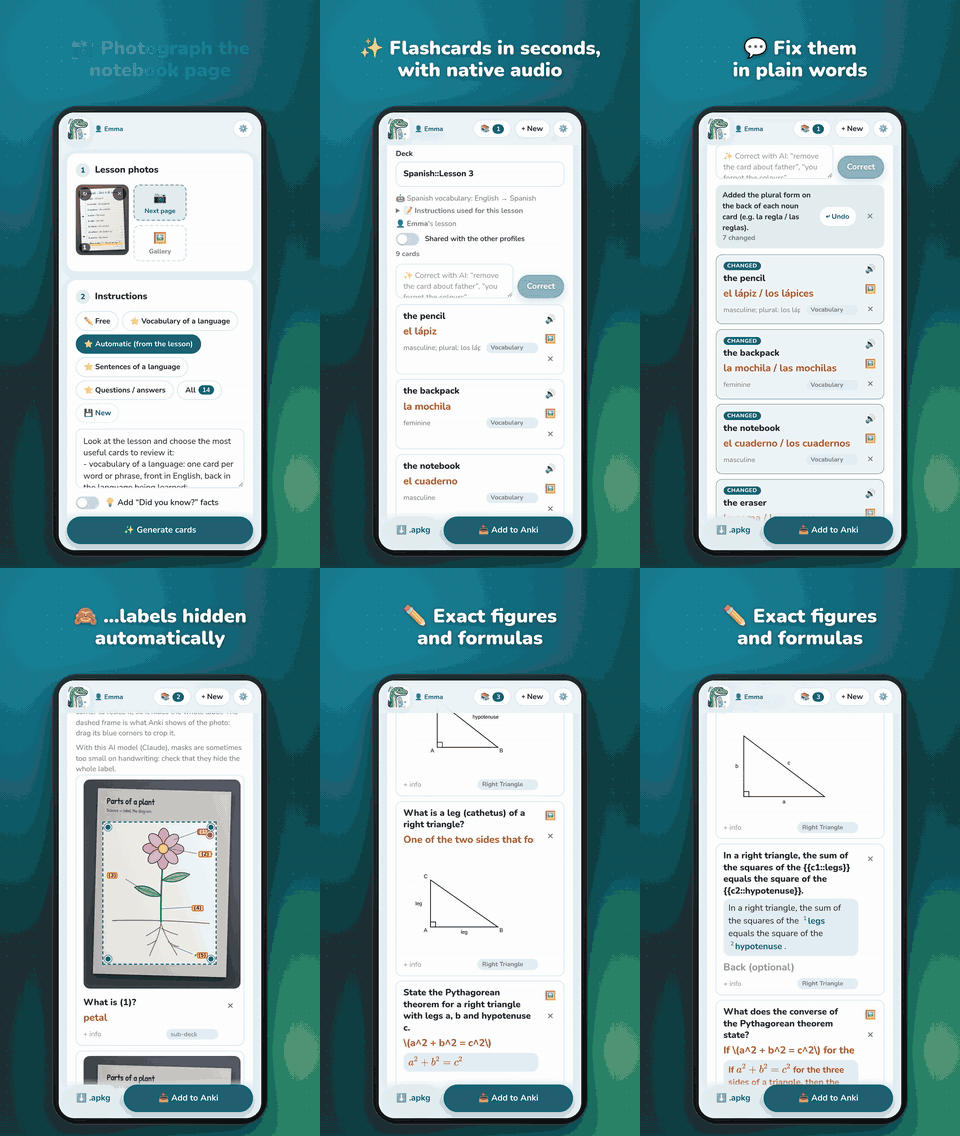
So I built Notosaurus, a free and open-source add-on: you take a photo of a lesson with your phone (a notebook page, handwriting included, a textbook page or a PDF), an AI drafts the cards, you review and fix them, and they go into Anki.

75-second demo

AnkiWeb link

AI does the boring typing, it makes mistakes, and nothing reaches Anki before a human has checked it. The content comes from your lesson, not from its imagination. You can edit any card, or ask for changes in plain words.

It's aimed at middle school, and at language learning first, because that's where it started: French -> Spanish vocabulary and natural audio on the back.

It also handles other subjects:

  • questions/answers, fill in the blanks (cloze), multiple choice, true/false

  • diagrams: the labels are hidden automatically, one card per label (like Image Occlusion, without drawing the boxes)

  • formulas in MathJax, geometry with exact figures (svg)

Windows and Mac users, I need you!
I only use Linux. The installation is tested automatically on Windows and macOS, but no real person has used it there yet. If you try it, please tell me how the first start went (it downloads its components) and whether anything looks off.


r/AnkiAi • • Jan 04 '26

Anesthesia Resident who spent too many hours making Anki cards. I built a tool to fix that.

12 Upvotes

Hey everyone, I've been using Anki since my pre-med years. Amidst our collective love for this tool is the equal hate we have for the biggest bottleneck we come across: time-consuming card creation. This was particularly relevant for me when I was trying to study for in-house exams in my pre-clinical years or high yield content for my Step exams.

Even when I became efficient at creating the cards, I'd frequently miss HY info or, more often, added too much detail, rendering my decks bloated and useless. It made studying for in-house exams difficult, Step prep even harder, and, now, as I prepare for my anesthesiology boards to come, very daunting.

So, I built a small web app called Incus that takes lectures files (PDFs, slides, docs) or a lecture transcript and generates Anki-ready cards. I've been using it myself and it's saved me a ton of time, even with a resident schedule (every minute counts).

I added a "density" toggle feature so you can choose between high-yield facts or exhaustive details. It even offers board-style cards or pharmacology focused cards.

I'm here looking for honest feedback from other power-users:

- Would this actually fit into your workflow?

- What would make it unusable for you?

-What would you never trust a tool like this to do?

If anyone wants to try it and give honest feedback, I've attached the link below. Hopefully, it can help your study habits as much as it has mine.

https://www.incus.app/

P.S.: Highly recommend using this on a Desktop/Laptop first to upload files effectively.

Thank you!