r/AndroidHelp • • 4d ago

Official youtube app is pushing spam jetx notification

8 Upvotes

My last post wasn't clear, so, here is new post with evidence, youtube is pushing this spam jetx notification for last 3-4 days around 3-4 pm my time(india) and i dont know, what seems to be causing this, clicking it opens a webpage on browser, you can see it is official youtube app in the video and not unknown app i installed as stated on my previous post, it comes under promotional notification, i can turn that off but that will only hide it off not remove it completly, the only solution i found online was to delete site settings on browser, so, notification stops completly but that didnt help. If you have any suggestions, please, pass it this way, it would be appreciated.
Additional note: i am a YouTube premium member too, so i shouldn't be getting any advertising as well.


r/AndroidHelp • • 10d ago

Want to delete this app

Thumbnail
gallery
8 Upvotes

Anybody knows how to delete this app


r/AndroidHelp • • 11d ago

Is there a launcher with an app menu like this?

Post image
8 Upvotes

I’d like to try a launcher with a app menu divided in categories like this, but I don’t know if one exists.


r/AndroidHelp • • 17d ago

Hey are these Android apps safe?

Thumbnail
gallery
8 Upvotes

Hey are these Android okay apps because my mobile is lagging and theyl seem suspicious and is it normal for a post to have to contain flair lol


r/AndroidHelp • • 25d ago

I need help to lock down a phone for a grandparent.

8 Upvotes

Hi. My grandmother is a run-of-the-mill older-generation who, unlike her late husband (rest in peace grandpa), doesn't have a knack for technology. She doesn't understand how dangerous the device in her hands has become. She knows at least some older basics of smartphone use and knows a bit of how dangerous the phone can be, but often downloads apps and games that have viruses (dunno how she keeps finding them).

Just about every time I see my grandmother she mentions something is wrong and has god knows how many thousands of notifications unresolved. Somehow this phone is giving the "water in the port" alert after months and I think she is going to need a new one.

She currently has an S25 and I am not sure what Android she will try to replace it with (though likely an S26 or S27). Just about the rest of us have historically ran iPhones. If I insist, I can probably get ahold of a new phone before she installs a million spam apps from airlines and cruises. I'm not completely tech illiterate, but what can I do to "lock down" her phone without it being invasive to her daily life?


r/AndroidHelp • • Oct 22 '26

New Samsung phone asks for password (frp bypass)

8 Upvotes

Just bought a Samsung phone at a yard sale. Got home and started charging it just for it to say it "an unauthorized attempt has been made to reset your device" and then asks for a password or gmail account.

The seller got it with a storage unit so I have no idea who owned it. The problem is that there are so many frp bypass tools being recommended online that I dont know which one is actually safe.

Any recommendations?


r/AndroidHelp • • Oct 01 '26

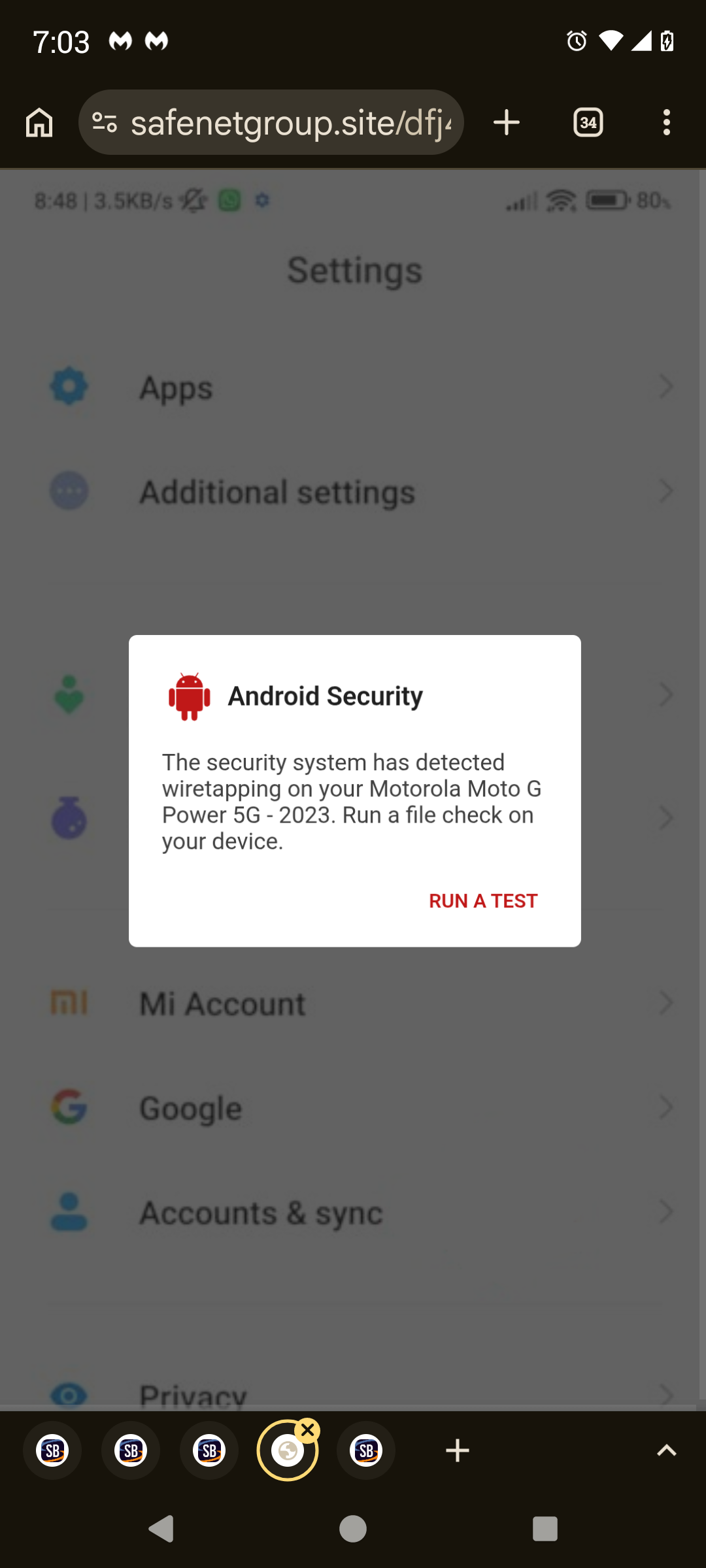
Redirected to "SafeNetGroup"

Post image
8 Upvotes

Hi,

Recently, a site I've been using for 2+ years on my android phone's chrome browser, Spacebattles.com, redirected me to an obvious scareware site (picture 1). It happened twice today, and the first time maybe I fat-fingered an ad or something, but I could have sworn the second time I was just scrolling downwards (or maybe I fat fingered an ad again, I couldn't really tell). Obviously, I just hit the back button, closed the tab, wiped my cookies/cache. I then did a full scan with malwarebytes, which showed absolutely nothing. I have paid malwarebytes, which includes real-time protection and safe browsing, which didn't do anything (they have all their permissions enabled, I checked).

Do I need to do anything more? Or should I just avoid that website and go about my day? I didn't seem to have any strange apps installed, and my phone's battery usage looks normal.

My phone is a Motorola Moto G Power 5g-2023 running Android 14.

I'm doing a system restart after this.

Edit: after the reset and it just happened for a third time. This time I definitely didn't touch shit, it just sent me to the scareware site.


r/AndroidHelp • • Sep 30 '26

How to solve block admin policy 😭

Post image
8 Upvotes

This is happening on my motorola g45.... bought this phone in 2025 personally...not company related !

Turned of all admin apps...tried many things still this pops up when trying to use another launcher

Pls help..i m not tech related person......


r/AndroidHelp • • Sep 03 '26

Help my dad forgot his phone password

Post image
8 Upvotes

His phone has a dot phone password and so far these are all the ones I've tried so if anyone has any other ideas please help Edit:thanks everybody I found it


r/AndroidHelp • • Sep 01 '26

Make Google play services less

Post image
8 Upvotes

My phone is already a potato I don't need play services taking what little I have. So please help, how do I make it take up less it used to be 1gb to like 700 mb


r/AndroidHelp • • Aug 18 '26

Pixel 8 Pro FRP bypass

Thumbnail
gallery
8 Upvotes

Hi!
I have a Pixel 8 Pro that I bought from a commercial seller at an auction. The device was listed as “untested”, and my original intention was simply to use its working display as a replacement for the Pixel 8 Pro I already own.

I’d still like to get some use out of the other phone. As far as I can tell, the device itself seems to be fully functional. Unfortunately, it has a Google account lock (FRP) and is running Android 16.

I’m not exactly sure what software or method you use, but I managed to get the Accessibility/Help button enabled through the documented method involving:

Emergency Call → Location → Google Maps → Share Location → etc.

From there, I can now glitch my way through quite a lot of the menus.

Unfortunately, I’m stuck at one particular point: for some reason, I can’t access the App Info screen, which means I can’t force-stop Google Play Services and Android Setup. Otherwise, I believe it would be possible to get past the setup process using one of the known methods.

If you have any helpful tips or know of a working method for Android 16 / Pixel 8 Pro, I’d really appreciate it.

My end goal is honestly pretty simple: I’d like to attach a large fan/cooler to the phone and turn it into a kind of mini PC. My girlfriend’s little brother could then connect it to a TV and use it to play Fortnite. 😄

One other problem is that I can’t access the Developer Options, so I apparently can’t enable USB debugging / ADB either. If I could get ADB working, I could at least try to force-stop the two apps via CMD/ADB.

Any advice on how to proceed would be greatly appreciated!


r/AndroidHelp • • Jul 28 '26

Fake android system app

Thumbnail
gallery
8 Upvotes

I'm having the same issue and I'm trying to find out if anyone else has experienced this.

On my phone, a package called com.android.non.szcz appeared, showing itself as an Android System app. It has re-enabled or reinstalled itself after being disabled, and on one occasion Android reported Google Play Store as the installer.

Things I've noticed:

The package name is com.android.non.szcz.

The APK was located under /data/app/.../base.apk.

It has reappeared after being disabled.

I've seen other users mention related apps such as Cool Weather, FileGo, and Lock & Hide.

At one point it requested permissions, but it now shows "No permissions requested".

I've checked Device Admin, Accessibility, overlays, and running services, and I haven't found anything obviously suspicious.

I have factory reset the phone, but the app still returned.

I'm trying to work out whether this is:

malware,

a compromised app,

a vendor/manufacturer issue,

or something else entirely

One thing I've noticed is that the app only seems to reappear when Google Play Store is enabled. If I disable Google Play Store, com.android.non.szcz does not appear to reinstall or re-enable itself.

Android also reports the installer as com.android.vending, which is the package name for Google Play Store.

I'm not claiming that Google Play itself is compromised, but I'm trying to understand why Android reports Play Store as the installer and why the app doesn't come back while Play Store is disabled. It could be Play Store carrying out a legitimate install request from another source, or something else entirel i simply don't know.

Has anyone else experienced this?

What phone model do you have?

When did it first appear?

Does Android report the installer as com.android.vending?

Does disabling Google Play Store stop it from reinstalling?

Did you find out what actually triggered the installation?

Has any security company or manufacturer confirmed what this package is?

Any technical information, logs, or confirmed findings would be greatly appreciated. Thanks!


r/AndroidHelp • • Jun 02 '26

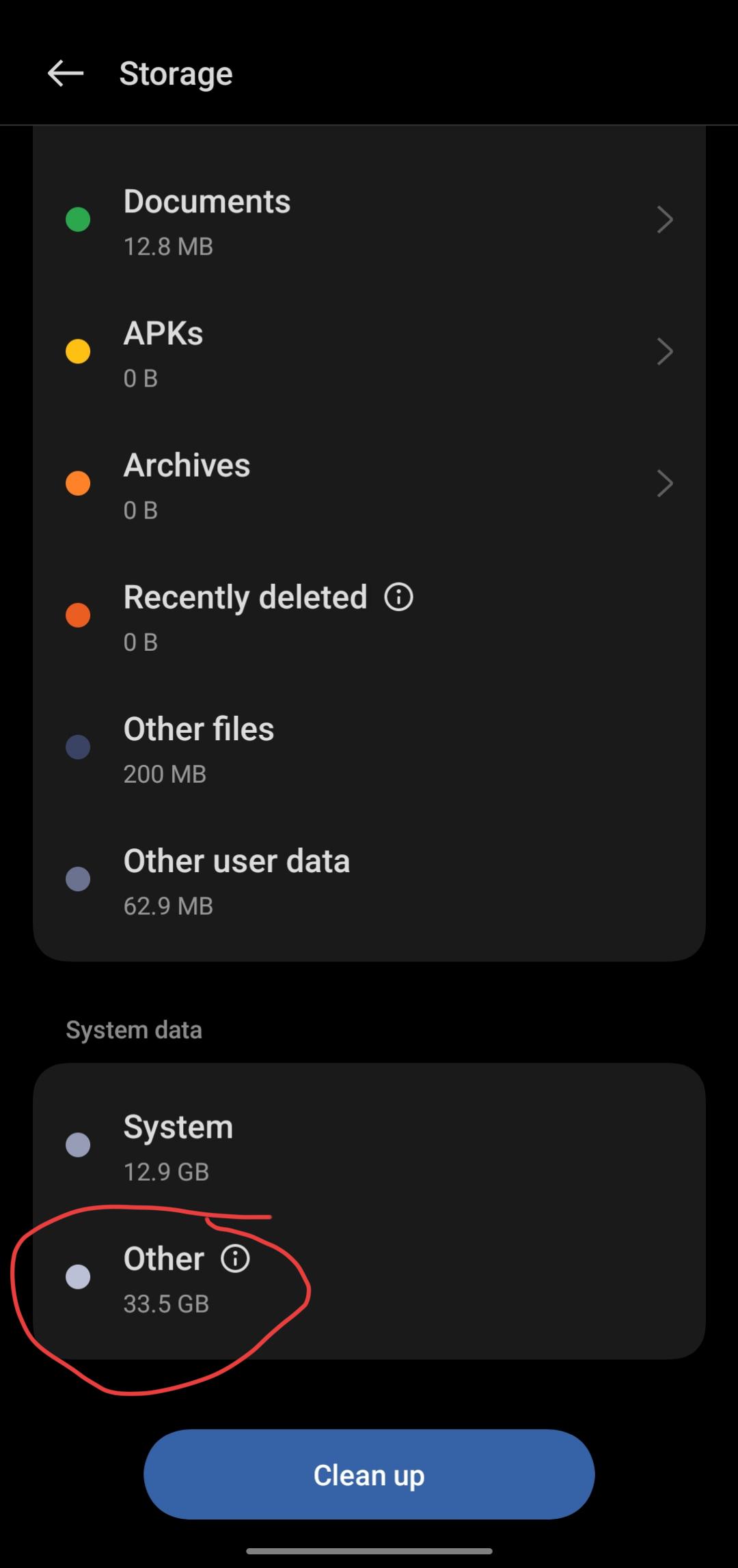
How can I access this "Other" folder?

Post image
8 Upvotes

This 'Other' file is occupying 33.5 GB on my Android, and I don't know how to fix this. Does anyone know how can I get rid of this 33.5 GB?


r/AndroidHelp • • Apr 05 '26

Media picker does not show all folders.

Post image
8 Upvotes

Problem : some apps direct image picking to Google Photos and that doesn't show all my folders. Even some folders that I've backed up.

Please help, it's a very annoying issue. Even if I delete Google Photos, this image picker is what opens and it has almost none of the folders that I use often. Like the folder for Reddit. This is annoying because this wasn't an issue earlier but as of recent Reddit update, this is what opens.

Any help/fixes are highly appreciated.


r/AndroidHelp • • Mar 11 '26

Floating icons on homescreen and cannot get rid of them.

Post image
8 Upvotes

This is driving me crazy. I was helping my mom with something on her phone, and i saw these icons. She doesnt know where they came from. One is a dog and the other is a Mahjong app. Both of them, when clicked, instantly open ads. After waiting for the ads to end, both of them take to the Mahjong game from “Gaming Hub”. After a series of troubleshooting (disabling notifications and features that AI told me to disable), nothing worked. I finally uninstalled the gaminghub app, and the icons are still there.

This isnt even my phone and I’m flipping out. Redditors, please come in clutch here.


r/AndroidHelp • • Feb 22 '26

Keyboard toolbar keeps showing notification dot, can't find source

Thumbnail
gallery
8 Upvotes

The emoji button shows it. Upon tapping it the AI symbol shows the notification. I tried literally every button and the notification dot won't disappear. I even went to the settings to enable all other images (gifs, bitmojis, etc) to see if it was hidden somewhere there, but without succes :( It's driving me insane a bit lol


r/AndroidHelp • • Dec 05 '25

"Banned MimeType" error?

8 Upvotes

So today I suddenly started getting messages from my wife that say "removed attachment of banned MimeType" whenever she sends screen shots from her iPhone. Is this a known issue for android/iPhone or both? Any fixes or work around?

I am using the default messaging app (have not tried on a 3rd party app like WhatsApp or signal) but it did seem to be a problem on both the native app and the Samsung specific messaging app.


r/AndroidHelp • • Aug 24 '25

My Mom did something to her phone (she doesn't remember what) and now it can't connect to WiFi

8 Upvotes

My mom owns a Galaxy S24 FE, she kept getting ads on her phone she didn't want. I was not around when she adjusted the settings so I couldn't tell you what she did, and she doesn't remember either, she remembers doing something in privacy, I don't know if she means the Google settings or the phone settings for that part. I've tried disconnecting the wifi, forgetting network, even restarting the phone, but the phone will not connect to the wifi. Everything else in the house is connected just fine, so it's not a wifi issue, it's particularly the phone itself. If I could tell you what was done in settings I'm sure that would make it easier to pinpoint the problem, but if there are any possible solutions, please give them to me.


r/AndroidHelp • • Jun 22 '23

Where are the photos of the Google Photoscan app?

8 Upvotes

Hello dear community,

some time ago, I spent several hours digitizing a large number of old analog photos. After a short research, I decided to use the Google Photoscan app: https://play.google.com/store/apps/details?id=com.google.android.apps.photos.scanner&hl=en_US

Now I would like to transfer these photos to my computer and add them to my photo archive, but I can't find them in the file system. They are inside the app but not in the file system. Unfortunately, there is no "Save all" function, only a share function when I click on each individual image within the app. This would take hours again. Additionally, the app adds an ugly white border with the label "Photoscanner by Google Photos" to all photos. Supposedly, the scanned photos should appear in the Google Photos app, but they don't. However, they must be stored somewhere since I can click on them within the app. Is there a way to transfer the photos collectively? Or am I now doomed to share each photo individually and then manually crop them all over again? That would be a real nightmare...

Looking forward to your input.

Best regards,

Hard facts: I have a Huawei P30 (ELE-L29) with EMUI 12.0.0. So it's not exactly pure Android.


r/AndroidHelp • • Jul 01 '22

"Can't load Android system. Your data may be corrupt." Help!! How to fix without factory resetting and losing data?!

8 Upvotes

Error message photo here

Help! I powered off my Moto E android phone to charge, and when turned back on it keeps resetting and resetting but doesn't make it to homescreen, instead the "Can't load Android system," message pops up. I have valuable information on my phone not backed up. How can I fix without losing data? Thank you!

I don't think my phone is rooted, not debugged either I think.


r/AndroidHelp • • Sep 20 '21

How Do I Disable Vibration On My Keyboard While Keeping Haptic Feedback Enabled?

8 Upvotes

I'm trying to Google for the answers, but every set of instructions I can find for Android are different from the one I read before, and none of them work. They all tell me to click things which aren't there.

Disabling Haptic Feedback seems to do the trick, but this disabled Haptic Feedback all across my phone. I'm trying to just disable it on my keyboard, so that every letter I press doesn't vibrate.


r/AndroidHelp • • May 09 '19

Keep getting error message

8 Upvotes

I keep getting the error popup that says "close apps after screen lock has stopped"

It happens every couple of minutes and no matter what I do, it won't stop

Here is a screenshot of the error message

https://i.imgur.com/yDBBaSV.png


r/AndroidHelp • • 5d ago

How to bypass "Get this app from Play"

7 Upvotes

EDIT: THIS WILL DISABLE PLAY PROTECT ALMOST ENTIRELY SO PLEASE BE CAREFUL! SIMPLY REVERTING THE COMMAND MAY NOT BRING IT BACK, I'M ACTIVELY LOOKING FOR A SOLUTION TO THAT.

Run this command via ADB:

`cmd appops set --uid com.android.vending SYSTEM_ALERT_WINDOW ignore`

If you're running it from a PC, add `adb shell` to the beginning, like this:

`adb shell cmd appops set --uid com.android.vending SYSTEM_ALERT_WINDOW ignore`

And enjoy!

Note: this won't remove any in-app checks, this will only make Google Play Store unable to show on top of apps, therefore unable to show the dialog/screen. It may still open on your phone even after the fix has been applied if Google Play Store is left in the recents.


r/AndroidHelp • • 10d ago

"restore your files before they get deleted"

7 Upvotes

I'm going to a restaurant for my nans birthday, and I'm in the car with her, and she saids to me that she has this pop up saying if she doesn't restore her files, they might get deleted, she thinks it's a scam and I don't want to accidently do something to her phone


r/AndroidHelp • • Oct 29 '26

Just want to remove my google account from this device !😭!

Post image
7 Upvotes

My phone model is Vivo y29.....I just want to remove my google account from this but it shows only delete account... google says it is ok but ?? 😭