r/AccessLearningZone • • 14h ago

Undo the Field or the Record in Microsoft Access

Post image
3 Upvotes

Changed the wrong customer? If you're still typing in a field, Undo can take back just that field edit. To throw away all pending edits on the current record, undo the whole record instead. If you've just saved, try the Undo button right away, but don't count on stepping back through several records. Watch the video to see the difference and learn how to add your own Undo button. https://599cd.com/Undo


r/AccessLearningZone • • 20h ago

Can You Find Missing Pantry Ingredients With a Query in Microsoft Access? Video Quiz X0.2

Thumbnail
youtu.be
3 Upvotes

Thanksgiving dinner is basically a database stress test: many-to-many recipes, scaling quantities, missing pantry items, and guests replying before they were invited. Think you can survive all five Access questions before the mutant turkey wrecks your joins?


r/AccessLearningZone • • 1d ago

Disable a Field Without VBA in Microsoft Access

Post image
3 Upvotes

Want to make a box on your form editable only when another field meets a condition? In this example, I use Conditional Formatting to disable Credit Limit unless State is Florida. Don't forget to check for Null, or a missing state can slip through. The rule changes what you can edit on the form, not the value already stored in the table. Watch the video to see it work in both single and continuous forms. https://599cd.com/Enabled


r/AccessLearningZone • • 1d ago

Link Orders to Their Details in Microsoft Access

Post image
3 Upvotes

Does your order form show line items from every order? Check the Link Master Fields and Link Child Fields properties on the subform control. The field names don't have to match. In this example, OrderID on the main form matches the value of OrderNumber in the line items. Watch my Fast Tip to see where to set both properties. https://599cd.com/LinkMasterFields


r/AccessLearningZone • • 1d ago

Microsoft Access Login Form: Build a Multi-User Login System

Thumbnail
youtu.be
3 Upvotes

Ever had users treat the Navigation Pane like a treasure map and somehow end up editing the very table you told them not to touch? A simple login can make an Access app feel much more like an actual application, but it also raises an important question: what are you really trying to secure?


r/AccessLearningZone • • 2d ago

What Range of Values Does the VBA Rnd Function Return in Microsoft Access? Video Quiz D3.2

Thumbnail
youtu.be
3 Upvotes

VBA random numbers look simple until your "1 to 6" die roll starts handing out surprises. Think you can nail all five questions on Rnd, Randomize, Int, and the tiny details that love causing off-by-one errors?


r/AccessLearningZone • • 2d ago

Stop Orphan Orders in Microsoft Access

Post image
2 Upvotes

An order shouldn't point to a customer who doesn't exist. In the Relationships window, turn on Enforce Referential Integrity between your customer and order tables. Access will block an order with a CustomerID that isn't in the customer table. Watch the video to see how to set it up and why Cascade Delete deserves a second look. https://599cd.com/2275


r/AccessLearningZone • • 3d ago

Microsoft Access Datasheet View Explained: Tables, Queries, Forms, and Subforms

Thumbnail
youtu.be
3 Upvotes

Ever open an Access grid and think, "This is basically Excel, right?" Then somebody hides a column, edits a joined query, or saves the layout and chaos enters the chat. Datasheet View is useful, but it has some sneaky rules depending on whether you're looking at a table, query, form, or subform.


r/AccessLearningZone • • 4d ago

Regular Expressions 3, International Dates, Ordinals, and More RegEx Patterns in Access Developer 67

Thumbnail
youtu.be
2 Upvotes

Imported dates are like tiny chaos goblins: 5 February, November 15th, weird two-digit years, and somehow "Jan. November." I have been tightening up the date parser and collecting regex patterns for spotting all sorts of messy real-world text. What regex pattern has saved you the most cleanup time?


r/AccessLearningZone • • 4d ago

Number Report Items in Microsoft Access

Post image
3 Upvotes

Want your invoice lines numbered 1, 2, 3 without touching the table? Add a text box to the report's Detail section, set its Control Source to =1, and set Running Sum to Over All. Access numbers the items as the report runs. Watch the video to see where those settings go. https://599cd.com/3530


r/AccessLearningZone • • 5d ago

Count Matching Orders in Microsoft Access

Post image
3 Upvotes

Want to see how many orders a customer has without opening the order list? Put DCount in a text box on the customer form. Use the current CustomerID as the filter, and an asterisk to count the matching rows. In the video, I'll show you how to set it up. https://599cd.com/1728


r/AccessLearningZone • • 5d ago

Store File Paths in Microsoft Access

Post image
5 Upvotes

Need to keep PDFs or photos with your records? For most databases, keep the file in a folder and store its path in Access. That way the file itself doesn't take up space inside the database. Just make sure everyone who needs it can reach the folder. Watch my Attachments lesson to see both approaches. https://599cd.com/Attachments


r/AccessLearningZone • • 6d ago

Find Missing Objects in Microsoft Access

Post image
2 Upvotes

If a table or form seems to have vanished, check what the Navigation Pane is showing before you rebuild anything. Bring the pane back with F11, clear the search, and check which objects are listed. If you still can't find it, the video shows where to look for hidden objects. https://599cd.com/5838


r/AccessLearningZone • • 7d ago

Measure the Difference in Microsoft Access

Post image
3 Upvotes

Need to compare a budget with actual spending? Abs gives you the size of the difference, whether you're over or under. Keep the signed difference too if direction matters. Watch my Absolute Value video to see how to use this in your queries, forms, and reports. https://599cd.com/ABS


r/AccessLearningZone • • 7d ago

Microsoft Access Navigation Pane Explained: Find Missing Tables, Forms, and Reports

Thumbnail
youtu.be
2 Upvotes

Nothing wakes up Access users quite like opening a database and realizing half the objects on the left side apparently vanished overnight. Before rebuilding anything or blaming gremlins, it is worth knowing the few surprisingly easy ways the Navigation Pane can make a healthy database look broken.


r/AccessLearningZone • • 8d ago

Odd or Even? Check the Remainder

Post image
3 Upvotes

Need to tell odd and even numbers apart in an Access query? Check the remainder, not the last digit. CustomerID Mod 2 equals zero for even numbers. Wrap that test in IIf to display Even or Odd. Watch the video for the query setup. https://599cd.com/Mod


r/AccessLearningZone • • 8d ago

What Records Control Report Detail Section Printing in Microsoft Access? Video Quiz A4.2

Thumbnail
youtu.be
2 Upvotes

Access report detail sections have one of those "wait, why did it print THAT many?" rules. Think you can go 5 for 5 on report records, form references, and the classic 30-label workaround?


r/AccessLearningZone • • 9d ago

Build a Date from Its Parts

Post image
2 Upvotes

Got a year in one field and a month in another? DateSerial puts the pieces together into a real date value. The order is year, month, day. If you only recorded the year and month, using day 1 is an assumption, not a recovered date. In this video, I show you how to build the dates, handle missing source values, and use an update query to save the results. Back up your database first. https://599cd.com/DateSerial


r/AccessLearningZone • • 10d ago

Find Each Share of the Total

Post image
4 Upvotes

Want to see what share of the total each category contributes? Divide its amount by the grand total with DSum, then display that fraction as a percent. Watch the video for the query-to-chart walkthrough. https://599cd.com/1448


r/AccessLearningZone • • 10d ago

Find the Last Backslash with InStrRev

Post image
4 Upvotes

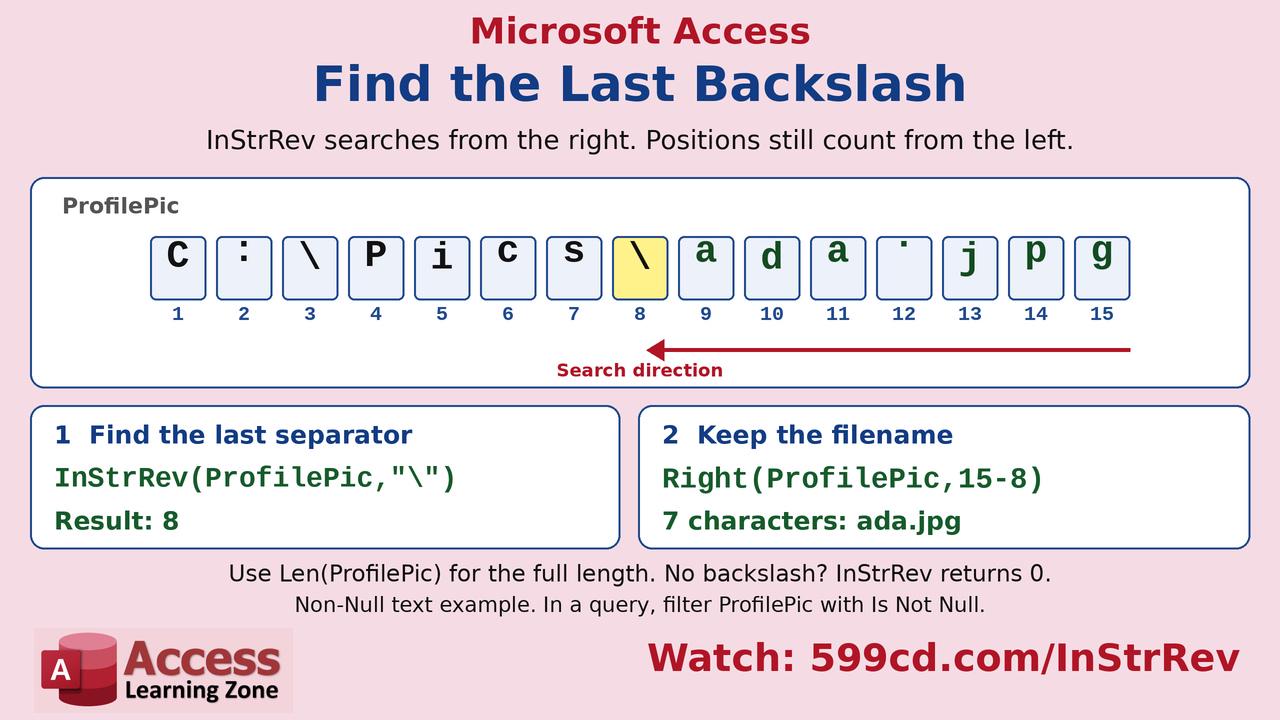
Need just the filename from a full path? InStrRev finds the last backslash, but its answer is still a position counted from the left. Subtract that position from the full length, then use Right to keep the filename. Watch the video for the query walkthrough. https://599cd.com/InStrRev


r/AccessLearningZone • • 10d ago

How Do You Calculate Total Inventory Value in Microsoft Access Forms? Video Quiz X3.4

Thumbnail
youtu.be
3 Upvotes

Form totals seem easy until Access cheerfully totals the wrong thing, counts records instead of values, or gives you one price when you needed the whole inventory value. Quick expert-level quiz: can you get all five before Bigfoot does?


r/AccessLearningZone • • 11d ago

Pick by Position

Post image
3 Upvotes

Got a short list that never changes? Choose uses a number to pick an item by position. The first item is 1, so 3 selects East from North, South, East, West. Watch the video to build the expression in a query. https://599cd.com/3641


r/AccessLearningZone • • 11d ago

Start Here. Keep the Rest.

Post image
4 Upvotes

Need the rest of a text value? Give Mid a starting position and leave off the length. In this one-space example, InStr finds the space and Mid starts one character after it. Watch the video for the query walkthrough. https://599cd.com/3331


r/AccessLearningZone • • 12d ago

First True Wins with Switch

Post image
2 Upvotes

More than one Switch test can be True. Access returns the value paired with the first True test, so put your conditions in the right order. A family size of 4 is both less than 5 and less than 10, but this expression returns Small. Watch the video to build the query. https://599cd.com/Switch


r/AccessLearningZone • • 12d ago

Latest for This Customer

Post image
3 Upvotes

Want to see a customer's last order date without opening the order form? DMax can find the most recent date in OrderT. Add criteria to limit it to one customer. Without that criteria, you're asking for the latest date across all customers. My DMax video shows how to put the result right on your customer form. https://599cd.com/DMax