r/macosprogramming • • May 01 '21

Can I use PhotoKit to manipulate photo keywords?

8 Upvotes

I've used PhotoKit to change dates & locations on photos.

The PhotoKit docs don't seem to show anything about changing the keywords, but keywords are there in the Photos.sqlite file ... is it something the Photos app does outside PhotoKit?

Searching is difficult as "keywords" is common in the context of discussion forums too!


r/macosprogramming • • Aug 13 '20

How to create Mac OS application?

8 Upvotes

Hello,

I'm new to do programming on Mac OS. Basically I think MAC provides the environment for making application/manager, notifies cpu or memory I used as percentage on the taskbar, the top of windows (refer to bottom of this page).

I wonder if I can make the application kinds of manager, which can give notification/show how much battery used/left on my bluetooth device linked to my MAC. But I don't know what I have to do first if I start to make this application.

Which language I have to use(swift/c++/etc ???) and Is there any link or search keywords to guide?

Thanks!


r/macosprogramming • • Aug 30 '18

5 Things to Know About macOS Mojave for Developers

Thumbnail
brightdigit.com
8 Upvotes

r/macosprogramming • • 4d ago

First app submitted to App Store

7 Upvotes

Well after many rounds of testing I have submitted my first ever app for review! Will be interesting to see how long approval takes, and if anyone buys it. It’s also on iOS.

Wish me luck!


r/macosprogramming • • 28d ago

ContainerDesk, an open-source SwiftUI app for Apple's container runtime

7 Upvotes

I maintain ContainerDesk, a free, MIT-licensed SwiftUI GUI for Apple's container runtime. It manages containers, images, volumes and networks, with logs, resource gauges and a terminal.

It uses native SwiftUI tables and wraps SwiftTerm in NSViewRepresentable. I'd welcome feedback on the terminal integration.

Source and screenshots: https://github.com/MacHatter1/ContainerDesk

Requires Apple silicon, macOS 26+ and Apple's container CLI. Current builds are unsigned and not notarized.


r/macosprogramming • • Sep 07 '26

Everything I learned making my app not look like a default Mac app with SwiftUI

Thumbnail
youtube.com
7 Upvotes

When I first started app development, I made a skeuomorphic stopwatch app that had titlebars and commenters said I should remove them. I spent time experimenting and learning how to get rid of them, and learned a few other things along the way. Here is everything I learned about macOS title bars for using Swift, SwiftUI, and NSView.


r/macosprogramming • • Sep 05 '26

I built Defi, a free and open-source scrolling window manager for macOS inspired by Niri

7 Upvotes

As a single-display user, and since macOS Spaces are a mess to use for multiple reasons. I have been looking for a horizontal window manager like Niri for macOS but none quite worked for me.

So I decided to build Defi.

It arranges windows in scrolling columns with virtual per-display workspaces, keyboard navigation, overview and main focus has been to make it fast, smooth, and reliable.

It's all native, free, and open source.

https://github.com/qeude/Defi

This is the first public version. I've mostly been building it around my own workflow, so I'd love to hear how it works for yours and what feels missing.

PS: "Defi" means "challenge" in French. I named it like this after multiple attempt with working with macOS accessibility stuff and it made that name appropriate 😅


r/macosprogramming • • Jul 28 '26

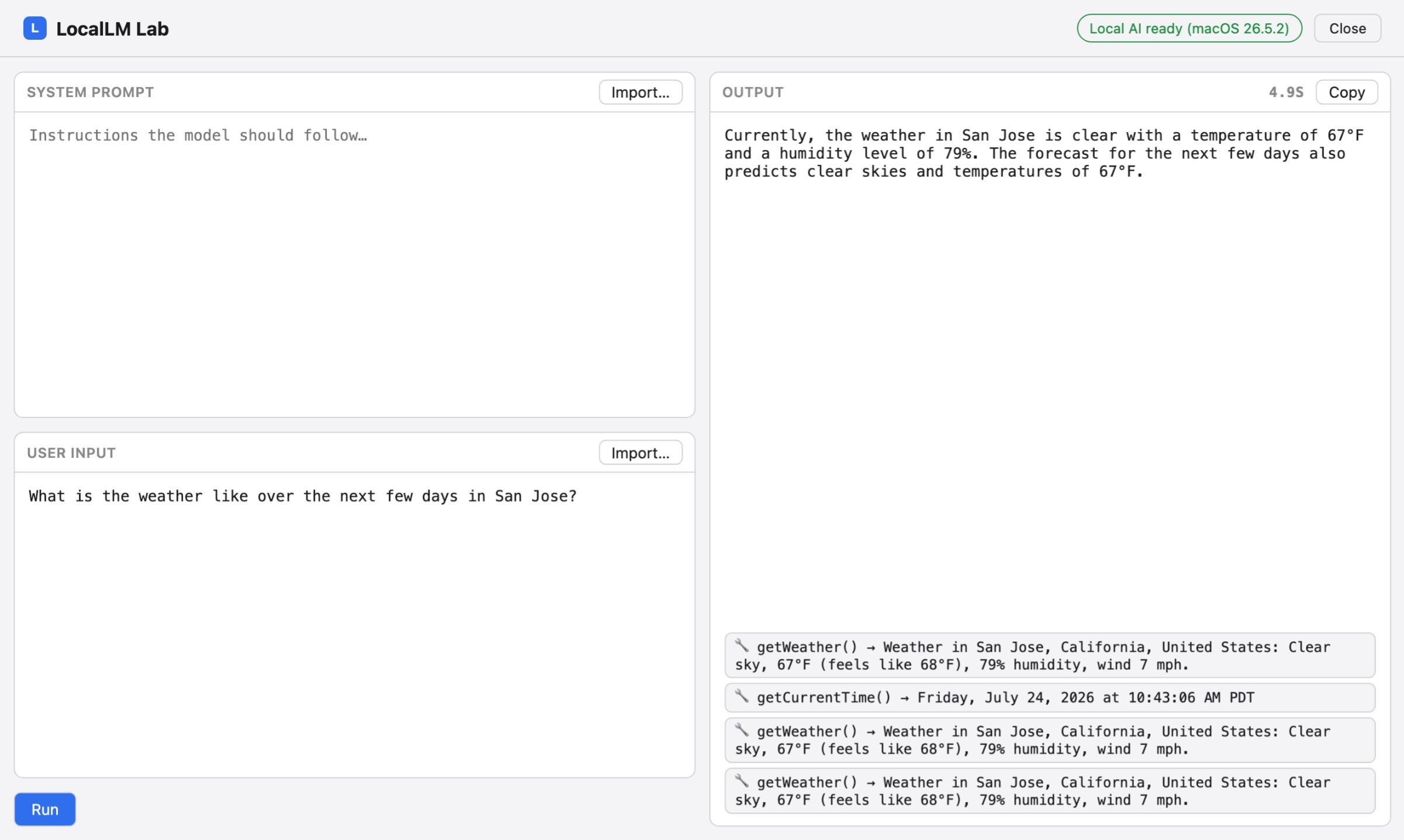
Tool for building with Apple's Foundation Model

Post image
7 Upvotes

A question to folks who are building apps around Apple's Foundation Models: how are you testing the prompts and validating the results?

I was doing a bunch of tweak->build->test cycles where the only tweaks were adjusting the system & user prompts. Since the local AI model is so small (just 4096 context budget), it didn't make sense to develop the prompts using your usual OpenAI/Anthropic models and expect the same behavior.

Finally gave up and built LocalLM Lab (thisbrain.ai/locallm), a small macOS playground for tweaking the prompts before actually committing them to app code.

The current version features:

  • Prompt Playground

  • System prompt + user input

  • Local OpenAI-compatible API so you can prototype big AI apps w/o paying for tokens

  • Local connectors for things like system clock, calendar, reminders, contacts, location, weather and a scoped filesystem access

The screenshot shows a weather query with the connector calls visible underneath.


r/macosprogramming • • Jul 22 '26

What's the best way to accept donations for a free app?

7 Upvotes

Hi,

I have a free macOS app that I maintain in my spare time, and I'd like to add an optional way for users to support its development. I'm looking for recommendations for platforms similar to "Buy Me a Coffee.". What platform do you use or recommend, and why? Stripe? Zeffy? Buy Me A Coffee?

nb: I already use Stripe for others projects.

I'd appreciate any recommendations or experiences. Thanks!


r/macosprogramming • • May 20 '26

Tired of CloudKit's web Dashboard? I built a native macOS GUI for it

7 Upvotes

Built a CloudKit GUI for macOS after getting tired of the web Dashboard

I've been working on a macOS app called NimbusDB — a native CloudKit database manager.

The web CloudKit Dashboard is fine but gets painful when you need to bulk import records, manage environments, or just browse data quickly. So I built something native.

What it does:

  • Connect to any CloudKit container with S2S keys

  • Browse, create, edit and delete records

  • Bulk import/export via JSON

  • Switch between Development and Production environments

  • Built-in debug console with timestamps and response times

  • Schema caching so columns don't disappear when the DB is empty

I actually use it daily to manage content for my other app Snippio — adding components and templates without touching the web Dashboard.

Still early but curious if anyone else has this pain point with CloudKit.


r/macosprogramming • • Apr 18 '26

Liquid Glass toolbar has inconsistent rendering in MacOS

Thumbnail
gallery
7 Upvotes

I noticed that even the sample app provided by Apple is having this issue when there is an ugly box on the toolbar intermittently. Only when we resize or navigate to other pages does it get back to the intented liquid glass. Is there a fix for this?


r/macosprogramming • • Aug 06 '25

FluidAudio Swift SDK now also supports Parakeet transcription through CoreML

Thumbnail
github.com
7 Upvotes

We released FluidAudio a month ago with speaker diarization. Since then, a couple of consumer AI apps have already deployed it in production.

We're excited to share that we've also converted the `nvidia/parakeet-tdt-0.6b-v2` model for English transcription! We're seeing around 110× RTFx on an M4 Pro — so a 60-second audio file transcribes in about 550 milliseconds.

We're still tuning the model and believe there's more performance to squeeze out. We'll be sharing our conversion script in a couple of weeks.

If you have any other model requests for CoreML conversion, please drop a comment here: https://github.com/FluidInference/FluidAudio/issues/49


r/macosprogramming • • Aug 04 '25

Vim-style modal navigation system-wide on macOS using Hammerspoon

7 Upvotes

Hi all,

I’ve been building a keyboard-first navigation setup for macOS using Hammerspoon, a lightweight open-source automation tool that lets you control macOS through Lua scripts. If you haven’t used it before, it’s kind of like a programmable window manager and input layer for macOS. And because it’s just scripting, it’s surprisingly easy to write or tweak your own config.

The project is called macOS-Vim-Navigation. It lets you move the mouse, scroll, select text, and switch screens entirely from the keyboard using modal logic inspired by Vim's NORMAL and VISUAL modes.


Why I made this

I spend most of my day working on an external monitor, and I found it frustrating to constantly reach for the trackpad just to scroll between programs, move the cursor, or focus a window. I wanted something predictable and consistent, so I can keep everything under keyboard control at the OS level. Nothing I found really did that, so I built this.

Since setting it up, it’s made my daily workflow feel much more seamless, and I now rely on it full time.


Key features

Visual selection via simulated drag

Implements real drag-selection using leftMouseDown, leftMouseDragged, and leftMouseUp. This makes it possible to visually select and copy content across any app with full clipboard integration.

Pixel-accurate scroll injection

Fixes macOS’s often inconsistent scroll behavior by injecting exact scroll deltas and respects your system’s natural vs. standard scroll direction.

Modal cursor movement

Like Vim’s NORMAL mode: use keys to move the mouse cursor in small or large steps, trigger clicks, simulate drags, or jump between modes.

Directional scrolling with repeat

Supports smooth, directional scrolling when holding down keys.

Multi-monitor support

Keeps cursor behavior predictable when moving between screens. Also includes one-key screen switching using ⌥ or ⌃.


GitHub

Source code and setup instructions:
https://github.com/arturgrochau/macos-vim-navigation

The README includes install steps, keybindings, and customization notes. I’ve tried to keep things clean and out of the way so it won’t interfere with system shortcuts or other apps.

Would love feedback, ideas, or suggestions for improvement.


r/macosprogramming • • Dec 06 '24

Selling Outside of the Mac App Store, Part 1: It's been a while…

Thumbnail blog.eternalstorms.at
7 Upvotes

r/macosprogramming • • Jul 06 '24

[article] Fixing the code signing and notarization issues of Unreal Engine (5.3+) projects

7 Upvotes

I wrote an article about my long journey in the packaging, code signing, and notarization process of an Unreal Engine macOS application.

I found several problems in the recently introduced modernized Xcode workflow, and a bug in the implementation of CEF as a macOS framework.

All the detailed information is in the article - that's quite long so I added a TL;DR section for the ones only looking for the solution.

I hope the article can help other developers and save them all the weeks I had to spend on this.

https://pgaleone.eu/unrealengine/macos/2024/07/06/codesigning-notarization-issues/


r/macosprogramming • • May 05 '24

DevTutor is an application designed to assist developers in creating exceptional apps using SwiftUI.

Thumbnail
gallery
7 Upvotes

r/macosprogramming • • Mar 05 '24

Measuring shared control latency on macOS: Hidden watermarks and overwhelming variance

Thumbnail
multi.app
7 Upvotes

r/macosprogramming • • Oct 01 '23

swiftGuard - Anti-forensic macOS app to safeguard your USB ports.

7 Upvotes

Anti-forensic macOS tray application designed to safeguard your system by monitoring USB ports. It ensures your device's security by automatically initiating either a system shutdown or hibernation if an unauthorized device connects or a connected device is unplugged. It offers the flexibility to whitelist designated devices, to select an action to be executed and to set a countdown timer, allowing to disarm the shutdown process.

What it offers

  • Monitoring: Continuously monitors USB ports for device activity, even in sleep mode.

  • Whitelisting: Allows users to whitelist authorized devices, ensuring hassle-free connectivity.

  • Discrete: Operates in the macOS system tray, minimizing interruptions.

  • Customizable: Allows users to configure various settings, including action (shutdown/hibernate), countdown timer and whitelist.

  • Lightweight: Designed to consume minimal system resources for optimal performance.

  • Privacy: Does not require an internet connection, ensuring the privacy of your data.

  • Open Source: Provides transparency and allows community contributions for continuous development.

See it in Action!

Why should You care?

A few reasons to use this tool:

  • Anti-Forensic Measures: In case the police or other thugs break in. The police often use a mouse jiggler to prevent the screen saver or sleep mode from being activated.

  • Prevent Data Exfiltration: You do not want someone adding or copying documents to or from your computer via USB.

  • Public Environments: If you frequently use your Mac in public places like libraries or cafes, swiftGuard acts as an additional layer of security against physical attacks in a potentially vulnerable setting.

  • Server Protection: You want to improve the security of your home or company server (e.g. your Raspberry Pi, NAS, etc.).

  • Data Protection Regulations: Many industries and organizations are subject to strict data protection regulations. swiftGuard helps maintain compliance by preventing unauthorized data transfers and access through USB ports.

Tip: You might also want to use a cord to attach a USB key to your wrist. Then plug the key into your computer and run swiftGuard. If your computer is robbed, the USB is removed and the computer shuts down immediately.


What Features are planned next?

  • Bluetooth: If a Bluetooth Device (tries to) connect(s), or if a new Bt Device comes near you MacBook, swiftGuard will shutdown/hibernate.

  • More Actions: When it detects a Manipulation swiftGuard is able to delete or encrypt files/folders, wipe ram, send an email notification, ...)

  • Custom Actions: You can define custom shell/python commands to be executed, e.g., run a script.

  • Linux Support: Cross-platform support.

  • Encryption: More security on top, with password protected configuration and defusing.

  • Auto Start/Update: I think this one is clear.

Getting started!

Visit the GitHub Repository to explore the code, contribute to development, or download the latest release.


r/macosprogramming • • Aug 15 '23

We made Xcode multiplayer with a native mac app!

7 Upvotes

We made Xcode and any other macOS app instantly multiplayer. You can point, draw, and even take remote control of your teammates’ shared apps. We wanted to give the macOS reddit community early access, so here's a 100 free signups!


r/macosprogramming • • Aug 01 '21

libASPL: C++17 library for creating macOS Audio Server Plug-In

Thumbnail
github.com
7 Upvotes

r/macosprogramming • • May 13 '21

I made an open-source framework that let's you allow your users to easily pick a color. Pretty basic stuff, but would love to get your feedback on it!

Thumbnail
github.com
7 Upvotes

r/macosprogramming • • Nov 12 '18

QuickLook plugin to visualize .car files (compiled Asset Catalogs)

Thumbnail
blog.timac.org
7 Upvotes

r/macosprogramming • • 22d ago

Run a decision model locally - OSS library

Post image
6 Upvotes

Hey macOS devs,

You can now run the Laya decision model with NobodyWho, our open-source on-device inference library. Unlike the LLMs that we also support, this type of model does not generate text. Instead you can score predefined answers, classify text or answer yes/no.

For example, if you are building a personal diary app, you can easily detect the user’s mood, categorize an entry or detect stress, offline after model download, without sending any sensitive data to the cloud.

First, you need to load the model:

import NobodyWho

let decisionModel = try await Decision.fromPath(
  modelPath: "hf://ggml-org/Laya-GGUF/Laya-Q8_0.gguf"
)

Then you can ask questions/analyze text:

let result = try await decisionModel.decide(
  state: .object(["message": .string("Diary entry: \(diaryEntry)")]),
  questions: [
    "topics": .choice(
      instructions: .string("Choose the main topic of this diary entry"),
      criteria: [
        "work": .string("job, colleagues, deadlines, career"),
        "relationships": .string("family, friends, partner"),
        "health": .string("sleep, exercise, food, illness"),
        "leisure": .string("hobbies, travel, going out"),
      ]
    ),
    "stressed": .noul(instructions: .string("Does the writer sound stressed?")),
    "mood": .score(
      instructions: .string("How is the writer's overall mood?"),
      criteria: [.string("bad"), .string("okay"), .string("great")]
    ),
  ]
)

let (topics, stressed, mood) = (
  result.answers["topics"],
  result.answers["stressed"],
  result.answers["mood"]
)

Output example:

// stressed
{
  type: noul,
  noul: 0.00002
}

// topics
{
  type: choice, 
  choice: leisure,
  probabilities: {
    work: 0.0422, 
    relationships: 0.1518, 
    health: 0.0302, 
    leisure: 0.7756
  },
  confidence: 0.7008
}

// mood
{
  type: score,
  score: 1.6995,
  legend: {0: bad, 1: okay, 2: great}, 
  probabilities: {0: 0.0082, 1: 0.2839, 2: 0.7078},
  confidence: 0.5493
}

A question can have the following types:

  • .noul gives you probability of a yes answer (0 to 1)

  • .choice selects the most likely option and returns a probability for each option

  • .score gives you an a weighted average and a probability per option.

The Laya model is around 450 MB in its Q8 variant and supports 100+ languages. For reference, the full answer comes after 0.11 seconds on an M4 Pro.

Here is a runnable example if you want to experiment with decision models or add the package to your app:

dependencies: [
  .package(url: "https://github.com/nobodywho-ooo/nobodywho-swift.git", from: "6.0.0"),
]

Links:


r/macosprogramming • • Oct 07 '26

Converted my individual Apple Developer account to an organization account or start a fresh one for the business?

6 Upvotes

I have a paid individual Apple Developer membership under my personal Apple Account. I recently formed an LLC and plan to ship apps under the company name. I see two paths:

  1. Convert my existing individual membership to an organization membership for the LLC.

  2. Leave my personal membership alone and enroll the LLC as a new, separate organization account.

Converting is cheaper and simpler today. My concern is what happens later if I part ways with the business, whether through a sale, new partners, or just walking away. I would rather not have my personal Apple Account permanently tied to a company I no longer own or run.

For those who have been through this:

  1. If you converted, did you later regret tying your personal Apple Account to the business? Or was transferring the Account Holder role painless when the time came?

  2. If you created a separate organization account, was the second $99 per year and the extra enrollment work worth the clean separation?

  3. Did anyone go through a sale or a partner split with a converted account? What did Apple actually require, and how long did it take?

  4. Any surprises with Team ID, bundle IDs, certificates, or existing apps in either direction?

  5. If you were starting over, which path would you pick?

I am a solo at the moment, so this is the moment to get it right or not! Thanks in advance.