r/learncss • u/n2fole00 • Jul 26 '19
Relearn CSS layout

3
Upvotes
r/learncss • u/OriginalCrow • Apr 07 '19
Hi, I am fairly new to hmtl and css and I have a simpe question:
I have two separate lines of text and I want them centered on the line they are in. The 2nd line has an image next to it, but at the moment the line + the image is centered and I just want to center the line on its own and then add the tiny image next to it.
It looks like this now:
          Lorem ipsum dolor sit amet, consectetur adipiscing elit
Suspendisse pharetra, ipsum  get efficitur tempor, neque elit vitae [img]
And I need it to look something like this:
          Lorem ipsum dolor sit amet, consectetur adipiscing elit
    Suspendisse pharetra, ipsum  get efficitur tempor, neque elit vitae           [img
Any suggestions how that can be done with CSS?
r/learncss • u/344a • Dec 06 '18
What the codes below doing is, when I am changing the browser size, the background color will be changed too.
browser width > 400px --> lightgreen
browser width > 800px --> lavander
My question is, when the browser size = 900px, then the background color could be lightgreen or lavander, right? I tried to put the codes min-width:800px before min-width:400px. It still be acting the same way.
Why the background color wasn't lightgreen if the size width =900px? Why is it so?
(The partial codes below are cited from w3school.)
<style>

body {
background-color: lightblue;
}
@media screen and (min-width: 400px) {
body {
background-color: lightgreen;
}
}
@media screen and (min-width: 800px) {
body {
background-color: lavender;
}
}
</style>
Thank guys.
r/learncss • u/BrakeGliffin • Feb 21 '18
Here's a portfolio site I'm building with css grid:
At mobile sizes, I'd like to have the containers have 1 gap in between each title/video pairing so that it's easy for the viewer to see which title matches which video. Title, video, row gap - title, video, row gap. Is there a way to do this with the grid-row-gap property?
Also if you have any feedback on the code/website itself I would appreciate it. It's my first website ever. Thanks!
r/learncss • u/web-dev-123 • Jun 13 '17

r/learncss • u/ttimsmith • Feb 16 '17

r/learncss • u/[deleted] • Mar 10 '16
http://pastebin.com/Yq1xPFDA I think the problem is between lines 58 and 62. My CSS buttons aren't changing color when I hover over them. Here is the HTML5 I am using with it. http://pastebin.com/XPGhfMLm
r/learncss • u/craigbuckler • Sep 11 '24

r/learncss • u/th3originals • Aug 03 '24
Hey everyone!
I've just uploaded a comprehensive tutorial on how to create the classic "Four In A Row" game using JavaScript, HTML, and CSS. Whether you're a beginner looking to dive into game development or someone who's interested in honing your JavaScript skills, this tutorial is for you!
🔗 Watch the full tutorial here: Four In A Row Game Tutorial
Project Setup: Step-by-step guide to setting up your environment and files.
HTML & CSS: Designing the game layout and styling it for a professional look.
JavaScript Game Logic: Learn how to handle game mechanics, player turns, and game state.
Adding Features: Implement sound effects, animations, and more!
Problem Solving: Tips on debugging and improving your code.
Beginner-Friendly: Perfect for those who are new to JavaScript and game development.
Hands-On Learning: Follow along with real-time coding and explanations.
Community Support: Join the discussion, ask questions, and share your progress.
I'd love to hear your feedback, see your creations, and answer any questions you might have. Let's build and learn together!
Feel free to share your thoughts and let me know what other projects you'd like to see in the future. Your support and feedback are invaluable.
Happy coding! 🚀
r/learncss • u/guivr • Jul 23 '24

r/learncss • u/Logical_Cherry_7588 • Jan 25 '24
Example
feature number
feature number
feature number
feature number
I have a bold span on them, but then I can't get them to line up properly. I have tried flex, margin, padding.
r/learncss • u/guivr • Nov 15 '23

r/learncss • u/Natural-Frontend • Jun 01 '23

r/learncss • u/geeknintrovert • Feb 20 '23
Hey, guys!
Can anyone tell me what would be the correct way to use the truncation feature with the `li` so that the bullet points appear too. giving inline to the <p> tag works but then it the truncation won't work.
Giving the classes directly to li wouldn't work either... the display property shouldn't be changes from the `-webkit-box` to anything if the truncation have to work to work but that leads to the bullet points not showing up.
Please help with this. Any guidance would be appreciated.
r/learncss • u/[deleted] • Jan 10 '23
Is it a bad practice to do this in my resets?
I've been thinking and improving my own resets and I found out that this could be really helpful, but I wonder if it's a bad practice to set all links to color inherit in CSS by default.
What do you guys think about this?
r/learncss • u/jscraft • Nov 28 '22

r/learncss • u/DystopiaPark • Nov 27 '22
I've learned how to do normal tables, but when it comes to these kinds of monsters I'm in total confusion as to what to do. I know about colspan and rowspan, but in these instances it doesn't help me to construct them.

r/learncss • u/just_here_to_rant • Oct 08 '22
Hi all!
I'm working on my first project, a wanna-be 8-bit Super Mario Bros page. I'm adding a question box, which opens an email, so the user can ask a question, and a flag pole, which is just for decoration.
I figure I can make both as either an image or actual CSS and let the browser render it.
Do you have any advice on which route I should go?
I need to consider browser compatibility, accessibility, mobile responsiveness, load time, maybe a few more things I can't think of.
Thanks!
r/learncss • u/Necessary-Dog-7109 • Sep 29 '22
Hey once again CSS Reddit :)
I'm still working on developing a crowd sourced learning map (mapedia.org), and am currently in the stage of accumulating the best programming learning resources from all over. This includes documentation, youtube videos, free courses, books, articles, tutorials, etc.
For context, the goal of this concept is to provide a single location for learners (including myself :)) to navigate learning concepts in a seamless way, while having access to all the best resources available. This allows learners to create their own learning path through data/community recommendations to learn any topic they wish :)
If anyone here could give a bit of their time to share any valuable learning materials that have helped you learn CSS, or any programming topic - myself and the learning community would greatly appreciate/benefit from this.
You can help contribute to this learning map directly, by pressing "Add New Resource" here - https://mapedia.org/topics/css (takes less than a minute to do so) or by just dropping your favorite learning links in the comments :)
Any help will go a very long way!
Cheers and thanks in advance!
r/learncss • u/zarkalos • Jul 29 '22
I am trying to write some css to change the background color of a button but does not seem to work.
What is tried: #sub_btn.btn.btn-primary{
background-color: black;
overflow:auto;
}
The display:none; works fine, but the background simply does not work. Any ideas?
r/learncss • u/bagelord • Jul 22 '22
r/learncss • u/No_Pain1033 • Jul 20 '22
I am trying to create a form with a time input and a text input. I would like them to sit side by side and maintain the ratio when the browser is resized. However, when i make the window smaller, the text input jumps below the time input as it doesn't resize correctly.
my code -
<!DOCTYPE html>
<html lang="en">

<head>
    <meta charset="UTF-8">
    <meta http-equiv="X-UA-Compatible" content="IE=edge">
    <meta name="viewport" content="width=device-width, initial-scale=1.0">
    <title>Document</title>
    <style>
        * {
            padding: 0%;
            margin: 0%;
        }

        .container {
            display: flex;
        }

        #list {
            border: 1px solid black;
            height: 100%;
            width: 100%;
            overflow: scroll;
            -ms-overflow-style: none;
            /* IE and Edge */
            scrollbar-width: none;
            /* Firefox */
        }

        .split {
            flex: 1;
            height: 100vh;
            border: 1px solid black;
            padding: 3%;
        }

        .time_input {
            width: 20%;
            position: relative;
            display: inline;
            height: 20px;
        }

        .event_input {
            float: right;
            width: 78%;
            height: 20px;
            position: relative;
            display: inline;
        }
    </style>
</head>

<body>
    <div class="container">
        <div class="split left">
            <form action="#" class="list">
                <input type="time" class="time_input" id="time_input">
                <input type="text" class="event_input" id="event_input">
            </form>
        </div>
        <div class="split right">

        </div>
    </div>
</body>

</html>
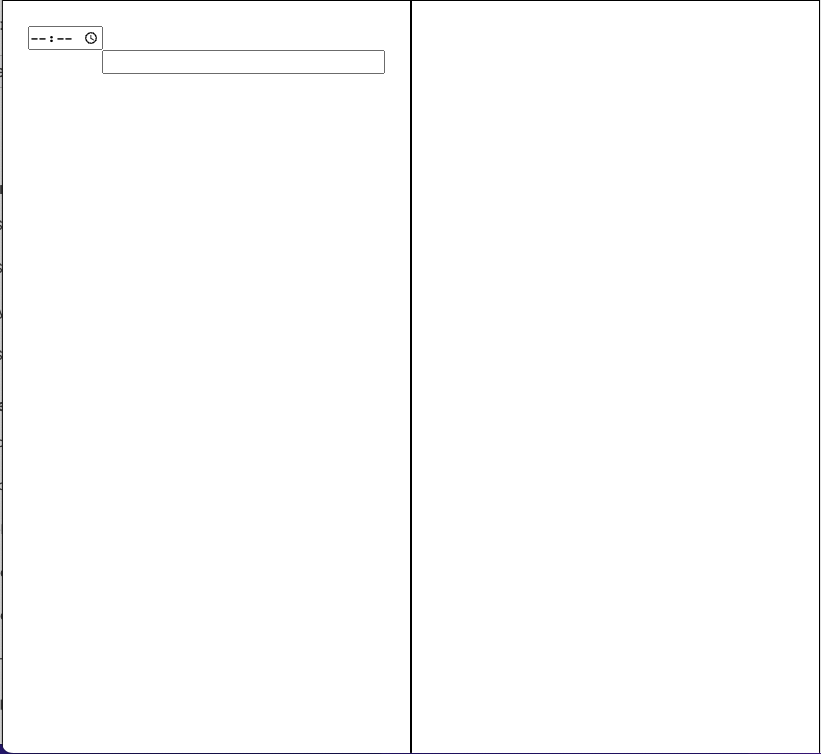
I have looked into the position property and messed around with that. I have read the MDN docs on this and i just don't think Im understanding it.
Cheers in advance

