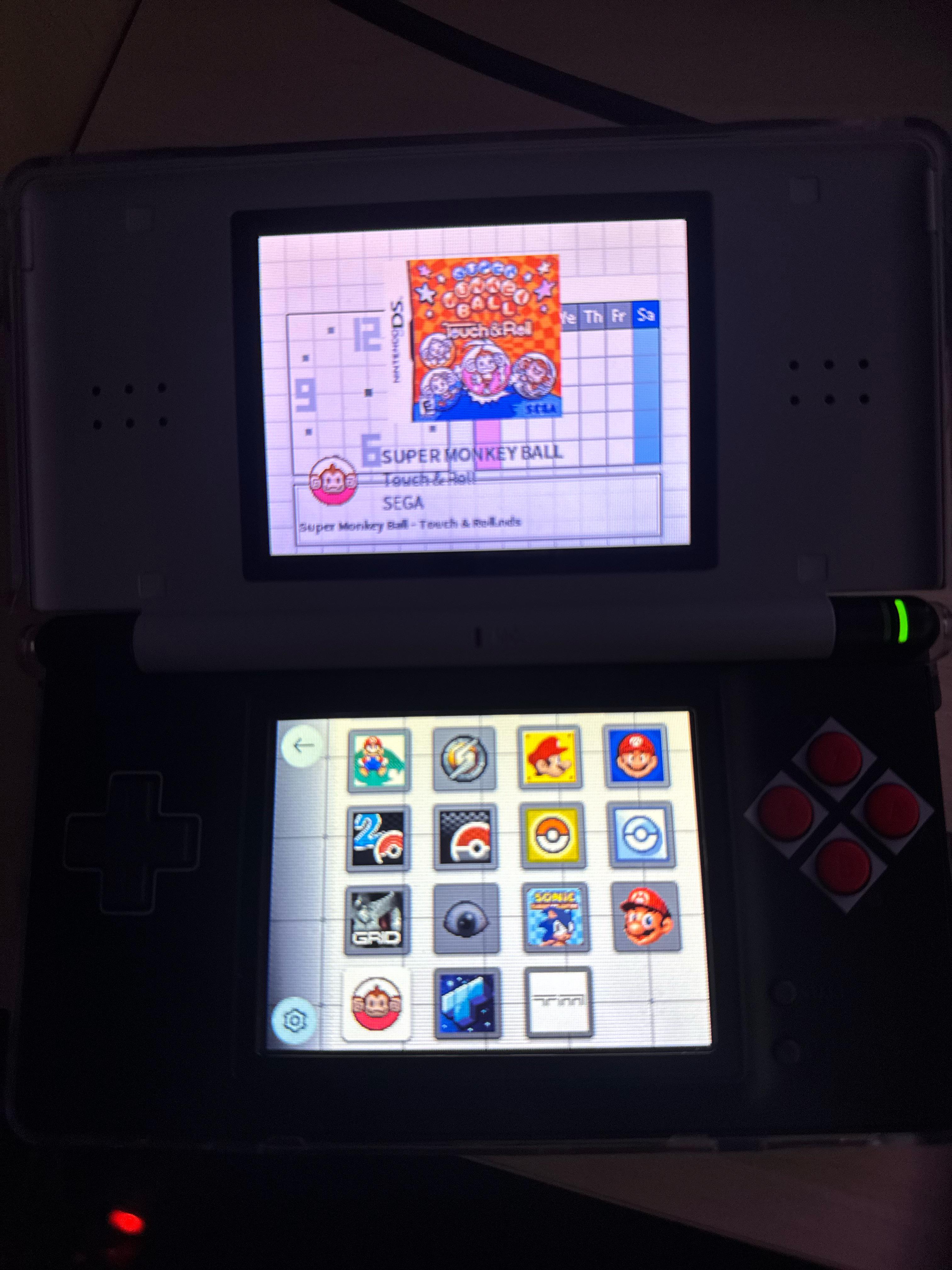
I'm working on a Pico Launcher theme that emulates the original DS home screen. So far I've got: - Touch controls - Some feedback audio - Brightness settings (persistent across resets) - Custom username and system theme colors or pass-through to firmware settings - Most elements are toggleable - Rearranged game art displays based on sorting mode - Battery status monitoring
The following is tested and working on DS Lite hardware, but my melonDS RTC doesn't work and idk how else to get a good video: - Working clock (with the annoying ticks included - toggleable) - Working calendar
I plan to work on the bottom screen to bring it closer to the original, but I haven't yet figured out how I want to go about it.
Thanks for all the support everyone. I've uploaded my current version files here both with and without startup sounds (startup sound is a bit redundant if you dont have flashme setup, so I made it optional). Just rename your desired version to '_picoboot.nds' and move all files to their respective locations and it should just work... hopefully. Let me know if you encounter any issues and I'll try to get it sorted.
Fair warning, this has only been tested on a DSpico in a DS Lite, both with and without flashme. I haven't encountered any issues, but I cant speak to the functionality on the original DS or DSi. (Removed firmware write, see edit)⚠️ The brightness setting currently writes to the user settings area of firmware for persistence, but I am unsure how other consoles would interact with this feature. Use with caution if you are not on a DS lite.
Edit: Changed the links to files that do not write to firmware, just for safety. Brightness setting is saved and will be loaded when the pico launches, but the default DS screens will respect your firmware settings. Make sure you have the new DSpicoClassicNFW.zip if you don't want the firmware write version.
I tested the no start up sounds on my DSlite and 3DS XL and both looked great! The box art was clipped a bit in the top screen though (I got them from the Pico loader site), like the box art was too big for the box, but other than that I liked it. The carousel looked fine. I didn't mess with the brightness setting.
Nice, glad to hear you like it and it works on other systems! Yeah, the box art clipping is an issue I'm not really sure how I want to handle quite yet. The problem is that cover art is 106x96px, so it's isn't perfectly square and doesn't exactly fit in the border of the clock face (95x95px). My solution was just to just clip some of it so I could repurpose the black border around the clock, but it doesn't look super great. I'll look into just drawing a new border around the cover art so I don't have to worry about forcing it into a space it doesn't fit.
Works great on my New 3dsxl so far. I'm curious how you get the game cover art to show when scrolling through the index? I just have a bunch of blank boxes with "?" on them. Thanks!
Works perfectly on the Nintendo DS as well. Only very long titles stick out slightly beyond the box, but that’s not a big issue. Thank you very much for your great work!
I tested the theme on an r4itt and it definitely works wonderfully; the games, cheats, and touch menu all work. It's a simple but beautiful theme, and the music adds a nice touch.
I'm currently using it as a secondary kernel since the only thing it's missing is soft reset in games, but as soon as picoloader supports that feature, I'll stop using YSMenu.
Looks great! Is there a way to implement a favorite list? Like I would like to toggle 3-7 out of the list as a favorite and have it display as a carousel of just those games. Then if I want to add or remove other games I can over time.
This might be a silly question but any idea on why it appears like this on the ds lite pico launcher 1.20, Also wanted to say this theme is mega and hope it takes off cause this is clean af
Are you using one of the _picoboot.nds files from the zip? My theme is mostly built on hardcoded changes to the launcher, so it wont display properly using the standard official GitHub release. My changes were made to the 1.2.0 version though, so if you needed it for the cheats menu or something, that should still be functional, provided you also downloaded the latest picoloader files from the official repo.
I realised what I did wrong. I placed the _picoboot.nds file in the _pico folder rather than the root. Got it working now and this is gonna be my permanent theme
Sorry, I'm not super familiar with with any carts other than the DSpico, but I believe LNH has picoloader files for ace3ds here. If you use those loader files, set up the correct folder structure, and rename one of the _picoboot.nds files from my zip to LAUNCHER.nds, it might work? Though I can't guarantee.
I actually do have the DSi background music in the files, I just currently have it disabled personally. I just uploaded the files now for people to test out if you're interested. Its not finished, but I think its pretty stable for a sort of preview/proof of concept release. (I can only confirm its working on the DS Lite with a DSpico for now since its the only system I have to test)
I currently have the brightness setting writing to firmware for persistence across resets, so I'm not sure how that would shake out for other systems. Its probably best to only use on DS lite for now until I can test for myself tbh.
I just edited my comments that contain links to files to new versions that do not write to firmware. The brightness setting will still be saved to the launcher, so when starting the launcher, the last used brightness will apply, but the default DS home screen and startup will respect the users firmware settings.
Yeah, I'm actually removing it right now so I can update the files for everyone just to be safe. I kinda forgot I had that in there until I had already uploaded. It should be safe, but I would like to test on personal hardware myself first. I'm also going to be throwing it on my github soon too so people can check for themselves.
downloaded this and the other files to be able to use soft reset for some games but now the soft reset sends me back to a blank pico launcher. is there a fix for that?
I just tested both versions on a small New3ds and an old 3dsXL, the theme looks amazing and everything fits as it should but the touch didn't work on neither of them, it detects the first tap, return to the root folder and the touch screen stops working on the menu.
Very nice theme, thanks a lot for this! Only thing I have found so far is that the display settings will not show the current states :) Running on a DS Lite
Once that was done I continued with the guide getting the usrcheat.dat and doing the DSi dumper to get the DSi files then deleted that.
Now I’m on the most up to date Pico Vanilla wise that is.
After that I downloaded from the mediafire once more, and extracted the files. I renamed the no sound one and then deleted the settings.json in _pico I then copied those files and overwrote everything. Then I edited the settings.json in _pico on the sd card to change theme from material to classic.
And that seems to have done it?
Touch and stuff is working. Cheats are working and so on. Anyone else want to verify?
 1
 1


10
u/Lohkas_ Apr 04 '26 edited Apr 04 '26
Thanks for all the support everyone. I've uploaded my current version files here both with and without startup sounds (startup sound is a bit redundant if you dont have flashme setup, so I made it optional). Just rename your desired version to '_picoboot.nds' and move all files to their respective locations and it should just work... hopefully. Let me know if you encounter any issues and I'll try to get it sorted.
Fair warning, this has only been tested on a DSpico in a DS Lite, both with and without flashme. I haven't encountered any issues, but I cant speak to the functionality on the original DS or DSi. (Removed firmware write, see edit)
⚠️ The brightness setting currently writes to the user settings area of firmware for persistence, but I am unsure how other consoles would interact with this feature. Use with caution if you are not on a DS lite.Edit: Changed the links to files that do not write to firmware, just for safety. Brightness setting is saved and will be loaded when the pico launches, but the default DS screens will respect your firmware settings. Make sure you have the new DSpicoClassicNFW.zip if you don't want the firmware write version.