r/UnityHelp • • Dec 30 '20

prefab to .blend or .obj

3 Upvotes

I personally don't have Unity and I hate to ask but is there anyone that could possibly convert the model for me? I need the prefab to be a .blend preferably if not a .obj or .fbx. Thanks in advance! If possible I can send the model link etc.


r/UnityHelp • • 2d ago

Anyone has an explaination for this?

Thumbnail gallery
2 Upvotes

Everytime i'm trying to update my unity hub, my anti-virus blocks it. Why?


r/UnityHelp • • 3d ago

Unity 7 and windows APIs

2 Upvotes

Hello, with Unity 7, when targeting windows standalone, will we be able to consume WinRT APIs directly with C# like UWP or regular WinRT apps, or native C++/WinRT plugins will still be required?


r/UnityHelp • • 7d ago

UNITY My IK bones are offsetting in unity

2 Upvotes

Im working on a game in unity and I have a setup where I have a main player gameobject with an animator for only walking, sprinting, etc. I have a child thats the player model that has an animator that switches between toilet and mop controllers but everytime the player uses a thing that triggers the animation like mopping or unclogging it offsets the IK bones just by a bit. Im pretty sure this isnt a code issue because the IK is being offset.r


r/UnityHelp • • 28d ago

Why do the lakes disappear when the game starts?

Thumbnail gallery
2 Upvotes

r/UnityHelp • • Oct 13 '26

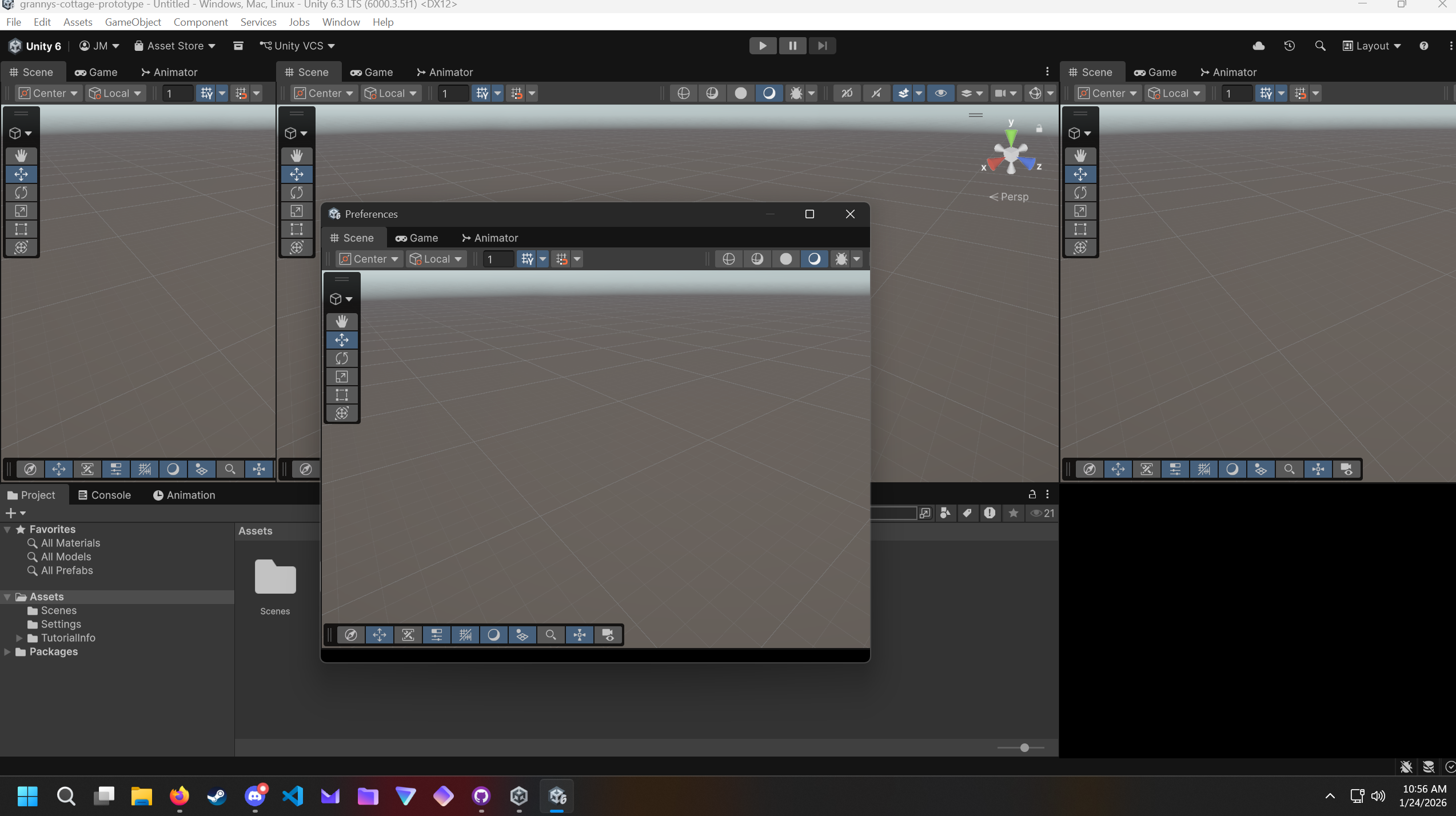
Unity Play View Blackscreen

Thumbnail
gallery
2 Upvotes

Hi all,
Everytime i start "play" mode on the unity editor for any project i get this black screen view shown in image one. The other images just show general editor views.
How can i disable this "blackscreen" effect? Because i now can't move game objects around while the game in on play mode.
Thank you all.

EDIT:

Thanks all, turns out it was an issue with preferences and the color tint applied on play-mode. It was black, so blacking out everything.


r/UnityHelp • • Sep 06 '26

Udon Airtime issues

2 Upvotes

r/UnityHelp • • Aug 25 '26

UNITY Sky shadergraph not working

2 Upvotes

I can't solve this problem: I made a simple Shader Graph for a starry sky (which I use as a skybox), but as soon as I move my view/camera (whether in Play mode or in the Scene view), the stars flicker/twinkle. I'd simply like them to stay still, if someone more experienced could help me, that would be greatly appreciated.


r/UnityHelp • • Aug 14 '26

Помогите с Юнити

2 Upvotes

Добрый вечер всем программистам и не программистам! Недавно начал изучать Юнити и появилась такая проблема. Ни как не могу разработать как это сделать: у меня есть слой, который видится игроку только после нажатия определенной клавиши. Мне же надо чтобы (только когда открыт этот слой) при нажатии ЛКМ открывался новый слой, и исчезал через секунду, при этом слой, открывающийся при нажатой клавише, остался. Если что то не понятно, задавайте вопросы, обязательно отвечу. Заранее спасибо за помощь ☺️


r/UnityHelp • • Aug 13 '26

PROGRAMMING What causes these popups, and how can I add them to my VS Code?

Post image
2 Upvotes

I've already fixed an issue I had with how to code color looks, and now I've gotten it to suggest auto-completions but these popups (from a Unity tutorial) would really help my learning process! Does anyone know where I can get it? Is it an Extension?


r/UnityHelp • • Aug 09 '26

UNITY FPS drops by half when looking at a plane in Unity 6 (MacBook Air M1)

2 Upvotes

I recently started learning Unity and made a small 3D project with a character controller and a basic pick-up/drop mechanic.

When I tested the game, I noticed that the scene felt strangely laggy, even though it was just a very basic scene. I opened the Stats window and noticed that whenever I look down at the plane, my FPS drops by roughly half. The game also feels noticeably less smooth, even at around 60 FPS.

I tried changing various project settings, URP settings, camera settings, etc., but nothing seemed to fix it. I also updated Unity and even created a completely new 3D project from scratch, but the exact same issue still happens.

I'm using a MacBook Air with an M1 chip.

Is this normal on an M1 MacBook Air, or is there something obvious I'm missing? The scene is extremely simple, so I wouldn't expect looking at a single plane to cause such a large FPS drop.

Any ideas what could cause this would be greatly appreciated!


r/UnityHelp • • Jul 24 '26

I Keep Getting This Error When I Try To Upload A Custom Bonelab Avatar. Error: Could not find a part of the path 'C:\bonelab \Library\com.unity.addressables\aa\Windows\catalog.json'.

Thumbnail
reddit.com
2 Upvotes

r/UnityHelp • • Jul 12 '26

How to fix this artifacts

Post image
2 Upvotes

3D universal scene


r/UnityHelp • • Jul 09 '26

UNITY Issue with Unity 6.5 and Hot Reload

2 Upvotes

Hello everyone,

Question for anyone who may have experienced this.

For quite some time now, I think since Unity 6.0, Unity has been crashing quite often while Hot Reload is enabled. Every time I save a script in Visual Studio and Hot Reload tries to update Unity, the editor sometimes crashes.

It does not happen every single time, but it happens often enough to be a problem. I have already disabled some Hot Reload settings, such as “Auto Refresh” and “Auto Recompile”. It improved after disabling Auto Recompile, but Unity still crashes way too often.

Has anyone else experienced frequent crashes with Hot Reload enabled? And if so, did you find a fix or workaround?


r/UnityHelp • • Jun 10 '26

URP Lit material looks corrupted after upgrading Unity 6 from 6000.0.66f1 to 6000.0.77f1

Post image
2 Upvotes

r/UnityHelp • • Apr 09 '26

UNITY Unity project not opening?

2 Upvotes

I've been trying to open this unity project for weeks, i have the correct version of unity the project needs and im logged in on a account, wth is going on with my unity?


r/UnityHelp • • Feb 01 '26

Target Locking System, camera snaps horizontally.

2 Upvotes

Hi, I'm trying to build a "for honor" style lock on system for a game, I've not got much experience writing code whatsoever so I've used a ton of ai to write this for me, and I'm trying to read back through it to learn what's actually going on. In the process I've realised that whenever I unlock from my "Locked On" camera to my "Orbital, third person" camera, the view seems to snap to the horizon instead of transitioning nicely back to the free cam.. I'm trying to understand why this is happening so that I can edit it and put a nice transition in there.

I'll share the camera lock on system script I've got below, happy to send any info that could help, many thanks.

using Unity.Cinemachine;

using UnityEngine;

public class CameraLockOn : MonoBehaviour

{

[Header("Cinemachine Cameras (CM 3.x)")]

[SerializeField] private CinemachineCamera cmFreeLook;

[SerializeField] private CinemachineCamera cmLockedOn;

[Header("Free camera orbit component (on CM_FreeLook)")]

[SerializeField] private CinemachineOrbitalFollow freeOrbit;

[Header("References")]

[SerializeField] private Transform player; // root (feet)

[SerializeField] private Transform targetPoint; // chest/shoulder pivot (IMPORTANT)

[Header("Targeting")]

[SerializeField] private LayerMask enemyLayer;

[SerializeField] private float lockRange = 12f;

[SerializeField] private float lockAngle = 60f;

[SerializeField] private float targetSphereRadius = 0.2f;

[SerializeField] private bool requireLineOfSight = true;

[SerializeField] private LayerMask lineOfSightBlockers;

[Header("Priorities")]

[SerializeField] private int freePriorityWhenActive = 20;

[SerializeField] private int lockPriorityWhenActive = 30;

[Header("Look offsets (no AimPoint needed)")]

[SerializeField] private float enemyLookHeight = 1.4f; // chest-ish

[SerializeField] private float playerFollowHeightHint = 0f; // leave 0 if using targetPoint correctly

[Header("Unlock snap tuning")]

[SerializeField] private float minPitch = -35f;

[SerializeField] private float maxPitch = 70f;

[SerializeField] private bool verticalAxisIsNormalized = false; // flip if pitch snaps weird

private PlayerActions controls;

private bool isLocked;

private Transform currentTarget;

// runtime proxy so we can LookAt enemy chest without editing prefabs

private Transform targetLookProxy;

public bool IsLocked => isLocked;

public Transform CurrentTarget => currentTarget;

private void Awake()

{

if (player == null) player = transform;

if (targetPoint == null) targetPoint = player;

// create look proxy once

GameObject proxy = new GameObject("LockOn_LookProxy");

proxy.hideFlags = HideFlags.HideInHierarchy;

targetLookProxy = proxy.transform;

controls = new PlayerActions();

controls.StandardMovement.ToggleLock.performed += _ => ToggleLockOn();

}

private void OnDestroy()

{

if (targetLookProxy != null)

Destroy(targetLookProxy.gameObject);

}

private void OnEnable() => controls.Enable();

private void OnDisable() => controls.Disable();

private void LateUpdate()

{

if (!isLocked) return;

if (currentTarget == null || !currentTarget.gameObject.activeInHierarchy)

{

Unlock();

return;

}

float dist = Vector3.Distance(player.position, currentTarget.position);

if (dist > lockRange * 1.25f)

{

Unlock();

return;

}

// update look proxy every frame (enemy chest height)

targetLookProxy.position = currentTarget.position + Vector3.up * enemyLookHeight;

// lock cam should follow player pivot (NOT feet) and look at proxy (NOT enemy pivot)

if (cmLockedOn != null)

{

cmLockedOn.Follow = targetPoint != null ? targetPoint : player;

cmLockedOn.LookAt = targetLookProxy;

}

}

private void ToggleLockOn()

{

if (isLocked)

{

Unlock();

return;

}

Transform found = FindBestTargetInFront();

if (found == null) return;

Lock(found);

}

private void Lock(Transform target)

{

isLocked = true;

currentTarget = target;

// set proxy immediately

targetLookProxy.position = currentTarget.position + Vector3.up * enemyLookHeight;

if (cmLockedOn != null)

{

cmLockedOn.Follow = targetPoint != null ? targetPoint : player;

cmLockedOn.LookAt = targetLookProxy;

}

SetActiveCamera(lockActive: true);

}

private void Unlock()

{

// snap free orbit to the current camera view (so free cam comes back already facing enemy direction)

SnapFreeOrbitToCurrentView();

isLocked = false;

currentTarget = null;

// restore free cam to orbit player normally

if (cmFreeLook != null)

{

cmFreeLook.Follow = targetPoint != null ? targetPoint : player;

cmFreeLook.LookAt = targetPoint != null ? targetPoint : player;

}

// optional: lock cam can look back at player pivot when inactive

if (cmLockedOn != null)

{

cmLockedOn.LookAt = targetPoint != null ? targetPoint : player;

}

SetActiveCamera(lockActive: false);

}

private void SetActiveCamera(bool lockActive)

{

if (cmFreeLook == null || cmLockedOn == null) return;

if (lockActive)

{

cmLockedOn.Priority = lockPriorityWhenActive;

cmFreeLook.Priority = freePriorityWhenActive;

}

else

{

cmFreeLook.Priority = lockPriorityWhenActive;

cmLockedOn.Priority = freePriorityWhenActive;

}

}

private void SnapFreeOrbitToCurrentView()

{

if (freeOrbit == null || Camera.main == null) return;

Vector3 fwd = Camera.main.transform.forward;

float yaw = Mathf.Atan2(fwd.x, fwd.z) * Mathf.Rad2Deg;

float pitch = Mathf.Asin(Mathf.Clamp(fwd.y, -1f, 1f)) * Mathf.Rad2Deg;

pitch = Mathf.Clamp(pitch, minPitch, maxPitch);

freeOrbit.HorizontalAxis.Value = yaw;

if (verticalAxisIsNormalized)

{

float norm = Mathf.InverseLerp(minPitch, maxPitch, pitch);

freeOrbit.VerticalAxis.Value = Mathf.Clamp01(norm);

}

else

{

freeOrbit.VerticalAxis.Value = pitch;

}

}

private Transform FindBestTargetInFront()

{

Vector3 origin = player.position + Vector3.up * 1.2f;

Collider[] hits = Physics.OverlapSphere(origin, lockRange, enemyLayer, QueryTriggerInteraction.Ignore);

Transform best = null;

float bestScore = float.NegativeInfinity;

Vector3 forward = player.forward;

for (int i = 0; i < hits.Length; i++)

{

Transform t = hits[i].transform;

Vector3 to = (t.position - player.position);

to.y = 0f;

float dist = to.magnitude;

if (dist < 0.001f) continue;

Vector3 dir = to / dist;

float angle = Vector3.Angle(forward, dir);

if (angle > lockAngle) continue;

if (requireLineOfSight)

{

Vector3 losStart = origin;

Vector3 losEnd = t.position + Vector3.up * enemyLookHeight;

Vector3 losDir = (losEnd - losStart);

float losDist = losDir.magnitude;

if (losDist > 0.01f)

{

losDir /= losDist;

if (Physics.SphereCast(losStart, targetSphereRadius, losDir, out _,

losDist, lineOfSightBlockers, QueryTriggerInteraction.Ignore))

{

continue;

}

}

}

float centered = Vector3.Dot(forward, dir);

float score = (centered * 2.0f) - (dist / lockRange);

if (score > bestScore)

{

bestScore = score;

best = t;

}

}

return best;

}

}


r/UnityHelp • • Jan 24 '26

Visual Glitching Since Windows 11 Update

2 Upvotes

I don't even know how to describe this adequately. Since updating my desktop to Windows 11, I've had issues with flickering in Unity, but this one takes the cake; the scene window somehow just fully takes over the other windows in the editor. Unless I mouse around or click in what is supposed to be a different box sometimes. I'm just at such a loss.


r/UnityHelp • • Jan 23 '26

UNITY Unity 6000.3.4f1 LTS, I get package errors saying "invalid signatures". Yesterday when I was importing the project, it was fine but today, this happens. Is this a project issue or a Unity issue? Thanks.

2 Upvotes

r/UnityHelp • • Jan 19 '26

My friend is having issues loading Heartopia via a Unity crash error

Thumbnail
reddit.com
2 Upvotes

r/UnityHelp • • Nov 23 '25

Is there a way to use the built in physics engine to make a realistic string that can retract and extend, with objects connected to it?

2 Upvotes

Me and my friend are trying to make a simple fishing game and quickly realizing it's going to be harder than we thought. Is there a way to do the described within the editor tools, or are we going to have to find another way?


r/UnityHelp • • Nov 13 '25

PROGRAMMING Beginner and working on a dungeon crawl and having some issues. I'm not reviving any errors but the code isn't working out as I'd like

Thumbnail
gallery
2 Upvotes

The way I understand it, my move script checks the map of my wall script and sees if the position I want to move into is a blank space. If it is, I can move. Despite this I can walk wherever I want, regardless of the map.

In the tutorial I got the map concept from they have the map and player on the same script, but I wanted to keep them separate so the enemies could reference the same map also.

I'm sure I've done something very silly and just can't see it, any help would be great


r/UnityHelp • • Oct 07 '25

The install button is disabled

2 Upvotes

I have visual studio installed and i just installed unity hub to program in unity but im trying to create a project and i cant install the editor, regardless of the options i have picked


r/UnityHelp • • Sep 19 '25

how do i change the texture on my trees

Post image
2 Upvotes

i got my trees renderd properly and i figured out that theres some sort of shader that needs fixing but i cant really understand it and google isnt very much help

pls nerds of reddit help me