I’m just trying to make a heart monitor with a particle generator, and suddenly this happens. It randomly decides between these two paths, and when I press play it goes crazy random. I have non clue what it could be, any ideas?
How do i make it so the players collider follows the players movement. Right now i have this to adjust the colliders hight how do i make it follow the players irl movement. ``` using System.Collections; using System.Collections.Generic; using UnityEngine; public class PhysicRig : MonoBehaviour { public Transform playerHead; public CapsuleCollider bodyCollider; public ConfigurableJoint headJoint; public float bodyHeightMin = 0.5f; public float bodyHeightMax = 2f; // Update is called once per frame void FixedUpdate() { bodyCollider.height = Mathf.Clamp(playerHead.localPosition.y, bodyHeightMin, bodyHeightMax); bodyCollider.center = new Vector3(playerHead.localPosition.x, bodyCollider.height / 2, playerHead.localPosition.z); headJoint.targetPosition = playerHead.localPosition; } }
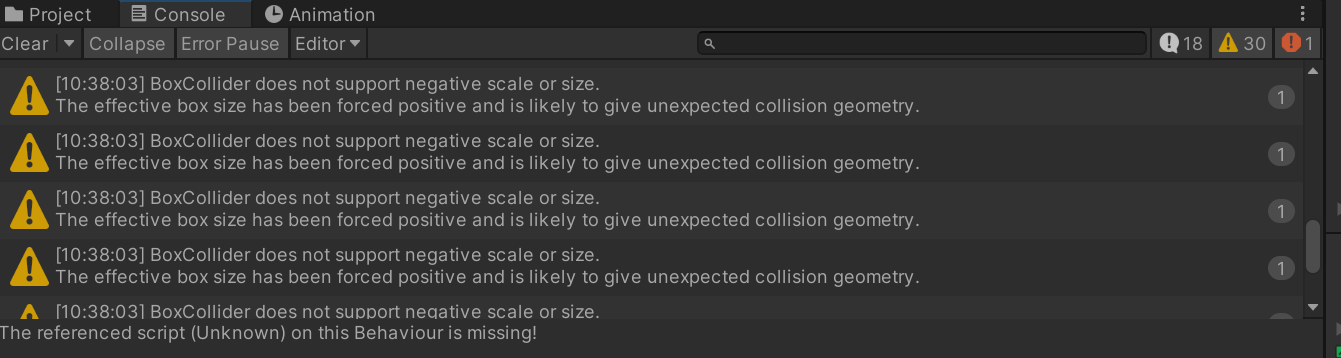
Hello rookie here! I asked chatgpt about this and it said that the transform scale of a gameobject with a component of a box collider should not have - negative transform scale (X, Y, Z). My game assets or objects have negative position for a quite long time now, why is this happening?
Issue: When having this issue. CharacterController is not moving in other scenes, upon using controls WASD
//Trying to make camera not follow player if they fall don't know what im doing wrong
if player.position= new Vector3(player.position.transform.position - 15, transform.position.y, transform.position.z)
{
Vector3 targetPosition = new Vector3(transform.position.x, transform.position.y, transform.position -10);
}
}
}
Thanks for all the help. Here's what chatgpt said.
Copy codeusing System.Collections;
using System.Collections.Generic;
using UnityEngine;

public class CameraController : MonoBehaviour
{
    [SerializeField] Transform player;
    [SerializeField] Vector3 cameraVelocity;
    [SerializeField] float smoothTime = 1f;
    [SerializeField] bool lookAtPlayer;
    [SerializeField] float fallThreshold = -15f; // Height threshold to stop following

    void Update()
    {
        // Check if the player is below the fall threshold
        if (player.position.y > fallThreshold)
        {
            // Smoothly follow the player's position
            Vector3 targetPosition = new Vector3(transform.position.x, player.position.y, transform.position.z);
            transform.position = Vector3.SmoothDamp(transform.position, targetPosition, ref cameraVelocity, smoothTime);

            if (lookAtPlayer)
            {
                transform.LookAt(player);
            }
        }
        else
        {
            // Optionally, you could set the camera to a fixed position or handle it differently when the player is falling
            // For example, keep the camera at the last known position or set it to a predefined position
        }
    }
}
Key Changes and Explanations:
Fall Threshold: I added a fallThreshold variable to define how low the player can go before the camera stops following.
Position Check: The condition to check the player's position is now properly using if (player.position.y > fallThreshold). This checks if the player's height is above the specified threshold.
Target Position Logic: If the player is above the threshold, the camera smoothly follows the player's y-position. When the player falls below the threshold, the camera will no longer update its position.
LookAt Logic: The camera will only look at the player when the player is above the fall threshold, maintaining focus on the player during normal gameplay.
Additional Notes:
You can modify how you want the camera to behave when the player falls. For example, you could keep it fixed at the last position or set it to a specific point in the scene.
Adjust the fallThreshold value to fit your game mechanics.
Copy codeCopy codeusing System.Collections;
using System.Collections.Generic;
using UnityEngine;

public class CameraController : MonoBehaviour
{
    [SerializeField] Transform player;
    [SerializeField] Vector3 cameraVelocity;
    [SerializeField] float smoothTime = 1f;
    [SerializeField] bool lookAtPlayer;
    [SerializeField] float fallThreshold = -15f; // Height threshold to stop following

    void Update()
    {
        // Check if the player is below the fall threshold
        if (player.position.y > fallThreshold)
        {
            // Smoothly follow the player's position
            Vector3 targetPosition = new Vector3(transform.position.x, player.position.y, transform.position.z);
            transform.position = Vector3.SmoothDamp(transform.position, targetPosition, ref cameraVelocity, smoothTime);

            if (lookAtPlayer)
            {
                transform.LookAt(player);
            }
        }
        else
        {
            // Optionally, you could set the camera to a fixed position or handle it differently when the player is falling
            // For example, keep the camera at the last known position or set it to a predefined position
        }
    }
}
 using System.Collections;
using System.Collections.Generic;
using UnityEngine;

public class CameraController : MonoBehaviour
{
    [SerializeField] Transform player;
    [SerializeField] Vector3 cameraVelocity;
    [SerializeField] float smoothTime = 1f;
    [SerializeField] bool lookAtPlayer;
    [SerializeField] float fallThreshold = -15f; // Height threshold to stop following

    void Update()
    {
        // Check if the player is below the fall threshold
        if (player.position.y > fallThreshold)
        {
            // Smoothly follow the player's position
            Vector3 targetPosition = new Vector3(transform.position.x, player.position.y, transform.position.z);
            transform.position = Vector3.SmoothDamp(transform.position, targetPosition, ref cameraVelocity, smoothTime);

            if (lookAtPlayer)
            {
                transform.LookAt(player);
            }
        }
        else
        {
            // Optionally, you could set the camera to a fixed position or handle it differently when the player is falling
            // For example, keep the camera at the last known position or set it to a predefined position
        }
    }
}
Key Changes and Explanations:
Fall Threshold: I added a fallThreshold variable to define how low the player can go before the camera stops following.
Position Check: The condition to check the player's position is now properly using if (player.position.y > fallThreshold). This checks if the player's height is above the specified threshold.
Target Position Logic: If the player is above the threshold, the camera smoothly follows the player's y-position. When the player falls below the threshold, the camera will no longer update its position.
LookAt Logic: The camera will only look at the player when the player is above the fall threshold, maintaining focus on the player during normal gameplay.
Additional Notes:
You can modify how you want the camera to behave when the player falls. For example, you could keep it fixed at the last position or set it to a specific point in the scene.
Adjust the fallThreshold value to fit your game mechanics.
4o miniDon't share sensitive info. Chats may be reviewed and used to train our models. Learn more
Key Changes and Explanations:
Fall Threshold: I added a fallThreshold variable to define how low the player can go before the camera stops following.
Position Check: The condition to check the player's position is now properly using if (player.position.y > fallThreshold). This checks if the player's height is above the specified threshold.
Target Position Logic: If the player is above the threshold, the camera smoothly follows the player's y-position. When the player falls below the threshold, the camera will no longer update its position.
LookAt Logic: The camera will only look at the player when the player is above the fall threshold, maintaining focus on the player during normal gameplay.
Additional Notes:
You can modify how you want the camera to behave when the player falls. For example, you could keep it fixed at the last position or set it to a specific point in the scene.
Adjust the fallThreshold value to fit your game mechanics.
Despite my best efforts, the hit animation for my enemy does not play to completion. The following can be seen in the video, but I will restate it anyway: Entry to the animation has no exit time, exit from the animation has exit time of 1. No unnecessary transition duration nor offset. Sample set to 7 with 4 frames and plays fine that way, speed is 1. I have disabled all wandering and movement code and the issue still persists. The only code that is left for the enemy is the OnHit and knockback listed below. I have no idea why the hit animation is not playing to completion or is being interrupted by the idle. Someone please help <3 This is bugging me so much but I don't want to refactor to not use a trigger.
Animator animator;
private float health = 10;
private float knockbackResist = 0;
public float wanderRadius = 1f;  // Radius in which the slime can wander
public float wanderInterval = 10f; // Time between each wander
public float moveSpeed = .5f;      // Movement speed of the slime
public float knockbackDuration = .4f; // Duration of the knockback effect

private Vector3 startPosition;
private Vector3 targetPosition;
private Vector2 lastMoveDirection;
private bool faceLeft = false;
private SpriteRenderer spriteRenderer;
private float wanderTimer;
private Vector2 knockbackVelocity;
private float knockbackTimer;
private bool isKnockedBack;
public float Health
{
    set
    {
        if (value < health && value > 0)
        {
            Debug.Log("ayo some health is being removed as we speak");
            animator.SetTrigger("Hit");
        }

        health = value;

        if(health <= 0)
        {
            animator.SetTrigger("Killed");
        }
    }
    get
    {
        return health;
    }
}
public float KnockbackResist {
    set { knockbackResist = value; }
    get { return knockbackResist; }
}

public void Start()
{
    animator = GetComponent<Animator>();
    spriteRenderer = GetComponent<SpriteRenderer>();
    startPosition = transform.position;
    targetPosition = transform.position;
    wanderTimer = wanderInterval;
}
private void FixedUpdate()
{
    if (knockbackTimer > 0)
    {
        ApplyKnockback();
    }
}
public void Defeated()
{
    Destroy(gameObject);
}
public void OnHit(float damage, Vector2 knockback)
{
    Health -= damage;

    //Calculate knockback force considering knockback resistance
    Vector2 effectiveKnockback = knockback * (1 - knockbackResist);

    //Apply knockback
    knockbackVelocity = effectiveKnockback;
    knockbackTimer = knockbackDuration;
    isKnockedBack = true;
}

private void ApplyKnockback()
{
    transform.position += (Vector3)knockbackVelocity * Time.fixedDeltaTime;
    knockbackTimer -= Time.fixedDeltaTime;
    if (knockbackTimer <= 0)
    {
        isKnockedBack = false;
        targetPosition = transform.position;
    }
}
IEnumerator DoStuff()
{
  bool condition;
  bool anotherCondition;

  while(condition)
  {
    //Grab Apples

    if(anotherCondition)
    {
      //Eat Apples  -- end loop and return to while(Condition)
    }

    //Sell Apples
    yield return null;
  }
}
What I have been trying to figure out, is if there is a way to end the loop for the current frame and RESTART at the top of the loop on the next frame, and not continue where the coroutine has left off, as you would with 'yield return null'. In the case of this coroutine, I'd like to be able to Eat Apples if anotherCondition is true, and at the start of the next frame return to while(condition) instead of executing Sell Apples.
This would be kind of like using 'return' in the middle of an Update method, but not sure if it's possible.
So I'm working on this application, in which you can choose a folder with DICOM files and the program makes a 3D model with it. I have already achieved to load a folder using a button and then removing the volume again with another button. However, if I want to choose another folder or the same one again with the first button then no model will be created, which is not good and I don't know how to solve this :(
Here a Picture of how the Program looks rn:
Here are the 2 scripts that include the folder dilemma.
When it comes to Addressables, how do you usually structure your game and assets? From what I understood, Addressables make it easy to deal with dynamic content, load content on-demand, assist with memory management, minimize computational requirements (specially on compute and memory constrained platforms), and allow also for content to be retrieved from remote locations. This assists with patching, but also with things like seasonal events, constantly updating assets and gameplay without having to keep downloading game patches. Overall, it seems very beneficial. So, where do you draw the line between assets that are what you can call core assets or immutable assets, those that are so common that are everywhere, and Addressables? Do you still try to make core assets Addressable to benefit from at least on-demand loading, memory management? Or you clearly categorize things in core or immutable, not Addressable, and then Addressables for local content (built-in/included) and Addressables for remote content (associated with either free or purchased content, static packs or dynamic seasonal events and so on) ? Thanks in advance
Whenever a song reaches the end of the track, it gets silent for a few seconds before looping back to the start of the song.
I've tried everything I could think of to fix it
Changed Load Type to "Compress In Memory" and "Streaming"
Changed Override sample rate to 22,050 Hz
Use "Gzip" Compression Format
Converted my wav files to Ogg
The last time I experience something like this was back when I tried looping mp3 files, but that was easily fixed by using wav instead. I have no idea what's causing this on my WebGL build.
Hello everyone, I'm currently having a unique problem with a VR app I'm building for some research. Basically, when I end my "play" in the unity editor my headset never recognizes that the session ended. I'm using OpenXR and a valve index. Here's a more detailed breakdown of my issue:
SteamVR continues displaying "Now Playing <my unity project name>".
My headset continues to show that it's waiting for the game to continue.
Subsequent runs of game-mode in the Unity editor run the game in the editor, but not in SteamVR.
Quitting and restarting Unity clears this issue: SteamVR's "Now Playing" is cleared, my headset goes back to SteamVR home and running game-mode in the Unity editor loads the game in SteamVr once more.
This issue occurs reliably; each playtest with VR requires restarting Unity and steamVR.
I am trying to make a simple multiplayer lobby in Unity. I have a system set up for creating a lobby and joining that lobby with a code, but I am unsure if I am supposed to use a NetworkManager alongside the lobby system.
I have a button that runs a function that does the following: Calls NetworkManager to StartHost() Creates a lobby with LobbyService.Instance.CreateLobbyAsync(name, playerCount, options) and then makes my lobby screen visible and instantiates a "playerCardPrefab" (an image background with text) as a child of a GridLayoutGroup.
Am I supposed to use Lobbies/LobbyService alongside a NetworkManager? So whoever clicks my CreateLobby() button creates the lobby and starts a host? Or am I just supposed to use one or the other?
Ive created a basic 3d character that can move around and has a hot bar and can pick up items. The player can join other lobbies, but when they do I see through the other players camera, but can still control myself and vice versa. Any help would be appreciated.
The hot bar should be able to be scrolled through when in game and it works if only 1 person is in the room at a time. Thanks. Just tell me if you need more info (I might take a while to reply)
So here is my problem. I added two sound effects to my player for "Jumping" and "Dying" but when I try to add the "point" sound effect it just isnt working. What I am trying to accomplish is that when my player model goes through the middle of both pipes a sound effect will happen I am new so I am not sure why it isnt working and have no idea how to fix it.
here is a youtube video showing the issue: video example
here is the code for Smiley (player model)
using System.Collections;
using System.Collections.Generic;
using UnityEngine;

public class SmileyScript : MonoBehaviour
{
    public Rigidbody2D myRigidbody;
    public float flapStrength;
    public logicScript logic;
    public PipeMiddleScript point;
    public bool birdIsAlive = true;
    public PipeMiddleScript pipeMiddle;

    [SerializeField] private AudioSource jumpSoundEffect;
    [SerializeField] private AudioSource deathSoundEffect;
    [SerializeField] private AudioSource pointSoundEffect;

    // Start is called before the first frame update
    void Start()
    {
        logic = GameObject.FindGameObjectWithTag("Logic").GetComponent<logicScript>();
        point = GameObject.FindGameObjectWithTag("Point").GetComponent<PipeMiddleScript>();
    }

    // Update is called once per frame
    void Update()
    {
        if (Input.GetKeyDown(KeyCode.Space) == true && birdIsAlive)
        {
            jumpSoundEffect.Play();
            myRigidbody.velocity = Vector2.up * flapStrength;
        }
    }

    private void OnCollisionEnter2D(Collision2D collision)
    {
        deathSoundEffect.Play();
        logic.gameOver();
        birdIsAlive = false;
    }

    private void OnTriggerEnter2D(Collider2D collision)
    {
        if (collision.gameObject.layer == 3)
        {
            pointSoundEffect.Play();
        }
    }
}
here is the code for the middle of my pipe
using System.Collections;
using System.Collections.Generic;
using System.Runtime.CompilerServices;
using UnityEngine;

public class PipeMiddleScript : MonoBehaviour
{
    public logicScript logic;

    // Start is called before the first frame update
    void Start()
    {
        logic = GameObject.FindGameObjectWithTag("Logic").GetComponent<logicScript>();
    }

    // Update is called once per frame
    void Update()
    {

    }

    private void OnTriggerEnter2D(Collider2D collision)
    {
        if (collision.gameObject.layer == 3)
        {
            logic.addScore(1);
        }
    }
}
if you need any more information from me feel free to ask. I really appreciate any help you can provide.
Hello.. I’m pretty new to Unity. But I have searched everywhere for an answer, googled, watched several times very closely through 5-6 tutorials on youtube on this matter, asked chat-GPT and tried what was said there, and still nothing..
I suppose there is a super easy fix to this. But I have imported my character and its animations from blender to Unity, I’m pretty sure I did it correctly, as I’ve seen how it should be done on several tutorials. I really have no clue what might be the problem. Is there any common mistakes that I have to check?
Things I have tried and double checked:
The right animation is set to play at entry (my problem is.. no animation at all when going in to the game)
I have checked loop time and loop pose and tried unchecking just to see if it did anything
I checked the static roll down window
I checked console errors (no errors)
I checked that my script on making the character move does not affect the animation
I have of course restarted the whole unity program several times I have tried more things that I don’t remember right now
I’m trying to see if mesh parts that are children of my character object interferes with anything.. But I don’t think that’s my problem..
This has taken my whole day to try and figure out. I’m considering creating a new character with new animations just to see if that will work.
Hello there, I'm Knightey (obvious, isn't it?) and I am working on a mod that adds localization to one Unity game (Limbus Company, you might heard of it).
Actually, I mostly scavenge from Chinese localization team who are the original makers of this mod, but I modified it when it comes to fonts.
The game uses lots of shaders for the fonts, which we cannot re-create in the mod because of the limited code for the mod, yet still, I wish to make our fonts as close to the original as possible.
Now to the question itself.
Is it possible to create multiple materials for TMP font, or somehow divide some of the shaders so they could be used in different situations and not all the time?
I tried using Font Weights to "divide" them but they seem to not show the chosen shaders, and that saddens me.
Or, maybe, you know some crutches that can help me with this problem?