r/UnityHelp • • Jul 23 '24

Help with blending cameras

2 Upvotes

I'm trying to recreate the ghost effect from Luigi's Mansion and I'm running into some issues. Basically, in the game the ghosts are rendered on a separate layer from the rest of the scene, and this layer is then overlayed on top of the main game using Linear Dodge (or some equivalent to it) to create a sort of Pepper's Ghost effect. I know it's possible to render multiple cameras of the same scene at once and I found this video that, while not achieving the exact effect I want, does show a method to combine camera views using shader blend modes (which would be what I'm after). The problem is that I can't seem to get the blend modes to work. I assume that the problem stems from the fact that he is using an older version of Unity (he is using 2021.1 whilst I am on 2022.3), but I've yet to find any sort of documentation on how exactly blending camera views would work. Would anyone have any advice on how to achieve this affect?

(EDIT: I've reworded the post to hopefully make more clear what I'm after, also added a screenshot from LM for reference)


r/UnityHelp • • Jul 15 '24

OTHER How to increase game difficulty in Unity 3D

Thumbnail
youtu.be
2 Upvotes

r/UnityHelp • • Jul 12 '24

MODELS/MESHES I'm currently working on a Gorilla Tag fangame that includes a horror mode. Do I need to rig the model of the monster the same way I do with the playermodel? I use blender and am on Unity version 2021.3.3f1.

2 Upvotes

r/UnityHelp • • Jun 27 '24

SPRITES/TILEMAPS am i able to trim my sprite as a single sprite

2 Upvotes

huhu yo so i need to crop my sprite since its flipping weirdly, but whenever i try going into the sprite editor to trim it, the button is greyed out and aparently your sprite mode needs to be set to multiple. if i set it to multiple, though, it messes with my bones that ive already got. i tried messing with adding bones with my sprite mode set to multiple but it didnt work for some reason which is why i have it set to single. is there another way to trim my sprite or do i gotta do some stupid nerd stuff to fix it


r/UnityHelp • • Jun 14 '24

Can’t find ‘Edit Grid and Snap Settings’

2 Upvotes

I’ve been trying different things for the last 30 minutes and I can’t find the Edit Grid and Snap Settings to change my grid visual. Please help


r/UnityHelp • • Jun 07 '24

Globe Rotation Help!

2 Upvotes

I'm trying to make a camera spin around a sphere by dragging the mouse to simulate spinning a globe. I'm not super experienced with Quaternions, but I managed to get that basic functionality working. So far the player can hold LMB and drag the mouse to rotate the camera around the sphere. The next time they manually rotate it, the camera will start the new rotation where it ended the last rotation.

Now I'm trying to include the functionality to spin the globe by letting go of LMB while still moving the mouse (Ex. drag the mouse to the right, the camera rotates right. Let go of LMB while still dragging right and the camera keeps rotating for a few seconds to simulate the follow through rotation you'd expect on a real globe). I've managed to make that work too. The follow through spin even decelerates to 0 like you'd expect.

But after letting the globe follow through spin and left clicking again, the camera snaps back closer to where the manual rotation ended. If it follow through spins long enough, it will snap back a little ahead of where the manual rotation ended, but it's supposed to let you start manually rotating where the follow throughj rotation ended.

Furthermore, the follow through rotation only applies to left and right rotation. And if I use the lastMouseV (a vector which represents the direction the mouse moved) for the vector to rotate along, it seems to set the axis of rotation 90 degrees of how it's supposed to be.

If anyone has any advice on how to fix my code, it'd be a god send. I've been struggling with it for days.

using System.Collections;

using System.Collections.Generic;

using UnityEngine;

public class CamRotate : MonoBehaviour

{

region Variables

[SerializeField] private Vector3 startPoint; // Start point of the rotation

[Header("Movement Variables")]

public Transform target; // The object around which the camera will orbit

public float inputSensitivity = 150.0f; // Mouse input sensitivity

private float mouseX, mouseY; // Mouse input values

private float startDistance; // Initial distance between camera and target

private bool isRotating = false; // Flag to track if rotation should occur

[Header("Zoom Variables")]

public float zoomSpeed = 5.0f; // Speed of zooming in and out

public float minFOV = 20f; // Minimum field of view

public float maxFOV = 100f; // Maximum field of view

[Header("Zoom Variables 2")]

public float zoom;

public float zoomMult = 4f;

public float minZoom = 2f;

public float maxZoom;

private float velocity = 0f;

public float smoothTime = 0.25f;

[SerializeField] public Camera cam;

[Header("Rotation Momentum Variables")]

public Vector3 rotation;

public float mouseRotationX;

public float mouseRotationY;

public float curRotationSpeedX = 0f;

public float curRotationSpeedY = 0f;

public float rotationSpeed = 1f;

public float rotationDamping = 1f;

public Vector3 lastMousePosition; // Last recorded mouse position

public Vector3 currentMousePosition;

public Vector3 lastMouseV; // Last recorded mouse movement vector

public float lastMouseS; // Last recorded mouse speed

public float deceleration;

endregion

void Start()

{

cam = GetComponent<Camera>();

zoom = cam.fieldOfView;

if (target == null)

{

Debug.LogError("Target not assigned for CameraOrbit script!");

return;

}

//Calculate the initial distance between camera and target

startDistance = Vector3.Distance(transform.position, target.position);

//Hide and lock the cursor

//Cursor.lockState = CursorLockMode.Locked;

//Cursor.visible = false;

// Initialize mouseX and mouseY based on current camera rotation

mouseX = transform.eulerAngles.y;

mouseY = transform.eulerAngles.x;

}

void LateUpdate()

{

// If the target exists, rotate the camera around it

if (target != null && isRotating) {

//Capture mouse input

mouseX += Input.GetAxis("Mouse X") * inputSensitivity * Time.deltaTime;

mouseY -= Input.GetAxis("Mouse Y") * inputSensitivity * Time.deltaTime;

mouseY = Mathf.Clamp(mouseY, -80f, 80f); //Limit vertical rotation angle

//Calculate rotation based on mouse input

Quaternion rotation = Quaternion.Euler(mouseY, mouseX, 0);

//Calculate the new position of the camera based on the rotation and initial distance

Vector3 negDistance = new Vector3(0.0f, 0.0f, -startDistance);

Vector3 position = rotation * negDistance + target.position;

//Update camera position and rotation

transform.rotation = rotation;

transform.position = position;

startPoint = transform.position;

} else if (target != null && !isRotating) {

transform.rotation = transform.rotation;

transform.position = transform.position;

startPoint = transform.position;

}

}

void Update()

{

scrollZoom();

cursorShoot();

checkMouseInput();

float scroll = Input.GetAxis("Mouse ScrollWheel");

if (scroll != 0f)

{

float newFOV = Camera.main.fieldOfView - scroll * zoomSpeed;

Camera.main.fieldOfView = Mathf.Clamp(newFOV, minFOV, maxFOV);

}

if (!isRotating)

{

transform.RotateAround(target.transform.position, lastMouseV, lastMouseS * Time.deltaTime);

}

decelerate();

}

void scrollZoom()

{

//ZoomCamera.fieldOfView -= Input.GetAxis("Mouse ScrollWheel") * zoomSpeed;

float scrollWheel = Input.GetAxis("Mouse ScrollWheel");

//zoom = Mathf.Clamp(zoom, minZoom, maxZoom);

zoom -= scrollWheel * zoomMult;

cam.orthographicSize = Mathf.SmoothDamp(cam.orthographicSize, zoom, ref velocity, smoothTime);

cam.orthographicSize = Mathf.Clamp(cam.orthographicSize, minZoom, maxZoom);

}

private void cursorShoot()

{

// Bit shift the index of the layer (8) to get a bit mask

int layerMask = ~(1 << LayerMask.NameToLayer("IgnoreRaycast"));

// This would cast rays only against colliders in layer 8.

RaycastHit hit;

// Does the ray intersect any objects excluding the player layer

if (Physics.Raycast(transform.position, transform.TransformDirection(Vector3.forward), out hit, Mathf.Infinity, layerMask))

{

Debug.DrawRay(transform.position, transform.TransformDirection(Vector3.forward) * hit.distance, Color.red);

}

}

private void checkMouseInput() {

// Check if left mouse button is held down

if (Input.GetMouseButtonDown(0)) {

isRotating = true;

lastMousePosition = Input.mousePosition;

}

// Check if left mouse button is released

if (Input.GetMouseButtonUp(0)) {

isRotating = false;

lastMouseS = CalculateMouseSpeed();

lastMouseV = CalculateMouseVector();

}

}

public float CalculateMouseSpeed() {

// Mouse speed calculation based on the change in mouse position

float speed = Input.GetAxis("Mouse X") / Time.deltaTime;

speed = Mathf.Clamp(speed, -300f, 300f); //Limit speed

return speed;

}

public Vector3 CalculateMouseVector() {

// Mouse movement vector calculation based on the change in mouse position

currentMousePosition = Input.mousePosition;

Vector3 mouseVector = currentMousePosition - lastMousePosition;

return mouseVector;

}

public void decelerate() {

if (!isRotating && lastMouseS > 0) {

lastMouseS -= deceleration * Time.deltaTime;

} else if (!isRotating && lastMouseS < 0) {

lastMouseS += deceleration * Time.deltaTime;

}

}

}


r/UnityHelp • • May 26 '24

PARTICLE SYSTEMS feedback for my own Lapse Blue Max, something is missing

2 Upvotes

r/UnityHelp • • May 04 '24

UNITY Weird point light glitch when moving camera, ground illumination turning off

2 Upvotes

r/UnityHelp • • Apr 08 '24

How do I make limbs react to physics?

2 Upvotes

r/UnityHelp • • Mar 13 '24

UNITY HDRP Scene is fully gray and the Game view is black

2 Upvotes

I'm using version 2023.2.5f1. When I run the game the scene view becomes gray and the game view becomes black and I get 2 errors,
1 :
NullReferenceException: Object reference not set to an instance of an object
UnityEngine.Rendering.HighDefinition.PhysicallyBasedSkyRenderer.Cleanup () (at ./Library/PackageCache/[email protected]/Runtime/Sky/PhysicallyBasedSky/PhysicallyBasedSkyRenderer.cs:356)
UnityEngine.Rendering.HighDefinition.SkyUpdateContext.Cleanup () (at ./Library/PackageCache/[email protected]/Runtime/Sky/SkyUpdateContext.cs:97)
UnityEngine.Rendering.HighDefinition.HDCamera.Dispose () (at ./Library/PackageCache/[email protected]/Runtime/RenderPipeline/Camera/HDCamera.cs:2116)
UnityEngine.Rendering.HighDefinition.HDCamera.ClearAll () (at ./Library/PackageCache/[email protected]/Runtime/RenderPipeline/Camera/HDCamera.cs:1251)
UnityEngine.Rendering.HighDefinition.HDRenderPipeline.Dispose (System.Boolean disposing) (at ./Library/PackageCache/[email protected]/Runtime/RenderPipeline/HDRenderPipeline.cs:1014)
UnityEngine.Rendering.RenderPipeline.Dispose () (at <579f6a25593149bdb5b2b685692d23ea>:0)
UnityEngine.Rendering.RenderPipelineManager.CleanupRenderPipeline () (at <579f6a25593149bdb5b2b685692d23ea>:0)
2 :
NullReferenceException: Object reference not set to an instance of an object
UnityEngine.Rendering.HighDefinition.ReflectionProbeTextureCache.NewRender () (at ./Library/PackageCache/[email protected]/Runtime/Lighting/Reflection/ReflectionProbeTextureCache.cs:669)
UnityEngine.Rendering.HighDefinition.HDRenderPipeline+LightLoopTextureCaches.NewRender () (at ./Library/PackageCache/[email protected]/Runtime/Lighting/LightLoop/LightLoop.cs:343)
UnityEngine.Rendering.HighDefinition.HDRenderPipeline.LightLoopNewRender () (at ./Library/PackageCache/[email protected]/Runtime/Lighting/LightLoop/LightLoop.cs:890)
UnityEngine.Rendering.HighDefinition.HDRenderPipeline.Render (UnityEngine.Rendering.ScriptableRenderContext renderContext, System.Collections.Generic.List`1[T] cameras) (at ./Library/PackageCache/[email protected]/Runtime/RenderPipeline/HDRenderPipeline.cs:2048)
UnityEngine.Rendering.RenderPipeline.InternalRender (UnityEngine.Rendering.ScriptableRenderContext context, System.Collections.Generic.List`1[T] cameras) (at <579f6a25593149bdb5b2b685692d23ea>:0)
UnityEngine.Rendering.RenderPipelineManager.DoRenderLoop_Internal (UnityEngine.Rendering.RenderPipelineAsset pipe, System.IntPtr loopPtr, UnityEngine.Object renderRequest, Unity.Collections.LowLevel.Unsafe.AtomicSafetyHandle safety) (at <579f6a25593149bdb5b2b685692d23ea>:0)
UnityEngine.GUIUtility📷rocessEvent(Int32, IntPtr, Boolean&)

and when I stop the game I get another error
3 :
NullReferenceException: Object reference not set to an instance of an object
UnityEngine.Rendering.HighDefinition.HDRenderPipeline.DisposeProbeCameraPool () (at ./Library/PackageCache/[email protected]/Runtime/RenderPipeline/HDRenderPipeline.cs:932)
UnityEngine.Rendering.HighDefinition.HDRenderPipeline.Dispose (System.Boolean disposing) (at ./Library/PackageCache/[email protected]/Runtime/RenderPipeline/HDRenderPipeline.cs:945)
UnityEngine.Rendering.RenderPipeline.Dispose () (at <579f6a25593149bdb5b2b685692d23ea>:0)
UnityEngine.Rendering.RenderPipelineManager.CleanupRenderPipeline () (at <579f6a25593149bdb5b2b685692d23ea>:0)

Error 1 and 3 only happens 1 time but error 2 keeps repeating.

I've already tried uninstalling and reinstalling the render pipeline, I also reimported all my assets


r/UnityHelp • • Jan 30 '24

PROGRAMMING WheelCollider and wheels not behaving correctly

2 Upvotes

r/UnityHelp • • Jan 26 '24

UNITY Need project save help

2 Upvotes

I’m a student. It’s getting ridiculous how annoying it is to transfer my saves from different computers(school and home). Usually when ll just have to import the extra stuff, but I can’t even count how the amount of times last semester(and now this semester), that I saved my project, only for that save to completely disappear and delete all the work I just spent hours doing. I can’t do these courses anymore if I don’t figure out why this is happening.


r/UnityHelp • • Jan 12 '24

Null reference error code that makes no sense

2 Upvotes

For context I’m learning how to do things that are fundamental for my new game, in this post I’m referring to a mechanic where the player is given a prompt and two button options (ideally the player reads the question prompt and presses a button that will cause the buttons and prompt to be inactive then activate a new text box with a response to the players choice)

I have a simple scene set up and everything is being referenced from what I can tell as shown in the video

The full error code is, NullReferenceException: Object reference not set to an instance of an object Choice.Choice1 () (at Assets/Code/Choice.cs:19) UnityEngine.Events.InvokableCall.Invoke () (at <f7237cf7abef49bfbb552d7eb076e422>:0) UnityEngine.Events.UnityEvent.Invoke () (at <f7237cf7abef49bfbb552d7eb076e422>:0) UnityEngine.UI.Button.Press () (at ./Library/PackageCache/[email protected]/Runtime/UI/Core/Button.cs:70) UnityEngine.UI.Button.OnPointerClick (UnityEngine.EventSystems.PointerEventData eventData) (at ./Library/PackageCache/[email protected]/Runtime/UI/Core/Button.cs:114) UnityEngine.EventSystems.ExecuteEvents.Execute (UnityEngine.EventSystems.IPointerClickHandler handler, UnityEngine.EventSystems.BaseEventData eventData) (at ./Library/PackageCache/[email protected]/Runtime/EventSystem/ExecuteEvents.cs:57) UnityEngine.EventSystems.ExecuteEvents.Execute[T] (UnityEngine.GameObject target, UnityEngine.EventSystems.BaseEventData eventData, UnityEngine.EventSystems.ExecuteEvents+EventFunction`1[T1] functor) (at ./Library/PackageCache/[email protected]/Runtime/EventSystem/Execute

And here is the code I wrote,

using System.Collections; using System.Collections.Generic; using UnityEngine; using UnityEngine.UI; using TMPro;

public class Choice : MonoBehaviour { public GameObject Bill1; public GameObject Veto; public GameObject Pass;

public GameObject TextBox; public int ChoiceMade;

public void Choice1 () { TextBox.GetComponent<Text>().text = "You choose to Veto Bill #1, fuck you."; ChoiceMade = 1; }

public void Choice2 () { TextBox.GetComponent<Text>().text = "You choose to Pass Bill #1, thank you so much!!"; ChoiceMade = 2; }

void Update()
{


    if (ChoiceMade >= 1)
    {
        TextBox.SetActive (true);
        Bill1.SetActive (false);
        Veto.SetActive (false);
        Pass.SetActive (false);
    }


}

}

If anybody has any solutions that would be greatly appreciated


r/UnityHelp • • Dec 29 '23

2D Lights not showing

2 Upvotes

I'm having a really frustrating issue where the 2D lights options are not showing. I've installed the URP and set it to 2D but nothing is working. I've repeated the exact same steps on a newly created file and it works perfectly but repeating the same steps on my game doesn't work.


r/UnityHelp • • Dec 26 '23

TEXTURES Material assignment not working as expected on imported Objs

2 Upvotes

Fairly new to Unity so any help much appreciated. Playing around with the HDRP sample scene and trying to assign a material to an imported OBJ shape (left of image) but it doesn't seem to show the nice texture that you can see on the existing sphere in the centre of the screen. I'm using exactly the same material. The OBJ has a similar number of polygons to the existing sphere. If I create a unity sphere object the material works well. Any idea how I can apply the same texture and material effect to the imported OBJ?


r/UnityHelp • • Nov 24 '23

Fix a shader issue in Unity

Post image
2 Upvotes

r/UnityHelp • • Oct 02 '23

PROGRAMMING Snapping new bubbles to hex grid help

2 Upvotes

Hello, our school project is a bubble shooter clone one and so far I'm having trouble with snapping the new bubble to the other bubbles. What happens is that if I shoot a bubble it will overlap with the bubbles that had been generated at the start of the level (the x in pic is where they overlap) and will only snap perfectly if it's snapping with a bubble that was spawned as a projectile (the bubbles below the overlapped bubble). I've been stuck here for days and hoping that someone can help me out with the math of positioning the bubbles. Thank you!

Edit: fixed code format

Here is my code:

for spawning the bubble cluster

public void SpawnBubbleCluster()

{

for (int row = 0; row < rows; row++)

{

for (int col = 0; col < columns; col++)

{

float xOffset = col * (hexGridSize * Mathf.Sqrt(3));

float yOffset = row * (hexGridSize * 1.5f);

if (row % 2 == 1)

{

xOffset += hexGridSize * Mathf.Sqrt(3) / 2;

}

Vector2 bubblePos = new Vector2(xOffset, yOffset);

GameObject newBubble = ObjectPool.Instance.GetPooledObjects();

if (newBubble != null)

{

newBubble.transform.position = bubblePos;

newBubble.transform.rotation = Quaternion.identity;

newBubble.SetActive(true);

newBubble.GetComponent<Rigidbody2D>().isKinematic = true;

LevelManager.Instance.AddRemainingBubbles(newBubble);

}

}

}

}

for snapping new bubbles

public void SnapToBubbleCluster(GameObject projectile)

{

float col = Mathf.Round(projectile.transform.position.x / this.hexGridWidth);

float row = Mathf.Round((projectile.transform.position.y - (col % 2) * (this.hexGridHeight / 2)) / this.hexGridHeight);

float snappedX = col * this.hexGridWidth;

float snappedY = row * this.hexGridHeight + (col % 2) * (this.hexGridHeight / 2);

Vector2 newSnappedPos = new Vector2(snappedX, snappedY);

projectile.transform.SetParent(this.transform);

projectile.transform.position = newSnappedPos;

}


r/UnityHelp • • Sep 18 '23

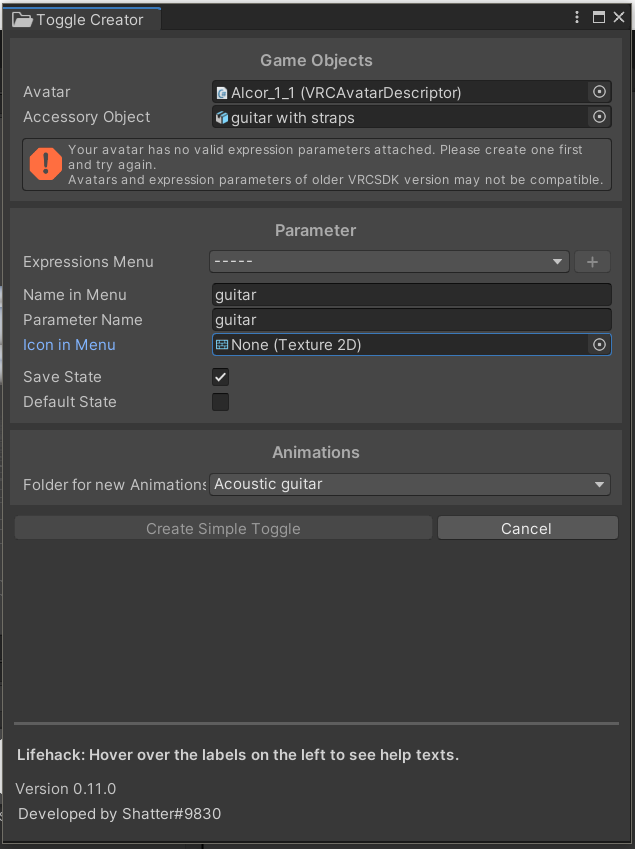
it says i have no valid expression parameters attached

Post image
2 Upvotes

r/UnityHelp • • Sep 05 '23

Can't log in to Unity Hub

2 Upvotes

So I'm trying to access Unity Hub but I can't log in to Unity. I've got Unity Hub 3.5.1 and a Unity 2020 version installed. I don't have 2FA enabled. After I enter my login details, it asks for a verification code (pic below). I get the email instantly, but when I enter the code, it just resets this prompt and keeps asking for a code. I haven't logged in for a year probably, and just updated Unity Hub today. I've tried with two different accounts, and I've also tried creating a new account with a different email - the same thing happens.

I've already sent an email to Unity Support, but their response time is 7 days, and I wanted to access Unity to brush up on some skills before an interview in 2 days. Any insight into this would be greatly appreciated!


r/UnityHelp • • Aug 01 '23

OTHER how to setup unity so it automatically imports my most used/favourite packages.

2 Upvotes

r/UnityHelp • • Jul 27 '23

Trying to Make World Map UI

2 Upvotes

Hi!

I'm trying to create a map UI for my open-world RPG game, alike to the one in WoW, and I'm really having trouble with how I should implement it.

I have the art all in place. I just need to make it so that the player marker corresponds to where the player is on the map, switches local maps when I the player goes a new area, and moves the player marker to the proper spot once in a new area.

My idea for switching maps is to create large 3D shapes that surround each local area, so that when the player collides with the shape, it detects them as being in that area. My idea for moving the player marker is to take coordinates found / programmed within each of the individual 3D shapes, but I'm also not sure how good of an idea this is either.

My whole plan is to make it so I can add maps with relative ease and not too much trouble. Unfortunately, I'm not a skilled programmer. I know some of the basics of Java, which has carried over in my knowledge of C# to program the game. However, when it comes to using that in tandem with the Unity libraries, I get stuck, since I don't have the same experience with Unity than I did with programming.

Would someone be able to provide me some ideas and possibly link me some references to useful commands or sample code I can analyze? Thanks so much for any help!


r/UnityHelp • • Jul 17 '23

Canvas Pixel Size

Thumbnail
gallery
2 Upvotes

r/UnityHelp • • Jul 13 '23

UNITY We created an SDK that allows you to have a voice studio for your characters in Unity

Thumbnail
github.com
2 Upvotes

r/UnityHelp • • Jul 03 '23

PROGRAMMING Seconds before a loop

2 Upvotes

So i have a loop that reduces itself by one. For example its starts at 30, spawns an object then reduces itself to spawn the next object in 29 seconds and it carries on. If i want to play a aound warning about that objects spawn how would i go about doing it? At first it did it on another loop starting at 29 however realised this doesnt work as the time difference increases. I have also tried other methods but seem to be stuck with the same issue. Anyway to achieve the effect im going for or do i need to change my approach?