r/UnityHelp • • Jun 24 '23

PROGRAMMING How do I add 3d objects to my player when a certain button is pressed?

2 Upvotes

I'm making a sailing game and want to make it so that when you press a button, a sail appears on your boat. Any tips on going about this? Maybe I could place the objects there, but then only render their mesh when you press the button. Is there a command for that?


r/UnityHelp • • Jun 19 '23

UNITY How do you get Unity Collaborate working?

2 Upvotes

r/UnityHelp • • Jun 17 '23

How does this even happenng?

2 Upvotes

I'm new to unity and trying to set minimum camera rotation X angle (90), and maximum (-90)
(according to the scene editor this is what I need):

private float maxXAngle = -90;
private float minXAngle = 90;

And I wrote this code:

if (rotation.x < maxXAngle)
{
    Quaternion currentRotation = transform.rotation;
    Quaternion newRotation = Quaternion.Euler(maxXAngle, currentRotation.eulerAngles.y, currentRotation.eulerAngles.z);
    transform.rotation = newRotation;
}
if (rotation.x > minXAngle)
{
    Quaternion currentRotation = transform.rotation;
    Quaternion newRotation = Quaternion.Euler(minXAngle, currentRotation.eulerAngles.y, currentRotation.eulerAngles.z);
    transform.rotation = newRotation;
}

And the results is:
when rotation.x > 180 it sets the rotation on X to 90
and when rotation.x < 0 it sets the rotation on X to 90 too.
I've been messing with this for about 2 hours and still could nor fix this so please help!


r/UnityHelp • • Jun 15 '23

UNITY URGENT: Issue with code

2 Upvotes

Hi, im currently trying to follow https://www.youtube.com/watch?v=XtQMytORBmM&t=2085s tutorial. I don't have any prior experience in coding.

I've hit a roadblock, where I'm trying to make a Boxcollider in the middle of the pipes and was working on the code, but there seems to be a problem, I do not understand where I went wrong because I feel like I've carefully followed all the instructions.

I've attached the C# scripts below, if someone could tell me how to correct this or a corrected version if I've messed it up it would be greatly appreciated. I've been stuck at this for two days and am kind of losing my mind. The worst part is I can't even go ahead and do the rest of it since unity is now stuck in safe mode, would appreciate the help.

These are the errors in getting in the middle pipe script

'LogicScript' is less accessible than field 'MiddlePipe.logic'

'LogicScript' does not contain a definition for 'addScore' and no accessible extension method 'addScore' accepting a first argument of type 'LogicScript' could be found (are you missing a using directive or an assembly reference?)

Thanks in advance!


r/UnityHelp • • Jun 08 '23

HELP ME HELP ME HELP ME

Post image
2 Upvotes

r/UnityHelp • • May 27 '23

Unity Rainbow Pinwheel Crash

2 Upvotes

Hi All. Relatively new to Unity, so this could have a simple answer.. My issue arrises after updating a script within visual studio. I will click run button within VS to update the script, return to Unity and click play. After doing this, my mouse turns into the spinning rainbow pinwheel, and unity becomes unresponsive. This will occur probably 1 out of 3 times. I then have to force quit and lose any progress. I'm enjoying game dev as a hobby but this has been really frustrating.. Any ideas?

I'm using a 2020 Apple M1 with 8GB of memory. Unity Editor Version is 2021.3.8f1

Thanks again and apologies if this is a silly question. New to Unity.


r/UnityHelp • • May 23 '23

how do you add a collider of some sorts to a particle system in 2d

2 Upvotes

i want to make a dripstone that drips little drops that are particles and i want you to get damaged by them but to do that i need a collider on each individual particle how do you do that in 2d??


r/UnityHelp • • May 21 '23

Where to start

2 Upvotes

Hi everyone.

I would love to start making games in Unity but I don't know where to start.

Most of the random tutorials I've found online doesn't help me because I'm mostly interested in making a turn based RPG game, and I've found very little about it.

My programming knowledge is very limited, specialy in C# so I've though that the best first stps would be to familiarice my self with the program.

The problem is that is very difficult to know where to start since there is so much.

I've been looking in the learning part of the Unity web page but it includes information about the industry and about job searching and I'm not very interested in those topics.

Can someone recomend me good tutorials to start with or good courses?

I've searched for a teacher and I've found someone that I think covers my needs but I've thought it would be better to try to learn as much as I can on my own since there is so much information available.

What do you think? Any advise?

Thanks in advance


r/UnityHelp • • May 20 '23

FPS Micro Game Model

2 Upvotes

Hello there everybody. I have been making a game with the FPS micro game template and was wondering if anyone might know how I could add a character model (hands) to the player character. I am new at unity and coding, etc. Thanks a heap


r/UnityHelp • • May 17 '23

Camera Follow on Y axis but not X?

2 Upvotes

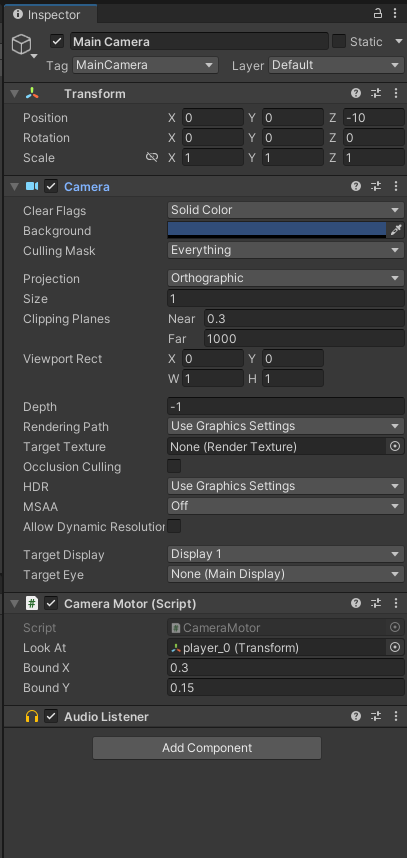
Hey all. New to Unity and following some tutorials. I'm making a Top-Down 2D game and am working on making the camera follow the player. It works perfectly sofar, except for if I try to only move left and right. Up and down and angles work great but if I go directly left and right it doesn't work. Any thoughts would be appreciated. Here's my script:

using System.Collections;

using System.Collections.Generic;

using UnityEngine;

public class CameraMotor : MonoBehaviour

{

public Transform lookAt;

public float boundX = 0.3f;

public float boundY = 0.15f;

private void LateUpdate()

{

Vector3 delta = Vector3.zero;

// Check if we are inside the bounds on the X Axis

float deltaX = lookAt.position.x - transform.position.x;

if (deltaX > boundX || deltaX < -boundX)

{

if (transform.position.x < lookAt.position.x)

{

delta.x = deltaX - boundX;

}

else

{

delta.x = deltaX + boundX;

}

}

// Check if we are inside the bounds on the Y Axis

float deltaY = lookAt.position.y - transform.position.y;

if (deltaY > boundY || deltaY < -boundY)

{

if (transform.position.y < lookAt.position.y)

{

delta.y = deltaY - boundY;

}

else

{

delta.y = deltaY + boundY;

}

transform.position += new Vector3(delta.x, delta.y, 0);

}

}

}

And here's the camera inspector:


r/UnityHelp • • May 16 '23

Android Build Physics isn't working as intended, any ideas?

2 Upvotes

I'm pretty new to Unity and made this little game using the Unity Remote app (whoops), however, when I built the game on my phone, the collision physics fell apart.

The intended interaction is for the hat to pop onto the head when the head catches up to it, which is working fine on my PC, but on mobile, it's like the 2 rigid bodies don't react at all.

I can get whatever further info you might need, but for now, I've dropped a clip of the interaction working properly on PC, and improperly on mobile, along with screencaps of the 2 RBs. I am at a loss.

I've tried messing with the fixed update method and various collision detection options but to no avail...

Any advice would be appreciated, thanks!


r/UnityHelp • • May 10 '23

SPRITES/TILEMAPS whenever i place a tile it seems to take one away anyone know what's up with this?

Post image
2 Upvotes

r/UnityHelp • • Apr 30 '23

having issues with creating a sprite from a camera view

Thumbnail self.unity2d
2 Upvotes

r/UnityHelp • • Apr 29 '23

can you tell me what is wrong with my script? I am making a Gorilla Tag fan game and I am making mod vents. it says this Assets\Scripts\Vent.cs(16,30): error CS1513: } expected this is my script: using System.Collections; using System.Collections.Generic; using UnityEngine; public class Vents : Mon

2 Upvotes

r/UnityHelp • • Apr 26 '23

I am trying to learn unity any suggestions?

2 Upvotes

r/UnityHelp • • Apr 21 '23

made a bottle in blender but in unity its transparent someone help pls

Post image
2 Upvotes

r/UnityHelp • • Apr 05 '23

Help with bug in compute shader

2 Upvotes

First off I am relatively new to using compute shaders in Unity, but I overall am an experienced dev.

I am creating a particle simulator. The main logic to compute the particle's velocity happens in a compute shader. The issue is that randomly some particles will not get updated for a few frames (see GIFs). When I copy the logic to run in a c# script it works as expected.

My thought is that the bug must be in the compute shader. Specifically, I thought it might be caused by a race condition of updating the particle velocity from the shader. I have tried to use GroupMemoryBarrier() and GroupMemoryBarrierWithGroupSync() in the shader (around line 49) but that did not work. My other thought was that it may be a bug related to floating point math as I know GPUs can handle that differently than a CPU

I am stuck as to what could be the issue, or what I could do to better debug the issue.

Here is an example of the behavior where each particle is set to repulse all particles in its range.

Bugged Code (Compute shader):

Correct behavior (CPU):

ComputeShader pseudo code. I replaced some of it with comments to make it more readable:

[numthreads(8,8,1)]
void CSMain (uint3 id : SV_DispatchThreadID)
{
 
    // if the current container is empty, skip it
    if (containers[id.z].length == 0)
    {
        return;
    }
 
    int containerIndex = id.z;
 
    // set of neighbors
    int neighbors[9];
 
    // SET UP NEIGHBORS
 
    // loop through the neighbors
    for (int i = 0; i < 9; i++)
    {
        int neighborIndex = neighbors[i];
 
        Container c1 = containers[containerIndex];
        Container c2 = containers[neighborIndex];
 
        if (c1.length == 0 || c2.length == 0)
        {
            continue;
        }
        if (c1.length <= id.x || c2.length <= id.y)
        {
            continue;
        }
 
        Particle p1 = particles[c1.offset + id.x];
        Particle p2 = particles[c2.offset + id.y];
 
        if (p1.objID == p2.objID || p1.objID == 0 || p2.objID == 0)
        {
            continue;
        }
 
        // GET DISTANCE SQUARED ACCOUNTING FOR SCREEN WRAP
 
        if (distanceSquared < 400*400)
        {
            // CALCULATE FORCE
 
            particles[c1.offset + id.x].velocity += forceVector * force;
        }
    }
}

The shader is called as follows:

computeShader.Dispatch(0, (numParticlesPerContainer - 1) / 8 + 1, (numParticlesPerContainer - 1) / 8 + 1, numContainers);

If you need any more info to help please ask.


r/UnityHelp • • Apr 05 '23

UNITY help with figuring out what to sit mass, drag, and angular drag to?

2 Upvotes

hi, I've been trying to code a racing type game (kinda like sonic riders) and I've been struggling to figure out what to set the variables(mass, drag, angular drag, and others) to get the effects I want, If I change one I have to change the forces of all the inputs and it effects the other variables, and so they need to be changed to, and so the forces need to be changed,,, and so on and so forth, so without an idea as to what to do will just make this a fouls errand.
so is there like a theory to this? something to follow that will help you figure out what to set those variables to?


r/UnityHelp • • Mar 18 '23

PROGRAMMING Unlocking Pages Through Events

2 Upvotes

Okay, here is my code:

using System.Collections;

using System.Collections.Generic;

using UnityEngine;

using UnityEngine.Events;

public class Logbook : MonoBehaviour

{

//defines a new dictionary

private Dictionary<int, bool> treasureDictionary = new Dictionary<int, bool>();

//contains the list of treasures

public List<ValueSO> treasures = new List<ValueSO>();

//contains the list of pages

[SerializeField]

List<GameObject> pages = new List<GameObject>();

//contains the list of treasure IDs

[SerializeField]

List<int> IDs = new List<int>();

//contains the list of page IDs

[SerializeField]

List<int> PageIDs = new List<int>();

//contains the events

public UnityEvent onZero, onOne, onTwo, onThree, onFour, onFive, onSix, onSeven, onEight, onNine, onTen;

//[SerializeField]

//LogEnt logent;

//called before the first frame update

void Start()

{

//creates the list of page IDs

for(int i = 0; i < pages.Count; ++i)

{

//gets the ID of each page from its corresponding LogEnt script

object obj = pages[i].GetComponent<LogEnt>().ID;

//adds the pages to the list

PageIDs.Add(i);

}

}

//adds the treasure UIs to the dictionary

public void AddTreasureUIToDictionary (int ID, bool isCollected)

{

//treasureDictionary[ID] = isCollected;

treasureDictionary.Add(ID, isCollected);

}

//acts if a treasure is added to the bin

public void CollectTreasure(int ID)

{

Debug.Log("Log entry added");

//LogEnt uiElement;

//if the treasure's ID is recognized, communicates to the UI

if (treasureDictionary.ContainsKey(ID))

{

Debug.Log("collect treasure");

//uiElement.CollectTreasure();

}

//if (treasureDictionary.TryGetValue(ID, out isCollected))

//{

// }

}

//compares the lists

public void CompareLists()

{

//populates the list of treasure IDs

foreach(ValueSO v in treasures)

{

IDs.Add(v.ID);

}

//displays the corresponding page to the found treasure

foreach(int p in PageIDs)

{

if (IDs.Contains(p))

{

Debug.Log(p + "is in the list");

if(p == 0)

{

onZero.Invoke();

}

else if(p == 1)

{

onOne.Invoke();

}

else if (p == 2)

{

onTwo.Invoke();

}

else if (p == 3)

{

onThree.Invoke();

}

else if (p == 4)

{

onFour.Invoke();

}

else if (p == 5)

{

onFive.Invoke();

}

else if (p == 6)

{

onSix.Invoke();

}

else if (p == 7)

{

onSeven.Invoke();

}

else if (p == 8)

{

onEight.Invoke();

}

else if (p == 9)

{

onNine.Invoke();

}

else if (p == 10)

{

onTen.Invoke();

}

}

}

}

}

Here's what I want my code to do: I want a function that lets you flip between pages by pressing an UI button, and I also want it to check if the event that sets the pages to active has already been activated, and if the event hasn't, the page is skipped. And if you hit previous on the first, you go to the last, and if you press the button for next on the last page, you go to the first. How would I go about doing that?


r/UnityHelp • • Mar 07 '23

UNITY someone explain to me like I am 5 year old what do I do?

2 Upvotes

https://imgur.com/KP7r402

#c without playing with the code this messages doesn't happen. Soon as I play with the code. I get that error message I really new to unity

This is the code that I am trying to put into c# I get that error message when I drag and drop onto player file name is called player as well

using System.Collections;

using System.Collections.Generic;

using UnityEngine;

using UnityEngine.AI;

public class Mover : MonoBehaviour

{

[SerializeField] Transform target;

// Update is called once per frame

void Update()

{

GetComponent<NavMeshAgent>().destination = target.position;

}

}


r/UnityHelp • • Feb 06 '23

SOLVED Am I saving in the right spot, I don't want to lose my project

Post image
2 Upvotes

r/UnityHelp • • Jan 28 '23

How to get Game over after 3 characters have died

2 Upvotes

So making a turn-based game for a school project and I was wondering how would get the game to check if all playable characters have died. Should I have the GameManager script checking for it? Atm, I Have a counter in the Healtsystem that increase every time a character's health reaches zero but it doesn't feel optimal to do it that way + I can´t attach textmeshPro Text game over texts to a prefab.

here is the Healtscript

using System.Collections;
using System.Collections.Generic;
using UnityEngine;
using System;
using TMPro;
public class HealthSystem : MonoBehaviour
{
public event EventHandler OnDead;
public event EventHandler OnDamaged;
    [SerializeField] private int health = 100;

private int healthMax;
private int deathCount = 0;
private void Awake()
    {
healthMax = health;
    }
public void Damage(int damageAmount)
    {
health -= damageAmount;
// prevent minus health
if(health < 0)
        {
health = 0;
        }
OnDamaged?.Invoke(this, EventArgs.Empty);
if(health == 0)
        {
Die();
        }
    }
public void Die()
    {
OnDead?.Invoke(this, EventArgs.Empty);
deathCount += 1;
    }
public float GetHealthNormalized()
    {
return (float)health/healthMax;
    }
public void Death()
    {
if (deathCount == 3)
        {
//Game over
        }
    }
}


r/UnityHelp • • Jan 26 '23

New to Unity and have a UI issue

2 Upvotes

I'm not very experienced with Unity, but I do have two scenes that work fine when I'm in the Editor and click Play. But when I do a Build, my first Scene with 2 basic UI buttons on a menu does not work. It works fine in the editor but not on the build. I have to Ctrl+Alt+Del each time. Is there something minor I'm missing here? Or do you know if this is a code issue I need to debug?

It's a New 2D Project, the first button is to Play the game and just opens up Scene 2, and the second button is coded to Exit the Application.