Feeling like a real noob again. I'm trying to create a feathered, circular sprite mask, so the opacity is lessened at the outer edge of the circle, making masked objects barely visible before disappearing outside of the mask, and fully visible toward the center. Thanks!
I have a game object (paddle for a pong like game) that is an arc and I want make this arc longer. Normal scaling will make it larger, but will also make the radius larger, and it will no longer fit the play field. I'm wondering is there a clever way to scale the arc without changing the radius? Or do I need to make a separate object for each size, and make them active as I need them?
If the only choice is to make a paddle for each size, is there a method you would recommend to handle them all? I would like to have 100 different sizes.
EDIT:For anyone with a similar issue: The solution I found was to use Unity's built in line renderer. This is simpler and more efficient then loading 100 different sprites.
Scaling a secant in a non-polar method without changing the radius seems to be impossible. You just have to draw more arc.
So just a brief explanation of what I'm doing.. I'm building a theme park.. I have 2 functioning rides a box that moves along a track, and a spinning ride that moves the player up and down and spins around in a seat a cyclone esque ride, for the most part it seemed to function fine, untill I started moving stuff, I know my script is sound so I don't think that's the issue.
But when for instance I move around in the world then get on the ride it offsets the player from the distance of 0,0,0 to the ride so the player ends up 50ft away from the spot hes ment to be at.
But only when I'm wearing my quest 2, if I for instance grap the player rig and drag it over the trigger in the scene window without my headset plugged in it all works perfectly, but when I'm wearing the headset and walk over the trigger it offsets.. does anyone know what's causing my issue because its really threw a spanner in my works and I'm not able to progress
using System.Collections;
using System.Collections.Generic;
using UnityEngine;

public class Cookable : MonoBehaviour
{
    private Renderer _renderChicken;
    public GameObject objChicken;
    public Texture2D cookedChicken;

    void Start()
    {
        _renderChicken = objChicken.GetComponent<Renderer>();
    }

    void OnTriggerEnter(Collider other)
    {
        _renderChicken.material.SetTexture("_MainTex", cookedChicken);
    }
}
The idea is that my chicken prop can be placed into a trigger (the inside of an oven), and its texture will change into that of a cooked chicken. How do I change my code to do that?
Help! I'm doing a top down shooter in unity and are creating a simple enemy follow, this is also the base of other scripts and I'm getting an error. How do I fix it?
I am trying to split my sprite sheet into cells using the sprite editor, with less than favorable results. I have been able to do this before, with the same cell size, but compiling all of my individual sprites has lead to several complications.
So, a little disclaimer, the pixel size of the sheet is... 9000 x 18000. Yeah, that's a lot. Each cell is a 1000 x 1000 sprite, which I recognize is not optimal in the slightest. However, until I finalize my sprites, it's not easy to condence the boundaries so all of my frames align. Like I said before though, I've managed to use 1000x1000 sprites on smaller spritesheets before.
In order to get any clarity for starters, I used to be able to go down to even 1024px for my max size, but now that is only possible with 16384.
The size I've been using for my other sprites before was 350 ppu, so that is still there.
Finally, the sprite editor will not even let me automatically slice by grid count. Even if it did, the compression would likely make the border that separates each sprite cut in.
Any help on how to optimize my little mess would be helpful. I can provide images on an as-needed basis. Thank you in advance!
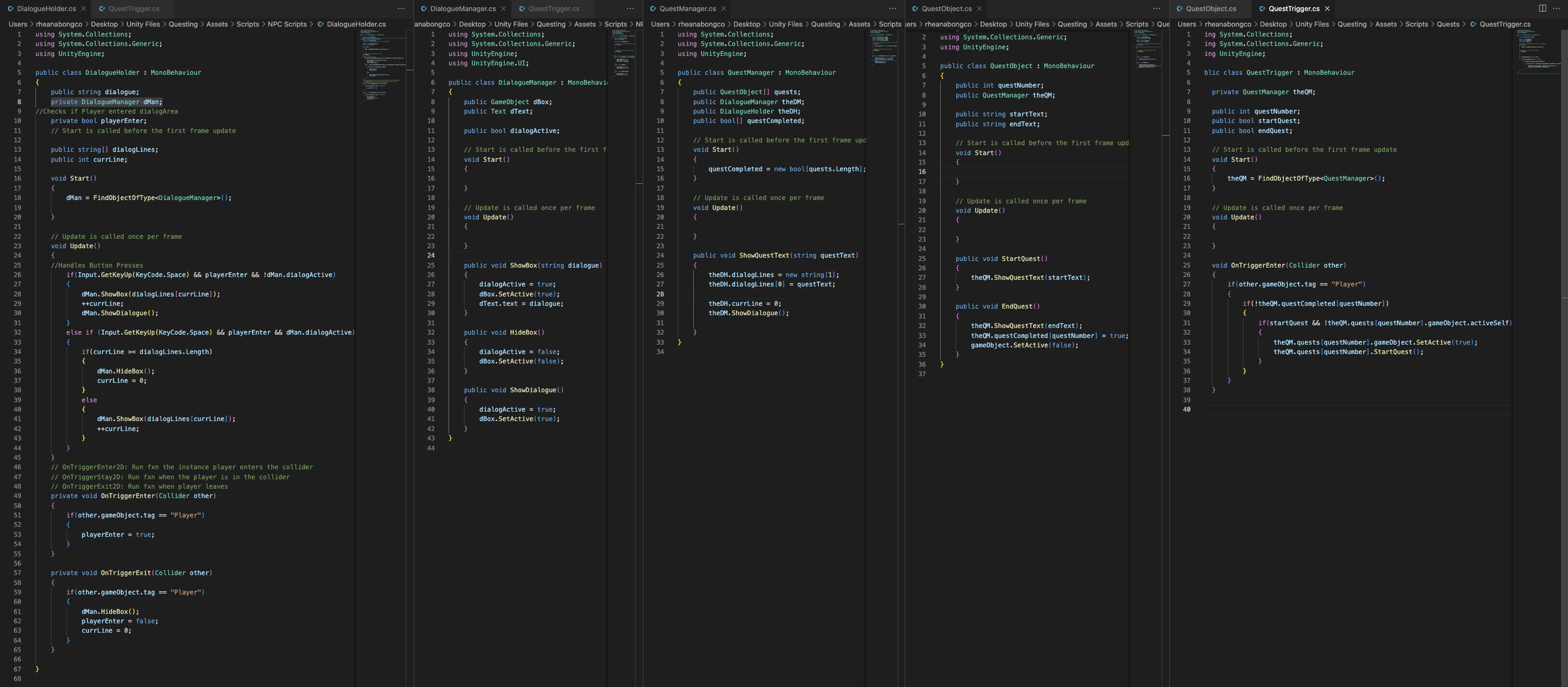
I have been following this tutorial but what I want is to attach the quest to the NPC dialogue. How can I do that? This are the codes. Thank you so much!
In the game you can have an interaction with the NPC where the NPC gives out dialogues, what I want is to also have the quest on the NPC so that after the NPC gives out his story dialogue it will then tell as his last dialogue the quest. For example, NPC: Hello, how are you? This island is filled with trashes, it was caused by the past villagers who used to live in here. [Press space to continue] Can you help me clear out the trashes? [Press space to continue]
Then after talking to NPC, there will be the summary of the quest on the top corner.
So it's been awhile since i started this project, This issue flared out of nowhere, When rendering on CPU I Don't have any major lighting issues, But when i render on GPU the issue suddenly arrises from nowhere.
(Its like the map had a water leak and its just spread to diffrent peices of maps)
Initally I thought it was an GPU issue as the lightmaps showed artifacts, So i went out next day bought a 2nd 3090 to replace my current, The issue still occurs now, with 1 or 2 cards installed.
I am new to unity and I'm trying to make a runner game. At first I used a normal cube as my player and the box collider worked perfectly fine. But when I imported a player asset online I began having issues with the box collider.
The problem is that the onGround bool is always set to false even when my player is on the ground. I tried resizing the box collider and I tried using a mesh collider but nothing worked. Any idea of how to fix this?
I am following a tutorial on YouTube and the dropdown for the movement script ground check is not appearing i cant find anything in the code. I am new to coding so idk pls help
I have two UI Images in two separate projects that both use the same source image file. In each project the images appear differently. In the imgur link below you will see that they use the same source image but appear different. The UI>Image like crops it or something?? The settings for the UI>Images are identical.
I cant figure out how the crop is done or why it's different between the projects.
I just started trying some game development, and I would like to send my game to some people for testing, feedback, etc. I am on Mac and some of them are on PC. When I open my Build Settings>Target Platform, mac is the only option. I am also interested in learning how to make or use an installer for easier distribution over mac (and windows once I am able to get a build there). I have done a lot of googling into both of these questions with not much help (the only couple times I thought I found something for mac distribution, it was out of date). Any help for either of these would be awesome!
I'm trying to make a script where if a particle from a fluid simulation asset hits a game object, it deletes it. I don't get any compiler errors from it but cant seem to figure out why it isn't working.
I'm new to Unity and C# in general so I might have screwed up some simple thing.
Obi is the Fluid simulation asset.
Here is the code:
using System.Collections; using System.Collections.Generic; using UnityEngine; using Obi;
[RequireComponent(typeof(ObiSolver))] public class somethig : MonoBehaviour { ObiSolver solver;
var world = ObiColliderWorld.GetInstance(); foreach (Oni.Contact contact in e.contacts) { // this one is an actual collision: if (contact.distance < 0.01) { Destroy(Cement_Floor); } } } }
I am wanting to build a large (2km x 2km) farm of row crops on a non-smooth terrain. I don't want to place them by hand for obvious reasons. I figured I could make a prefab of the crop building up to a grid, but then the crop would be floating or below the ground.
Is there a way to either make objects in a prefab follow the terrain under them, or a script I could write to place plants in large rows? I am still fairly new to Unity so I would like all the guidance I can get.
I've been programming for a while now, so I recently decided to start working on my first ever Unity game. I know nothing of design patterns or game architecture, and I know that my game's code is poorly organized. In order to visual any issues in the overall architecture, I mapped out all of the scripts within my game.
=== EXPLANATION ===
Each block represents either a .cs file or a game object in Unity. Each color represents the general role of each block.
Green - Scripts used by instances of objects/UI elements.
Red - Scripts which act purely in the background/manage UI elements.
Orange - Game objects.
Blue - Static, global scripts.
Each arrow designates a specific relationship.
Bolded - The source script inherits from the target script.
Dashed - The source script stores a direct reference to the target script/object.
Dotted - The source script references a function originating from the target script (only used when referencing static classes.)
With that out of the way, here's some fresh spaghetti. I know the function of each script/object is not given, which makes analysis far more difficult, but are there any strikingly horribly design patterns in this mess?
Hey everyone, I've been googling around for a while now and am not seeing this issue anywhere else online, so I decided to make my first post here. I am having an issue in my game that crashes Unity on the second "play". The first time I hit play, the game runs fine, but it's the second time I do it that it crashes every single time.
My problem is with the SkinnedMeshedRenderer.SetBlendShapeWeight() method. If I disable this single line of code everything is fine. So I'm extremely confident that SetBlendShapeWeight() is the culprit. I'm currently using SetBlendShapeWeight() when a character in my game equips a new piece of gear, like a shirt. The function will adjust the shirt to fit the character's size. We essentially have a large and small character.
Does anyone here know why this might happen, or have any insight on to the proper way to use this function? Thanks in advance!