This configuration of the Stremio app will allow you to stream movies/TV from most devices, with the exception being IOS devices such as the iPhone and iPad. If you want to stream from those devices, this guide is not for you.
You can use this Stremio configuration to stream movies/TV on most other platforms, including Windows, Mac, Android, FireOS (includes Fire Stick and Fire TV), Linux, AndroidTV, and even the Steam Deck.
However, the Stremio setup guide will require that you use a Windows, Mac, Linux, or Android device. Please don't attempt the setup steps on another device.
Additional information for FireOS (includes Fire Stick and Fire TV) and Linux devices is located below the Stremio setup guide, but you need to go through the Stremio setup guide beforehand with a required device (Refer to previous bullet point).
Stremio Setup Guide
Part 1: Stremio
For Windows/Mac users - Go to https://www.stremio.com/ and download the relevant client for your platform
Towards the bottom of the page, select the "Debrid Provider" option and select "Real Debrid" from the drop-down menu. This will cause a new text box to appear underneath.
In the Debrid Options menu: Check the box "Don't show download to debrid links" and leave the other boxes unchecked.
Click "Install" at the bottom. It should open the Stremio app and prompt you with an "Install Addon" window. Click the green install button at the bottom.
Optional but highly Recommended - In Stremio, click the puzzle piece in the top right to view your addons. Click "My Addons" and uninstall the "WatchHub" addon. It's an eyesore and it clutters your streams list.
Now that you have completed the setup, you may install Stremio on any device of your choice (excluding IOS) and log in to your account to start streaming Movies/TV. Refer to the section below for Stremio installation on FireOS devices (Fire Stick, FireTV).
FireOS devices (Fire Stick, FireTV)
After you have gone through the setup on another device, watch this video on how to install Stremio on your FireOS device https://youtu.be/U1o-scADuIg and then log into your account in the Stremio app. At this point you're good to stream. It will download everything that you just set up and sync your shows across all devices. However, some FireOS devices may not be capable of 4k streaming.
Edit 10/16/2023 - if you are on firestick, make sure to download the Android TV apk from the Stremio downloads section. The youtube video linked above was created before Stremio had an Android TV version. The UI is much improved over the base android UI for use on a smart tv.
Linux
Use the flatpak and everything should work. At the time of making this guide, I had issues in the setup process on Linux but I'm pretty sure that was my fault for having weird defaults on my Arch install. You should be able to complete the setup process on Linux without issues and streaming is guaranteed to work. In the case that you run into issues, Just complete the setup steps on a recommended device first, then install and log into the Stremio app on your Linux device.
Additional information
YOU DO NOT NEED A VPN.
Account sharing: You should only share your Stremio account with people who are connected to the same WiFi network as you. If you do not follow this rule, your Real Debrid account may be suspended.
Bugs/Glitches:
Sometimes, an episode of a show or a movie will display "No streams found" even though it should be available. This has only happened to me a handful of times, but the problem will resolve itself eventually.
If the picture is black but the audio is still playing, you should go back and select a stream with a different resolution.
Issue: No streams are appearing at all, or none of them work. Here are the possible explanations:
Your Real Debrid Subscription has expired. Go to Real-Debrid and check your account status.
Real Debrid servers are down/undergoing maintenance. Wait an hour or so, and then try again.
You made a mistake while following the guide. My DMs are open if you can't figure it out. I'll probably try to help.
Hey everyone, I created a website to host what is hopefully the only guide you will ever need. Any suggestions to improve or correct the guide are welcome.
The website has explanations for how everything works and step by step instructions with images to help you.
I noticed most people keep asking the same questions repeatedly, so I have decided to create some kind of hub where most of the answers can be found. Let's go ahead and get to it.
What is Stremio?
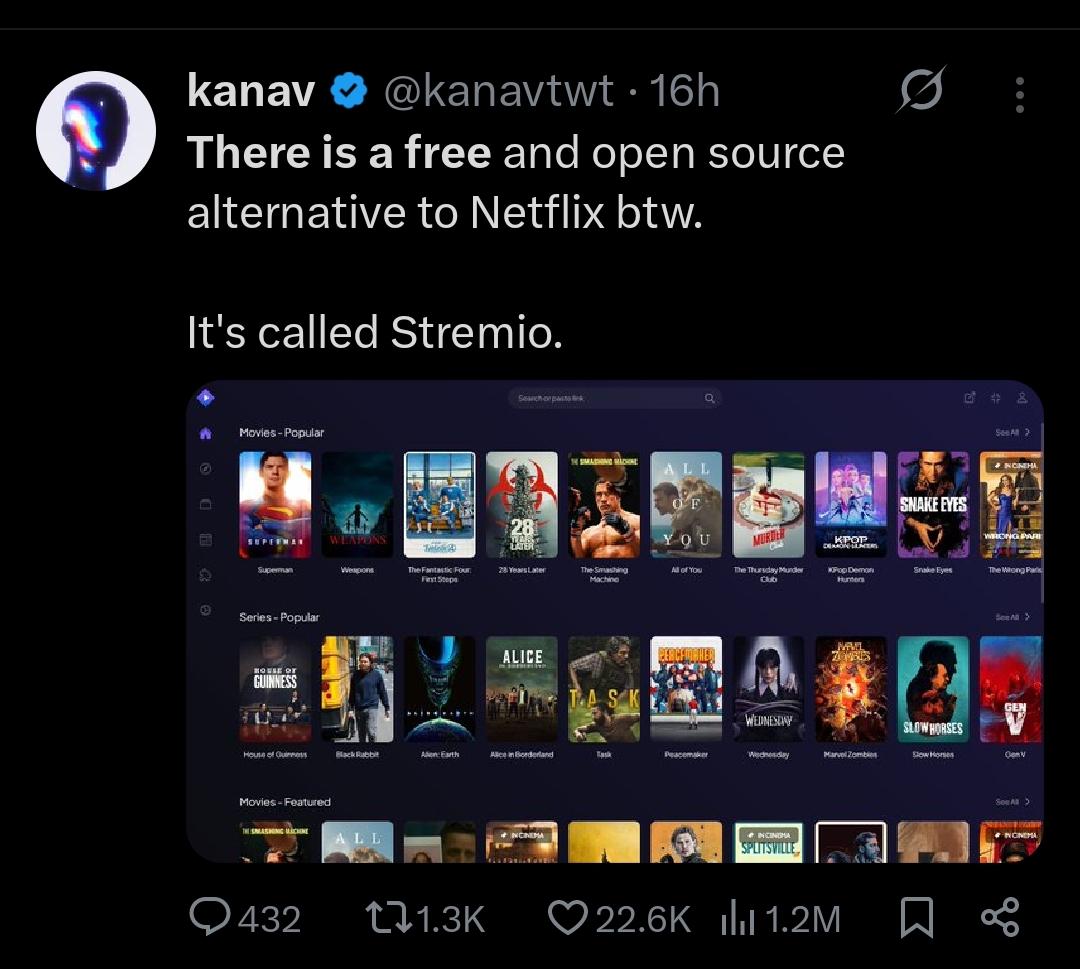
Stremio is a free streaming app that lets you watch movies, TV shows, live channels, and more.
What platforms are supported?
The application currently supports Windows, Mac, Linux (including Steam Deck), Android, Android TV, Samsung TVs (2019+), LG TVs (2020+), IOS, and Web.
What differentiates it from other streaming apps?
Among its many cool features, the highlight is its add-on system, which allows us to expand what we can watch, including copyrighted content. Torrentio is the most popular.
What is Torrentio?
It is an add-on that provides torrent streams from scraped torrent providers. Currently, it supports YTS, EZTV, RARBG, 1337X, The Pirate Bay, and KickassTorrents, among others. The addon also supports debrid services.
What is a debrid service?
A debrid service is an unrestricted multi-hoster that allows you to stream and download videos instantly at the best speeds. In plain English, the debrid services act as a proxy between the BitTorrent tracker and you, so you download the content directly from their servers at high speed. Most of the content is already cached, meaning you can instantly access it.
Do I really need to get a debrid service?
My recommendation is yes, get one. Why?
High-speed downloads, no buffering. Yes, including 4K content (your experience might vary based on your internet connection).
If you live in a country where internet providers monitor torrent activity, you are safe with one.
Content may be available even after the original source is no longer available.
A small cost gets you a Netflix-like experience for as little as $3 US dollars per month.
If you live in a country where torrenting is allowed or have a VPN and are okay with some buffering here and there, you can skip it.
Debrid providers
My recommendation is Real Debrid due to its excellent cost-value benefit (just ignore the drama from a few months ago; it is still the best option for most). If you get the 6-month subscription, the monthly cost is around $3 US dollars. Another alternatives are AllDebrid or TorBox, which are at a similar price.
Note: You cannot use the service from several locations at once. You are allowed to connect from unlimited devices as long as they use the same public IP address. If you do, you risk having your account banned. TorBox, Premiumize, and EasyDebrid don't have this limitation.
There are other options compatible with Torrentio, but the cost tends to be much higher. Although some may offer additional features:
You can find here a detailed post comparing content cached on the different debrid services.
Automated setup
Now that we have covered the basics, you can automatically set Stremio up by using Stremio Account Boostrapper.
Stremio Account Bootstrapper lets you set up your Stremio account with just a few clicks by bootstrapping a preset into your account. It's handy for newcomers, those who want a solid foundation to build their setup on, or to speed up the process of setting up new accounts for family members or friends.
Manual setup
Setting up the application
I recommend you complete the initial setup on a computer due to a web browser is needed.
Install the application from the official website or your device store.
Create an account
Uninstall WatchHub and Public Domain Movies from the addon section.
Note: if you own an Android-based device that doesn't include Google Play Store, for instance, a Fire TV. You either need to download the app through an alternative store like Aurora Store, Aptoide, APKPure or sideload the apk (a quick search will teach you how to do it if it is your first time).
Priority foreign language: defaults to English. Change it if that is not your preferred language.
Exclude qualities/resolutions: check "screener" and "cam" to filter out low-quality videos. You can also check "4k" if your connection is not fast enough to reproduce high-quality videos.
Max results per quality: 10
Video size limit: leave empty. If you have a slow connection or limited bandwidth, you can limit the video size. For instance: 2GB, 800MB (2GB for movies and 800MB for TV shows).
Debrid provider (optional): if you pay for a subscription, select your provider.
Debrid API Key (optional): click "here" and follow the steps to get your API key based on your provider.
Debrid options (optional): check "Don't show download to debrid links" and "Don't show debrid catalog."
This is the last step for the basic setup. Now, go and enjoy your favorite movies and TV shows.
Although, if you want to improve the experience, please keep reading.
How to add streaming platforms catalogs
Besides the default catalogs (lists), which cannot be removed, we can add additional ones to the home through addons.
Streaming Catalogs provides us with listings of the most popular streaming platforms:
Once you are done selecting the platforms and finished with the installation, you will see new catalogs based on those selections. This is what it looks like:
Customized catalogs
This is where things get interesting. It is cool to add new catalogs based on the content from streaming platforms, but if you are like me, you probably don't care much about which platform the content comes from and more about the content itself.
The Trakt addon is the tool that will allow us to create an experience tailored specifically to us.
What is Trakt?
It is a media tracking service that helps users sync their TV shows and movies across numerous platforms and devices.
Setting up the Trakt Lists addon
Install the Trakt addon from the addons section or from here
The standard Trakt lists are static. In other words, if the owner of the list or collaborators don't maintain them, the content won't get updated. This might be okay for some types of lists, but dynamic lists are generally a better option. That's when MDBList and couchmoney come to the rescue.
MDBList
It offers a plethora of filters to match our search criteria. For example, we could create a list where action movies from 2010 to the present with over 60 rank on Rotten Tomatoes order by release date are shown. We can create up to 4 lists with a free account. A Trakt account is required if we want to create our own lists.
Couchmoney
It also creates custom lists based on recently watched, trending, or a specific list. We can filter the content by date, genre, language, and popularity. We can create up to 10 lists. A Trakt account is required.
Now that we have covered the basics, let's go and add a few lists.
Thanks to other users, we are not required to create our own lists. Instead, we will use public lists which donot need a Trakt account. I recommend you take a look at the MDBList lists from Gary and Riz.
Once you have found the ones you are interested in, we will add them through the Trakt addon. To easily find the list, use the search function, including the username and the list name. For instance: "garycrawfordgc horror".
The steps to add lists created by Couchmoney are the same. Keep in mind that you are going to need a Trakt account and some content marked as watched for the tool to be able to start making suggestions.
Once you are done adding the lists, it should look something like this:
Note: you can use a combination of static public and own Trakt lists, public and own dynamic lists created by MDBList, and own dynamic lists created by couchmoney.
Click install, and tadaaaaaa!
Note: you DO NOT need a Trakt TV account if you add public lists. It is only required if you want to access your own private lists (Watch List or Recommendations, for example) or if you want to keep track of what you have watched (scrobbling).
Include ratings over the covers
Rating Poster Database has recently introduced a free tier that allows you to display IMDB, Metacritic, and Rotten Tomatoes ratings over the covers. The most popular catalogs addons include support for it, including Streaming Catalogs, Cyberflix Catalog, Trakt.tv, among others.
Go to RPBD website and create a Patreon account to get a free key. Once you have received it, introduce it in the addon/s you have chosen, and it would look like this:
That concludes the advanced setup. Congratulations, you are ready to enjoy the ultimate streaming experience!!!
Can I watch live TV?
Yes, you can. My recommendation is the USA TV addon that offers over 160 US channels in HD, including news and sports.
How to watch anime on the platform
Torrentio, along with other popular add-ons, provides most of the content. However, it is recommended to install Anime Kitsu to make sure the metadata is resolved correctly.
How to watch Asian dramas
The most popular add-ons provide some Asian content. If you want to expand the chances of finding what you are looking for, please install the StreamAsia add-on. More info can be found here in the official addon post.
How can I change the order of my addons?
Stremio currently doesn't allow users to change the order in which their installed addons appear on the home screen. As a workaround, it is common for users to remove and re-install add-ons in the order they want them to appear. This is a tedious and cumbersome process as you can imagine.
Addon Manager uses the internal Stremio API to manipulate addon order without having to add/remove them.
Note: the default lists cannot be removed, but you can push them down or you can useHidden Cinemeta. Stremio Account Bootstrapper already does this for you.
FAQ
Is it safe to use?
Yes, as long as you take normal precautions. For instance, always download the app from official sources.
Is it legal?
The application itself is legal. However, depending on the addons you install, some might not.
Do I need a VPN?
It depends. If you are using a debrid service, you DO NOT need a VPN to safely stream content on Stremio, regardless of whether you live in a torrent-friendly country or not. Although, you might still want to get one to improve your security outside Stremio.
Countries like Spain, Switzerland, and Poland are safe regarding torrenting. Mexico, The Netherlands, and much of Eastern Europe tolerate or ignore it. However, Australia, Canada, UK, and US are stricter.
Please research about the situation of the country you live in. If it is not part of the friendly ones, you must pay for a debrid service (recommended) or a VPN.
Do I have to repeat the setup process on every device?
No. Stremio is cloud-based. Whatever you change in your account will be reflected across devices, including add-ons, library, in-progress content, etc. Just install the app and log in with your credentials.
Stremio is not available for my device. Can I still use it?
Yes, you just need a web browser. If Stremio is not supported by your device or you don't want to install the app, Stremio offers a web client. Just access https://web.stremio.com/, enter your credentials, and you are good to go.
iPhone/iPad support
As of August 2025, the Stremio team has released a native IOS app. You can install it from the store. More info here.
You can also enjoy the full experience through the web client along with an external player . The details of how to set it up can be found in Stremio's blog.
Both options require a debrid service, it WON'T work without one.
Where can I find more add-ons?
You can find them in the add-ons section within the app or on this excellent community list or search this subreddit. If you cannot find it in those places, it is very likely that doesn't exist.
Can I mark the content as watched on my Trakt account?
Yes. Go to settings and log into your Trakt account (not present on Android TV). Stremio will automatically mark it as watched once you finish watching a movie or TV Show.
I'm a dev, and I would love to develop my own addon
Please be respectful of my time and go over the guide before asking questions. If it is not clear or hasn't been covered in this post, I will be more than happy to answer your questions. More experienced users are welcome to chime in as well.
Even though Stremio wasn't initially designed as a live content video player, there's a strong demand for watching TV on the platform, and this addon aims to fulfill that need! 😁.
This addon aims to transform Stremio into an all-in-one app where users can also enjoy live content that matters most to them along with their favorite movies and TV shows. Whether you're tuning in to watch your favorite team's match, staying updated on daily events, entertaining your kids with cartoons, or exploring nature and history documentaries, now you can do it all!
Stremio doesn't replicate a traditional cable experience; instead, the idea is to select a channel and let it play in the background.
I curated this list based on viewership, popularity, availability, and community feedback, opting for a more minimalistic approach (channels that people would be willing to pay a cable subscription for).
No more sketchy sites or apps, full of ads, geo-restricted, and low-quality streams, and fully integrated into our favorite streaming platform!
What does the USA TV addon include?
The add-on provides access to over 180 HD/FHD channels across various categories including local channels, news, sports, entertainment, premium, lifestyle, kids' shows, documentaries, Latino programming, and much more.
You can find the complete channel lineup here. (deprecated)
Tested on Android TV (mainly), Android (built-in and VLC), Windows, Samsung TV, LG TV, and Linux using the built-in player, andiPhone using Outplayer.Web client is not supported without an external player.
To keep in mind
Like any TV-over-internet service, there is inevitably some delay.
Channels focusing on movies or TV shows are not the priority (even though, some are included when live events are broadcasted or when their programming is hard to find on the platform)
If you are looking for a large line-up, EPG, DVR, etc, this is not for you. This addon doesn't try to replicate an IPTV service with every channel in existence, it just gives access to the content that cannot be obtained on demand and most people are interested in. Please check theTVApp if this add-on doesn't fulfill your needs.
Some channels may take longer to load initially or be buffered until cached. Please be patient. Your internet connection also plays a big role in the stream's stability.
Channels may be added or removed without prior notice, depending on availability.
The add-on utilizes publicly available IPTV streams, and a VPN is not mandatory.
I may add a couple more channels in the future, but please don't request specific channels. Maintaining all streams requires significant time and effort, adding more channels only increases this workload.
No, I won't expand the content to other countries/regions. However, you can access my original project if you are interested in Argentinean/Latin-American programming.
The fine print
This add-on DOES NOT stream or re-stream the signal; it utilizes publicly available streams. I am not responsible for how it is used by the end user. It is provided 'as is,' without any warranty, express or implied. Please use it at your own risk!
I recommend installing it from a computer as it requires a web browser. Once installed, it will sync with your other devices.
You can access it from the Home or Discover (TV Channel) sections. The Discover section allows you to filter channels by category, making it easy to find the channel you want. You can also add your favorite channels to the library for quick access.
Pro tip: If you would like to have the TV catalog at the top of the home section, please use theStremio addon manager.
I've been running this on free stuff for a while, but I'm investing in a proper server to level up the experience. Yep, I'm paying for this out of pocket — for all of you to enjoy even a better FREE product.
As you know, I don't accept donations. However, if you want to chip in to help cover server expenses — be my guest.
It doesn't mean we cannot access programming listings because Stremio doesn't support it.
If you would like to have access to the USA TV programming, please create aTitanTV account. Once you have created the account, go tomy lineups, temporarily disable your ad blocker, click "Create Token Lineup", and enter the following token:
...create a bookmark and you are done! You can now visualize all the programming (the channel order matches the add-on), search, filter by genre, set a reminder, and even save programs as favorites.
Note: The TV guide is based on Spectrum Manhattan, therefore,EST.Only NY/East Coast local channels were added.
Recommended to use an ad blocker addon or a web browser with an ad blocker built-in. For instance:AdBlock,uBlock origin, or Brave.
The channel lineup doesn't get automatically updated when I make changes to it. You will need to re-enter the token
Troubleshooting / Support
Before asking for help, please try basic troubleshooting, such as clearing the cache, rebooting your device, checking your internet connection, logging out/in, installing the latest version, etc.
I run daily tests to verify the status of the feeds, so I know if a channel went down. No need to flood the sub with messages.
This addon includes public feeds that come and go, this is expected.
Errors like ERROR_CODE_IO_BAD_HTTP_STATUS mean the server is not responding. This could be a temporary issue or not. Rest assured I will fix it as soon as I have the chance, not just the minute it happens.
The servers might get overloaded at times and there's nothing I can do about it. Try an alternative feed if there's one.
If it still doesn't work, please add a comment including the channel, platform, app version, and issue description, and make sure it is not a temporary problem before posting.
Speaking of support, leaving a comment and liking the add-ons page is appreciated.
I won't answer DMs!
Preview
Update (07/24)
I have added a bunch of channels since the release check the channel line-up to see what is currently available) and removed some others that weren't stable enough (mostly the Warner Bros Discovery-owned). Since the DMCA take-down, I'm struggling to find more sources. If anybody has access to some stable streams (Discovery, History, etc), please dm me.
If you wonder what the criteria is to include a channel or not (yeah, it is not random). I'm mostly pulling the data from TV Channels Ranked by 2023 Viewership, Suppose.tv, and Sports TV Without Cable, no widely available VOD, popularity, and availability, along with the feedback from the community.
Also, all the channels work with the built-in player and external players (VLC, OutPlayer). I got confirmation from some users (thank you!), that it works as expected on Apple devices (web client + external player), Samsung and LG TVs as well.
Finally, the addon hasn't received much love on the Stremio add-ons page. Please, if you are enjoying it, leave a comment. The track record when it comes to live TV addons on Stremio is not the best and people might be hesitant to try it because of that.
I hope everybody is enjoying their favorite TV programming!
Update (07/27)
I have created a TV guide on TitanTV to act as a companion for the addon. I've also added several new channels (Syfy, NFL Network, ID, and Paramount) to complete what I believe is the final lineup. Although a few notable channels (Discovery, Nat Geo, History) are still missing due to unavailable sources, I’ll try to re-add them if I find alternative feeds. Finally, I have introduced so many changes since the release that I have bumped the version to 1.1 (you don't need to do anything on your side, you will get the latest changes regardless).
Before wrapping up, I would like to share how I've been feeling over the past few days... a bit disappointed and pissed off at times. I’ve encountered some disappointment and frustration, partly due to the constant demands and some negative comments I’ve received despite the significant effort put into this project, which has far exceeded my original scope.
I didn't intend to rant, but I believe it's important for us to address these issues so that we can learn and grow as a community. To illustrate this, a recent example was a kid selling empty promises that got 800 likes in a matter of hours just for... a good marketing campaign, while the guy who delivered the first functional live TV addon had to put up with a lot of nonsense.
The right expectations were set from the very beginning regarding what the addon can and cannot do. I kindly ask that you appreciate the work provided for FREE and think carefully before posting your comment. Remember, less than a week ago, there wasn’t even a live TV addon available (with many claiming it was impossible).
My motivation comes from knowing that this addon has made a difference in your lives—whether it’s helping you set up Stremio for your grandpa’s westerns, watching the game with your brother over the weekend, seeing your kids smiling in front of the TV, enjoying the Olympics with your partner, or providing Hallmark’s Christmas in July special for your mom.
For the last time, I won't be adding more channels, creating addons for specific countries, or providing channel recommendations. I’ve gone above and beyond by creating a channel lineup and TV guide, so please don’t expect everything to be handed to you.
Lastly, my request for comments on the add-ons page yielded just 4 comments and 6 likes after 165k views. Moving forward, I’ll be transitioning to maintenance mode to ensure the add-on remains stable, but I won’t be undertaking any additional work or answering comments tied to the previous paragraph.
On the flip side, I want to express my gratitude to those who have acknowledged my efforts, offered constructive feedback, and reminded me of the reasons why I do it.
A big thank you to u/Stremio-Racer for their support when I needed it the most (right when I was about to snap).
Update (08/03)
Added many more channels (ACC Network, NFL RedZone, ESPN U, Big 10 Network, ESPN Deportes, Discovery, Nat Geo, Disney XD, Boomerang, Cooking Channel, Magnolia Network, GSN, PBS Kids, BET, and Freeform) and created a new category called "Premium" which includes Cinemax, HBO, Showtime, and Starz. Which gives a total of close to 80 channels (the minimalistic approach hasn't aged very well 😂) Also, it has been fixed filtering by genre on Android TV and Web client. Plus minor cosmetic changes.
Update (08/14)
Added the following channels: Oxygen, NewsNation, MotorTrend, Nat Geo Wild, OWN, Reelz, TV One, BBC America, FXX, RFD-TV, NBC Sports, A&E, TCM, MeTV Toons, Bounce, Yes Network, HBO Latino, Sundance TV, CNN en Español
Fixed Cartoon Network feed
Added label for geo-located PBS channels. Incorporated two non-geo-located alternative feeds (KET and MPT).
Replaced geo-located feeds (TBS, TNT, TCM, truTV)
Added additional streams for a few sports channels
Moved Spanish-speaking channels to the end of the catalog
Update (08/24)
Added We TV, Pop TV, CMT, MGM+, Outdoor Channel, and Laff channels
Replaced Nickelodeon feed
Removed MeTV Toons
Created automated tests for nightly feed validation
Replaced the default "SD" label on some platforms with "HD" to avoid confusion about feed quality
Update (09/04)
Added NewsMax, BBC World News, Bloomberg, C-SPAN, HLN, Lifetime Movies Network, Spectrum Sportsnet LA, VH1, Fox Business Network, ESPNews, GET, and beIN Sports Ñ channels
Added additional local stations
Update (09/07)
After weeks and weeks of looking for History Channel, I have found it. This is a new server so I will rely on the community for feedback
Added Hallmark Mystery
Huge milestone... In 1.5 months after being released, USA TV has become the #2 addon on the Stremio Addons website, right after Torrentio 🥳️. Thanks to all of you for the constant support!
The addon currently offers over 110 channels and over 160 streams (including local/regional and alternative feeds). For those who keep demanding more and more, I invite you to check out how much a similar offering would cost you... maybe you would be more grateful and less annoying after seeing it 😉
Update (09/10)
One of the main servers went down. I was able to replace most of the streams, but you will notice that some alternative feeds were removed along with Bally Sports and HBO Latino. Close the app and clear the cache to make sure your device picks up the latest changes
TitanTV has updated its website which has deleted the TV guide entirely. I had recreated it with a new token and updated the setup instructions
Update (09/12)
Added around 15 local stations each for CBS, Fox, and NBC, and 10 for ABC. If the game is not on any of those stations, sorry!
New channels: CW, SportsNet New York, Altitude Sports, SEC Network, Universal Kids, Travel Channel, BET Her, Estrella TV, Nat Geo Mundo, Discovery en Espanol, Science
Re-added Bally Sports and NBC California and Washington
Added a second and even a third feed for most sports channels
Renamed Spanish category to Latino (please upgrade or reinstall it if you don't see the change reflected)
Bumped version to 1.3.0
Total channels: over 120 and almost 240 feeds (including local and alternative ones)
This lineup is much larger than I intended to be when I started working on this project and it has become more of a cable replacement than a complement to what Stremio already offers.
Please understand I don't have access to every channel out there, at this point if I don't add a channel is because I don't have access to it. You know, asking me to add SEC Network on every other comment won't magically make it appear.
Long story short, I will go into maintenance mode for real this time. I cannot keep investing so much time in this project, especially when things break badly like a few days ago. Do you remember the sentence "adding more channels only increases this workload" from my original post? Well, I'm starting to feel the burnout and it's good to know when it's time to stop. Besides, there's not much work to be done at this point.
For those constantly asking for removed channels, the reason should be obvious. If the channel is gone, it is because of the lack of alternative feeds.
Update (07/02/2025)
Added new channels, restored some others, and added additional feeds (a total of 195 channels)
Added Music category
Bumped to v1.5
This is a partial update based on the work completed for version 2.0. I didn't want to keep you waiting until the full release, so here's an early look at the progress. The wait just got a little easier!
Note: you need to reinstall it to get all the categories.
Update (09/16/2025)
Updated feeds
Update 10/04/2025
Updates won't be provided on Reddit anymore. For the latest updates, please check https://www.stremaddon.net
Choose your options for providers, quality, foreign language etc
You can now choose to install Torrentio without a Debird Provider. Personally I use Real Debird to connect directly to a server vs having my IP shared in peer to peer and to speed up performance.
To install with Real Rebird follow the next steps.
I'm new to posting on this sub but I have gotten a lot of positive feedback on my build and have been asked to provide a guide.
Notes:
AIOStreams is awesome but it can be challenging/intimidating to set up for beginners. I hope this guide is helpful regardless of your experience level.
I sometimes say "required" or "optional" but technically everything here is optional. When I say "optional" here, I mean that it doesn't really take too much away from the main aspects of the build to omit it. You could probably figure out ways to replicate much of the build without some of the "required" things but I won't offer guidance on every possible combination/scenario in this guide. Feel free to ask in the comments though.
All prices are in USD and are current as of posting.
Key features of my build:
Optimized: Fewer points of failure and increased redundancy without sacrificing performance.
Minimalist: Put all of the "heavy lifting" in the background so that I can keep the UX & UI as simple and clean as possible.
Aggressive language filtering/sorting for higher probability of getting correct audio & subtitles.
Note that my build prioritizes English since it is my native language. I provide instructions for changing this.
All addons are within AIOStreams to keep everything fully customizable.
New approaches I have not found on this sub.
At the core of this build is AIOStreams. To have all of the addons in my build, I use Midnight's instance. This will not be an all-encompassing guide to AIOStreams, just how to replicate my build. If you are unfamiliar with AIOStreams or just getting started, you can find great guides by following that link. However, my hope is that even a beginner could replicate this build using this guide (but may not fully understand AIOStreams in the end).
Prerequisites
Required - a willingness to accept that this probably isn't the perfect setup for you and you'll probably want to tweak it.
Required - Stremio installed and running.
Required - at least one debrid service.
I recommend having two for redundancy.
If it's just for you, I would recommend getting Real-Debrid and/or TorBox.
If sharing with family/friends, I would recommend Torbox and/or Premiumize as they allow for concurrent streams from different IPs (Real-Debrid does not). This is what I have.
I went ahead and upgraded to Paid Tier 1 so I don't get rate-limited with multiple family members. It's dirt cheap and you get $300 credit for first 90 days (I've used $0.16 this month lol).
Pro tip: have all your API keys easily accessible as you're setting everything up (e.g., in your notes app).
Once there, make sure you select "Advanced" setup mode and familiarize yourself with the home page if this is your first time using AIOStreams.
Each section will now follow the tabs on the left (desktop) or top (mobile) of your screen on the AIOStreams website.
Services
Step 1:
Click on the services tab (cloud icon) and select the debrid services you use. For Real-Debrid, TorBox, and Premiumize, this is as simple as pasting your API key found on the respective debrid's website. Here, I select TorBox and Premiumize but you can choose what you like (won't really make a difference).
Step 2:
Enter your RPDB, TMDB, and TVDB API keys at the bottom of the page.
Addons
Step 1:
On the services screen, you can select "Next" or click the addons tab which has a puzzle icon to move forward to the addons section.
Step 2:
To the right of "Installed" click "Marketplace" so that we can install the addons we want.
Step 3:
In no particular order, you can search & install the following scraper addons:
Required - Torrentio
Free - keep default settings.
This is a popular scraper for torrents (files) to stream and will likely be the main source for files unless it's down.
I include the other scrapers below for redundancy if torrentio is down or if there is a niche title. Most are free so why not have more options.
Required - Comet
Free - keep default settings.
Required - Jackettio
Free - keep default settings.
Required - TorrentGalaxy
Free - keep default settings.
Required - TorrentsDB
Free - keep default settings.
Required - StremThru Torz
Free - keep default settings.
Optional - TorBox Search
Paid - Requires TorBox API key entered in the "Services" section previously. This is included with all TorBox plans so "free" if you already have the service.
Good scraper, backups others.
Keep default settings.
Optional - Debridio Scraper
Paid - Requires that you enter your Debridio API Key. Debridio is a paid service (see details in prereqs above).
Good scaper, backups others.
Paste API key, keep default settings.
Note that you can include a free popular scraper MediaFusion but I've had problems with it in this build. With how many scrapers I've already included, it doesn't really add much in my opinion.
Step 4:
In the same AIOStreams Marketplace from Step 3, search & install the following list/miscellaneous addons. These are all kinda optional and just really provide lists for the homepage. If you already have your own lists setup, feel free to substitute (also see step 5 if you can't find them in the marketplace). In no particular order:
REMOVED - AI Companion (can use Rotten Tomatoes instead maybe, config here)
EDIT - I can no longer recommend this addon as it seems like it’s down permanently. I will keep the instructions here in case it comes back online though.
LLM Provider: select Gemini (OpenAI Compatible)
LLM Provider API Key: paste your Google aistudio api key here.
Preferred search language: your language here (I put English).
Model name: gemini-2.5-flash-lite (highest rate limits and fast).
Maximum results: 10 (adjust to your liking)
Keep default for everything else.
RPDB Catalogs
Keep default.
Streaming Catalogs
Select the services you want. Keep default for everything else.
USA TV
Free - Keep defaults.
AI Search
Paste AI studio API key
If on a paid AI studio tier, turn off AI Response Caching. Otherwise, probably better to keep checked to avoid hitting rate limits on free tier.
Paste RPDB api key.
Language: yours here.
Gemini Model Name: gemini-flash-latest
Number of Recommendations: 20 (adjust to your liking)
Debridio TV
Paid
Paste your debridio api key and select what channels you want.
Keep defaults for others.
Step 5:
AIOStudio addon marketplace doesn't have all stremio addons. However, you can add your own stremio addons by going to the same Marketplace section from steps 3 & 4, scrolling all the way down, and select configure under custom. Then, you paste the manifest url for the addon here (I just keep defaults). Below are the custom addons we'll configure in no particular order:
Just paste your RPDB api key on config site and then paste manifest url into AIOStreams.
Step 6:
Sort the lists/catalogs how you prefer. You can toggle individual lists off to hide them from home & discover pages in Stremio.
Step 7:
Go to "Installed" and at the bottom of the page, go to Addon Fetching Strategy. Select Dynamic and paste one of the below versions (change the language if non-English):
This is the most recently updated one, best for most people. It may take slightly longer than V1 on more niche titles (no noticeable difference on new titles).
((count(cached(regexMatched(resolution(language(quality(totalStreams, 'Bluray REMUX', 'Bluray', 'WEB-DL') 'English') '2160p')))) >= 3 and (count(cached(regexMatched(resolution(totalStreams, '2160p')))) >= 5 or count(cached(regexMatched(resolution(totalStreams, '1080p')))) >= 5) and count(cached(regexMatched(quality(totalStreams, 'Bluray REMUX', 'Bluray', 'WEB-DL', 'WEBRip')))) >= 5) or count(cached(totalStreams)) >= 3 and totalTimeTaken > 7000) or totalTimeTaken > 10000
Version 2.1:
Use this one if you have a non-English (or English even) language that is not common you want to even more aggressively search for it. It will exhaustively search for your language, meaning if a stream exists with the language, it will find at least one (may not be high quality/resolution though). However, if a stream with your language does not exist, it will keep searching until the timeout condition which means it will take a while. I plan on optimizing this further and making a separate post for our non-English community but I hope this works in the meantime. MAKE SURE TO CHANGE LANGUAGE IF DESIRED.
(((count(cached(regexMatched(resolution(language(quality(totalStreams, 'Bluray REMUX', 'Bluray', 'WEB-DL') 'English') '2160p')))) >= 3 and (count(cached(regexMatched(resolution(totalStreams, '2160p')))) >= 5 or count(cached(regexMatched(resolution(totalStreams, '1080p')))) >= 5) and count(cached(regexMatched(quality(totalStreams, 'Bluray REMUX', 'Bluray', 'WEB-DL', 'WEBRip')))) >= 5) or count(cached(totalStreams)) >= 3 and totalTimeTaken > 7000) and count(cached(language(totalStreams,'English'))) > 0) or totalTimeTaken > 10000
Version 1.0:
My original condition. Use this if the above does not work.
(count(cached(resolution(language(quality(totalStreams, 'Bluray REMUX', 'Bluray', 'WEB-DL', 'WEBRip') 'English') '2160p'))) >= 3 and (count(cached(resolution(totalStreams, '2160p'))) >= 5 or (count(cached(resolution(totalStreams, '2160p'))) > 0 and count(cached(resolution(totalStreams, '1080p'))) >= 5)) and count(cached(quality(totalStreams, 'Bluray REMUX', 'Bluray', 'WEB-DL', 'WEBRip'))) >= 5 and count(cached(language(totalStreams,'English'))) >= 2) or totalTimeTaken > 7000
This will fire all of the torrent scrapers at once (in parallel) then as soon as there are "enough" files that are "high quality" then all of the searching stops. Often, this just grabs torrentio files and exits immediately. In the end, this makes sure that torrent search is super fast while also being redundant and gets quality streams.
Filters
These next few sections are the "meat" of the build. Filters is where we tell AIOStreams which streams/files we want to keep/show after searching.
Step 1:
Now we move onto the next tab which is filters (funnel icon).
Step 2:
In Cache subsection, I like to exclude uncached (this is like excluding RD download). This makes sure I'm just streaming cached files from debrid and I don't have to wait for them to download to debrid.
Step 3:
Go to Resolution subsection. I require 2160p through 480p (nothing else with show up).
Select all resolutions in "Preferred Resolutions" then sort to your liking (I do 2160p first to Unknown last).
Step 4:
Quality subsection. I exclude CAM, TS, TC, SCR, Unknown.
I setup preferred qualities in the following order: BluRay REMUX, BluRay, WEB-DL, WEBRip, HDRip, HDTV, DVDRip, HC HD-Rip.
Step 5:
Encode subsection. I exclude XviD & DivX. I have the preference sorted: AVC, HEVC, AV1, Unknown.
Step 6:
Visual tags. Exlcude 3D. My preference order: HDR+DV, DV Only, DV, HDR10+, HDR10, HDR Only, HDR, 10bit, IMAX, SDR, Unknown.
This lets me put, for example, 1080p content with "for sure" english over 4K content with unknown/other language. This is aggressive and you may want to omit entirely (or change language, of course).
Size. I like to globally cap at 30GB because I find I get buffering over that. Adjust to your liking or omit.
Step 12:
Result Limits. I set global limits to 9 and resolution limit to 3. Then I get, for example, 3 4K streams, 3 1080p streams, and 3 720p streams (assuming all exist). This is plenty for me as I've done a lot of work on filtering and sorting and keeps my stream list minimal and simple. Adjust to your liking or omit.
Step 13:
Deduplicator. Enable this.
I keep the rest of the settings in the filters section as default.
Sorting
Here is where we tell AIOStreams how to sort the streams/files found after filtering. This is the order in which they'll be displayed in stremio.
Set sort order type to global and include the following sort criteria: Library, Cached, Stream Expression Matched, Resolution, Language, Quality, Regex Patterns, Visual Tag, Encode, Size, Seeders.
I sort in the order above. This is aggressive with respect to language. Feel free to move language a bit lower if you care less. I found this is a good order for me.
Formatter
Under Formatter Selection, select Custom. Then, paste this into name template:
I just enable pre-cache next episode (just a safety measure) and auto play. Keep everything else as default.
Save & Install
Create a password and write it down (seriously). Click create and write down your UUID (very seriously). The only way to access/tweak this configuration in the future is via this UUID and Password combo.
Click install and import into Stremio as you normally do with addons!
Final Notes
Under this build, the only addons I have in Stremio are Cinameta, Local Files, Trakt Integration, OpenSubtitles Pro, and AIOStreams (that we just configured). I personally delete the other addons and also use this Addon Manager to remove the popular Cinameta lists (removes from search and home page) and also remove the Trakt lists (we have these elsewhere).
Edit: Forgot to add my template to the post, dang! I couldn’t figure out how to get AIOStreams to accept the URL so unfortunately you have to download manually to use it (or copy/paste the json into a text editor for safety). Also idk if it fully works but you can always read the json file. Please let me know if there are problems. https://drive.proton.me/urls/YYBWZGNXP0#QccY8og0POBf
Edit 2: thank you for the amazing feedback, support, and awards! You all are truly who make this community what it is. I’m trying my hardest to respond to everyone’s questions! If I miss you on accident, feel free to DM me!
I never thought i will witness this kind of quality without looking at those shitty ads. Bought RD for 3 months and definitely its way too better than what I thought initially
I'm excited to announce the beta launch of a brand new, community-driven Stremio Addons catalog.
This is the successor to the (now 3 year old) community list over at stremio-addons.com, which was managed via the Stremio-Community/stremio-addons-list repository on GitHub. The old list will still be around for now, but new addons will no longer be added to it.
The new platform is built from the ground up with a focus on user experience and community engagement. It aims to provide a more intuitive and efficient way for you to discover and manage your addons, while also giving developers a platform to showcase their work.
✨ Key Features:
🔍 Advanced search and filtering capabilities
⭐️ Community-powered addon rankings
🏷️ Smart categorization by content type (Movies, TV Shows, Music, Subtitles, Anime, etc.)
🚀 One-click addon installation directly to your Stremio account
📱 Modern, user-friendly interface
🔒 No GitHub account required to submit an addon - just use your Stremio account!
🌟 For Users:
Large catalog of addons to discover
Built-in addon manager
Mobile-friendly UI
🌟 For Developers:
Streamlined addon submission process
Better visibility for your addons
Provide detailed addon documentation in markdown (GitHub flavored).
Showcase your work on your personal profile page
Add your socials - including donation links - directly to your personal profile
💡 Existing addons from the previous community list have been imported up until April 2nd 2025. If you've submitted an addon after this period, please consider submitting it again through the new platform.
ℹ️ Feedback
We're still in beta, so naturally you may encounter issues. If you have any questions, suggestions or issues, drop a comment below or start a chat in the discord channel. We will provide a better way to collect user feedback and bug reports in the future.
❤️ Support the Project
I (Sleeyax) have been passionately working on this project part-time over the past few months. If you find it useful and would like to support its continued development in the form of a donation or sponsorship, it would mean the world to me. Your support will help cover hosting costs and allow me to dedicate more time to developing this project.
A big thank you to the Stremio team for pushing Stremio to the next best version of itself everyday. Without their dedication and hard work, the community and this platform included would not have evolved into what it is today.
Also a big shout out to everyone who tested the private beta and provided feedback. Your input has been invaluable in shaping this project. (If this applies to you and you want me to tag you by your Reddit username in this post, please let me know).
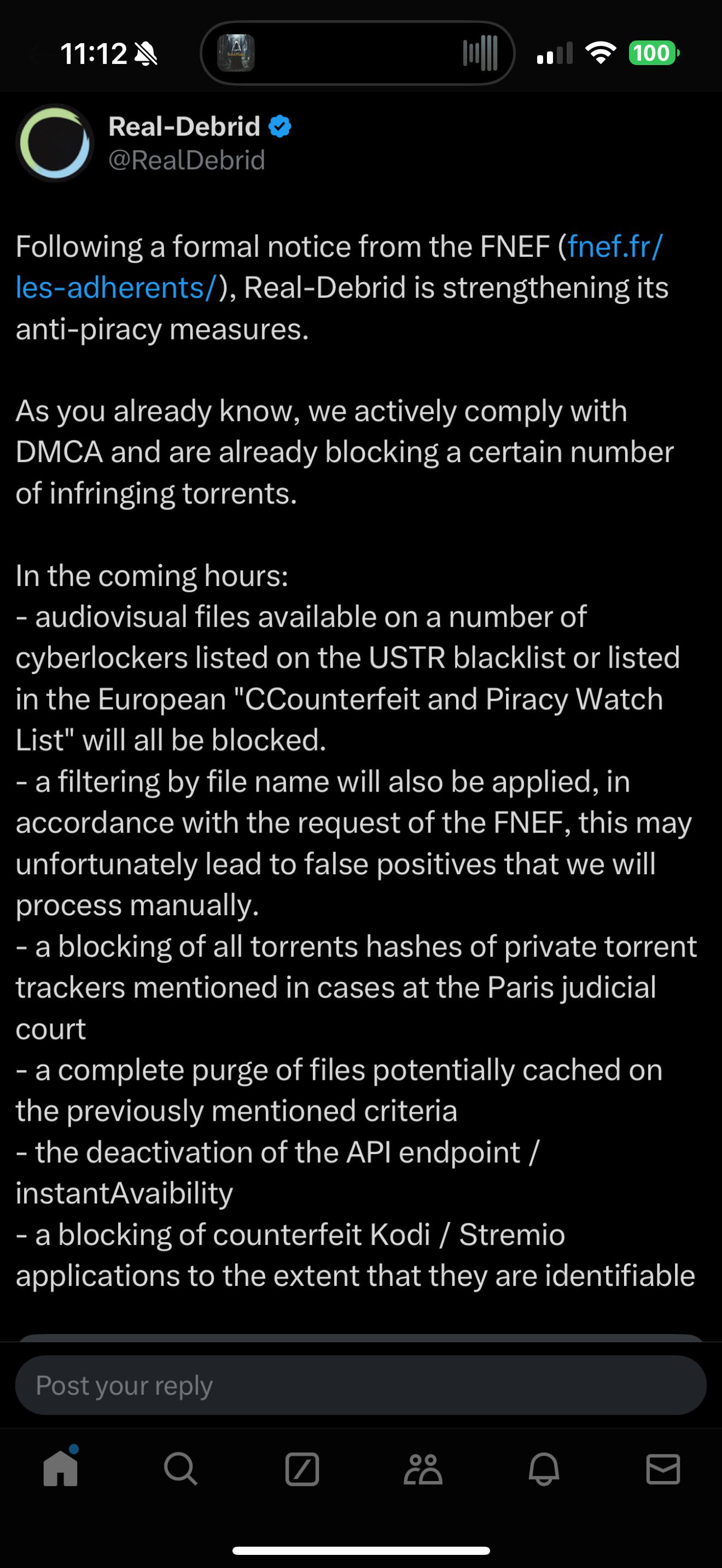
Today, we gather to honor and bid farewell to Real-Debrid, a service that transformed the streaming experience for countless users. For years, it stood as a beacon of seamless entertainment. It solved buffering woes, elevated video quality, and brought convenience to cord-cutters worldwide.
It was more than a tool; it was a game-changer for those navigating the complexities of online content. As it strengthens anti-piracy efforts and faces an uncertain future, we celebrate its legacy of innovation and accessibility.
this plugin is for Stremio Enhanced, a stremio client that allows for more control of the player. this is a community project! meaning the intros are selected by people using the clock icon and it automaticly shares with the rest of the users.