r/sidephone • • Sep 01 '26 Bravo

Sidephone → main phone (2 mos in )

Thumbnail
gallery
543 Upvotes

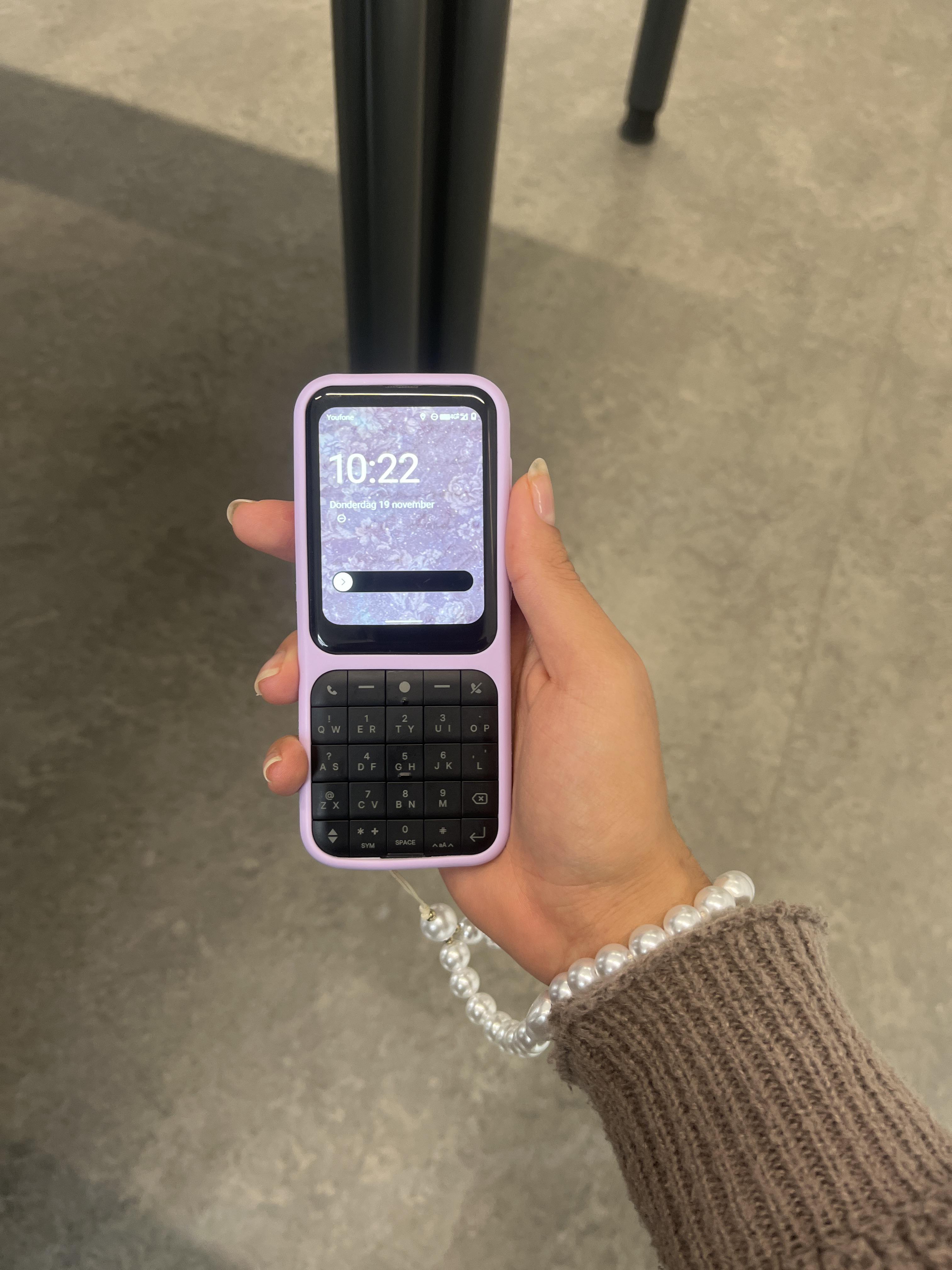
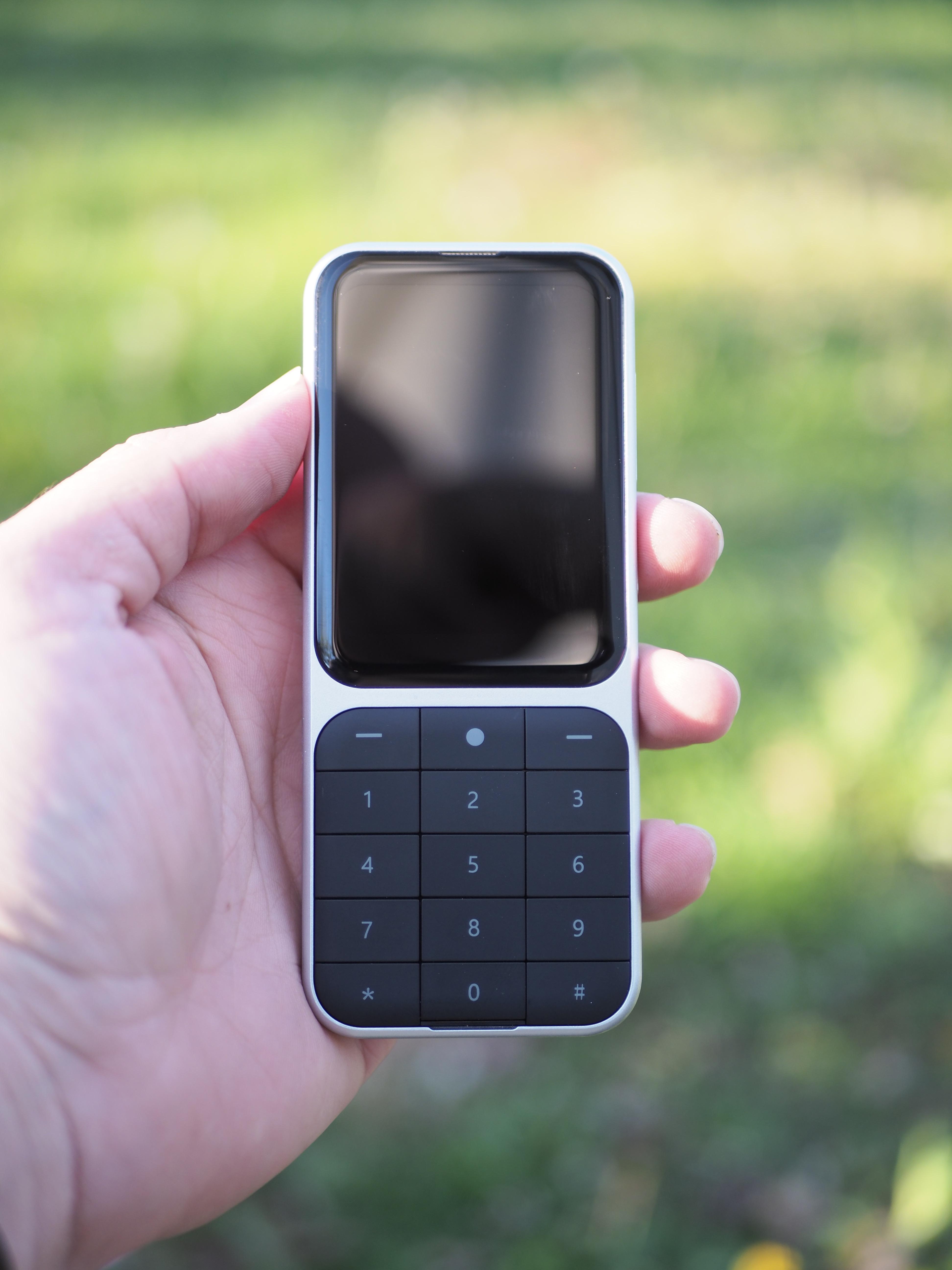
Sharing my experience after using the Sidephone as my main phone for 2 months now. Got the device early July, UK based on EE. No issues with the device, and I installed the qwerty keypad right away.

My goal was to cut down on phone addiction and screen time. I figured this could be a nice in-between, letting me keep my main apps without going full 2004 lol. I'd been eyeing a bunch of qwerty/dumbphone projects (Unihertz, Clicks Communicator, Minimal Phone, Zinwa, Dumber, etc.) but went with Sidephone for the simplicity, aesthetic, and modularity.

Took a bit to adjust, relearning the double-tap qwerty and the Android ecosystem coming from an iPhone 15 Pro. This sub was a huge help getting my setup dialled in, and I'm now really comfortable using it as a main phone:

-Calls are clear

-Works with airpods

-Typing got fast with SideType

-Access to my main apps (WhatsApp, Spotify, Substack, Reddit, Email)

-Great battery life

-No social apps

-Great launcher with Side Home

-Camera is honestly fun, the low res works for me since I'm into toy cams and vintage film vibes

So far:

-Screen time is way down. I only reach for my iPhone when I need an app Sidephone can't run, or I'm on desktop

-No more doom scrolling, the friction actually works. Reddit's mostly text, Substack shows one post at a time

-I'm reading a lot more instead of streaming or scrolling for entertainment, helped along by an e-reader (X3) and a reading app (Readest), so now reading is my default instead of socials/browser/streaming

Things I miss:

-Front-facing camera (I know, probably too much to ask) would make video calls great

-QR code scanning, not sure if it exists, can't seem to use the camera for it. Maybe there's an app I haven't found?

-Payments on Sidephone would be amazing

-Some way to track the device. I lost mine travelling, left it in a rental car, and had zero way to locate it. Lucky the rental company searched and found it for me.

Big shoutout to oliver for the Side suite of apps, genuinely changed my experience. Getting my gamepad soon and can't wait to play retro games on it!

If you're after a simpler device that keeps you off distractions, Sidephone is great. Other dumbphone/qwerty options are popping up, but the balance of app access vs. friction here is really well done. Also just the nicest-looking candy bar phone with the cool modular keypads. With a bit of patience, this can absolutely be a main driver.

Really excited to see where this goes!

Ps yes i matched my case to my nails for extra pizzaz 💅


r/sidephone • • Mar 13 '26

0001 of 1000 - Checking In! 🫡

Post image
375 Upvotes

I was already excited by the phone, and then this little treat has added a whole new level!

I opened my Sidephone yesterday and I only went and got NUMBER 1 of the Founder Edition(s)! 😊

Full disclosure: I am based in the UK, so had to get a pal in the US to really help me out and send it on over (which I had to pay extra customs on), which is why it's taken a little more time for me to open it. I'll be doing an unboxing video very soon and then it will be my daily driver for a while so I can do a full video but my very quick thoughts are that is really neat. Admittedly, I am coming from using a Titan 2, so the size difference is huge.

Just as a quick one: the phone is working well on Vodafone and 3 in the UK, so no issues there...now just to get the phone sorted so it's set up perfectly for me!

Thanks,
Joseph / DumbphonesUK


r/sidephone • • 5d ago

One month in

Post image
367 Upvotes

One month in, couldn’t be happier. Even attached a phone cord. The first phone I got had a rebooting problem. Got sent a new one the following day and this one has not given me any issues. Even got Spotify working.


r/sidephone • • Oct 29 '25

Sidephone's App Library

Thumbnail
gallery
357 Upvotes

For a complete and current list of all supported applications, please visit sidephone.com/pages/app-library

How does Sidephone select which apps to add to the App Library?

To feature an application in the App Library, it must be an active project, it must work well on Sidephone's hardware and software, and it must be available for Sidephone to download from an official source. The team then works to determine if it aligns with Sidephone's ethos and the community's values.

The goal of the App Library is to provide a few additional tools, utilities and media to make using Sidephone as a primary device more enjoyable, without detracting from the overarching project objective of helping people reach and maintain a deep level of focus and intention throughout their day.

Will Sidephone's supported app list change over time?

Yes, the official list of applications that Sidephone supports is expected to change over time as we expand to more regions, develop more partnerships and create more apps of our own. We do not intend for Sidephone's App Library to have thousands of apps; only core essentials and a few extras.

Can apps that aren't in the App Library be added to Sidephone?

Yes. We recognize that essential tools are different for everyone. For this reason, we have not added restrictions that would prevent 3rd party applications from being added and installed. Sidephone uses AOSP as its base.

Before adding applications, please ensure that they were obtained legitimately. Apps that rely on Google services to function (eg. certain health apps, payment apps, communication tools, transportation apps) will not work because Sidephone is de-Googled. Please note, Sidephone cannot guarantee or be held responsible for experiences that you have as a result of installing 3rd party apps, as these are outside of our control.

Why is Sidephone de-Googled?

We did not wish to have Google's hardware and software guidelines (eg. minimum 4 inch screen size) restrict Sidephone's design and development. Creating a truly different mobile phone required us to untether ourselves from existing ecosystems.

Are all apps visible in the App Library?

To keep Sidephone's OS clutter-free, and to keep unwanted apps out of view, each supported app is organized within an 'App Pack'. All App Packs are hidden by default. To enable an 'App Pack', you must scan a QR code, which then reveals all applications within the pack for installation on Sidephone.

Is it possible to use web apps in the browser?

Yes. A number of web apps are available via Firefox & Vivaldi that we have not included in our list (eg. ClassPass, Libby, Cryptee, Pocketcasts)


r/sidephone • • Oct 08 '25

Using WhatsApp on Sidephone

328 Upvotes

Hi everyone, here's a video of me using WhatsApp on the Sidephone that I've been showing community members across Europe over the past month and a half. u/johnozbay and I spent the majority of a day in Amsterdam testing the device, and trying it with various apps, from Cryptee (encrypted file storage), to Vivaldi (web browser), to Spotify (music), and more.

u/Savings-Double-2853 I made this video in response to your and u/Difficult_Doubt_1716 's questions earlier in the week. CC: u/drones02 and u/Annual_Daikon_4789

Disclaimers:

  • The video call on 4G chewed through battery. We built Sidephone to be the most capable r/dumbphone, but using it like a smartphone will cause it to lose battery quickly. That said, if a WhatsApp video call is needed in an emergency, it is available and works. I wouldn't want someone to have the impression they can spend all day on a video call.

  • My personal real world experience was 10 hrs music playback with locally saved Spotify songs and where data was shut off from being used. If using data, this drops to 5hrs at the moment on my particular carrier at the time.

  • The video shows Sidephone's PR0 prototype that we received 3 months ago and that Sebastian and I were testing ever since, across Europe and in the US. The PR2 samples received this week are much closer to production. They have the camera light in the rear bar, improved antennas, and more.


r/sidephone • • Oct 03 '25

What is a Sidephone?

Post image
304 Upvotes

This post is intended to be the project’s AMA & FAQ. It’s an opportunity for people to develop clarity on what Sidephone is, who’s behind it, and why we’re building it. Feel free to ask us anything in the comments!

What is a Sidephone?

  • Sidephone is a feature phone with a few extra abilities. It is closer to r/dumbphones than a smartphone.

  • We designed Sidephone to be the best first step for anyone looking to abandon their smartphone in search for something healthier.

  • We recognize that only having the ability to call and text would be overwhelming for many people, so we’ve curated a list of applications within what we call Sidephone’s App Library to help simplify the switch over from a smartphone.

What can you do with a Sidephone?

  • The choice is yours. It is a simple mobile phone. The best fit for everyone will look a little different.

    • You can use Sidephone as your primary device, replacing your smartphone entirely. This is where people will see the most immediate and largest impact.

    • You can configure it as your business phone.

    • You can set it up as an occasional phone to use when you want to take a break from the noise and distractions on your smartphone.

  • A complete and current list of the applications in Sidephone’s App Library and Sidephone’s OS features will be shared online soon, and linked here for reference in a future edit.

What restrictions does Sidephone have?

  • Sidephone is an unlocked mobile phone, allowing you to use it with carriers that support Sidephone’s 4G LTE cellular bands and are friendly to feature phones:

    • WCDMA: B1 / B2 / B5 / B6 / B8 / B19

    • FDD: B1 / B2 / B3 / B4 / B5 / B7 / B8 / B12 / B17 / B18 / B19 / B20 / B26 / B28A / B28B

    • TDD: B39 / B40 / B41

  • We do not currently have any OS restrictions in place that force you to only use the apps in our App Library. It is theoretically possible to sideload any Android .apk to Sidephone.

    • In the future, we may release a Kids version or similar that further restricts this.

Why are we building it?

  • Sebastian and I both grappled independently with a couple of medical issues that reshaped the appreciation we have for life and the way we spend our time. It took these medical experiences for us to realize that life is a gift.

  • As we began to change things so that we experience life to its fullest, we both, without ever having met each other, began to adopt solutions that encouraged us to spend less time online and consuming, and more time offline and creating.

  • We felt that the single biggest time sink in our lives (time we spent that we wished we could get back) was time spent on our smartphones or doing smartphone adjacent tasks (capturing content for social media, etc).

  • Our goal with Sidephone is to bring back the benefits of life before the modern smartphone.

What’s the philosophy behind Sidephone?

  • There’s a cost to the conveniences we continue to integrate into our lives every day.

  • A Sidephone acts as a sort of ‘off switch’ that allows your brain to take a break from the overstimulation that comes with being online.

  • Sidephone takes the concept of ‘choosing to do without’ and applies it to technology, so that people can protect their minds, their time and live a beautiful and authentic life free from the algorithm.

    • It places a larger barrier between you, and the unimportant things that are competing for your time and attention.

    • It signals to others that you’re present and attentive.

    • It is a device purpose-built to protect the qualities that keep you innately you.

Will abandoning my smartphone actually do any good?

  • It’s risk-free to try. And you don’t even need to buy a Sidephone to do it. In fact, we probably prefer that you try a free method if you’re still on the fence with the concept as a whole.

Who’s behind it?

  • We’re a small and globally-spread team. Chris Ristovski founded the project in Toronto, Canada. Sebastian Snell leads OS development from New York. Laurent Le Pen runs manufacturing operations in Shenzhen.

We've referred to Sidephone as a community project, is Sidephone a not-for-profit?

  • Sidephone is a business. Our promise is that we will be as transparent and pro-consumer as possible. We're deeply committed to building healthier mobile devices. We're confident that what we deliver will be something that aligns with the community's values and preferences.

I've suggested an idea for a keypad, tile or feature, am I entitled to any sort of compensation?

  • We cannot give every contributor who has shared an idea on Reddit or via email financial rewards or share in the business. The complexities of navigating this would make the project untenable. Please do not share anything that you feel is sensitive IP.

How accessible is Sidephone?

  • We are committed to developing ways for Sidephone to be able to integrate with more medical devices and equipment over time. Many of these integrations are out of our control at this time and as a small venture.

  • At the moment, we leverage many native accessibility tools and workflows one would expect from Android or iOS. We are committed to building for accessible requirements as the project grows.


r/sidephone • • Apr 17 '26

Android 16 brief overview and a look at the performance

289 Upvotes

A lot of questions rolling in, hopefully this short video answers some of them.


r/sidephone • • Oct 27 '25

Adding a Sundial keypad into Sidephone for the first time

278 Upvotes

Laurent from the manufacturing team in Shenzhen adding a Sundial keypad into Sidephone for the very first time.

Learn more about Sidephone's Sundial here: https://www.reddit.com/r/sidephone/comments/1oh6fcz/sidephones_sundial_keypad/


r/sidephone • • Jan 20 '26

Side Phone Tile Ideas

Thumbnail
gallery
275 Upvotes

r/sidephone • • May 16 '26

Feeling pretty retro right now...

Post image
267 Upvotes

Can't wait to get my hand on the new controller keypad.


r/sidephone • • Apr 22 '26 Bravo

Day 1 with Sidephone in the UK

Thumbnail
gallery
261 Upvotes

Hi all, typing this from the qwerty keyboard tile on my new Sidephone, which I'm so excited about! I've been stalking this subreddit for a few months and finally caved after breaking my smartphone, so this is my new daily driver.

So far I've installed most apps from all app packs, I don't want to go fully dumb phone quite yet but I'm absolutely loving the inconvenience of this thing. I can access google and amazon and youtube, but don't get sucked in, and not just because of the small screen. The loading time and interface is slower and more frustrating to use, functional but inconvenient, encouraging me to put the phone down and live in the real world. I'd rather wait until I can access my laptop which is less addicting too.

Firefox is my preferred browser so far, giving you the option of where you want to search by the search bar. Google, Bing, Wikipedia etc. Screenshot attached.

I've also side loaded spotify, city mapper and reddit. City mapper doesn't show the map but seems to know where I am well enough and provides accurate directions and live updates of bus arrival. Spotify is brilliant, slower response time than I'm used to, but again, I don't mind that and love the inconvenience.

With jake type you have to add words to the dictionary using the on screen keyboard if it doesn't know it, but I'm assuming in a few weeks that'll be less common after I enroll common place names, brands, UK spelling etc.

I inserted my Voxi sim card from my last phone with no issues at all. The hotspot worked on my work laptop when waiting for the bus (at least for teams message and email, I haven't tried a call yet). I ordered a last minute order from amazon via the browser for next day delivery (going to visit family abroad tomorrow I'll keep you updated with my experience).

Whatsapp works perfect aside from chat history loading, but every new message is there.

I created a new proton mail account (much needed with or without the Sidephone), but have loaded my 2 gmail accounts onto K9 with no issues so far (aside from perhaps it not splitting promotions and spam mail from important stuff, but I can check that on my laptop).

(A lot of the pictures above are fully zoomed in)

Overall really love it so far! Drop me any questions 😊


r/sidephone • • Apr 13 '26

RIP my sidephone

Post image
259 Upvotes

Happened earlier today on a walk after taking a photo of some flowers I wanted to identify. 100% my own fault. Absolutely gutted. Any chance for spare parts being made available? Long shot I know. But I loved this phone. I would also humbly request to ditch the 2.5D glass on the next generation. ​


r/sidephone • • Feb 05 '26

Mini Update: All phones have successfully cleared US customs and are awaiting last mile UPS delivery

Post image
255 Upvotes

Hi everyone, some great news today. I was informed earlier that all phones and silicone cases made it successfully through US customs. They are now awaiting last mile UPS delivery from the port of entry to the warehouse. The keypads are still pending import but we do not expect any issues as all shipment fees were pre-paid to expedite customs.

I don't think we've shown the packaging that the keypads come in yet, so this might be a little bit of a treat. The photo above is from Laurent.

For the accessories, it was important to us that we picked a case that could be multipurpose. We kept all stickers off so that it can be repurposed for another use you have around the home, or to carry keypads on the go, in a bag, etc.


r/sidephone • • Feb 26 '26

Okay, this is pretty cool

Post image
230 Upvotes

I got my Sidephone today and have been working on setting things up. I'll admit, I've had some doubts ever since I placed my order, but this thing is pretty damn cool. I love the app packs and how intentional you have to be about what you install. I've never side-loaded apps before, but getting Spotify on here was a breeze.

The qwerty keyboard is pretty awesome, too. I really like the feel of it, and it seems pretty great at predicting what you want to type. I'm terrible at T9 typing, so I don't see myself ever swapping back. I like the look of the sundial, but I'm honestly not sure what my use case would be ... I'd be interested to hear how others are using it!

Also, the camera actually seems pretty solid? Obviously it's not iPhone quality, but I think it's better than my old Jelly Star.

I need to use it more to see how it holds up under daily use, but it's a great first impression. The thought and care that the team put into it shows, and I can't wait to see how it evolves!

Edit: I've started playing around with the sundial, and it's pretty cool! I mapped my most used apps to the corners (phone, messages, spotify, and pocketcasts), and made long-pressing up take me Home, and long-pressing down take me to Settings. Love being able to play and pause with the center button, too. I could see myself using this on days I know I won't be texting much.


r/sidephone • • Aug 05 '26

It has arrived!!!!

Post image
226 Upvotes

Spent today setting it up and getting it to how I like. I truly love the form factor of this and I’m excited to use it as a second device.

Thank you Sidephone team!!!


r/sidephone • • Oct 27 '25

Sidephone's Sundial Keypad

Thumbnail
gallery
221 Upvotes

The Sundial Keypad features 9 distinct buttons, purposefully arranged for intuitive music control on Sidephone.

How does it work?

The soft-touch dial consists of 4 functions: previous, skip, volume up, and volume down. The center glass acrylic button within the dial is pre-programmed as the play/pause function.

At each corner of the keypad are 4 bonus functions pre-programmed to open the following apps: Phone, Messages, Camera and Clock

The Sundial offers 9 distinct buttons in total. To better align Sundial with everyone's unique preferences and workflows, all buttons are reprogrammable. Buttons can be remapped easily in Sidephone's Settings.

Designed alongside the Sundial keypad are a selection of silicone cases that make it possible to change the color of Sidephone in seconds.

What colors are available?

The first 1000 Sundial keypads will be produced in silver/white. If there is enough interest, a silver/black variant will be released as well. 8 summer-inspired silicone case colors will be available for the Sundial.

How much will the Sundial keypad cost?

The Sundial keypad is $29. Silicone cases that have been designed for the Sundial keypad are $10. Bundles will be available that offer up to 3 silicone cases and 3 different keypads/tiles for $100.

When will the keypad be available?

Sidephone's Sundial keypad will be available to ship alongside the first batch of 1000 devices, currently estimated for delivery in January 2026.

Customers who have purchased Sidephone's Founders Edition device will have an opportunity to add a Sundial to their order at the end of November at a discounted price.

Note: Any early supporter incentives extended to US customers will also be extended to international customers once Sidephone becomes available in each new region.

What does the Sundial look like in real life?

Here is a video of Laurent in Shenzhen adding a Sundial keypad into Sidephone for the very first time: https://www.reddit.com/r/sidephone/comments/1oh6jt8/adding_a_sundial_keypad_into_sidephone_for_the/


r/sidephone • • Apr 25 '25

My tile wish-list!

Post image
221 Upvotes

r/sidephone • • Apr 26 '25

Wanted to change things up a bit and share some product photography instead of computer renderings. Here's what the prototype of Sidephone is looking like!

Post image
217 Upvotes

r/sidephone • • Apr 25 '25

Sidephone - An embodiment of the Past & Future

Thumbnail
gallery
215 Upvotes

Hello everyone! We're excited to reveal Sidephone's final production design. For the full reveal experience, we encourage everyone to watch the release video with u/ReturningRetro live on YouTube now: https://www.youtube.com/watch?v=JqFK2v10VAY

This is quite a shift from our previous design, but rest assured, this is where we have finally landed with the product.

In designing Sidephone, we wanted to imagine what phones would look like in the far future. We don't believe humanity will continue to carry larger and larger screens on their person, that act as corridors to content consumption.

We believe people will carry more intentional and capable tools, with physical buttons that can be programmed to launch automations, apps and perform various actions unique to each person. We plan to be the company at the forefront of this movement.

Behind Sidephone is the world's first fully swappable keypad on a mobile phone, staying in line with our vision of creating 1 phone, with 1000 possibilities.

As much as this device is meant to be healthy, it is also meant to be fun and enjoyable to use. As a community, we're confident we will imagine and design many different ideas for future inputs - so that we can all have a phone that represents us uniquely, and fits our unique needs.

We're thrilled to be able to bring this phone to the world.

Thank you for your love and support.


r/sidephone • • Jan 23 '26

1000 Sidephones packaged and awaiting import 🛫

Post image
210 Upvotes

Hey everyone! Quick photo of the pallets of Founders Edition Sidephones that completed production and are arriving in Texas shortly

We will update everyone the moment that the FCC certification is live which will allow us to get the phones to everyone


r/sidephone • • Mar 28 '26

3 Weeks with the sidephone.

Post image
204 Upvotes

Hi all, please delete if external linking is not allowed.

I’ve been using the sidephone as my primary device for 3 weeks today. I feel like I’ve gotten a good feel for the device and wanted to take my time to offer a review if anyone is still deciding if sidephone is for you. I don’t know if the review will actually BE helpful, but maybe it will be to someone out there.

The tl/dr of the whole thing is: It’s delightful.

Here’s all 1700+ words if you feel the need to read more. https://minimally.digital/three-weeks-with-the-sidephone/

Much love to the sidephone team! Thanks for making the device I’ve needed for years.


r/sidephone • • Apr 16 '26 Bravo

Android 16 fully functional

Post image
203 Upvotes

I have android 16 fully working on the Sidephone with Gapps fully functional. RCS is working and Android Auto is working This took a lot of work and was a headache and a half. Performance is just as good as the stock OS. I asked myself if i could do it and the answer was yes, yes i can. I will be posting a full guide in the coming weeks. Best part? You don't even need a custom recovery to accomplish it. You do need the bootloader unlocked though, but I am looking at trying to find a way around it as it makes getting Play integrity significantly harder to get around.


r/sidephone • • Sep 26 '26

One Week with the Sidephone

Post image
202 Upvotes

Hi all

Thought I would add my review to the sub. I have been using my Sidephone for one week.

For some context,I live on the east coast of Canada and I have been a heavy Android smartphone user since they came around. This is my first foray into the world of alternative tech. I am an elder Millenial so I have used dumbphones/T9 texting and such,but not in 15+ years.

My intent with the Sidephone was not to completely remove my smartphone from the equation. I am currently using my smartphone for a small handful of things,and I am comfortable with that. It lives turned off in my bag when not being used. In the future I may find myself removing it entirely and that would be great, but for now I use it with no sim card on wifi when available to do banking,and use it totally offline for Strava/music while running and in the car with maps if needed.(All of those work well enough for my needs in offline modes)

My intent was to reduce phone usage/screen time/ constant connection and to degoogle.

I have the founder's edition (#705). It took two weeks to arrive in Canada (I am rural) and I did not have to pay any customs.

So far,I'm really enjoying this phone. I absolutely adore the size and the form factor. It feels great in the hand. A number of people around me have been asking me all about it,and why I got it which means I get to hop up on my soapbox of the importance of reclaiming attention and intentional technology use lol. You can see the gears turning when people realize they dont *have* to buy an IPhone or Samsung S whatever.

Setting up the phone and getting it the way I wanted took me basically a whole weekend,lol. It's not the plug and play experience most of us are now accustomed to - but in a weird way I kind of like that. Friction is the point (for me).

I'm only using the qwerty keyboard,I've not even touched any of the others yet and I have not had any issues with it not working correctly. It is quite odd feeling to text on it,but I can feel myself getting used to it and faster as time goes on. I do wish like many folks that the keyboard was backlit,but for the odd time I am texting in the dark (or need to text silently) I flip to the onscreen keyboard. It's tiny of course but I have small hands and works in a pinch. The keys are not any noisier than the flip dumbphone my coworker has.

Group messages are working for me? I shut off RCS before swapping my SIM,and at first all the group messages were coming in individually as MMS. Once I downloaded them,they then appeared in the group thread. However,when I switched to Fossify Messages from the default messaging app,then they started arriving normally? Weird but ok with me. I am assuming once I hit 30 days of no RCS and am booted out,my group thread will need to be recreated with me in it.

Battery life has been fine for my needs. I end the day with ~70% battery life,and that is mostly just texting and maybe a short call or two. I pretty much always have a charger/power bank available to me so I can't see it ever being an issue.

I have intentionally kept my app list small. In addition to the default apps,I've added weather,proton mail,sidetype and sidespot,notally,whatsapp,localsend,opencamera,fdroid,organic maps,fossify calendar,messages and firefox browser. All are working fine for me. I even logged into my online bank on the browser just to see and it works normally (although the screen is tiny so its not fun to use lol)

I tested using Hotspot with the Sidephone and it did work,though I didn't actually use it for any length of time so not sure how much it drains the battery or anything.

My only two issues so far: the screen swiping and the 4g connectivity. I do notice unlocking or swiping on the screen is inconsistent. It gets better if you swipe from the center of the screen and also press down with your finger more,but it doesn't resolve it entirely. You can unlock with the power button,but for swiping to open the app list it's slightly annoying at times.

The 4g/connectivity problem is not a sidephone "issue" per se. Where I am located specifically,cell phone coverage is not great and so I have had a phone call or two where it was dropping out/bad service. However this was a problem with my last smartphone until I switched carriers so not really specific to the phone itself,although I think if it was 5G compatible that would resolve the issue. Just something to think about if you also live somewhere with poor cellular coverage/infrastructure. I don't talk on the phone a ton and I am willing to try different carriers if needed but that remains to be seen.

Oh - one other thing to note. The magnet it comes with is not very strong....but the adhesive is!! Wherever you put that thing,that's where it's staying forever 😅

Some things I'd personally like to see:

Backlit Keyboard

5G capabilities ?

Sensors: proximity and also something for step counting.

A more robust case (I am notoriously hard on my tech, I am trying hard to be so so careful with it)

In summary: Very happy with it! When I'm at work or out and about,I find myself reaching for my phone......and then realizing I can't really do much with it and putting it back down - which is exactly what I wanted. I'm glad I pulled the trigger and excited to see where Sidephone is able to take this.

Happy to answer any questions if you've got them.


r/sidephone • • Feb 25 '26

Using the Sidephone as intended

Post image
187 Upvotes

r/sidephone • • Nov 29 '25

Sidephone's Compact QWERTY Keypad

182 Upvotes

Hi everyone, this weekend we are revealing Sidephone's Compact QWERTY Keypad; a 5x5 grid of buttons that offer a QWERTY-style typing experience in a far smaller form factor.

Powering the Compact QWERTY Keypad is a predictive algorithm (similar to Predictive T9) that will display desired words as each key is pressed. Development is actively continuing on this, and we plan to have a demo ready in time for CES 2026.

The advantage of Sidephone's modularity and open app distribution is that the keypads can be adapted for various languages over time as interest in each new region develops (AZERTY, QWERTZ, etc). Like with the T9 demo last week, the Compact QWERTY keypads can be paired with software keyboards that extend their functionality and adapt them to various languages.

To start, we plan to have 1x keypad option available: English (US) for $29 USD. This will be a proof of concept before adapting the idea to other languages. To adapt a keypad for another language, we would need to be reasonably certain that the MOQ for new configurations can be met (current Q'ty 1000 for keypads)

The QWERTY keypad - English (US) is planned to ship March 2026. This differs from the Sidephone Founders Edition, initial silicone cases and Sundial keypad which are expected to ship in January 2026.