r/PowerShell • • Oct 27 '24

Question What am I doing wrong? Did I fail to build community around my PowerShell modules?

174 Upvotes

Hi,

So I've been thinking for some time now, and even more lately, that over the years, I've created a lot of PowerShell modules (80+) that I've given up for free, published on PSGallery, but I have a feeling that I failed to build a community around it.

And when I look at the work I did over the last few years, I get very few contributors to my modules in any way (PR, issues, helping with other people's problems, help with documentation), very few github sponsors, if any, feedback is pretty much minimal on new releases, and I think I do something wrong. Don't get me wrong I greatly appreciate the people that helped in any way they did so far, I believe that for the amount of stuff I creteated/maintain I would see much more "action".

I could assume nobody uses my stuff, but I don't believe it's true, as PSGallery, GitHub downloads, and blog visits show a different story.

When I release a new PSWriteHTML, it's basically 1000+ downloads in a day, yet according to GitHub, it appears nobody cares. People can create issues on repositories, and until I actually get to it, no one will even try to help them. I have to go and try to help people even after the issue has been open for a few days.

I own plenty of modules, including AD, GPO, O365, Infoblox, Qualys, DNS, Office, HTML writing/Parsing, FTP/SFTP, PGP, Images, and all kinds of random modules that are hard to track. Yet, I keep maintaining them, adding new features, fixes, upgrades, and so on. Yet, I'm all alone with this.

It would be easy to say the projects are not used, so you get no feedback, sponsors, help with issues, or discussions, and pretty much you can stop doing this, but the "stats," however you read them, are telling quite a different story. I am baffled and genuinely thinking, what am I doing wrong?

Most of my licenses are from MIT, but recently, I've noticed one company that plans to wrap around my Testimo module and start selling it. They brag about it with screenshots on their page. While I always wanted to share my work, it's not something I had in mind when making an MIT license, so I am considering making some changes.

This gets me thinking:

  • What am I doing wrong?

  • How do you think this can be improved?

  • Are people afraid to help? Is the entry-level too high, or are the projects just too easy/advanced (pick one) for them?

  • Or are there some other issues I am not aware of?

  • Maybe it's a language barrier (me being a non-native speaker), and my language is not friendly enough (and I don't notice this)

What do you think? Why do some other projects thrive, and mine are "silent"? To name a few, 'dbatools', 'importexcel', etc. Why do some people have many sponsors and others have fewer?

With regards,
Przemek

PS. Just to be clear - I don't want you to go now and create many issues around my PowerShell modules, so I get even more overloaded and have an even harder time—I am just genuinely curious about what I just wrote.


r/PowerShell • • Apr 22 '23

Information ChatGPT the ultimate teaching assistant

174 Upvotes

I've found a rather effective method for learning Python, as someone familiar with PowerShell.

As someone who benefits from interactive learning and asking questions to form connections, I've found AI to be a game-changer. In the past six months, the AI's direct feedback has helped me learn more than I ever did in the preceding years, even after passing eight Microsoft exams!

Since November, I've been captivated by AI and decided to learn Python for two reasons:

a) to work with APIs and explore exciting applications

b) to overcome my struggles with math and hopefully spark my interest through Python.

To facilitate my learning, I've been using the Edge browser's Bing chat sidebar to interact with the dreary Microsoft Learn pages.By turning complex concepts into engaging fantasy stories or condensing the information into digestible chunks, I've been able to retain the knowledge better, even if it takes a bit longer to complete each module. (I have a pretty great prompt for that too if anyone wants it)

So I wondered if the GPT-4 model's ability to merge concepts and find connections could help me transfer my programming knowledge to Python. To my delight, it's been incredibly helpful.

Here's my approach:

  1. Open Edge and the Bing sidebar (Creative Mode). Use any free Python website as context for the sidebar (or a PDF eBook if you have one).

  2. For each lesson, paste the prompt below.

  3. Remember to refresh the topic each time to avoid repetitive responses from Bing.

Give it a try and see how it works for you! This method has been a fantastic learning tool for me, and I hope it serves you well too.

Prompt:
Re-explain the current web page, which teaches Python, in a more comprehensive and engaging manner. Keep in mind that the reader is well-versed in PowerShell. Utilize the reader's existing knowledge of PowerShell to teach Python more effectively, highlighting the similarities and differences between the two languages in the context of the topic. Choose an appropriate format and structure for the topic, avoiding the use of tables. Use markdown to enhance formatting and engage the reader, emphasizing critical Python-related terms or concepts by bolding or underlining them. Do not search the web for new information.

Edit: more information added


r/PowerShell • • Dec 05 '22

Script Sharing To my friends in Security and IAM - Creating users in AD the traditional way is time consuming and tedious. I created a free PowerShell app to help reduce the burden. GitHub info in comments

174 Upvotes

r/PowerShell • • Feb 08 '22

What was the one thing you learned in PowerShell that made the biggest difference?

174 Upvotes

Just looking for people's opinions, what was the one thing you learned in PowerShell that made the biggest difference in your ability to do your job?


r/PowerShell • • Aug 07 '20

Script Sharing Get-WhatToEat

174 Upvotes

Because sometime i don't know what i'm going to order...

(With Windows Terminal) :

function Get-WhatToEat {
    $list = @(
        '🍔'
        '🍜'
        '🍕'
        '🌭'
        '🌯'
        '🍣'
    )
    Clear-Host
    Get-Random $list
}

Get-WhatToEat

r/PowerShell • • Aug 11 '19

Subnet Calculator using Windows Forms for a GUI

174 Upvotes

Subnet Calculator using Windows Forms for a GUI

<#
Created By: Matthew Sisson
Created Date: 8/7/2019

.PARAMETER IPAddress
Enter the IP address with CIDR notation.

.EXAMPLE
Subnet-Calculator.ps1 -IPAddress 172.16.20.1/23
or
Subnet-Calculator.ps1 172.16.20.1/23
#>
[CmdletBinding()]
param (
    [string]$IPAddress='172.16.0.1/16'
    )

    ### Get Favicon.ico ###
[Net.ServicePointManager]::SecurityProtocol = [Net.SecurityProtocolType]::Tls12
$FavIcon = Test-Path -Path "favicon.ico" -PathType Leaf
If ($FavIcon -eq $false) {Invoke-WebRequest "https://contoso.com/favicon.ico" -OutFile "favicon.ico"}

    ### Functions ###
# Function to convert IP address string to binary
function toBinary ($dottedDecimal){
 $dottedDecimal.split(".") | ForEach-Object {$binary=$binary + $([convert]::toString($_,2).padleft(8,"0"))}
 return $binary
}

# Function to binary IP address to dotted decimal string
function toDottedDecimal ($binary){
 do {$dottedDecimal += "." + [string]$([convert]::toInt32($binary.substring($i,8),2)); $i+=8 } while ($i -le 24)
 return $dottedDecimal.substring(1)
}

# Function to convert CIDR format to binary
function CidrToBin ($cidr){
    if($cidr -le 32){
        [Int[]]$array = (1..32)
        for($i=0;$i -lt $array.length;$i++){
            if($array[$i] -gt $cidr){$array[$i]="0"}else{$array[$i]="1"}
        }
        $cidr =$array -join ""
    }
    return $cidr
}

# Function to convert network mask to wildcard format
function NetMasktoWildcard ($wildcard) {
    foreach ($bit in [char[]]$wildcard) {
        if ($bit -eq "1") {
            $wildcardmask += "0"
            }
        elseif ($bit -eq "0") {
            $wildcardmask += "1"
            }
        }
    return $wildcardmask
    }

Function Subnet-Calc {
# Check to see if the IP Address was entered in CIDR format.
if ($IPAddress -like "*/*") {
    $CIDRIPAddress = $IPAddress
    $IPAddress = $CIDRIPAddress.Split("/")[0]
    $cidr = [convert]::ToInt32($CIDRIPAddress.Split("/")[1])
    if ($cidr -le 32 -and $cidr -ne 0) {
        $ipBinary = toBinary $IPAddress
        $smBinary = CidrToBin($cidr)
        $Netmask = toDottedDecimal($smBinary)
        $wildcardbinary = NetMasktoWildcard ($smBinary)
        }
    else {
        Write-Warning "Subnet Mask is invalid!"
        Exit
        }
    }

# Address was not entered in CIDR format.
else {
    if (!$Netmask) {
        $Netmask = Read-Host "Netmask"
        }
    $ipBinary = toBinary $IPAddress
    if ($Netmask -eq "0.0.0.0") {
        Write-Warning "Subnet Mask is invalid!"
        Exit
        }
    else {
        $smBinary = toBinary $Netmask
        $wildcardbinary = NetMasktoWildcard ($smBinary)
        }
    }
    
# First determine the location of the first zero in the subnet mask in binary (if any)
$netBits=$smBinary.indexOf("0")

# If there is a 0 found then the subnet mask is less than 32 (CIDR).
if ($netBits -ne -1) {
    $cidr = $netBits
    #validate the subnet mask
    if(($smBinary.length -ne 32) -or ($smBinary.substring($netBits).contains("1") -eq $true)) {
        Write-Warning "Subnet Mask is invalid!"
        Exit
        }
    # Validate the IP address
    if($ipBinary.length -ne 32) {
        Write-Warning "IP Address is invalid!"
        Exit
        }
    #identify subnet boundaries
    $networkID = toDottedDecimal $($ipBinary.substring(0,$netBits).padright(32,"0"))
    $networkIDbinary = $ipBinary.substring(0,$netBits).padright(32,"0")
    $firstAddress = toDottedDecimal $($ipBinary.substring(0,$netBits).padright(31,"0") + "1")
    $firstAddressBinary = $($ipBinary.substring(0,$netBits).padright(31,"0") + "1")
    $lastAddress = toDottedDecimal $($ipBinary.substring(0,$netBits).padright(31,"1") + "0")
    $lastAddressBinary = $($ipBinary.substring(0,$netBits).padright(31,"1") + "0")
    $broadCast = toDottedDecimal $($ipBinary.substring(0,$netBits).padright(32,"1"))
    $broadCastbinary = $ipBinary.substring(0,$netBits).padright(32,"1")
    $wildcard = toDottedDecimal ($wildcardbinary)
    $Hostspernet = ([convert]::ToInt32($broadCastbinary,2) - [convert]::ToInt32($networkIDbinary,2)) - 1
   }

# Subnet mask is 32 (CIDR)
else {
    
    # Validate the IP address
    if($ipBinary.length -ne 32) {
        Write-Warning "IP Address is invalid!"
        Exit
        }

    #identify subnet boundaries
    $networkID = toDottedDecimal $($ipBinary)
    $networkIDbinary = $ipBinary
    $firstAddress = toDottedDecimal $($ipBinary)
    $firstAddressBinary = $ipBinary
    $lastAddress = toDottedDecimal $($ipBinary)
    $lastAddressBinary = $ipBinary
    $broadCast = toDottedDecimal $($ipBinary)
    $broadCastbinary = $ipBinary
    $wildcard = toDottedDecimal ($wildcardbinary)
    $Hostspernet = 1
    $cidr = 32
    }
    
$Global:IPAddress = $IPAddress
$Global:Netmask = $Netmask
$Global:Wildcard = $Wildcard
$Global:NetworkID = $networkID
$Global:CIDR = $cidr
$Global:Broadcast = $broadCast
$Global:FirstAddress = $firstAddress
$Global:LastAddress = $lastAddress
$Global:Hostspernet = $Hostspernet
$Global:ipBinary = $ipBinary
$Global:smBinary = $smBinary
$Global:Wildcardbinary = $wildcardbinary
$Global:networkIDbinary = $networkIDbinary
$Global:firstAddressBinary = $firstAddressBinary
$Global:lastAddressBinary = $lastAddressBinary
$Global:broadCastbinary = $broadCastbinary
return
}

    ### Form Colors ###
$FormBackColor = "#222222"
$FormForeColor = "#c5c9ca"
$PanelBackColor = "#3b3f42"
$TextboxBackColor = "#2b2b2b"
$TextboxForeColor = "#c3803c"
$ButtonBackColor = "#2e4058"

    ### Load Assembies ###
Add-Type -AssemblyName System.Windows.Forms
[System.Windows.Forms.Application]::EnableVisualStyles()

   	### Form ###
$Form = New-Object system.Windows.Forms.Form
$Form.Text = "Subnet Calculator"
$Form.FormBorderStyle = "FixedDialog"
$Form.TopMost  = $True
$Form.MinimizeBox  = $False
$Form.MaximizeBox  = $False
$Form.StartPosition = "CenterScreen"
$Font = New-Object System.Drawing.Font("Segoe UI Semibold",10)
$BinaryFont = New-Object System.Drawing.Font("Consolas",10)
$Form.Font = $Font
$Form.Width = 480
$Form.Height = 585
$Form.AutoScroll = $True
$Form.AutoSize = $True
$Form.AutoSizeMode = "GrowOnly"
$Form.TopMost = $True
$Form.Opacity = 1 #0.95
$Form.BackColor = $FormBackColor
$Form.ForeColor = $FormForeColor
$Form.ShowInTaskbar = $False
#$Image = [system.drawing.image]::FromFile("bg.png")
#$Form.BackgroundImage = $Image
$Form.BackgroundImageLayout = "Center"
$Icon = New-Object System.Drawing.Icon ("favicon.ico")
$Form.Icon = $Icon

    ### Title Panel ###
$TitlePanel = New-Object Windows.Forms.Panel
$TitlePanel.Location = '4,0'
$TitlePanel.size = '466,86'
$TitlePanel.BackColor = $PanelBackColor
$TitlePanel.ForeColor = "#fffff" #$FormForeColor
$Form.Controls.Add($TitlePanel)
$label = New-Object Windows.Forms.Label
$label.Location = New-Object Drawing.Point 0,-5
$label.Size = New-Object Drawing.Point 466,52
$label.BackColor = "Transparent"
$label.ForeColor = "#737373"
$label.Text = "CONTOSO"
$label.TextAlign = "TopCenter"
$label.add_Click({[system.Diagnostics.Process]::start("https://contoso.com")})
$TitleFont = New-Object System.Drawing.Font("Segoe UI Semibold",32)
$label.Font = $TitleFont
$TitlePanel.Controls.Add($label)
$label = New-Object Windows.Forms.Label
$label.Location = New-Object Drawing.Point 0,45
$label.Size = New-Object Drawing.Point 466,40
$label.BackColor = "Transparent"
$label.ForeColor = "#57b1fd"
$label.Text = "Subnet Calculator"
$label.TextAlign = "TopCenter"
$label.add_Click({[system.Diagnostics.Process]::start("https://contoso.com")})
$TitleFont = New-Object System.Drawing.Font("Segoe UI Semibold",18)
$label.Font = $TitleFont
$TitlePanel.Controls.Add($label)

   	### IP Address ###
$label = New-Object Windows.Forms.Label
$label.Location = New-Object Drawing.Point 50,92
$label.Size = New-Object Drawing.Point 125,20
$label.BackColor = "Transparent"
$label.text = "IPv4 Address"
$Form.Controls.Add($label)
$FormIPAddress = New-Object System.Windows.Forms.TextBox
$FormIPAddress.Location = New-Object System.Drawing.Point 50,112
$FormIPAddress.Size = New-Object System.Drawing.Point 125,20
$FormIPAddress.text = $IPAddress
$FormIPAddress.TabIndex = 1
$FormIPAddress.BackColor = $TextboxBackColor
$FormIPAddress.ForeColor = $TextboxForeColor
$FormIPAddress.BorderStyle = "FixedSingle"
$Form.Controls.Add($FormIPAddress)
$FormIPAddress.Add_LostFocus({
    $IPAddress = $FormIPAddress.text
    $NetMask = $FormSubnet.text
    $CIDR = $FormCIDR.text

    Subnet-Calc
    
    $FormIPAddress.text = $Global:IPAddress
    $FormSubnet.text = $Global:NetMask
    $FormCIDR.text = $Global:CIDR
    $FormNetworkID.text = $Global:NetworkID
    $FormWildcard.text = $Global:Wildcard
    $FormHosts.text = $Global:Hostspernet
    $FormHostRange.text = "$Global:FirstAddress - $Global:LastAddress"
    $FormBroadcast.text = $Global:Broadcast
    $BinaryAddress.text = $Global:ipBinary
    $BinaryNetmask.text = $Global:smBinary
    $BinaryWildcard.text = $Global:wildcardbinary
    $BinaryHostMin.text = $Global:firstAddressBinary
    $BinaryHostMax.text = $Global:lastAddressBinary
    $BinaryBroadcast.text = $Global:broadCastbinary
})

   	### Subnet Mask ###
$label = New-Object Windows.Forms.Label
$label.Location = New-Object Drawing.Point 200,92
$label.Size = New-Object Drawing.Point 125,20
$label.BackColor = "Transparent"
$label.text = "Subnet Mask"
$Form.Controls.Add($label)
$FormSubnet = New-Object System.Windows.Forms.TextBox
$FormSubnet.Location = New-Object System.Drawing.Point 200,112
$FormSubnet.Size = New-Object System.Drawing.Point 125,20
$FormSubnet.text = $NetMask
$FormSubnet.TabIndex = 2
$FormSubnet.BackColor = $TextboxBackColor
$FormSubnet.ForeColor = $TextboxForeColor
$FormSubnet.BorderStyle = "FixedSingle"
$Form.Controls.Add($FormSubnet)
$FormSubnet.Add_LostFocus({
    $IPAddress = $FormIPAddress.text
    $NetMask = $FormSubnet.text
    $CIDR = $FormCIDR.text

    Subnet-Calc
    
    $FormIPAddress.text = $Global:IPAddress
    $FormSubnet.text = $Global:NetMask
    $FormCIDR.text = $Global:CIDR
    $FormNetworkID.text = $Global:NetworkID
    $FormWildcard.text = $Global:Wildcard
    $FormHosts.text = $Global:Hostspernet
    $FormHostRange.text = "$Global:FirstAddress - $Global:LastAddress"
    $FormBroadcast.text = $Global:Broadcast
    $BinaryAddress.text = $Global:ipBinary
    $BinaryNetmask.text = $Global:smBinary
    $BinaryWildcard.text = $Global:wildcardbinary
    $BinaryHostMin.text = $Global:firstAddressBinary
    $BinaryHostMax.text = $Global:lastAddressBinary
    $BinaryBroadcast.text = $Global:broadCastbinary
})

   	### CIDR ###
$label = New-Object Windows.Forms.Label
$label.Location = New-Object Drawing.Point 350,92
$label.Size = New-Object Drawing.Point 75,20
$label.BackColor = "Transparent"
$label.text = "Mask Bits"
$Form.Controls.Add($label)
$FormCIDR = New-Object System.Windows.Forms.TextBox
$FormCIDR.Location = New-Object System.Drawing.Point 350,112
$FormCIDR.Size = New-Object System.Drawing.Point 75,20
$FormCIDR.text = $CIDR
$FormCIDR.TabIndex = 3
$FormCIDR.BackColor = $TextboxBackColor
$FormCIDR.ForeColor = $TextboxForeColor
$FormCIDR.BorderStyle = "FixedSingle"
$Form.Controls.Add($FormCIDR)
$FormCIDR.Add_LostFocus({
    $IPAddress = $FormIPAddress.text
    $NetMask = $FormSubnet.text
    $CIDR = $FormCIDR.text

    $IPAddress = $IPAddress+"/"+$CIDR

    Subnet-Calc
    
    $FormIPAddress.text = $Global:IPAddress
    $FormSubnet.text = $Global:NetMask
    $FormCIDR.text = $Global:CIDR
    $FormNetworkID.text = $Global:NetworkID
    $FormWildcard.text = $Global:Wildcard
    $FormHosts.text = $Global:Hostspernet
    $FormHostRange.text = "$Global:FirstAddress - $Global:LastAddress"
    $FormBroadcast.text = $Global:Broadcast
    $BinaryAddress.text = $Global:ipBinary
    $BinaryNetmask.text = $Global:smBinary
    $BinaryWildcard.text = $Global:wildcardbinary
    $BinaryHostMin.text = $Global:firstAddressBinary
    $BinaryHostMax.text = $Global:lastAddressBinary
    $BinaryBroadcast.text = $Global:broadCastbinary
})

    ### Text Panel ###
$TxtPanel = New-Object Windows.Forms.Panel
$TxtPanel.Location = '4,150'
$TxtPanel.size = '466,125'
$TxtPanel.BackColor = $PanelBackColor
$Form.Controls.Add($TxtPanel)

   	### NetworkID ###
$label = New-Object Windows.Forms.Label
$label.Location = New-Object Drawing.Point 46,10
$label.Size = New-Object Drawing.Point 125,20
$label.BackColor = "Transparent"
$label.text = "Network"
$TxtPanel.Controls.Add($label)
$FormNetworkID = New-Object System.Windows.Forms.Label
$FormNetworkID.Location = New-Object System.Drawing.Point 46,30
$FormNetworkID.Size = New-Object System.Drawing.Point 125,25
$FormNetworkID.BackColor = $TextboxBackColor
$FormNetworkID.ForeColor = $FormForeColor
$FormNetworkID.BorderStyle = "FixedSingle"
$FormNetworkID.text = $NetworkID
$FormNetworkID.TextAlign = "MiddleCenter"
$TxtPanel.Controls.Add($FormNetworkID)

   	### Wildcard Mask ###
$label = New-Object Windows.Forms.Label
$label.Location = New-Object Drawing.Point 196,10
$label.Size = New-Object Drawing.Point 125,20
$label.BackColor = "Transparent"
$label.text = "Wildcard Mask"
$TxtPanel.Controls.Add($label)
$FormWildcard = New-Object System.Windows.Forms.Label
$FormWildcard.Location = New-Object System.Drawing.Point 196,30
$FormWildcard.Size = New-Object System.Drawing.Point 125,25
$FormWildcard.BackColor = $TextboxBackColor
$FormWildcard.ForeColor = $FormForeColor
$FormWildcard.BorderStyle = "FixedSingle"
$FormWildcard.text = $Wildcard
$FormWildcard.TextAlign = "MiddleCenter"
$TxtPanel.Controls.Add($FormWildcard)

   	### Hosts ###
$label = New-Object Windows.Forms.Label
$label.Location = New-Object Drawing.Point 346,10
$label.Size = New-Object Drawing.Point 75,20
$label.BackColor = "Transparent"
$label.text = "Hosts"
$TxtPanel.Controls.Add($label)
$FormHosts = New-Object System.Windows.Forms.Label
$FormHosts.Location = New-Object System.Drawing.Point 346,30
$FormHosts.Size = New-Object System.Drawing.Point 75,25
$FormHosts.BackColor = $TextboxBackColor
$FormHosts.ForeColor = $FormForeColor
$FormHosts.BorderStyle = "FixedSingle"
$FormHosts.text = $Hostspernet
$FormHosts.TextAlign = "MiddleCenter"
$TxtPanel.Controls.Add($FormHosts)

   	### Broadcast ###
$label = New-Object Windows.Forms.Label
$label.Location = New-Object Drawing.Point 46,65
$label.Size = New-Object Drawing.Point 125,20
$label.BackColor = "Transparent"
$label.text = "Broadcast Address"
$TxtPanel.Controls.Add($label)
$FormBroadcast = New-Object System.Windows.Forms.Label
$FormBroadcast.Location = New-Object System.Drawing.Point 46,85
$FormBroadcast.Size = New-Object System.Drawing.Point 125,25
$FormBroadcast.BackColor = $TextboxBackColor
$FormBroadcast.ForeColor = $FormForeColor
$FormBroadcast.BorderStyle = "FixedSingle"
$FormBroadcast.text = $Broadcast
$FormBroadcast.TextAlign = "MiddleCenter"
$TxtPanel.Controls.Add($FormBroadcast)

   	### Host Range ###
$label = New-Object Windows.Forms.Label
$label.Location = New-Object Drawing.Point 196,65
$label.Size = New-Object Drawing.Point 225,20
$label.BackColor = "Transparent"
$label.text = "Host Address Range"
$TxtPanel.Controls.Add($label)
$FormHostRange = New-Object System.Windows.Forms.Label
$FormHostRange.Location = New-Object System.Drawing.Point 196,85
$FormHostRange.Size = New-Object System.Drawing.Point 225,25
$FormHostRange.BackColor = $TextboxBackColor
$FormHostRange.ForeColor = $FormForeColor
$FormHostRange.BorderStyle = "FixedSingle"
$FormHostRange.text = "$FirstAddress - $LastAddress"
$FormHostRange.TextAlign = "MiddleCenter"
$TxtPanel.Controls.Add($FormHostRange)

    ### Binary Panel ###
$BinaryPanel = New-Object Windows.Forms.Panel
$BinaryPanel.Location = '4,280'
$BinaryPanel.size = '466,215'
$BinaryPanel.BackColor = $PanelBackColor
$Form.Controls.Add($BinaryPanel)
$label = New-Object Windows.Forms.Label
$label.Location = New-Object Drawing.Point 0,0
$label.Size = New-Object Drawing.Point 50,20
$label.BackColor = "Transparent"
$label.text = "Binary"
$BinaryPanel.Controls.Add($label)

   	### Binary IP Address ###
$label = New-Object Windows.Forms.Label
$label.Location = New-Object Drawing.Point 50,21
$label.Size = New-Object Drawing.Point 90,20
$label.BackColor = "Transparent"
$label.text = "IP Address"
$label.TextAlign = "MiddleRight"
$BinaryPanel.Controls.Add($label)
$BinaryAddress = New-Object System.Windows.Forms.Label
$BinaryAddress.Location = New-Object System.Drawing.Point 146,20
$BinaryAddress.Size = New-Object System.Drawing.Point 275,25
$BinaryAddress.BackColor = $TextboxBackColor
$BinaryAddress.ForeColor = $FormForeColor
$BinaryAddress.BorderStyle = "FixedSingle"
$BinaryAddress.text = $ipBinary
$BinaryAddress.Font = $BinaryFont
$BinaryAddress.TextAlign = "MiddleCenter"
$BinaryPanel.Controls.Add($BinaryAddress)

   	### Binary Netmask ###
$label = New-Object Windows.Forms.Label
$label.Location = New-Object Drawing.Point 50,51
$label.Size = New-Object Drawing.Point 90,20
$label.BackColor = "Transparent"
$label.text = "Netmask"
$label.TextAlign = "MiddleRight"
$BinaryPanel.Controls.Add($label)
$BinaryNetmask = New-Object System.Windows.Forms.Label
$BinaryNetmask.Location = New-Object System.Drawing.Point 146,50
$BinaryNetmask.Size = New-Object System.Drawing.Point 275,25
$BinaryNetmask.BackColor = $TextboxBackColor
$BinaryNetmask.ForeColor = $FormForeColor
$BinaryNetmask.BorderStyle = "FixedSingle"
$BinaryNetmask.text = $smBinary
$BinaryNetmask.Font = $BinaryFont
$BinaryNetmask.TextAlign = "MiddleCenter"
$BinaryPanel.Controls.Add($BinaryNetmask)

   	### Binary Wildcard ###
$label = New-Object Windows.Forms.Label
$label.Location = New-Object Drawing.Point 50,81
$label.Size = New-Object Drawing.Point 90,20
$label.BackColor = "Transparent"
$label.text = "Wildcard"
$label.TextAlign = "MiddleRight"
$BinaryPanel.Controls.Add($label)
$BinaryWildcard = New-Object System.Windows.Forms.Label
$BinaryWildcard.Location = New-Object System.Drawing.Point 146,80
$BinaryWildcard.Size = New-Object System.Drawing.Point 275,25
$BinaryWildcard.BackColor = $TextboxBackColor
$BinaryWildcard.ForeColor = $FormForeColor
$BinaryWildcard.BorderStyle = "FixedSingle"
$BinaryWildcard.text = $wildcardbinary
$BinaryWildcard.Font = $BinaryFont
$BinaryWildcard.TextAlign = "MiddleCenter"
$BinaryPanel.Controls.Add($BinaryWildcard)

   	### Binary HostMin ###
$label = New-Object Windows.Forms.Label
$label.Location = New-Object Drawing.Point 50,111
$label.Size = New-Object Drawing.Point 90,20
$label.BackColor = "Transparent"
$label.text = "First Address"
$label.TextAlign = "MiddleRight"
$BinaryPanel.Controls.Add($label)
$BinaryHostMin = New-Object System.Windows.Forms.Label
$BinaryHostMin.Location = New-Object System.Drawing.Point 146,110
$BinaryHostMin.Size = New-Object System.Drawing.Point 275,25
$BinaryHostMin.BackColor = $TextboxBackColor
$BinaryHostMin.ForeColor = $FormForeColor
$BinaryHostMin.BorderStyle = "FixedSingle"
$BinaryHostMin.text = $firstAddressBinary
$BinaryHostMin.Font = $BinaryFont
$BinaryHostMin.TextAlign = "MiddleCenter"
$BinaryPanel.Controls.Add($BinaryHostMin)

   	### Binary HostMax ###
$label = New-Object Windows.Forms.Label
$label.Location = New-Object Drawing.Point 50,141
$label.Size = New-Object Drawing.Point 90,20
$label.BackColor = "Transparent"
$label.text = "Last Address"
$label.TextAlign = "MiddleRight"
$BinaryPanel.Controls.Add($label)
$BinaryHostMax = New-Object System.Windows.Forms.Label
$BinaryHostMax.Location = New-Object System.Drawing.Point 146,140
$BinaryHostMax.Size = New-Object System.Drawing.Point 275,25
$BinaryHostMax.BackColor = $TextboxBackColor
$BinaryHostMax.ForeColor = $FormForeColor
$BinaryHostMax.BorderStyle = "FixedSingle"
$BinaryHostMax.text = $lastAddressBinary
$BinaryHostMax.Font = $BinaryFont
$BinaryHostMax.TextAlign = "MiddleCenter"
$BinaryPanel.Controls.Add($BinaryHostMax)

   	### Binary Broadcast ###
$label = New-Object Windows.Forms.Label
$label.Location = New-Object Drawing.Point 50,171
$label.Size = New-Object Drawing.Point 90,20
$label.BackColor = "Transparent"
$label.text = "Broadcast"
$label.TextAlign = "MiddleRight"
$BinaryPanel.Controls.Add($label)
$BinaryBroadcast = New-Object System.Windows.Forms.Label
$BinaryBroadcast.Location = New-Object System.Drawing.Point 146,170
$BinaryBroadcast.Size = New-Object System.Drawing.Point 275,25
$BinaryBroadcast.BackColor = $TextboxBackColor
$BinaryBroadcast.ForeColor = $FormForeColor
$BinaryBroadcast.BorderStyle = "FixedSingle"
$BinaryBroadcast.text = $broadCastbinary
$BinaryBroadcast.Font = $BinaryFont
$BinaryBroadcast.TextAlign = "MiddleCenter"
$BinaryPanel.Controls.Add($BinaryBroadcast)

    ### Button Panel ###
$ButtonPanel = New-Object Windows.Forms.Panel
$ButtonPanel.Location = '4,500'
$ButtonPanel.size = '466,52'
$ButtonPanel.TabIndex = 0
$ButtonPanel.BackColor = $PanelBackColor
$Form.Controls.Add($ButtonPanel)
$label = New-Object Windows.Forms.Label
$label.Location = New-Object Drawing.Point 330,30
$label.Size = New-Object Drawing.Point 130,20
$label.BackColor = "Transparent"
$label.ForeColor = "#57b1fd"
$label.Text = "contoso.com"
$label.TextAlign = "MiddleRight"
$label.add_Click({[system.Diagnostics.Process]::start("https://contoso.com")})
$ButtonPanel.Controls.Add($label)

   	### Close Button ###
$Closebutton = New-Object Windows.Forms.Button
$Closebutton.text = "Close"
$Closebutton.Location = New-Object Drawing.Point 195,15
$Closebutton.TabIndex = 0
$Closebutton.FlatStyle = "Flat"
$Closebutton.BackColor = $ButtonBackColor
$ButtonPanel.Controls.Add($Closebutton)
$CloseButton.Add_Click({$Form.Close()})

    ### Show Form ###
Subnet-Calc
$FormIPAddress.text = $Global:IPAddress
$FormSubnet.text = $Global:NetMask
$FormCIDR.text = $Global:CIDR
$FormNetworkID.text = $Global:NetworkID
$FormWildcard.text = $Global:Wildcard
$FormHosts.text = $Global:Hostspernet
$FormHostRange.text = "$Global:FirstAddress - $Global:LastAddress"
$FormBroadcast.text = $Global:Broadcast
$BinaryAddress.text = $Global:ipBinary
$BinaryNetmask.text = $Global:smBinary
$BinaryWildcard.text = $Global:wildcardbinary
$BinaryHostMin.text = $Global:firstAddressBinary
$BinaryHostMax.text = $Global:lastAddressBinary
$BinaryBroadcast.text = $Global:broadCastbinary
$Form.ShowDialog() | Out-Null

r/PowerShell • • Apr 01 '19

Master User Creator (MUC) v2 - help automate Office 365 and Active Directory user creation. Made with PowerShell

Thumbnail
thelazyadministrator.com
173 Upvotes

r/PowerShell • • Apr 17 '26

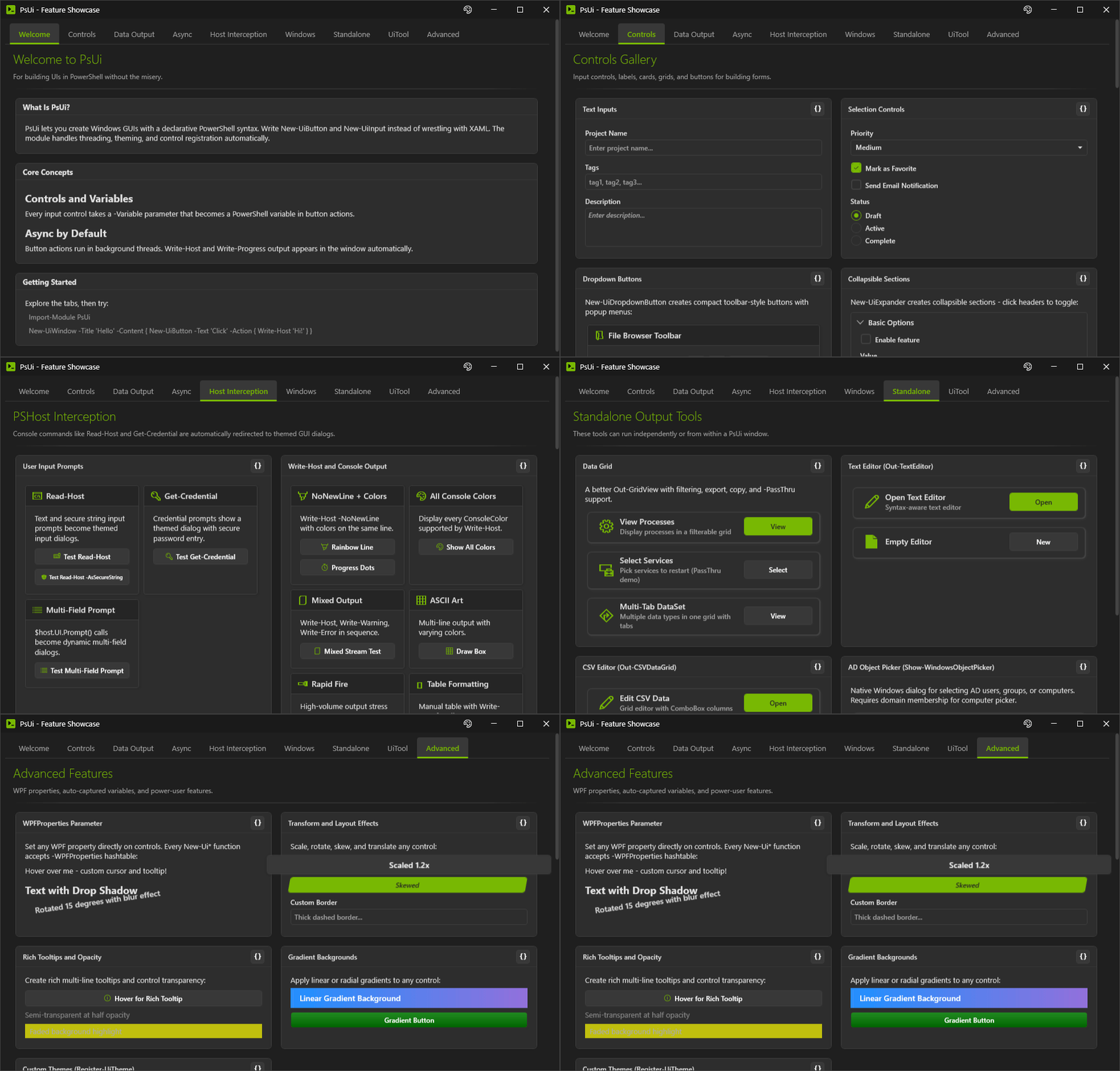
Script Sharing PsUi: PowerShell UIs made slightly less shitty

172 Upvotes

I've worked on this over the past year and change. It's probably most useful for internal tools (tools for your helpdesk or whatever). It abstracts the horror of WPF over PowerShell into a slightly more palatable experience.

It'll allow you to avoid XAML. You won't have to worry about runspaces or Dispatcher.Invoke. You call functions, things show up on screen, the window doesn't freeze when your script runs. All the threading shit is buried in a C# backend so you can worry about the actual PowerShell logic.

If you've ever tried to implement WPF for PowerShell properly (runspace pools, synchronized hashtables, dispatchers) you know that setup is a massive pain in the balls from the start. One wrong move and your UI thread has shit the bed, your variables are gone, and your beautiful form has collapsed in on itself with the weight of a neutron star. I went through all of that so you don't have to. My sanity went to hell somewhere around month four but hey, the module (probably) works.

So how it actually works: your -Action scriptblocks don't run on the UI thread. They run on a pre-warmed RunspacePool in the background (pool of 1-8 runspaces, recycled between clicks so there's no spinup cost). When you define a control with -Variable 'server', the engine hydrates that value into the runspace as $server before your script runs, and dehydrates it back to the control when it's done. It's by-value, not by-reference, so form data (strings, booleans, selected items) round-trips cleanly. If you need to pass heavier objects between button clicks there's a $session.Variables store for that.

The host interception is there because running scripts off the UI thread breaks every interactive cmdlet. Write-Host doesn't have a console to write to. Read-Host has nobody to ask. Write-Progress has nowhere to render. Get-Credential just dies. So PsUi injects a custom PSHost that intercepts all of that and routes it back to the UI. Write-Host goes to a console panel with proper ConsoleColor support, Write-Progress drives a real progress bar, Read-Host pops an input dialog on the UI thread and blocks the background thread until you answer, Get-Credential does the same with a credential prompt, and PromptForChoice maps to a button dialog. The output batches in chunks so if your script pukes out 50k lines the dispatcher queue doesn't grow unbounded and murder the UI.

Controls talk to the background thread through a proxy layer that auto-marshals property access through the dispatcher. You don't see any of this, you just write $server and it works.

New-UiWindow -Title 'Server Tool' -Content {
    New-UiInput -Label 'Server' -Variable 'server'
    New-UiDropdown -Label 'Action' -Variable 'action' -Items @('Health Check','Restart','Deploy')
    New-UiToggle -Label 'Verbose' -Variable 'verbose'
    New-UiButton -Text 'Run' -Accent -Action {
        Write-Host "Hitting $server..."
        # runs async, window stays responsive
    }
}

Controls include inputs, dropdowns, sliders, date/time pickers, toggles, radio groups, credential fields, charts, tabs, expanders, images, links, web views, progress bars, hotkeys, trees, lists, data grids, file/folder pickers, and a bunch of dialogs. Light theme by default, dark if you pass -Theme Dark.

PSGallery:

Install-Module PsUi

https://github.com/jlabon2/PsUi

GIF of it in action: https://raw.githubusercontent.com/jlabon2/PsUi/main/docs/images/feature-showcase.gif

Works on 5.1 and 7. If you do try it and anything breaks, please open an issue and let me know.


r/PowerShell • • Jan 03 '23

Misc Awesome FREE Powershell Notes for Professional e-book

172 Upvotes

Just a shoutout to a great book I came across last year when I started to dig more in depth in powershell, this .pdf was a massive help and the examples are great ! I still come back to it whenever I need to get a reference on something, and really recommend having on your collection.

https://goalkicker.com/PowerShellBook/

if you like the style of the book, you can also download for free other programming languages like .NET,C#,PHP,Python,etc..Full list of free ebooks to download -> https://goalkicker.com/


r/PowerShell • • Oct 09 '19

My IT Tool

172 Upvotes

Figured I'd share my little program as well. Been working on this on and off for about 6 months now. Just started getting into Powershell. Some key features are a security check the second the program is ran. If the user is not part of the proper OU, it will display an error message, email the IT dept with their username and computer, and then close the program. Just to make sure only IT people can use it. Every action is also logged to a central server Event Viewer.

Program screenshots: https://imgur.com/a/qsjk4ek

Code: https://pastebin.com/0FmdSaRF

I know I can clean it up some and probably stream line some stuff but, again, I've only been using Powershell since the beginning of the year basically and I have no real other programming experience prior. I made this to really just make my job a little easier and quicker. I started this in Powershell Studio trial with the form and tabs. Pulled that code and have been using ISE ever since. Apparently Studio is just too expensive for my company but oh well.

EDIT: GOLD?! Wow, my first! Thank you internet stranger! I also wanted to thank everyone on here who helped me the times I came looking for help with certain aspects of this thing. I really appreciate it. And thanks to everyone on this post for tips and suggestions, I will definitely look into them all. Always looking to improve.


r/PowerShell • • Jan 11 '19

Solved Cmd can be found fast by typing "cmd", what do you use to get PowerShell fast?

172 Upvotes

r/PowerShell • • Feb 21 '26

What is the best way to learn PowerShell in 2026

171 Upvotes

I'm trying to learn power shell/ power bi for my job. I am pretty interested in it. I have coded before, but its been a while so i am rusty. What would be the best course/ ways to learn powershell from scratch? I keep seeing "powershell in a month of lunches" but ive noticed the companion videos are more than a decade old on that course, are they still relevant? If anyone a course for this paid or free, sharing it would be amazing as I am a little lost/overwhelmed on where to start and how to stay consistent.

Any help is appreciated!


r/PowerShell • • Jun 26 '19

Trolling your colleagues with the new Windows Terminal

Thumbnail
blog.kieranties.com
171 Upvotes

r/PowerShell • • Feb 28 '19

We are growing - Thank you to Reddit!

171 Upvotes

Hello guys, I just wanted to say big thanks for all of the feedback so far, time and good willing spent.

Approximately month ago, I decided to dive into a modules/functions with one of my colleagues by creating GitHub repo, so we can share our knowledge and at the same time sharp it by reviewing other people code and styles.

Until today we had few pull requests(probably coming from one of the Reddit users) and many times we had demystified our confusion or concerns, just here on Reddit.

I have to say thank you to you all for your time and investments.

If you are interested to help us further, have a look here - https://github.com/nemanja-jovic/powershell4all


r/PowerShell • • Dec 11 '18

The other powershell

Post image
171 Upvotes

r/PowerShell • • Jul 30 '19

Script Sharing Easy, fully automated, worry-free driver and firmware updates for Lenovo computers

170 Upvotes

Hello all!

As I've been hinting at I had something in the works for everyone who owns or works with Lenovo computers - like myself!

My new module - LSUClient - is a PowerShell reimplementation of the Lenovo System Update program and it has allowed me to easily and fully automate driver deployment to new machines as well as continuously keeping them up to date with 0 effort.

GitHub:

https://github.com/jantari/LSUClient/

PowerShell Gallery (available now):

https://www.powershellgallery.com/packages/LSUClient

Some of my personal highlights:

  • Does driver, BIOS/UEFI and firmware updates

  • Run locally or through PowerShell Remoting on another machine

  • Allows for fully silent and unattended updates

  • Supports not only business computers but consumer (e.g. IdeaPad) lines too

  • Web-Proxy support (Use -Proxy parameter)

  • Ability to download updates in parallel

  • Accounts for and works around some bugs and mistakes in the official tool

  • Since I know my /r/sysadmin friends - yes you can run it remotely with PDQ Deploy!

  • Free and Open-source

I hope this will be as helpful for some of you as it has been for me - no matter which option for driver deployment you choose, none is perfect:

  • Lenovos SCCM packages are out of date and only available for some models

  • Manually pre-downloading drivers for every model and adding them to MDT is a pain

  • Even if you somehow automate the process of getting drivers for new computer models and importing them into MDT, you still have no way of keeping those machines updated once they're out in the field

  • The official Lenovo System Update tool has a CLI, but it's buggy, unreliable, produces very hard to parse log files, installs a service that runs as SYSTEM, uses the proxy settings of the currently logged in user with no manual override, runs graphical update wizards and waits for NEXT when you told it to be silent, etc etc - believe me, I've tried it.

What I do now is deploy new machines with WDS + MDT, then let PDQ-Deploy install some base software and run this module to get all drivers and UEFI patched up - no housekeeping required, all updates are always the latest fetched directly from Lenovo.

If you do work in IT and use a WebProxy to filter your traffic you will need to allow downloads including .exe, .inf and .xml files (possibly more in the future) from download.lenovo.com/* !

Please share your feedback, I am actively using this and looking to improve,

jantari


r/PowerShell • • Jan 05 '18

Meltdown/Spectre report for networks

170 Upvotes

I created a reporting script for Meltdown/Spectre including CVE-2017-5753 for Windows networks in PowerShell.

Get it from Github: https://github.com/vrdse/MeltdownSpectreReport

I'm happy for any feedback, suggestions for further checks or different assessment, and of course pull requests!

MeltdownSpectreReport

Query mitigation status of Meltdown and Spectre against one or multiple Windows computers. It uses parallelization for fast data collection.

Report includes

  • Mitigation status for CVE-2017-5754 in Windows

  • Mitigation status for CVE-2017-5715 in Windows

  • Mitigation status for CVE-2017-5753 in Edge

  • Mitigation status for CVE-2017-5753 in IE

  • Mitigation status for CVE-2017-5753 in Chrome

  • Mitigation status for CVE-2017-5753 in Firefox

  • Information to assess the risk (CPU, Hyper-V, Terminal Server, Docker)

  • Information for troubleshooting (Hardware Manufacturer and Model, Registry Keys, Uptime, Installed Hotfixes, ...)

It requires PowerShell 2.0 or later and PSRemoting enabled on remote systems.

The script includes Get-SpeculationControlSettings from Microsoft and Invoke-Parallel from RamblingCookieMonster. All credits for these functions go to them. Thank you!

Example

Execution against local computer

PS C:\> .\MeltdownSpectreReport.ps1 -ComputerName computer01
ComputerName                       : computer01
Manufacturer                       : HP
Model                              : HP Spectre x360 Convertible
BIOS                               : F.47
CPU                                : Intel(R) Core(TM) i7-6560U CPU @ 2.20GHz
OperatingSystem                    : Microsoft Windows 10 Pro
OSReleaseId                        : 1709
isHyperV                           : True
isTerminalServer                   : False
isDocker                           : True
CVE-2017-5754 mitigated            : True
CVE-2017-5715 mitigated            : False
CVE-2017-5753 mitigated in Edge    : True
CVE-2017-5753 mitigated in IE      : True
CVE-2017-5753 mitigated in Chrome  : False
CVE-2017-5753 mitigated in Firefox : True
BTIHardwarePresent                 : False
BTIWindowsSupportPresent           : True
BTIWindowsSupportEnabled           : False
BTIDisabledBySystemPolicy          : False
BTIDisabledByNoHardwareSupport     : True
KVAShadowRequired                  : True
KVAShadowWindowsSupportPresent     : True
KVAShadowWindowsSupportEnabled     : True
KVAShadowPcidEnabled               : True
OSMitigationRegKeySet              :
AVCompatibility                    : True
MinVmVersionForCpuBasedMitigations : 2.0
InstalledUpdates                   : {@{HotFixId=KB4048951; Description=Security Update; InstalledOn=15.11.2017 00:00:00; ComputerName=computer01},
@{HotFixId=KB4049179; Description=Security Update; InstalledOn=05.11.2017 00:00:00; ComputerName=computer01},...}
Uptime                             : 15:01:18.3875647
ExecutionDate                      : 06.01.2018

Execution against multiple computers

PS C:\> $ComputerName = Get-ADComputer -Filter * | Select-Object -ExpandProperty Name
$Report = .\MeltdownSpectreReport.ps1 -ComputerName $ComputerName
$Report | ConvertTo-Csv -NoTypeInformation -Delimiter ',' | Out-File C:\report.csv
$Report | Out-GridView

PS C:\> $ComputerName = Get-Content $env:USERPROFILE\Desktop\servers.txt
.\MeltdownSpectreReport.ps1 -ComputerName $ComputerName -ErrorAction 
SilentlyContinue | 
Export-Csv -Path $env:USERPROFILE\Desktop\servers.txt -NoTypeInformation

Properties

Mitigation Status

This highly relies on the information from Spectre still unfixed, unlike what Intel says and CPU security bugs caused by speculative execution. I highly recommend to read them.

Note: Not every mitigation, especially for CVE-2017-5753, is of the same quality. As the root cause relies in the CPU, all these mitigations are not really a fix to the actual problem. Mitigation means, it's "more difficult to exploit", and not every mitigation makes it equally difficult. The report only knows true or false for the mitigation. true is usually considered as "as good mitigated as currently possible"

CVE-2017-5754 mitigated (aka Meltdown)

Is true if CVE-2017-5754 mitigated if KVAShadowRequired is false, or if both, KVAShadowWindowsSupportPresent and KVAShadowWindowsSupportEnabled are true. The test are actually done by Get-SpeculationControlSettings].

CVE-2017-5715 mitigated (aka Spectre Variant 2)

Is true if BTIHardwarePresent, BTIWindowsSupportPresent, and BTIWindowsSupportEnabled are true. The test are actually done by Get-SpeculationControlSettings]

CVE-2017-5753 mitigated in Edge (aka Spectre Variant 1)

Is true if one of the following Windows Updates is installed: 'KB4056893', 'KB4056890', 'KB4056891', 'KB4056892', 'KB4056888'

The list of updates was obtained from ADV180002 | Guidance to mitigate speculative execution side-channel vulnerabilities.

Is empty if Edge was not found.

CVE-2017-5753 mitigated in IE (aka Spectre Variant 1)

Is true if one of the following Windows Updates is installed: 'KB4056890', 'KB4056895', 'KB4056894', 'KB4056568', 'KB4056893', 'KB4056891', 'KB4056892'

The list of updates was obtained from ADV180002 | Guidance to mitigate speculative execution side-channel vulnerabilities.

Also see Mitigating speculative execution side-channel attacks in Microsoft Edge and Internet Explorer for details.

Is empty if IE was not found.

CVE-2017-5753 mitigated in Chrome (aka Spectre Variant 1)

Is true if C:\Program Files (x86)\Google\Chrome\Application\chrome.exe is version >=64, or 63 and Site Isolation is enabled by policy.

See Google’s Mitigations Against CPU Speculative Execution Attack Methods, Actions Required to Mitigate Speculative Side-Channel Attack Techniques for details.

Read more about Site Isolation and enable if desired as follows:

HKEY_LOCAL_MACHINE\Software\Policies\Google\Chrome\SitePerProcess is 1.

See also Policy List/SitePerProcess.

Is empty if Chrome was not found.

CVE-2017-5753 mitigated in Firefox (aka Spectre Variant 1)

Is true if C:\Program Files\Mozilla Firefox\firefox.exe or C:\Program Files (x86)\Mozilla Firefox\firefox.exe is version >=54.0.7

See Mitigations landing for new class of timing attack for details.

Is empty if Firefox was not found.

Roles

isHyperV

Is true if vmms (Hyper-V Management) Service is running.

Hypervisors are at increased risk.

isTerminalServer

Is true if TerminalServerMode is 1.

Terminal Servers (Remote Desktop Servers) are at increased risk.

isDocker

Is true if PATH system variable contains docker (which is the default).

Container hoster are at increased risk.

SpeculationControlSettings

BTI*

BTI is Branch Target Injection as described in CVE-2017-5715 alias Spectre (Variant 2).

This vulnerability requires always a microcode update for the CPU, which will be offered by the hardware OEM.

These properties might give you further insights, why CVE-2017-5715 mitigated is false.

KVA*

KVA or Kernel VA (also known as KPTI (Kernel page-table isolation) or KAISER) removes the mapping of kernel memory in user space process and thus mitigates the practical explotation of CVE-2017-5754 alias Meltdown.

KVAShadowPcidEnabled is an optimization, not a requirement for security.

These properties might give you further insights, why CVE-2017-5754 mitigated is false.

Registry Keys

OSMitigationRegKeySet

As per Windows Server guidance to protect against speculative execution side-channel vulnerabilities:

Customers need to enable mitigations to help protect against speculative execution side-channel vulnerabilities.

Enabling these mitigations may affect performance. The actual performance impact will depend on multiple factors, such as the specific chipset in your physical host and the workloads that are running. Microsoft recommends that customers assess the performance impact for their environment and make necessary adjustments.

OSMitigationRegKeySet is true if the values for the registry key Memory Management are set as required, i.e. FeatureSettingsOverride is 0 and FeatureSettingsOverrideMask is 3. OSMitigationRegKeySet is empty if the computer is a client.

To create the required values, you can use the following PowerShell commands:

New-ItemProperty -Path 'HKLM:\SYSTEM\CurrentControlSet\Control\Session Manager\Memory Management' -PropertyType 'DWORD' -Value '0'  -Name 'FeatureSettingsOverride'
New-ItemProperty -Path 'HKLM:\SYSTEM\CurrentControlSet\Control\Session Manager\Memory Management' -PropertyType 'DWORD' -Value '3'  -Name 'FeatureSettingsOverrideMask'

Note: This is not required for Clients.

AVCompatibility

As per Important information regarding the Windows security updates released on January 3, 2018 and anti-virus software, the security updates are only installed, if the registry value cadca5fe-87d3-4b96-b7fb-a231484277cc is present in HKEY_LOCAL_MACHINE\SOFTWARE\Microsoft\Windows\CurrentVersion\QualityCompat.

The value is either set by the the installed Anti-Virus, or must be set manually if no Anti-Virus is installed.

To add the value manually, you can use the following line of PowerShell:

New-ItemProperty -Path 'HKLM:\SOFTWARE\Microsoft\Windows\CurrentVersion\QualityCompat' -Name 'cadca5fe-87d3-4b96-b7fb-a231484277cc' -PropertyType DWord -Value '0x00000000'

Note: Only use this command, if you don't have any Anti-Virus installed, or verified that it's compatible!

MinVmVersionForCpuBasedMitigations

If Hyper-V is installed, an additional Registry value has to be taken care of. MinVmVersionForCpuBasedMitigations is the value of the minimum supported VM version for CVE-2017-5715 fix of VM guests. If Hyper-V is not active, it's empty.

From Protecting guest virtual machines from CVE-2017-5715 (branch target injection)

By default, virtual machines with a VM version below 8.0 will not have access to updated firmware capabilities required to mitigate CVE-2017-5715. Because VM version 8.0 is only available starting with Windows Server 2016, users of Windows Server 2012 R2 or earlier must modify a specific registry value on all machines in their cluster.

To give every VM version access to the updated firmware capabilities, you can use the following PowerShell code:

if ((Get-ItemProperty -Path 'HKLM:\SOFTWARE\Microsoft\Windows NT\CurrentVersion\Virtualization' -ErrorAction SilentlyContinue).MinVmVersionForCpuBasedMitigations) {
    Set-ItemProperty -Path 'HKLM:\SOFTWARE\Microsoft\Windows NT\CurrentVersion\Virtualization' -Name MinVmVersionForCpuBasedMitigations -Value '1.0'
}
else {
    New-ItemProperty -Path 'HKLM:\SOFTWARE\Microsoft\Windows NT\CurrentVersion\Virtualization' -Name MinVmVersionForCpuBasedMitigations -PropertyType String -Value '1.0'
}

*Note: A cold reboot of each VM is required. Rebooting the OS from inside the Guest is not sufficient to make the setting effective. You have to Turn the machine off and on again.

This can be considered as the Hyper-V Guest equivalent to "microcode CPU update from hardware OEM".

History

0.4.3

  • * PCID not required anymore for 'CVE-2017-5754 mitigated' to be true

  • * issue #2 fixed

0.4.2

  • * issue with 'CVE-2017-5753 mitigated in IE' and PSv2 fixed

0.4.1

  • * fixing "Firefox.exe located in Program Files (x86) #1"

0.4

  • + MinVmVersionForCpuBasedMitigations added

0.3.1

  • * OSMitigationRegKeySet fix

0.3

  • + CVE properties added

  • + CVE-2017-5753 for Edge, IE, Chrome, and Firefox

  • + isDocker check

  • + Get-SpeculationControlSettings updated to 1.0.2

0.2

  • + PowerShellv2 support


r/PowerShell • • Nov 06 '17

FoxDeploy: Creating Glorious PowerShell Dashboards

Thumbnail
foxdeploy.com
170 Upvotes

r/PowerShell • • May 25 '25

Misc Do you think it's a good idea to let fresh new students build a slot machine in PowerShell to learn the basics?

169 Upvotes

Some of my students (not all 😉) are into gambling and trading apps on their phones while in class. I’m thinking about using that interest to grab their attention. Of course, it doesn’t involve real money, it’s just for learning.

By building a simple slot machine, they could learn a lot of programming fundamentals in a fun way, like arrays, if/else statements, loops, variables, file encoding, randomness in cmdlets.

And then let them try to expand the slot machine with new rules for winning.

So if you're completely new to PowerShell or scripting and around 16 or 17 years old, what kind of projects or exercises would actually get you interested you think?


r/PowerShell • • Mar 13 '25

DSCv3 has been released and its no longer PowerShell based.

169 Upvotes

MS have released DSCv3. Its written in Rust and is its own application, much like Terraform and Ansible. You can write configs in JSON or YAML and create custom resources in whatever language you like. No more MOF files!
https://devblogs.microsoft.com/powershell/announcing-dsc-v3/


r/PowerShell • • Apr 12 '19

Meet Emailimo - Easy way to send pretty emails

169 Upvotes

Hello ;-) It's me again.

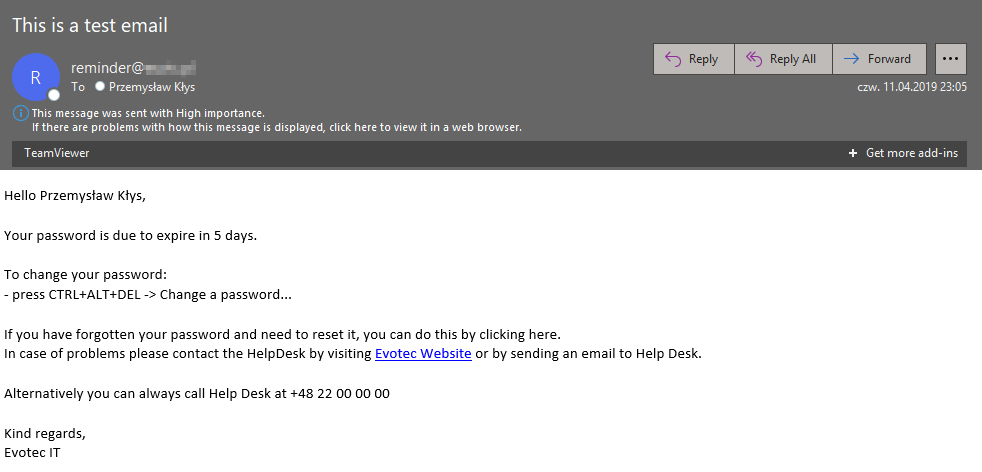
Today I wanted to present a little PowerShell module that makes it easy to send emails. Full overview with examples can be found https://evotec.xyz/meet-emailimo-new-way-to-send-pretty-emails-with-powershell/

What is it about? It's supposed to make it clearly visible what you're trying to send with Powershell so that when you look back at your code in 6 months time you know what is going on and you can fix any formatting as you want it.

Import-Module PSWriteHTML -Force
Import-Module Emailimo -Force
### Prepare your data:
$UserNotify = 'Przemysław Kłys'
$PasswordExpiryDays = 5
Email -WhatIf {
    EmailHeader {
        EmailFrom -Address '[email protected]'
        EmailTo -Addresses "[email protected]"
        EmailServer -Server 'mail.evotec.com' -UserName 'YourUsername' -Password 'C:\Support\Important\Password-Evotec-Reminder.txt' -PasswordAsSecure -PasswordFromFile
        EmailOptions -Priority High -DeliveryNotifications Never
        EmailSubject -Subject 'This is a test email'
    }
    EmailBody -FontFamily 'Calibri' -Size 15 {
        EmailTextBox {
            "Hello $UserNotify,"
            ""
            "Your password is due to expire in $PasswordExpiryDays days."
            ""
            'To change your password: '
            '- press CTRL+ALT+DEL -> Change a password...'
            ''
            'If you have forgotten your password and need to reset it, you can do this by clicking here. '
            "In case of problems please contact the HelpDesk by visiting [Evotec Website](https://evotec.xyz) or by sending an email to Help Desk."
            ''
            'Alternatively you can always call Help Desk at +48 22 00 00 00'
            ''
            'Kind regards,'
            'Evotec IT'
        }
        EmailText -LineBreak
    }

Example 2:

Import-Module PSWriteHTML -Force
Import-Module Emailimo -Force
### Prepare your data:
$UserNotify = 'Przemysław Kłys'
$PasswordExpiryDays = 5
Email {
    EmailHeader {
        EmailFrom -Address '[email protected]'
        EmailTo -Addresses "[email protected]"
        EmailServer -Server 'mail.evotec.com' -UserName 'UserName' -Password 'C:\Support\Important\Password-Evotec-Reminder.txt' -PasswordAsSecure -PasswordFromFile
        EmailOptions -Priority High -DeliveryNotifications Never
        EmailSubject -Subject 'This is a test email'
    }
    EmailBody -FontFamily 'Calibri' -Size 15 {
        EmailText -Text "Hello ", $UserNotify, "," -Color None, Blue, None -Verbose -LineBreak
        EmailText -Text "Your password is due to expire in ", $PasswordExpiryDays, "days." -Color None, Green, None
        EmailText -LineBreak
        EmailText -Text 'To change your password: '
        EmailText -Text '- press ', 'CTRL+ALT+DEL', ' -> ', 'Change a password...' -Color None, BlueViolet, None, Red
        EmailText -LineBreak
        EmailTextBox {
            'If you have forgotten your password and need to reset it, you can do this by clicking here. '
            "In case of problems please contact the HelpDesk by visiting [Evotec Website](https://evotec.xyz) or by sending an email to Help Desk."
        }
        EmailText -LineBreak
        EmailText -Text 'Alternatively you can always call ', 'Help Desk', ' at ', '+48 22 00 00 00' `
            -Color None, LightSkyBlue, None, LightSkyBlue -TextDecoration none, underline, none, underline -FontWeight normal, bold, normal, bold
        EmailText -LineBreak
        EmailTextBox {
            'Kind regards,'
            'Evotec IT'
        }
    }
}

Here's couple of screenshots. Hopefully those show up on Reddit. If not, go for the link :-)


r/PowerShell • • Aug 31 '18

Script Sharing Office 365 OffBoarding Employees Script

169 Upvotes

This script can be used as part of the offboarding process for an employee. It will do the following:
Latest version 1.1.2

  1. Block O365 Sign-In.

  2. Disconnect Existing sessions in case employee is signed in at another location.

  3. Forward emails or Convert to Shared Mailbox and assign to Manager

  4. Set Internal and External Out-Of-Office

  5. Cancel all meetings organized by employee

  6. Remove from all distribution groups

  7. Re-assign O365 Group Ownerships.

  8. Remove from all O365 Groups

  9. Make Manager admin for OneDrive for Business account

  10. Send an email to the Manager when all is completed, with results.

http://www.thecodeasylum.com/office-365-offboarding-users-with-powershell/

The Office 365 Employee Off-Boarding Application is available now on my site, there is an x64 and x86 version so pick your flavor : http://www.thecodeasylum.com/downloads/


r/PowerShell • • Mar 21 '23

After years of abandonment, r/PowerCLI is open and modded again

168 Upvotes

r/powercli is back online.

The previous mods restricted then abandoned the sub years ago. I requested to take it over and booted the old mods. Post restrictions have been removed.

I use PowerCLI every day, and I think I and other everyday users need a good community to collaborate with. Please subscribe and make a post.

I imagine that this will take a good bit of work to get the sub looking good and full of good content. If you want to help, send a message.


r/PowerShell • • Jul 27 '20

Retro Synthwave Theme for PowerShell in Windows Terminal

168 Upvotes

I made a synthwave-y type theme for PowerShell for Windows Terminal. You can either use the theme OR I commented out the color names to align with PowerShell tokens so you can use it as a base to create your own theme.

My Windows Terminal Retro Theme

Looks like this:

And htop in Linux looks like this (props to luzkenin on Twitter)

Enjoy!