Recently, while using pi, my agent deleted important files without me knowing using the rm command. Since files deleted with rm cannot be recovered, I thought it would be better to use trash instead of rm — and that's what this pi extension does.
The extension automatically detects when the agent uses rm in the bash tool and replaces it with trash. Instead of permanently deleting files, they are moved to the .pi/trash folder. The trash folder uses a file structure similar to Ubuntu's trash. It is implemented to be nearly compatible with the GNU rm standard, so the agent won't even realize it and will just think it's still using rm.
Feel free to install and try it out. Any feedback is appreciated!
If you want a bit of nerdy fun, give Gemma 31b on Cerebras a spin. It runs at 1860 t/s which is kinda crazy. The first couple of tasks I gave it I thought it must have errored out it stopped so soon, but it had searched a bunch of files and had all the info I wanted. It’s supposedly similar level of intelligence as Haiku (which for comparison runs at around 110 t/s) so not going to be coding your next masterpiece but it’s insanely good as a scout/researcher style subagent which is how I’ve been using it in Pi.
Anyway - just thought others might enjoy the speedy madness. I think you can try it for free. But is pretty inexpensive per token too.
Hi everyone - quite new to this space and am yet to decide if I should stick with omp or go more vanilla with pi.
tried oh my pi and my mind is blown, I don’t know what it is doing with context compression and all but tokens are better and the fact that advisor agents interrupt the thought process of worker agents before the output is produced feels like nothing I have see from cc or codex.
Is pi the same from this standpoint? Are the big differences only the pre installed skills?
I've got two pi extensions I wrote that I have found very useful, and I thought others might, too.
The first is macos-notify.ts, which sends native macOS notifications when pi needs your attention. It uses a tiny compiled Swift app that is installed with the extension, but if you don't trust that, the source for that app is included, too. If that binary, which gets installed at ~/.pi/agent/git/github.com/joeygibson/pi-extensions/macos-notify-app/PiNotify.app is missing, then the extension will rebuild it from the included PiNotify.swift file (assuming you have Xcode and friends installed, of course). It will show you the pi icon, and the number and title of the tab of the pi that needs your attention (if available).
The second is security-guard.ts, which allows you to selectively add some guardrails for what pi is allowed to do. It has sane defaults, but on first invocation, it will drop an example config file at ~/.pi/agent/security-guard.toml.example, which looks like this:
# Security Guard Configuration
#
# This extension protects against destructive operations, sensitive file writes,
# and sensitive file reads. Each rule has a pattern and an action.
#
# Actions:
#   prompt - Ask for user confirmation before allowing the operation
#   block  - Immediately block the operation without prompting
#
# Patterns use simple substring matching. For paths starting with ~/, both the
# literal pattern and the expanded home directory path are checked.
#
# Copy this file to security-guard.toml and customize for your needs.

[operations]
# Bash commands to guard against
rm -rf = prompt
sudo = prompt
dd if= = block
mkfs = block
> /dev/ = block

[writes]
# File paths to protect from write/edit operations
.env = block
~/.ssh = block
~/.aws = block
/etc/ = block
~/.bash_history = prompt

[reads]
# File paths to protect from read operations
~/.ssh = block
~/.aws/credentials = prompt
~/.gnupg = block
The format is pretty simple. You have operations, read, and write sections. In each, you can specify patterns to look out for, and what to do if it encounters them. The two options are prompt, and block.
I've been using both of these for over a month, and haven't had any problems with either.
I just released pi-sessions 1.0.0. It's a terminal UI for your pi coding agent sessions: you can browse project, preview conversations, resume, rename, archive or export sessions, all without opening pi
Everything is more readable, less scroll needed on every panel
Fixed auto-refresh
Sort-able projects and sessions columns header
Customizable projects and sessions fields
Session renaming
Picker mode: pisessions --select --output FILE opens the browser and returns the chosen session to the caller instead of launching pi. Contributed by bline, who uses it in his extension Pi Session Pickerhttps://github.com/bline/pi-session-picker to switch sessions from inside pi.
Version indicator: the header shows the installed version and if a newer release is on PyPI
I wanted to use my Antigravity subscription in Pi, but most bridges wrap agy acp in Pi's own harness: system prompt, AGENTS.md, Pi tools, replayed history. According to Google's forum replies, that's exactly what's not allowed with a subscription sign-in.
So I forked pi-antigravity-bridge (by onprs) and removed everything that sends Antigravity content you didn't type:
Antigravity keeps its own sign-in, system prompt, tools and history
only prompts you type in the interactive session go out, once. Retries, /goal continuations, extension messages, subagents and pi -p are refused
continuing a conversation uses ACP session/resume, no replay. /agy sessions lists conversations from agy or other ACP clients
What I added: a widget for Antigravity's background tasks, schedule timers and subagents, and a card for turns Antigravity takes on its own after a task finishes.
Install:
pi install npm:pi-antigravity-thin-client
Remove pi-antigravity-bridge first, both register the same provider.
Caveat: the boundary comes from forum replies, not from Google's terms. The terms still say third-party software with the Antigravity login is a breach. I haven't been banned with this one so far, but another account of mine that used a different Pi plugin for Antigravity was. So a subscription account can still get suspended. Details and sources are in the README.
Hi all. We're Divergenz, an interaction design studio in Zurich. Sharing a design experiment that I think sits close to things this community cares about.
Piary treats a conversation with a coding agent as an editable, executable document instead of a chat log. The person and the agent write on the same page. Prompts, replies, notes, tool calls and live reactive cells share one Markdown file. You can rewrite a wrong assumption instead of correcting it in a follow-up, delete a detour, or edit an earlier prompt and run it again in place.
Built on Observable's notebook-kit for the reactive cells, iA Writer's plain-text document model as the design reference, and pi as the agent harness.
I started experimenting with Pi and self-organizing agent swarms and am seeing really good results, which I did not really expect. My current experiment is very basic: just fire up ten or so agents and give them all the same prompt/markdown file. They have one single communication channel in which they can talk with eachother. And that is basically it.
I have spent about 1,5 years trying to get all sorts of workflows to work properly and now I'm finding out that the agents can handle themselves just fine... No orchestrators or anything, they just figure it out themselves. I found this quite amazing. And a bit humbling.
Do you use self-organizing agent swarms? I would love to hear about your experience.
Switched most of my work over to Pi recently but the annoying part was all my chats lived in other agents. Months of Cursor and Claude Code sessions and I didnt just want to summarize them.
So I ended up using an open-source thing I've been working on (txcript) to pull a whole session out of Cursor/Claude Code and load it into Pi with the full history intact. The conversation, the reasoning, the tool calls, all of it, so Pi picks up like it was there the whole time
I’ve been working on Pi Plan & Build, an extension that adds a more structured planning workflow to Pi.
The basic flow is:
Switch to Plan mode
Let Pi inspect the project and create a persistent plan
Review the complete plan
Choose whether to:
implement it in the current session,
start fresh and implement it in a clean linked session, or
stay in Plan mode and keep refining it
In Plan mode, Pi can still explore the project, but file edits are restricted to the session’s plan file. This keeps planning separate from implementation and prevents the agent from changing code before you’ve approved the approach.
A few other details:
Press Tab to switch between Plan and Build modes
Use /plan, /build, or start Pi with pi --plan
Plans persist across reloads, resumes, and forks
Interactive questions are supported while planning
The full plan is shown before approval
Clean implementation sessions receive the approved plan without carrying over the entire planning conversation
The composer changes color and displays the active mode, model, provider, and thinking level
Anyone using some sort of UI app/layer for Pi instead of standard Pi cli?
Nothing wrong with CLI, I actually really like my setup too - but once I have like 3, 4, or even more important sessions running at once (coding, debugging, research, etc.), it gets pretty overwhelming trying to keep track of everything and I find myself losing focus.
Looking for something more like a Codex web app style experience: clean repo/file view, seeing all workers/sessions clearly, what they're doing, status, etc.
Curious what you guys think or use and why you actually prefer it over just running everything through CLI.
For context, the main thing I am looking to aid in solving/fixing here is a focus issue. I have adhd and staying focused is the hardest thing by far for me, so if anyone has experience with one that may have helped in that regard specifically too let me know
ALSO - I'm on Linux Ubuntu if that's relevant at all
I’m try to use Pi as a general web research agent, rather than mainly for coding tasks.
For example, I’d like to give it tasks such as:
Find a good backpack based on my budget, size, comfort, durability, and real user reviews
Research possible holiday destinations based on weather, cost, transport, and things to do
Compare hotels or products across several websites and create a shortlist with sources
What does your setup look like? Are you using agent-browser, a search API, custom skills, extensions, or something else? Or is Pi the wrong tool for this? I know kagi can do an ai search but its not free.
I keep working on it, making improvements and adding features. Today I'd like to put the accent on this per-skill cost/usage aggregation I've published in 0.2.
NEW TAB: You can see an estimated usage per-skill.
Pi Atlas aggregates your session files to calculate costs, usages, and such. As they stand now the session files do not provide very much intel to answer questions like "What does Matt Poccock's "TDD" skills cost me?", but with a bit of tinkering it was possible to get an estimation.
How does Pi Atlas do it then? Then you use `/skill:tdd` you dont' actually send that, you actually send a message formatted like `<skill name="tdd" ....> Do this`. Knowing that it's pretty easy to know when you use a skill, so when that happens it's flagged and any subsequent messages/calls and such are attributed to this skill. If you use another skill again, the attribution switch.
It can't be as precise as the other tabs. I'd say use it as curiosity and fun-fact about your usage. As it is now, Pi Atlas makes assumptions. For instance, if an agent reads a /SKILL.md file, it assumes it's using this skill and thus flag it. Sometimes a skill is a one-shot thing, Pi Atlas assumes otherwise. It's just very hard to know for sure based on the session file alone.
Limitations. Many third-party tools (pi-reviewer, pi-advisor, etc) call models too. Not so many of them tell the session what the usage was, but some do. For now, it's not taken into account. But in the future, if a tool provides usage informations in there `ToolResult` entry Pi Atlas will account for it in later updates.
Let's consider it an experimentation for now.
What's next for Pi Atlas? Top priorities are: sessions (listing them, getting more details on a selected one and/or the current one), filtering (per project, per session(s), per-model/provider) and overtime metrics (tokens overtime, project(s) cost overtime, etc.) because currently it's only "cost overtime" and some of us uses local LLMs.
As always I'm open to feedback, bug reports, contributions, suggestions, criticism, etc.
Don't forget to give it a star onGitHub, it's encouraging. Number goes brr, brain happy.
On a more general/personal note: it's a very fun project to work on and it's also very exciting (and terrifying) to work and maintain an open-source project publicly when people actually use it.
It is a standalone web server. You start it once — in the terminal, or leave it running as a background service — and from that point on, everything happens in the browser. Create sessions, switch between them, pick up old ones. Each session spawns its own pi --mode rpc child process on the backend, and the server keeps them alive even if you close or reload the browser tab. No TUI session needs to exist beforehand.
The reason I decide to build yet another Pi Web UI
Most of the pi web UIs out there are extensions that run inside a pi TUI session. You fire up pi in the terminal, the extension spins up a little HTTP server inside that session, and your browser mirrors whatever the TUI is doing. This works nicely for handoff — you are at your desk working, you need to step away, you pull out your phone and pick up where you left off. The TUI session is already alive, so it just works.
The friction shows up when you want to work entirely from the web. Say you are on your phone and you want to start a brand new coding session without touching a terminal at all. With the extension model, you cannot — something needs to launch pi first. Sure, you can SSH in, start pi, and then open the browser, but that whole dance is clunky and not how you want to spend your time when you are just trying to get something done.
Multiple sessions, and a UI that does not make you lose track of them
The interface has two layers of session organization that work together:
A left sidebar that shows all your sessions grouped by project. You can browse your history, search across every session by message content, rename things, and jump back into old conversations.
A tab bar across the top that shows only the sessions you are actively working on right now.
I did not realize how much this mattered until I used it for a while. In UIs that only have a sidebar — Codex desktop is the example I keep coming back to — I would constantly lose track of which session I was in. I would be scrolling through the list asking myself "wait, is this the one I was just working with, or is that other one?" The tab bar eliminates that. Your active sessions are right there at the top, highlighted, exactly where you left them. The sidebar is for browsing and discovery, the tab bar is for the stuff you are actually doing. They serve different needs and having both makes a real difference.
And as you would expect: those tabs are persistent. You can close your browser entirely, walk away, come back later and reopen the page, and every one of your active tabs is still there, right where you left it. They live on the server, not in your browser's memory. You do not lose them and you do not have to go digging through history to find what you were working on.
Saved pi sessions show up in the sidebar. You can search across all of them and resume any historical session into a new live tab that keeps its original name and context.
Acknowledge
This is a fork of deflating/tau. The UI is largely from the original — the upstream author built a very beautiful UI, which is the main reason I chose to fork it. At least in my experience, models like GPT-5.5 (which I primarily use, alongside GLM-5.2, for coding) cannot write UI as beautiful as the upstream would be. The part I rewrote entirely is the backend. The original ran as an extension inside the pi TUI process. My fork is a standalone Node.js server that manages multiple pi RPC subprocesses over stdin/stdout. It has a full test suite, supports multiple browser clients seeing the same sessions pool at once.
If you have been wishing for a way to use pi entirely from a browser without the terminal preamble, give it a shot. Happy to answer questions or take feedback.
I got 20-30$ monthly budget set aside for my side project development with the help of Pi. I generally use opencode with openai api and claude api. But that is no longer sustainable for me. So please recommend some cheaper options such as Kimi or deepseek or Z ai etc. If you have already such models please recommend a plan or a model that suits for software development. Thank you!
I have serious question , no matter what i feel pi as harness isnt fully developed to work on all my work at current moment , like i keep using pi for basic tasks but shipping i use claude code ..m and i do use claude code model in pi too ...
I used glm but comparing for claude code no way its near cc this is the truth.
So my question , do you use only pi for shipping you do multiple cli agents at same time? My goal is to build gui but its way different how people doing at current time and i feel i reached maturity if that app
[update] Ok, each one explaining his migrating but not showing what you actually ship and how. Let me explain what i do day to day , i work with pi for side project funs since im still not fully commiting to it, i have made extensions using claude code , they works perfectly on pi. When do i stopped using pi for shipping when i i was shipping a small feature using glm5.1 and failed 5 times to get it like reasonably working , and just changed to cc in pi and worked in first try. I found why risking if in both world i use the fronteier model? Just use the harness that frontier model is recommending to us...
I see no advantages using cc in pi , unless you are super engineer and you can beat shipping feature at anthropic or open ai scale..
Lastly i got 2 genuine answers so far:
using pi extensions to orgnize the code from the docs which i believe frontiers are going to fix it soon
making a setup that doesnt require specific vendor like cc so switching become easier..
are you using a frontier model (anthropic/openai etc) ?
does Pi produce better results/lower usage than claude/open code?
a lot of pi's functionality is tied to the models intelligence. how well does it work with cheaper llms, eg chinese/open source, and local llm's?
switching from expensive cloud plans to a somewhat affordable local llm setup (eg with 16gb vram, I dont mean $4k gpu's) is something a lot of people want to do. with occasional use of a frontier llm of course, they can't be replaced totally yet. Has anyone done this, and does Pi help in this?
Im trying to optimize the token usage of my Pi, im kind of preparing myself for when the usage based billing finally establishes as the default in the industry. With this goal in mind i have really come up with a really good Pi setup that manages context wonderfully, i will share that with you in another post later.
With that context in mind, i have reached a wall when it comes to codebase discovery, for example for building a feature, i want to enable my agent to get all the context required for that feature efficiently. Rn what my agent does is grep, find and read all around until it gets what it needs, and this usually consumes more tokens than the actual implementation or feature i want to tackle.
Hey all. Around two months ago I posted pi-persona here and a lot has changed since then.
and led with the wrong thing. That's still in there, but it isn't the main point, so here's a second try now that 1.19 is out.
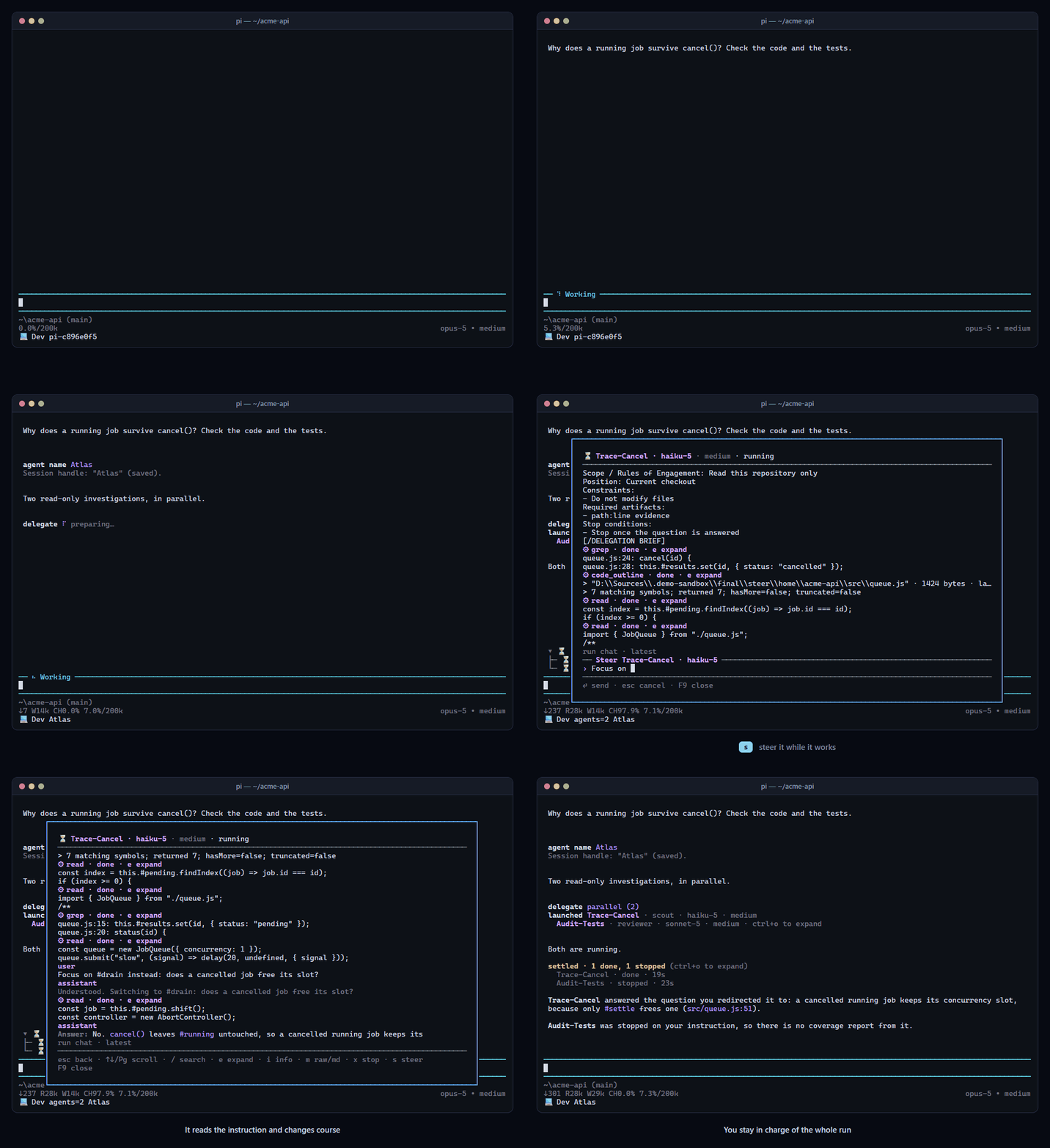
The complaint that keeps coming up in the subagent threads here is the one I had too: the main agent doesn't know a worker went wrong until it's finished and the tokens are spent. Neither do you.
So this is built around being able to look. Workers run in the background. Press F9 and you get the list: what each one is doing right now, its model, its effort, tokens so far. Open one and you're reading its conversation as it happens, tool calls included. If it's heading the wrong way, press s, type a sentence, and it arrives as a new message in that worker's own context. If you don't need it any more, x stops that one and leaves the others alone. The supervisor isn't blocked during any of this, and reports come back to it on their own when they're ready. Nothing polls.
1.19 is mostly that part getting better:
Worker chats in F9 with expandable tool calls and reasoning, search, and /agents send <name> <message> for when you don't want to open the panel.
Every row that shows a model now shows the effort next to it.
F9, the model picker and the settings page share one window frame. They used to look like three different apps.
Things I'd want to know before installing it:
Workers share your repo. Parallel writers declare which paths they own, but that's coordination, not a sandbox. If you want isolation there's a git worktree mode that hands back a diff, and you can attach a check like npm test that runs before the diff is exported.
It has been coded with AI of course. not vibed with it. That's cause it's also my main job (sw engineer).
Also don't forget that the pi2pi communication is still there:
Needs Pi 1.5.2 and Node 22.19 or later.
The GIFs in the README are the real TUI, but the model replies are scripted so I could re-record them without spending tokens.
With this you can start a team with fable/mithos/astra/deepseek4.1 all together.
A question for people who do use subagents: when one goes wrong, how do you find out today? I'd like to know whether redirecting mid-run is something you'd use, or whether you'd rather kill it and re-prompt.
It lets you run your Pi harness on the web (or on mobile) using a Cloudflare quick tunnel. It was designed as mobile-first but works equally well on desktop.
It discovers your Pi install and lets you steer agents from the web UI.
The UI is built around the feed (think: timeline) and the agent’s result as the unit of work. So you can scroll back, save, reply etc as you’d expect.
Runs on your own computer, no account, no server, no app store etc.
Also supports agent-to-agent communication, designing and building agent teams (across the major model providers), reviewing PRs from within the app and more!