I built an app called zerotap - it's an AI that can control your phone using natural language. You tell it what to do and it does the tapping, scrolling, typing for you.
Just added MacroDroid support, so now you can use it as an action in your macros. MacroDroid handles the triggers, zerotap handles the stuff that's hard to automate normally - like replying to messages, ordering food, or filling out forms in apps that have zero automation support.
The app is on Google Play. There's also a BYOK option if you prefer to use your own API key.
Whether you're a new or an advanced Macrodroid user, setting up Shizuku is a must to unlock the true power of Macrodroid.
Shizuku is a free android app that allows you to execute powerful ADB commands directly on your device. Essentially, it is the closest thing you can get to root access without the need to root your device.
With Shizuku, you can run shell commands that normally require superuser access or manual ADB input.
Here's a quick list of a few commands you can execute and what they do:
"settings put system pointer_location 1" — Enable pointer locations.
"settings put system show_touches 1" — Enable show taps.
You can move files across different folders:
"mv /storage/emulated/0/Pictures/Reddit/*.jpg /storage/emulated/0/Download" — Move all jpg files from the reddit folder to the downloads folder for example.
You can disable any app on your phone, to prevent it from using the battery in the background for example and re-enable it when needed.
"pm disable-user --user 0 com.google.android.youtube" — Disable YouTube for example.
Well luckily, an official guide is already established. For most users running Android 11 or above, you'd want to jump to the "Wireless debugging" section of this guide: https://shizuku.rikka.app/guide/setup/
If you're on android 10 or below, go to the "Start by connecting to a computer" section of that same guide.
In order for the Shizuku service to keep functioning flawlessly, make sure to whitelist it, and have all four of the following toggles enabled in developper options:
If you've done everything correctly, you should see "Shizuku is running" at the top when you open the Shizuku app. Once that is done, in the Shizuku app, head over to "Authorized applications" and enable Macrodroid, then force stop Macrodroid and re-open it.
Now, one thing to keep in mind, is that you'll need to enable Shizuku every time you reboot your device. If you're on android 10 or below, you will have to repeat the same steps mentionned in the guide. However, for android 11+ users, this can be easily accomplished wirelessly; In case you haven't done so already, make sure to grant Macrodroid the following ADB permission using the action "Shell script" (Make sure to select "Shizuku" in the action menu) and the command "pm grant com.arlosoft.macrodroid android.permission.WRITE_SECURE_SETTINGS".
Congratulations, you've just ran your first adb shell command using Shizuku! This command is primarily used to allow Macrodroid to change a wide variety of global, secure and system settings using the "Modify system setting" action, one of which is wireless debugging which is required to start Shizuku.
The following macro utilizes this setting to automatically enable wireless debugging for you and start the Shizuku service every time you boot your device: https://www.macrodroidlink.com/macrostore?id=22435 (Always make sure to force stop and restart macrodroid after enabling Shizuku for it to take effect). You now also no longer require the Macrodroid helper app primarily used for the "Modify system settings" action.
And voilà! Now all that's left to do is to explore the endless possibilities you've unlocked!
Bonus tip: Shizuku also works with many other apps to offer users more control over their device, here's a list of some really great apps you might find useful: https://github.com/timschneeb/awesome-shizuku
I got the new MacroDroid update a few days ago and came on Reddit to see if anyone had mentioned the new AI feature, but I couldn't find much about it.
I've been playing around with it and it's honestly brilliant. You can basically describe what you want a macro to do, hit copy, then paste it into an AI app. I've been using Claude, and it's helped me make some macros that I genuinely wouldn't have known how to build myself.
One of the more complicated ones I've made sorts my downloads automatically. If it detects a movie, it moves it into my Movies folder and creates the folder if it doesn't exist. If it sees something like S01E03, it knows it's a TV episode and moves it into the TV folder.
I've also got it handling multiple episodes. So if I download, say, 10 episodes individually, it can recognise they're from the same series, create a folder for them and name it automatically.
I've even got another one that clears out the random unwanted files that sometimes come with downloads, like pictures, subtitles and other stuff I don't need.
I've made an automatic brightness macro too. My phone's adaptive brightness never seems to work quite how I want it to, so I've built my own version that changes the brightness depending on the conditions. I've tweaked it a few times and it's now working exactly how I wanted.
Another simple one automatically deletes screenshots after an hour. I was using Sweep for that before, but I thought I'd see if MacroDroid could do it instead.
Those are probably the biggest things I've made so far. I'm still thinking of other things I can automate and ways to improve some of my older macros.
What I really like is that I'm not particularly good at writing this sort of logic myself, but I can explain what I want and then work through it with Claude and MacroDroid until it works. I've ended up making some pretty complex stuff from ideas that I probably wouldn't have even attempted before.
I'm surprised there doesn't seem to be much discussion about the new feature yet. Has anyone else been experimenting with it, and if so, what have you made?
I stumbled across MacroDroid a few days ago. I have created several for my phone since then. It took a few attempts to get the DND while charging at night, but wow, this app is absolutely awesome!
I just wanted to say that MacroDroid is fantastic.
I can't understand why is it not more universally known and used. Every time someone speaks of Android automation, you hear T*sker or Automate. IMHO, MacroDroid is so much better and free unlike T*sker.
MacroDroid does tons of things very reliably, is free of charge so far, is stable, and very intuitive.
Sounds like an ad LOL but it really is just my opinion from the user standpoint. Bravo, MacroDroid developer! And thank-you!
I recently discovered this amazing app, which has become my faithful assistant. Initially, I created a simple macro to automatically enable and disable the NFC module in a card payment app. However, using Google Gemini, I was able to solve one of Xiaomi's most challenging issues—gesture navigation in third-party launchers. Of course, you can use ADB, but that causes an annoying bar at the bottom of the screen. However, with Macros, as you can see in the screenshot, the screen remains bezel-less, and the buttons don't appear even after rebooting the phone. I'd love to hear your ideas on how to use Macros!
I'm usin a samsung galaxy s5 (No custom rom original android 6.0.1), i rooted it, installed f-droid, macrodroid. But macrodroid isnt free a program. I can only use 5 macros and if i want use more days, i have to watch ads. And Its only 99₺ (2,16$) on my country. I downloaded it from play store. Is Macrodroid pro worth buying?
A floating Android overlay touchpad for MacroDroid - draws a movable pad + cursor on screen and reports taps, gestures, and swipes back to MacroDroid via local variables.
Features
Cursor movement - relative motion with sensitivity, edge stretch, and inertia
Taps - single tap fires click coordinates, double tap expand notification bar; triple tap opens the settings menu
Long hold - slide to adjust volume or brightness, with a live value readout
Gesture draw - tap then hold then drag to send a swipe path (start/end coordinates) to MacroDroid
Auto-dock - pad hides on touch outside pad as a pill sliver or invisible corner zones; 5 animation styles
Shortcuts menu - one-tap buttons loaded from tp_shortcuts, supports grid layouts
Pad lock - Locks pad to a place, instead of roaming.
Live settings - full in-overlay settings panel (cursor, pad, movement, taps, dock, zones, offsets, display)
Orientation aware - cursor and pad remap automatically on rotation
No SD card / no install - entire JAR is embedded in a MacroDroid local variable and loaded at runtime.
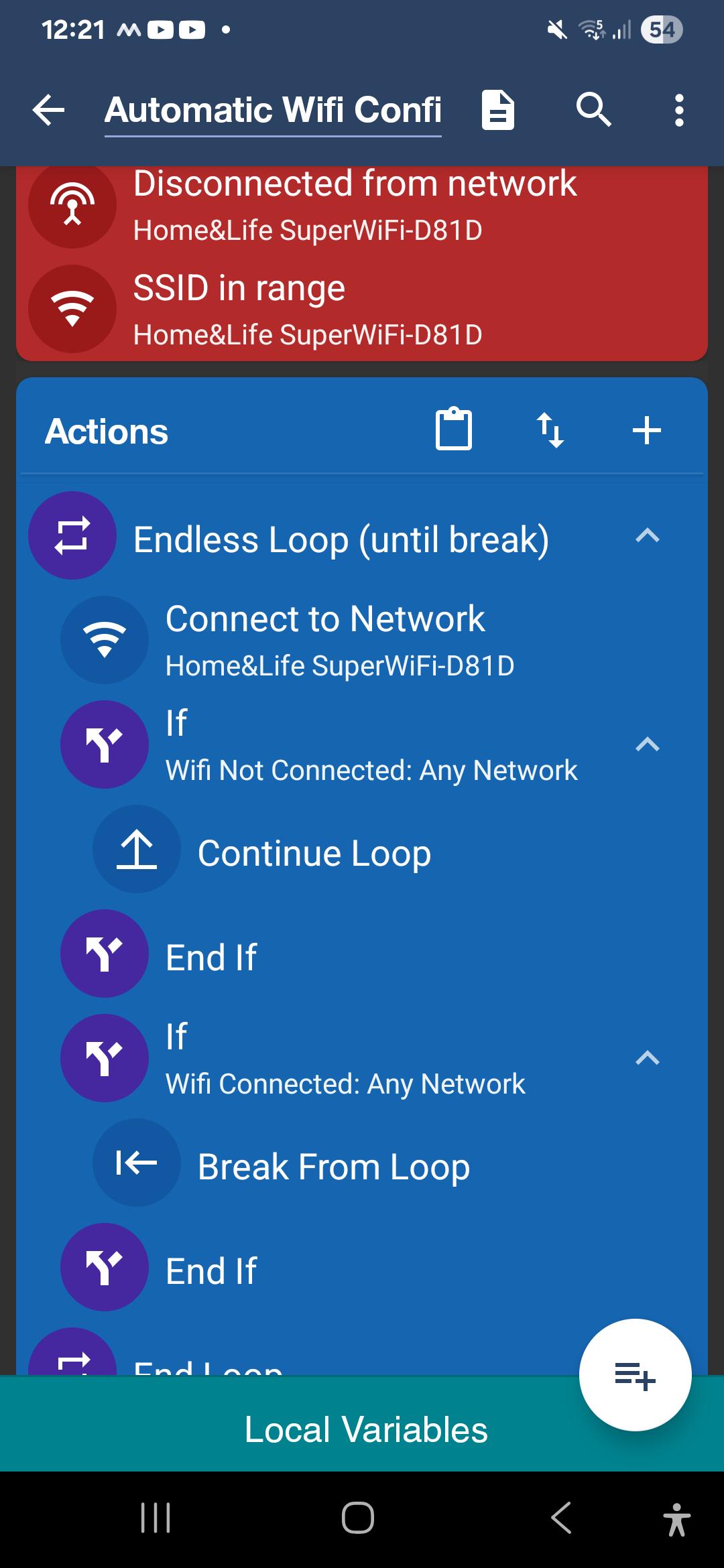
I created a macro that connects to your Wi-Fi easily whenever it is in range and you're disconnected from your SSID. I'm posting this macro here because it's my first time ever working with loops (I wanted to see how they worked) and i got this one idea. This may not work so... I want some feedback by someone.
I know app promos can get annoying, so I'll keep this straight to the point. I made an app called Notch Touch that turns your phone's camera cutout into an extra gesture button (tap, double-tap, swipe,swipe and hold, long-press, etc.). With a BUNCH of extra functionality!
Originally, the automation triggers I built were hardcoded specifically for Tasker. A bunch of my users reached out pointing out that this sucked for MacroDroid users having to use clunky workarounds, and honestly, you guys were totally right.
I just pushed an update that switches the broadcast system to clean implicit intents, and the action inside the app is now officially named Tasker/MacroDroid Integration.
Before anyone downloads it, I want to be 100% upfront: MacroDroid integration is a Pro feature. I'm a solo student dev balancing app development with my engineering degree and the nominal fee for the Pro version helps keep up active support for the app :D.
BUT, I personally hate when apps lock a feature behind a paywall without letting you test if it actually works for your setup first.
So I built in a trial system: you can watch a single short ad to unlock all Pro features for 30 minutes. You can renew this as many times as you want to build and test your macros completely for free. If you end up liking it and want it permanently, it's a one-time purchase (no subscriptions for the Pro version, I promise).
How it works now:
Trigger Macros from the Notch
In Notch Touch, set a gesture to the Tasker/ MacroDroid action and give it a name, and once you hook it up in your macro, launch it directly using any gesture ! I have a detailed instruction guide linked at the end of the post :)
2. Control the Notch from MacroDroid
You can use the Send Intent action to control my app silently in the background.
You can have MacroDroid automatically disable the notch touch area when you launch a game to stop accidental touches, or dynamically change what a swipe does based on any condition ,say time of day!
So a single tap could take a screenshot in the morning and toggle your Flashlight at night, without you having to switch it manually in the app !