r/blenderpython • • Jan 31 '25

Have any tips for a beginner?

5 Upvotes

(posted this about 2min ago on the wrong account. ups)

Hello. im currently trying to learn how to make my own addons/scripts in blender, but the course my work provided didn't help much.. i was wondering if you guys have any tips on where to begin and/or can recommend some courses? never coded before, so im guessing its obvious to learn the basics. but i really wanna know if there's some nice courses out there.

currently taking this course: https://www.udemy.com/course/learn-blender-python

although it has a lot of good information about everything, i cant seem to learn anything from it. the course consists of a bunch of videos where a guy explains a lot of stuff and then at the end of each video says "now you do it". i have to watch the videos 3 times before the information sticks and that doesn't always work either.. and sometimes he shows me stuff "he normally don't ever do" or goes a lot back and forth on what he's doing because he changes his mind.. and it makes me even more confused. i understand how others might like this course, but it just wasn't for me..

any tips?


r/blenderpython • • Dec 24 '24

Python and C++ programming in Blender

5 Upvotes

I don't know if this is the right place but I have a question for more experienced Blender-python and C++ developers that have years and years of professional add-on development and general scripting knowledge. But people of other skill levels are also welcome to give their opinion.

Aside from the mandatory and well known resources for learning python scripting and add-on development such as https://docs.blender.org/api, everything that's listed on this blenderartists page, as well as careful usage of ChatGPT as a tutor, are there any books or high-quality advanced tutorials that in the end made you say "Wow, I wish I knew this sooner, this changes everything. I'm so glad I stumbled upon this!"?

Heck, even resources that delve deeper into C++ side for Blender are welcome, because if I'm not wrong, writing modifiers is only possible in C++ even though they are planned to be completely replaced by geometry-node based ones, which are also written in C++.

Would the book by Paolo Acampora be a good candidate, I'm not posting a link since I don't want to promote anyone directly and potentially break the rules.

Sorry for the long-winded question. I know that when I write things they're kinda unintelligible so feel free to ask for further clarification if needed and thank you in advance.


r/blenderpython • • Dec 08 '24

Is Numpy always pre-installed in Blender?

5 Upvotes

Hello everyone!
I'm working on an add-on that uses numpy and, until now, I wrote a "double" of any numpy-using function without numpy, that is slower but allows users without numpy to test the add-on without all installing story. But now I need some function that is difficult to implement by myself (matrix inverse, and matrix can be larger than 4x4).
I tested Blender on Ubuntu and Windows, and it seems that numpy is pre-installed. Is it true? Do people still use older versions without this feature?
The feature that needs matrix inverse is not a core feature, I can work-around it if numpy is a problem for someone.
Thanks for your thoughts!


r/blenderpython • • Feb 06 '24

My first blender script

5 Upvotes

Just started learning scripting in blender. I don't know if I'll do anything more with this, but the idea was some sort of procedural building. Needs an interior and a lot more details to actually be considered a building but I thought I'd share. [edit] Added window holes and interior floors

import bpy
import random

cubes = []
interior = []
wall_thickness = .2

for tt in range(4):
    # Create the first cube and store the object in the list
    tr_scale = (random.random() * 3+2 , random.random() * 3+2 , random.random() * 3+2 )
    bpy.ops.mesh.primitive_cube_add(size=2, enter_editmode=False, align='WORLD', location=(0, 0, 0), scale=(tr_scale))
    cube = bpy.context.active_object
    z_min = min([v[2] for v in cube.bound_box])
    cube.location.z-=z_min
    bpy.ops.object.origin_set(type='ORIGIN_CURSOR', center='MEDIAN')
    bpy.ops.object.transform_apply(scale=True)
    cubes.append(bpy.context.active_object)
    
    #create interior cube of 
    bpy.ops.object.duplicate(linked=False)
    dup = bpy.context.active_object
    sx = 1-(wall_thickness/tr_scale[0])
    sy = 1-(wall_thickness/tr_scale[1])
    sz = 1-(wall_thickness/tr_scale[2])/2
    bpy.ops.transform.resize(value=(sx,sy,sz), orient_type='GLOBAL', constraint_axis=(False,False,False))
    interior.append(dup)
   

base = cubes[0]
for cube in cubes[1:]:
     # Add a boolean modifier to the base object
    bool = base.modifiers.new(name="Bool", type='BOOLEAN')
    bool.object = cube
    bool.operation = 'UNION'

    # Apply the boolean modifier
    bpy.context.view_layer.objects.active = base
    bpy.ops.object.modifier_apply(modifier="Bool")

    # Delete the cube from the scene
    bpy.data.objects.remove(cube, do_unlink=True)
    #cube.hide_set(True)

cubes.clear()
cubes.append(base)

obj = base
x_min = min([v[0] for v in obj.bound_box])
x_max = max([v[0] for v in obj.bound_box])
y_min = min([v[1] for v in obj.bound_box])
y_max = max([v[1] for v in obj.bound_box])
for tt in range(4):
    x = random.uniform(-x_min, -x_max)
    y = random.uniform(-y_min, -y_max)
    # Create the first cube and store the object in the list
    tr_scale = (random.random() * 3+2 , random.random() * 3+2 , random.random() * 3+2 )
    bpy.ops.mesh.primitive_cube_add(size=2, enter_editmode=False, align='WORLD', location=(0, 0, 0), scale=(tr_scale))
    cube = bpy.context.active_object
    z_min = min([v[2] for v in cube.bound_box])
    cube.location.z-=z_min
    bpy.ops.object.origin_set(type='ORIGIN_CURSOR', center='MEDIAN')
    bpy.ops.object.transform_apply(scale=True)
    cube.location = (x,y,0)
    cubes.append(bpy.context.active_object)
    
    #create interior cube of 
    bpy.ops.object.duplicate(linked=False)
    dup = bpy.context.active_object
    sx = 1-(wall_thickness/tr_scale[0])
    sy = 1-(wall_thickness/tr_scale[1])
    sz = 1-(wall_thickness/tr_scale[2])/2
    bpy.ops.transform.resize(value=(sx,sy,sz), orient_type='GLOBAL', constraint_axis=(False,False,False))
    interior.append(dup)

for cube in cubes[1:]:
     # Add a boolean modifier to the base object
    bool = base.modifiers.new(name="Bool", type='BOOLEAN')
    bool.object = cube
    bool.operation = 'UNION'

    # Apply the boolean modifier
    bpy.context.view_layer.objects.active = base
    bpy.ops.object.modifier_apply(modifier="Bool")

    # Delete the cube from the scene
    bpy.data.objects.remove(cube, do_unlink=True)
    #cube.hide_set(True)

#Add interiorFloors before interior is cut out
for z in [0,3,6]:
    bpy.ops.mesh.primitive_cube_add(size=2, enter_editmode=False, align='WORLD', location=(0, 0, z), scale=(13,13,.23))
    floor_plane = bpy.context.active_object
    bool = floor_plane.modifiers.new(name="FloorIntersect", type='BOOLEAN')
    bool.object = base
    bool.solver = 'FAST'
    bool.operation = 'INTERSECT'
    bpy.ops.object.modifier_apply(modifier="FloorIntersect")
    bpy.ops.transform.resize(value=(.98,.98,1), orient_type='GLOBAL', constraint_axis=(False,False,False))
    floor_plane.name = "Floor"

for cube in interior:
     # Add a boolean modifier to the base object
    bool = base.modifiers.new(name="Bool", type='BOOLEAN')
    bool.object = cube
    bool.operation = 'DIFFERENCE'

    # Apply the boolean modifier
    bpy.context.view_layer.objects.active = base
    bpy.ops.object.modifier_apply(modifier="Bool")

    # Delete the cube from the scene
    bpy.data.objects.remove(cube, do_unlink=True)
    
def create_windows(obj, window_size, height, probability, amount):
  for _ in range(amount):
    if random.random() < probability:
        #
      radius = 20      
       # Use random angle to place within boundary circle
      angle = random.uniform(0, 2*math.pi)
      x = obj.location.x + radius * math.cos(angle)
      y = obj.location.y + radius * math.sin(angle)      
      z = height#random.uniform(height_min, height_max)

      # Cast ray around perimeter
      ray_origin = (x, y,z)
      ray_direction = (obj.location.x - x,obj.location.y - y, 0)
      
      depsgraph = bpy.context.evaluated_depsgraph_get()
      bvhtree = BVHTree.FromObject(obj, depsgraph)
      
      location, normal, index, dist = bvhtree.ray_cast(ray_origin, ray_direction)

      # If ray hits the object, create a window using Boolean with a cube
      if location:
        bpy.ops.mesh.primitive_cube_add(size=window_size, enter_editmode=False, align='WORLD', location=location)
        window_cube = bpy.context.active_object
        bpy.ops.transform.resize(value=(sx,sy,sz*1.5), orient_type='GLOBAL', constraint_axis=(False,False,False))
        bool = obj.modifiers.new(name="WindowBool", type='BOOLEAN')
        bool.object = window_cube
        bool.operation = 'DIFFERENCE'
        bpy.context.view_layer.objects.active = obj
        bpy.ops.object.modifier_apply(modifier="WindowBool")
        bpy.data.objects.remove(window_cube, do_unlink=True)
        

create_windows(base, 1.5,.7, 0.6,3) 

create_windows(base, .8 ,1.2, 0.8, 10)
create_windows(base, .8 ,4.2, 0.8, 10) 
create_windows(base, .8 ,7.2, 0.8, 10) 

r/blenderpython • • May 07 '23

Section Box - Unbounded Cross Sections Blender Addon out now!

Thumbnail
youtu.be
5 Upvotes

r/blenderpython • • Feb 02 '22

Desktop assistant with talking head (3d animation and python)

5 Upvotes

Know this is random but have been taking a short course on making a desktop assistant in python and I have some basic functionalities down (uses ptsx3yt and speech recognition for voice commands) and wanted to take make an interface where a 3d head talks when the program speaks. thought about using blender because I know blender but maybe there is a less complicated way to do it without rigging a 3d head and magically mapping it to this program in an interface somehow? Maybe unity and makehuman? The whole lipsync phenome stuff is just confusing lol. Even some basics on how to even conceptualize something like this would be helpful.


r/blenderpython • • Jun 01 '21

Is there a way of getting the right most vertex in world space without looping over all the vertices?

5 Upvotes

When I say "right", I mean if I were to loop over all the vertices, it would be the vertex with the larger x value. I've tried using object.bound_box but I don't think there's a way to convert them to world space.


r/blenderpython • • Mar 18 '21

How to bake physics via python for Blender 2.9x?

5 Upvotes

The method I used to use only works for 2.7x and not for 2.8x and 2.9x. Anyone have a good way to do this for 2.9x for fluid simulation?


r/blenderpython • • Dec 01 '20

Help learning the API

5 Upvotes

Hi !

I'm a beginner to programming addons and scripts for Blender (I have some knowledge in python tho)

I'm trying to create an addon which require to open several files as a sequence. I don't need to open them, I need to save their filepaths in the correct order. I would like to use the Built-in ImportHelper class, but i can't get it to read multiple filepaths at once.

Any thoughts ?


r/blenderpython • • May 19 '20

Mandelbrot set from order one through eight

Thumbnail
youtu.be
5 Upvotes

r/blenderpython • • Jan 20 '18

[Discussion] best video tutorials and topics that you wish were covered?

5 Upvotes

What are the best video tutorials for learning python and the blender API?

Are there topics that are not covered that you wish were?

Do you think there are any gaps in todays blender scripting tutorials?


r/blenderpython • • Jan 31 '15

Collection of helpful scripts!

5 Upvotes

Iterate over objects belonging to a group:

import bpy

group = bpy.data.groups['GroupName']

for obj in bpy.data.objects: 
        if(group in obj.users_group):
            #Do stuff here


Apply location, rotation and scale of all objects in scene

import bpy

for obj in bpy.data.objects:
        obj.select = True
        bpy.ops.object.transform_apply(location=True,rotation=True,scale=True)
        obj.select = False


Set all objects origin to their geometry

import bpy

for obj in bpy.data.objects:
    if obj.type == 'MESH':
        obj.select = True
        bpy.context.scene.objects.active = obj
        bpy.ops.object.origin_set(type='ORIGIN_GEOMETRY')
        obj.select = False


Remove doubles for every object in the scene

import bpy

for obj in bpy.data.objects:
    if obj.type == 'MESH':
        obj.select = True
        bpy.context.scene.objects.active = obj
        bpy.ops.object.mode_set(mode='EDIT')
        bpy.ops.mesh.remove_doubles()
        bpy.ops.object.mode_set(mode='OBJECT')
        obj.select = False


Render animation (Blender Internal)


import bpy
nframes = 150
scene = bpy.data.scenes['Scene']
scene.frame_current =1
for n in range(0,nframes):
    scene.render.filepath = "C:/temp/"+str(scene.frame_current)
    bpy.ops.render.render(write_still =True)
    bpy.data.scenes['Scene'].frame_current +=1


Write keyframe to file


import bpy

obj = bpy.context.active_object
scn = bpy.context.scene
scn.frame_set(1)
fileID = "C:/temp/"+obj.name+".txt"
f = open(fileID,'a')
nframes=150
for n in range(0,nframes):
    f.write(str(n)+","+str(obj.location.x)+","+str(obj.location.y)+","+str(obj.location.z)+","+str(obj.rotation_euler[0])+","+str(obj.rotation_euler[1])+","+str(obj.rotation_euler[2])+","+str(obj.scale.x)+","+str(obj.scale.y)+","+str(obj.scale.z)+"\n")
    scn.frame_set(n)
f.close()


Insert keyframes from textfile

(Textformat: frame,loc_x,loc_y,loc_x,rot_x,rot_y,rot_z,scl_x,scl_y,scl_z)


import bpy

scn = bpy.context.scene

obj = scn.objects['Cube']

fileID = "C:/temp/"+obj.name+".txt"

f = open(fileID,'r')

for line in f:
    temp = line.split(',')
    obj.location = (float(temp[1]),float(temp[2]),float(temp[3]))
    obj.rotation_euler = (float(temp[4]),float(temp[5]),float(temp[6]))
    obj.scale = (float(temp[7]),float(temp[8]),float(temp[9]))
    obj.keyframe_insert(data_path="location", frame=float(temp[0]))
    obj.keyframe_insert(data_path="rotation_euler", frame=float(temp[0]))
    obj.keyframe_insert(data_path="scale", frame=float(temp[0]))
f.close()


Remove all materials in a scene


import bpy

for obj in bpy.data.objects:
    if obj.type == 'MESH':
        while len(obj.material_slots) > 0:
            obj.select = True
            bpy.context.scene.objects.active = obj
            bpy.ops.object.material_slot_remove()
            obj.select = False


More to be added. In the mean time feel free to contribute!


r/blenderpython • • Jan 14 '15

Tesseract in Blender

5 Upvotes

Some time ago I ported a script written by Wanja Chresta from Blender 2.49 to Blender 2.5+. There are two scripts, the first one lets you rotate a tesseract in the viewport. The second script will animate the rotation and render out the results to a folder.

First script:
http://www.pasteall.org/56125/python

Second script:
http://www.pasteall.org/56126/python

How to use instructions are included in the scripts. Tell me if you run into any problems! Or if you have any questions about editing the scripts.


r/blenderpython • • May 16 '14

Just thought I'd share a tutorial I made on how to realistically simulate gravity in the blender game engine using python!

Thumbnail
youtube.com
5 Upvotes

r/blenderpython • • May 14 '26

Mesh Writer — Search. Mesh. Animate. 5,000+ Symbols & 3700+ SVGs for Mesh and Geometry Nodes

4 Upvotes

Mesh Writer is a searchable symbol library (with a built-in SVG editor) that turns symbols, SVGs, math characters and emojis,  into Geometry Nodes curves or 3D mesh or 3D Curves.

With over 5,000+ symbols and 3,700+ SVG assets, Mesh Writer streamlines the full workflow — search, insert, import materials, and convert to mesh or Geometry Nodes,

Get it now on Superhive: Get Mesh Writer


r/blenderpython • • Dec 04 '25

How do I lock an objects location, rotation or scale?

Post image
4 Upvotes

I want to lock an objects location, rotation or scale but I dont know how to do it with python


r/blenderpython • • Sep 30 '24

I made an Addon for Blender - Interactive Storyboard Writer

4 Upvotes

r/blenderpython • • Feb 19 '24

MatLayer 2.0.4 Release - A free, open-source, fully-featured material editing add-on for Blender!

4 Upvotes

I'm really proud to release yet another version of MatLayer, my free, open-source material editing add-on for Blender!

This update brings improved importing for texture sets, improved support for custom group nodes, support for using alternative UV maps for projection and exporting, and the inclusion of an ambient occlusion material channel.

You can get this release here:

https://github.com/LoganFairbairn/MatLayer/releases/tag/2.0.4

Happy Blending fellow artists!

Made for Blender version: 4.0.0

Not backwards compatible with previous MatLayer materials.

New Features:

- Added the ability to define a UV map for a specified layer when using UV layer projection.

- Added the ability to bake textures when exporting to a specified UV map. This makes custom texture atlasing possible.

- Made texture properties from custom group nodes show in the user interface.

- The import texture set operator can now import some images using commonly used naming conventions for channel packed textures.

- The import texture set operator correctly imports texture sets using names such as 'metallic'.

- The import texture set operator now imports textures using the naming convention that starts with 'T_', the standard naming convention for game engine textures.

- Added ambient occlusion material channel.

Tweaks:

- Changed the default bake padding from 32px to 14px.

User Interface:

- Small UI tweaks to some layer projection settings.

- Moved the import texture set button next to the layer operator buttons.

Bug Fixes, Clean up:

- Fixed custom group nodes not connecting to layer projection.

- Fixed material channels not relinking for custom node groups.

- Added git ignores for pycache files, and removed existing pycache files from remote repo.

- Removed conversion mix nodes that were automatically added to the MatLayer BSDF group node for Blender 4.0.


r/blenderpython • • Nov 27 '23

MatLayer 2.0.2 is out! (free, layer based PBR material editing add-on)

4 Upvotes

https://github.com/LoganFairbairn/matlayer/releases

Feel free to fiddle with the code!

This release fixes some major bugs with mesh map baking, toggling material channels on / off and implements better options for managing external textures.

Change Log:

- Removed the icon from the load export template menu because it wasn't required and was identical to the icon used in the save export template operator.

- Fixed many issues with toggling on / off material channels in the texture set settings.

- Fixed mesh maps saving in the wrong resolution when using upscaling.

- Changed baked mesh maps to save in uncompressed png format, instead of open exr. This also fixes the bug where images were saving as png files with an exr extension.

- Changed baked mesh maps to save in their own folder.

- Made all folder properties store in the blend file, instead of in add-on preferences. This means users can have unique folder paths per blend which is much more useful.

- Made it possible to define custom paths for custom folders for all images MatLayer saves externally.

- Added the ability to mark debug log messages as errors or warnings.

- Removed auto snapping adjustments when selecting layers. This auto snapping adjustment feature implemented to make it easier to move decal layer objects was more annoying and confusing for users than it was helpful.

- Updated the MatLayer BSDF to be more compatible with Blender 4.0. This improved performance slightly, but makes Blender 3.6 materials no longer compatible.


r/blenderpython • • Oct 07 '23

How to force Context to be 'Outliner' for using 'bpy.ops.outliner.select_walk' in the 3D Viewport?

4 Upvotes

Hi, I've been trying to use the 'bpy.ops.outliner.select_walk' functionality which walks up and down the list of objects in the outliner with the arrow keys. I want to use this functionality while in the context of the 3D viewport, similar to what ZBrush and Maya do by default. By default in Blender, this functionality only works when hovering the mouse over the Outliner and pressing the up and down arrow keys on the keyboard..

Therefore, I'm trying to make a Python script to force the context to be 'Outliner', even when I'm in the 3D viewport. Is this possible?

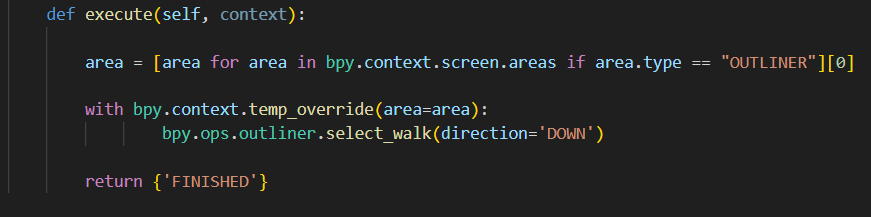
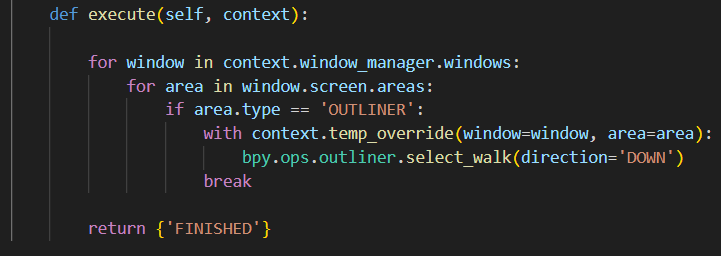
After some research, I have found and tried to adapt some existing examples such as the 2 different approaches below, which both use 'bpy.context.temp_override()'. However, I can't get either of these code to work in the scenario of forcing Outliner context whilst in the 3d viewport context. I can only get it to work for it's original purpose of overriding the Blender text editor context with the 'VIEW_3D' context, and performing an operator such as adding primitives and overriding.

I have errors in the VS Code terminal like:

ERROR (wm.operator): C:\Users\blender\git\blender-v360\blender.git\source\blender\windowmanager\intern\wm_event_system.cc:1551 wm_operator_invoke: invalid operator call 'OUTLINER_OT_select_walk'

Approach 1:

Approach 2:

I must be doing something wrong, any help would be much appreciated! Many thanks.


r/blenderpython • • Feb 24 '23

Script for panning your view 45 degrees instead of 90 in 3d-viewport DOESN'T WORK :(

4 Upvotes

Hey guys, I'm a complete noob in scripts and python, but I'm using blender since a few years now. So I stumbled upon a thing i would need as a feature. I want to pan my view like if you do with ALT+MMB but 45 degrees instead of 90.

I contacted my new friend ChatGPT and it's crazy, he generated a script, told me how to install it and stuff. It didn't show up in the add-on panel after installing it, so I asked if he can tell me how to fix it and he gave me another version where he checked himself every step he just told me and it worked.

The addon shows up in the add-ons panel and I even can set a key binding in the panel itself, but nothing happens when I press the buttons. We tested some versions together but nothing worked.

I checked like everything viable and restarted blender everytime to make sure of the safest outcome, but we didn't got it done. It has to be conflicting with other add-ons I have installed or the thing, that you need to drag your mouse in the direction while pressing the buttons.

I just wanted a small quality of life improvement. I don't know if someone can help me, but atleast I wanted to give it a try. I don't know if ChatGPT knows because I don't know hardly any code so I'm lacking skill to get it right I think.

I'm new to this reddit, so I just post the script here and maybe someone wants to try it and I'm just too lost to get it right haha.

Btw ChatGPT is a really nice dude. We are homies now.

import bpy
from bpy.app.handlers import persistent

bl_info = {
    "name": "Custom View Panning",
    "blender": (2, 80, 0),
    "category": "User Interface",
}

addon_keymaps = []

class CustomViewPanningPreferences(bpy.types.AddonPreferences):
    bl_idname = __name__

    # Default key binding is set to Alt + RMB, 45 degrees
    keymap_item: bpy.props.StringProperty(
        name="Key Binding",
        default="alt right_mouse",
    )

    def draw(self, context):
        layout = self.layout
        layout.prop(self, "keymap_item")

    def save_preferences(self):
        unregister_keymaps()
        register_keymaps()

# Register the custom key binding when the add-on is enabled
def register():
    try:
        bpy.utils.register_class(CustomViewPanningPreferences)
        register_keymaps()
        bpy.app.handlers.load_post.append(load_handler)
    except:
        print("Failed to register keymaps")

# Unregister the custom key binding when the add-on is disabled
def unregister():
    try:
        unregister_keymaps()
        bpy.app.handlers.load_post.remove(load_handler)
        bpy.utils.unregister_class(CustomViewPanningPreferences)
    except:
        print("Failed to unregister keymaps")

@persistent
def load_handler(dummy):
    register_keymaps()

def register_keymaps():
    wm = bpy.context.window_manager
    prefs = bpy.context.preferences.addons[__name__].preferences
    keymap_item = prefs.keymap_item

    kc = wm.keyconfigs.addon

    if kc:
        km = kc.keymaps.new(name='3D View', space_type='VIEW_3D')

        if keymap_item != "":
            kmi = km.keymap_items.new('view3d.rotate', keymap_item, 'PRESS', shift=False)
            kmi.properties.use_cursor_init = True
            kmi.properties.use_mouse_init = True
            kmi.properties.angle = 0.3927  # 45 degrees in radians
            addon_keymaps.append((km, kmi))

def unregister_keymaps():
    wm = bpy.context.window_manager

    for km, kmi in addon_keymaps:
        km.keymap_items.remove(kmi)

    addon_keymaps.clear()

r/blenderpython • • Aug 09 '21

UX tutorial I"m mocking up a hardware interface for blender

4 Upvotes

I need help writing a Python script that modifies dimensions of primitive mesh objects using a few Raspberry Pi analog pin values.

Context: I'm prototyping a device that makes 3D printing a few basic parts super quick and easy. mockup drawing: https://docs.google.com/drawings/d/e/2PACX-1vRw1r0v2hiGI0VALE_KoquSJl7qMrdtmqKwtjPEbqG_pDkWJJHsiMIFbirs06IgjGzGZHWrqV_HzEqt/pub?w=960&h=720

User story: As an amateur machinist / hobby garage maker, I need a way to design and print simple 3D objects like bushings, washers, shims without interrupting my flow state (learning and using Blender with a computer and mouse definitely interrupts my flow).

Product: a hardware device (like a audio mixer board) that connects to my 3D printer. The device is a SOC - e.g. Raspberry Pi running Blender (this works - i've tried it) and some slicer software (I haven't tried it yet)

The interface is all hardware: a LCD screen, a few LED lights and knobs (no screen, keyboard or mouse). mockup v1: https://docs.google.com/drawings/d/e/2PACX-1vRw1r0v2hiGI0VALE_KoquSJl7qMrdtmqKwtjPEbqG_pDkWJJHsiMIFbirs06IgjGzGZHWrqV_HzEqt/pub?w=960&h=720

I need help writing a Python script that modifies objects using the hardware knob values, then exports as STL, calls a OS script that launches the slicer software and sends it to the printer.

(the final product will have a web interface where the user sets it up e.g. chooses their 3D printer)


r/blenderpython • • Jul 11 '21

What part of this code is the actual action of locking the rotation?Seems like this code is only creating a ui...

Thumbnail
gist.github.com
4 Upvotes

r/blenderpython • • Jun 25 '21

Which Python.

4 Upvotes

Hi,

I have watched a couple of tutorials on setting up an IDE (VSCode) with blender. In one video the presenter uses Python that comes with Blender. In another, he downloads the latest python and uses it.
Is there any reason to do one or the other?

Thanks,
Robb