r/AskCodecoachExperts • • Apr 19 '25

Learning Resources OOP Explained Visually – A Quick Guide to the Pillars of Object-Oriented Programming

Post image
4 Upvotes

Struggling with OOP concepts?

Here's a quick visual breakdown of the four key pillars of Object-Oriented Programming:

  • Encapsulation

  • Inheritance

  • Polymorphism

  • Abstraction

This diagram also highlights important sub-concepts like data hiding, method overloading, types of inheritance, and interfaces vs abstract classes.

Follow Us for more developer-friendly explanations that make complex topics simple.


r/AskCodecoachExperts • • Apr 17 '25

Learning Resources Still confused between Git and GitHub? Here's the clearest breakdown I’ve seen β€” save this!

Thumbnail
gallery
4 Upvotes

A lot of beginners (and even some juniors) still confuse Git and GitHub, so we put together this simple breakdown to clear things up.

Think of it like a game:

  • Git = local save system

  • GitHub = cloud saves + multiplayer mode

Just curious β€” how did you first understand the difference between Git and GitHub?


r/AskCodecoachExperts • • Aug 30 '26

Discussion πŸ‘‹Welcome to r/AskCodecoachExperts - Introduce Yourself and Read First!

3 Upvotes

Hey everyone! I'm u/CodewithCodecoach, a founding moderator of r/AskCodecoachExperts.
This is our new home for all things related to software engineering, coding, development, and technology. Whether you're a beginner writing your first lines of code or an experienced engineer working on complex systems, we're excited to have you join us!
What to Post
Post anything that you think the community would find interesting, helpful, or inspiring. Feel free to share your coding questions, projects, technical challenges, career experiences, tips, or lessons you've learned along the way.
Some ideas include:
πŸ’» Programming and software development questions

πŸ› Debugging help and troubleshooting

πŸš€ Projects you're building or recently completed

🧠 System design, architecture, and best practices

βš™οΈ Web, mobile, backend, frontend, DevOps, and cloud development

πŸ€– AI, automation, and emerging technologies

πŸ“š Learning resources, tutorials, and useful tools

πŸ’Ό Software engineering careers, interviews, and workplace experiences

Community Vibe
We're all about being friendly, constructive, and inclusive. No matter your experience level, everyone's learning something.
Let's build a space where engineers can ask questions without hesitation, share knowledge openly, help each other solve problems, and have meaningful conversations about technology.
How to Get Started
Introduce yourself in the comments below and tell us what you work with or what you're currently learning.

Post something today! Even a simple coding question can spark a great conversation.

If you know another developer or software engineer who would love this community, invite them to join.

Interested in helping out? We're always looking for new moderators, so feel free to reach out to me to apply.

Thanks for being part of the very first wave. Together, let's make r/AskCodecoachExperts an amazing community for software engineers, developers, and technology enthusiasts. πŸš€

Welcome to the community β€” let's build, learn, and grow together!


r/AskCodecoachExperts • • Jul 12 '25

How To / Best Practices Job Interview πŸ‘¨πŸ»β€πŸ’»

3 Upvotes

HR:- What are your salary expectations? Candidate:- β‚Ή35,000 per month. HR: You’re a great fit, but we’re working with a tight budget. Candidate:- I can manage with β‚Ή30,000. HR: Let’s settle at β‚Ή28,000. Candidate (reluctantly):- Okay.

✨️✨️Post-Interview:-✨️✨️

HR to Management: Great news! Closed the position under budget. We had β‚Ή40,000 approved, but hired at β‚Ή28,000.

Manager: Brilliant! That’s cost-effective hiring.

All seems well… until the new hire discovers the truth.

He learns the actual budget and suddenly feels undervalued and misled.☠️ Motivation drops. Trust fades.πŸ₯Ί Within three months, he resigns for a better offer.😏 Now the cycle begins againβ€”new hiring, new training, more costs, lost time.

πŸ” The irony? Trying to save β‚Ή12,000 ended up costing the company much more.

πŸ’‘ Takeaway: Short-term savings on salaries can lead to long-term losses. Underpaying talent risks losing them and all the investment made in them.

πŸ‘‰ If you want to attract and retain top talent, pay them what they truly deserve.


r/AskCodecoachExperts • • May 20 '25

πŸ”– Web Development Series βœ… πŸ“± Web Dev Series #7 – Responsive Design (Mobile First): Make Your Site Fit Every Screen!

3 Upvotes

Hey devs! πŸ‘‹ Welcome back to our Web Development Series β€” where anyone can learn web dev step by step, even if it’s their first day of coding.

In the πŸ“Œ Series Roadmap & First Post, we promised real-world, project-based learning. So far, you’ve built pages and added interactivity... now let’s make sure they look great on every device.

Time to talk about Responsive Web Design.


πŸ€” What is Responsive Design?


Responsive Design means your website automatically adapts to different screen sizes β€” from tiny phones πŸ“± to giant desktops πŸ–₯️ β€” without breaking.

Instead of creating multiple versions of your site, you design one smart layout that adjusts itself using CSS techniques.


πŸ’‘ Real-Life Analogy:


Think of your website like water in a bottle πŸ§΄πŸ’§ Whatever shape the bottle (device), the water adjusts to fit β€” without spilling.

Responsive design is about flexibility + flow.


🏁 What is Mobile-First Design?


β€œMobile-first” means: You start designing for the smallest screens (like phones) β€” then scale up for tablets and desktops.

Why?

  • Most users are on mobile

  • Forces you to keep content clean, fast, and user-friendly


πŸ”§ Key Tools of Responsive Design


1. Viewport Meta Tag (Important!)

Add this to your HTML <head>:

<meta name="viewport" content="width=device-width, initial-scale=1.0">

βœ… This tells the browser to render the page based on device width.


2. Flexible Layouts

Use percentages or flexbox/grid, not fixed pixels:

.container {
  width: 100%;  /* Not 960px */
  padding: 20px;
}

3. Media Queries

Let you apply styles based on screen size:

/* Small screens */
body {
  font-size: 14px;
}

/* Larger screens */
@media (min-width: 768px) {
  body {
    font-size: 18px;
  }
}

βœ… Mobile styles load by default, and bigger screen styles get added later β€” that’s mobile-first!


πŸ“ Common Breakpoints (You Can Customize)


DeviceWidth Range
Mobile0 – 767px
Tablet768px – 1024px
Laptop/Desktop1025px and above

πŸ§ͺ Mini Responsive Task:


<div class="box">I resize based on screen!</div>

<style>
  .box {
    background: skyblue;
    padding: 20px;
    text-align: center;
  }

  @media (min-width: 600px) {
    .box {
      background: lightgreen;
    }
  }

  @media (min-width: 1000px) {
    .box {
      background: orange;
    }
  }
</style>

βœ… Open in browser βœ… Resize window and watch color change based on screen width!


⚠️ Beginner Mistakes to Avoid:


❌ Forgetting the viewport tag β†’ Site will look zoomed out on phones ❌ Using only fixed widths β†’ Layout won’t adapt ❌ Ignoring mobile layout β†’ Your site may break on phones


πŸ“š Learn More (Free Resources)


πŸ’¬ Let’s Talk!


Need help understanding media queries? Want us to review your layout? Drop your code below β€” we’ll help you build it the right way. πŸ™Œ


🧭 What’s Next?


Next up in the series: Version Control (Git & GitHub)

πŸ”– Bookmark this post & follow the Full Series Roadmap to stay on track.

πŸ‘‹ Say "Made it responsive!" if you’re learning something new today!


r/AskCodecoachExperts • • May 19 '25

Learning Resources Comment you already know these πŸ‘‡πŸΌ

Post image
3 Upvotes

Join the community and help each other to learn absolutely for free


r/AskCodecoachExperts • • May 19 '25

πŸ”– Web Development Series βœ… 🧩 Web Dev Series #6 – DOM Manipulation: Make Your Page Come Alive!

3 Upvotes

Hey devs! πŸ‘‹ Welcome back to our Web Development Series β€” built for absolute beginners to advanced learners. If you’ve been following our πŸ“Œ Series Roadmap & First Post, you know we’re on a mission to help you go from 0 to Full Stack Developer β€” the right way.

In our last post, you learned how to use variables, data types, and console.log() in JavaScript.

Now it’s time to interact with your actual web page β€” meet the DOM!

🌐 What is the DOM?


DOM stands for Document Object Model.

It’s like a live tree structure representing your HTML page β€” and JavaScript lets you access and change any part of it.

Every element (headings, paragraphs, buttons) becomes a node in this tree. JS gives you superpowers to:

  • Read elements

  • Change text, styles, attributes

  • Add/remove things

  • Respond to clicks & inputs

🧠 Real-Life Analogy


Think of your web page like a LEGO model 🧱

Each block = an HTML element DOM = the instruction manual your browser follows to build the model JavaScript = you reaching in to rearrange, color, or swap blocks while it’s still standing

πŸ› οΈ Basic DOM Access in JavaScript

Get an Element by ID:

<p id="message">Hello!</p>
let msg = document.getElementById("message");
console.log(msg.textContent);  // β†’ Hello!

Change Text:

msg.textContent = "You clicked the button!";

Change Style:

msg.style.color = "blue";

🧩 Mini Interactive Example


<h2 id="greet">Hi, student!</h2>
<button onclick="changeText()">Click Me</button>

<script>
  function changeText() {
    document.getElementById("greet").textContent = "You're learning DOM!";
  }
</script>

βœ… Copy & paste this into an .html file

βœ… Open in browser and click the button!

You just changed the DOM using JavaScript!

πŸ“Œ DOM Methods You Should Know


MethodPurpose
getElementById()Select by ID
getElementsByClassName()Select by class
getElementsByTagName()Select by tag name
querySelector()Select first matching element
querySelectorAll()Select all matching elements

⚠️ Common Beginner Mistakes


❌ Running JS before the page loads β†’ Use <script> after your HTML OR use window.onload

❌ Typing wrong ID/class β†’ Always double-check spelling!

❌ Mixing innerHTML and textContent β†’ textContent is safer for just text

πŸ“š Learn More (Free Resources)


πŸ’¬ Ask Us Anything!


Still confused by querySelector() vs getElementById()? Want to try changing an image or background color? Drop your code β€” we’ll help you out! πŸ™Œ

🧭 What’s Next?


Next up in the series: Events in JavaScript – Responding to User Actions (Click, Hover, Input & More!)

πŸ”– Bookmark this post & check the Full Series Roadmap to never miss a step.

πŸ‘‹ Say β€œDOMinator πŸ’₯” in the comments if you're enjoying this series!


r/AskCodecoachExperts • • May 16 '25

πŸ”– Web Development Series βœ… 🎨 Web Dev Series #3 – CSS Basics: Style Your First Web Page Like a Pro

3 Upvotes

Hey awesome learners! πŸ‘‹ Welcome back to our Web Development Series β€” built for absolute beginners to advanced learners who want to go from just learning to actually building websites.

🎨 What is CSS?


CSS (Cascading Style Sheets) controls the look and feel of a website.

If HTML is the structure of your house… CSS is the paint, furniture, and interior design.

With CSS, you can:

  • 🎨 Change colors, fonts, and spacing

  • 🧭 Control layout and alignment

  • πŸ“± Make websites responsive across devices

🏠 Let’s Style Our HTML Resume!


We’ll take your basic HTML page from Post #2 and give it a modern makeover.

πŸ’Ύ Step 1: Add a <style> tag


Inside the <head> section of your HTML file:

<head>
  <title>My Web Resume</title>
  <style>
    body {
      font-family: Arial, sans-serif;
      background-color: #f7f7f7;
      color: #333;
      padding: 20px;
    }
    h1 {
      color: #007BFF;
    }
    ul {
      list-style-type: square;
    }
    a {
      color: #E91E63;
      text-decoration: none;
    }
    img {
      border-radius: 10px;
    }
  </style>
</head>

βœ… Save β†’ Refresh β†’ Boom! Your page now looks alive.

🧩 How CSS Works (Beginner Analogy)


Think of HTML as LEGO blocks, and CSS as paint + stickers for those blocks. You don’t change the structure β€” you just style the existing elements.

CSS uses selectors (like body, h1, img) to target HTML elements and applies rules inside {}.

Example:

h1 {
  color: red;
  font-size: 36px;
}

🎯 Common CSS Properties You’ll Use a Lot


PropertyWhat It Does
colorText color
background-colorBackground color
font-sizeSize of the text
font-familyTypeface used
paddingSpace inside the element
marginSpace outside the element
borderAdds a border (can be styled too)
text-alignAligns text (left, center, right)

πŸ§ͺ Mini CSS Task (Try This!)


Add these styles and see what happens:

h2 {
  background-color: #fffae6;
  padding: 10px;
  border-left: 4px solid #FFC107;
}

βœ… This will highlight your section titles with a nice accent!

πŸ–ΌοΈ BONUS: External CSS File


As your styles grow, it’s better to move them to a separate file.

  1. Create a new file: style.css

  2. Copy all styles into it

  3. Link it in your HTML like this (inside <head>):

<link rel="stylesheet" href="style.css">

Now your HTML is clean and your styles are organized!

πŸ“š Learn More (Optional Resources)


πŸ’¬ Questions? We Got You!


Confused by padding vs margin? Not sure how to center elements? Ask anything below β€” we’ll guide you through it.

🧭 What’s Next?


Next up: ** JavaScript Essentials: Make Your Website Come Alive!** β€” the secret to making websites look polished and professional.

πŸ”– Bookmark this post & follow the flair: Web Development Series

πŸ‘‹ Say hi if you styled your first page β€” we’d love to see what you made!


r/AskCodecoachExperts • • Apr 28 '25

Programming Help Needed Web Designers bring the colors 🎨, Web Developers bring the logic 🧠 β€” together they build digital magic!

Post image
3 Upvotes

r/AskCodecoachExperts • • Apr 19 '25

NumPy Explained in 60 Seconds: This Python Superpower Deserves More Hype βœ…

Thumbnail
gallery
3 Upvotes

Ever wondered how Python handles massive datasets so fast? The secret sauce is NumPy β€” the backbone of scientific computing in Python.

Here's why NumPy is a game-changer:

  • Blazing-fast arrays that beat native Python lists

  • Vectorized operations (no more loops!)

  • Built-in support for linear algebra, FFT, stats and more

  • Foundation for libraries like Pandas, TensorFlow, SciPy, Sklearn

Whether you're into data science, AI, or just want to crunch numbers like a boss β€” NumPy is your best friend.

If you want quick, beginner-friendly Python tips like this every week β€”

**Follow our growing Reddit community πŸ‘‡πŸΌ

r/AskCodecoachExperts** and let's level up your coding game together!

What’s your favorite NumPy trick or gotcha moment?


r/AskCodecoachExperts • • Apr 19 '25

Learning Resources APIs For Programmer β¬πŸ‘¨β€πŸ’»

Thumbnail
gallery
3 Upvotes

Follow Us for more amazing tips and coding tutorials. Let's level up together! ⚑


r/AskCodecoachExperts • • Sep 14 '26

Learning Resources Tips for a student

2 Upvotes

Hey, guys. Software engineering student here. I'm studying online for a software engineering degree while I work, but I'm getting pretty overwhelmed. Thought that asking for tips from the pros may be the right move.

I'm learning Python using the boot Python crash course from no starch press, and I'm doing well, but I feel like I need to do better even if I spend all the time I can on that. I'm basically done with the learning part, just starting the part about projects.

I wanted to know if there is a more efficient way to do this. Should I learn using YouTube? Coursera? Udemy? Is a book the best option as I thought at first?

I'm learning SQL next, but I feel like I need to work harder since I'll graduate in a couple of years (studying for the whole degree is just 3 years since it's online). But maybe I'm just not working smart enough.

So I would like to ask for your tips. What's the best and fastest way to learn? What should I learn? Where?

I'm sorry for asking so many questions, just trying to get better. Thank you in advance, guys.


r/AskCodecoachExperts • • Aug 31 '25

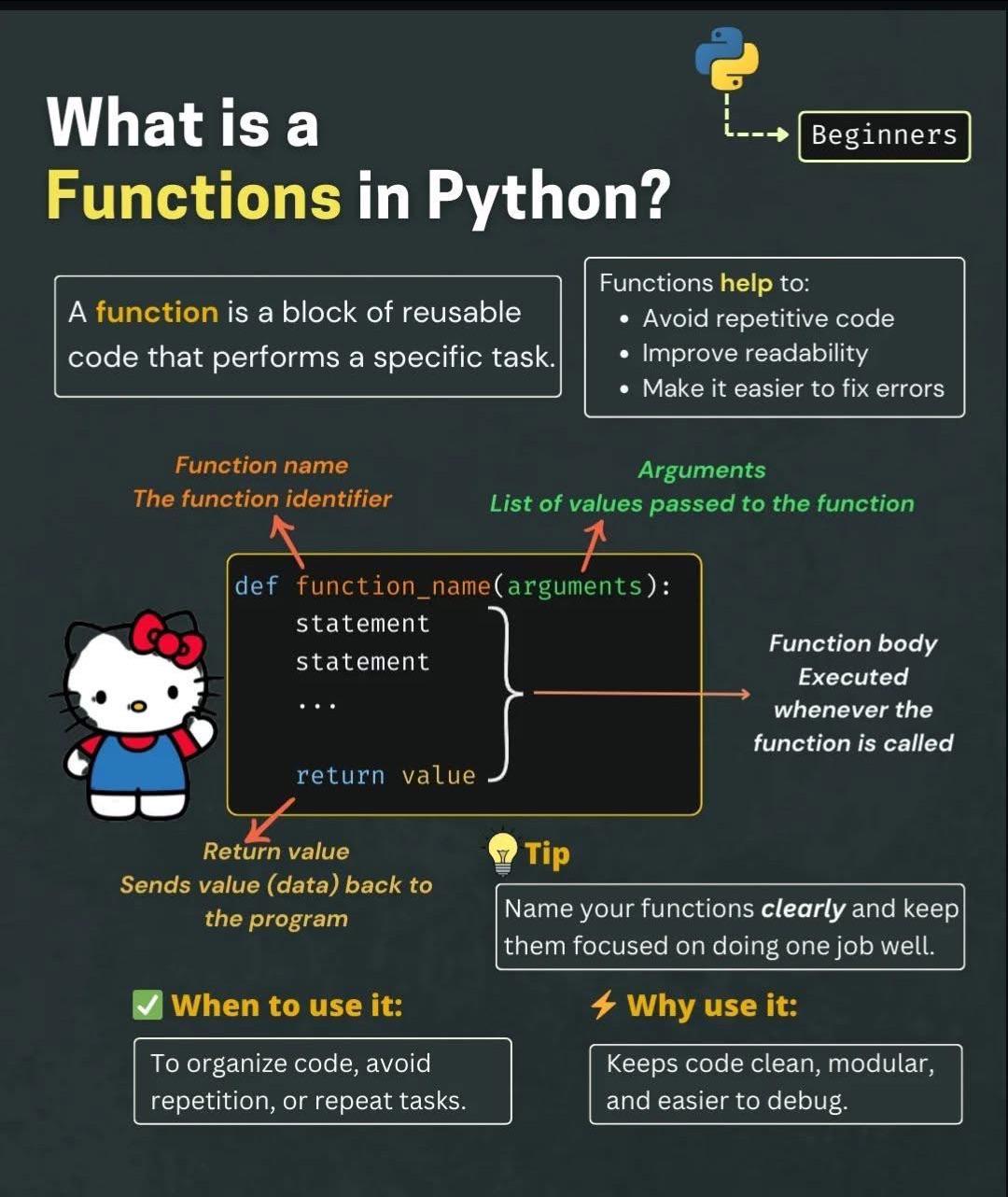
Learning Resources Functions in Python 🐍

Post image
2 Upvotes

Subscribe us on YouTube for tutorials and short coding tips & Tricks

Learn Free Coding with CodeCoach

Regards,
CodeCoach Team


r/AskCodecoachExperts • • Aug 20 '25

Learning Resources Hey Folks

Thumbnail reddit.com
2 Upvotes

r/AskCodecoachExperts • • Jul 10 '25

Learning Resources Every frontend developer should Try this Modern CSS Grid Gallery created in 5 Easy Steps

Thumbnail
youtube.com
2 Upvotes

r/AskCodecoachExperts • • Jun 13 '25

Learning Resources Concepts that every Javascript developer should know ⬇️

Thumbnail
gallery
2 Upvotes

r/AskCodecoachExperts • • May 15 '25

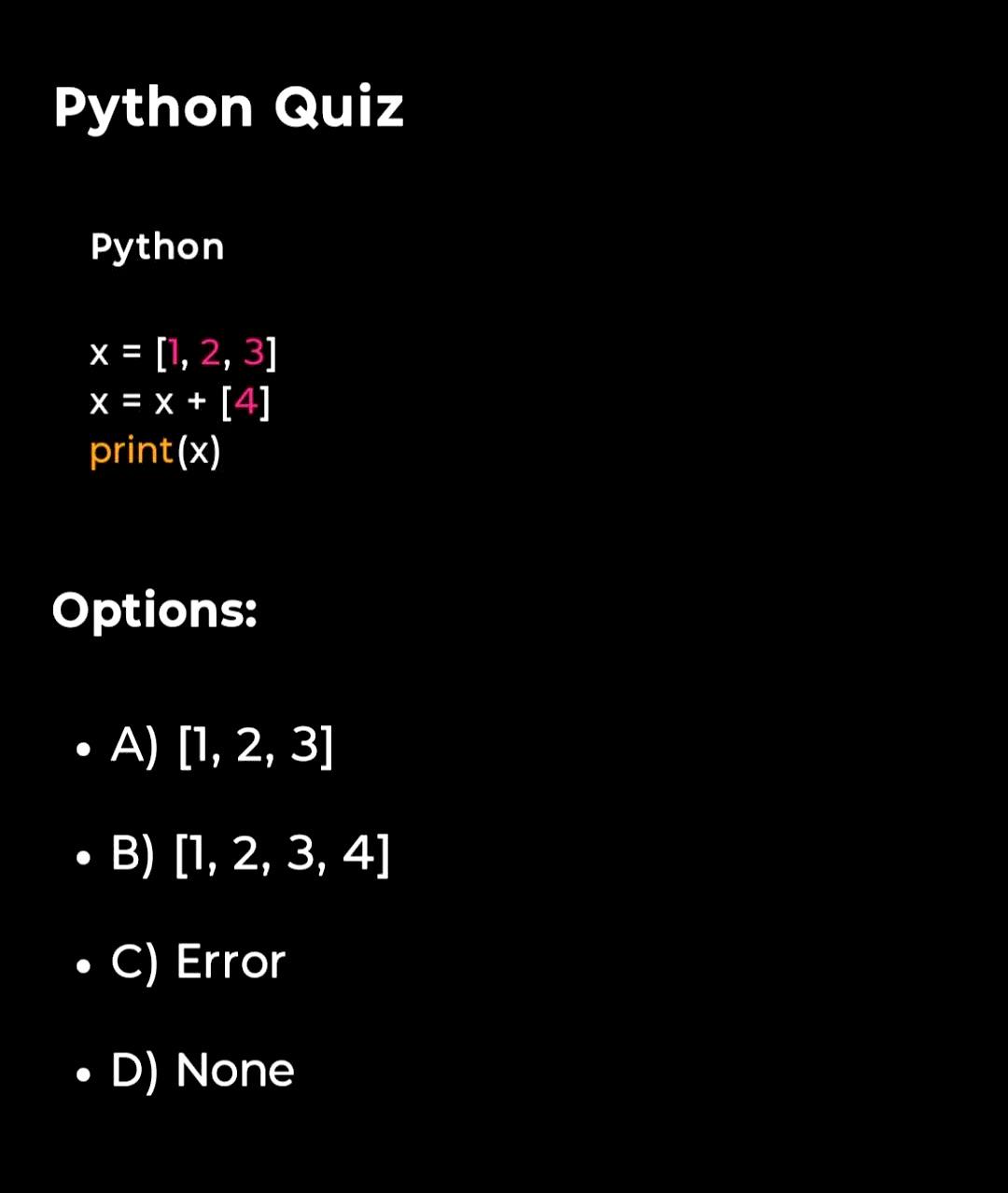
Developers Coding Puzzle Python #Quiz

Post image
2 Upvotes

r/AskCodecoachExperts • • May 15 '25

How To / Best Practices Programming Languages and uses

Post image
2 Upvotes

r/AskCodecoachExperts • • May 15 '25

πŸ”– Web Development Series βœ… πŸš€ Web Dev Series #2 – HTML Basics Explained (with a Real-Life Resume Example)

2 Upvotes

Hey future developers! πŸ‘‹ Welcome back to our Web Development Series β€” made for absolute beginners to advanced learners who want to build websites the right way (no fluff, no shortcuts).

🧱 What is HTML?


HTML (HyperText Markup Language) is the foundation of every web page. It tells the browser what content to show β€” like headings, text, images, and links.

Think of it like building a house:

  • 🧱 HTML = the structure (walls, rooms)

  • 🎨 CSS = the style (paint, decor)

  • βš™οΈ JavaScript = the behavior (buttons, switches)

Let’s build your first HTML page β€” with a real-life resume example!

πŸ“„ Real-Life Analogy: Resume as a Web Page


Imagine you’re making a web version of your resume. Here’s how HTML tags map to resume content:

Resume SectionHTML TagRole
Your Name<h1>Main title / heading
About Me paragraph<p>Paragraph text
Skills list<ul> + <li>Bullet list of skills
Portfolio link<a>Clickable link
Profile photo<img>Image display

πŸ–ΌοΈ Common Beginner Confusions: <a> & <img> Tags


πŸ”— <a> – Anchor Tag (Clickable Link)

<a href="https://yourportfolio.com">Visit My Portfolio</a>
  • href = the URL you want to open.

  • Whatever is inside becomes clickable text.

  • You can link to websites, files, or even email addresses.

βœ… Add target="_blank" to open the link in a new tab.


πŸ–ΌοΈ <img> – Image Tag (Self-closing!)

<img src="profile.jpg" alt="My Photo" width="200">
  • src = source of the image (file or URL)

  • alt = text shown if image doesn't load

  • width = size in pixels

βœ… It’s a self-closing tag β†’ no </img> needed.


πŸ’» Create Your First HTML Page (Mini Project!)


Create a new file called my_resume.html, paste this code:

<!DOCTYPE html>

<html> <head> <title>My Web Resume</title> </head> <body> <h1>Jane Developer</h1> <p>Aspiring Full Stack Developer πŸš€</p>

<h2>Skills</h2>
<ul>
  <li>HTML</li>
  <li>CSS</li>
  <li>JavaScript</li>
</ul>

<h2>Portfolio</h2>
<p>
  Check out my work: 
  <a href="https://yourportfolio.com" target="_blank">Visit Portfolio</a>
</p>

<img src="profile.jpg" alt="My Profile Photo" width="200">

</body> </html>

βœ… Save the file β†’ Open it in your browser β†’ You just built your first webpage! πŸŽ‰


🧰 Key HTML Tags Recap


TagWhat It Does
<html>Wraps the whole HTML page
<head>Metadata (title, links, etc.)
<title>Sets the browser tab title
<body>Page content (what users see)
<h1>–<h6>Headings from biggest to smallest
<p>Paragraph text
<a>Link to another page/site
<img>Displays an image
<ul> / <li>Unordered list & list items

πŸ§ͺ Mini Tasks (Hands-On Practice)


βœ… Try building a second page β€” my_hobbies.html with:

  • A heading (<h1>)

  • A paragraph (<p>)

  • A list (<ul> + <li>)

  • A link (<a>) to your favorite site

  • An image (<img>) from your computer or the web

βœ… Change the image width to 150px

βœ… Use target="_blank" in the link

πŸ“š Learn More (Optional Resources)


πŸ’¬ Ask Us Anything!


Drop your doubts or questions below β€” no question is too basic. We’re here to help you understand every step clearly.

🧭 What’s Next?


Next in the series: CSS for Beginners β€” Styling Your First Web Page 🎨 We’ll add colors, fonts, layouts, and much more!

πŸ”– Bookmark this post & follow the flair: Web Development Series

πŸ‘‹ Say hi in the comments if you’re coding along β€” let’s build together!


r/AskCodecoachExperts • • May 04 '25

How To / Best Practices Go microservice project Code Review

2 Upvotes

Hi

I am building a go microservice application. with multiple gRPC microservice, Right now I have build 1 of the gRPC microservice for handling everything related to users. and a RestApi service which is server for RESTAPI (Frontend), and client for gRPC services called gateway.

Could you guys please perform a code review of my users microservice repo.

The layout is I guess 100% done, with just only functions to add for new functionality. just that it would be another function of similar struct.

Please have a look at the repo. let me know if you have any comments.

Please let me know if I am following best practices, or if the project structure looks good.

Feel free to open an issue in github or add a comment here.

Thanks


r/AskCodecoachExperts • • May 03 '25

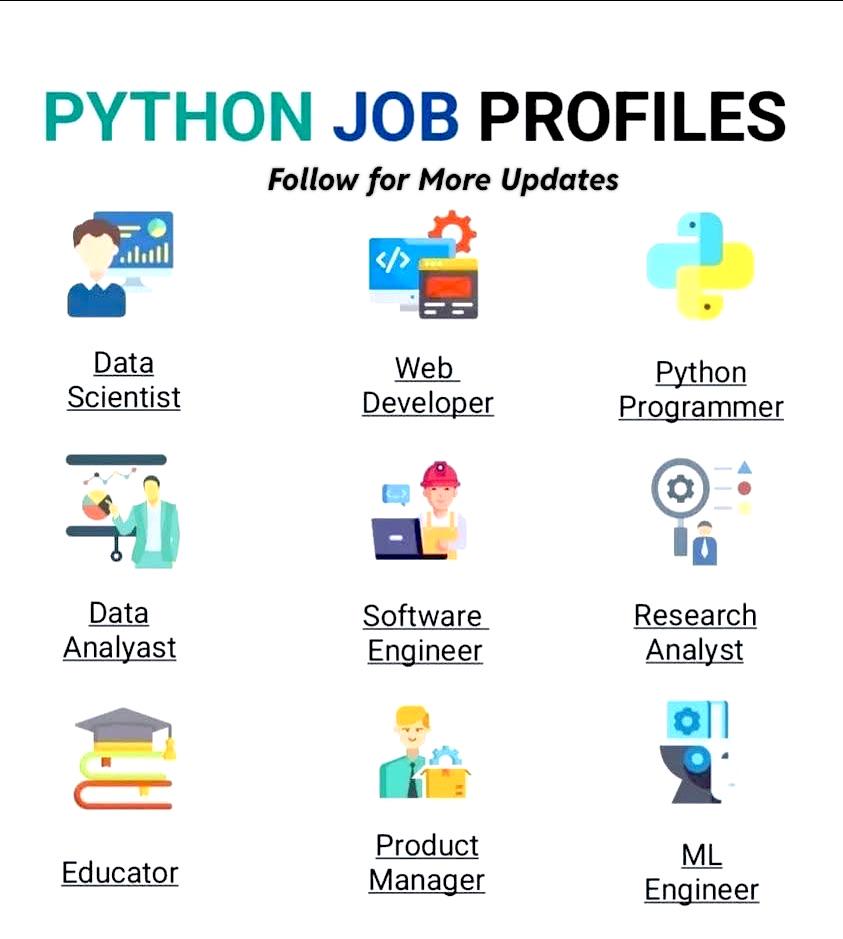
Career Advice & Interview Preparation Python Job Profiles

Post image
2 Upvotes

Cheatnotes prepared by u/CodewithCodecoach


r/AskCodecoachExperts • • May 03 '25

Programming Help Needed How to convert gRPC type to golang type?

2 Upvotes

I am working on Go microservice application, this far I have created 3 repos for it.

- Common service (Contains all the gRPC code for interservice communication)

- Gateway service (Server for RestApi, client for all the other gRPC microservice)

- user-management (1 of the gRPC microservice, this will take care of everything related to users).

Link to repos.

My current question is.

In authenticated function (functions which can be only assessable by logged in users) I am storing `user` in context.

the flow is in the request header there would be an auth token and a function will return the user for that token, the user type is `pb.AuthUserResponse` type generated from gRPC function.

However, when i want to consume this user I am expecting user of type `types.User`

So my question is since i want to user to be `types.User` should i change it from `pb.AuthUserResponse`?

should I manually make this `types.User` from `pb.AuthUserResponse`

Can I use Json.Marshal function for this?


r/AskCodecoachExperts • • Apr 29 '25

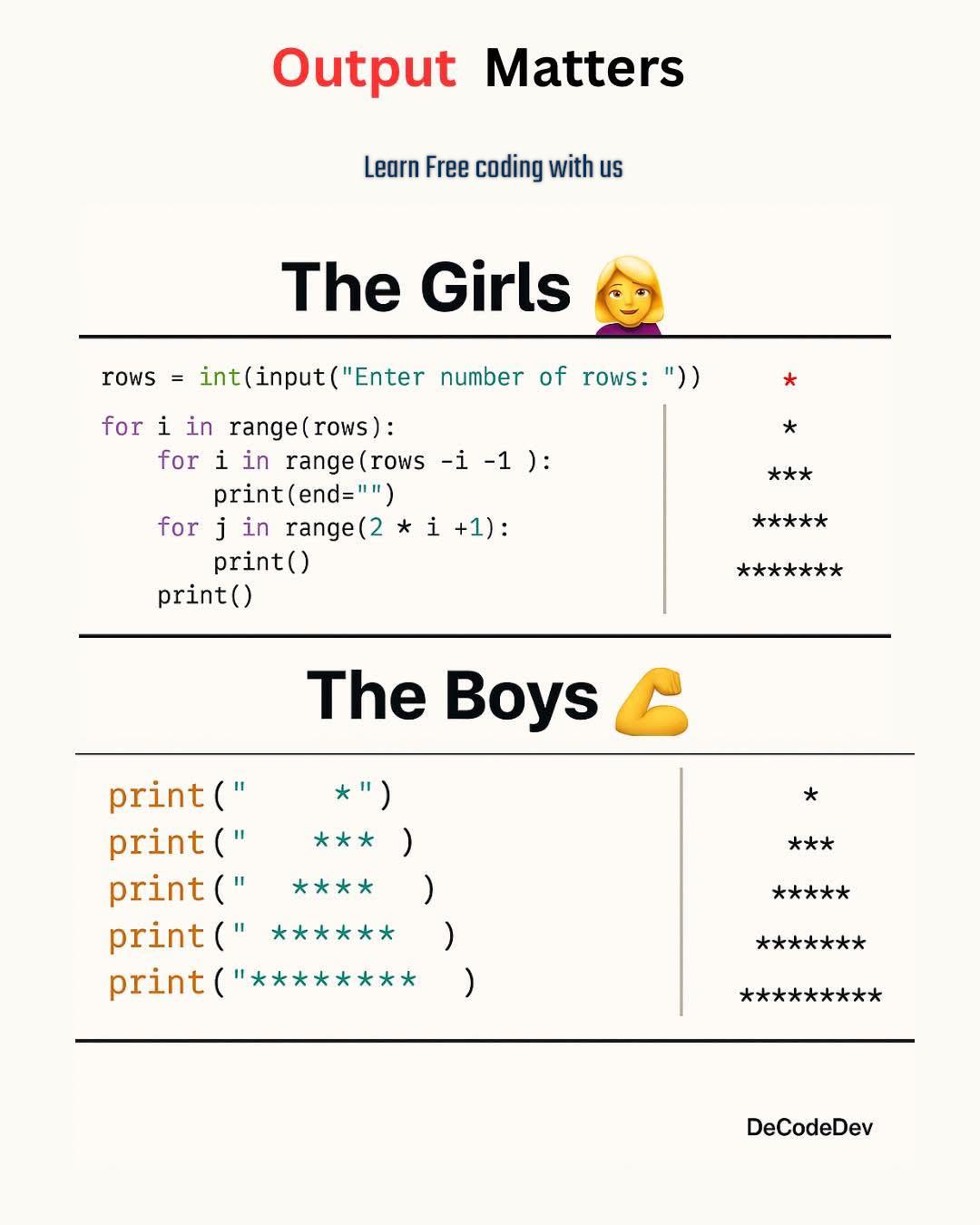
Developers Coding Puzzle Output Matters πŸ‘€

Post image
2 Upvotes

Learn Free Coding with us like Frontend development, web development, HTML, CSS, JavaScript, React


r/AskCodecoachExperts • • Apr 15 '25

Learning Resources Your 2025 Roadmap to Mastering HTML5! πŸš€

Thumbnail
gallery
2 Upvotes

New to web development or want to sharpen your fundamentals? This INFOGRAPHIC breaks down everything you need to learn HTML5 from zero to hero:

1️⃣ HTML Basics – Tags, Elements, Attributes

2️⃣ Text Formatting – Headings, Paragraphs, Lists

3️⃣ Forms & Inputs – User Interaction Essentials

4️⃣ Semantic Tags – header, main, article, footer

5️⃣ Media Tags – Embed Audio, Video, & iframes

6️⃣ Tables & Layout – Structuring Data Visually

7️⃣ HTML APIs – Geolocation, Drag & Drop, Web Storage

8️⃣ Accessibility & SEO – Write cleaner, smarter, optimized code

9️⃣ HTML5 + CSS3 + JS – Power up with full frontend workflow!

Save this roadmap, follow the path, and become a frontend ninja in 2025! Tag a learning buddy and start the journey today!

HTML5Roadmap #FrontendDeveloper #LearnToCode #WebDevelopment2025 #HTML5 #CodeCoachExperts #BeginnerToPro #CodingInfographic


r/AskCodecoachExperts • • Jul 20 '26

Learning Resources Road map

1 Upvotes

Roadmap

I am beginner and never code before so I am thinking to start with c++ for which I found striver dsa playlist do it is a combo of c++ and dsa or I have to first learn c++ from any other platform and then have to come here I am bit confused and don't know what to do can anyone explain plz .

And also I think in first few lecture he had taught basics of c++ do this is what we need or it is just a quick revision.