r/ArduinoHelp • • Jun 03 '26

Trying to forward Serial1 reading to Serial.println and only getting numbers

2 Upvotes

I have a battery with a built-in BMS that has a serial console port. It has a baud rate of 115200 and I have been able to successfully send commands and read clean data from it via the Arduino IDE serial console. Considering I can communicate to the battery via the serial console, that suggests there shouldn't be any weird encoding issues.

I want an Arduino Mega to read from this using the Serial1 connection. The problem is, if I try to forward what the battery sends to the Arduino, all I get is a jumble of nothing but numbers. When connecting to the BMS directly, typing "help", the output is mostly text.

Here's what I tried in void loop()

while (Serial.available() > 0 {
  Serial1.print(Serial.read());
}

while (Serial1.available() > 0) {
  //THE NEXT 4 LINES ARE VARIOUS THINGS I TRIED,
  //I UNCOMMENTED THEM ONE AT A TIME
  //String incomingtext=Serial1.readString();
  //char incomingtext=(char)Serial1.read();
  //char incomingtext=Serial1.read();
  //int incomingtext=Serial1.read();
  
  //I ALSO TRIED THE FOLLOWING ONE AT A TIME WITH EACH ABOVE COMBO
  //Serial.println(incomingtext);
  //Serial.println((char)incomingtext);
  //Serial.println(" "+incomingtext);
}

The first while() loop just takes whatever I enter from the serial console through USB to the BMS. I have no idea if the BMS is receiving the correct commands, but it does have a consistent output if I type different things.

Whenever I type "help" repeatedly, it's usually a consistent output, like this:

10410110811213


r/ArduinoHelp • • May 24 '26

My Arduino not being read by my laptop

2 Upvotes

This is a issue I am facing for some time
My Arduino is not being read by my computer
When ever I try to connect it every com port is unknown and after selecting board when I click upload it just gets stuck on uploading
And while trying the online Arduino the board is not being found
Can I get some help I need to submit a project soon


r/ArduinoHelp • • May 24 '26

Arduino and stepper motor help

2 Upvotes

So I'm working a project.. just starting out and thought first... let's get the stepper motor to run. Watched this video and followed along.
https://www.youtube.com/watch?v=wcLeXXATCR4&t=8s
code I ran is below
What am I missing? should the code be uploaded and then just start running? driving me nuts trying to solve what should be a simple problem. Maybe it's not the code.. maybe my driver is fried .. not ever sure where to begin trouble shooting this

I appreciate any good advice you can give a newbie

Thanks in advance

code:

// pin connections

const int dirPin = 2; // direction pin

const int stepPin = 3; // step pin

void setup() {

pinMode(dirPin, OUTPUT);

pinMode(stepPin, OUTPUT);

// set direction of rotation to clockwise

digitalWrite(dirPin, HIGH);

}

void loop() {

// take one step

digitalWrite(stepPin, HIGH);

delayMicroseconds(2000);

// pause before taking next step

digitalWrite(stepPin, LOW);

delayMicroseconds(2000);

}


r/ArduinoHelp • • May 21 '26

Help with setup - Spreadsheet to run LED's

2 Upvotes

I'm new to setting up an arduino and need help with how to get data from a spreadsheet to light up LED's. I've attached images of where I've got to and need help pointing in the direction of next steps please.

I have a spreadsheet with an input screen (Green boxes with amount) this drives the data screen with zero's and one's, where 'one' should light up the corresponding LED.

I want this to change the lights in real time so when the amount input is changed the lights will change.

Any help appreciated.


r/ArduinoHelp • • May 09 '26

Arduino uno q

2 Upvotes

Hi! I’m a graphic design student and completely new to Arduino/electronics.

Recently I got really interested in making interactive objects that feel kind of “alive” — like reacting to people, showing emotion through light/sound/movement, etc.

I started looking into Arduino Uno Q and TinyML stuff, but honestly I’m still super lost on where to begin 😭

Does anyone know if Uno Q is enough for this kind of thing, or if there are any beginner-friendly projects/resources I should look at?

Would really appreciate any advice!


r/ArduinoHelp • • May 08 '26

Newbie Question: Do I need to unplug external 12V power before uploading code?

2 Upvotes

Hi everyone,
I’m new to Arduino and robotics. I’m currently building a flywheel project using an Arduino Uno R3, an L298N motor driver, and a DC motor.
My setup is powered by a 12V wall adapter plugged directly into the Arduino’s DC barrel jack.
When I want to update or change my code via USB, do I need to completely disconnect the 12V power and the L298N wiring, or is it safe to keep everything plugged in while the Arduino is connected to my computer? I want to avoid frying my board or my USB port.
Any advice on the best workflow for frequent code iterations would be appreciated!


r/ArduinoHelp • • May 04 '26

Arduino Research Project

Thumbnail reddit.com
2 Upvotes

r/ArduinoHelp • • May 03 '26

Fox Hunt Type project Help

Post image
2 Upvotes

Complete beginner here so bear with me. I’m trying to solve a problem on my own that I’ve found the US market has a problem with for a very niche community of Houndsmen. There is a hunting terrier collar made by Bellman and Flint in the UK that is and has been unobtanium in the US market for quite some time. This is simply a 425 mhz transmitter that is fixed to a dogs collar and then a receiver (think avalanche rescue devices). We use terriers to go underground and remove burrowing varmints alive.
I’m thinking can accomplish this for my small group by simply building a fox hunt style transmitter with a custom build handheld receiver.
What I need help with is parts. I know roughly what I need to build the transmitter but figured I’d be better off getting a list together for the receiver beforehand in case something isn’t compatible.

Needs to be able to give a readout on an LCD screen giving depth in feet, give direction to transmitter in someway shape or form, and able to read up to absolute maximum depths of 15 feet. Is there someone here with a brain that can help me out?


r/ArduinoHelp • • May 03 '26

Strange artifact on lcd screen

Post image
2 Upvotes

r/ArduinoHelp • • Apr 30 '26

I need help

2 Upvotes

I am working on my senior project for my engineering class and im trying to create a motion activated sink that dispenses both soap and water into one stream and after a few seconds the soap shuts off to only let water run. I’m using a arduino uno r3 board a pir sensor and a 2 relay module. is there a way i could wire all these components onto my board or am i cooked. (im not very familiar with arduino and this is my first time using it) this is what i have so far


r/ArduinoHelp • • Apr 22 '26

SRF05 Ultrasonic distance sensor and Arduino

Post image
2 Upvotes

Each time that I try to connect the sensor Vcc pin with the Arduino it shuts down. Somebody can explain why please?


r/ArduinoHelp • • Apr 20 '26

Help with the TFT LCD 2.8” 240x320

Post image
2 Upvotes

r/ArduinoHelp • • Apr 17 '26

can anybody tell me if it is possible to download the esp32 boards to the arduino ide, but as a tar.gz file

2 Upvotes

its because i have a pretty bad wifi connection for my computer, so it would be nice if i could download the boards without the Library Manager


r/ArduinoHelp • • Apr 12 '26

Newbie with Arduino. Is this diagram right for the perfboard?

2 Upvotes

Hello! I am a newbie with using the arduino. We currently have a huge final school project, and we're going to create a flood detection system, along with other systems.

We already have a physical prototype. Although it makes use of a breadboard. Now, as the wiring can be messy, we opted to use a perfboard/matrix board to have it look professional and durable for the final demo. We started our research, and this is what we concluded.

In the attached images, you can see the initial diagram created in Wokwi. The other is the edited version connected to the perfboard.

Is the perfboard wired correctly as to how it's wired in the Wokwi diagram? Do you have any tips and tricks as a newbie? What materials should we use? What should we anticipate when soldering? We plan on just soldering to the perfboard, and not to the pins connected to the sensors, buzzers, etc. Would that be fine?

For reference:
(image 1)
potentiometer 1 = ph sensor
potentiometer 2 = turbidity sensor

(image 2)
green highlight = connected to the Arduino with M to M jumper wires
blue highlight = connected to the rest of the components (servos, motors, buzzers, etc.) via jumper wires

Important note:
The perfboard is 7x9 cm. We will be connecting the wires to the perfboard through the male header pins of the jumper wires. We have limited time, and thought this way would be the most efficient.

Thank you so much for the help!!


r/ArduinoHelp • • Apr 09 '26

Servo details? (metal discs)

2 Upvotes

I know this is not specifically about Arduino (not sure where else to post though?)

But I -am- using it with an Arduino. :)

Servo: 25KG Digital RC Servo RDS3225

It comes with the with the round metal discs (to attach to each side one with gear/teeth)

Its 20mm wide disc.

Q: where can I get info on this disc? specifically the hole position/spacing? (I think they are M3 sized holes?)


r/ArduinoHelp • • Mar 29 '26

Powerstarve Problem

2 Upvotes

hello so

i have an Arduino Nano

a Powerbank Module which provides 5V

2 4ohms 3W speaker

then i have a DFMiniPlayer

4 Water Proof Prox Sensor

Oled Screen I2C 0.96 INCH

so the problem is when this is all connected

my Powerbank Module Crashes i suspected it to be powerstarving since when the Speaker gets to play something with voice the Light on my Powerbank Module Blinks until i clear the obstacle in the Proximity Sensor

my question is how would i fix this?

PS; i did try to put a powerbank instead and it worked fine but i wanted it to not include a Powerbank if possible what could be done properly here? I'm quite lost also I'm new to Arduino and this is just for our project


r/ArduinoHelp • • Feb 24 '26

What should you power first? Stepper or driver?

2 Upvotes

I have a nemo17 stepper from Ender 3v2 and A4988 that controls it.

There are two power sources - one 12v for the stepper and 5v for the driver itself. Which one should I turn on first? And if I want to turn off the stepper, should I do in the same order?
Also - is it safe to connect/disconnect any wires to A4988 whilst everything is powered?


r/ArduinoHelp • • Feb 21 '26

Building a $20 plant sensor that plugs into your phone. Need growers + makers to help me build it right.

Thumbnail reddit.com
2 Upvotes

r/ArduinoHelp • • Feb 19 '26

data transmission help: LoRa or not under obstacles?

2 Upvotes

Hi, I have a research about wearable devices and I know that wifi/Bluetooth is better when it comes "wearable" for sending information whether vital information or other stuff.

But the wearable device for this project, doesn't need wifi/Bluetooth since its kinda useless under obstructed places, unless RF modules comes in. Even though I've found the suitable modules, I still dont know what to pick or buy when it comes to space constraints(the microcontroller only has 11 GPIO pins available) and coding difficulty, whether I should choose RA 02 since its LoRa and capable to pass through walls/obstacles very well(spread spectrum) but uses SPI interface, or HC 12 (even though its not LoRa, it still passes through obstacles quite well according to some studies/tests because it operates at 433mhz, while being UART(usually 4 pins only) interface).

It might be dumb for me on asking this but I cant buy both of them since I dont have allowance enough on buying both of them(only 1 pair of that specific module)

Should I sacrifice simplicity and affordability over complexity and capability? Or complexity and capability over simplicity and affordability?

please correct me if im wrong, im quite new to communication modules.


r/ArduinoHelp • • Feb 06 '26

Please help with basic esp32-cam face detection

2 Upvotes

This seems like something so incredibly basic in terms of what can be done with arduino esp32-cam, but I have been going at this for over a week and can not get it to work. Trying to have an esp32-cam ov2640 (plugged into an esp32-cam-mb) to play a live video feed through ip address, showing boxes around faces. I have gotten it to play video feed, but no boxes show up.

Current hardware:

- esp32-cam ov2640

- esp32-cam-mb

Current code:

- esp32->camera->CameraWebServer

- Input my wifi credentials

- in board_config.h, commented out the esp eye thing, and uncommented CAMERA_MODEL_AI_THINKER

Current settings:

- board: AI Thinker ESP32-Cam

- flash frequency: 40mhz

- flash mode: QIO

- partition scheme: Huge APP 3mb ...

Current result:

- the tab is called esp32 ov2640

- I see settings on the left side for a bunch of stuff

- no settings to toggle face detection, face recognition

- pressing start stream fails to load stream

- console: Failed to load resource: net::ERR_EMPTY_RESPONSE


r/ArduinoHelp • • Jan 27 '26

Not responding?

Post image
2 Upvotes

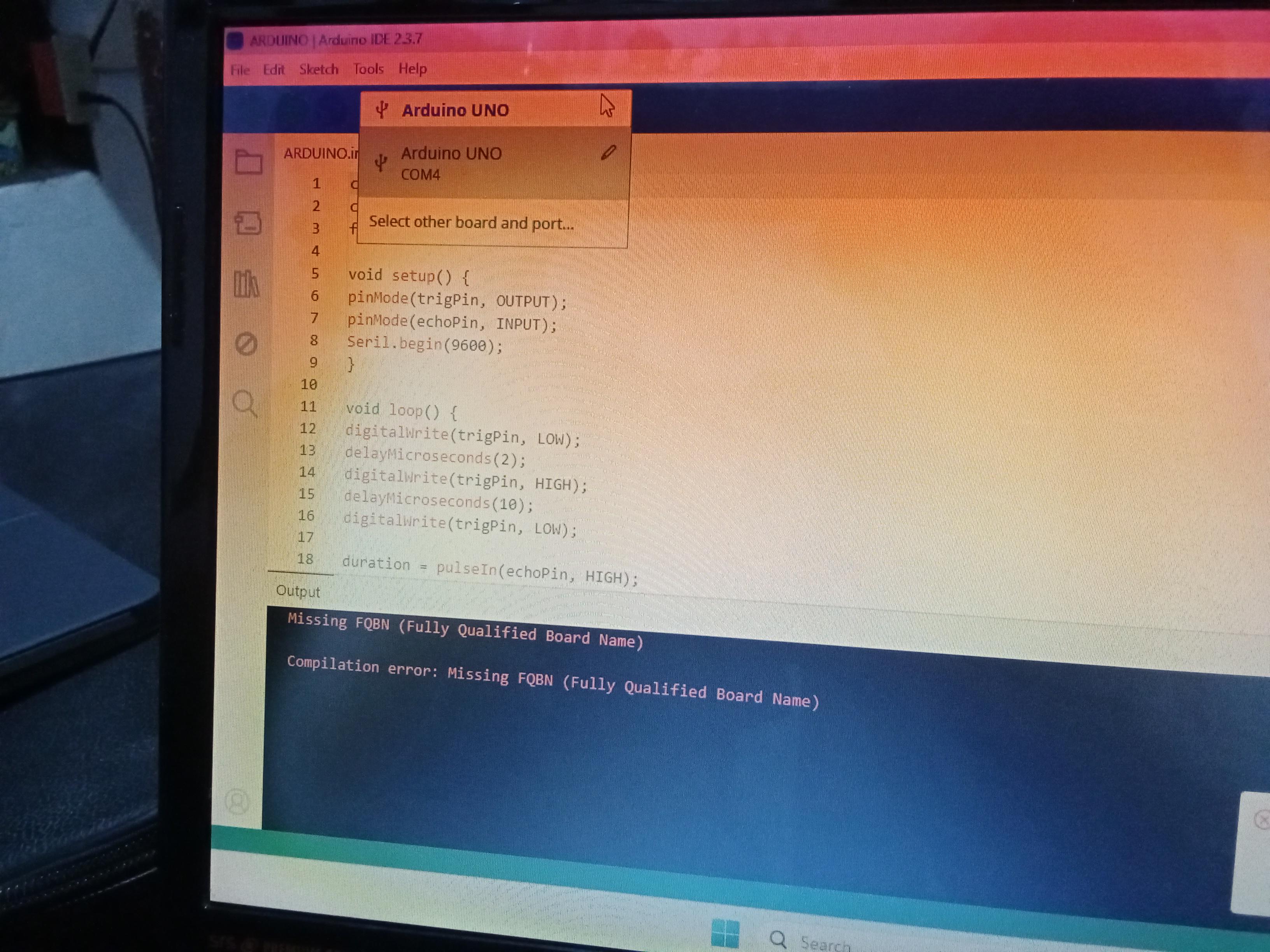
Im not sure what's wrong with it and I haven't seen any other people having the same issue, but for some reason it like won't respond? I kept trying to verify the code to see if the Arduino board is working but this kept popping up even after I keep pressing the port or the board it still won't work so please help


r/ArduinoHelp • • Jan 25 '26

[Using Ubuntu] How do I install to Tools/Board/Boards Manager from GitHub?

2 Upvotes

Trying to install "esp32 by Espressif Systems" through Boards Manager on Arduino IDE 2.3.7 and get "Failed to install..... DEADLINE_EXCEEDED". There was a link to the GitHub so I have the zip extracted. How/where do I install this?

I do not have the device yet to connect to, waiting for delivery. Just trying to get it setup as much as I could


r/ArduinoHelp • • Jan 16 '26

Heltec WiFi LoRa 32 v4 PSRAM questions

2 Upvotes

Good morning and thanks for the help with this!

TL;DR: Looking for updated Heltec Wifi LoRa 32 v4 board definitions w/psram support for Arduino IDE 2.3.x or work around.

Background:

I have a basic functioning project that utilizes Heltec WiFi LoRa v3 modules to send remote control (ex-link) commands to Samsung televisions. The core project works when I issue one command at a time but crashes when I attempt to display information on the screen after sending a large comma-separated series of commands (aka, the rxpacket buffer is larger).

Process of elimination and a little help from ESP Exception Decoder proved out that the crashes are caused internal to the HT_SD1306Wire.h library, but only on subsequent runs where memory is constrained. Displaying the output on setup or single commands does not crash the system.

I ordered some v4 boards. The primary reason for the upgrade was to have access to the 2MB onboard PSRAM with the hopes that offloading the display functions to PSRAM will eliminate the memory constraints that appear to be causing the crashes.

I was able to more or less get the existing code to work as-is but replicating the crashes, presumably for the same memory limitations. I noticed that the Heltec provided board definitions do NOT include the "PSRAM enabled" option.

Using the definitions for Adafruit Feather ESP32-S3 board, I was able to get some test code to compile and validated that the board's PSRAM shows up and is usable. However, using that board definition in Arduino IDE causes a wide variety of other compile time errors.

My next step was to use the native Heltec board definitions again, but manually add the "-DBOARD_HAS_PSRAM" , "-mfix-esp32-spram-cache-issue", and "-DCONFIG_SPIRAM_SUPPORT=1" to the platform.local.txt. This resulted in a large number of compile time errors related to memory allocation.

I've reached the limit of my depth of understanding, which pretty much ends at being a user of the otherwise functioning native APIs. Sadly, I am not and don't have the time or energy to become a compiler/linker expert.

Attached below is a test program that demonstrates the issue and the platform.local.txt. Commented lines are other permutations I tried:

#heltec_lora_v4_testing.ino
#include <Arduino.h>
#include <esp_log.h>
//#include <SoftwareSerial.h> using namespace EspSoftwareSerial;
//#include "HT_SSD1306Wire.h"
#include <HardwareSerial.h>
#include "heltec.h"
#include <LoRaWan_APP.h>
#define Serial0 Serial
void setup() {
  Serial0.begin(115200);
}
void loop() {
  delay(2000);
  log_d("Total heap: %d", ESP.getHeapSize());
  log_d("Free heap: %d", ESP.getFreeHeap());
  log_d("Total PSRAM: %d", ESP.getPsramSize());
  log_d("Free PSRAM: %d", ESP.getFreePsram());
  if (psramFound()) {
Serial0.println("PSRAM is enabled!");
// Allocate from PSRAM
uint8_t *buffer = (uint8_t *)ps_malloc(1024 * 100); // 100 KB
if (buffer) {
Serial0.println("Allocated 100KB in PSRAM");
free(buffer);
} else {
Serial0.println("PSRAM allocation failed");
}
  } else {
Serial0.println("No PSRAM detected");
  }
}

.

# C:\...\Arduino15\packages\Heltec-esp32\hardware\esp32\3.0.3\platform.local.txt
#
# Append PSRAM flags to the build properties
#
#compiler.cpp.flags=-DBOARD_HAS_PSRAM -mfix-esp32-psram-cache-issue
#compiler.c.flags=-DBOARD_HAS_PSRAM -mfix-esp32-psram-cache-issue
compiler.cpp.extra_flags=-DARDUINO_HELTEC_WIFI_LORA_32_V4 -DESP32S3 -DCONFIG_SPIRAM_SUPPORT=1 -DBOARD_HAS_PSRAM -mfix-esp32-psram-cache-issue
#compiler.cpp.flags=-DBOARD_HAS_PSRAM
#compiler.c.flags=-DBOARD_HAS_PSRAM

r/ArduinoHelp • • Jan 14 '26

nRF24L01 help

2 Upvotes

Hi, i am makign an rc plane and i've been tasked to do the electronics. Plan is to make everything from scratch without any pre made help from pre produced products, this includes the receiver and transmitter. Onbaord computer is an arduino nano and the Controller is an arduino Uno.

Onboard computer parts:
-arduino nano
-5 servos
-nRF24L01 module
-Ultrasonic Distance sensor

Controller parts:
-arduino uno
-2 analogue sticks
-nRF24L01 module

The real problem comes now the nRF module on the controller works perfectly and is confirmed to send packets but the nRF module on the onboard computer gives back an ok signal but "silently fails"(doesnt start listening), i've ruled that the issue is related to power and ive confirmed this by plugging in a buck module that delivers an uninterrupted 3.3v to the nRF module and it receives perfectly. In short i need help trying to deliver enough power to the module so it starts receiving. I had asked AI to figure out thge problem and it suggested to power the nRF module direcly to the nanos 3.3v rail with a 10 uF resistor but that still doesnt work. So i had gone out and bought a 3.3v buck module and that STILL doesnt work. The AI thinks that my jumpers are the problem as it introduces alot of inductance and dips in the voltage.

Ill also attatch my code for both boards aswell.

VERT IMPORTANT EDIT: Ive figuerd out something that happpens to be not power relaated but when i swap the Controller board logic into the arduino nano the module works fine, so im sorry for the earlier comment about the problem being a power related one but i guess it has something to do how any board interacts with my receiver code that seems to be the problem as i alos swithed the Onboard coputer logic into the Arduino Uno and i still get the same problem where the module sends an ok signal but doesnt actually start listening. For anyone who has experience on these nRF modules i need help figuring out why my receiver code(Onboard computer logic) fails after the ok signal but before it starts listening

Controller logic:

#include <SPI.h>
#include <RF24.h>
#include <nRF24L01.h>


const byte CEpin = 9;
const byte CSNpin = 10;


struct Stickdata {
  int Lx;
  int Ly;
  int Rx;
} __attribute__((packed));


Stickdata data;
RF24 Roller(CEpin, CSNpin);


const byte pipeAddy[5] = {'0','1','1','1','6'};


void setup() {
  Serial.begin(9600);


  Roller.begin();
  if (!Roller.isChipConnected()) {
    Serial.println("NRF24 NOT CONNECTED!");
  } else {
    Serial.println("NRF24 FOUND.");
  }


  Roller.setAutoAck(false);
  Roller.setDataRate(RF24_250KBPS);
  Roller.setPALevel(RF24_PA_LOW);
  Roller.setChannel(108);


  Roller.openWritingPipe(pipeAddy);
  Roller.stopListening();
}


void loop() {
  data.Lx = analogRead(A3) - 507;
  data.Ly = analogRead(A2) - 504;
  data.Rx = analogRead(A0) - 501;


  bool ok = Roller.write(&data, sizeof(data));
  Serial.println(ok ? "Send OK" : "Send FAILED");


  delay(125);
}

Onboard computer logic:

#include <SPI.h>
#include <RF24.h>
#include <nRF24L01.h>
#include <Servo.h>
#include <HCSR04.h>


const byte LeftServoPin = 2;
const byte RightServoPin = 3;
const byte RudderPin = 4;
const byte LElevatorPin = 5;
const byte RElevatorPin = 6;


const byte CEpin = 9;
const byte CSNpin = 10;


const byte Trig = 7;
const byte Echo = 8;


Servo LAleronServo;
Servo RAleronServo;
Servo RudderServo;
Servo LeftServo;
Servo RightServo;


struct Stickdata {
  int Lx;
  int Ly;
  int Rx;
} __attribute__((packed));


Stickdata data;


UltraSonicDistanceSensor Altitude(Trig, Echo);
RF24 Plane(CEpin, CSNpin);


const byte pipeAddy[5] = {'0','1','1','1','6'};


void setup() {
  Serial.begin(9600);


  LeftServo.attach(LeftServoPin);
  RightServo.attach(RightServoPin);
  RudderServo.attach(RudderPin);
  LAleronServo.attach(LElevatorPin);
  RAleronServo.attach(RElevatorPin);


  Plane.begin();
  if (!Plane.isChipConnected()) {
    Serial.println("NRF24 NOT CONNECTED!");
  } else {
    Serial.println("NRF24 FOUND.");
  }
  
  Plane.setAutoAck(false);
  Plane.setDataRate(RF24_250KBPS);
  Plane.setPALevel(RF24_PA_MIN);
  Plane.setChannel(108);


  Plane.openReadingPipe(0, pipeAddy);
  Plane.startListening();
}


void loop() {
  int altitude = Altitude.measureDistanceCm();


  // Check for incoming packets
  if (Plane.available()) {
      Plane.read(&data, sizeof(data));
      Serial.println("Packet received!");
      Serial.print("Lx: "); Serial.println(data.Lx);
      Serial.print("Ly: "); Serial.println(data.Ly);
      Serial.print("Rx: "); Serial.println(data.Rx);


      /*
      int ElevatorRotation = map(data.Ly, -500, 500, 0, 180);
      int AleronRotation = map(data.Lx, -500, 500, 0, 180);
      int RudderRotation = map(data.Rx, -500, 500, 0, 180);


      LeftServo.write(ElevatorRotation);
      RightServo.write(180 - ElevatorRotation);
      LAleronServo.write(AleronRotation);
      RAleronServo.write(AleronRotation);
      RudderServo.write(RudderRotation);
      */
  }


  delay(125);
}