r/ArduinoHelp • u/PapyonsuzPanda54 • Jan 03 '26
How can I build a rhythmic tapping mechanism like this baby soother?
reddit.com
2
Upvotes
r/ArduinoHelp • u/Twinkle_toes077 • Jan 01 '26

I've tried everything to light an LED but I can't make it work.
r/ArduinoHelp • u/Creative_Commons_Co • Dec 25 '25

r/ArduinoHelp • u/Mysterious-Air-1016 • Nov 04 '25
I need help with a school project, our group was assigned to make an automatic attendance checker.
These are the list of components that we have: Breadboard Arduino Uno Push buttons Wires
We haven’t started yet on anything so let me know if there are more components that we need to make a simple automatic attendance checker. Our group isn’t very knowledgeable about this, so help is very much appreciated! Thank you 🙏
r/ArduinoHelp • u/Routine-Winter-3514 • Nov 02 '25
Hello! I am currently attempting to build a cosmic watch V2 detector. Im basically finished but i cant make it save data to a microSD card.
Building the detector is like following a recipe. All the steps have been laid out in an instruction manual, and all the code used has been pre-written. I followed the steps and the result was that the detector counts, and registers when displaying data onto its OLED screen. But when i try to use the SDcard mode, where it saves its data to an SDcard, it doesnt work. In the serial monitor is see that "SD initialization failed", and then it goes on registering observations. Then i check the SDcard and there as been created a .txt file with nothing written inside it. This is the problem. I've been atemtping this using a SanDisk 32GB microSD card formatted as FAT32 with 32 KB unit allocation size.
I have uploaded other arduino programs to the same setup to troubleshoot, they were able to create files and write things inside of them. So it is possible. My conclusion is that there must be something wrong with the code, but i find that highly unlikely as it has been professionally developed.
Is there anyone who might be able to help me in my situation? Attached to this post is the code uploaded to the arduino to run the SD card logging. More information can be found on this github repository: https://github.com/spenceraxani/CosmicWatch-Desktop-Muon-Detector-v2/blob/master/Instructions.pdf
I would appereciate any help!
/*
  CosmicWatch Desktop Muon Detector Arduino Code


  This code is used to record data to the built in microSD card reader/writer.

  Questions?
  Spencer N. Axani
  [email protected]


  Requirements: Sketch->Include->Manage Libraries:
  SPI, EEPROM, SD, and Wire are probably already installed.
  1. Adafruit SSD1306     -- by Adafruit Version 1.0.1
  2. Adafruit GFX Library -- by Adafruit Version 1.0.2
  3. TimerOne             -- by Jesse Tane et al. Version 1.1.0
*/


#include <SPI.h>
#include <SD.h>
#include <EEPROM.h>


#define SDPIN 10
SdFile root;
Sd2Card card;
SdVolume volume;


File myFile;


const int SIGNAL_THRESHOLD    = 50;        // Min threshold to trigger on
const int RESET_THRESHOLD     = 25;


const int LED_BRIGHTNESS      = 255;         // Brightness of the LED [0,255]


//Calibration fit data for 10k,10k,249,10pf; 20nF,100k,100k, 0,0,57.6k,  1 point
const long double cal[] = {-9.085681659276021e-27, 4.6790804314609205e-23, -1.0317125207013292e-19,
  1.2741066484319192e-16, -9.684460759517656e-14, 4.6937937442284284e-11, -1.4553498837275352e-08,
   2.8216624998078298e-06, -0.000323032620672037, 0.019538631135788468, -0.3774384056850066, 12.324891083404246};

const int cal_max = 1023;


//initialize variables
char detector_name[40];


unsigned long time_stamp                    = 0L;
unsigned long measurement_deadtime          = 0L;
unsigned long time_measurement              = 0L;      // Time stamp
unsigned long interrupt_timer               = 0L;      // Time stamp
int           start_time                    = 0L;      // Start time reference variable
long int      total_deadtime                = 0L;      // total time between signals


unsigned long measurement_t1;
unsigned long measurement_t2;


float temperatureC;


long int      count                         = 0L;         // A tally of the number of muon counts observed
float         last_adc_value                = 0;
char          filename[]                    = "File_000.txt";
int           Mode                          = 1;


byte SLAVE;
byte MASTER;
byte keep_pulse;


void setup() {
  analogReference (EXTERNAL);
  ADCSRA &= ~(bit (ADPS0) | bit (ADPS1) | bit (ADPS2));    // clear prescaler bits
  //ADCSRA |= bit (ADPS1);                                   // Set prescaler to 4
  ADCSRA |= bit (ADPS0) | bit (ADPS1); // Set prescaler to 8

  get_detector_name(detector_name);
  pinMode(3, OUTPUT);
  pinMode(6, INPUT);

  Serial.begin(9600);
  Serial.setTimeout(3000);


  if (digitalRead(6) == HIGH){
     filename[4] = 'S';
     SLAVE = 1;
     MASTER = 0;
  }

  else{
     //delay(10);
     filename[4] = 'M';
     MASTER = 1;
     SLAVE = 0;
     pinMode(6, OUTPUT);
     digitalWrite(6,HIGH);
     //delay(2000);
    }

  if (!SD.begin(SDPIN)) {
    Serial.println(F("SD initialization failed!"));
    Serial.println(F("Is there an SD card inserted?"));
    return;
  }

  get_Mode();
  if (Mode == 2) read_from_SD();
  else if (Mode == 3) remove_all_SD();
  else{setup_files();}

  if (MASTER == 1){digitalWrite(6,LOW);}
  analogRead(A0);


  start_time = millis();
}


void loop() {
  if(Mode == 1){
  Serial.println(F("##########################################################################################"));
  Serial.println(F("### CosmicWatch: The Desktop Muon Detector"));
  Serial.println(F("### Questions? [email protected]"));
  Serial.println(F("### Comp_date Comp_time Event Ardn_time[ms] ADC[0-1023] SiPM[mV] Deadtime[ms] Temp[C] Name"));
  Serial.println(F("##########################################################################################"));
  Serial.println("Device ID: " + (String)detector_name);


  myFile.println(F("##########################################################################################"));
  myFile.println(F("### CosmicWatch: The Desktop Muon Detector"));
  myFile.println(F("### Questions? [email protected]"));
  myFile.println(F("### Comp_date Comp_time Event Ardn_time[ms] ADC[0-1023] SiPM[mV] Deadtime[ms] Temp[C] Name"));
  myFile.println(F("##########################################################################################"));
  myFile.println("Device ID: " + (String)detector_name);

  write_to_SD();
  }
}


void setup_files(){
  for (uint8_t i = 1; i < 201; i++) {
      int hundreds = (i-i/1000*1000)/100;
      int tens = (i-i/100*100)/10;
      int ones = i%10;
      filename[5] = hundreds + '0';
      filename[6] = tens + '0';
      filename[7] = ones + '0';
      if (! SD.exists(filename)) {
          Serial.println("Creating file: " + (String)filename);
          if (SLAVE ==1){
           digitalWrite(3,HIGH);
           delay(1000);
           digitalWrite(3,LOW);
          }
          delay(500);
          myFile = SD.open(filename, FILE_WRITE);
          break;
      }
   }
}


void write_to_SD(){
  while (1){
    if (analogRead(A0) > SIGNAL_THRESHOLD){
      int adc = analogRead(A0);

      if (MASTER == 1) {digitalWrite(6, HIGH);
          count++;
          keep_pulse = 1;}

      analogRead(A3);

      if (SLAVE == 1){
          if (digitalRead(6) == HIGH){
              keep_pulse = 1;
              count++;}}
      analogRead(A3);

      if (MASTER == 1){
            digitalWrite(6, LOW);}


      measurement_deadtime = total_deadtime;
      time_stamp = millis() - start_time;
      measurement_t1 = micros();
      temperatureC = (((analogRead(A3)+analogRead(A3)+analogRead(A3))/3. * (3300./1024)) - 500)/10. ;


      if (MASTER == 1) {
          digitalWrite(6, LOW);
          analogWrite(3, LED_BRIGHTNESS);
          Serial.println((String)count + " " + time_stamp+ " " + adc+ " " + get_sipm_voltage(adc)+ " " + measurement_deadtime+ " " + temperatureC);
          myFile.println((String)count + " " + time_stamp+ " " + adc+ " " + get_sipm_voltage(adc)+ " " + measurement_deadtime+ " " + temperatureC);
          myFile.flush();
          last_adc_value = adc;}

      if (SLAVE == 1) {
          if (keep_pulse == 1){
              analogWrite(3, LED_BRIGHTNESS);
              Serial.println((String)count + " " + time_stamp+ " " + adc+ " " + get_sipm_voltage(adc)+ " " + measurement_deadtime+ " " + temperatureC);
              myFile.println((String)count + " " + time_stamp+ " " + adc+ " " + get_sipm_voltage(adc)+ " " + measurement_deadtime+ " " + temperatureC);
              myFile.flush();
              last_adc_value = adc;}}

      keep_pulse = 0;
      digitalWrite(3, LOW);
      while(analogRead(A0) > RESET_THRESHOLD){continue;}

      total_deadtime += (micros() - measurement_t1) / 1000.;}
    }
}


void read_from_SD(){
    while(true){
    if(SD.exists("File_210.txt")){
      SD.remove("File_209.txt");
      SD.remove("File_208.txt");
      SD.remove("File_207.txt");
      SD.remove("File_206.txt");
      SD.remove("File_205.txt");
      SD.remove("File_204.txt");
      SD.remove("File_203.txt");
      SD.remove("File_202.txt");
      SD.remove("File_201.txt");
      SD.remove("File_200.txt");
      }

    for (uint8_t i = 1; i < 211; i++) {

      int hundreds = (i-i/1000*1000)/100;
      int tens = (i-i/100*100)/10;
      int ones = i%10;
      filename[5] = hundreds + '0';
      filename[6] = tens + '0';
      filename[7] = ones + '0';
      filename[4] = 'M';


      if (SD.exists(filename)) {
          delay(10);
          File dataFile = SD.open(filename);
          Serial.println("opening: " + (String)filename);
          while (dataFile.available()) {
              Serial.write(dataFile.read());
              }
          dataFile.close();
          Serial.println("EOF");
        }
      filename[4] = 'S';
      if (SD.exists(filename)) {
          delay(10);
          File dataFile = SD.open(filename);
          Serial.println("opening: " + (String)filename);
          while (dataFile.available()) {
              Serial.write(dataFile.read());
              }
          dataFile.close();
          Serial.println("EOF");
        }
      }

    Serial.println("Done...");
    break;
  }

}


void remove_all_SD() {
  while(true){
    for (uint8_t i = 1; i < 211; i++) {

      int hundreds = (i-i/1000*1000)/100;
      int tens = (i-i/100*100)/10;
      int ones = i%10;
      filename[5] = hundreds + '0';
      filename[6] = tens + '0';
      filename[7] = ones + '0';
      filename[4] = 'M';

      if (SD.exists(filename)) {
          delay(10);
          Serial.println("Deleting file: " + (String)filename);
          SD.remove(filename);
        }
      filename[4] = 'S';
      if (SD.exists(filename)) {
          delay(10);
          Serial.println("Deleting file: " + (String)filename);
          SD.remove(filename);
        }
    }
    Serial.println("Done...");
    break;
  }
  write_to_SD();
}


void get_Mode(){ //fuction for automatic port finding on PC
    Serial.println("CosmicWatchDetector");
    Serial.println(detector_name);
    String message = "";
    message = Serial.readString();
    if(message == "write"){
      delay(1000);
      Mode = 1;
    }
    else if(message == "read"){
      delay(1000);
      Mode =  2;
    }
    else if(message == "remove"){
      delay(1000);
      Mode = 3;
    }
}


float get_sipm_voltage(float adc_value){
  float voltage = 0;
  for (int i = 0; i < (sizeof(cal)/sizeof(float)); i++) {
    voltage += cal[i] * pow(adc_value,(sizeof(cal)/sizeof(float)-i-1));
    }
    return voltage;
    }


boolean get_detector_name(char* det_name)
{
    byte ch;                              // byte read from eeprom
    int bytesRead = 0;                    // number of bytes read so far
    ch = EEPROM.read(bytesRead);          // read next byte from eeprom
    det_name[bytesRead] = ch;               // store it into the user buffer
    bytesRead++;                          // increment byte counter


    while ( (ch != 0x00) && (bytesRead < 40) && ((bytesRead) <= 511) )
    {
        ch = EEPROM.read(bytesRead);
        det_name[bytesRead] = ch;           // store it into the user buffer
        bytesRead++;                      // increment byte counter
    }
    if ((ch != 0x00) && (bytesRead >= 1)) {det_name[bytesRead - 1] = 0;}
    return true;
}r/ArduinoHelp • u/Whatever_org • Oct 25 '25
Hey there, in my project I need to switch a 3.3 V Current with a mosfet and I'm not completely sure if the Arduino Nano can handle that or if I need to amplify the IOpin with a transistor or if I just need a certain Mosfet
Thank you for the help
r/ArduinoHelp • u/BiC_MC • Oct 25 '25
[solved]
I am trying to use a few libraries; MIDI.h, Adafruit_TinyUSB.h, and EEPROM.h
On their own, if I create an example project through the file menu, they work just fine, but if I save the project arduino forgets the libraries ever existed???
Reinstalling the IDE did nothing (though it seems to have preserved settings, so I guess I could go and try to find every reference to arduino and delete it before installing it again)
Do I just have to create a random example project every time I want to compile my code???
Edit: fully uninstalled by deleting all arduino files in %appdata% and %localappdata% as well as deleting all libraries in documents/arduino/libraries; After installing again, the issue went away
r/ArduinoHelp • u/Far_Addition_4131 • Oct 24 '25
I am making a detonation device using Arduino, MOSFETs, and e-matches.
I encountered a problem with igniting the e-match, where when I connected it to the MOSFET (LR7843) it wont activate the E-match and doesn't fully turn on. Note: I also included a separate power supply to the E-match, which is a 9V battery with
The digital pin 2 of the Arduino is connected to the PWM pin of the LR7843 MOSFET, and the GND of the Arduino is connected to the GND Pin of the LR7843. The + pin of the LR7843 is connected to the positive terminal of the battery and also one of the pins of the E-match, and the - pin of the LR7843 is connected to the negative terminal of the battery. The Load pin of the LR7843 is connected to the other pin of the E-match.
A recurring issue pops up whenever I connect the E-match to the MOSFET; the LR7843 MOSFET doesn't fully turn on (it doesn't turn on the LED in the module). And when I disconnect the E-match from it, it will turn on...
Please Send Helps and Advicess
r/ArduinoHelp • u/Isaii12 • Oct 21 '25
r/ArduinoHelp • u/TreehouseAndy • Oct 20 '25
Hi all. I'm trying to make an Arduino MIDI device. I've done this before, but I lost the code. I want it to transmit the midi over USB, but not serial, I want it to appear as a normal midi device. I'm on an esp32-s3, which I know works as it is the same as my last project. I'm on platformio. I've been trying all day an I'm going round on circles with dependencies and errors. Help would be appreciated.
r/ArduinoHelp • u/strangessssss • Oct 14 '25
I’m not to Arduino (To be honest, I’ve tried it out only with Arduino uno kit) but I’m pretty good developer and free using may technologies. Furthermore, I’ve got the algorithm of this project in js that I created last night. The problem is that I do not know what modules I gotta use for this project. So, for the project I need 48 stepper motors and 6 esp32 that will be connected 8 motors. But I can’t understand how to connect them so that I will be able to control them from one main controller(raspberry or something else)
r/ArduinoHelp • u/ShironekozCosplay • Oct 12 '25

Hi! I'm starting an arduino project to make the mask of Queen from To Be Hero X, but y barely have 0 idea of arduino, and her mask is a chaos Her mask opens and closes thanks that every golden piece makes a 180° turn and become closer when all of them are in the same position. I know that servomotors can make that movement, but they are to big to use one for every piece, and I'm asking if someone knows a way to simplify it
I've already searched several tutorials for iron man mask, but the movement is different and because is a helmet and not a small mask, all the pieces can be hidden under it, but not in this case 😭
Thanks for reading!
r/ArduinoHelp • u/seanbassitbutona • Oct 03 '25
is it possible to run a simulator/prototype of an airbus PFD in an arduino without sensor but connected to external controller such as the thrustmaster set to show/simulate the movement of an aircraft
r/ArduinoHelp • u/TurkeyDrips • Sep 24 '25
Hello: I hope someone can tell me my problem. The serial monitor on Transmitter is printing the correct data. The Receiver prints everything, but not the data. I've tested my DHT. I think my problem is with the struct and float, part, I can't figure it out. Code below.:
____________________________________________________________________________________
//transmitter
#include <SPI.h>
#include <nRF24L01.h>
#include <RF24.h>
#include <DHT.h>
#define DHTPIN 2 // DHT22 data pin
#define DHTTYPE DHT22 // DHT type
DHT dht(DHTPIN, DHTTYPE);
RF24 radio(9, 8); // CE, CSN pins
struct SensorData {
float temperature;
float humidity;
};
const byte address[6] = "00001";
void setup() {
Serial.begin(9600);
dht.begin();
radio.begin();
radio.openWritingPipe(address);
radio.setPALevel(RF24_PA_LOW);
radio.stopListening();
}
void loop() {
SensorData data;
data.temperature = dht.readTemperature();
data.humidity = dht.readHumidity();
if (!isnan(data.temperature) && !isnan(data.humidity)) {
radio.write(&data, sizeof(SensorData));
Serial.print("Sent Temp: ");
Serial.print(data.temperature);
Serial.print("C, Hum: ");
Serial.print(data.humidity);
Serial.println("%");
}
delay(2000);
}
____________________________________________________________________________________________
//Receiver
#include <SPI.h>
#include <nRF24L01.h>
#include <RF24.h>
#include <LiquidCrystal_I2C.h>
RF24 radio(9, 8); // CE, CSN pins
const byte address[6] = "00001"; // Must match transmitter address
LiquidCrystal_I2C lcd(0x27, 16, 2); // LCD I2C address (check yours), columns, rows
struct SensorData {
float temperature;
float humidity;
};
void setup() {
Serial.begin(9600);
lcd.init();
lcd.backlight();
lcd.print("Receiving Data...");
radio.begin();
radio.openReadingPipe(0, address); // Open reading pipe on address
radio.setPALevel(RF24_PA_MAX);
radio.startListening(); // Receiver starts listening
}
void loop() {
if (radio.available()) {
SensorData data;
radio.read(&data, sizeof(data));
lcd.clear();
lcd.setCursor(0, 0);
lcd.print("Temp: ");
lcd.print(data.temperature);
lcd.print(" C");
lcd.setCursor(0, 1);
lcd.print("Hum: ");
lcd.print(data.humidity);
lcd.print(" %");
Serial.print("Received - Temp: ");
Serial.print(data.temperature);
Serial.print("C, Humidity: ");
Serial.print(data.humidity);
Serial.println("%");
}
}
r/ArduinoHelp • u/Party_Conversation14 • Sep 21 '25
I have the problem that I connect the water pump to the relay module but it does not turn on, I connected the positive to the no to turn on when it is turned on and the negative to the com but the pump does not turn on, why could that be?
r/ArduinoHelp • u/Julian8383 • Sep 08 '25

Hey guys
I am doing only my second ever arduino project, but im struggling to find a power supply solution to it. Long story short I have x4 SG90 servo motors which I am trying to power from a battery pack that contains x4 AA batteries (just the regular off the self ones, from any local store).
But they are struggling as the servos are not behaving right. All other elements in my circuit are fine (as ive tested them) so ive narrowed it down to a power supply issue.
Can anyone recommend me a method to power these servo motors effectively? The solution has to be mobile and so a power supply from a computer or wall outlet will not work. Its not shown in the schematic, but the battery pack connects to the power rails of the bread board.
Thanks in advance!!
r/ArduinoHelp • u/Infinite_Math7517 • Sep 01 '25
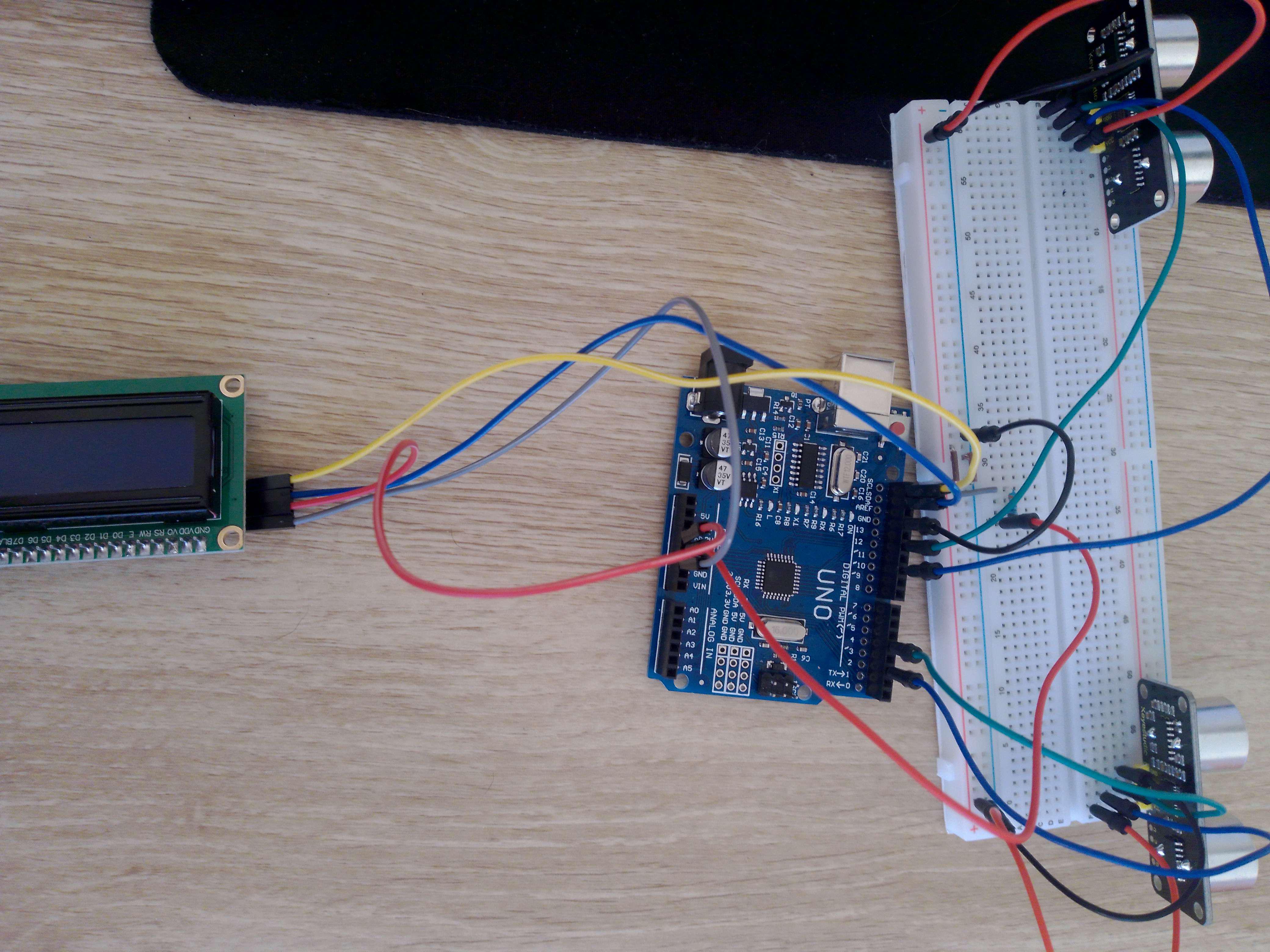
The circuit is two ultrasound sensors, a LCD and a Arduino Uno. I don't know why its not working and don't have anyone to ask so here I am. any help is appreciated. Code is below
#include <LiquidCrystal_I2C.h>
LiquidCrystal_I2C lcd(0x27, 16, 2);
long Start = 0 ;
int Start1 = 0;
long Start3 = 0;
long End = 0;
int End1 = 0;
long End3 = 0;
long Time = 0;
void setup() {
  lcd.init();
  lcd.backlight();
  pinMode(2, INPUT);
  pinMode(4, OUTPUT);
  pinMode(10, INPUT);
  pinMode(12, OUTPUT);
}

void loop() {
  if (Start1 = 0) {
    digitalWrite(4, HIGH);
    delay (10);
    digitalWrite(4, LOW);
    Start = pulseIn(2, HIGH);
    Start1 = Start * 0.034 / 2;
    delay(500);
  }
  if (Start1 < 0); {
    Start3 = millis();
  }
  if (End1 = 0, Start1 < 0); {
    digitalWrite(12, HIGH);
    delay (10);
    digitalWrite(12, LOW);
    End = pulseIn(10, HIGH);
    End1 = End * 0.034 / 2;
    delay(500);
  }
  if (End1 < 0) {
    End3 = millis();
  }
  if (End3 < 0) {
    Time = End3 - Start3;
    lcd.clear();
    lcd.setCursor(0, 0);
    lcd.print(Time);
    lcd.setCursor(0, 1);
    lcd.print("milliseconds");
    delay(2000);
  }
}r/ArduinoHelp • u/KeyKeyner_kreker • Aug 30 '25
Hi, recently I wanted to program button, but when i using digitalRead and print result on screen I have some problems. When I press the button it works correctly (print "1"), but when I dont press a button it works wrong and prints sometime 1 and sometimes 0.
Can you help me? Or fix my mistakes. Here is the code:
void setup() {
  // put your setup code here, to run once:
  Serial.begin(9600);
  pinMode(2, INPUT);
}

void loop() {
  // put your main code here, to run repeatedly:
  Serial.println(digitalRead(2));
  delay(500);
}r/ArduinoHelp • u/[deleted] • Aug 23 '25
Hey. Wanted to start out robotics. Zero experience in coding. Overall a beginner. How can I start out? (I have been asked to buy the arduino uno and some other important components like a breadboard).
r/ArduinoHelp • u/Background-Bench-395 • Aug 09 '25

I’m building a custom LED lighting system for a go-kart using an Arduino. The setup includes multiple COB LED strips (white, red, and yellow) for functions like parking lights, low beam, high beam, turn signals, hazard lights, all controlled by separate buttons on the steering wheel. The challenge is to program smooth fade-in/fade-out effects for certain lights, handle timed blinking sequences for the turn signals, and manage multiple lighting modes without interference or delays between them. Every idea and help is Appreciated
