r/AndroidTVApps • u/cookedzera • 23d ago
Aura 7.6 for Android TV: music front and centre, a “Who’s watching” picker, and Settings that finally explain themselves
Hey everyone! Aura 7.6 is out. It’s the free, ad-free home screen for Android TV and Google TV: your apps on frosted glass over living photographs.
What’s new
Music, front and centre. Play something in Spotify, YouTube Music or any music app and press Home: one calm card with the cover replaces the widgets. OK opens a full-screen Now Playing in the album’s own colours, and its controls fade away while you listen. Leave the remote for 10 seconds and the music becomes the screen. Hold OK on the card to minimise it.
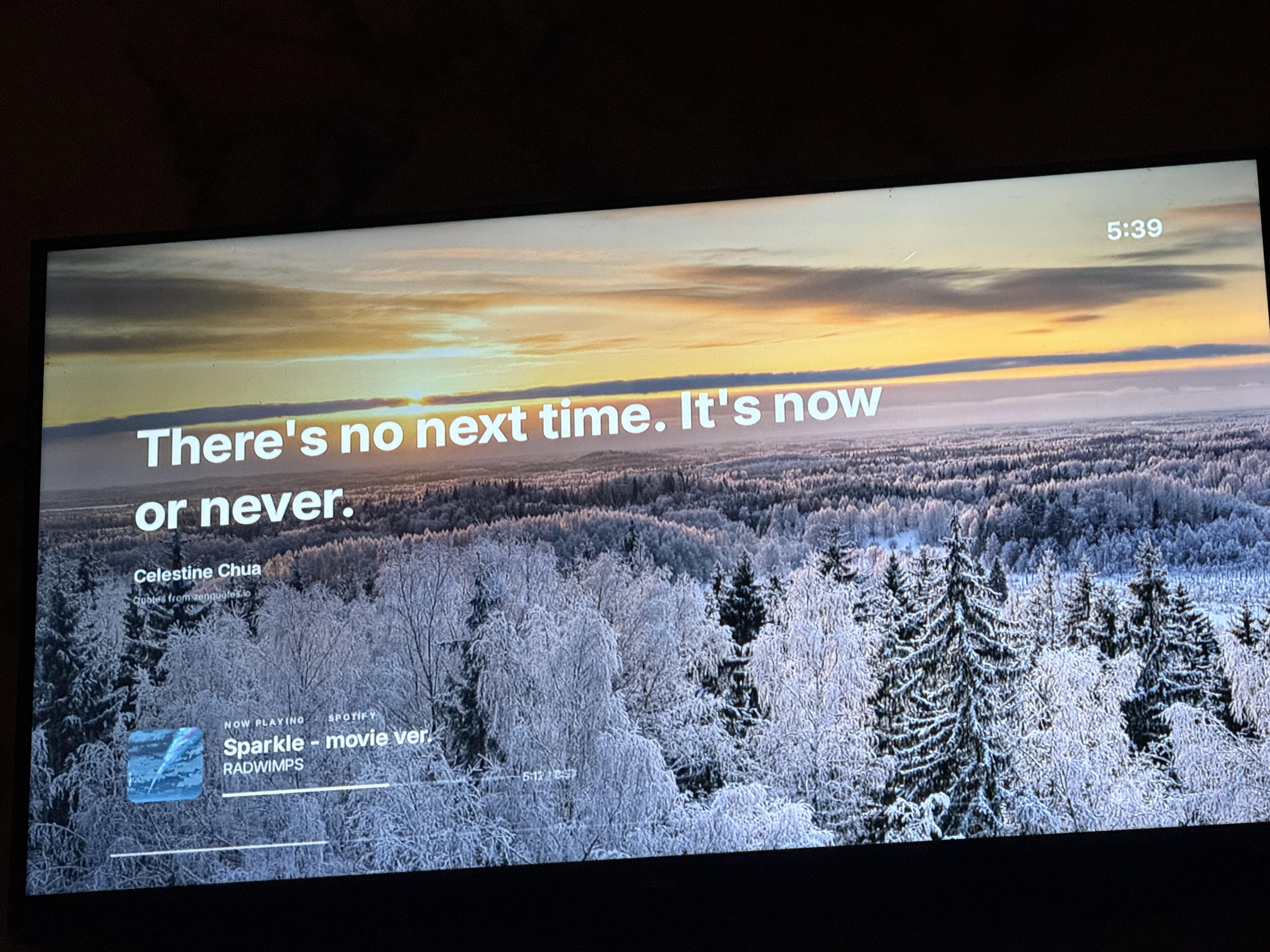
Music in the screensaver. The quotes and photographs stay, with the song in a small player under the words.
Who’s watching. A quiet new profile picker. On Google TV the remote’s Profile button now opens Aura’s picker instead of Google’s.
Settings, reorganised. Grouped into sections, and each row tells you what it does when you land on it.
Only apps. One switch for the simplest home: your apps on the photograph, nothing else.
Search, folders, your own art for any app, backing up your setup to your phone, and typing from your phone.
Smoother all round. Continue watching loads faster, start-up arrives in order, the screensaver uses less memory, and there’s a long list of fixes.
Heads up: this is a big release, and more features means more room for bugs. If anything looks off, please tell me here or open an issue on GitHub, with your TV model if you can. I’ll fix what you find in the next build.
Coming next (7.7 beta):
🎨 Music scenes: hand-drawn, anime-style skies and towns for the screensaver while your music plays
🌍 Flyovers are coming back, lighter than before
🎙️ Aura’s own voice search on the remote’s mic button
✨ …and a couple of surprises
Install: in the free Downloader app on your TV, type 4172997. Already on Aura? Settings → Updates.
Updating from 7.5? Run Settings → Set up on this TV → Switch everything on once, so the Profile button works.
GitHub: https://github.com/cookedzera/aura-tv
Thanks for all the feedback so far, it’s what shaped this one ❤️
2

1
u/Indervir007 23d ago
How much total space now it takes? Compared to stock launcher????
1
u/cookedzera 23d ago
The APK is now under 1 MB (~15–20 MB max with cached wallpapers vs. 200–400+ MB on stock), and it notifies you on the home screen when a new version drops so you can update in one click from Settings → Updates without losing your default setup!
1
1
1
u/MoistSalamander5275 23d ago
Hi thanks for the launcher, works amazingly fast, but I wanted to ask how do I customize the apps tiles like all the apps that I use are somehow down the line so can you enable moving apps around or some sorting like recent downloaded apps on front vs tv box apps further down. Once again thanks
1
u/cookedzera 23d ago
It's already built in! Just hold
OKon any app tile from that menu you can select Move (then use the arrow keys to bring your main apps to the front), Hide from home to hide unused TV box apps, or Add to folder to group them!
1
1
u/Heemz7 23d ago
Question the Smart Stack for Today's Pick only shows one item from the TMDB and one New Pick from Netflix. On the settings is shows Find New Picks 30 ready so am assuming there is 30 to choose from. Is it to show more than one from TMDB?
The other thing on that same Smart Stack the Netflix Pick is showing a show I don't watch "The Great Indian Kapil Show" (the older version also showed this, can it be changed?
Also when I had 7.4 installed it showed the update but I couldn't get the update to install I had to go to the GitHub store can this be resolved?
It also force closes randomly. I am on Fire OS 6.7.1.1 and I installed Aura 7.6.apk
1
u/cookedzera 23d ago
Tonight's pick: "30 ready" is the pool it picks from. It shows one a day on purpose (the same one all evening, a new one tomorrow), so you'll see a different pick each day. 7.6.1 will make better use of that pool.
The Netflix card is "New today". It doesn't come from your Netflix account: it comes from a public schedule of new episodes on the streaming apps installed on your TV, and it favours Indian shows, which is why The Great Indian Kapil Show keeps coming up. To remove it now: Settings → Widgets → New today on your apps → Left out. In 7.6.1 it will stop suggesting shows you don't watch.
(Also: Fire OS 6 is Android 7.1, and Android only lets apps read your own Continue watching and app rows from Android 8, so those cards can't appear on your Fire TV.)The update from 7.4: sorry about that. I'm fixing the in-app updater on Fire TV for 7.6.1. Until then, installing over the top with Downloader (code 4172997) keeps all your settings. Just don't uninstall first.
Force closes: thanks for the Fire OS version, it helps a lot. Which Fire TV model do you have, roughly how often does it close, and what were you doing just before (on home, coming back from an app, the screensaver, after the TV woke)? 7.6.1 will also save a crash report on the TV that you can send me, so these get fixed properly.
1
u/Heemz7 23d ago
Thanks for your response. I do highly enjoy this app. I am on Firestick 4k. The issue with the random crash happened when I launch the launcher, scroll through the Aura Home Screen or when I went to settings.
Can we add continue watching in the next update. It would be cool to see both the what's new to watch and continue watching if possible.
Again thank you for the app it really gives a lot of clean, modern versatility!
1
u/Faker_SD 23d ago
Do you know if I can setup as a default launcher?
1
u/cookedzera 23d ago
yes if your tv is andorid based / google tv or fire tv then 100% it will guide in first install on welcome screen steps
1
u/Heemz7 23d ago
Another option I think would be cool, for the VPN Users, to either be able to turn on their preferred VPN from Control Center or to at least see that it Connected or Disconnected in the Control Panel and Status Bar on the Home Screen
1
u/cookedzera 23d ago
Great idea, thank you! It's coming in 7.6.1: - Control Center shows your VPN: Connected or Off, with the app's name. OK opens your VPN app to switch it on or off (hold OK to choose which one if you have several). - A small shield appears in the status bar on the home screen while a VPN is on, and it updates the moment it connects or drops. One honest limit: Android doesn't let any app turn another app's VPN on or off directly, so the switch itself stays in your VPN app, one press away.
1
u/fUUUUUU33 22d ago
Can't Install Google Play Protect notification, how to skip this?
1
u/cookedzera 22d ago
install anyway or disabel it( the warning is due to sdk needed for few control center featrues) app is 100% safe and open source and transparent
1
u/TucumanArg 22d ago edited 22d ago
Hola Genio en la próximo update podrías implementar cambiarle desde las opciones el idioma.. gracias 🫶
2
1
u/TheKing1975 21d ago
Everything works perfectly the only problem I find is that I can’t set as default launcher. I’m testing it on a firestick. I also tried with launcher manager, but as it went in block. How can I solve it?
1
u/cookedzera 21d ago
u have to give adb permission :) look in settings > set up on tv > grant all permissiom
1
u/TheKing1975 21d ago
Ok done ... but I don’t understand how to avoid that when I click on the Home button it goes back to the main screen. It always comes back to the beginning and then I have to open the Aura app again. What are the correct steps ???
1
1
u/TheKing1975 20d ago
So I managed to set the launcher on a Xiaomi box and the home button goes great. I can’t do it on Firestick that as I understand it is possible to activate adb only through PC or Android device. I downloaded Bugjaeger on Android tablets, I enter the ip that I see on Firestick but it doesn’t connect/can’t find the firestick network. How to solve ? Help
1
u/Heemz7 19d ago edited 19d ago
I used Launcher Manager Mini and ABD Shell to setup the custom Default Home Screen. Here is the link you can use: https://xdaforums.com/t/app-firetv-noroot-launcher-manager-change-launcher-without-root.4176349/
Or
You can download the Launcher Manager Mini app from this Link: http://aftv.news/632067 or if you are using Downloader app on the TV it's 632067.
You will them have to run ADB from your computer or mobile app and run these commands separately:
FOR COMPUTER:
adb connect FIRESTICK_IP_ADDRESS adb shell appops set com.wolf.minilm SYSTEM_ALERT_WINDOW allow
adb shell pm grant com.wolf.minilm android.permission.READ_LOGS
adb shell dumpsys deviceidle whitelist +com.wolf.minilm
adb shell am force-stop com.wolf.minilm
FOR MOBILE:
appops set com.wolf.minilm SYSTEM_ALERT_WINDOW allow
pm grant com.wolf.minilm android.permission.READ_LOGS
dumpsys deviceidle whitelist +com.wolf.minilm
am force-stop com.wolf.minilm
1
1
u/TbO2903 20d ago
Could you add the possibility to create categories to better organize who has a lot of apps.
1
u/cookedzera 19d ago
yeah sure i can add , but we already have folder feature :) to help u arrange them the way u want !
1
u/Indervir007 23d ago
I already applied it as default launcher so does it automatically get updated?
1
1
1
1
1
1
1
u/Wide-Kaleidoscope339 22d ago
Bro I don't have claude or laptop I made the same , with the help of arena ai's agentic mode. I made something similar and converted into launcher apk to install on tv. Bro I want to ask u one thing is it possible that can we use netmirror's Netflix directly like a section of Netflix with tiles like layout with all trending movies/shows on netmirror's Netflix and when we click on any of them it will take you directly to the netmirror's Netflix that movie/show page directly. Like how cool is that so I tried for 4 days but end up giving up can u help by doing something on it
1
u/TucumanArg 22d ago
Muy bueno pero hay alguna manera de cambiarle el idioma a español desde las opciones?
1
u/TheKing1975 19d ago

Help .... This is the situation I’m in. I enabled debug and adb (I gave the consent) on my first generation Firestick, I unlocked developer mode but when I open Aura and want to connect, it doesn’t work in any way. He always tells me OFF. I also tried through Laungher Manager but it doesn’t go and so every time I press the home button it goes back to the Amazon screen. Where is it that I’m wrong ??? Who can help me
1
u/Heemz7 16d ago
On the Amazon Window, Go to Settings>My Firestick>Developer Options and enable ADB Debugging and Apps from Unknown Sources
1
u/TheKing1975 16d ago
Already done everything but nothing, it doesn’t change and doesn’t switch to ON
1
u/Percentage-Fearless 18d ago
I will add a feature to resize picons (make them smaller or larger) and to create a list of favorites.
1
u/Unlucky-Ad6642 16d ago
Any thoughts on making a built in sleep timer? There arent any good free ones on android TV at the moment and this would make this launcher a no brainer for me! Something that you could reprogram your remote buttons to and have s screen overlay to set it would be amazing.
2
u/ColdAndChosen 23d ago
Google is blocking at while trying to install by saying it is looking into sensitive data.